In an increasingly saturated digital landscape, visual remixing has rapidly established itself as a pivotal new discovery engine, with Pinterest collages leading this transformative shift. From the viral dynamism of Gen Z’s "Shuffles" to meticulously curated moodboards that serve as strategic planning tools, these layered visuals transcend mere aesthetics, becoming powerful instruments for brand building, traffic generation, and sustained engagement. Unlike the fleeting nature of much contemporary digital content, Pinterest collages are meticulously crafted to be saved, searched, and shared, ensuring their impact resonates long after initial publication. This comprehensive guide delves into the mechanics, strategic value, and advanced techniques for creating Pinterest collages that captivate audiences, amplify brand presence, and drive tangible results.
The Evolving Landscape of Digital Discovery
Pinterest has quietly but profoundly evolved beyond its initial reputation as a platform solely for planning dream kitchens or bookmarking aspirational recipes. It has transformed into one of the most relevant and forward-thinking platforms for creators, small business owners, and individuals seeking meaningful inspiration. This evolution is underpinned by a fundamental distinction articulated by Pinterest itself: "Pinterest is not social media—it’s personal media." This philosophy emphasizes discovery, planning, and self-expression over fleeting social interactions, fostering an environment where evergreen content thrives, remaining searchable and impactful for weeks, months, and even years.
The platform’s shift aligns perfectly with broader digital trends, particularly the increasing demand for visual-first content that resonates on a deeper, more personal level. As users navigate an overwhelming stream of information, the ability to quickly absorb and connect with curated visual narratives has become paramount. Pinterest collages, with their inherent capacity to convey mood, consolidate ideas, and tell complex stories at a glance, are perfectly suited to this contemporary consumption habit. They blend creative expression with strategic planning, catering to trends observed across Gen Z and millennial demographics, including the pursuit of curated visual identities, the intersection of wellness and productivity, and the burgeoning concept of lifestyle design as content. While other platforms grapple with rapidly shifting algorithms and ephemeral content cycles, Pinterest offers a steadfast environment for building lasting digital assets. A compelling statistic underscores this stability: 80% of weekly Pinterest users report discovering a new brand or product on the platform, signifying its robust capacity for driving sticky, conversion-oriented traffic.
Pinterest Collages: A Defining Moment
Currently, Pinterest collages are experiencing a full-blown surge in popularity. These visually rich compilations, ranging from intricate vision board-style posts and comprehensive product roundups to aesthetic mashups designed to compel immediate saving, are dominating user feeds. Their success lies in their intrinsic design, which caters to modern cognitive processing and scrolling habits: they are inherently visual, mood-forward, and optimized for both rapid inspiration and long-term strategic application.
A significant catalyst for this trend was the introduction of Pinterest’s "Shuffles" app. Launched in beta, Shuffles empowered users to create interactive collage content directly from existing Pins and their personal photo libraries. This intuitive tool was rapidly embraced by Gen Z, who leveraged it to explore and express their identities, articulate fashion sensibilities, design interiors, and construct holistic lifestyle aesthetics. The app’s immediate success was remarkable; within just four weeks of its beta release, Modern Retail reported close to 500,000 downloads on Apple’s App Store. This rapid adoption unequivocally validated the notion that "visual remixing is the new discovery engine." Coupled with Pinterest’s ongoing enhancements in AI-powered search, the platform is now heavily leaning into aesthetic-driven content—content designed not merely to be seen, but to be actively saved, revisited, and integrated into users’ personal planning. In essence, if a traditional Pin functions as a single magazine advertisement, a Pinterest collage operates as the complete editorial spread, positioning the creator as the visionary art director.
Deconstructing the Pinterest Collage: More Than a Moodboard
While a Pinterest collage can certainly possess the captivating beauty of a traditional moodboard, its definition extends far beyond simple aesthetic curation. A Pinterest collage is a strategically curated collection of images, meticulously styled, layered, and designed to visually articulate a narrative. This narrative might encapsulate a specific "vibe" – such as "slow mornings + strong matcha" – present a comprehensive product lineup, or even convey an overarching aesthetic vision. It represents the powerful intersection of strategic communication, compelling visual storytelling, and scroll-stopping appeal.
Unlike conventional Pins that typically highlight a singular image or concept, a collage provides a complete narrative arc within a single visual frame, eliminating the need for users to navigate away from the platform for full context. These are bite-sized branding opportunities with the potential for substantial results. Their ubiquity across the platform underscores their current relevance and effectiveness.
Diverse Applications: Who is Pinning with Purpose?
The Pinterest collage trend is not confined to a specific demographic or fleeting aesthetic; it has become a fundamental method for online creation, communication, and curation across a broad spectrum of users. From independent creatives to multi-hyphenate entrepreneurs and passionate hobbyists, individuals are leveraging collages to "pin with intention."
-
Creators and Influencers: For content creators, Pinterest collages are a natural extension of their craft: telling visual stories that resonate and are readily shared. A single collage can effectively introduce an entire brand mood, illustrate seasonal style transitions, or compile a roundup of recent favorites, consolidating content that would otherwise require numerous individual Pins. Creators are increasingly using them for:
- Trend Forecasting and Inspiration Boards: Visually mapping out emerging styles and concepts.
- Behind-the-Scenes Peeks: Offering curated glimpses into their creative process or daily life.
- Niche Content Deep Dives: Exploring specific themes or product categories in detail.
- Content Pillars: Establishing visual themes that define their overall brand identity.
This format allows fashion creators to outline fall trends or wellness coaches to depict a "Sunday reset" routine, delivering high impact and enduring visibility.
-
Small Business Owners and Brands: Pinterest has long been a powerhouse for product discovery, and collages are transforming this discovery into direct conversion. Instead of isolated product photographs, brands are now employing collage-style Pins to provide context, illustrate lifestyle integration, and demonstrate how multiple items complement each other. Examples include:
- Curated Product Collections: Showcasing an entire seasonal line or a themed grouping of items.
- Lifestyle Integration: Illustrating how products fit into a consumer’s daily life or a specific aesthetic.
- Gift Guides and Bundles: Presenting thoughtful combinations for various occasions.
- Before-and-After Visualizations: Demonstrating the transformative power of a product or service.
Collages function as dynamic digital storefront display windows, drawing consumers in with comprehensive visual narratives.
-
Coaches, Educators, and Thought Leaders: Online educators and coaches are utilizing Pinterest collages as concise, visually engaging content libraries. These visual tools simplify the explanation of complex concepts in an easily digestible, scrollable format, offering a longevity far beyond that of typical social media posts. Use cases include:
- Visual Explanations of Concepts: Breaking down complex ideas into understandable visual components.
- Step-by-Step Tutorials: Guiding users through processes like "How to Set Up a Morning Routine."
- Inspirational Quote Series: Combining motivational messages with resonant imagery.
- Resource Roundups: Curating links and information around a specific topic.
A significant bonus is the versatility of these collages, which can be repurposed as email content, digital products, or printable resources.
-
Everyday Users (Pinterest’s Power Base): This demographic remains the bedrock of Pinterest’s success. From DIY brides and new parents planning nurseries to students designing dorm rooms and conscious consumers building minimalist capsule wardrobes, collages are ideal for visual planning. Users value the control, creative freedom, and clarity these tools provide. Popular themes encompass:
- Personal Vision Boards: Visualizing goals for career, travel, or personal growth.
- Event Planning Moodboards: Curating aesthetics for weddings, parties, or home renovations.
- Style Inspiration: Developing personal fashion or interior design aesthetics.
- Meal Planning and Recipe Ideas: Visualizing weekly menus or dietary goals.
The essence here is not merely collecting ideas, but actively constructing a visual reflection of one’s aspirations and identity. Ultimately, Pinterest collages empower individuals to express themselves, enable businesses to sell smarter, and facilitate more intentional online planning.
Anatomy of a Collage: Exploring Key Types
Pinterest collages have evolved into a sophisticated medium for diverse forms of storytelling and expression. Understanding their various types is key to leveraging their full potential:
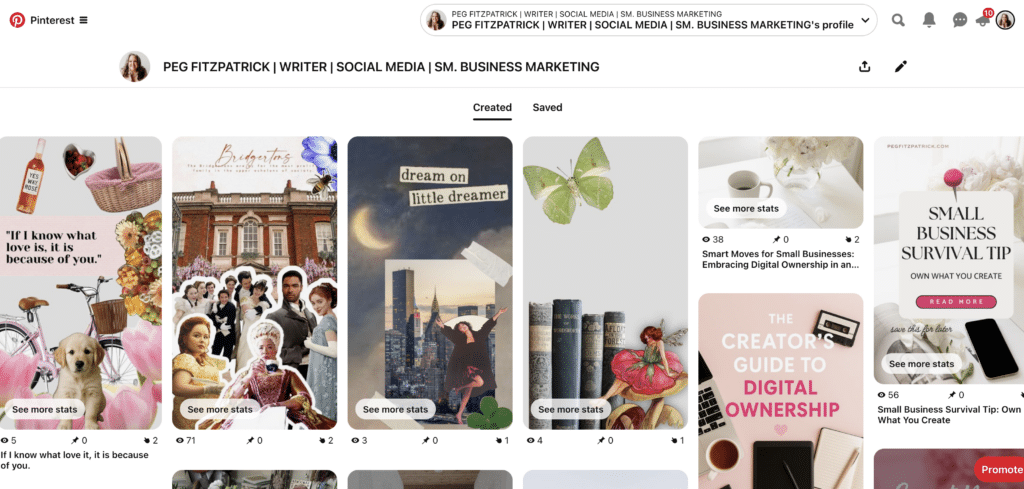
- Vision Board Collages: These are classic applications, combining images, motivational quotes, and affirmations to create powerful visual representations of personal or professional goals and aspirations.
- Style and Aesthetic Collages: Focused on fashion, personal style, or specific aesthetic movements, these collages often blend outfit ideas, accessories, and color schemes to forge cohesive visual identities.
- Seasonal Mood Boards: Capturing the essence of a particular time of year, these boards integrate colors, activities, and themes to inspire fashion, home decor, and lifestyle choices relevant to the season.
- Product Collages: Employed by brands and influencers, these showcase multiple items within a single, appealing image, effectively promoting products and driving sales by illustrating context and complementarity.
- Color Palette Guides: These collages focus on specific color schemes, using swatches or evocative imagery to provide inspiration for design projects, fashion coordination, or interior decor.
- Quote + Image Mashups: Designed to inspire and resonate emotionally, these combine impactful quotes with relevant, striking imagery, making them popular for personal development content and social sharing.
- Mobile-Native Collages (Shuffles): Created directly within the Pinterest mobile app, these interactive collages utilize cutouts from existing Pins and personal photos, offering dynamic and highly personalized visual experiences.
Each type offers distinct avenues for creative expression, idea dissemination, and audience engagement, providing a rich source of inspiration for users.
Crafting Impactful Collages: A Practical Guide
The creation of a Pinterest collage is a blend of artistic vision and strategic foresight. Whether built natively within Pinterest or designed using external tools, the process should be intentional, aiming to deliver a visual message that instantly connects with the target audience.
Option 1: Using Pinterest’s Native Collage Tool (Mobile Only)
Pinterest has integrated its own built-in collage feature, drawing heavily on the success of Shuffles. To create one directly in the Pinterest app:
- Open the Pinterest app on your mobile device.
- Tap the plus icon (+) at the bottom of the screen.
- Select "Collage" from the creation options.
- Choose images from your saved Pins or your device’s photo gallery.
- Arrange and edit your chosen images using the intuitive drag-and-drop interface, resizing, rotating, and layering as desired.
- Add text, stickers, or filters to enhance the visual narrative.
- Review your collage to ensure it aligns with your vision.
- Add a compelling title and description, incorporating relevant keywords.
- Select a relevant board to save your collage to.
- Publish your new collage.
Pinterest provides a detailed walkthrough in its Help Center for further assistance.
Option 2: Designing a Pinterest Collage with Canva
Canva remains the preferred tool for many creators seeking a branded and polished aesthetic.
- Log in to Canva and select a "Pinterest Pin" template (typically 1000 x 1500 pixels for optimal vertical display).
- Choose a layout or start with a blank canvas. Canva offers numerous collage templates.
- Upload your brand assets (logos, color palettes, fonts) and desired images.
- Drag and drop images into your layout, adjusting size, position, and layering.
- Add text overlays for titles, calls-to-action, or key information, ensuring readability.
- Incorporate brand elements like subtle color accents or a small, unobtrusive logo.
- Ensure mobile optimization by checking how the design appears on a phone screen.
- Download your finished collage as a high-quality JPG or PNG.
- Upload to Pinterest, adding a rich description, relevant keywords, and a direct link.
Saving your design as a template in Canva allows for efficient reuse, especially for content series or recurring themes.
Bonus Tools for Deeper Creation:
For creators seeking more advanced features, tools like PicMonkey for photo editing and graphic design, Adobe Express for quick and professional visuals, and various mobile collage apps offer enhanced capabilities for cutting, layering, and adding effects. The key is to make the creation process both enjoyable and purposeful, as well-crafted collages can maintain relevance for months on end.
Maximizing Reach: Pinterest SEO for Collages
Creating visually stunning collages is only the initial step. To ensure sustained engagement and reach the intended audience, optimizing for Pinterest’s search algorithm is crucial.
-
Optimize Pin Title and Description:
- Keyword-Rich Titles: Use clear, descriptive titles that incorporate primary keywords relevant to your collage (e.g., "Minimalist Fall Fashion Capsule," "Healthy Weeknight Meal Prep Ideas").
- Detailed Descriptions: Provide a comprehensive description (200-500 characters) that elaborates on the collage’s content, weaving in secondary keywords naturally. Think about what users would search for to find your content.
-
Incorporate Hashtags Strategically:
- Relevance over Quantity: Use 5-10 highly relevant hashtags. Mix broad terms with niche-specific ones (e.g., #FallFashion #CapsuleWardrobe #AutumnStyle #MinimalistOOTD).
- Shuffles Context: Hashtags are particularly effective for discovery within the Shuffles app, helping users find more of the aesthetic they’re exploring.
-
Design with SEO in Mind:
- Text Overlay: Integrate keywords directly into text overlays on your collage image. This not only aids readability but also provides Pinterest’s visual search algorithm with more context.
- Aspect Ratio: Adhere to Pinterest’s recommended vertical aspect ratio (e.g., 2:3 or 1000×1500 pixels) for optimal display and visibility in feeds.
- High-Quality Imagery: Use clear, high-resolution images. Pinterest prioritizes visually appealing content.
-
Engage with the Community:
- Repinning and Saving: Actively repin relevant content from others and encourage users to save your collages to their boards.
- Comments and Interaction: Respond to comments on your Pins to foster community and signal engagement to the algorithm.
-
Monitor Performance and Adjust:
- Pinterest Analytics: Regularly check your Pin analytics for impressions, saves, and outbound clicks. Identify which collages are performing best.
- A/B Testing: Experiment with different titles, descriptions, image layouts, and calls-to-action to see what resonates most with your audience.
By diligently implementing these SEO strategies, Pinterest collages transform from mere visuals into powerful, long-term assets that drive engagement and build a stronger presence on the platform.
From Inspiration to Conversion: Driving Traffic with Collages
The true power of a Pinterest collage lies not just in its aesthetic appeal, but in its ability to generate tangible results: attracting new visitors, growing followers, and converting leads. Pinterest’s distinct advantage is its capacity to build long-term traffic through evergreen content that users actively seek out and save.
-
Every Pin Needs a Destination: Even when creating a "vibe" collage, ensure it links to a helpful destination:
- Blog Post: A detailed article expanding on the collage’s theme.
- Product Page/Collection: Direct links to featured items in an e-commerce store.
- Lead Magnet: A free download (e.g., checklist, template) related to the collage’s topic.
- Newsletter Sign-up: A direct path for audience growth.
- Landing Page: A dedicated page for a specific campaign or offering.
The objective is to provide a clear "action step" for the audience, preventing them from remaining in "moodboard limbo."
-
Match the Collage to the Link: Avoid the common pitfall of linking to a generic homepage. If a collage showcases "fall slow fashion," the link should lead directly to that specific blog post or product collection. This direct alignment enhances user experience, resulting in higher click-through rates and longer site visits.
-
Save to Multiple Relevant Boards: Maximize reach by scheduling your collage to appear on several pertinent boards. For instance, a "clean girl skincare" collage could be pinned to boards titled "Skincare Routines," "Beauty Essentials," "Self-Care Ideas," and "Minimalist Living." Distribute these saves naturally over time to avoid appearing spammy.

-
Repurpose Smartly: A single, well-crafted Pinterest collage can fuel an entire content cycle across multiple platforms:
- Instagram Carousels or Reels: Break down collage elements into engaging sequences.
- Blog Post Graphics: Integrate the collage directly into a related article.
- Email Newsletter Features: Use it as a visual hook for your subscriber base.
- Facebook Group Content: Share it to spark discussion and engagement.
- Digital Products: Turn it into a printable guide or worksheet.
-
Utilize Idea Pins + Shuffles for Engagement: While Idea Pins (multi-frame stories) and Shuffles collages don’t always allow direct outbound links, they often receive greater reach and engagement on Pinterest. Use them to:
- Build Brand Awareness: Introduce your aesthetic and style.
- Showcase Expertise: Offer quick tips or visual tutorials.
- Nurture Community: Encourage comments and saves.
- Direct to Profile: Encourage users to visit your profile where links are available.
-
Track What’s Working: Leverage Pinterest analytics to monitor key metrics:
- Impressions: How many times your collage was seen.
- Saves: How many users saved your collage.
- Outbound Clicks: How many users clicked through to your linked destination.
- Top Pins: Identify your highest-performing collages.
Analyze this data to replicate successful strategies and refine future content. Ultimately, a Pinterest collage is a purposeful asset. Combining scroll-stopping visuals with strategic links transforms inspiration into tangible results.
Data-Driven Creativity: Analytics and Future Trends
Eliminating guesswork from your Pinterest strategy is entirely possible, as the platform provides comprehensive analytics. Smart creators consistently leverage this data to inform their next moves and build sustainable momentum.
Where to Start: Pinterest Analytics
Access your Pinterest Business Hub to review crucial metrics:
- Overview Dashboard: Get a high-level view of your account’s performance.
- Top Pins: Identify which of your collages (and other Pins) are generating the most impressions, saves, and clicks.
- Audience Insights: Understand who your audience is, their demographics, and their interests.
- Outbound Clicks: Track how many users are clicking through to your linked content.
- Saved Pins: See which of your collages are being saved the most, indicating high perceived value.
The goal is to discern patterns: which colors, layouts, topics, and calls-to-action are consistently driving both saves and clicks?
What to Watch in Collage Performance:
- Engagement Rate: Calculate (Saves + Outbound Clicks) / Impressions to gauge overall user interaction.
- Click-Through Rate (CTR): Outbound Clicks / Impressions indicates how effective your collage is at driving traffic off-platform.
- Save Rate: Saves / Impressions shows how compelling your visual content is for long-term inspiration and planning.
- Pin Type Performance: Compare the performance of static collages versus Shuffles or Idea Pin collages.
Use Pinterest Trends to Stay Ahead
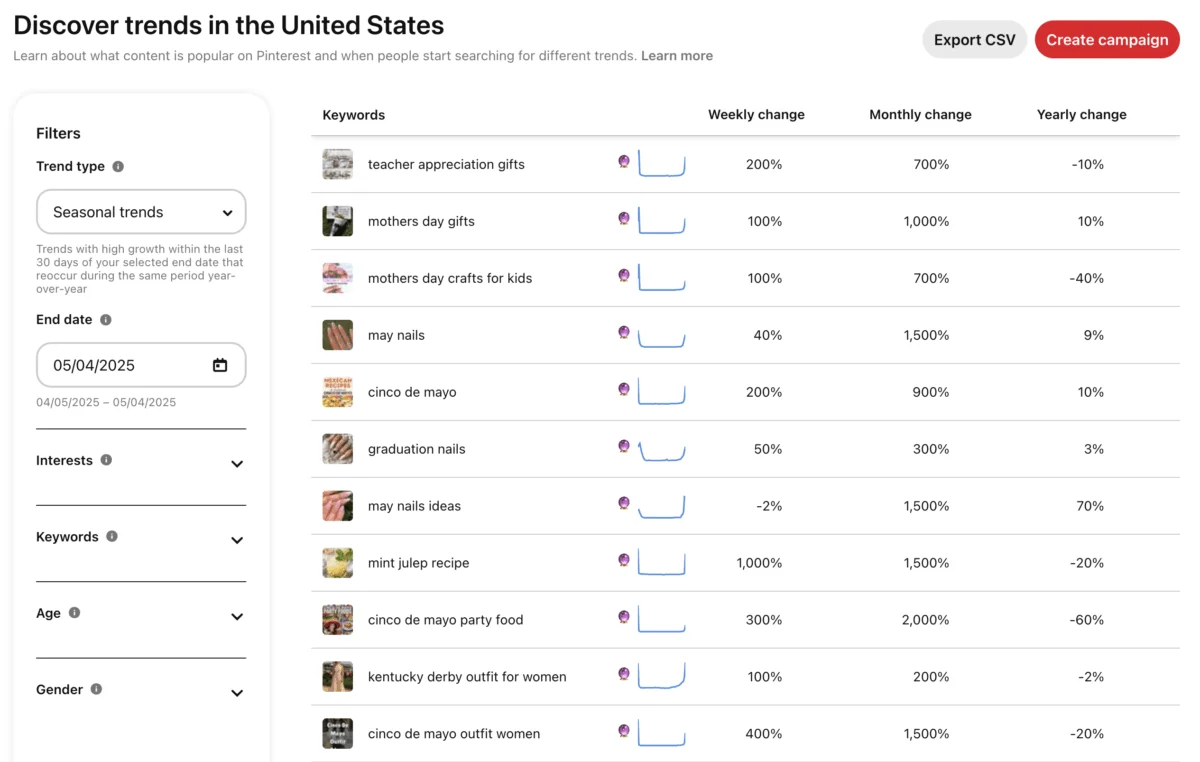
The Pinterest Trends tool serves as a powerful predictive resource, revealing what your target audience is actively searching for before it becomes mainstream. By monitoring rising trends, creators can develop relevant Pinterest collages preemptively. Search terms such as "cottagecore aesthetic," "minimalist home office," "sustainable fashion brands," "mental health journal prompts," or "DIY wedding decor" offer insights into emerging user interests. Identifying these trends early and crafting collages around them allows creators to position their content at the top of search results, sustaining visibility over time.
Test. Tweak. Repeat.
Not every collage will go viral, and some may underperform; this is part of the iterative process. Pinterest rewards consistency and a willingness to experiment. Consider A/B testing elements like:
- Different Layouts: Simple grids vs. layered overlays.
- Color Palettes: Bold vs. muted tones.
- Text Overlays: Different fonts, messaging, or calls-to-action.
- Image Selection: Lifestyle shots vs. product-focused images.
- Pin Descriptions: Varying keyword density and storytelling approaches.
Small, systematic tweaks can yield significant insights, allowing data to guide creativity rather than stifle it.
Watch What Others Are Doing
Your niche is a valuable source of competitive intelligence. Search for "Pinterest collage" combined with your industry keywords (e.g., "Pinterest collage interior design," "Pinterest collage small business marketing") to observe:
- Popular Styles: What visual aesthetics are resonating?
- Common Themes: Which topics are frequently covered?
- Engagement Strategies: How are others driving saves and clicks?
Pinterest success isn’t about reinventing the wheel, but about presenting content in a fresh, on-brand manner that aligns with existing user search intent.
Common Mistakes to Avoid
Pinterest is a platform with significant long-term payoff, but only if navigated strategically. A stunning Pinterest collage can achieve sustained traction, but its impact can be undermined by common missteps:
- Overdesigning or Overcrowding: A Pinterest collage is a visual story designed to halt the scroll, not a chaotic scrapbook page. Packing in excessive images, fonts, and text overwhelms the viewer. Prioritize visual flow, allow images to "breathe," and embrace white space for clarity.
- Ignoring Mobile Optimization: Over 80% of Pinterest traffic originates from mobile devices. A collage that looks impressive on a desktop but becomes an illegible jumble on a smartphone will fail to engage. Always test your collage’s appearance at mobile scale before publishing.
- No Clear Focus or Call-to-Action (CTA): While aesthetics are crucial, every collage needs a purpose. It should lead somewhere: a blog post, a product, or a specific idea. Even a subtle prompt to "save for later" or "learn more" provides direction and encourages interaction.
- Weak or Missing Keywords: Without effective keywords, Pinterest cannot accurately categorize and distribute your collage to the relevant audience. Avoid vague or overly "cutesy" titles (e.g., "spring thingz") in favor of real, searchable phrases that describe your content.
- Forgetting to Link Out (or Linking to the Wrong Page): A common oversight is uploading collages as Idea Pins without an actionable next step, or linking a skincare moodboard directly to a generic homepage instead of the specific product collection it showcases. Every Pin requires a logical, specific, and relevant destination; otherwise, it becomes a dead end.
- Relying Only on Static Pins: While static Pins remain powerful, Pinterest increasingly favors engagement-rich content such as videos and content originating from Shuffles. Exclusively posting static collages means missing out on potential algorithmic boosts and broader reach.
- Posting Once, Then Ghosting: Collages are evergreen, but Pinterest still rewards consistent content. Repin your highest-performing collages to different, relevant boards, and update seasonal content with fresh variations. Maintain momentum to keep the content flywheel turning.
Avoiding these pitfalls is not about striving for perfection, but about embracing a strategic approach, refining your methods, and ensuring your Pinterest collages work as diligently as you do.
Elevating Your Strategy: Advanced Tips and Creative Approaches
Once the foundational principles of Pinterest collages are mastered, the focus shifts to smarter, more impactful creation. These advanced strategies are designed to enhance content distinction, build audience trust, and sustain traffic generation long after publication.
-
Create a Collage Series: Individual Pins are effective, but a cohesive series fosters bingeability and deeper engagement. Consider:
- Seasonal Style Guides: A sequence of collages for "Summer Capsule Wardrobe," "Autumn Layers," etc.
- Project Phases: "Dream Kitchen Planning: Phase 1 (Inspiration)," "Phase 2 (Materials)," "Phase 3 (Finishing Touches)."
- "X Ways to Style Y": A series demonstrating versatile product applications.
Employ a consistent layout or design template across the series to ensure immediate brand recognition.
-
Lean Into Themes That Spark Emotion or Utility: Pinterest users are inherently planners and dreamers. Collages that offer either a practical solution or evoke a desirable feeling are invaluable. Effective themes include:
- Problem-Solution Collages: "Beat Burnout: Your Self-Care Toolkit."
- Aspirational Lifestyle Boards: "Minimalist Living for Busy Professionals."
- Educational Guides: "The Ultimate Guide to Plant Parenthood."
- Mood-Enhancing Visuals: "Cozy Autumn Hygge Vibes."
-
Collaborate With Others for Shared Reach: Partnering with individuals in complementary niches can significantly expand your audience. For example, a collaboration between a home decor blogger ("Minimalist Home Vibes") and a beauty influencer ("Clean Beauty Favorites") could involve cross-pinning to each other’s boards, tagging, and maintaining aligned aesthetics for mutual audience growth.
-
Reuse High-Performing Content in New Formats: Maximize the longevity of your best content. If a blog post or product guide is performing well, distill its essence into a compelling Pinterest collage. Conversely, if a collage is highly successful, remix it into:
- An Idea Pin: Add voice-overs or videos to elements.
- A Blog Post: Expand on the collage’s themes.
- An Instagram Reel: Showcase the visual elements in motion.
- A Newsletter Segment: Use it as a visual hook for subscribers.
-
Add Subtle Brand Elements Without Screaming Branding: People save content that inspires, not overtly advertises. Instead of prominent logos, integrate subtle branding through:
- Consistent Color Palettes: Use your brand colors throughout.
- Unique Typography: Employ brand fonts for text overlays.
- Watermarks: A small, transparent watermark in a corner.
- **Visual


 Suro Senen
 Pevita Pearce