
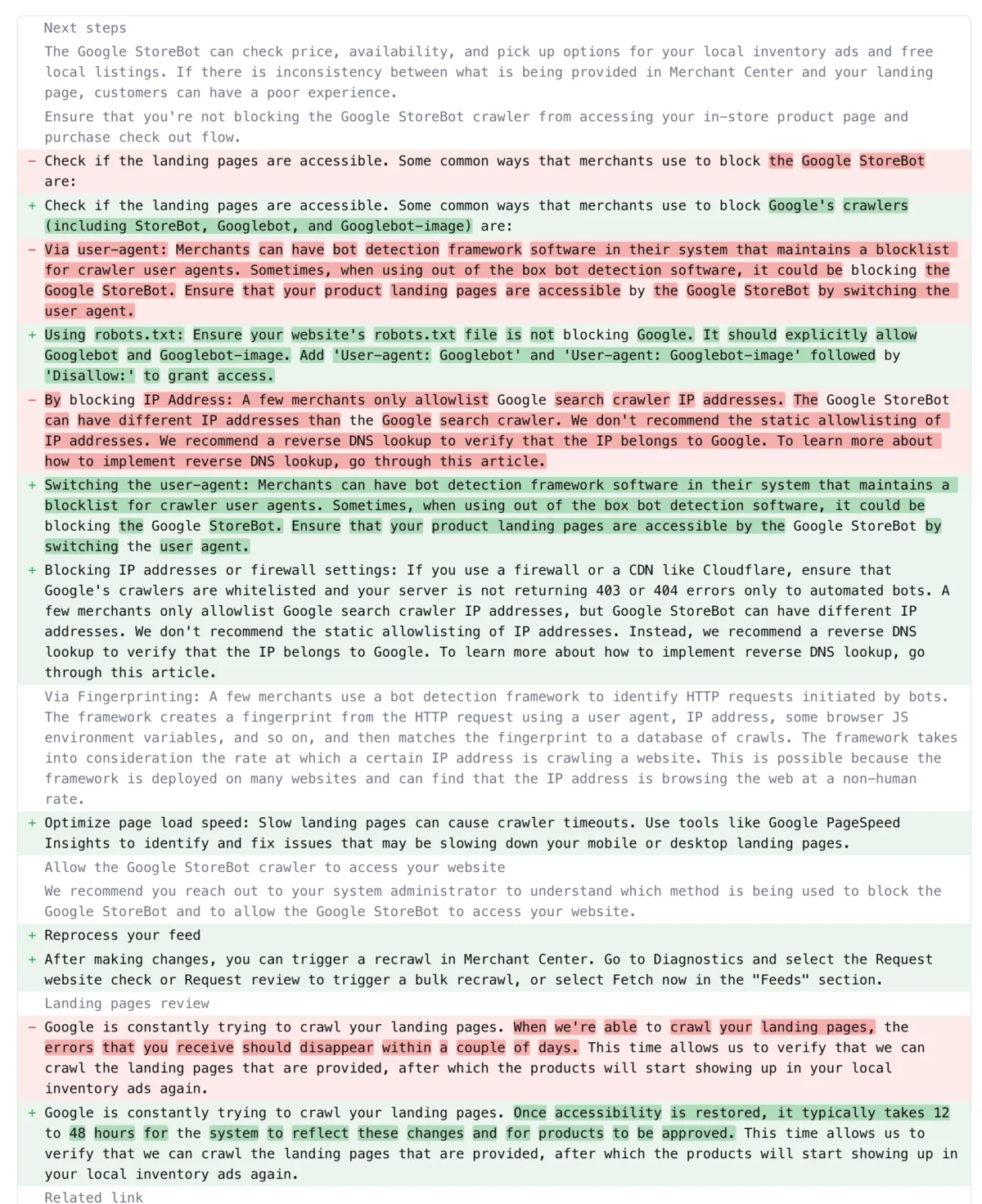
Google has significantly revised its critical help document, "How to fix: Google StoreBot crawler can’t access your in-store product page," providing much-needed clarifications and comprehensive guidance for merchants. The update addresses a range of technical issues that can hinder Google StoreBot’s ability to access in-store product pages, thereby impacting the visibility of products in local inventory ads. These crucial updates encompass detailed explanations regarding user-agents, proper configuration of robots.txt files, implications of blocking IP addresses, firewall rules, the complexities of fingerprinting, and the often-underestimated role of page speed. Furthermore, the document now offers specific timelines for reprocessing and re-approval of landing pages once accessibility issues are resolved, a vital piece of information for retailers managing their online presence.
Understanding Google StoreBot and Local Inventory Ads
Google StoreBot is a specialized web crawler deployed by Google to gather information about product availability in physical retail stores. Its primary function is to verify the accuracy of local product feeds submitted by merchants through Google Merchant Center, which in turn powers Google’s Local Inventory Ads (LIA). These ads are a crucial component of Google’s strategy to bridge the gap between online search and offline retail, allowing consumers searching for specific products to see which nearby stores have them in stock. When a user performs a "near me" search or looks for a product available locally, LIAs display relevant store information, product prices, and real-time stock availability, driving foot traffic to brick-and-mortar locations.
The ecosystem of local search has grown exponentially over the past decade. According to Google’s own data, "near me" searches have seen a dramatic increase, underscoring consumers’ preference for local and immediate shopping solutions. For merchants, participation in Local Inventory Ads represents a direct channel to capture this high-intent local traffic. However, the effectiveness of LIAs hinges entirely on Google StoreBot’s ability to successfully crawl and verify the in-store product pages provided in a merchant’s product feed. If StoreBot is blocked or encounters issues, the products cannot be verified, leading to their disapproval and removal from local inventory ads, directly impacting a retailer’s visibility and potential sales.
The Critical Role of Crawler Accessibility
The core of the updated document emphasizes crawler accessibility as paramount. Google’s various crawlers, including the general-purpose Googlebot, Googlebot-image, and the specialized StoreBot, are the eyes and ears of its search engine. They systematically traverse the web, discovering new content and updating existing information. For local inventory ads, StoreBot specifically validates that the landing page linked in a product feed accurately reflects the product’s availability and details in a physical store. Any impediment to this crawling process means Google cannot confirm the information, rendering the associated products ineligible for display in local inventory ads. This can result in significant financial repercussions for businesses relying on these ads to attract local customers.
The update explicitly states, "Once accessibility is restored, it typically takes 12 to 48 hours for the system to reflect these changes and for products to be approved." This clear communication of a reprocessing timeline is a significant improvement, providing merchants with a tangible expectation for when their products might reappear in ads. This "time allows us to verify that we can crawl the landing pages that are provided, after which the products will start showing up in your local inventory ads again," Google elaborates. This transparency is crucial for inventory management and marketing planning, as merchants can better anticipate the impact of their technical adjustments.
Key Clarifications in the Updated Document
The revisions to the help document are extensive, detailing common misconfigurations and technical pitfalls that lead to crawler blocking. These issues, while often unintentional, can severely disrupt a merchant’s local presence.
-
User-Agents: A Closer Look
The updated document now provides clearer definitions and expectations regarding user-agents. A user-agent is a string of text sent by a web client (like a browser or a crawler) to a web server, identifying the client and its operating system. Google’s crawlers, including StoreBot, identify themselves with specific user-agent strings. Merchants might inadvertently block these user-agents if their server configurations or security measures are too aggressive or misconfigured. For instance, some web application firewalls (WAFs) or custom server-side scripts might be set to block any user-agent that doesn’t resemble a standard web browser, mistakenly classifying Google’s crawlers as malicious bots. The clarification helps merchants ensure their systems are configured to specifically allow or properly handle Google’s known user-agent strings, preventing unintended blocking. -
Navigating Robots.txt Directives
Therobots.txtfile is a fundamental component of website management, instructing web crawlers which parts of a site they are allowed or not allowed to access. While intended to manage crawl budget and prevent crawling of sensitive or duplicate content,robots.txtis a frequent source of errors leading to crawler blocking. Common mistakes include usingDisallow: /for all crawlers, accidentally disallowing critical product page directories, or applying disallow directives specifically to Google’s user-agents without realizing the full implications. The updated guidance likely reiterates best practices forrobots.txtconfiguration, emphasizing the need for precision and regular auditing to ensure that StoreBot (and other essential Google crawlers) can access product landing pages without hindrance. A single misplaced character in arobots.txtfile can have widespread negative consequences for a merchant’s product visibility.
-
The Pitfalls of IP and Firewall Blocking
Blocking IP addresses is a common security measure to protect against spam, malicious attacks, or excessive bot traffic. However, Google’s crawlers operate from a vast and dynamic range of IP addresses. Merchants who block specific IP ranges without verifying if they belong to legitimate Google crawlers risk inadvertently cutting off StoreBot’s access. Similarly, firewall rules, which filter incoming and outgoing network traffic, can be configured too restrictively. A firewall might block traffic from unknown IP addresses or patterns, again mistakenly identifying Google StoreBot as a threat. The document’s updated advice likely cautions against blanket IP blocking and encourages merchants to consult official Google resources for lists of known Googlebot IP ranges, though these are often dynamic and require more sophisticated whitelisting strategies than simple static lists. Instead, focusing on user-agent detection in conjunction with IP verification is often recommended. -
Decoding Fingerprinting Challenges
"Fingerprinting" in this context refers to sophisticated methods websites use to identify and categorize incoming traffic, including distinguishing between legitimate users, standard bots, and potentially malicious crawlers. This can involve analyzing HTTP headers, request patterns, browser characteristics, and more. While useful for security, overly aggressive or misconfigured fingerprinting mechanisms can incorrectly identify Google StoreBot as an unwanted bot and block its access. For example, if a site expects a certain sequence of requests typical of a human user and StoreBot’s automated process deviates, it might be flagged. The document’s clarification on fingerprinting suggests Google is addressing a more advanced technical challenge where websites might be unintentionally preventing its crawlers due to complex bot detection logic. -
Page Speed: More Than Just User Experience
The inclusion of "page load speed issues" as a blocking factor highlights Google’s ongoing emphasis on website performance. While often discussed in the context of user experience and Core Web Vitals, page speed also directly impacts a crawler’s ability to efficiently process a page. A slow-loading page can consume excessive crawl budget, lead to timeouts, or cause crawlers to abandon the page before fully rendering its content. If StoreBot consistently encounters slow loading times, it may deprioritize crawling those pages, or even fail to crawl them altogether, leading to product disapproval. This emphasizes that optimizing website performance is not just about pleasing human visitors but also about ensuring machine accessibility and efficient indexing. Merchants are therefore encouraged to invest in robust hosting, optimized images, efficient code, and minimized server response times.
Reprocessing and Re-Approval: What to Expect
The specific timeline of "12 to 48 hours" for reprocessing and approval is a critical addition. Before this update, merchants often faced uncertainty regarding how long it would take for their changes to take effect. This waiting period allows Google’s systems to re-crawl the affected landing pages, verify that the accessibility issues have been resolved, and then re-evaluate the product data. This systematic verification process is essential to maintain the quality and accuracy of information displayed in Local Inventory Ads. During this time, products previously disapproved due to accessibility issues will remain out of the ad ecosystem, underscoring the importance of proactive monitoring and swift issue resolution. For high-volume retailers, even a 12-hour delay can translate into missed sales opportunities, making adherence to Google’s guidelines a constant operational priority.
Broader Implications for Merchants and Local SEO
The updated guidance from Google carries significant implications for merchants, extending beyond just local inventory ads:
- SEO Impact: While directly related to Local Inventory Ads, ensuring StoreBot accessibility is a microcosm of broader technical SEO best practices. Issues that block StoreBot often affect other Google crawlers as well, potentially harming organic search visibility for local product searches. If a merchant’s product pages are inaccessible to StoreBot, they might also be inaccessible or poorly crawled by Googlebot, impacting overall organic rankings.
- Advertising Effectiveness: For businesses investing in Google Ads, particularly Local Inventory Ads, unresolved StoreBot accessibility issues lead to wasted ad spend and ineffective campaigns. Ads may show products that are technically available but cannot be verified, or simply not show the products at all, diminishing return on investment.
- User Experience and Brand Trust: Inaccessible product pages create a fragmented user experience. Customers searching for products locally expect accurate, real-time information. When they encounter outdated or missing product data in LIAs, it erodes trust and can drive them to competitors.
- Operational Efficiency: Merchants must integrate regular checks of Google Merchant Center diagnostics into their operational routines. Proactive identification and resolution of crawling issues can save significant time and resources compared to reactive troubleshooting after products have been disapproved.
- Competitive Advantage: In the highly competitive retail landscape, particularly for small and medium-sized businesses, maintaining optimal visibility in local search and advertising channels can be a significant differentiator. Those who effectively manage StoreBot accessibility will gain a competitive edge over those who struggle with technical misconfigurations.
Best Practices for Maintaining StoreBot Accessibility
Based on Google’s updated document and broader SEO principles, merchants should adopt several best practices:
- Regularly Monitor Google Merchant Center: The diagnostics tab in Google Merchant Center is the first line of defense. It provides detailed reports on product status, including disapproval reasons related to crawling issues.
- Audit Robots.txt and Server Logs: Periodically review the
robots.txtfile to ensure no critical directories or Google crawlers are inadvertently blocked. Analyze server access logs to identify patterns of Google StoreBot activity and detect any instances of blocking or errors. - Verify User-Agent Handling: Ensure that server configurations, firewalls, and security solutions are configured to properly identify and allow Google’s official user-agents, including StoreBot. Avoid overly aggressive user-agent switching detection.
- Optimize Page Speed and Core Web Vitals: Continuously work on improving website loading times. Tools like Google PageSpeed Insights can help identify performance bottlenecks. Fast-loading pages are not only better for users but also more efficient for crawlers.
- Review Firewall and IP Blocking Rules: Exercise caution when implementing IP blocking or firewall rules. If specific IP ranges must be blocked for security reasons, cross-reference them with official Google IP ranges to avoid unintentional blocking.
- Test Landing Pages: Regularly test product landing pages from various locations and devices to ensure they are accessible, load quickly, and display correctly. Use Google Search Console’s URL Inspection Tool for specific pages.
- Stay Informed: Keep abreast of updates to Google’s guidelines and best practices, as the digital landscape and Google’s algorithms are constantly evolving.
Conclusion: The Evolving Landscape of Local Search
The comprehensive update to Google’s "How to fix: Google StoreBot crawler can’t access your in-store product page" help document underscores the increasing complexity and importance of technical SEO for local retail. It reflects Google’s ongoing commitment to providing accurate and timely local product information to users, while simultaneously guiding merchants through the intricate technical requirements. For retailers, these clarifications are more than just technical notes; they are essential directives for maintaining online visibility, driving in-store traffic, and ultimately, securing sales in an ever-competitive marketplace. By understanding and diligently applying these updated guidelines, merchants can ensure their products remain discoverable and accessible, effectively bridging the critical gap between online searches and offline purchases. The consistent effort required to manage these technical aspects is no longer optional but a fundamental pillar of modern retail strategy.