Released on May 20th, 2026, WordPress 7.0 marks a significant milestone in the evolution of the world’s most popular content management system. This major update propels the platform beyond its traditional roots, emphasizing smarter workflows and a more integrated, app-like user experience. While previous iterations largely focused on refining the block editor, version 7.0 elevates this foundation, setting a new trajectory for web development and content management. The release underscores a strategic move by the WordPress community to enhance usability, efficiency, and future-proofing, particularly in areas like artificial intelligence integration and responsive design.
The Vision: Moving Towards an App-Like Experience
For years, WordPress has been synonymous with blogging and traditional website creation, evolving into a robust Content Management System (CMS) that now powers over 43% of all websites globally. The journey, notably through the multi-phase Gutenberg project, has consistently aimed at modernizing the editing experience. WordPress 7.0 is a pivotal step in this ongoing transformation, shifting the perception of the backend from a conventional administrative panel to a dynamic, intuitive web application. This overarching vision is evident in several key enhancements designed to streamline user interaction, improve visual feedback, and provide developers with a more standardized ecosystem. The core development team has articulated a clear intent to make the platform feel less like a collection of disparate tools and more like a cohesive, integrated environment where tasks flow seamlessly. This approach not only benefits seasoned developers and agencies but also significantly lowers the barrier to entry for new users and small businesses seeking to establish a powerful online presence without extensive technical expertise.
Enhanced Administrative Interface and User Experience
A hallmark of WordPress 7.0 is its thoroughly refreshed administrative interface, a subtle yet impactful overhaul designed to foster a more fluid and engaging user experience. One of the most immediately noticeable changes is the introduction of smoother page transitions within the backend. Leveraging the CSS View Transitions API, navigation between different administrative screens now appears significantly more refined and less jarring, contributing to the overall app-like feel. This seemingly minor aesthetic improvement dramatically enhances user perception of speed and responsiveness.
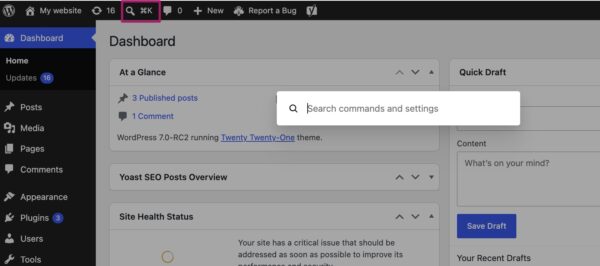
Complementing this visual fluidity is the debut of the Command Palette shortcut in the top menu bar. Accessible by clicking a dedicated icon or using the keyboard shortcuts ⌘K (Mac) or Ctrl+K (Windows), the Command Palette offers a quick, centralized hub for backend navigation and various administrative actions. This feature, reminiscent of command palettes found in modern code editors and operating systems, significantly boosts productivity for power users by minimizing clicks and accelerating task execution. Users can quickly search for pages, posts, settings, or even trigger specific functions without delving through multiple menus.
Further contributing to the modern aesthetic is an updated default color palette. The scheme previously known as ‘Modern’ has been adopted as the new default, aligning the admin interface more closely with the contemporary visual language of the block and site editors. This change fosters a more consistent and harmonious design across the entire WordPress experience. For those who preferred the classic look, the original default, now labeled ‘Fresh,’ remains available in user profile preferences, ensuring backward compatibility and user choice. These collective improvements deliver a cleaner, more intuitive, and visually appealing backend, reflecting WordPress’s commitment to user-centric design.
Revolutionizing Content Management: Visual Revisions
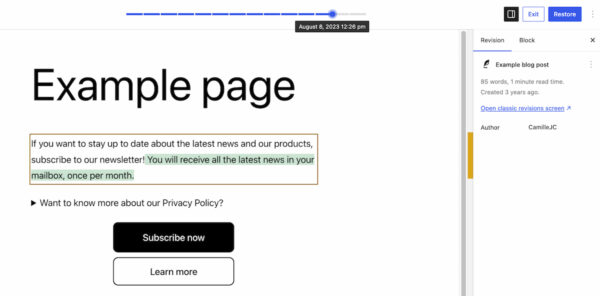
Content management receives a substantial upgrade in WordPress 7.0 with the introduction of visual revisions. Previously, reviewing past versions of pages or posts involved sifting through raw text differences, which could be cumbersome and time-consuming, especially for complex layouts or extensive content changes. This new feature fundamentally transforms the revision process, making it intuitive and visually explicit.
The revisions interface, accessible from its familiar location, now presents a live preview of the page, allowing users to navigate through earlier versions using a prominent slider at the top. This slider clearly indicates the date and time of each saved revision. What makes this feature truly revolutionary is its visual differentiation of changes: additions are highlighted in green, modified sections in yellow, and deleted content in red. This immediate visual feedback enables site administrators, content creators, and editors to pinpoint alterations at a glance, eliminating the need for textual analysis.
The implications for content integrity and workflow efficiency are profound. Users can quickly identify the source of layout discrepancies, track content evolution, or restore previous versions with greater confidence and speed. This capability is particularly beneficial for teams collaborating on content, ensuring accountability and simplifying the process of reviewing contributions. For compliance and auditing purposes, the ability to visually verify content changes against specific timestamps adds a layer of transparency that was previously challenging to achieve. The visual revision system not only enhances the user experience but also reinforces WordPress’s position as a robust platform for professional content management.
Expanding Creative Horizons: New Blocks and Editor Improvements
The block editor, a cornerstone of modern WordPress development, continues its evolution in version 7.0 with the addition of new blocks and significant enhancements to existing ones. These updates are designed to empower users with greater creative control and reduce the reliance on third-party plugins for fundamental design elements.
A highly anticipated addition is the new Breadcrumbs block. This block allows users to effortlessly integrate SEO-friendly breadcrumb navigation paths onto their pages. Once added, it automatically generates the correct hierarchical path based on the page’s structure, with intuitive options for customization. Breadcrumbs are crucial for user navigation, helping visitors understand their location within a website, and are also highly valued by search engines for improving site structure understanding and display in search results. The native inclusion of this block streamlines a common SEO practice, making it more accessible to all users.
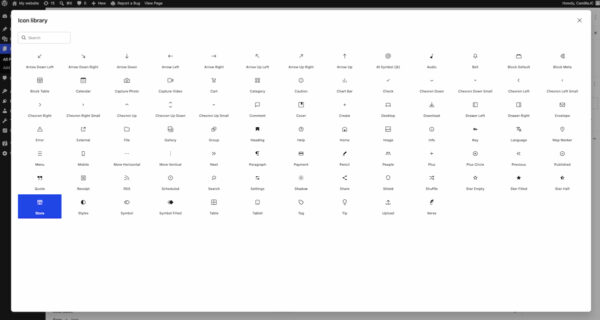
Another valuable new component is the Icon block, providing users with a curated directory of icons directly within the backend. This eliminates the need for external icon libraries or custom SVG uploads for basic visual elements, simplifying design workflows. Users can select from a growing collection of icons to enhance visual appeal, draw attention to specific content, or improve readability without leaving the editor.
Existing blocks have also received notable improvements. The Grid block, a powerful tool for creating flexible layouts, has replaced its previous Auto/Manual toggle with more sophisticated options for setting responsiveness. This provides finer control over how content arranges itself across different screen sizes, empowering users to craft truly adaptive designs without writing custom CSS. Similarly, the Cover block now supports embedded videos (from platforms like YouTube) as backgrounds, offering dynamic and engaging visual possibilities for hero sections and banners. These block-level advancements collectively contribute to reducing the need for custom coding or external plugins, enabling users to achieve complex designs directly within the native WordPress environment.
Empowering Responsive Design Controls
Recognizing the critical importance of mobile-first design, WordPress 7.0 introduces advanced viewport-based controls, democratizing the process of creating highly responsive websites. This feature allows site creators to precisely control the visibility of individual blocks based on the user’s screen size (desktop, tablet, or mobile).
The implementation is remarkably user-friendly: users simply select a block, navigate to the ‘Show’ option in its toolbar, and choose the specific devices on which the block should be displayed. Any unselected device types will automatically hide the block. This intuitive mechanism empowers users to fine-tune their designs for different devices without delving into complex custom CSS or relying on external responsive design plugins. For instance, a detailed infographic might be displayed only on desktop and tablet, while a simplified summary appears on mobile.
This capability is a significant win for anyone building websites without extensive coding knowledge, including small business owners, marketers, and independent designers. It streamlines the creation of tailored experiences for various screen sizes, ensuring optimal readability, usability, and performance across the diverse landscape of modern devices. By embedding these controls directly into the block editor, WordPress 7.0 reinforces its commitment to accessible and efficient web development, contributing to better user experiences and potentially improved search engine rankings through enhanced Core Web Vitals.
Streamlined Site Building: Smarter Pattern Editing
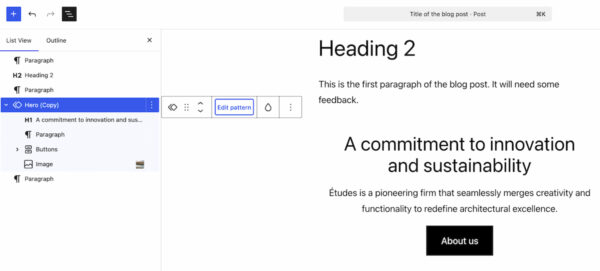
Patterns and templates, which have become integral to efficient site building in WordPress, receive an intelligent upgrade in version 7.0 with the introduction of smarter editing modes. This enhancement addresses a common challenge: making minor content adjustments to patterns without inadvertently altering their underlying design or layout.
When a user selects a pattern, the List View now intelligently filters to display only the content-focused elements, such as text and image blocks. This allows users to concentrate solely on optimizing the textual and visual content, ensuring they don’t accidentally disrupt the pattern’s structural integrity. For instance, in a testimonial pattern, only the quote and author’s name might be editable initially.
However, recognizing that design adjustments are sometimes necessary, a dedicated ‘Edit pattern’ button is provided. Clicking this button reveals all elements within the pattern, including design-focused components like spacers, column structures, or group blocks. This dual-mode approach offers the best of both worlds: a focused content editing experience for routine updates and the flexibility to make deeper design modifications when required.
This new methodology significantly streamlines the customization of patterns, making them more adaptable to specific use cases across a website. It promotes consistency by guiding content edits while still providing the power to modify layouts when intentionally desired. For agencies and theme developers, this feature promises more efficient client workflows, reducing the likelihood of accidental design breaks and improving the overall maintainability of sites built with patterns.
Laying the Groundwork for AI Integration
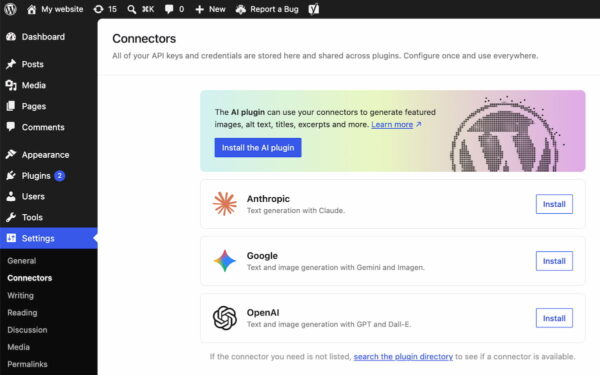
While WordPress 7.0 does not natively include AI-powered tools, it takes a significant, forward-looking step by laying crucial groundwork for future artificial intelligence integration. A new ‘Connectors’ section has been introduced under ‘Settings’ in the WordPress backend. This dedicated area serves as a central hub for managing external integrations, specifically targeting AI providers and agents.
Through this Connectors section, users can link their WordPress installations to various AI services, including prominent platforms like Claude, Gemini, and OpenAI. The interface allows for the configuration of API keys and other credentials, providing a standardized and secure method for establishing these connections. Should a specific integration not be immediately listed, a directory search function is available, indicating an expandable and future-proof ecosystem.
This strategic move is vital for several reasons. Firstly, it provides a single, consistent location for maintaining all API-based integrations, simplifying management for site administrators. Secondly, and perhaps more importantly, it establishes a standardized framework for developers. This framework ensures that plugins and themes seeking to leverage AI capabilities can do so through a consistent, officially supported channel, promoting stability, security, and interoperability within the WordPress ecosystem. It prepares WordPress for a future where AI-driven content generation, image optimization, SEO analysis, and personalized user experiences will become increasingly commonplace, offering a robust foundation without committing to any single AI vendor. This approach empowers both the core platform and its vast plugin community to innovate responsibly with AI.
Improved Plugin Management and Ecosystem Support
WordPress 7.0 also introduces a practical enhancement for managing the extensive array of plugins that define much of the platform’s flexibility: a new list filter for plugins. This feature allows plugins to register custom tabs on the ‘Plugins’ screen, enabling site administrators to group related plugins under a single, properly labeled view.
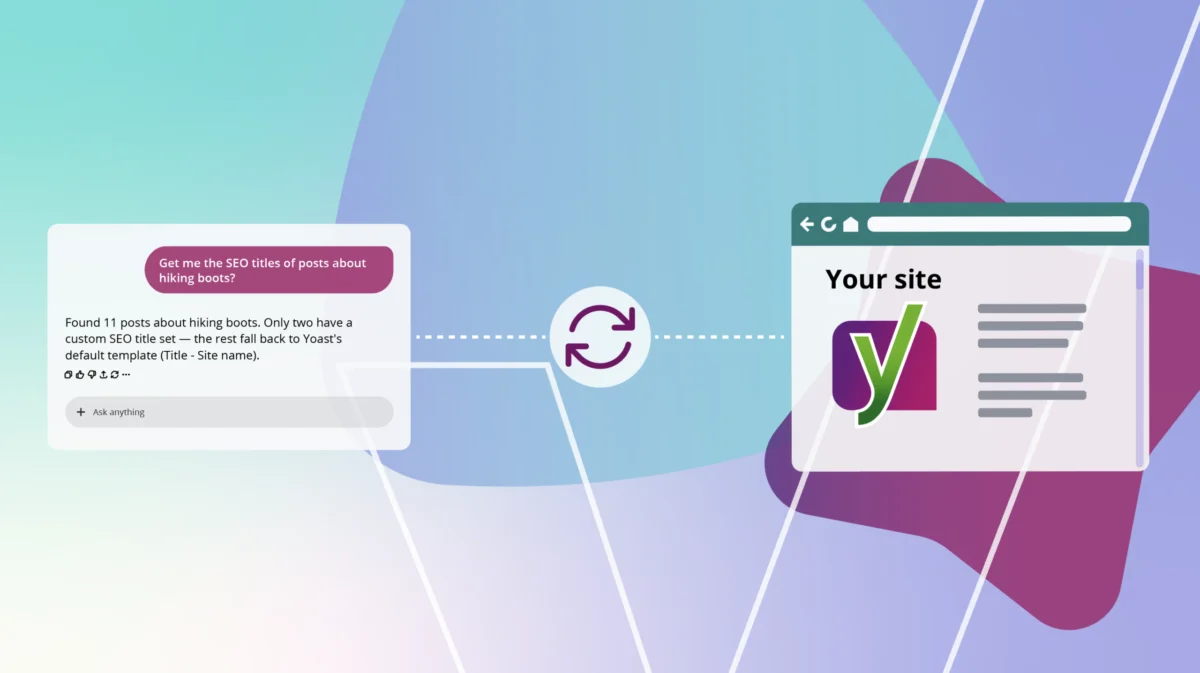
For instance, a developer like Yoast has utilized this feature to create a dedicated "Yoast" tab on the Plugins screen. When activated, this tab consolidates all Yoast-developed plugins installed on a website into one centralized view. This greatly simplifies the management process for site administrators who often juggle numerous plugins from various developers. It makes it easier to check version numbers, manage activation/deactivation, and maintain an overview of specific plugin suites.
This improvement addresses a long-standing pain point in plugin management, especially for sites with a large number of installed extensions. By providing a structured way to organize plugins, it enhances the overall administrative experience, reduces clutter, and improves efficiency. From a developer perspective, it offers a standardized method to present their suite of tools to users, reinforcing brand identity and improving user navigation within the WordPress backend. This subtle yet significant feature demonstrates WordPress’s continuous effort to refine the user experience at every level.
Under the Hood: Performance and Technical Updates
Beyond the visible user interface enhancements and new features, WordPress 7.0 includes crucial under-the-hood improvements focused on performance and technical infrastructure. These updates are vital for the platform’s scalability, speed, and long-term stability.
A significant area of focus is client-side media processing. This enhancement shifts some of the computational burden associated with media uploads and manipulations from the server to the user’s browser. The result is faster upload times and reduced strain on server resources, which is particularly beneficial for media-heavy websites or those experiencing high traffic volumes. This client-side optimization contributes to a snappier user experience and more efficient resource utilization.
Continued improvements to block rendering ensure that the block editor operates with greater efficiency and responsiveness. As the block editor becomes the primary interface for content creation, optimizing its performance is paramount for maintaining a smooth and intuitive workflow. These refinements contribute to faster page loads and a more seamless editing experience.
The release also emphasizes overall responsiveness, ensuring that the WordPress backend and front-end continue to perform optimally across a wide range of devices and network conditions. Performance optimizations are a continuous process within WordPress development, and version 7.0 delivers tangible gains in this area.
A notable technical update is the elevation of the minimum required PHP version to 7.4. This move is consistent with the WordPress project’s policy of progressively increasing PHP requirements to align with modern web standards and security best practices. PHP 7.4 offers significant performance improvements and security enhancements over older versions. While this requires hosting providers and site owners to ensure their environments are up-to-date, it ultimately contributes to a more secure and performant WordPress ecosystem. This change will prompt some older installations to upgrade their server environments, ensuring they benefit from the latest PHP features and security patches.
A Glimpse into the Future: Real-time Collaboration Postponed
One highly anticipated feature that was initially slated for WordPress 7.0, but ultimately postponed, was real-time collaboration. This functionality, envisioned to allow multiple users to edit content simultaneously in a manner similar to Google Docs, represents a significant leap towards the "Phase 3" goals of the Gutenberg project, focusing on collaboration workflows.
A decision was made shortly before the release, specifically on May 8th, 2026, to defer the inclusion of real-time collaboration. This postponement was a strategic move by the core development team to prioritize the stability and robustness of the WordPress 7.0 release. Developing and integrating real-time collaboration is a complex undertaking, requiring extensive testing to ensure seamless performance, data integrity, and security across diverse hosting environments and user scenarios. The team determined that additional development and testing time were necessary to meet the high standards expected for a core WordPress feature. While its absence from 7.0 might be a slight disappointment for some, it underscores the project’s commitment to delivering well-tested and reliable features. This functionality is expected to be a highlight of a future major release, further solidifying WordPress’s position as a powerful platform for collaborative content creation.
Industry Reactions and Future Outlook
The release of WordPress 7.0 has been met with generally positive reactions from the broader web development community, users, and industry analysts. The emphasis on an "app-like experience" and "smarter workflows" resonates with the growing demand for intuitive and efficient web tools. Developers are keen to explore the standardized AI Connectors framework, seeing it as a strategic move that future-proofs the platform and opens new avenues for innovation in AI-powered plugins and services. Theme and plugin developers also appreciate the enhanced block editor capabilities, which reduce the need for custom coding and streamline design processes.
Site owners and content creators are particularly enthusiastic about features like visual revisions, which promise to significantly improve content management and reduce the risk of errors. The advanced responsive design controls empower non-technical users to create professional, device-agnostic websites, broadening WordPress’s appeal to a wider audience. The performance improvements, while less visible, are crucial for maintaining user engagement and improving SEO, factors that directly impact the success of any online venture.
In conclusion, WordPress 7.0 is not merely an incremental update; it represents a deliberate stride towards a more modern, efficient, and intelligent web development platform. By refining the user experience, enhancing core capabilities, and strategically laying the groundwork for future technologies like AI and real-time collaboration, WordPress continues to cement its dominance as the internet’s preferred CMS, ready to meet the evolving demands of the digital landscape. The commitment to performance, usability, and a future-ready ecosystem ensures that WordPress will remain at the forefront of web innovation for years to come. Users are encouraged to update to the latest version to leverage these new features and explore the detailed release post on WordPress.org for comprehensive insights.

 Jia Lissa
 Siti Muinah