rifanmuazin
In the dynamic landscape of digital advertising, where every dollar spent is scrutinized for maximum return on investment (ROI), a powerful yet often overlooked strategy for optimizing campaign performance and conserving budgets is ad scheduling. This technique, also historically known as "dayparting," allows advertisers to precisely control when their advertisements are displayed across various digital platforms. By aligning ad delivery with periods of peak audience activity and conversion potential, businesses can significantly enhance their advertising efficiency. This article delves into the intricacies of ad scheduling, exploring its cost-saving benefits, performance-boosting capabilities, and practical implementation across major advertising platforms like Google Ads, Microsoft Ads, and Meta Ads.
Understanding the Fundamentals of Ad Scheduling
At its core, ad scheduling is the practice of segmenting your advertising efforts by time. By default, most digital advertising campaigns are configured to run 24 hours a day, seven days a week. Ad scheduling deviates from this default by enabling advertisers to select specific days of the week and hours of the day during which their ads will be visible to potential customers. The fundamental principle behind this strategy is to concentrate ad spend on the times when target audiences are most likely to engage with and convert from advertisements.
Consider a hypothetical scenario for an e-commerce business specializing in artisanal coffee beans. Through diligent analysis of past campaign data, the business might discover that its highest conversion rates occur on weekday mornings between 8 a.m. and 11 a.m., coinciding with when consumers are likely planning their daily routines and seeking their morning caffeine fix. Conversely, data might reveal that ad clicks occurring late on Sunday nights or in the very early hours of Monday morning yield minimal to no conversions. Without ad scheduling, the business would continue to allocate budget to these unproductive periods, effectively "wasting" advertising spend. By implementing ad scheduling, this business could choose to limit its ad visibility to the high-performing weekday morning slots, thereby ensuring that its advertising budget is invested strategically during periods of peak consumer intent.

This data-driven approach is not merely about limiting ad exposure; it’s about optimizing it. The effectiveness of ad scheduling is directly correlated with the advertiser’s understanding of their target audience’s online behavior patterns. Research indicates that consumer online activity is not uniformly distributed throughout the day or week. For instance, a business-to-business (B2B) software provider might find its leads convert best during standard business hours on weekdays, when decision-makers are actively researching solutions. In contrast, a business catering to a younger demographic might see higher engagement on social media platforms during evening hours and weekends. The ability to pinpoint these optimal windows of opportunity is where ad scheduling demonstrates its profound value.
The Multifaceted Advantages of Ad Scheduling
The strategic implementation of ad scheduling offers a dual benefit: significant cost savings and a notable boost in conversion rates. By focusing ad spend on periods with a higher propensity for conversions, advertisers can achieve more with less. This leads to a more efficient allocation of marketing budgets, freeing up resources that can be reinvested in other growth initiatives or campaign enhancements.
Furthermore, ad scheduling provides a crucial layer of control, particularly within the context of increasingly automated advertising platforms. For instance, Google Ads offers various automated campaign types, such as Smart campaigns and Performance Max (PMax) campaigns, designed to streamline campaign management through machine learning algorithms. While these automated systems are designed to optimize performance, they can sometimes operate with less transparency or direct advertiser control. Ad scheduling, however, remains a fundamental lever that advertisers can utilize even within these automated frameworks. In fact, some advanced campaign types, like PMax, may even prompt advertisers to establish an ad schedule during the initial setup process, underscoring its importance in campaign strategy.
The ability to apply ad scheduling at the campaign level across different campaign types also contributes to a more unified and manageable advertising structure. This consistency simplifies oversight and facilitates higher-level strategic planning.
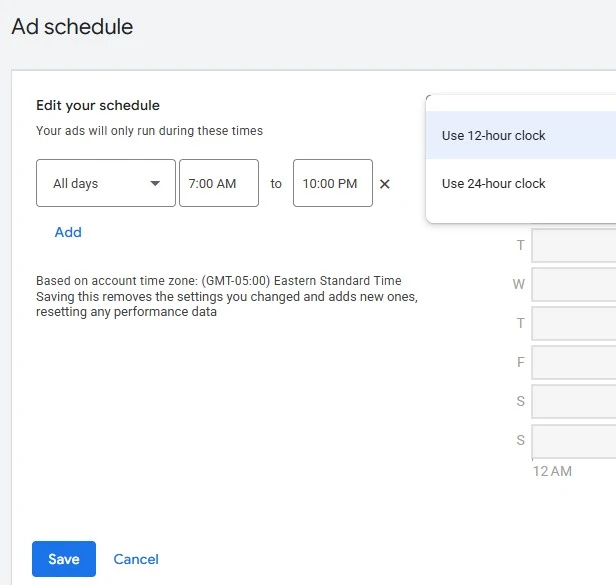
Beyond simply turning ads on and off, ad scheduling can be integrated with bid adjustments to create nuanced bidding strategies. Both Google Ads and Microsoft Ads permit advertisers to modify their bids based on specific days and times. This means that even if an advertiser chooses to maintain a 24/7 ad schedule, they can strategically increase bids during peak conversion times to ensure higher ad visibility and potentially secure more valuable placements, or decrease bids during less productive periods to conserve budget. This sophisticated approach allows for granular control over ad spend and competitive positioning throughout the advertising cycle.
It is important to note that leveraging bid adjustments in conjunction with ad scheduling often requires a manual bidding strategy. However, the flexibility offered by these platforms ensures that opportunities for bid optimization exist across a wide spectrum of account types and campaign objectives.
Navigating Time Zones: A Critical Consideration for Google Ads
When implementing ad scheduling in Google Ads, a critical factor to consider is the handling of time zones. Google Ads operates on a system where campaign time zones are set at the account level. Advertisers must be acutely aware of this setting to ensure their ad schedules align with the intended audience’s local time.
For campaigns targeting audiences across multiple time zones, this introduces a layer of complexity. For example, if an advertiser wishes for their ads to appear between 1 p.m. and 4 p.m. local time on both the East Coast (Eastern Time) and West Coast (Pacific Time) of the United States, a direct implementation within a single campaign can be challenging. Since Eastern Time is three hours ahead of Pacific Time, a schedule set from 1 p.m. to 4 p.m. Eastern Time would mean ads are running from 10 a.m. to 1 p.m. Pacific Time. To cover the desired window for both regions, the advertiser might need to set the schedule from 1 p.m. to 7 p.m. Eastern Time. This could result in ads running past the desired 4 p.m. cutoff on the East Coast, potentially leading to some unavoidable wasted spend if strict adherence to the 4 p.m. stop time in the Eastern Time zone is crucial.
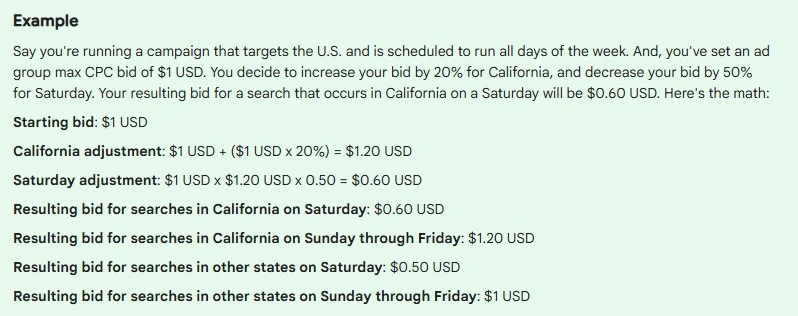
While this time zone discrepancy can present a challenge, strategic planning can mitigate its impact. Advertisers can perform careful calculations to determine the optimal schedule that encompasses all target time zones with minimal overlap into unproductive periods. Alternatively, a more robust, albeit complex, account structure could involve creating separate campaigns for distinct geographical regions, each with its own ad schedule tailored to the local time zone. This approach, while requiring more meticulous management, offers greater precision in time-based ad delivery.
Implementing Ad Scheduling in Google Ads: A Step-by-Step Guide
The process of setting up ad scheduling in Google Ads is designed to be intuitive, but it requires a foundational understanding of historical performance data.
Step 1: Analyze Historical Performance Data
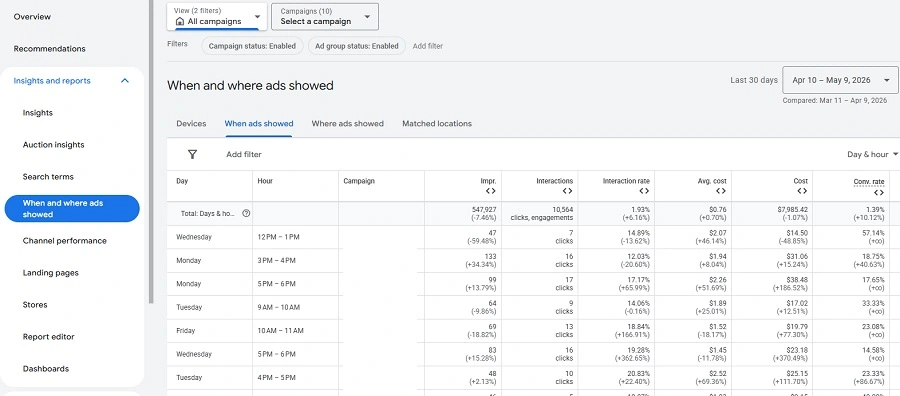
The cornerstone of an effective ad schedule is a thorough examination of past campaign performance. Google Ads provides robust reporting tools that allow advertisers to delve into this data. Navigate to the "Reports" section and select "Where and when ads showed," or alternatively, access the "Ad schedules" section within "Audiences, keywords, and content." These sections offer invaluable insights into which days and times your ads have historically generated the most clicks, impressions, and, most importantly, conversions.
The data presented typically includes metrics such as:
- Impressions: The number of times your ads were shown.
- Clicks: The number of times users clicked on your ads.
- Click-Through Rate (CTR): The percentage of impressions that resulted in a click.
- Conversions: The number of desired actions (e.g., purchases, form submissions) completed by users who clicked your ads.
- Conversion Rate: The percentage of clicks that resulted in a conversion.
- Cost Per Conversion (CPC): The average cost incurred for each conversion.
By visualizing this data, often presented in hourly and daily breakdowns, advertisers can clearly identify periods of high and low performance. For instance, a heatmap or a detailed table might reveal that Tuesday afternoons between 2 p.m. and 4 p.m. consistently outperform other time slots, while Saturday evenings show minimal engagement.
Step 2: Consider Additional Scheduling Factors
Beyond historical data, advertisers must incorporate business-specific considerations that may not be directly reflected in performance metrics. This includes operational hours, planned promotions, or external events that might influence consumer behavior. For example, if a business operates exclusively on weekdays, it would be logical to restrict ad scheduling to those days, regardless of any historical data suggesting potential weekend engagement. Similarly, if a significant promotional event is scheduled for a specific day, advertisers might choose to increase ad visibility during that period through adjusted scheduling.
Step 3: Select and Configure Your Ad Schedule
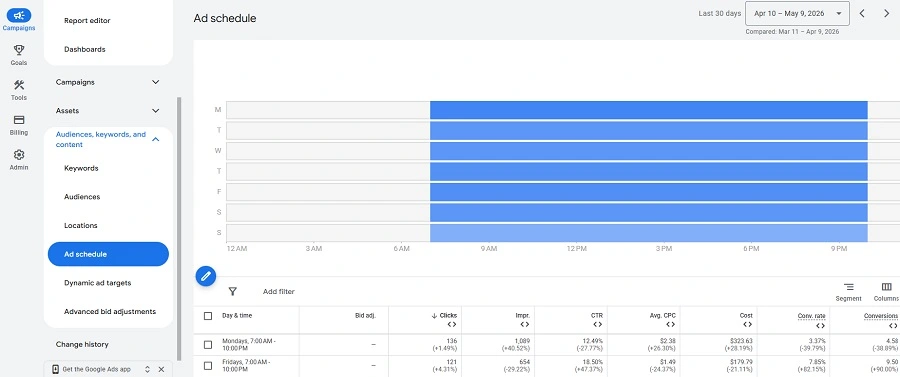
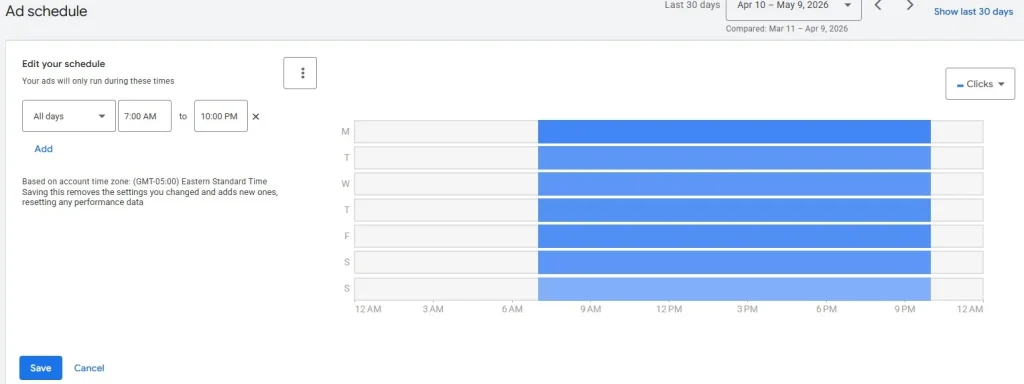
Once the analysis is complete and business factors have been considered, advertisers can proceed to configure their ad schedule within the Google Ads interface. Within the campaign settings, locate the "Ad schedule" subsection. Here, you will find options to edit or add new ad schedules. The platform presents a visual interface, typically a grid representing days of the week and hours of the day, allowing you to select specific time blocks for ad delivery.
Google Ads offers the flexibility to create granular schedules. For instance, an advertiser might choose to run ads during morning business hours, pause them during a lunch lull, and then resume them in the afternoon. Experimentation with different combinations and segmentations is encouraged to identify the most effective schedule for a particular campaign and business objective. This iterative approach ensures continuous optimization and alignment with evolving audience behavior.
Enhancing Ad Management with Microsoft Ads Scheduling
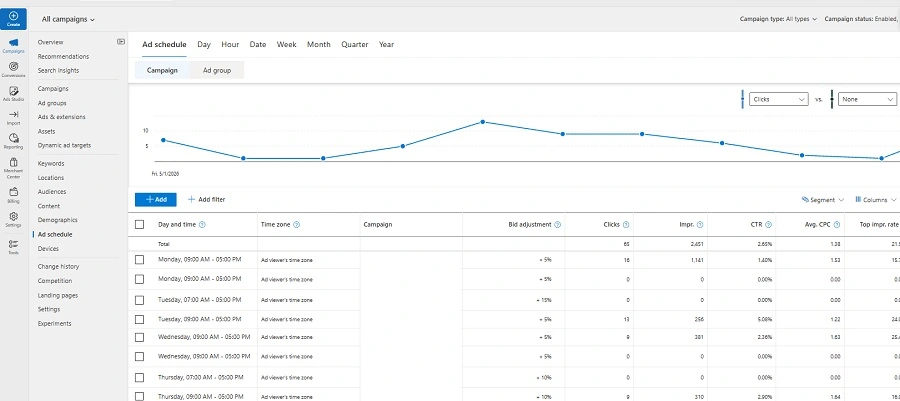
Microsoft Ads, formerly Bing Ads, offers a comparable ad scheduling functionality, but with some notable advantages in terms of flexibility and user experience. Similar to Google Ads, ad scheduling can be applied at the campaign level for all campaign types. However, Microsoft Ads further extends this capability by allowing ad schedules to be configured at the ad group level, providing an even finer degree of control over ad delivery.
A significant benefit of Microsoft Ads scheduling is its dynamic time zone adjustment. Unlike Google Ads, which relies on a fixed account-level time zone, Microsoft Ads automatically adjusts ad schedules to reflect the viewer’s local time. This greatly simplifies the management of campaigns targeting diverse geographical audiences, eliminating the complex calculations and potential for wasted spend associated with time zone discrepancies in Google Ads.
For advertisers utilizing Microsoft Import to transfer campaign elements from Google Ads, it is often advisable to manually manage ad schedules on each platform. This is because the time zone handling and overall scheduling interfaces can differ, and a direct import might not accurately translate the intended scheduling strategy.
The setup process in Microsoft Ads mirrors that of Google Ads, with options to define specific days and hours for ad delivery. Advertisers can access the "Ad Schedule" section, either within campaign settings or via the dedicated left-hand panel, to view performance data by day and hour and then configure their desired schedule. The visual interface allows for the layering and selection of individual or groups of time slots, enabling a tailored approach to ad visibility.
Ad Scheduling in Meta Ads: A Lifetime Budget Requirement
Meta Ads, encompassing platforms like Facebook and Instagram, also offers ad scheduling capabilities, though with a distinct prerequisite. Ad scheduling in Meta Ads is exclusively available when utilizing a "lifetime budget" for an ad set, rather than a "daily budget." This means that advertisers must opt for a total budget for a campaign over its duration, rather than a per-day spending limit, to access the time-based control features.
Within an ad set that has a lifetime budget configured, advertisers can find the ad scheduling options by expanding the "Budgets & Schedule" section and selecting "Show More Options." This reveals the ability to specify the days and times during which ads should be displayed. Given the vast reach of Meta’s platforms and the diverse demographics they serve, ad scheduling can be an invaluable tool for ensuring that advertising efforts are concentrated during periods when the target audience is most receptive and likely to engage, thereby maximizing the value of the advertising investment.
The Broader Impact: Ad Scheduling for Small Businesses
Ad scheduling is not an esoteric tactic reserved for large corporations; it is a fundamental strategy that can significantly benefit small businesses. Whether an enterprise is active on one, two, or all three of these major advertising platforms, ad scheduling offers a tangible pathway to enhanced ROI.
For small businesses with limited marketing budgets, the ability to eliminate wasted ad spend is paramount. By strategically aligning ad delivery with peak consumer activity, these businesses can compete more effectively and achieve their marketing objectives without overextending their resources. The insights gained from historical performance data empower small business owners to make informed decisions about where and when to invest their advertising dollars, leading to more efficient campaigns and a greater return on their paid media efforts.
Furthermore, ad scheduling can be seamlessly integrated into broader digital marketing strategies. It complements other optimization techniques, such as audience targeting, keyword research, and creative development, to create a holistic and high-performing advertising ecosystem. By understanding the nuances of ad scheduling across different platforms and applying this knowledge strategically, small businesses can unlock significant cost savings and drive improved campaign performance, ultimately contributing to sustainable growth and success in the competitive digital marketplace. As the digital advertising landscape continues to evolve, mastering ad scheduling remains a critical skill for any business seeking to maximize its advertising impact and achieve its business goals.