
The Google Display Network (GDN) presents a powerful avenue for businesses to promote their products and services, but it also carries the potential for significant ad spend with limited returns if not approached strategically. A thorough understanding of its mechanics, available options, and expected performance is crucial before launching any campaign to ensure alignment with overarching business objectives. This guide delves into the intricacies of the GDN, offering insights and strategies to maximize campaign success.
Understanding the Google Display Network
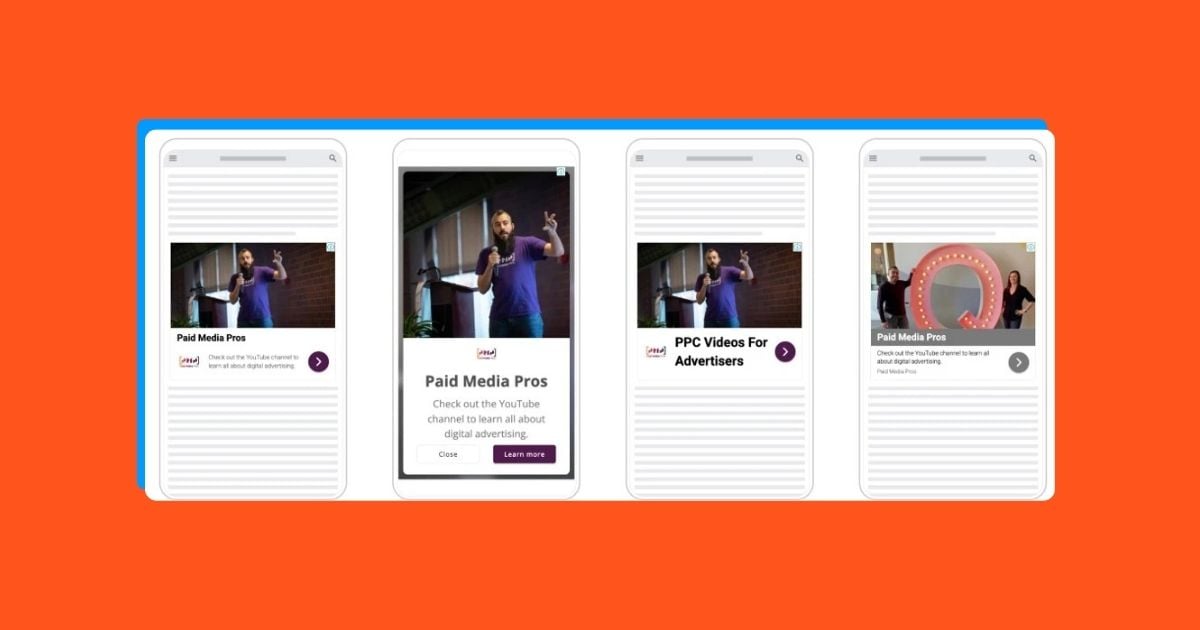
Contrary to its name, the Google Display Network is not a platform solely owned and operated by Google. Instead, it comprises an extensive network of websites, mobile applications, and video content, including YouTube, that feature advertising placements. The vast majority of these apps and websites are owned and operated by independent individuals and businesses. These content creators allocate space on their digital properties for Google to display advertisements, receiving a share of the advertising revenue in return. Essentially, website owners provide the advertising real estate, advertisers create the ads, and Google acts as the intermediary, placing these ads on the owners’ sites based on specific targeting parameters. Advertisers pay Google for ad impressions, with Google retaining the majority of the payment and distributing a portion to the website owner for utilizing their ad space.
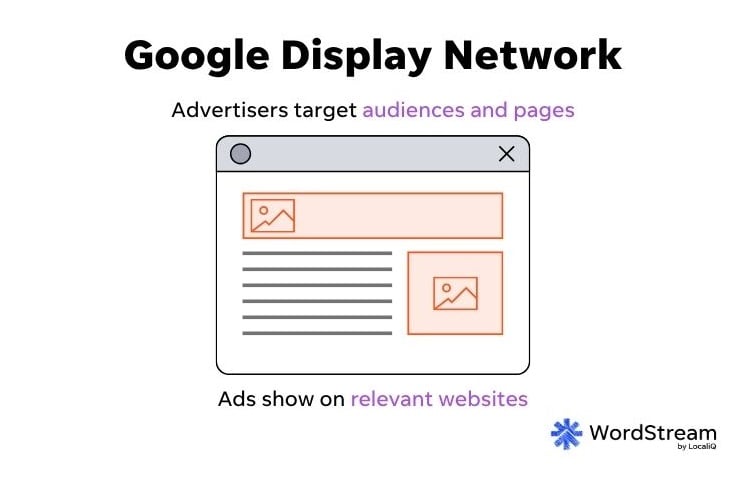
The potential of the GDN lies in its immense reach, connecting advertisers with a vast segment of global internet users. This broad reach can be leveraged to achieve several key marketing objectives.
Key Benefits of Advertising on the Google Display Network

-
Generating Brand Awareness: For any business, establishing initial awareness among potential customers is a critical step. While word-of-mouth and search engine optimization play vital roles, the GDN offers a dynamic way to introduce your brand to a relevant audience. Ads can be displayed to users browsing content related to your business or based on their past online behavior, effectively capturing attention at opportune moments.
-
Nurturing Existing Audiences: The customer journey is rarely linear; it often involves multiple touchpoints before a conversion occurs. The GDN serves as an effective tool for re-engaging users who have previously interacted with your brand. By providing further information and reinforcing your offerings, these ads can cultivate deeper interest and guide users further down the sales funnel.
-
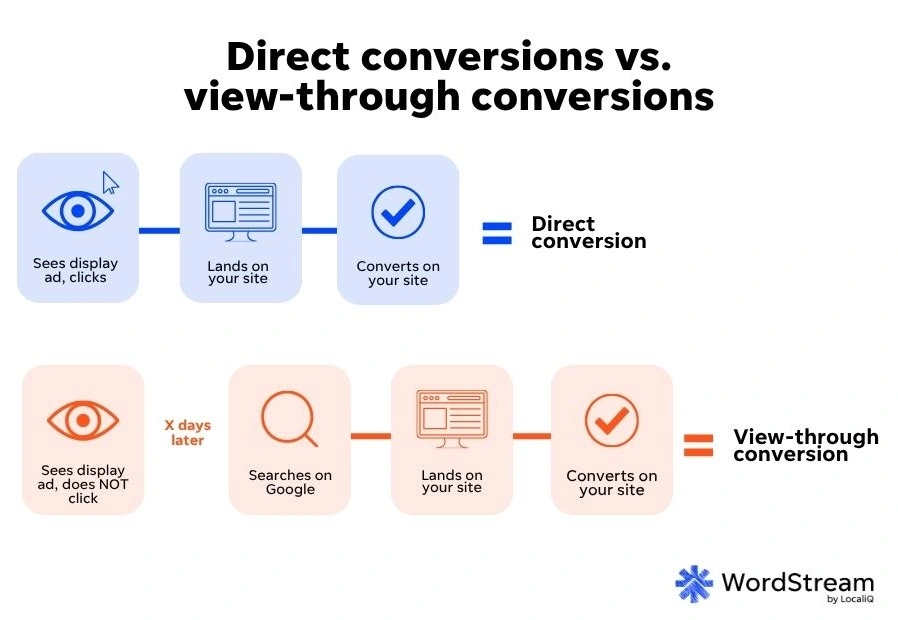
Driving Conversions: While not exclusively a direct-response channel for all marketers, the GDN can significantly contribute to sales generation. The effectiveness of GDN campaigns in driving conversions is contingent on factors such as the product or service offered, the typical buyer cycle, robust conversion tracking, and sophisticated automated bidding strategies. Furthermore, the concept of "view-through conversions" allows advertisers to attribute conversions on search ads to prior impressions on display ads, highlighting the indirect impact of display campaigns.
Campaign Types for Display Advertising on Google
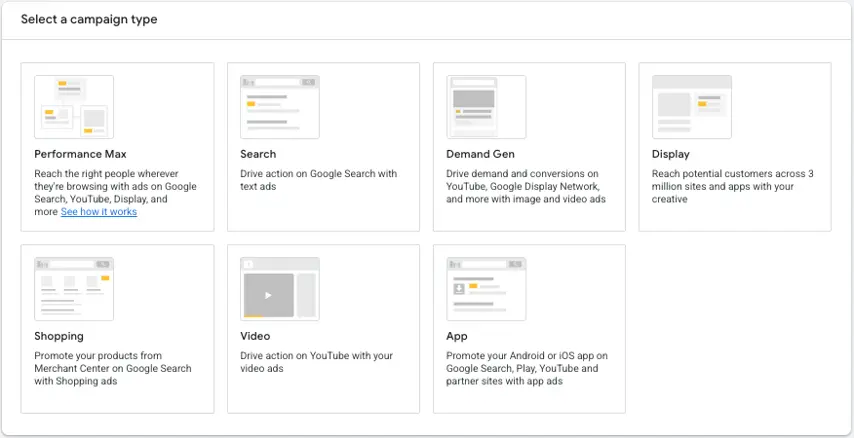
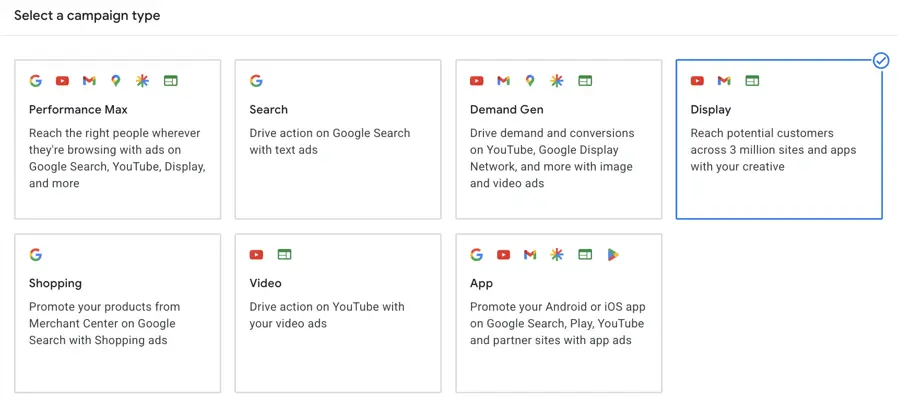
Google offers a variety of campaign types that can facilitate advertising on the GDN. The choice of campaign objective often dictates the available options, and while the interface may present a single "Display" option, several campaign types can be configured to run on the GDN depending on specific settings.
-
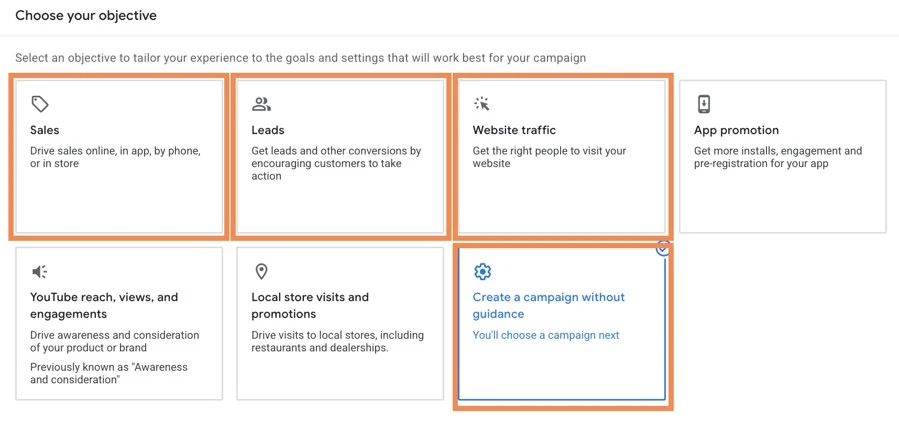
Display Campaigns: These are the most direct route to advertising on the GDN. While Google is transitioning away from standalone Display campaigns, they currently focus exclusively on websites, apps, and videos within the GDN, excluding placements like Gmail or Discover. When setting up a new campaign, selecting objectives such as Sales, Leads, or Website Traffic can lead to the creation of a display-only campaign. For maximum control, opting for a campaign without a pre-defined goal and then selecting "Display" is often recommended. These campaigns offer extensive targeting capabilities and flexibility for GDN-exclusive placements.
-
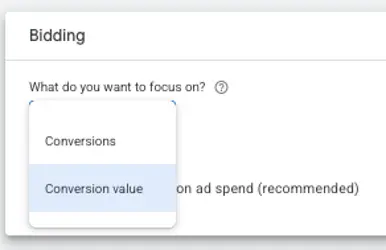
Performance Max (PMax) Campaigns: PMax campaigns are Google’s highly automated campaign type designed to reach audiences across all Google-owned properties, including Search, YouTube, Gmail, Discover, Shopping, Maps, and the GDN. These campaigns leverage machine learning to dynamically create ads for various placements and rely heavily on Google’s Smart Bidding strategies. Advertisers can choose to optimize for Conversions or Conversion Value, with options for Target CPA or Target ROAS. While PMax can drive impressions and clicks, its broad reach across networks may impact other campaigns. Its lack of transparency can also be a drawback, and lead quality can be variable.
-
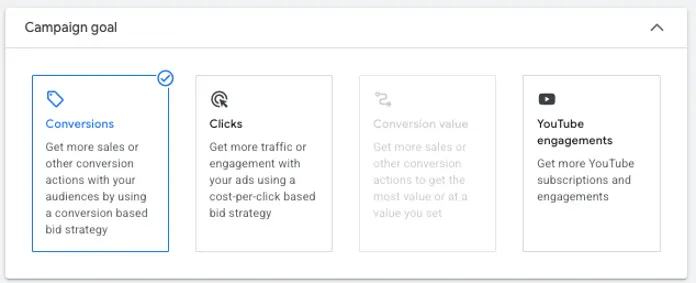
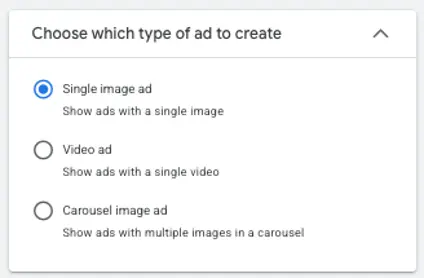
Demand Gen Campaigns: As Google’s latest campaign offering, Demand Gen campaigns are designed to target users earlier in their buying journey, including placements on the GDN, YouTube, Discover, and Gmail, but excluding Search. The primary goal is to generate demand and interest before a user actively begins searching for a product or service. Demand Gen campaigns are slated to become the default for what were previously GDN-only campaigns as they are phased out. These campaigns offer flexibility in optimization, allowing for targeting based on conversions, clicks, conversion value, or YouTube engagements. Ad formats include single image ads, video ads, and carousel image ads, providing a more structured approach compared to Responsive Display Ads.
Ad Formats on the Google Display Network
Advertisers can utilize three primary ad formats on the GDN, each with its unique advantages:
-
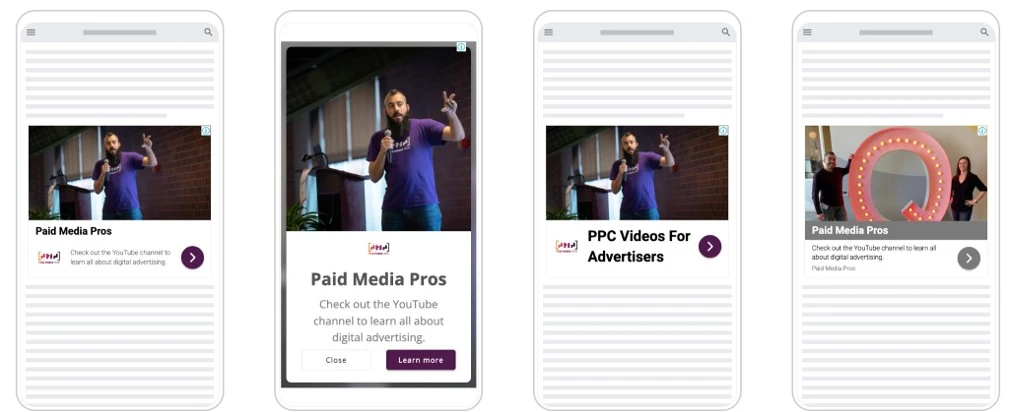
Responsive Display Ads (RDAs): Google’s most recommended and automated ad format for the GDN. Advertisers upload a collection of assets—headlines, descriptions, images, logos, and videos—which Google then dynamically combines to create ad units that adapt to various placements. The primary benefit is reduced reliance on design skills and resources, allowing for broad reach. However, this automation can lead to less granular control over brand aesthetic and ad composition.
-
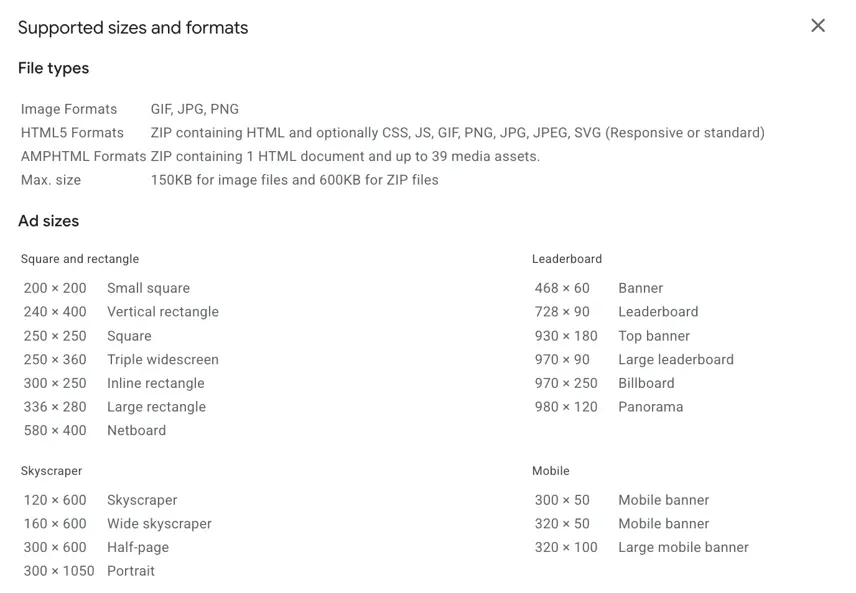
Static Banner Ads: These are the traditional, fully designed creatives that adhere to specific dimensions (e.g., 300×250, 728×90). They offer complete creative control, ensuring ads precisely match brand guidelines. The challenge lies in the effort required to design multiple versions for the approximately 20 different ad sizes, demanding significant design resources.
-
HTML5 Ads: These dynamic ads utilize animation and motion, offering advanced user interaction capabilities. When executed effectively, HTML5 ads can be highly engaging, providing interactive experiences and product showcases. They also allow for full brand control. However, this format requires advanced technical expertise and is typically employed by larger brands focused on e-commerce sales or prioritizing user interaction as a key campaign objective.
Targeting Options on the Google Display Network
Effective targeting is paramount for success on the GDN. Advertisers have two primary methods:
-
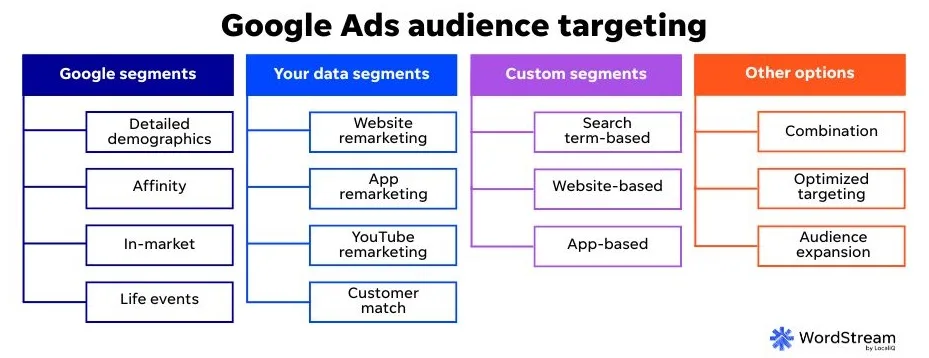
Audience Targeting: This involves defining specific groups of users based on their characteristics, interests, and behaviors. Options include:
- Affinity Audiences: Broad categories of users based on their long-term interests and habits.
- In-Market Audiences: Users actively researching or intending to purchase specific products or services.
- Custom Audiences: Tailored audiences based on specific keywords, URLs, or app usage.
- Your Data Segments: Remarketing lists of users who have previously interacted with your website or app.
- Demographics: Targeting based on age, gender, parental status, and household income.
-
Contextual Targeting: This method controls where ads appear by aligning them with the content of websites and apps. Options include:
- Keywords: Ads are shown on pages whose content is relevant to specific keywords.
- Topics: Ads are displayed on pages related to broad categories of content.
- Placements: Advertisers can manually select specific websites, apps, or YouTube channels to show their ads on.
Content Controls for Brand Safety
Concerns about ad placement and brand safety are common. Google provides several controls to manage where ads appear:
- Inventory Type: At the account level, advertisers can select the type of inventory to show their ads next to, ranging from "Limited" to "Standard" to "Expanded," allowing for a trade-off between reach and brand safety.
- Advanced Settings: These include exclusions for sensitive content, specific content themes, keywords, and placements. These can be applied at the account or campaign level.
- Brand Guidelines: Google allows advertisers to input custom colors, fonts, logos, and qualitative text guidelines to ensure ads align with brand specifications.
Best Practices for Google Display Network Campaigns
To optimize performance and achieve desired outcomes on the GDN, consider the following best practices:
- Regularly Monitor Placements: The GDN is dynamic. Consistent review of ad placements and setting up exclusions for underperforming or inappropriate sites is crucial. A weekly or bi-weekly review initially, followed by monthly or quarterly checks, is recommended.
- Select the Right Bidding Strategy: Choose bidding strategies that align with your campaign objectives. Google’s automated bidding options are designed to optimize for specific actions, ensuring your budget is allocated effectively towards your goals.
- Invest in High-Quality Creative: As a visual platform, compelling creative is paramount. High-quality images, videos, and well-crafted ad copy are essential for capturing user attention and driving clicks.
- Expand Beyond the GDN: While the GDN is powerful, consider extending your reach to other networks like the Microsoft Audience Network or programmatic advertising platforms. Diversifying your ad placements can amplify your business’s visibility.
The Google Display Network offers a vast landscape for advertisers to connect with their target audience. By understanding its mechanics, leveraging the appropriate campaign types and ad formats, and implementing robust targeting and content controls, businesses can harness its potential to achieve significant growth in brand awareness, audience engagement, and ultimately, conversions. Strategic planning and continuous optimization are key to navigating this complex yet rewarding advertising environment.