rifanmuazin
The newsletter signup form stands as a critical gateway, mediating the crucial interaction between a website visitor and an organization’s email list. This digital interface is solely responsible for collecting subscriber information, subsequently integrating individuals into an email platform, thereby initiating the process of delivering newsletters and fostering direct communication. While many small businesses, and even larger enterprises, often view the deployment of a signup form as a singular, static task, industry analysis consistently reveals this approach to be a significant oversight. Common deficiencies include excessive data requests, insufficient value proposition, and suboptimal placement, collectively presenting multiple points of potential subscriber loss before the first email ever reaches an inbox. Addressing these fundamental flaws is paramount for effective audience building and sustained digital engagement.
Streamlining Data Collection: The Essential Fields
The foundation of an effective newsletter signup form begins with minimalism. The absolute minimum requirement, and often the optimal starting point, is a single field for an email address coupled with a clear ‘subscribe’ button. This minimalist approach is rooted in conversion psychology; every additional field introduced into a form creates friction, and increased friction invariably leads to reduced sign-up rates. For the vast majority of small business newsletters, an email address alone provides all the necessary data to deliver substantial value to the subscriber.
Consider a 2023 study by MarketingSherpa, which found that conversion rates can drop by as much as 11% for every additional form field beyond the email address. HubSpot data further supports this, indicating that forms with only two fields (typically email and perhaps name) achieve the highest conversion rates, often exceeding 20%, whereas forms with five or more fields can see conversion rates plummet below 10%. This empirical evidence underscores the principle that less is often more in the context of initial data capture for newsletters.
Strategic Inclusion of a First Name Field
The inclusion of a first name field on a newsletter signup form is justified only when there is a concrete plan to leverage personalization within the newsletter content. Addressing a subscriber by their first name, such as “Hey Sean,” rather than a generic “Hey there,” has been shown to modestly increase email open rates, with some studies suggesting an uplift of 2-3%. However, this benefit materializes only if the email content actively utilizes a merge tag to insert the subscriber’s name. If there is no intention to incorporate the subscriber’s name into subsequent email communications, omitting this field becomes a strategic decision to minimize friction. One fewer field translates directly into one less potential reason for a visitor to abandon the signup process, thereby optimizing the conversion funnel.
Fields to Prudently Exclude from Newsletter Forms
Certain data fields are almost universally detrimental to newsletter signup conversion rates. These include phone numbers, company names, job titles, and physical addresses. Such fields are more appropriately situated on lead capture forms designed for gated content downloads, sales inquiries, or business-to-business (B2B) prospecting. Their presence on a newsletter form sends an implicit signal that the requesting entity seeks significant information from the subscriber before delivering any perceived value in return. This imbalance often deters potential subscribers who are primarily seeking informational content rather than a sales interaction. A fundamental principle of data collection for newsletters is to collect only the data that will be actively used to enhance the subscriber’s experience or deliver the promised value. Unused data fields represent unnecessary barriers and potential privacy concerns that erode trust and reduce conversion.

Optimizing Placement for Enhanced Visibility and Conversion
The strategic placement of a newsletter signup form is as critical as its design and content, directly influencing its visibility and, consequently, its conversion potential. A meticulously designed form that remains unseen will inherently fail to expand an email list. The effectiveness of various placements differs based on the website’s primary function and user behavior.
Above-the-Fold on the Homepage:
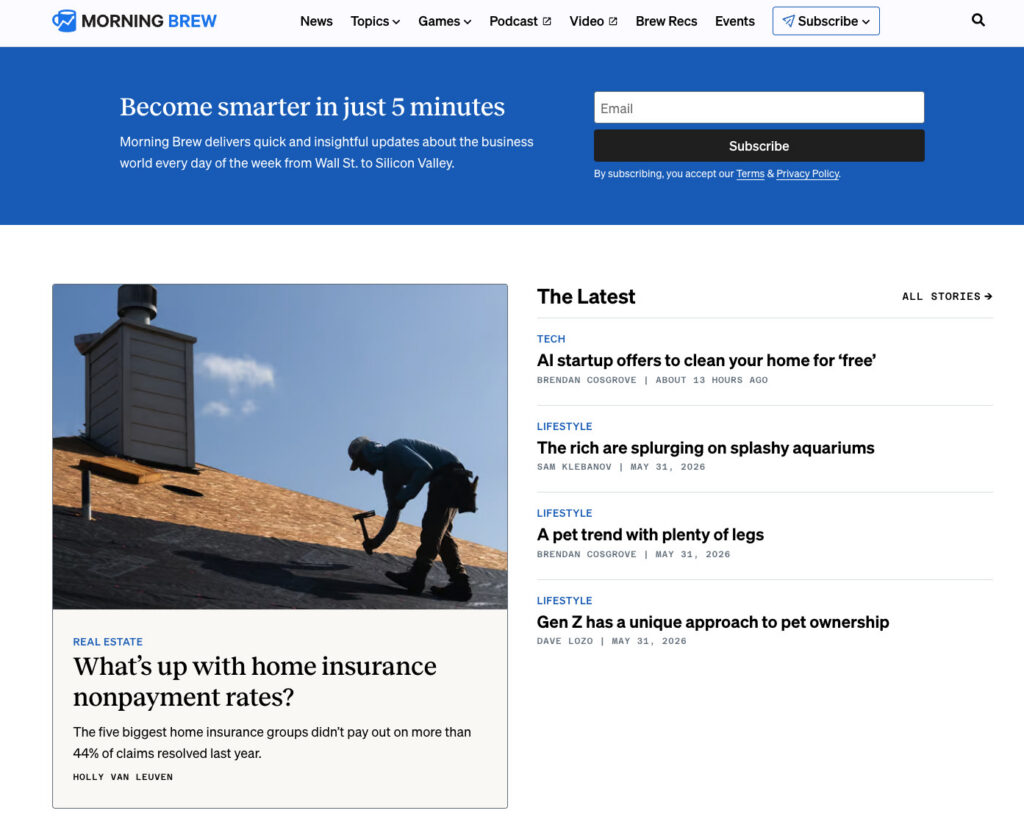
For businesses where the newsletter is the core product, such as prominent digital publications like Morning Brew or The Hustle, placing the signup form prominently above the fold on the homepage is an essential strategy. In these instances, visitors arrive with the explicit intention of subscribing, making the form the central focus of the page.
Conversely, for businesses where the newsletter serves as a supporting element to a primary product or service, a homepage form remains valuable but must strategically complement other primary calls to action. It should be positioned to enhance the overall message without overshadowing the core offering, typically yielding conversion rates between 1% and 3% depending on design and context.
Sidebar Signup Forms:
Sidebar forms maintain visibility as readers navigate through content, making them particularly effective on desktop interfaces. Visitors who arrive at a site seeking specific information are consistently presented with the option to subscribe to a newsletter covering similar topics, without interrupting their reading flow. This persistent presence makes the subscription option readily available when interest peaks. On mobile devices, however, many website themes collapse sidebars below the main content, significantly reducing their immediate visibility. Therefore, for mobile optimization, sidebar placement should ideally be complemented by at least one other form location.
Dedicated Signup Pages:
A standalone page exclusively dedicated to the newsletter offers unparalleled space to articulate the value proposition of subscribing, free from the competition of other website calls to action. These pages are ideal for linking from social media profiles, podcast show notes, guest post bylines, and any external mentions of the newsletter. Alexandra Franzen, a renowned business strategist who cultivated her audience predominantly through email, describes her newsletter as “an art project,” emphasizing the goal of making it so compelling that “every reader goes and tells ten friends about it.” A dedicated signup page should embody this philosophy, focusing on selling the unique experience and value rather than merely soliciting a subscription. Such pages, when well-crafted, can achieve conversion rates upwards of 5-10% due to focused messaging.
Persistent Header or Top Navigation Bar Forms:
Integrating a compact signup form into the header or top navigation bar ensures its visibility across every page of a website. This strategy is particularly effective for content-rich sites where users frequently browse multiple pages within a single session. The form should remain concise, typically an email field and a button, to avoid cluttering the navigation. While generally lower in individual conversion rates (often below 1%), its omnipresence can accumulate significant subscriber numbers over time due to constant exposure.
Footer Signup Forms:
The website footer serves as a natural destination for visitors who have consumed content and are seeking further engagement or information. A newsletter signup form positioned here acts as a safety net, capturing individuals who were not immediately ready to subscribe upon arrival but whose interest grew as they explored the site. These forms often convert at lower rates (0.5% to 1.5%) but capture highly engaged visitors who have demonstrated a deeper level of interest by scrolling through the entire page.
Exit-Intent Pop-ups:
An exit-intent pop-up is a dynamic form that triggers when a visitor’s cursor indicates an intention to leave the page (e.g., moving towards the browser’s close or back button). This serves as a final opportunity to present the newsletter offer before the visitor departs. The efficacy of exit-intent pop-ups, which can boast conversion rates from 3% to 10% when well-executed, hinges on a few critical elements: displaying it only once per session to avoid annoyance, ensuring a clearly visible close button, and presenting a specific, compelling offer. For example, “Get weekly email tips for your small business” will invariably outperform a generic “Subscribe to our newsletter.”
Crafting Conversion-Driven Newsletter Signup Form Copy
The textual elements of a newsletter signup form – what it promises, its frequency, and the perceived effort required – are pivotal drivers of conversion.
Prioritizing Benefit Over Action:
A common pitfall in form design is defaulting to generic calls to action such as “Subscribe to our newsletter.” While this instructs the reader on the desired action, it fails to provide any compelling reason to perform it. The term “subscribe” describes a mechanical process, neglecting to answer the visitor’s implicit question: “What’s in it for me?”
Conversely, benefit-driven copy actively addresses this question. A statement like “Get one email per week with strategies to grow your small business” succinctly answers three crucial questions: What will I receive? How frequently? Is it relevant to my needs? This clarity enables visitors to make an informed decision within seconds. The distinction is profound: “Subscribe to our newsletter” places the cognitive burden on the reader to envision the value, whereas “Get our Tuesday email: one tactic to grow your list this week” eliminates guesswork by providing specific details regarding day, promise, and topic.
Setting Clear Frequency Expectations:
One of the most frequently overlooked yet critical elements on a newsletter signup form is the explicit communication of email frequency. Informing subscribers upfront that emails are sent every Tuesday, twice a month, or weekly significantly mitigates early unsubscribes. When individuals subscribe without clear expectations regarding frequency, the arrival of an unexpected email can trigger an immediate unsubscribe response. Explicit frequency expectations prevent this reaction, as a subscriber who knowingly opted in for weekly emails is far less likely to feel surprised or inconvenienced by an email arriving on a Wednesday morning. This transparency establishes a foundational contract between the sender and the receiver, fostering mutual understanding and building trust from the very first interaction.
Utilizing Specific Call-to-Action Buttons:
The call-to-action (CTA) button is the final textual element a visitor encounters before committing to subscribe. Generic text such as “Submit” provides no value, and “Subscribe” remains vague. The most effective button text directly reflects the benefit promised elsewhere on the form. If the headline proclaims “Weekly email marketing strategies for small businesses,” the button could compellingly state “Get weekly strategies” or “Send me the tips.” This transforms the button into a confirmation of the promised value rather than a mere mechanical instruction.
Social proof can further enhance button effectiveness. Phrases like “Join 1,200 readers” leverage the psychological principle of conformity, indicating to the visitor that others have already found value in subscribing. If a subscriber count is substantial, its inclusion on the button can be a powerful motivator. Conversely, button text that introduces ambiguity, such as “Learn more” or “Get started,” should be avoided, as the outcome of clicking the button must be unequivocally clear.
The Evolution of Form Creation: Beyond Templates to AI-Powered Solutions
For many years, the standard advice for creating newsletter signup forms involved selecting a template, customizing colors and logos, and publishing. However, this approach inherently carries a significant limitation: templates are designed as generic frameworks, not tailored to specific business needs. They presuppose a universal layout, copy, and field structure, often forcing businesses to adapt their unique offering to a pre-existing design rather than building a form that authentically reflects their newsletter’s value. A template lacks the contextual understanding of a newsletter’s specific sending schedule, target audience (e.g., freelance designers, food industry small business owners), brand aesthetics, or tone of voice. This often results in a form that feels disconnected from the brand it represents.
Recognizing these limitations, innovative solutions like the AI Signup Form Builder in AWeber represent a significant leap forward. This technology adopts a fundamentally different approach. Instead of starting with a blank template, users describe their newsletter’s purpose and content. The AI then processes this information, potentially analyzing the user’s existing website to understand their content and brand voice, and generates a complete, customized form. This form is designed to seamlessly integrate with the existing brand identity and content, eliminating the need to adapt to a generic structure. This paradigm shift ensures that the generated form is not merely functional but also highly relevant and optimized for the specific audience and offering. These AI-generated forms can be embedded on any webpage, deployed as standalone landing pages, or configured as pop-ups, with flexible display options. Crucially, each form is directly linked to the subscriber list, ensuring that new signups are immediately ready to receive the next newsletter.
Measuring Performance: Essential KPIs for Form Optimization
The creation of a signup form is merely the initial step; continuous tracking of its performance is indispensable for understanding whether placement, copy, and field choices are effectively driving subscriptions.

Conversion Rate by Placement:
Monitoring the conversion rate for each specific form placement is crucial for identifying which locations yield the highest number of subscribers. For instance, a form embedded within a top-performing blog post might convert at 3%, whereas a footer form might achieve 0.5%. This granular data provides actionable insights, directing where to allocate further optimization efforts. Tools like AWeber’s AI Signup Form Builder often include built-in analytics to track this data, providing real-time insights into form efficacy across various locations.
Unsubscribe Rate in the First 30 Days:
A high unsubscribe rate within the initial month of subscription often signals a misalignment between the expectations set by the signup form and the actual content or frequency of the emails delivered. A thorough review of the form copy in relation to the actual email content and sending schedule is imperative. A discrepancy between what was promised and what is delivered is the most prevalent cause of early unsubscribes, indicating a breach of the implicit trust established at the point of signup. Addressing this mismatch is vital for retaining new subscribers and building a loyal audience.
Frequently Asked Questions (FAQs)
What constitutes a newsletter signup form?
A newsletter signup form is a dedicated web form, either embedded within a website or presented as a standalone page, designed specifically to capture visitor information for the purpose of adding them to a recurring email newsletter list. Unlike broader email signup forms that might feed into automated sequences, product updates, or transactional emails, a newsletter form has a singular, focused objective: to enroll the right individual onto a specific newsletter distribution list. This distinction is vital because the form’s design, messaging, and field selection must precisely reflect the nature of the content and the commitment the subscriber is making. If a form promises “Get our weekly tips” but then delivers daily promotional emails, it creates a significant trust deficit even before the first email reaches the inbox.
How is a newsletter signup form added to a website?
Using modern email marketing platforms such as AWeber, the process is streamlined. Within the AI Signup Form Builder, a user describes their newsletter’s content and purpose. The system then generates a customized form that aligns with the brand’s aesthetic. Once the design is approved, an embed code is provided. This code can then be copied and pasted into the HTML of a website, typically within a custom HTML block in popular website builders like WordPress, Squarespace, or Wix, allowing the form to appear wherever desired on the site.
What is the process for adding a newsletter signup to Facebook?
To integrate a newsletter signup with Facebook, one must first create the signup form within an email marketing platform like AWeber. After creation, a hosted URL for the form is generated. This link can then be added to a Facebook page’s action button, included in the page’s bio, or pinned as a post. When visitors click this link, they are directed to the hosted form, where they can subscribe without needing to leave their browser, ensuring a smooth user experience.
How can a newsletter signup form be created using HTML?
While it is technically possible to hand-code a newsletter signup form in HTML, it is significantly more efficient and reliable to build the form using an email marketing platform like AWeber. These platforms generate a clean, functional HTML version of the form, pre-wired with the necessary subscription logic to connect directly to the email list. Users can then copy this generated HTML code and further customize the styling, field labels, and layout directly within the HTML, without the complex task of building the backend subscription functionality from scratch. This approach combines the flexibility of HTML customization with the robust functionality of a dedicated email service provider.
Conclusion: A Foundation for Enduring Digital Connections
The newsletter signup form, far from being a mere technicality, is a foundational element of any robust digital marketing strategy. Its design, placement, copy, and underlying technology directly influence the growth and quality of an email list, which remains one of the most powerful assets for direct audience engagement and revenue generation. By moving beyond generic solutions and embracing data-driven optimization and intelligent tools like AI-powered form builders, businesses can transform a common oversight into a highly effective mechanism for building lasting connections with their audience. The meticulous attention to these details ensures that every potential subscriber is met with a compelling, frictionless, and trustworthy pathway to deeper engagement.