
 rifanmuazin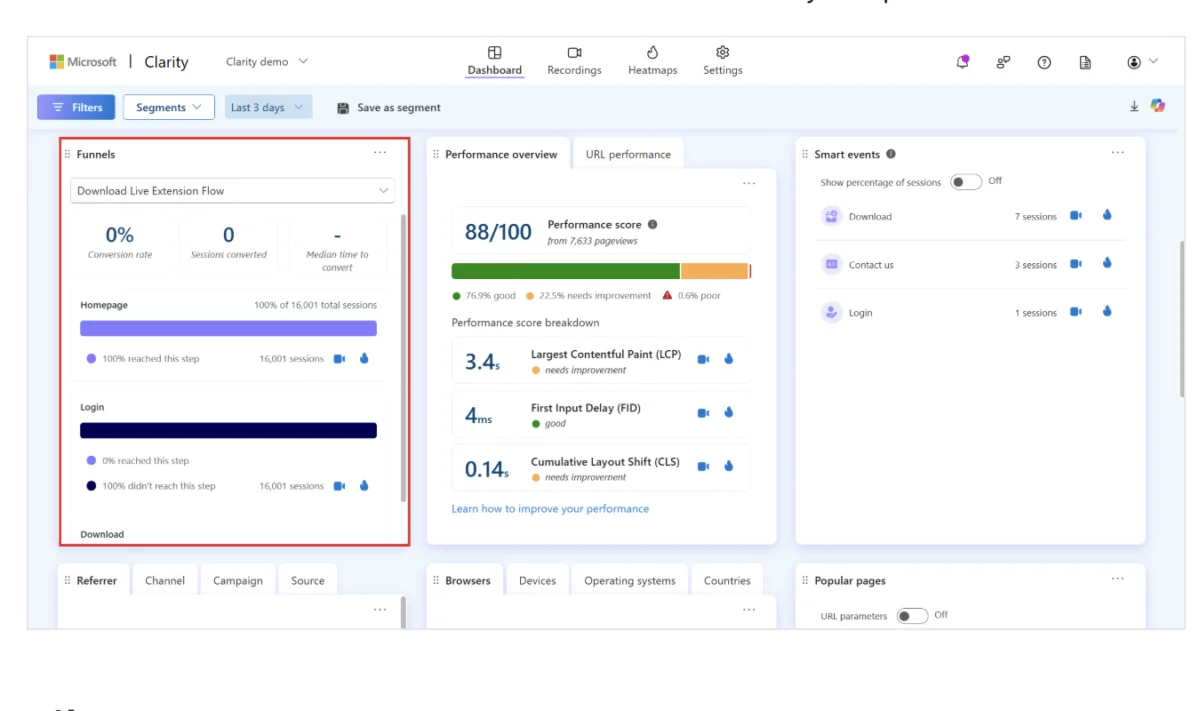
The digital landscape has undergone a seismic shift in how organizations interpret user intent, leading to a sophisticated rivalry between two of the industry’s most prominent behavioral analytics platforms: Mouseflow and Microsoft Clarity. As businesses increasingly pivot toward data-driven decision-making, the choice between a specialized, high-depth diagnostic tool and a high-scale, democratized free utility has become a central point of deliberation for marketing technology (MarTech) stacks. While both platforms aim to demystify the "black box" of user behavior through session replays and heatmaps, their underlying philosophies regarding data retention, analytical depth, and cost-to-value ratios offer distinct paths for digital strategists.
The Evolution of Behavioral Analytics: A Brief Chronology
The discipline of web analytics was long dominated by quantitative metrics—page views, bounce rates, and session durations—provided by legacy tools like Google Analytics. However, the mid-2010s saw the rise of qualitative behavior tools that sought to explain the "why" behind the "what."
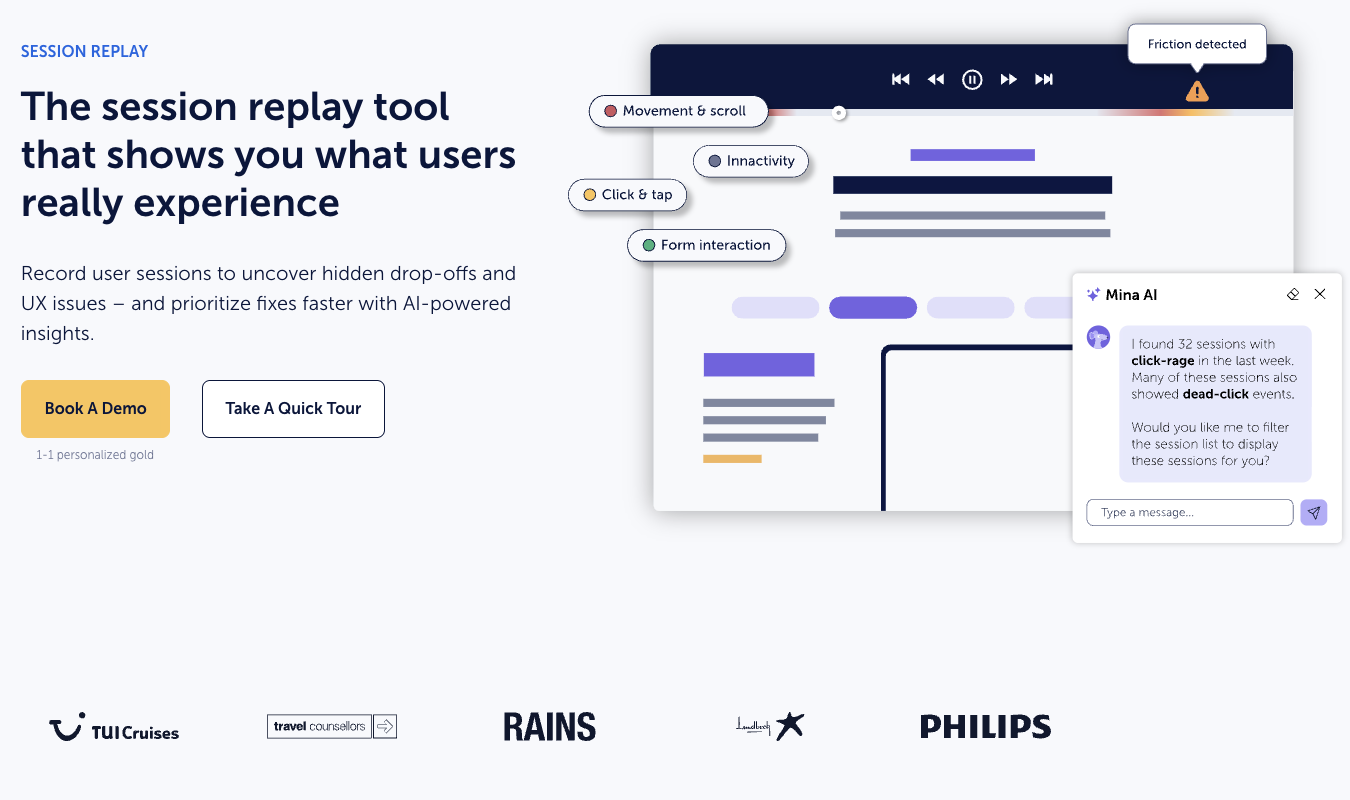
Mouseflow, founded in 2010, established itself early as a premium contender in this space, focusing on providing granular, interconnected data that allowed UX designers and conversion rate optimization (CRO) specialists to diagnose specific points of friction. Over the last decade, Mouseflow has evolved from a simple recording tool into an AI-integrated suite, culminating in the recent launch of "Mina," an AI assistant designed to automate the discovery of user frustration.
In contrast, Microsoft Clarity entered the market much later, launching in late 2020. Microsoft’s entry disrupted the industry by offering a "forever free" model with no traffic caps. This was a strategic move by Microsoft to integrate web behavior data into its broader ecosystem, including Bing Webmaster Tools and Microsoft Advertising. Since its inception, Clarity has rapidly closed the feature gap, introducing automated "friction signals" and, in 2024, launching a dedicated funnels feature to compete more directly with paid alternatives.
Technical Deep Dive: Session Recordings and AI Synthesis
At the heart of both platforms is the session recording—a video-like playback of a user’s journey through a website. However, the methodology of how this data is surfaced for the end-user marks the first major divergence between the two competitors.
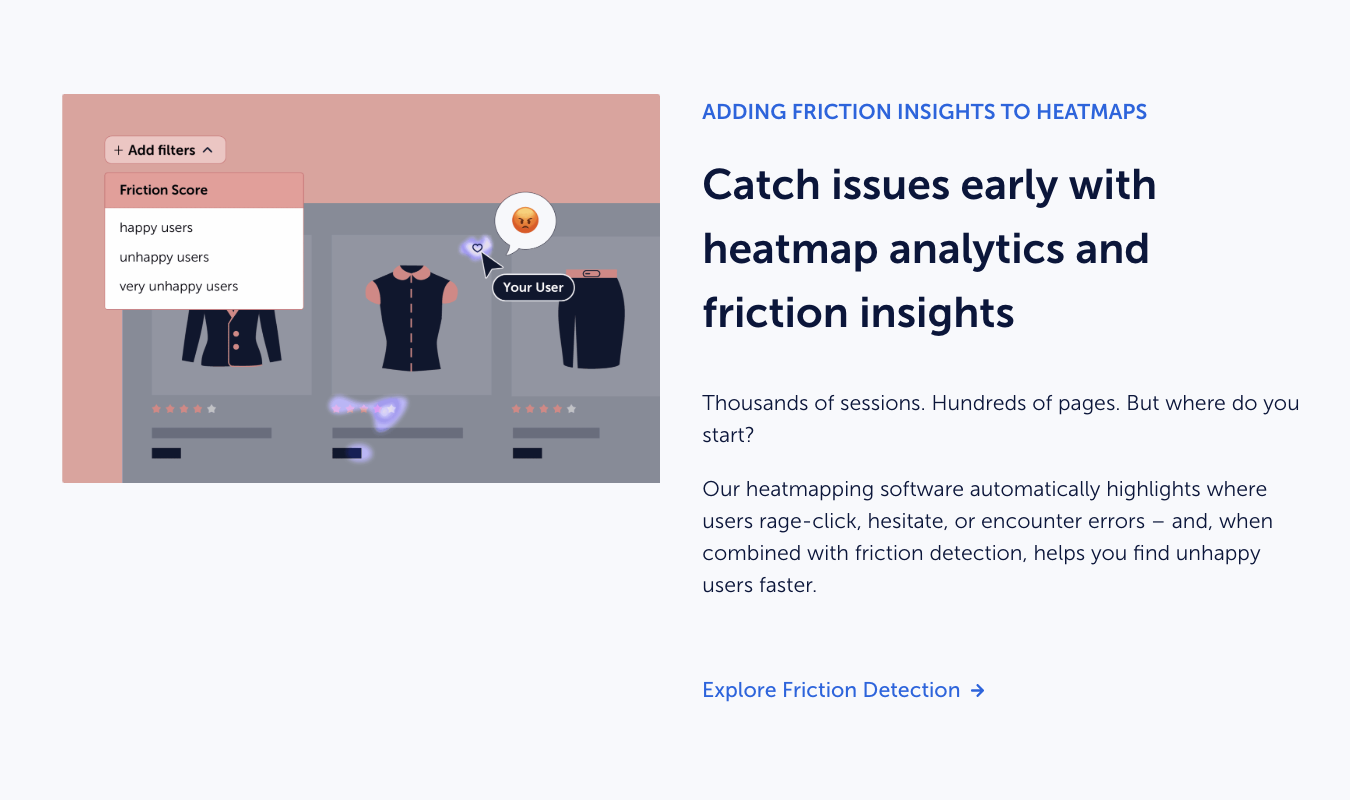
Mouseflow positions session recordings as a diagnostic component of a larger analytical ecosystem. The platform utilizes a sophisticated "Friction Score" system, which automatically flags recordings where users exhibit signs of struggle, such as "rage clicks" (repeatedly clicking an unresponsive element) or "mouse wandering." The introduction of Mina, Mouseflow’s AI agent, represents a significant leap in productivity. Instead of manually auditing hundreds of hours of video, analysts can query the AI to find specific patterns—such as identifying why users are failing to complete a checkout on mobile devices.
Microsoft Clarity approaches session recordings through the lens of sheer scale. Because Clarity does not sample data—meaning it records 100% of traffic regardless of volume—it provides a comprehensive historical record. Clarity’s integration with Microsoft Copilot allows for automated session summaries, providing a text-based overview of what occurred during a user’s visit. While this is highly efficient for high-level overviews, it lacks the deep, interconnected segmentation found in Mouseflow, which allows users to filter recordings by specific custom variables or historical funnel drop-offs with higher precision.
Heatmap Sophistication: From Observation to Diagnosis
Heatmaps are the visual representation of aggregate user data, and here, Mouseflow maintains a technical advantage in terms of variety and utility. Mouseflow offers seven distinct heatmap types:
- Click Heatmaps: Identifying where users are interacting.
- Scroll Heatmaps: Showing how far down a page users travel.
- Movement Heatmaps: Tracking the cursor’s path.
- Attention Heatmaps: Measuring which parts of the page are viewed the longest.
- Friction Heatmaps: Highlighting areas where users experience errors or delays.
- Interactive Element Heatmaps: Specifically for menus and drop-downs.
- Geo Heatmaps: Segmenting behavior by geographic location.
This multi-layered approach allows for a "vigorous analytics workflow," where a researcher can layer attention data over click data to see if users are being distracted by non-interactive elements.
Microsoft Clarity offers three primary heatmap types: click, scroll, and area. While more limited in scope, Clarity has optimized these for speed and ease of use. A notable addition is Clarity’s Shopify-specific conversion maps, which allow e-commerce store owners to see exactly which elements on a page are driving revenue. For many small-to-medium enterprises (SMEs), these three maps provide 90% of the necessary insights without the complexity of a seven-tier system.
Conversion Funnels and the Qualitative Gap
The ability to track a user through a defined path—the "funnel"—is critical for any business looking to improve its bottom line. Mouseflow’s funnel tool is built for deep-tissue analysis. It allows users to create dynamic funnels where they can "jump" from a drop-off point directly into the session recordings of the users who left. This creates a seamless loop between quantitative data (the drop-off rate) and qualitative evidence (the recording of the error).
Microsoft Clarity’s funnel feature, while a welcome addition in 2024, remains relatively lightweight. It tracks conversion rates and "time to convert" effectively but offers fewer options for slicing and dicing the data by complex segments.
Furthermore, Mouseflow includes a built-in feedback and survey tool. This allows companies to trigger "exit-intent" surveys—asking a user why they are leaving just as they move their mouse toward the browser’s close button. This "Zero-Party Data" is invaluable for understanding the psychological barriers to conversion. Microsoft Clarity lacks native survey tools, requiring users to integrate with third-party platforms like Qualtrics or Typeform to achieve similar results.
Data Privacy and the "Free" Model Implications
A critical area of analysis for enterprise-level organizations is the handling of data. Mouseflow operates as a dedicated data processor. Users pay a subscription fee, and in return, Mouseflow provides a secure environment for data collection, often with longer retention periods on higher-tier plans and strict adherence to GDPR and CCPA standards.
Microsoft Clarity’s "free" status comes with a different set of considerations. As part of the Microsoft ecosystem, the data collected by Clarity can be used to improve Microsoft’s broader machine learning models and advertising services, as outlined in their service agreements. For organizations with highly sensitive data or strict internal compliance requirements regarding third-party data usage, the "paid" model of Mouseflow provides a clearer line of data ownership and privacy.
Comparative Data and Market Positioning
To understand the market value, one must look at the pricing structures. Mouseflow offers a limited free tier (500 sessions per month) but quickly scales into paid plans starting at approximately $31 per month for 5,000 sessions. For high-traffic enterprise sites, these costs can reach into the thousands of dollars annually.
Microsoft Clarity remains entirely free with no usage-based pricing. This makes it the undisputed leader for:
- Startups and Bloggers: Who need insights without overhead.
- High-Volume Content Sites: Where session caps on paid tools would be prohibitively expensive.
- Agencies: Looking for a low-friction tool to install on client sites for quick audits.
Mouseflow remains the preferred choice for:
- SaaS and E-commerce Platforms: Where a 1% increase in conversion rate justifies the software’s cost.
- UX Researchers: Who require the specialized friction and attention heatmaps.
- Data-Sensitive Industries: Such as banking or healthcare, which may prefer a dedicated data processor.
Strategic Impact and Industry Outlook
The competition between Mouseflow and Microsoft Clarity reflects a broader trend in the software industry: the "commoditization of features." As basic session recording and heatmapping become standard expectations, the value proposition is shifting toward AI-driven synthesis and integration.
The broader impact of this rivalry is the democratization of UX data. Small businesses now have access to the same level of behavioral insight that was once reserved for corporations with massive research budgets. However, as the volume of data grows, the "insight gap"—the distance between having data and knowing what to do with it—remains.
Industry analysts suggest that the next frontier for these tools will be "predictive analytics." Rather than just showing what happened or why it happened, future iterations of Mouseflow’s Mina or Microsoft’s Copilot may predict which users are likely to churn based on their real-time navigation patterns, allowing businesses to intervene before the user leaves the site.
For organizations seeking a middle ground, platforms like Crazy Egg continue to offer a competitive alternative, particularly with their recent focus on Google Analytics 4 (GA4) integration. By allowing users to view GA4 data through a more visual, user-friendly interface, Crazy Egg is positioning itself as the bridge between traditional quantitative analytics and modern behavioral insights.
Ultimately, the choice between Mouseflow and Microsoft Clarity is not a question of which tool is "better," but which tool fits the organization’s current maturity level. Microsoft Clarity provides the "what" at an unbeatable price point, while Mouseflow provides the "why" with a level of surgical precision that remains the gold standard for conversion optimization professionals.








