rifanmuazin
While not typically the first platform that springs to mind when envisioning an e-commerce startup, HubSpot CRM is emerging as a powerhouse for building and scaling online businesses, often discovered only after initial launch. Many businesses eventually turn to HubSpot for a robust CRM solution when managing customer records becomes a complex challenge. However, the platform’s potential to foster business growth extends far beyond customer management, offering a comprehensive suite of tools that can be integrated from the earliest stages of an e-commerce venture.
HubSpot provides free Content Management System (CMS) tools, enabling businesses to establish their own websites, alongside a spectrum of commerce-focused features, including HubSpot Payments. Crucially, it integrates seamlessly with leading e-commerce platforms like Shopify, bridging the gap between customer relationship management and broader online store operations. This article explores why e-commerce businesses should consider HubSpot and outlines the steps to leverage its capabilities for online success.
The Strategic Advantage of HubSpot for E-commerce
For many business leaders, HubSpot CRM is a familiar name, recognized as one of the most prevalent customer relationship management systems available. Yet, its profound connection to the end-to-end e-commerce process is often underestimated. Within an online retail context, HubSpot CRM functions as the central nervous system for every customer interaction outside of the immediate checkout process. It meticulously logs browsing behavior, tracks sales opportunities, monitors order fulfillment, attributes email communications to specific contacts, and connects customer service chat logs directly to revenue generation. This creates a granular, unified timeline of each buyer’s journey—a level of insight that is remarkably rare within the e-commerce software landscape.
The prevailing model for many online stores involves a fragmented ecosystem of disconnected applications. One tool might manage abandoned carts, another handles email marketing, and a third attempts to predict customer engagement. HubSpot breaks this siloed approach by consolidating all data into a single, cohesive view within its CRM. This unified platform allows for sophisticated automation, where an abandoned cart, for instance, can serve as a trigger within the CRM to initiate targeted sales outreach.
The impact of such integration is demonstrable. For example, CODE41, a watch brand, reported a significant surge in sales, revenue, and leads by leveraging a combination of HubSpot’s integrated tools, achieving increases of 257%, 223%, and 279% respectively. Beyond transactional management, HubSpot inherently incorporates inbound marketing capabilities, facilitating the cultivation of evolving customer relationships rather than merely managing a static storefront. This holistic approach explains why e-commerce teams often rely on HubSpot for customer-centric functions, even when their primary storefront is managed by platforms like Shopify or BigCommerce.
Core Benefits of HubSpot’s Integrated E-commerce Platform
HubSpot’s platform often presents an accessible entry point, with its full capabilities revealing themselves as businesses engage with its features for real-world store operations. The most significant advantages stem from the often-overlooked, granular functionalities that enhance the customer lifecycle.
Unified Customer Data: A Single Source of Truth
Traditional e-commerce tools tend to scatter customer information across various applications. A product view might be recorded in one system, an email open in another, an order in a third, and customer inquiries lost in the digital ether. HubSpot CRM consolidates these disparate data points into a singular, chronological timeline. Whether a customer views a product, abandons a cart, interacts with a campaign email, returns days later, or engages in a support chat, all these actions are visible within a unified profile. This comprehensive view provides unparalleled context for understanding customer behavior and intent.
Automation Designed for Real-World Business Dynamics
Businesses do not operate on perfectly linear workflows. HubSpot’s sales automation and marketing triggers empower teams to construct practical, adaptable workflows that effectively recover revenue and enhance customer engagement. A typical flow might link cart abandonment to personalized email follow-ups, subsequently updating a sales pipeline stage and assigning a representative for direct outreach. This process is designed to be intuitive and efficient, minimizing the complexity often associated with automation setup.
Inbound Marketing That Drives Tangible Revenue
Customer purchasing decisions are rarely instantaneous. Prospects typically engage in a research and consideration phase, involving searching, comparing, intermittent engagement, and eventual commitment. HubSpot meticulously tracks this entire customer journey. Many e-commerce businesses discover that repeat purchases often originate from content, such as blog posts that provide in-depth product selection guidance, demonstrating the revenue-generating power of well-executed inbound marketing strategies.
Seamless Payment and Quoting Integration
HubSpot Payments offers a more streamlined and reliable transaction experience compared to fragmented invoicing methods. This feature is particularly beneficial for Business-to-Business (B2B) e-commerce operations. Sales representatives can generate quotes directly within the CRM. When a buyer accepts, the order is processed, subscriptions are automatically initiated, the CRM is updated, the sales pipeline is adjusted, and onboarding tasks are created, with the customer seamlessly entering a welcome sequence.
AI-Powered Assistance Without Overwhelm
HubSpot’s AI content tools, integrated within the CMS and campaign builders, effectively address the “blank page” challenge for content creation. These tools are invaluable for generating initial drafts, crafting meta descriptions, producing alt text for images, and streamlining repetitive copywriting tasks that can otherwise consume valuable team resources. Furthermore, AI-driven workflow suggestions can significantly reduce setup time for users who may not be automation experts.
Scalable Growth Infrastructure
HubSpot does not promise to magically generate traffic or invent revenue. Instead, its strength lies in its ability to create a robust infrastructure that supports and scales crucial growth components. By consolidating customer understanding, sales processes, marketing initiatives, and customer support experiences within a single framework, HubSpot enables a small operation to function with the efficiency of a larger team and empowers larger teams to operate with enhanced agility.
A Step-by-Step Guide to Building an Online Store with HubSpot
There are several viable approaches to establishing an online store using HubSpot, contingent upon specific business needs and operational scale. The following outlines a general step-by-step process.
1. Establish a Foundation with a HubSpot CRM Account
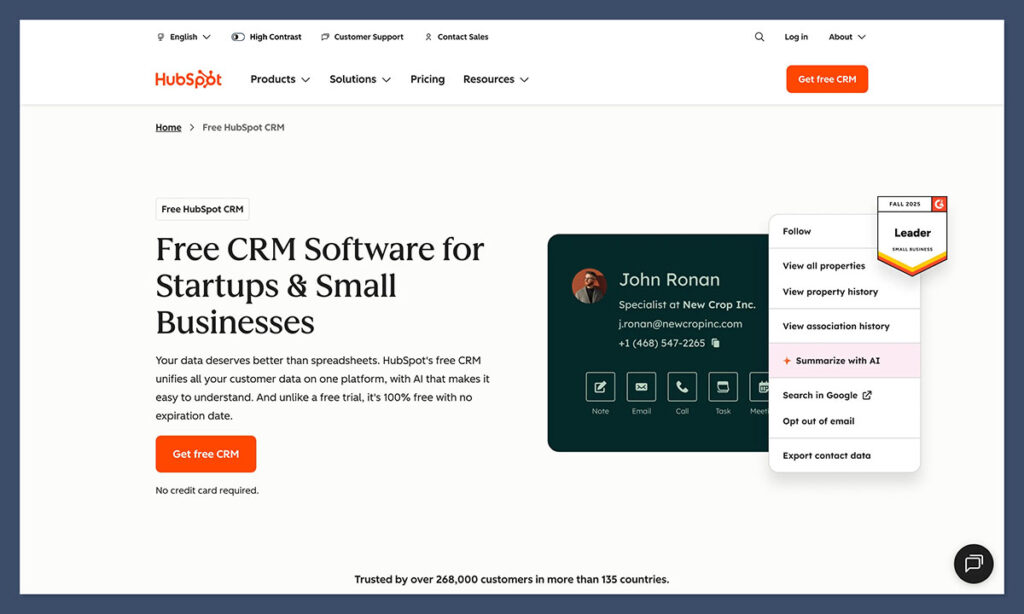
The HubSpot CRM serves as the central intelligence hub for any e-commerce operation built on the platform. The free CRM tier provides essential functionalities, including contact management, list segmentation, pipeline visualization, email capabilities, and basic automation. Once this core system is operational, other components like the CMS, commerce tools, quoting features, and chat widgets integrate seamlessly, revolving around this central record. Many businesses upgrade to Sales Hub or Marketing Hub as their need for advanced automation and marketing sophistication grows, often prompted by the realization that certain follow-up processes can be automated.
2. Select Your E-commerce Integration Strategy
The choice of e-commerce integration strategy depends on the business model and product catalog size. Three primary options exist:
- Option A: HubSpot CMS + HubSpot Payments: Ideal for businesses with a smaller, curated product selection, digital goods, or subscription-based services. This approach keeps all customer data and transactions within the HubSpot ecosystem.
- Option B: HubSpot CRM + Third-Party E-commerce Platform (e.g., Shopify, BigCommerce): This is a common and effective strategy for businesses that require a feature-rich storefront with extensive product catalog management. HubSpot CRM handles customer relationships, marketing, and sales automation, while the e-commerce platform manages the front-end store and checkout.
- Option C: Direct Integration via APIs or Connectors: For highly custom or complex e-commerce setups, businesses can leverage HubSpot’s APIs or pre-built connectors to integrate their existing e-commerce infrastructure with the HubSpot CRM.
For businesses with extensive product catalogs, Option B or C might be more suitable. However, for businesses focused on curated offerings or higher-touch sales, Options A or B often provide a more integrated and manageable experience.
3. Develop Your Storefront with HubSpot CMS
HubSpot’s CMS is designed for simplicity and ease of use. Users can select from a variety of themes and utilize an intuitive drag-and-drop editor to arrange modules and build visually appealing pages that are optimized for customer engagement and conversion. A significant advantage of this approach is the seamless communication between the CMS and the CRM. When a customer repeatedly views a product, adds items to their cart and then abandons it, or consults an FAQ page, these interactions are meticulously recorded. This builds a detailed profile of user interest and intent, distinguishing between genuinely curious prospects and those who may have become disoriented.
4. Integrate Product Information Effectively
The process of adding products to your e-commerce setup has long-term implications for data management and customer experience. It is crucial to establish a standardized product naming convention early on. Avoiding variations of the same product with slightly different names (e.g., “Blue T-Shirt” versus “T-Shirt, Blue”) will prevent confusion and streamline inventory management, marketing efforts, and customer inquiries.
5. Configure Payments and Streamline the Checkout Process
For businesses operating within the United States, HubSpot Payments offers a straightforward integration solution that connects directly with quotes, product pages, forms, and chat functionalities. This allows for the easy distribution of payment links via email, direct messages, landing pages, and other communication channels. For international operations, integrating with providers like Stripe in conjunction with a commerce solution is a common and effective approach. The key is to select a payment gateway that aligns with your business’s geographical reach and operational requirements.
6. Synchronize Carts, Orders, and Sales Pipelines
HubSpot excels at creating a unified flow between abandoned carts, completed orders, and sales pipeline management, often surprising users with its interconnectedness. For instance, an abandoned cart can trigger automated follow-up emails, update the customer’s status in the sales pipeline, and even assign tasks to sales representatives for personalized outreach. This seamless integration helps to recapture lost sales opportunities and nurture leads effectively. A hypothetical example of this could be a “considering churn” pipeline stage. When a customer repeatedly visits the cancellation page, HubSpot can automatically generate a task, send a retention-focused email, and flag the account for proactive engagement, potentially improving customer retention rates.
7. Implement Automation Tailored to Real-World Scenarios
HubSpot empowers businesses to build automation workflows that mirror their actual operational processes. Starting with simple automations is recommended:
- Welcome Emails: Automatically send a welcome email to new subscribers or customers.
- Abandoned Cart Reminders: Trigger emails to customers who have left items in their cart.
- Order Confirmation and Shipping Updates: Automate notifications for order status changes.
- Post-Purchase Follow-ups: Send thank-you notes or requests for reviews after a purchase.
As more data is gathered about customer interactions and store usage, the complexity and sophistication of automation flows can be increased. It is essential to rigorously test the effectiveness of these automated sequences over time to ensure they are achieving their intended objectives.
8. Leverage Inbound Marketing for Lead Generation and Conversion
HubSpot’s foundational philosophy is rooted in inbound marketing principles. By integrating blog posts, landing pages, email campaigns, and the CRM within a unified environment, businesses can uncover patterns and correlations that might otherwise remain hidden. HubSpot’s ability to track page views, email clicks, orders, and repeat purchases provides clear insights into the content that effectively drives conversions. This allows for data-driven optimization of marketing strategies to focus on what truly resonates with the target audience and generates tangible business results.
9. Monitor Key Performance Indicators with Integrated Analytics
HubSpot’s analytics capabilities extend beyond mere data visualization; they are directly linked to individual customer records. This provides a richer context for understanding performance metrics. Key metrics to track include:
- Website Traffic and Engagement: Monitor where visitors are coming from and how they interact with your site.
- Conversion Rates: Analyze the percentage of visitors who complete desired actions (e.g., make a purchase, sign up for a newsletter).
- Sales Pipeline Velocity: Track the speed at which deals move through your sales process.
- Customer Lifetime Value (CLTV): Understand the total revenue a customer is expected to generate over their relationship with your business.
- Marketing Campaign Performance: Measure the effectiveness of your various marketing initiatives.
The combination of granular data and contextual understanding allows for more informed decision-making and strategic adjustments, leading to sharper business outcomes.
Why E-commerce Brands Embrace HubSpot
While HubSpot may not be immediately perceived as a dedicated e-commerce platform, its comprehensive capabilities make it an invaluable asset for online businesses. Many e-commerce ventures begin with a disparate collection of tools, only to discover that HubSpot can effectively manage the strategic “thinking” aspects of their business. This includes nurturing customer relationships, executing follow-up strategies, managing quotes, handling renewals, creating compelling content, and implementing critical automation that prevents crucial communication gaps.
Numerous platforms excel at managing the storefront itself. However, HubSpot distinguishes itself by deeply understanding the buyer’s journey. It tracks what customers click on, what they ignore, their late-night browsing habits, and the specific email that finally overcomes their hesitation. This profound context fundamentally transforms how an e-commerce store operates, shifting the paradigm from broad promotional blasts to guided, personalized customer decision-making processes.
For businesses curious to explore these capabilities, the first step is to create a free HubSpot CRM account. Experimenting with the CMS, sending payment links, building simple workflows, and observing how these interconnected elements begin to form a cohesive and powerful business system is a highly recommended approach.
Frequently Asked Questions About HubSpot for E-commerce
How does HubSpot compare to Shopify for e-commerce?
Shopify is primarily a robust e-commerce storefront engine, focused on facilitating online sales. HubSpot, conversely, functions as a comprehensive customer engagement and business growth platform. When integrated, they form a powerful synergy. However, for businesses that heavily rely on lead nurturing, complex quoting processes, or managing subscription renewals, HubSpot offers distinct advantages in these specific areas.
Can HubSpot support a complete e-commerce store independently?
Yes, HubSpot can effectively manage a complete online store, particularly for businesses with a focused product catalog and a straightforward buying process, or those not reliant on extensive, complex retail infrastructure. The combination of HubSpot CMS, Commerce Hub, and HubSpot Payments can adequately handle digital products, subscriptions, coaching services, curated kits, and a significant portion of B2B e-commerce transactions. For very large or intricate product catalogs, integrating HubSpot with platforms like Shopify or BigCommerce is often a more practical solution.
Is HubSpot cost-prohibitive for small businesses?
Not necessarily. Many businesses initiate their journey with the free HubSpot CRM and free CMS tools, incurring costs only as their needs evolve towards advanced automation, more sophisticated sales functionalities, or intensive marketing campaigns. When these advanced features are actively utilized, the return on investment (ROI) typically becomes evident relatively quickly.
Does HubSpot facilitate subscription management and renewals?
Absolutely. Commerce Hub is equipped to handle recurring payments, manage subscription records, track renewals, and implement workflows directly linked to billing events. This effectively streamlines what can often be a complex and labor-intensive aspect of e-commerce operations.
Are HubSpot’s AI tools genuinely beneficial for e-commerce?
Yes, HubSpot’s AI tools are valuable for automating routine tasks such as drafting emails, constructing workflows, generating website content, and identifying potential customer segmentation patterns. While they do not replace strategic planning, they significantly reduce the time spent on administrative tasks, allowing teams to concentrate on high-impact activities that drive revenue.