Philadelphia, PA – June 24, 2026 – AWeber, a leading provider of email marketing and automation solutions, today announced a significant enhancement to its AI Signup Form Builder, introducing the capability to create and visually place inline forms directly onto websites without requiring any coding expertise. This advancement aims to empower content creators, marketers, and small business owners to strategically embed lead capture forms within their content, leveraging prime engagement opportunities to convert readers into subscribers more effectively. The update, detailed by Chris Vasquez, underscores a commitment to simplifying sophisticated marketing tools, making high-impact strategies accessible to a broader audience.
The strategic placement of signup forms has long been a critical factor in optimizing conversion rates. Traditional approaches often involved placing forms in sidebars, footers, or as pop-ups. While effective in certain contexts, these methods sometimes interrupt the user experience or fail to capture attention at the peak moment of engagement. An inline form, conversely, is seamlessly integrated within the flow of content, appearing when a reader is already immersed and interested in the topic at hand. This contextual relevance has been shown in various marketing studies to significantly increase the likelihood of a user completing a form, turning passive consumption into active participation.
The Evolution of Lead Capture and AI Integration
The digital marketing landscape has witnessed a continuous evolution in lead generation strategies. From simple text-based calls to action to elaborate landing pages, the goal has remained consistent: to capture user information for further engagement. Email marketing, in particular, has consistently proven to be one of the most effective channels for nurturing leads and driving sales, boasting an average return on investment (ROI) of $42 for every $1 spent, according to recent industry reports. However, the technical complexities associated with designing, implementing, and optimizing signup forms have often posed a barrier for businesses lacking dedicated web development resources.
The advent of Artificial Intelligence (AI) has begun to democratize many aspects of digital marketing, from content creation and SEO optimization to personalization and automation. AWeber’s integration of AI into its form builder represents a natural progression, aiming to simplify the initial hurdle of lead capture. By automating the design and placement process, AWeber addresses a common pain point for its user base, enabling them to focus more on content creation and strategy rather than technical implementation. This move positions AWeber at the forefront of user-friendly marketing technology, aligning with broader industry trends toward no-code and low-code solutions.

Unlocking Conversions with Contextual Placement
The core principle behind inline forms is psychological: catching a reader when their interest is highest. A form embedded mid-article, for instance, can prompt a signup for a related newsletter or exclusive content at the very moment the reader is most receptive to that offer. In contrast, a sidebar form might only catch the eye of someone scanning the page, potentially leading to lower engagement rates. Data from various A/B tests conducted by marketing analytics firms indicate that well-placed inline forms can boost conversion rates by an average of 15-25% compared to static sidebar forms, depending on the industry and content type. This significant uplift underscores the strategic importance of AWeber’s new feature.
Creating and Placing Inline Forms with Unprecedented Ease
AWeber’s updated AI Signup Form Builder offers three intuitive starting points for users, catering to different workflows and preferences:
- Custom Prompt: Users can simply describe their desired form and specify it as an inline form for their site. The AI then generates a tailored form based on the description, streamlining the creative process. This method is ideal for those with a clear vision of their form’s purpose and design.
- Fill-in-the-Blanks: A guided approach where users answer a few prompts about their campaign goals and target audience. Crucially, they select "embeds directly on my website" as the form type, allowing the AI to optimize the form for inline integration. This is particularly useful for users who appreciate structured guidance.
- Template Gallery: For those seeking inspiration or a quick start, a curated gallery of inline templates is available. Users can browse pre-designed options and customize them to fit their brand aesthetics and content strategy. This method offers a balance of speed and personalization.
Regardless of the starting point, all paths converge in a unified form editor. Here, users can fine-tune every aspect of their form – adjusting copy, refining design elements, and configuring settings such as double opt-in preferences or success messages. This comprehensive editor ensures that while the creation process is AI-assisted, the final product remains entirely aligned with the user’s brand identity and marketing objectives.
The real innovation, however, lies in the placement mechanism, designed to be executed in a mere "four clicks." This process fundamentally eliminates the need for any technical coding knowledge, a significant barrier for many small businesses and individual content creators.
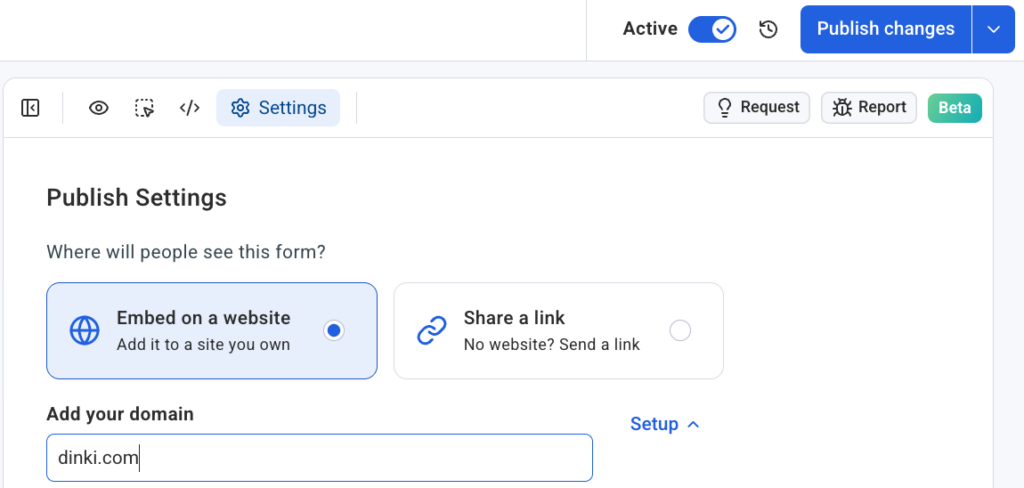
The Four-Click Placement Process Detailed:
- Access Settings: Within the form editor, users navigate to the "Settings" tab, a centralized hub for configuration options.
- Domain Specification & Snippet Confirmation: Users specify the exact domain where the form is intended to appear. A crucial prerequisite is the installation of the AWeber signup form snippet on the website. This snippet is a lightweight piece of code, usually placed once in the website’s header or footer, which enables AWeber’s system to interact with the site and dynamically render forms. AWeber provides clear, step-by-step instructions for installing this snippet, which typically takes only a few minutes and does not require advanced programming skills. This initial setup is a one-time process per domain, after which multiple forms can be placed effortlessly.
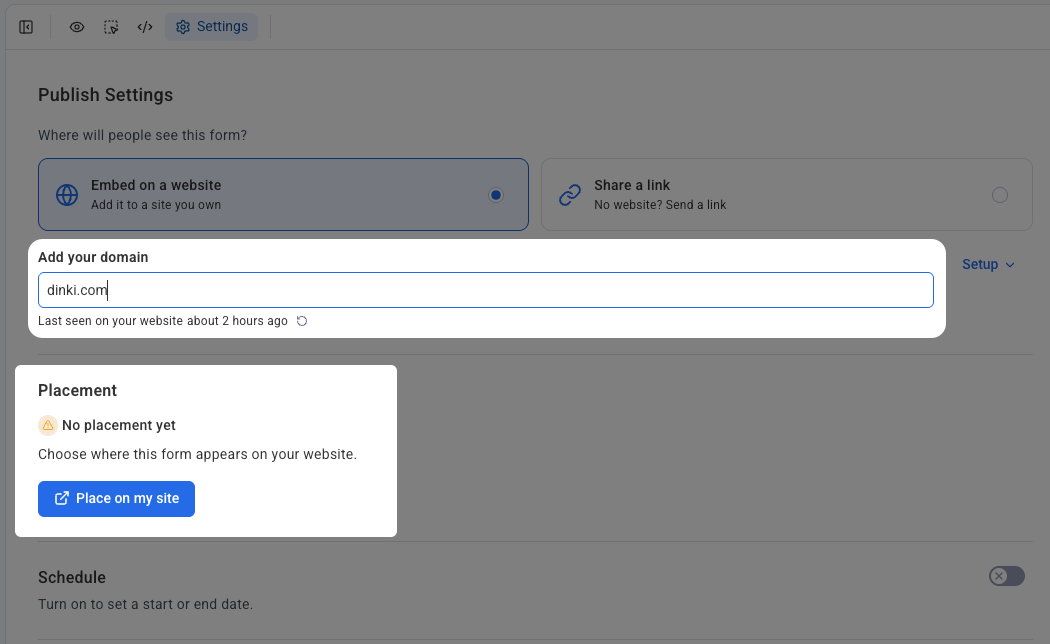
- Initiate Placement: With the domain set and snippet confirmed, users click the prominent "Place on my site" button, signaling their intent to integrate the form onto their live web page.
- Visual Confirmation & Deployment: This is where the magic of visual placement unfolds. Upon clicking "Place on my site," the user’s actual live website opens in a new interface, overlaid with a dynamic "placement widget." This is not a static wireframe or a generic preview; it is a live, interactive representation of the user’s webpage. Users can then visually identify and click the precise section of their page where they wish the form to appear. Once the desired location is selected, a final click on "Confirm placement" instantly embeds the form. The form is then live on the website, seamlessly integrated into the content flow, without any manual code injection or complex development work.
This direct, visual interaction eliminates guesswork and the iterative process of coding, saving valuable time and reducing potential errors. It’s a testament to AWeber’s focus on user experience, translating complex web development tasks into intuitive point-and-click actions.
Universal Compatibility and Organized Management
A significant advantage of this new functionality is its broad compatibility. The AI Signup Form Builder works seamlessly across a diverse range of self-hosted website platforms, including but not limited to WordPress, Shopify, Wix, Squarespace, and many more. This universal applicability ensures that a vast majority of AWeber’s user base, regardless of their chosen content management system or e-commerce platform, can leverage this powerful feature.
For users managing multiple websites or handling client accounts, AWeber has implemented a robust organizational structure. Each domain connects independently within the "Settings" tab. This means forms created for one domain remain distinct and organized, preventing cross-site placement errors and ensuring a streamlined workflow for agencies or individuals with extensive digital footprints. This clear separation aids in maintaining brand consistency and strategic alignment across different web properties.
Statements and Industry Reactions
Chris Vasquez, author of the announcement and a key figure in AWeber’s product development, remarked, "Our vision with the AI Signup Form Builder has always been to empower every business, big or small, to harness the power of email marketing without the technical headaches. This inline form placement feature is a monumental step in that direction. By allowing users to visually select and instantly embed forms directly into their content, we’re not just saving them time; we’re enabling them to optimize their lead capture strategy with unprecedented ease and precision. We believe this will significantly boost conversion rates and help our customers grow their audiences more effectively."
Industry analysts have quickly recognized the implications of AWeber’s update. "The ‘no-code’ movement is gaining immense traction, and AWeber’s latest offering perfectly encapsulates this trend within the email marketing sphere," stated Dr. Elena Petrova, a senior analyst at Digital Marketing Insights. "By abstracting away the complexities of web development, AWeber is lowering the barrier to entry for sophisticated lead generation tactics. This move is particularly beneficial for small to medium-sized businesses that often lack dedicated IT teams, allowing them to compete more effectively with larger enterprises."
Early feedback from beta testers has been overwhelmingly positive. Sarah Chen, owner of a sustainable fashion blog, shared, "Before this, embedding forms was always a chore. I’d have to bother my web designer or spend hours fumbling with code. Now, I can literally create a beautiful form with AI and place it right where I want it in minutes. My subscriber growth has already seen a noticeable bump!"
Broader Impact and Future Implications
The introduction of visual, no-code inline form placement by AWeber carries several significant implications for the digital marketing ecosystem:
- Democratization of Advanced Marketing: Small businesses, solopreneurs, and content creators can now implement sophisticated lead generation strategies that were previously the domain of larger organizations with dedicated development teams. This levels the playing field, fostering greater innovation and competition.
- Enhanced User Experience for Marketers: By eliminating the technical friction associated with form placement, marketers can dedicate more time to content strategy, audience engagement, and campaign optimization, leading to more impactful results.
- Increased Conversion Efficiency: The ability to place forms contextually within engaging content is expected to lead to higher conversion rates across the board, translating directly into accelerated list growth and potential revenue increases for AWeber users.
- Streamlined Agency Workflows: Marketing agencies managing multiple client websites can significantly reduce the time and resources spent on form implementation, allowing them to focus on higher-value strategic services.
- Catalyst for Further AI Innovation: This feature sets a precedent for how AI can be leveraged to simplify user interfaces and automate complex web development tasks in the broader marketing technology sector, potentially inspiring other platforms to follow suit with similar user-centric innovations.
- Impact on Web Developers: While simplifying tasks for marketers, this innovation also frees up web developers from routine form embedding requests, allowing them to concentrate on more complex, bespoke website functionalities and technical challenges.
AWeber’s commitment to empowering its users through intelligent automation is evident in this latest update. By providing a tool that marries the power of AI-driven design with intuitive, no-code visual placement, AWeber is not just offering a new feature; it’s redefining the ease and effectiveness of turning valuable content attention into loyal subscribers. The future of lead capture, it appears, is intelligent, integrated, and incredibly straightforward. Businesses are now empowered to put their forms exactly where their readers already are, maximizing engagement and driving sustainable growth in the dynamic digital landscape.

 Laily UPN
 Basiran