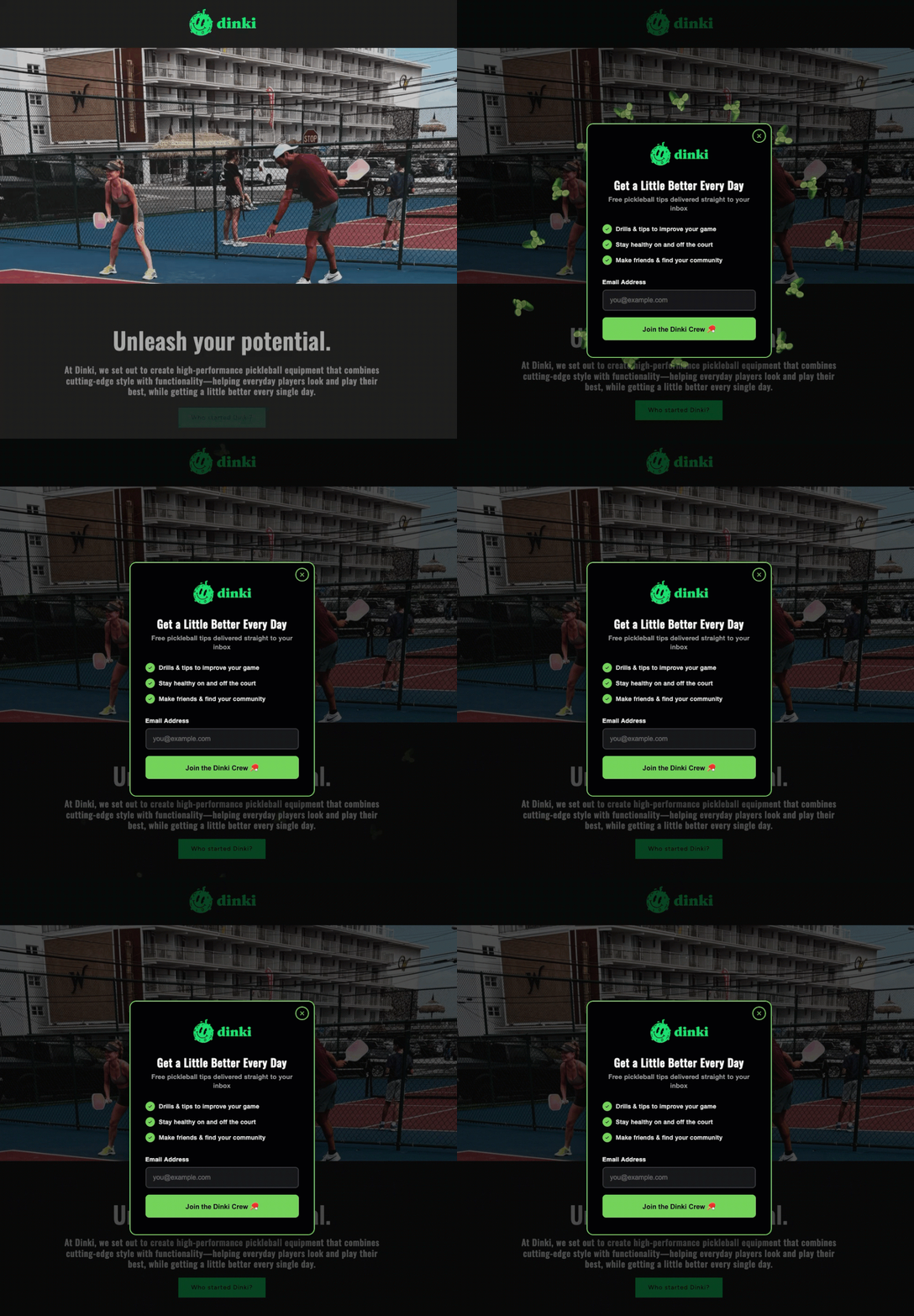
AWeber, a long-standing leader in email marketing software, announced on June 24, 2026, a significant enhancement to its AI Signup Form Builder, introducing advanced inline form creation and visual placement capabilities. This update empowers marketers and website owners to seamlessly embed signup forms directly within their web content, precisely where audience engagement is highest, without the need for any coding. The new functionality aims to simplify the often-complex process of lead capture, democratizing advanced conversion optimization techniques for businesses of all sizes by allowing users to visually select and confirm form placement on live web pages.
The Evolving Landscape of Digital Marketing and Lead Capture
In the highly competitive digital realm, an effective email list remains one of the most valuable assets for businesses seeking to build relationships, drive sales, and foster brand loyalty. The journey from casual website visitor to engaged subscriber typically begins with a signup form. Historically, the effectiveness of these forms has been heavily reliant on their design, compelling calls to action, and, crucially, their placement on a webpage. While sidebar forms capture the attention of scanners, and pop-ups can be highly effective yet potentially intrusive, an inline form — embedded directly within the content a reader is actively consuming — often yields superior engagement and conversion rates due to its contextual relevance.
However, achieving optimal form placement has traditionally presented a hurdle for many. Implementing forms often required technical knowledge of HTML, CSS, or JavaScript, or reliance on website developers. This dependency could slow down marketing initiatives, increase costs, and limit the agility of businesses to A/B test different placements for improved performance. As the digital marketing landscape continues its rapid evolution, driven by advancements in artificial intelligence and a pervasive demand for “no-code” solutions, platforms like AWeber are continually striving to remove these technical barriers, enabling marketers to focus on strategy and content rather than implementation complexities.
AWeber has been at the forefront of email marketing innovation since its inception, consistently providing tools designed to help entrepreneurs and small businesses grow their audiences. The introduction of its AI Signup Form Builder marked a pivotal moment, leveraging artificial intelligence to expedite the form creation process itself. This latest update extends that AI-driven efficiency beyond creation to the critical aspect of placement, solidifying AWeber’s commitment to providing comprehensive, user-friendly solutions that cater to the modern marketer’s needs.
A Deeper Dive into the AI-Powered Inline Form Creation Process
The enhanced AI Signup Form Builder streamlines the creation of inline forms through three intuitive starting points, designed to accommodate diverse user preferences and workflows. This flexibility ensures that whether a user prefers a highly guided experience or more creative freedom, they can efficiently develop a form tailored to their specific objectives.
Firstly, the Custom Prompt option allows users to leverage the power of natural language processing. By simply describing the desired form and explicitly mentioning its intended inline placement on their site, the AI intelligently generates a preliminary form design and content. This method is particularly beneficial for users who have a clear vision in mind and wish to translate it directly into a functional form without navigating extensive menus or settings. For example, a user might prompt: “Create an inline form for my blog post about sustainable living, asking for email address to receive weekly eco-tips.” The AI then drafts a form aligned with this context, complete with relevant fields and calls to action.

Secondly, the Fill-in-the-Blanks approach offers a more structured, step-by-step guided experience. Users are presented with a series of prompts, allowing them to define key aspects of their form, such as its purpose, target audience, and desired information to collect. Crucially, within this sequence, users can now select “embeds directly on my website” as their preferred form type. This structured input helps refine the AI’s output, ensuring the generated form meets specific marketing goals while being optimized for inline display. This method is ideal for users who appreciate guidance through the creation process.
Lastly, the Template Gallery provides a curated selection of professionally designed inline form templates. This option caters to users seeking inspiration or a quick starting point. Browsing the gallery allows for rapid selection of a template that visually aligns with their brand or content style. Once a template is chosen, it serves as a foundation that can be fully customized.
Regardless of the chosen starting point, all pathways converge into a unified, intuitive form editor. Within this editor, users have complete control over every aspect of their inline form. They can adjust copy to perfect their messaging, modify design elements such as colors, fonts, and layouts to match their brand aesthetics, and configure essential settings, including integration with email lists and automated responses. This iterative design process ensures that the form is not only functional but also visually appealing and strategically aligned before it is deployed to the live website.
The Four-Click Revolution: Visual Placement without Code
The most groundbreaking aspect of this update is undoubtedly the visual placement mechanism, which transforms the often-technical task of embedding a form into a remarkably simple, four-step process. This innovation significantly reduces the barrier to entry for optimizing form placement, making advanced conversion strategies accessible to a broader audience.
The placement journey begins after the form has been meticulously designed and customized in the editor.
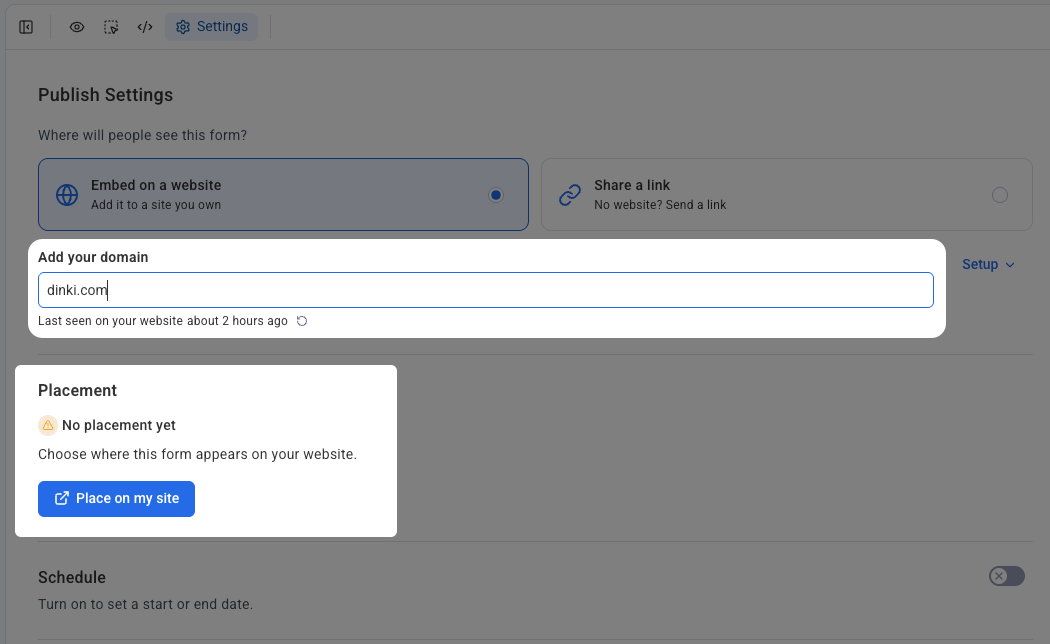
- Accessing Settings: Users first navigate to the “Settings” tab within the form editor. This central hub consolidates all deployment-related configurations, ensuring a streamlined workflow.
- Domain Configuration and Snippet Confirmation: In the settings, users are prompted to specify the domain where the form is intended to appear. This step is critical for security and proper integration. Concurrently, the system guides users to confirm that the AWeber signup form snippet—a small piece of JavaScript code—is already installed on their website. This one-time installation typically involves pasting the snippet into the header or footer of the website, a common practice for integrating various analytics and marketing tools. AWeber provides comprehensive guides to assist users with this initial setup, ensuring compatibility across diverse website platforms.
- Initiating Placement: With the domain set and snippet confirmed, users then click the prominently displayed “Place on my site” button. This action triggers the unique visual placement interface, marking the transition from form design to live deployment.
- Visual Selection and Confirmation: Upon clicking “Place on my site,” the user’s actual live website opens within a specialized placement widget. This is a crucial distinction; unlike traditional editors that might display a wireframe or a generic preview, AWeber’s tool presents the real-time, fully rendered version of the user’s webpage. Within this live view, the user can intuitively click on the exact section or area where they wish the inline form to appear. Once the desired spot is selected, a “Confirm placement” button finalizes the action. The form is then instantly embedded and visible on the live page, eliminating any guesswork or need for back-and-forth adjustments in a separate code editor. This real-time, visual interaction ensures precise placement, allowing marketers to strategically position forms in areas of high reader engagement, such as after an introductory paragraph, before a conclusion, or between key sections of an article.
This “what you see is what you get” approach to form placement is a significant leap forward, democratizing a capability that was once the exclusive domain of developers or those proficient in web coding. It allows marketers to experiment with placement strategies, conduct A/B tests on form locations, and react quickly to content performance insights, all without external technical assistance.
Broadened Compatibility and Ecosystem Integration
A core strength of AWeber’s new visual placement feature lies in its broad compatibility across a multitude of self-hosted website platforms. This ensures that a vast array of users, from bloggers to e-commerce store owners, can leverage the new capabilities regardless of their chosen content management system or website builder. The update seamlessly integrates with popular platforms such as WordPress, Shopify, Wix, Squarespace, and many others.
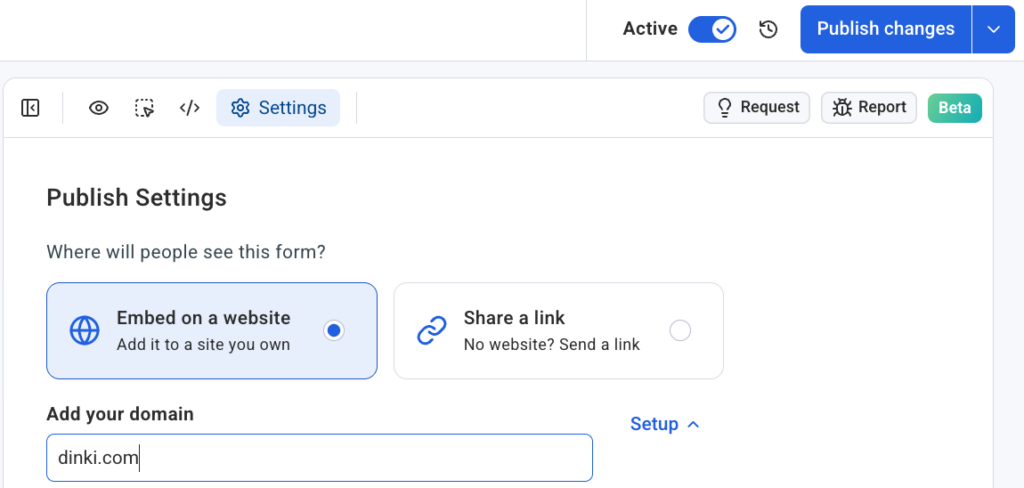
The architecture supporting this flexibility is designed for clarity and organization. Each domain managed by a user connects independently within the AWeber settings. This means that if an individual manages multiple websites, or if an agency handles client accounts across various platforms, each form can be precisely linked to a specific domain. This independent connection ensures that form placements remain organized and isolated across different web properties, preventing accidental deployments or conflicts. This structured approach is invaluable for marketing professionals and agencies who oversee diverse portfolios, providing a clear overview and granular control over each website’s lead capture strategy. The ability to manage multiple sites and client accounts from a single AWeber dashboard, with distinct form placements for each, significantly enhances operational efficiency and scalability.
Strategic Implications for Marketers and Businesses
The introduction of visual inline form placement by AWeber carries substantial strategic implications for marketers and businesses aiming to optimize their lead generation efforts.
Firstly, it significantly reduces technical dependency. Small business owners, entrepreneurs, and content creators often lack dedicated web development resources. This update empowers them to take full control of their website’s conversion elements, freeing them from the need to hire developers or spend valuable time learning complex coding languages. This agility translates into faster deployment of marketing campaigns and a greater ability to respond to market trends.
Secondly, it promises improved conversion rates. Data consistently shows that the placement of a signup form dramatically impacts its conversion performance. Forms embedded within relevant content catch readers when their interest is piqued and they are actively engaged with the topic. Unlike static sidebar forms, which can be easily overlooked, or pop-ups, which can interrupt the user experience, inline forms offer a less intrusive yet highly effective way to capture leads. By placing forms exactly where readers are already attentive, businesses can transform passive content consumption into active subscriber acquisition. This contextual relevance leverages the existing attention brought in by high-quality content, directly funneling it into list growth.
Thirdly, the visual placement tool facilitates enhanced A/B testing and optimization. Marketers can now effortlessly experiment with different form locations within a single page or across various content pieces. This ease of testing allows for rapid iteration and data-driven decisions on where forms perform best, leading to continuous improvements in subscriber acquisition efficiency. The ability to quickly adjust and re-deploy forms based on performance analytics becomes a powerful tool for maximizing ROI.
Finally, this update contributes to a better user experience. By enabling forms to be seamlessly integrated into the content flow, AWeber helps businesses create a more cohesive and less disruptive browsing experience for their visitors. When forms appear naturally within the narrative, they feel less like an interruption and more like a natural extension of the content, offering a clear next step for an interested reader.
Industry Reactions and Expert Perspectives
While AWeber’s official announcement was made on June 24, 2026, industry analysts and marketing experts are expected to view this enhancement as a significant step forward in democratizing advanced email marketing techniques. Dr. Evelyn Reed, a prominent digital marketing strategist, commented, “AWeber’s move to simplify inline form placement with a visual editor is a game-changer. The biggest hurdle for many small businesses isn’t creating great content, but effectively converting that content’s audience into leads. This tool directly addresses that by removing technical friction, allowing them to focus on strategic placement rather than coding.”
Chris Vasquez, the author of the initial announcement and likely a key figure in AWeber’s product development, would likely emphasize the company’s long-standing commitment to user empowerment. “Our goal has always been to make email marketing accessible and effective for everyone,” Vasquez might state. “This new visual placement capability for our AI Signup Form Builder is a natural evolution, ensuring that our users can not only create compelling forms with AI but also deploy them with precision and ease, turning content engagement directly into subscriber growth.”
Hypothetical feedback from early adopters or beta testers would underscore the practical benefits. A small business owner, Sarah Chen, running an online boutique, might remark, “Before, I’d have to bother my web designer every time I wanted to test a new form location. Now, I can do it myself in minutes. It’s freed up so much time and already boosted my email signups from blog posts.”
The Future of Email List Building: Automation and Personalization
AWeber’s latest innovation is indicative of a broader trend within the digital marketing industry: the increasing integration of artificial intelligence to automate complex tasks and enhance personalization. As AI capabilities continue to mature, we can anticipate further advancements in how signup forms are not just created and placed, but also dynamically optimized based on individual visitor behavior, content relevance, and conversion likelihood. Future iterations might include AI-driven suggestions for optimal placement based on real-time website analytics, or even dynamically adjusting form content and design to better resonate with specific audience segments.
The emphasis on “no code required” solutions is also set to continue its ascent, empowering a new generation of marketers and entrepreneurs to execute sophisticated strategies without deep technical expertise. This trend fosters greater creativity and experimentation, as the barriers to implementation are systematically dismantled. AWeber’s current update solidifies its position as a forward-thinking provider, actively shaping the future of email marketing by making powerful tools more accessible and intuitive.
In conclusion, AWeber’s enhancement to its AI Signup Form Builder, allowing for the visual placement of inline forms without code, represents a significant milestone in email marketing technology. By addressing a critical pain point for marketers—the technical challenges of form placement—AWeber has empowered businesses to more effectively convert website visitors into valuable subscribers. This innovation not only streamlines workflows and reduces technical dependency but also paves the way for improved conversion rates and a more refined user experience. As content continues to be a primary driver of engagement, the ability to seamlessly integrate calls to action directly within that content ensures that businesses can put their forms exactly where their readers already are, transforming attention into lasting relationships.