Pinterest, once primarily known as a platform for aspirational home decor and recipe planning, has undergone a significant transformation, emerging as a dynamic hub for visual discovery and strategic content creation. At the forefront of this evolution are Pinterest collages, layered visual compilations that are redefining how users engage with content, explore identities, and drive brand engagement. These curated visuals are not merely aesthetic; they represent a powerful shift towards "personal media," offering enduring value in a digital landscape often dominated by fleeting trends.
The Evolution of Pinterest and Visual Discovery
Pinterest’s journey from a digital corkboard to a sophisticated discovery engine reflects a broader trend in online consumption: the increasing demand for visual-first, mood-forward content that transcends mere scrolling. Unlike transient social media feeds, Pinterest’s architecture is built on the premise of inspiration and future planning. This fundamental difference positions it as a unique platform where content retains relevance for weeks, months, and even years after its initial publication.
Recent advancements, including AI-powered search upgrades, have further amplified Pinterest’s role in aesthetic-driven content. The platform’s commitment to visual remixing as a primary mode of discovery has been particularly embraced by younger demographics, notably Gen Z, who leverage visual storytelling to articulate personal style, aspirations, and product preferences. This demographic’s influence underscores a broader cultural movement towards curated digital identities and lifestyle design as a form of content.
The Rise of the Collage Phenomenon
The contemporary surge in Pinterest collages can be directly linked to the launch and subsequent viral success of Pinterest’s standalone application, Shuffles. Released as a beta, Shuffles quickly amassed nearly 500,000 downloads on Apple’s App Store within four weeks, demonstrating a significant user appetite for interactive collage creation. This app allows users to combine elements from existing Pins and personal photos, fostering a highly personalized and expressive form of content.
The phenomenon extends beyond Shuffles, with collages now dominating Pinterest feeds in various forms: from vision board-style posts that delineate personal goals to product roundups and aesthetic mashups designed to capture attention. This prevalence highlights a user preference for content that is not only visually appealing but also strategically organized to convey a comprehensive narrative or mood without requiring users to navigate away from the platform immediately. As Pinterest itself articulates, it is "personal media," prioritizing user-centric discovery and long-term engagement over ephemeral social interactions.
Defining the Pinterest Collage
A Pinterest collage is more than a simple collection of images; it is a meticulously curated visual narrative, functioning as a mood board with a clear mission. These compilations are styled, layered, and designed to communicate a story, a concept, or a product range effectively. Whether illustrating a specific aesthetic like "slow mornings + strong matcha," showcasing a product lineup within a lifestyle context, or articulating an overarching brand vision, collages serve as a potent intersection of creative expression, strategic planning, and scroll-stopping appeal.
Distinguishing itself from a single-image Pin, a collage offers a complete narrative arc. It provides bite-sized branding with potentially significant results, allowing creators and businesses to convey complex ideas or multiple product features in a single, digestible visual. This format aligns seamlessly with modern consumption habits, catering to a visual-first mindset optimized for quick inspiration and sustained strategic value.
Who is Leveraging Collages and Why
The widespread adoption of Pinterest collages transcends specific demographics or niches, establishing itself as a fundamental tool for online creation, communication, and curation. A diverse array of users, from solo entrepreneurs to established brands, are leveraging collages to achieve varied objectives.
-
Creators and Influencers: For content creators, collages are invaluable for visual storytelling. They allow for the introduction of an entire brand mood, the showcasing of seasonal style transitions, or the compilation of favorite items without the need for numerous individual Pins. Creators use them for mood-setting and branding, content promotion and roundups, and visual content planning, such as mapping out fashion trends or illustrating wellness routines. This format delivers impact and ensures content longevity.
-
Small Business Owners and Brands: Pinterest’s long-standing reputation as a product discovery platform is amplified by collages, which effectively convert discovery into tangible conversions. Instead of isolated product shots, brands can utilize collage-style Pins to provide context, illustrate lifestyle integration, and demonstrate how multiple items complement each other. This includes creating thematic product groupings, lifestyle showcases, gift guides, and virtual storefront displays, turning abstract inspiration into concrete purchasing decisions.
-
Coaches, Educators, and Thought Leaders: Online educators and coaches are employing collages as concise, visual content libraries. These tools are instrumental in explaining complex concepts in a clear, scrollable format, offering an evergreen resource that far outlasts typical social media posts. Examples include outlining program roadmaps, presenting educational breakdowns, visualizing client transformations, and offering motivational content. These collages also possess the versatility to be repurposed as email content, digital products, or printables.
-
Everyday Users (Pinterest’s Core Audience): The platform’s power base, comprising individuals planning various aspects of their lives, finds collages indispensable for visual planning. From DIY enthusiasts and parents designing nurseries to students envisioning dorm decor and minimalists curating capsule wardrobes, collages provide a sense of control and creative expression. Popular themes encompass aesthetic planning, personal style curation, event planning, and goal visualization, allowing users to craft a visual reflection of their aspirations.
Ultimately, Pinterest collages empower users across all segments to express themselves authentically, market products more intelligently, and plan with greater intention, solidifying their role as a critical digital asset.
Strategic Applications: Types of Pinterest Collages
Pinterest collages have evolved into a versatile medium, enabling diverse forms of storytelling and engagement. Understanding the various types is key to leveraging their full potential:
-
Vision Board Collages: These are foundational to Pinterest’s original ethos. Users combine images, motivational quotes, and affirmations to create powerful visual representations of personal and professional goals, fostering motivation and clarity.
-
Style and Aesthetic Collages: Highly popular for fashion and design, these collages blend outfit ideas, accessories, textures, and color schemes to define a cohesive look or a specific aesthetic, from "boho chic" to "minimalist capsule."
-
Seasonal Mood Boards: Capturing the essence of particular times of the year, these boards integrate seasonal colors, activities, and themes. They serve as inspiration for fashion choices, home decor updates, and lifestyle activities, anticipating trends like "fall harvest aesthetics" or "summer beach vibes."
-
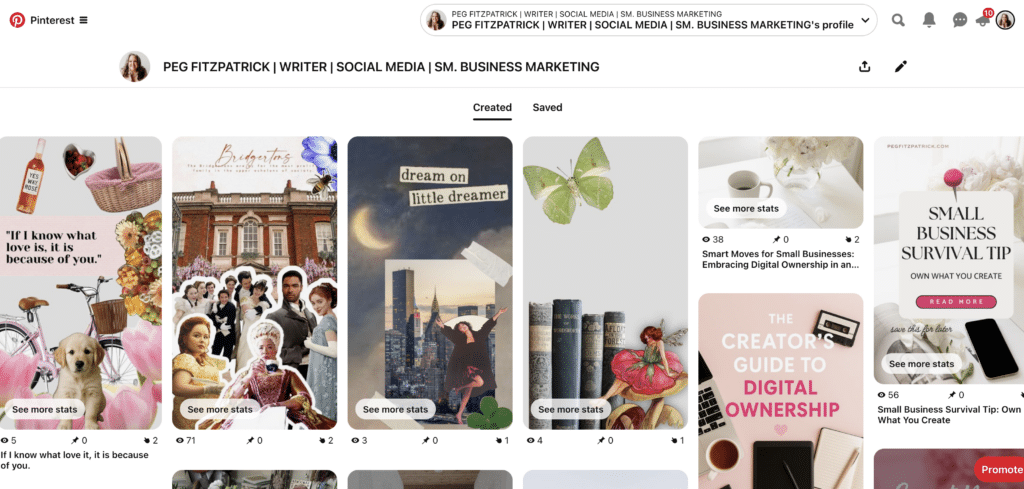
Product Collages: A powerful tool for e-commerce, product collages enable brands to showcase multiple items within a single, visually appealing image. They are effective for promoting new collections, curating product bundles, and illustrating how different products can be used together, driving direct sales.
-
Color Palette Guides: These collages focus purely on color theory and application. They display swatches, textures, and images that exemplify a chosen palette, offering inspiration for interior design, graphic design projects, or fashion coordination.
-
Quote + Image Mashups: Combining inspiring quotes with relevant, evocative imagery, these collages aim to create an emotional connection and resonate deeply with viewers. They are frequently shared for personal development and motivational purposes.
-
Mobile Pinterest Collages (via Shuffles): Created directly within the Pinterest mobile app or Shuffles, these collages often feature interactive elements and cutouts from Pins and personal photos. They are dynamic, highly personalized, and reflect a modern approach to digital scrapbooking and identity exploration.
Each collage type provides a distinct avenue for creativity, idea sharing, and audience engagement, offering endless possibilities for compelling visual content.
Crafting Effective Collages: A Technical Guide
Creating a Pinterest collage involves both artistic vision and strategic execution. Whether utilizing Pinterest’s native tools or external design platforms, intentionality is paramount to producing visuals that resonate with the target audience.
Option 1: Using Pinterest’s Native Collage Tool (Mobile Only)
Pinterest has integrated a built-in collage feature, particularly through the Shuffles app, enabling direct creation within its ecosystem.
- Open the Pinterest App: Ensure you have the latest version.
- Tap the Plus Icon: Located at the bottom of the screen, select "Pin" or "Idea Pin."
- Choose "Collage": This option may appear after selecting a photo or as a direct creation mode.
- Select Images: Choose photos from your camera roll or saved Pins.
- Edit and Arrange: Use tools to cut out elements, layer images, add text, stickers, and adjust transparency. Shuffles specifically offers advanced cutout and layering capabilities.
- Add Background: Select a solid color, patterned background, or another image.
- Add Text and Effects: Enhance with descriptive text, quotes, or visual effects.
- Publish: Add a title, description, and link (if creating a standard Pin), then choose a relevant board.
Option 2: Using Canva to Design a Pinterest Collage
Canva is a popular choice for creators seeking polished, branded collages due to its extensive templates and user-friendly interface.
- Start a New Design: Select "Pinterest Pin" dimensions (e.g., 1000 x 1500 pixels for a vertical Pin).
- Choose a Template or Start from Scratch: Canva offers numerous collage templates. Alternatively, begin with a blank canvas.
- Upload or Select Images: Import your own brand assets or utilize Canva’s stock photo library.
- Arrange and Layer: Drag and drop images, resize, rotate, and layer them to create your desired composition. Use grid features for organized layouts.
- Add Text and Graphics: Incorporate branded fonts, call-to-actions (CTAs), logos (subtly), and graphic elements.
- Refine and Optimize: Ensure readability, visual hierarchy, and mobile optimization.
- Download and Upload: Download your completed collage as a high-quality PNG or JPG, then upload it to Pinterest, adding a descriptive title, rich description, and a destination link.
Bonus Tools for Advanced Creators:
- Adobe Creative Suite (Photoshop, Illustrator): For professional-grade graphic design and intricate layering.
- PicMonkey: Offers robust photo editing and design features for more complex collages.
- Procreate (iPad): Excellent for hand-drawn elements and digital painting integrated into collages.
Maximizing Reach: SEO and Traffic Generation
Creating a visually compelling collage is only half the battle; ensuring it reaches the intended audience and drives sustained engagement requires robust search engine optimization (SEO) and strategic traffic generation. Pinterest operates as a visual search engine, making keyword optimization crucial for discoverability.
-
Optimize Pin Title and Description:
- Keyword-Rich Titles: Incorporate primary keywords naturally within the Pin title. Think about what users would search for (e.g., "Minimalist Fall Fashion Capsule Wardrobe").
- Detailed Descriptions: Write comprehensive descriptions (2-3 sentences minimum) that include relevant keywords, long-tail phrases, and a clear call to action. Pinterest uses this text to understand and categorize your content.
-
Incorporate Hashtags Strategically:
- Relevance is Key: Use 5-10 relevant hashtags that broaden discoverability without appearing spammy. Mix broad and niche hashtags.
- Shuffles App Integration: Hashtags are particularly effective within the Shuffles app for trend discovery and categorization.
-
Design with SEO in Mind:
- Text Overlay: Use text overlay on your collage itself, incorporating keywords that Pinterest can potentially "read" or recognize, further reinforcing content relevance.
- Pin Image Filename: Name your image file with relevant keywords before uploading (e.g.,
fall-outfit-collage-minimalist-style.jpg).
-
Engage with the Community:
- Repinning and Saving: Actively save relevant Pins from others to your boards, signaling to Pinterest your niche and interests.
- Comment and Interact: Engage with content in your niche to build community and visibility.
-
Every Pin Needs a Destination:
- Strategic Linking: Link every collage to a specific, relevant destination, such as a blog post, product page, landing page, or newsletter sign-up. Avoid generic homepage links if more specific content exists.
- Clear Call to Action (CTA): Implicitly or explicitly guide users on the next step.
-
Match Collage to Link: Ensure the visual content of the collage directly corresponds to the linked page, enhancing user experience and improving click-through rates.
-
Save to Multiple Relevant Boards: Distribute your collage across several highly relevant boards over time, maximizing its reach to different segments of your audience.
-
Repurpose Smartly: Extend the life of your collage by repurposing it across other platforms (Instagram Stories, blog features, email newsletters) and even creating short video versions for Idea Pins or TikTok.
Measuring Success: Analytics and Trend Forecasting
Effective Pinterest strategy hinges on data-driven decisions. Pinterest Analytics provides invaluable insights into content performance, while the Pinterest Trends tool acts as a predictive resource for staying ahead of user interests.
Pinterest Analytics: Access your Pinterest Business Hub to monitor:
- Impressions: How many times your Pins were seen.
- Engagements: Saves, close-ups, and clicks.
- Outbound Clicks: Traffic driven to your linked destination.
- Top Pins and Boards: Identify which content and themes resonate most.
- Audience Insights: Understand demographics and interests of your engaged users.
Analyze these metrics to identify patterns: What layouts, color schemes, or topics generate the most saves and clicks? This data should directly inform future content creation.
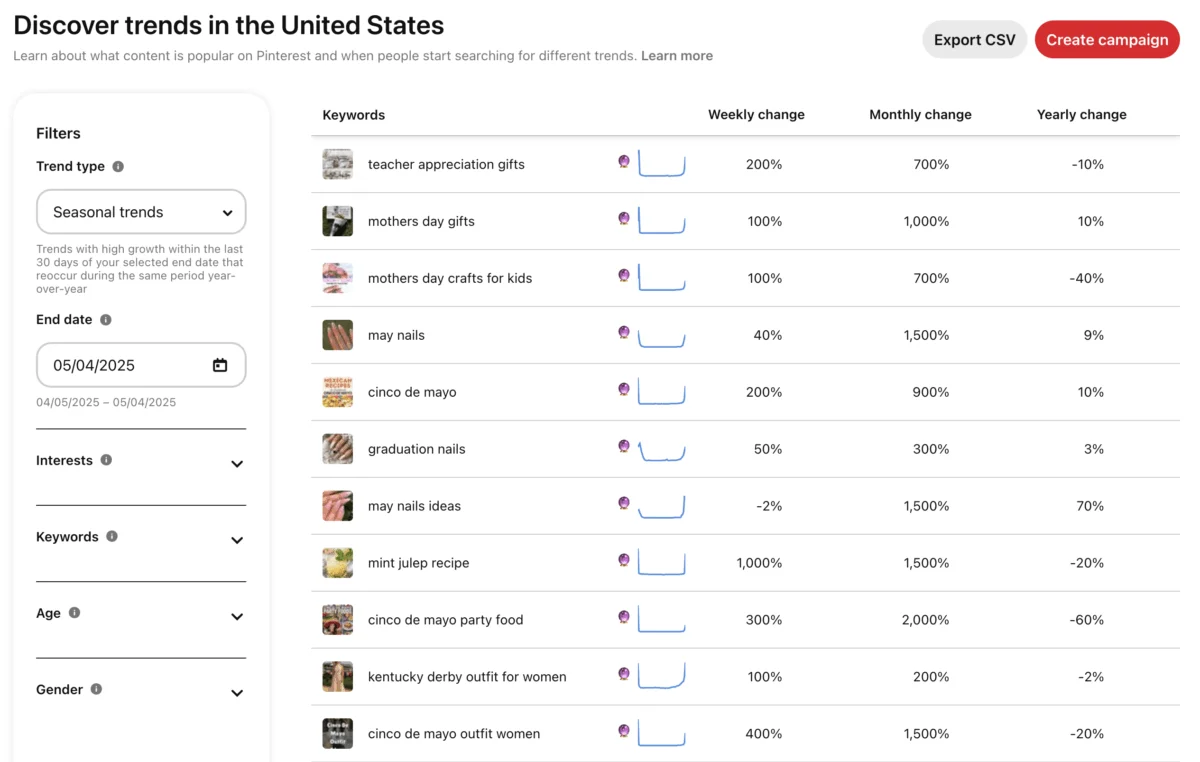
Pinterest Trends Tool: This tool is a powerful predictive resource, revealing what users are actively searching for before trends peak.

- Keyword Research: Input terms related to your niche (e.g., "aesthetic room decor," "sustainable fashion tips," "cozy fall recipes").
- Trend Identification: Observe rising search volumes and seasonal popularity.
- Proactive Content Creation: Develop collages around emerging trends to position your content at the top of search results as interest grows.
Test. Tweak. Repeat: Pinterest rewards consistency and experimentation. Regularly test different elements:
- Visual Styles: Vary layouts, color palettes, and imagery.
- Text Overlays: Experiment with different fonts, sizes, and CTAs.
- Descriptions and Hashtags: A/B test different keyword strategies.
- Linking Strategies: Track which types of links (blog posts vs. product pages) perform best for specific collage types.
Watch What Others Are Doing: Monitor top-performing content within your niche to identify successful strategies regarding visual style, text, and overall messaging. This competitive analysis provides clues without necessitating direct imitation.
Common Pitfalls and Best Practices
While powerful, Pinterest collages can be ineffective if common mistakes are not avoided. Adhering to best practices ensures long-term impact.
-
Avoid Overdesigning or Overcrowding: A collage should be visually appealing and clear, not cluttered. Focus on flow, visual hierarchy, and sufficient white space. Too many elements can overwhelm and deter engagement.
-
Ensure Mobile Optimization: With over 80% of Pinterest traffic originating from mobile devices, collages must be designed to be legible and engaging on small screens. Always preview your designs on a phone before publishing.
-
Establish a Clear Focus and CTA: Every collage needs a purpose. Whether it’s to inspire, inform, or sell, guide the viewer towards a clear next step or takeaway. Ambiguous collages lead to missed opportunities.
-
Prioritize Strong Keywords: Pinterest is a search engine. Neglecting keyword research or using vague terms significantly limits discoverability. Use specific, searchable phrases in titles, descriptions, and text overlays.
-
Always Link Out Correctly: Ensure every standard Pin collage links to a relevant and functional destination. Broken links or misaligned links (e.g., linking a specific product collage to a general homepage) frustrate users and diminish trust. Idea Pins, while not allowing direct outbound links, should still lead to a clear follow-up action or search prompt.
-
Diversify Content Beyond Static Pins: While static collages are valuable, Pinterest increasingly favors engagement-rich formats like Idea Pins (multi-frame stories) and content from Shuffles. Integrating these dynamic formats can boost reach and engagement.
-
Maintain Consistency: Pinterest rewards active and consistent participation. Don’t post a collage once and abandon it. Repin best-performing collages to different boards, update seasonal content, and consistently introduce fresh visuals to keep your content flywheel turning.
Advanced Tips and Creative Ideas
For creators looking to maximize their impact on Pinterest, advanced strategies can elevate collages from effective to exceptional, fostering deeper audience connection and sustained traffic.
-
Create Collage Series: Develop cohesive series around a central theme, using consistent branding or layout. Examples include "Weekly Outfit Inspiration," "Monthly Goal Setting Boards," or "Product Spotlight Series." This builds bingeability and audience recognition.
-
Lean Into Emotional or Utilitarian Themes: Pinterest users are often seeking solutions or specific feelings. Collages that tap into these desires perform exceptionally well. Consider themes like "Self-Care Sunday Routines," "Productivity Hacks for Creatives," "Dream Travel Itineraries," or "Budget-Friendly Home Makeovers."
-
Collaborate for Shared Reach: Partner with creators or brands in complementary niches. Create collages that align with each other’s content, cross-promote on boards, and tag collaborators to expand audience exposure.
-
Repurpose High-Performing Content: Transform successful blog posts or product guides into visually compelling collages. Conversely, if a collage performs well, remix it into an Idea Pin, a video, or even expand it into a dedicated blog post. This maximizes content efficiency.
-
Add Subtle Brand Elements: Instead of overt advertising, integrate brand elements subtly. Use consistent brand colors in backgrounds or text, incorporate a distinct visual style (e.g., specific filters or textures), or place a small, unobtrusive logo. The goal is inspiration, not interruption.
-
Tap Into Nostalgia and Pop Culture: Leverage cultural references or nostalgic themes that resonate with millennial and Gen Z users. Ideas like "90s Aesthetic Home Decor," "Y2K Fashion Comeback," or collages inspired by popular TV shows or movies can garner significant attention.
Pinterest collages are not merely attractive images; they represent a visual language that audiences instinctively understand. By approaching collage creation with intention and strategic insight, creators can ensure their content not only gets saved but also leaves a lasting impression and drives measurable results.
Your Turn – Get Started on a Pinterest Collage
The comprehensive guide to Pinterest collages has outlined the strategic advantages, creative possibilities, and technical steps required to harness this powerful visual tool. You now possess the knowledge to transform your presence on Pinterest, whether your objective is brand building, lifestyle planning, or simply creating content that captures attention and endures.
Getting started is a straightforward process, demanding consistency and a commitment to visual connection:
- Define Your Purpose: Before designing, clarify the objective of your collage. Is it to inspire, educate, promote a product, or drive traffic to a specific resource? A clear purpose will guide your visual and textual choices.
- Identify Your Target Audience: Understand who you are trying to reach. What are their interests, pain points, and aesthetic preferences? Tailor your collage style and content accordingly.
- Conduct Keyword Research: Utilize Pinterest Trends and the Pinterest search bar to identify relevant keywords and phrases. Integrate these into your Pin title, description, and potentially on the collage itself.
- Gather High-Quality Visuals: Source compelling images that align with your brand, message, and target aesthetic. Consider using your own photography, high-quality stock images, or elements from existing Pins.
- Choose Your Creation Tool: Decide whether to use Pinterest’s native collage feature (especially for Shuffles-style content) or a design platform like Canva for more polished, branded visuals.
- Design with Intent: Focus on creating a clear, uncluttered, and aesthetically pleasing layout. Prioritize mobile optimization and ensure any text overlay is legible.
- Craft a Compelling Description: Write a keyword-rich description that tells a story, adds value, and includes a clear call to action.
- Link Strategically: Ensure your collage links to a relevant, specific destination that provides further value to the viewer.
- Schedule for Consistency: Plan a content calendar to consistently publish new collages, leveraging different types and themes.
- Monitor and Adapt: Regularly review your Pinterest Analytics to understand what resonates with your audience and adjust your strategy based on performance data.
Success on Pinterest is not about fleeting virality; it’s about sustained engagement through authentic, valuable visuals that connect with an audience actively seeking inspiration and solutions. Start where you are, pin with purpose, and build a digital asset that works tirelessly for your brand or personal aspirations.

 Nana Muazin
 Lina Hope