rifanmuazin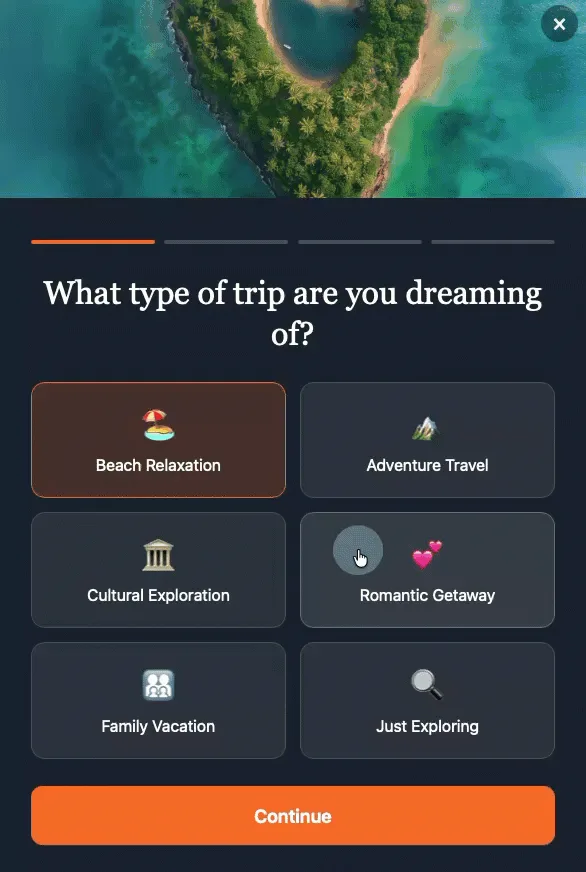
In the evolving landscape of digital marketing, the design of online forms plays a pivotal role in converting casual visitors into engaged subscribers or qualified leads. A significant shift in best practices advocates for multi-step forms, which segment a traditionally lengthy single-page form into a series of shorter, more manageable screens. This design choice, which asks for one piece of information at a time—such as a name, then an email, then company details, and finally interests—has demonstrated a measurable and substantial impact on conversion rates. Research conducted across various industries consistently indicates that multi-step forms achieve approximately three times higher conversion rates compared to their single-page counterparts, suggesting that businesses utilizing monolithic signup forms are likely missing out on a considerable number of potential subscribers and valuable data.
The transition from single-page to multi-step forms is not merely a stylistic preference but a strategically informed decision rooted in fundamental principles of human psychology and user experience design. For decades, web forms have served as essential conduits for data collection, ranging from simple contact forms to complex application processes. Early web forms often mirrored their paper predecessors, presenting users with a daunting array of fields. As user experience (UX) research matured, the inherent friction and cognitive load associated with these long, unbroken forms became apparent, leading to high abandonment rates and frustrated users. The advent of multi-step forms emerged as a direct response to these challenges, offering a more intuitive and less intimidating interaction model. By breaking down a single, overwhelming task into a series of smaller, seemingly effortless steps, multi-step forms effectively mitigate user fatigue and enhance the overall completion rate.
Three core psychological principles underpin the superior conversion performance of multi-step forms: progressive disclosure, the completion effect, and reduced perceived effort. Understanding these mechanisms is crucial for any organization aiming to optimize its digital interactions.
Progressive Disclosure: Managing Cognitive Load
Progressive disclosure is a user interface design principle that advocates for showing users only the information they need at a specific moment, delaying the presentation of advanced or less frequently used features until they are relevant. In the context of forms, a single-step form with five or more fields immediately presents a user with a significant cognitive challenge. The visitor instinctively performs a rapid cost-benefit analysis: “Is providing all this information worth my time and effort?” This immediate evaluation often leads to premature abandonment, especially if the perceived effort outweighs the immediate perceived value.
Conversely, a multi-step form that begins with just one simple question completely bypasses this initial mental hurdle. The user sees a single, easily answerable prompt, responds, and then moves to the next screen. This incremental approach prevents information overload and minimizes the initial commitment required, thereby fostering a smoother and more engaging user journey. By unveiling fields progressively, the form maintains a low cognitive load throughout the interaction, making the entire process feel less demanding.
The Completion Effect: Leveraging Psychological Momentum
The completion effect, often associated with the Zeigarnik effect in psychology, describes the human tendency to remember incomplete tasks better than completed ones and, crucially, the inherent drive to finish what has been started. Once a visitor has invested even a minimal amount of effort into answering the first question of a multi-step form, a psychological commitment is established. This initial micro-commitment creates an intrinsic desire to see the process through to its conclusion.
Incomplete tasks generate a subtle tension or curiosity. Users want to know what comes next and achieve a sense of accomplishment by completing the sequence. This psychological momentum is a powerful driver for multi-step forms. Each successful step provides positive reinforcement, encouraging the user to continue to the next, much like checking items off a to-do list provides satisfaction and motivation. The more steps completed, the stronger the internal drive to finish the entire form, even if subsequent questions require slightly more thought.
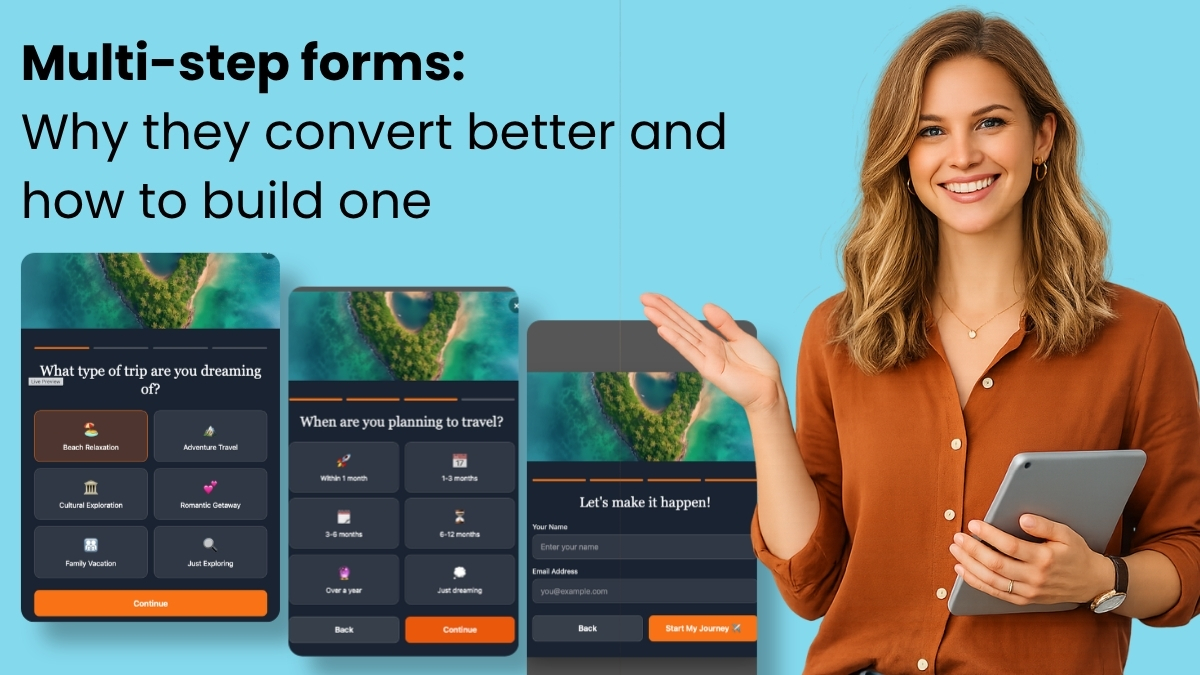
Reduced Perceived Effort: The Illusion of Simplicity
Perhaps the simplest yet most potent factor contributing to the success of multi-step forms is the significant reduction in perceived effort. While the total number of fields and the actual effort required to complete a five-field form remains identical whether presented on one screen or five, the perception of that effort differs dramatically. Five fields crammed onto a single screen can feel like a laborious chore, a substantial amount of “work.”
However, when those same five fields are spread across five distinct screens, the interaction transforms from a daunting task into a series of quick, manageable exchanges, almost like a conversation. Each step feels small and achievable, contributing to an overall impression of speed and ease. The psychological barrier to entry is lowered, as the user is never confronted with the full scope of the task upfront. This perception of reduced effort is critical in today’s fast-paced digital environment, where users have short attention spans and high expectations for seamless interactions.
Crafting Effective Multi-Step Forms: Design Principles
Implementing multi-step forms effectively requires adherence to several key design principles to maximize their benefits and avoid introducing new points of friction. Breaking these rules can negate the advantages and lead to increased abandonment.
-
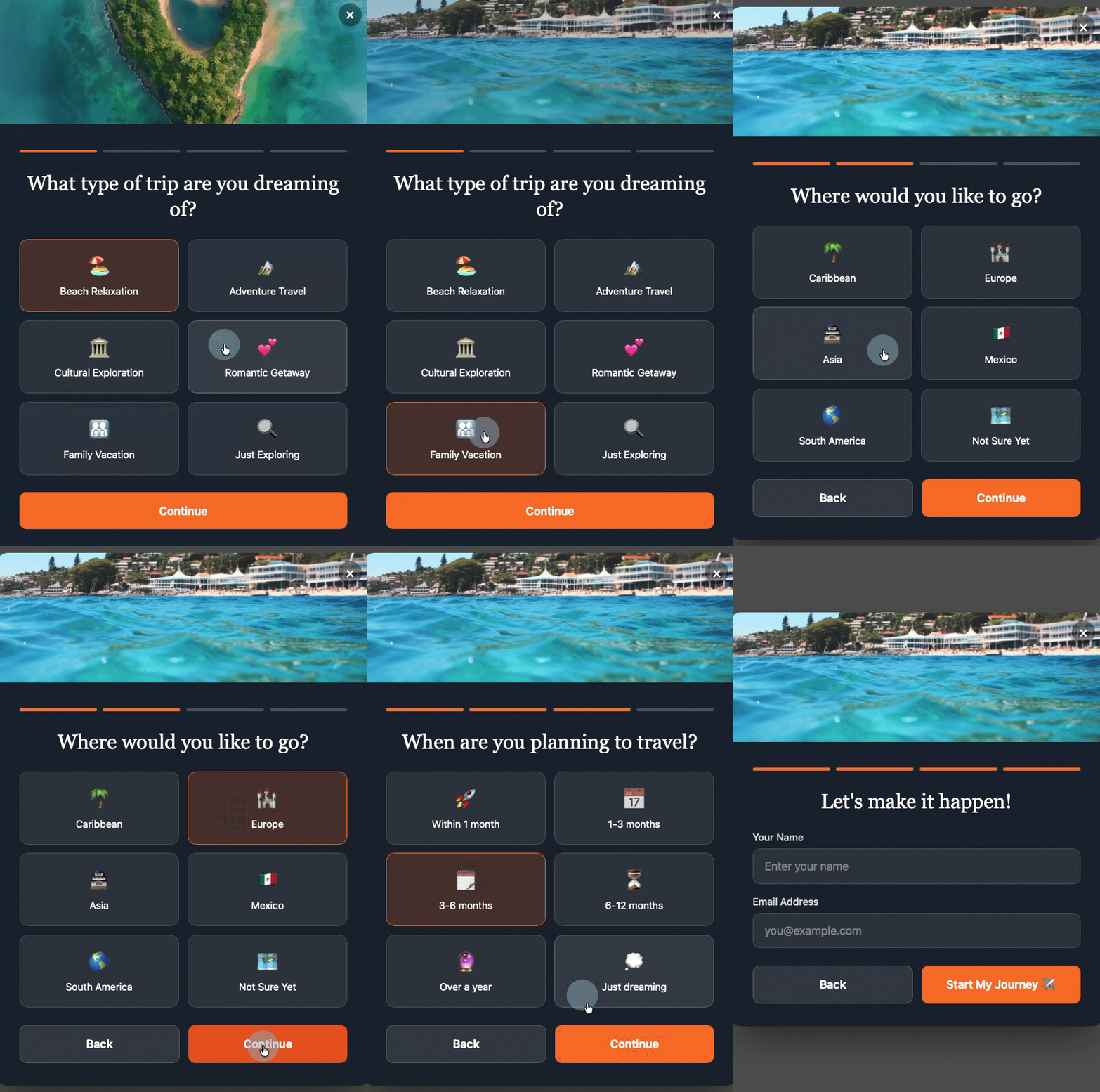
Start with the Easiest Question First: The initial interaction should be virtually effortless. Questions that require minimal thought or effort, such as selecting from a few clickable options (e.g., “What brings you here today?” or “Are you a business owner or an individual?”), are ideal. This approach immediately builds momentum and leverages the completion effect from the outset, rather than demanding personal details like a full name or email address upfront, which can feel intrusive without prior engagement.
-
Maintain a Singular Focus Per Step: The core benefit of multi-step forms—reducing perceived effort and cognitive load—is compromised if a single step begins to feel like a miniature form itself. The golden rule is one question per screen. This ensures clarity, maintains the conversational flow, and prevents users from feeling overwhelmed. If a question has multiple components, consider if it can be further broken down or rephrased for simplicity.
-
Provide Clear Visual Progress Indicators: Uncertainty about the length or remaining duration of a process can generate anxiety and lead to drop-offs. A simple yet effective solution is to incorporate visual cues that clearly indicate progress. This could be a “Step X of Y” counter (e.g., “Step 2 of 4”) or a graphical progress bar that fills as steps are completed. Such indicators provide reassurance, manage expectations, and reinforce the sense of accomplishment, encouraging users to continue.
-
Strategically Position Personal Information: Counterintuitively, placing fields for personal information like name and email address at the very end of the form sequence often yields better results. When visitors answer interest-based or qualifying questions first, they have already invested time and effort into the interaction. By the time they reach the name and email fields, they are more committed to the process, viewing these fields as a natural and necessary conclusion to an already engaged interaction, rather than an initial barrier to entry. This approach leverages the completion effect, making the disclosure of personal data feel less like a demand and more like a final step in a valuable exchange.
-
Ensure Every Question is Purposeful: Critically, every question included in a multi-step form must serve a distinct purpose. If a question is asked merely to fill a step, it should be eliminated. Each response should directly contribute to qualifying the subscriber, enabling segmentation, or personalizing future communications. For instance, questions about interests can map to specific tags or custom fields in an email marketing platform, allowing for highly targeted follow-up.
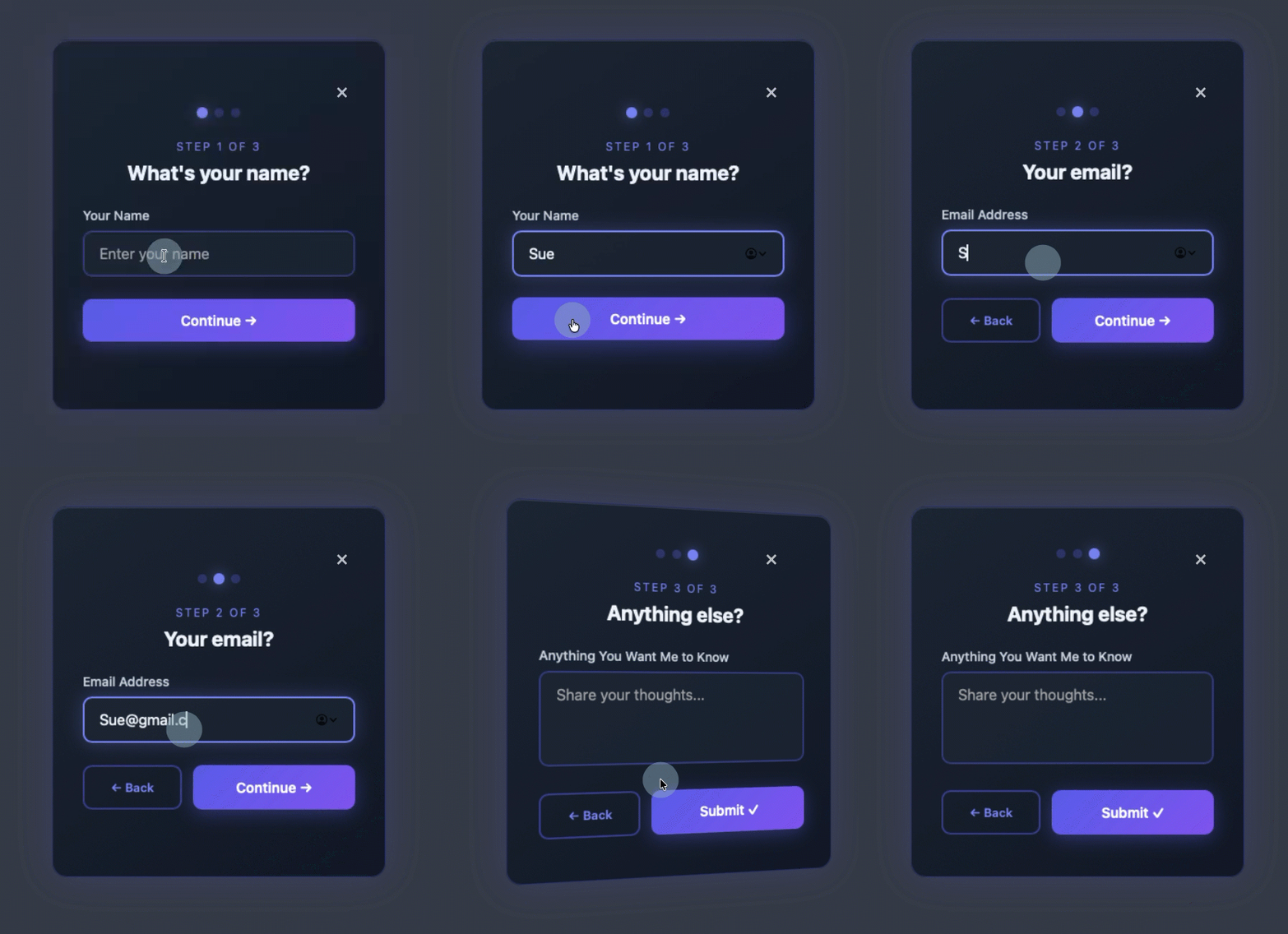
The Evolution of Form Building: AI-Powered Solutions
The traditional method of building multi-step forms often involved complex coding, reliance on rigid templates, or cumbersome drag-and-drop interfaces that still required significant manual configuration. However, the emergence of artificial intelligence (AI) in form creation has revolutionized this process, making sophisticated multi-step forms accessible to businesses of all sizes, regardless of their technical expertise.
The AWeber AI Signup Form Builder exemplifies this paradigm shift. Unlike conventional builders, it allows users to generate fully functional multi-step forms from a single conversational prompt. Users describe their desired form in plain language—for example, “I want a five-question quiz that segments subscribers by interest” or “I need a three-step qualification form for my consulting business”—and the AI handles the rest. This includes generating the form with appropriate animations, transitions, and automatic field mapping. Crucially, the AI also creates the necessary tags and custom fields within the user’s email platform based on the form’s questions and answer options, streamlining the entire data collection and organization process. Users can even upload an image of a form they admire, and the AI will use it as visual inspiration to create a custom form that aligns with their brand and requirements, moving beyond the limitations of generic templates.
Real-World Application: AWeber’s AI Form Builder in Action
The practical power of AI-driven form building was vividly demonstrated by Chris Vasquez, AWeber’s Chief Product Officer, during an episode of “The Shift AI Show.” Vasquez built a multi-step personality quiz live, showcasing the builder’s intuitive capabilities. The AI-powered builder generated a complete quiz, with each question presented on its own screen. Visitors interacted by clicking options rather than typing, further reducing effort. After entering their name and email, the form immediately displayed their personality type on the same page, providing instant gratification.
Beyond the user-facing experience, the backend integration was seamless. The form automatically created custom fields and applied relevant tags in AWeber. For instance, a new contact added during the demo appeared with the tag “personality visionary” already applied. This immediate, automated tagging enables powerful subsequent actions, such as triggering a specific welcome automation sequence tailored to the subscriber’s personality type, driving segmented email sends, or powering dynamic content blocks within future emails. Vasquez underscored the value, noting, “It’s so frictionless for them to give you that info up front. And frankly, it’s kind of fun to interact with, so it almost entices engagement. You don’t have to go, ‘I’ll learn more about them later.’ You can get a lot of that information up front without driving people away.” This statement encapsulates the core value proposition: collecting richer data at the point of signup while simultaneously enhancing the subscriber’s experience.
Transformative Impact on Email Marketing Strategy
Multi-step forms, particularly when powered by AI, do more than just increase subscriber numbers; they fundamentally elevate the quality and utility of collected data, leading to more effective email marketing campaigns.
-
Automated and Granular Segmentation: The tags and custom fields applied during the form completion process enable automatic subscriber segmentation without any manual intervention. For example, a subscriber indicating interest in “vacation getaways” can be automatically sorted into one segment, while another interested in “investment property” goes into a different one. This real-time, precise segmentation allows marketers to build highly targeted lists from day one, ensuring that subsequent communications are relevant to each individual’s expressed preferences.
-
Hyper-Personalized Welcome Sequences: Instead of a generic welcome email for every new subscriber, multi-step forms facilitate the triggering of distinct welcome sequences based on specific answers, quiz results, or qualification criteria. A subscriber who selected “I need help right now” on a qualification form can immediately enter an urgent follow-up sequence, receiving content geared towards immediate solutions. Conversely, someone who chose “just exploring” might enter a nurture sequence designed for broader education and relationship building. This level of personalization dramatically improves initial engagement and sets the stage for a more meaningful customer journey.
-
Dynamic Content Becomes Practical: Modern email platforms, such as AWeber, support dynamic content blocks that display different information within a single email based on subscriber tags. Multi-step forms that apply the right tags at signup make dynamic content immediately actionable. Marketers can send one email that dynamically adjusts its content—such as product recommendations, relevant articles, or service offerings—to each recipient based on the interests or characteristics identified during the signup process. This eliminates the need for manual tagging or waiting to gather more data, allowing for truly personalized communication from the very first send.
Addressing Common Inquiries about Multi-Step Forms
How many steps should a multi-step form have?
Most effective multi-step forms typically range from three to five steps. Fewer than three steps might not fully leverage the benefits of progressive disclosure, as the form could still feel somewhat condensed. More than five steps, however, risks introducing fatigue and increasing drop-off rates, even with the completion effect in play. The optimal number is ultimately dictated by the specific data required. Every step must serve a clear purpose, collecting information that will be actively used for segmentation, personalization, or lead qualification. Unnecessary steps should be removed to maintain efficiency.
Can multi-step forms be built without coding knowledge?
Yes, absolutely. Tools like the AWeber AI Signup Form Builder are designed to empower users without any coding expertise. By simply describing the desired form in plain language—whether it’s a quiz, a qualification flow, or an interest selector—the AI generates a complete, functional multi-step form. This includes all necessary transitions, animations, and automatic mapping of fields to custom fields and tags within the email platform. There is no need for HTML, CSS, or JavaScript, democratizing access to advanced form design.
How do multi-step forms integrate with email automation?
The integration of multi-step forms with email automation is seamless and powerful. Each answer provided in a multi-step form can be configured to apply a specific tag or populate a custom field in the email marketing platform. These tags and custom fields then serve as triggers for various automation sequences. For example, a subscriber selecting “I need help right now” on a qualification quiz can automatically be enrolled in an urgent follow-up sequence, while someone selecting “just exploring” might enter a more general nurture sequence. This immediate, data-driven segmentation ensures that subsequent email automations are highly relevant and timely from the moment of signup.
How are multi-step forms implemented on WordPress sites?
Integrating multi-step forms into a WordPress website is straightforward. Typically, it involves installing a one-time code snippet from the email marketing platform (like AWeber) into the WordPress site’s header, which can be done via theme settings or a dedicated plugin like WPCode. Once this initial snippet is in place, all form creation, management, and updates are handled directly within the email platform’s dashboard. Any form created or modified within the platform is automatically published to the WordPress site. Users retain control over where and when each form appears on their site, and on which devices, all without further modifications to the WordPress code. Future updates, such as the AWeber WordPress plugin, are expected to further simplify this installation process.
What are the best tools for building multi-step forms?
For small businesses and marketers focused on email marketing, AI-powered tools like the AWeber AI Signup Form Builder represent the forefront of multi-step form creation. These tools differentiate themselves from traditional form builders, which often rely on manual drag-and-drop interfaces or pre-built templates. AI builders create comprehensive multi-step forms from conversational prompts, generating branded, functional forms complete with step transitions, custom field mapping, and automatic subscriber tagging. Their inherent integration with email marketing platforms means that all collected data directly feeds into subscriber lists, segments, and automations without the need for complex third-party integrations, offering an all-in-one solution optimized for email marketing success.
Conclusion: A New Era for Lead Capture and Personalization
The evidence is clear: multi-step forms are not just a trend but a strategic imperative for businesses seeking to maximize online conversions and enhance their email marketing efforts. By leveraging deep psychological principles such as progressive disclosure, the completion effect, and reduced perceived effort, these forms transform what was once a source of friction into an engaging, conversational experience. The advent of AI-powered form builders, as exemplified by AWeber, further democratizes access to this powerful technology, enabling marketers to create sophisticated, branded, and highly effective multi-step forms with unprecedented ease.
This fusion of smart design and artificial intelligence promises not only higher conversion rates but also a richer, more actionable dataset from the moment a subscriber joins. The ability to automatically segment, personalize welcome sequences, and drive dynamic content from the very first interaction fundamentally improves the efficacy and ROI of email marketing. As digital engagement continues to evolve, multi-step forms, particularly those intelligently crafted by AI, will remain at the forefront of effective lead capture and customer journey personalization.


 Ammar Sabilarrohman
 Asro
Asro