Visual remixing has emerged as a formidable engine for digital discovery, and nowhere is this more evident than on Pinterest. Far from its traditional perception as a mere platform for planning dream kitchens or saving recipes, Pinterest has quietly, yet powerfully, evolved into a cutting-edge hub for creators, small business owners, and digital strategists. Central to this transformation is the burgeoning popularity of Pinterest collages – layered visuals that are not merely aesthetically pleasing but serve as potent tools for engagement, brand building, and traffic generation. These dynamic visual assets are actively being saved, searched, and shared, signaling a significant shift from fleeting, scroll-and-forget content towards evergreen, high-value inspiration.
The Evolving Landscape of Pinterest and Visual Culture
Pinterest’s evolution reflects broader cultural shifts, particularly among Gen Z and millennials, who prioritize curated visual identities, seamless integration of wellness and productivity, and the meticulous design of their digital lifestyles. The platform, famously described by its co-founder Ben Silbermann as “personal media” rather than social media, thrives on evergreen, searchable content that continues to deliver value weeks, months, and even years after its initial post. This stands in stark contrast to the ephemeral nature of platforms like TikTok, where trends burn brightly and fade quickly, or Instagram, which constantly recalibrates its algorithms and content focus.
The strategic importance of Pinterest cannot be overstated for businesses and creators. According to Pinterest Business, a remarkable 80% of weekly users discover a new brand or product on the platform. This translates into tangible, long-term traffic and conversion potential, distinguishing Pinterest as a critical component of a robust digital marketing strategy. The platform’s emphasis on visual search and discovery aligns perfectly with contemporary consumption habits, where users seek inspiration and solutions in a highly visual format.
Defining the Pinterest Collage Phenomenon
A Pinterest collage is more than just a collection of images; it is a meticulously curated visual narrative, a mood board imbued with a specific mission. It is designed to interrupt the endless scroll, captivate an audience, and compel them to save, explore, and engage. These collages blend creative expression with strategic digital planning, serving as bite-sized branding tools with disproportionately large results. They cater to a visual-first, mood-forward approach to content consumption, optimized for both immediate inspiration and long-term strategic planning.
The current prominence of Pinterest collages can be traced, in part, to the 2022 launch of Shuffles by Pinterest. This standalone app allows users to create interactive collage content directly from existing Pins and their personal photo libraries. Gen Z users rapidly adopted Shuffles, leveraging it as a dynamic medium to explore identity, fashion trends, interior design concepts, and comprehensive lifestyle aesthetics. Modern Retail reported nearly 500,000 downloads of Shuffles on Apple’s App Store within four weeks of its beta release, unequivocally demonstrating that “visual remixing is the new discovery engine.” This user-driven innovation, combined with Pinterest’s ongoing enhancements in AI-powered search, underscores the platform’s commitment to aesthetic-driven content that is not merely seen but actively saved and revisited. Essentially, if a traditional Pin is a single magazine ad, a Pinterest collage is a captivating full-page spread, with the user acting as the creative director.
Key Stakeholders and Strategic Applications
The Pinterest collage trend transcends demographic boundaries and has become integral to how diverse groups create, communicate, and curate online.
-
Creators and Influencers: These individuals leverage collages to craft compelling visual stories that resonate and get shared. A single collage can effectively convey an entire brand mood, showcase seasonal style transitions, or curate a roundup of favorite products, eliminating the need for multiple individual Pins. They utilize collages for content planning, showcasing affiliate products contextually, and mapping out overarching aesthetic visions, leading to higher engagement and affiliate conversions. Fashion creators might map out fall trends, while wellness coaches could illustrate a “Sunday reset” routine, finding that the collage format delivers significant impact and longevity.
-
Small Business Owners and Brands: Pinterest has long been a conduit for product discovery, and collages amplify this by transforming discovery into conversion. Rather than presenting isolated product photos, brands employ collages to provide context, illustrate lifestyle integration, and demonstrate how multiple items complement each other. Examples include fashion brands presenting capsule wardrobes, home decor businesses showcasing room transformations, or beauty brands detailing multi-step routines. This approach functions as a highly effective digital storefront display, offering a cohesive visual narrative that encourages deeper exploration and purchase decisions.
-
Coaches, Educators, and Thought Leaders: For these professionals, Pinterest collages act as digestible content libraries. They serve as powerful visual aids to explain complex concepts in an easily scrollable format, extending the lifespan of educational content far beyond typical social media posts. Use cases include breaking down course modules, illustrating key concepts, providing actionable step-by-step guides, and offering motivational content. These collages can also be repurposed efficiently as email content, digital products, or printables, expanding their utility and reach.
-
Everyday Users (Pinterest’s Power Base): This demographic forms the bedrock of Pinterest’s success. From DIY enthusiasts planning events to individuals curating minimalist capsule wardrobes, collages facilitate visual planning and personal expression. Popular themes encompass dream home renovations, travel itineraries, self-care routines, and event planning. Collages allow users to not just collect ideas but to actively construct a visual reflection of their aspirations and identity, offering a sense of control and creative calm in a busy digital world. The core takeaway is that Pinterest collages empower individuals to express themselves, enable businesses to sell smarter, and facilitate more intentional planning online.
Categorization of Pinterest Collages
Pinterest collages are a versatile medium, manifesting in several distinct types:
-
Vision Board Collages: A foundational use, these collages visualize goals and aspirations, often incorporating images, motivational quotes, and affirmations to create powerful visual representations of personal or professional objectives.
-
Style and Aesthetic Collages: These focus on fashion trends, personal sartorial choices, or specific visual aesthetics, blending outfit ideas, accessories, and color schemes into cohesive looks.
-
Seasonal Mood Boards: Capturing the essence of a particular time of year, these combine colors, activities, and themes to inspire fashion, home decor, and lifestyle choices relevant to the season.
-
Product Collages: Utilized by brands and influencers, these showcase multiple products within a single, appealing image, effectively promoting items and driving sales by illustrating context and complementarity.
-
Color Palette Guides: Focused on specific color schemes, these collages provide inspiration for design projects, fashion, or home decor, often displaying swatches or exemplary imagery.
-
Quote + Image Mashups: These collages combine inspirational quotes with relevant imagery to evoke emotion and resonate with viewers, frequently shared for personal development and motivational purposes.
-
Mobile Pinterest Collages (Shuffles): Created directly within the Pinterest mobile app, particularly via Shuffles, these interactive collages utilize cutouts from existing Pins and personal photos, resulting in dynamic and highly personalized content.
Each type offers unique avenues for creative expression, idea sharing, and audience engagement, providing a rich toolkit for diverse content strategies.
Crafting Effective Pinterest Collages: A Practical Guide
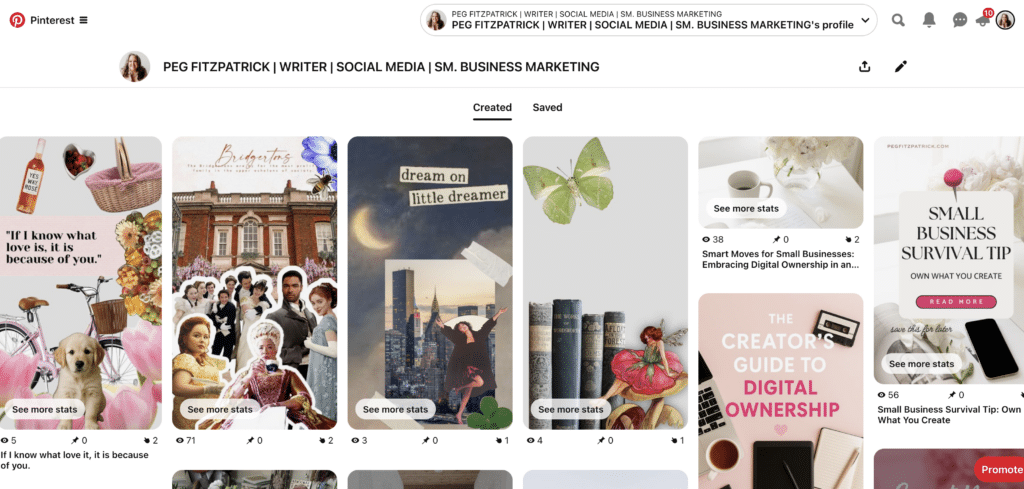
The creation of a Pinterest collage blends artistic vision with strategic intent. Whether leveraging Pinterest’s native tools or external design platforms, the process should be purposeful, aiming to connect instantly with the target audience.
Option 1: Using Pinterest’s Native Collage Tool (Mobile Only)
Pinterest has integrated its own collage feature, echoing the dynamic capabilities of its Shuffles app. To create one directly in the Pinterest mobile application:
- Open the Pinterest app and tap the ‘+’ icon.
- Select ‘Pin’ and then ‘Collage’ from the options.
- Choose images from your camera roll or select existing Pins.
- Utilize the editing tools to cut out elements, resize, layer, and add text or stickers.
- Arrange the elements creatively to form your visual narrative.
- Add a descriptive title and a rich description with relevant keywords.
- Select a relevant board to save your collage.
- Add a destination link if applicable, directing users to more information or a product page.
This method leverages the platform’s internal algorithms, potentially boosting reach.
Option 2: Designing a Pinterest Collage with Canva
Canva is the preferred tool for many creators seeking branded and polished collages.
- Open Canva and select a custom size for Pinterest Pins (typically 1000 x 1500 pixels for a vertical format).
- Browse Canva’s extensive library of templates or start from scratch.
- Upload your chosen images or select from Canva’s stock photo collection.
- Arrange and layer images, applying filters, effects, and text overlays to enhance the visual story.
- Incorporate your brand elements, such as consistent fonts, colors, and a subtle logo.
- Ensure mobile optimization by testing how the design appears on a smartphone screen.
- Download the finished collage as a high-quality JPEG or PNG.
- Upload the image to Pinterest, adding a keyword-rich title, description, and a compelling destination link.
Saving a custom template in Canva allows for efficient reuse, streamlining the creation of themed series or seasonal content.
Bonus Tools for Deeper Creation:
For advanced users, tools like Adobe Express, PicMonkey, and Figma offer more sophisticated editing and design functionalities, allowing for greater creative control and professional-grade collages. The objective is to make the collage-making process enjoyable yet strategic, ensuring content longevity and impact.
Maximizing Reach: Pinterest SEO for Collages
Creating visually striking collages is only half the battle; ensuring their discoverability and sustained engagement requires robust SEO.
-
Optimize Pin Title and Description:
- Keyword Research: Utilize Pinterest’s search bar, related searches, and the Pinterest Trends tool to identify high-volume keywords and long-tail phrases relevant to your collage’s content.
- Natural Integration: Incorporate these keywords naturally into your title and description. Avoid keyword stuffing, focusing instead on clear, descriptive language that accurately reflects the collage’s theme.
- Call to Action: Include a subtle call to action within the description, encouraging saves, clicks, or visits to your linked content.
-
Incorporate Hashtags Strategically:
- Relevance is Key: Use 5-10 highly relevant hashtags that categorize your content. Think broadly and specifically (e.g., #MinimalistDecor #ScandinavianStyle #HomeInspiration #LivingRoomGoals).
- Shuffles App: Hashtags remain particularly powerful within the Shuffles app for content discovery, offering an additional avenue for visibility.
-
Design with SEO in Mind:
- Text Overlays: Integrate key phrases or questions directly onto your collage image. Pinterest’s AI can read text overlays, enhancing discoverability.
- High-Quality Imagery: Use clear, high-resolution images that are visually appealing and relevant. Pinterest prioritizes quality content.
- Vertical Format: Optimize for Pinterest’s preferred 2:3 aspect ratio (e.g., 1000×1500 pixels) to maximize screen real estate on mobile devices.
-
Engage with the Community:
- Re-pinning: Regularly re-pin your best-performing collages to relevant boards, including group boards if applicable, to expand their reach.
- Comments and Saves: Encourage interaction by responding to comments and creating content that inherently encourages saves.
-
Monitor Performance and Adjust:
- Pinterest Analytics: Regularly check your Pinterest Business Hub for insights into impressions, saves, outbound clicks, and engagement rates.
- Iterative Improvement: Use this data to identify what resonates with your audience and refine your future collage creation strategy.
By meticulously implementing these SEO strategies, Pinterest collages can transcend mere aesthetics to become powerful, long-lasting assets that significantly bolster a brand’s presence and engagement on the platform.
Driving Action: Using Collages to Generate Traffic
The true power of a Pinterest collage lies in its ability to convert inspiration into action, guiding users to external websites, online shops, or newsletters. This is achieved by transforming scroll-stopping visuals into effective traffic-generating mechanisms.
-
Every Pin Needs a Destination: Even abstract “vibe” collages should link to a helpful resource. This could be a blog post offering more details, a product collection featured in the collage, a sign-up page for a newsletter related to the theme, or a landing page for a free resource. The critical element is providing a clear action step, preventing users from being left in “moodboard limbo.”
-
Match the Collage to the Link: A common pitfall is linking a specific collage (e.g., “Fall Slow Fashion”) to a generic homepage. Optimal results stem from precise alignment: the collage should link directly to the specific blog post, product category, or collection it highlights. This enhances user experience, reduces bounce rates, and increases the likelihood of conversion.
-
Strategic Multi-Board Saving: Do not limit a collage to a single board. Schedule its appearance on several relevant boards over time. For instance, a collage on “clean girl skincare” could be pinned to boards titled “Skincare Routines,” “Self-Care Essentials,” “Beauty Favorites,” and “Morning Rituals.” Distribute these saves naturally to avoid appearing spammy.
-
Intelligent Repurposing: A single, well-crafted Pinterest collage can fuel an entire content cycle. Repurpose it across other digital channels:
- Instagram Stories/Reels: Break down elements of the collage or use it as inspiration.
- Email Newsletters: Embed the collage to visually introduce a topic or product.
- Blog Posts: Feature the collage as a visual summary or introduction.
- Digital Products: Incorporate elements into lead magnets or printables.
-
Leveraging Idea Pins and Shuffles for Engagement: While Idea Pins and Shuffles collages may not always allow direct outbound links, they are invaluable for maximizing reach and engagement. Use them to:
- Build Brand Awareness: Showcase your aesthetic and expertise.
- Grow Your Audience: Attract new followers through highly engaging, shareable content.
- Educate and Inspire: Deliver value through multi-frame stories or interactive visual narratives.
- Drive Indirect Traffic: Mention your website or store in the text overlay or description, encouraging users to visit your profile for links.
-
Track What’s Working: Pinterest Analytics is crucial. Monitor impressions, saves, outbound clicks, and the specific content that drives traffic. Identify patterns in colors, layouts, topics, and keywords that perform best, then strategically create more of what resonates. This data-driven approach transforms inspiration into measurable results.
Analytics and Continuous Optimization
Pinterest provides robust analytical tools that offer direct insights into content performance. Leveraging this data is essential for smart creators to build momentum and refine their strategies.
Starting with Pinterest Analytics:
Navigate to your Pinterest Business Hub and examine key metrics:
- Impressions: How many times your collages were seen.
- Saves: How often users saved your collages to their boards.
- Outbound Clicks: The number of times users clicked through to your linked destination.
- Engagement Rate: A measure of how interactive your content is (saves, clicks, comments).
- Top Pins/Boards: Identify your highest-performing content and the boards that generate the most engagement.
The objective is to identify consistent patterns: which visual styles, color palettes, layouts, or topics are driving both saves and clicks?
What to Watch in Collage Performance:
- Visual Style: Are bright, minimalist, or moody aesthetics performing best?
- Content Themes: Which topics or solutions resonate most deeply with your audience?
- Layout Variations: Do grid, layered, or scattered arrangements generate more interaction?
- Text Overlays: Are specific calls to action or embedded keywords more effective?
- Destination Links: Which linked content is driving the most valuable traffic (e.g., purchases, sign-ups)?
Utilizing the Pinterest Trends Tool:
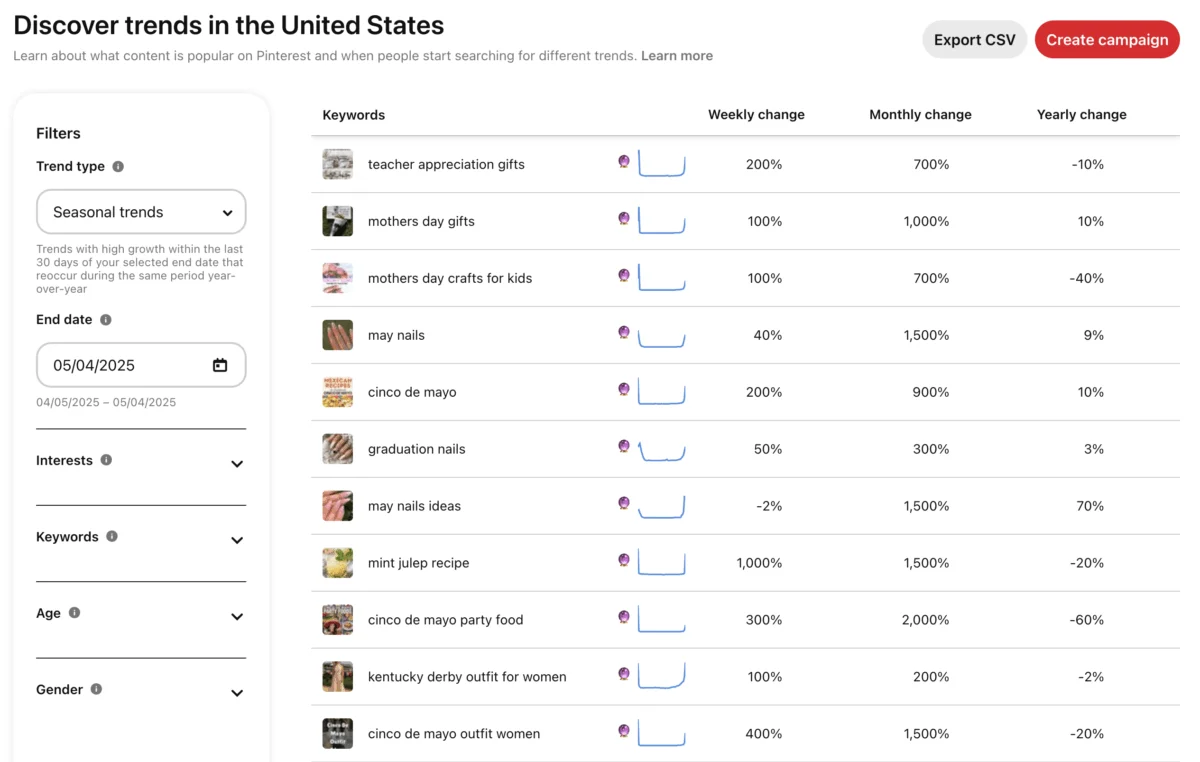
The Pinterest Trends tool acts as a predictive resource, revealing what users are actively searching for before trends reach their peak. By searching terms like “aesthetic room decor,” “sustainable fashion,” “mindful living,” or “digital nomad setup,” creators can identify rising demand. The strategy involves creating collages around these emerging trends preemptively, positioning content at the forefront of search results as the wave builds.

Test, Tweak, Repeat:
Not every collage will go viral, but consistent experimentation is rewarded. Implement A/B testing for various elements:
- Layouts and Composition: Experiment with different arrangements of images.
- Color Schemes: Test vibrant versus muted palettes.
- Text Overlays and Fonts: Vary messaging and typography.
- Call to Actions: Compare explicit versus subtle prompts.
- Pin Titles and Descriptions: Test different keyword combinations.
Small, iterative tweaks based on data can yield significant insights and optimize future content.
Observing Competitors and Niche Leaders:
Researching how others in your niche are utilizing collages provides valuable clues. Search for “Pinterest collage” combined with your industry keywords to identify:
- Popular Visual Styles: What aesthetic trends are dominating?
- Engagement Triggers: What types of content are eliciting the most saves and clicks?
- Successful Content Formats: Are they using static, Idea Pins, or Shuffles predominantly?
Pinterest success isn’t about reinvention but about showing up strategically with fresh, on-brand visuals aligned with existing search intent.
Common Mistakes to Avoid
While Pinterest offers significant rewards, several common missteps can hinder a collage’s effectiveness:
-
Overdesigning or Overcrowding: A collage should be a clear visual story, not a cluttered scrapbook. Too many images, fonts, or excessive text can overwhelm viewers. Prioritize flow, visual hierarchy, and sufficient white space to allow images to breathe.
-
Ignoring Mobile Optimization: With over 80% of Pinterest traffic originating from mobile devices, a collage that looks pristine on a desktop but is illegible on a phone will fail. Always test designs at smartphone scale before publishing.
-
Lack of Clear Focus or CTA: Every collage needs a purpose. Without a clear message or a soft call to action, viewers are left without direction. Ensure your collage leads somewhere – a blog post, a product, or a concept – providing a reason to click or save.
-
Weak or Missing Keywords: If Pinterest’s algorithm cannot understand your collage’s content, it cannot present it to the right audience. Neglecting keyword research or using vague titles like “spring thingz” will severely limit discoverability. Employ real, searchable phrases.
-
Forgetting to Link Out (or Linking Incorrectly): Collages uploaded as Idea Pins without a clear next step, or linking a skincare mood board to a generic homepage instead of the specific product collection, are missed opportunities. Every Pin needs a logical, specific destination.
-
Relying Only on Static Pins: While static Pins are effective, Pinterest increasingly favors engagement-rich content, including videos and dynamic collages from Shuffles. Exclusively using static Pins means missing out on potential algorithmic boosts.
-
Posting Once, Then Ghosting: Collages are evergreen, but consistent presence is still valued. Re-pin your top-performing collages to different boards, update seasonal content with fresh variations, and maintain a consistent posting schedule to keep the flywheel turning.
Avoiding these pitfalls requires a strategic approach and a willingness to refine tactics, ensuring your Pinterest collages work as diligently as you do.
Advanced Tips and Creative Ideas
Beyond the fundamentals, advanced strategies can elevate Pinterest collages, fostering deeper engagement, building trust, and ensuring sustained traffic.
-
Create a Collage Series: Instead of isolated Pins, develop cohesive series that encourage binge-worthy consumption. Examples include “Weekly Wardrobe Edits,” “Monthly Goal Setting Vibes,” or “Seasonal Home Refresh Guides.” Maintain a consistent layout or design template for immediate brand recognition.
-
Lean Into Themes That Spark Emotion or Utility: Pinterest users are typically planners and dreamers. Collages that offer solutions or evoke a desired feeling are gold. Themes such as “Mindful Morning Routines,” “Productivity Hacks for Creatives,” “Sustainable Living Swaps,” or “Cozy Winter Reading Nooks” resonate deeply.
-
Collaborate for Shared Reach: Partner with creators or businesses in complementary niches to create collages that mutually benefit both audiences. For instance, one partner could create “Minimalist Home Office Ideas” while the other creates “Digital Tools for Entrepreneurs,” cross-promoting each other’s content.
-
Reuse High-Performing Content in New Formats: Transform successful content into collages, and vice versa. If a blog post is thriving, condense its key visuals into a collage. If a collage performs well, remix it into:
- Video Pin: Animate elements or add music.
- Idea Pin: Create a multi-frame story expanding on the collage’s theme.
- Infographic: Turn data or steps into a visually digestible format.
-
Add Subtle Brand Elements: Instead of overt advertising, integrate branding subtly. Use a consistent color palette, specific font pairings, a minimal watermark, or a signature visual style. People save content that inspires, not advertises.
-
Tap Into Nostalgia and Pop Culture: Pinterest’s millennial and Gen Z user base appreciates cultural references. Collage ideas like “90s Rom-Com Fashion Inspo,” “Dark Academia Aesthetic,” “Y2K Throwback Outfits,” or “Coastal Grandmother Style” can generate significant engagement.
Pinterest collages are more than just pretty pictures; they are a visual language that audiences already understand. By approaching their creation with intention and strategic insight, content creators can ensure their visuals are not just saved but remembered and acted upon.
Your Turn – Get Started on a Pinterest Collage
The strategic framework has been laid out, the examples provided, and the power of a well-executed Pinterest collage underscored. Now, the opportunity lies in application. Whether your objective is brand building, life planning, or simply creating engaging content that resonates, Pinterest collages offer a streamlined path to standing out without succumbing to burnout.
To begin your journey with Pinterest collages today:
- Define Your Goal: What do you want your collage to achieve (e.g., drive traffic, inspire, showcase products)?
- Identify Your Audience: Who are you trying to reach, and what are their visual preferences and pain points?
- Brainstorm Themes: Leverage Pinterest Trends to find relevant and popular topics.
- Gather Visuals: Curate high-quality images that align with your theme and brand aesthetic.
- Choose Your Tool: Decide whether to use Pinterest’s native mobile tool or a design platform like Canva.
- Design with Purpose: Focus on clarity, visual hierarchy, and mobile optimization.
- Optimize for SEO: Craft keyword-rich titles and descriptions, and use relevant hashtags.
- Add a Destination Link: Ensure your collage directs users to a logical and valuable next step.
- Schedule and Promote: Pin to multiple relevant boards and consider repurposing across other platforms.
- Analyze and Adapt: Monitor performance using Pinterest Analytics to refine your strategy continuously.
Success on Pinterest is not about virality, but about consistent, strategic presence with visuals that connect and content that endures. Start where you are, pin with purpose, and build content that works smarter than the algorithm.