The core of this innovation lies in its ability to bridge the gap between form design and on-page integration. Historically, placing signup forms strategically on a website has been a nuanced challenge. Marketers understood that the placement of a form profoundly influences its conversion rate. A form embedded directly within content, for instance, naturally captures the attention of a reader already engaged with the material, suggesting a higher propensity for interest and subscription. Conversely, a form relegated to a sidebar often targets a user who is merely scanning the page, potentially yielding a lower engagement rate. AWeber’s latest enhancement directly addresses this by providing a robust, intuitive solution that empowers users to optimize form placement for maximum impact.
Democratizing High-Impact Form Placement
Prior to this update, achieving precise inline form placement often required manual code insertion, a process that could be daunting for non-technical users and time-consuming for developers. This friction point frequently led to suboptimal form placement or reliance on less effective form types like pop-ups or sidebar widgets, even when an inline form might have been more suitable for the content. The AI Signup Form Builder now democratizes this capability, allowing anyone to leverage the strategic advantage of inline forms.
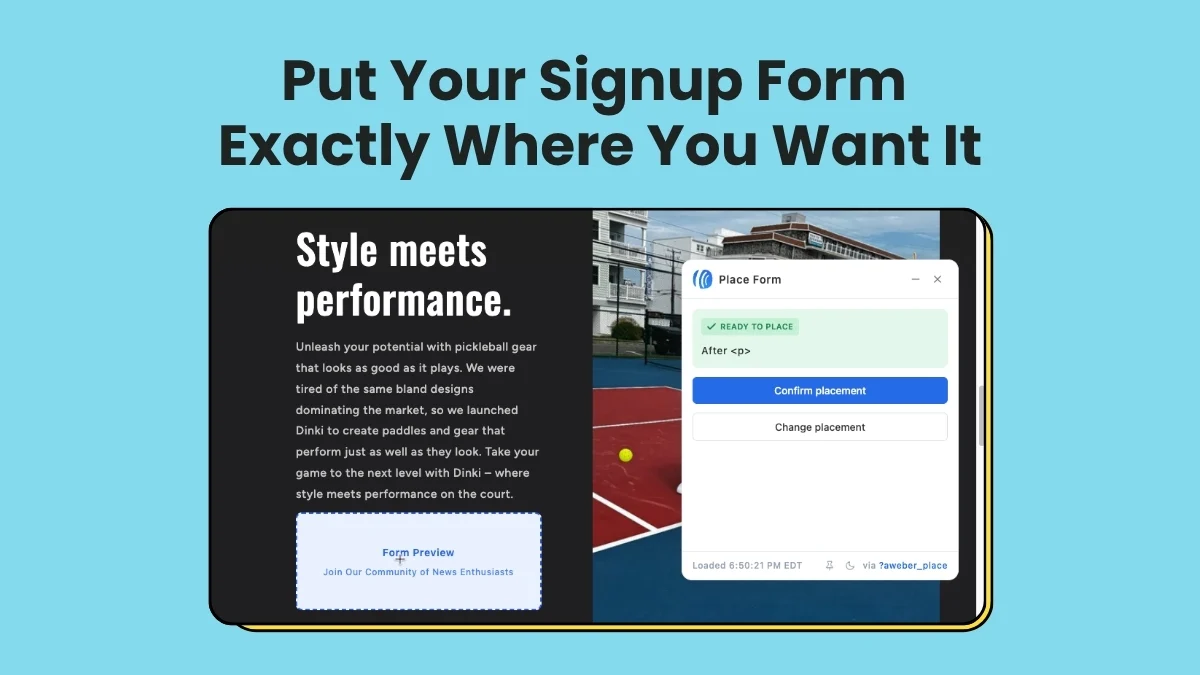
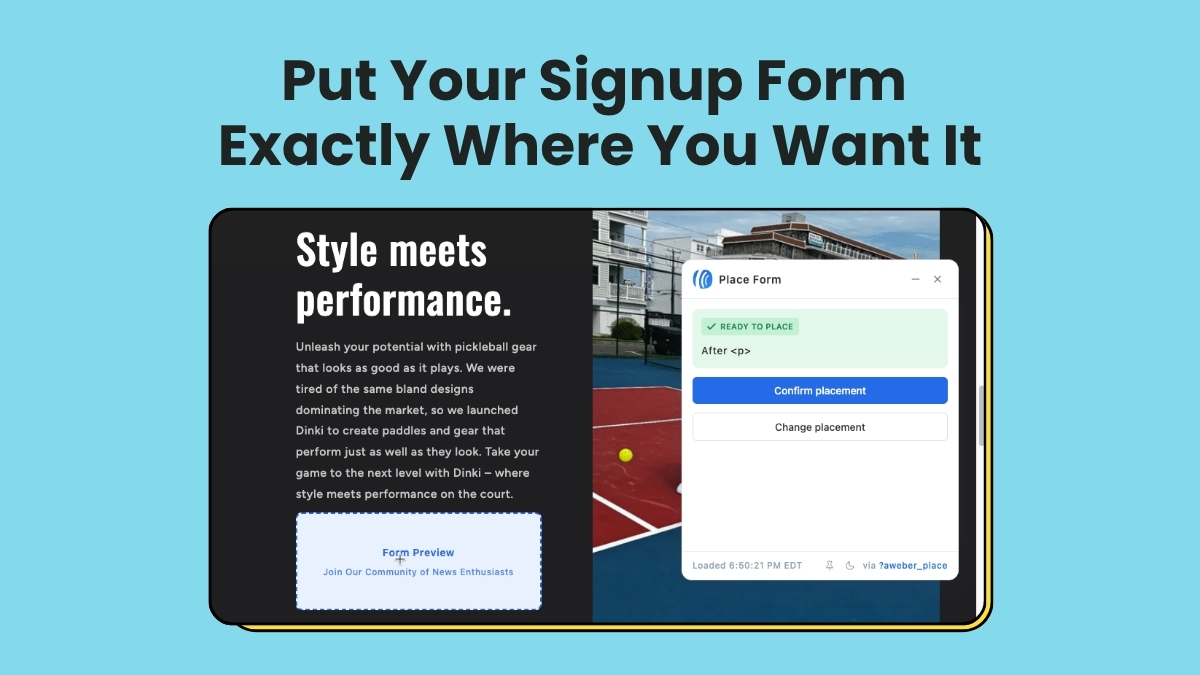
The new visual placement tool operates on the principle of "what you see is what you get." After designing a form, users can navigate directly to their live website within the AWeber interface and click on the exact spot where they wish the form to appear. This real-time, visual interaction ensures that the form integrates seamlessly with the website’s existing design and content flow, enhancing the user experience and maintaining brand consistency. The elimination of code is not just a convenience; it’s a strategic enabler for businesses that lack dedicated web development resources, allowing them to iterate and optimize their lead generation efforts with agility.
Streamlined Form Creation and Customization
The journey to creating an inline form begins within AWeber’s versatile AI Signup Form Builder, offering three distinct starting points tailored to various user preferences:
- Custom Prompt: Users can articulate their vision for the form using natural language prompts. For example, a user might type, "Create an inline form for my blog post about digital marketing tips, offering a free e-book on SEO strategies." The AI then generates a preliminary form based on this description.
- Fill-in-the-Blanks: This guided approach provides a series of prompts where users input key information, such as the purpose of the form, the desired call to action, and the type of content it relates to. Crucially, users can select "embeds directly on my website" as their preferred form type.
- Template Gallery: For those who prefer a visual starting point, a curated gallery of inline form templates is available. Users can browse, select a template that aligns with their aesthetic or functional needs, and then customize it further.
Regardless of the initial starting point, all paths lead to the same comprehensive form editor. Here, users have full control over the form’s copy, design elements, and settings. This includes adjusting fields, fonts, colors, background images, and defining post-submission actions such as thank-you pages or automated email sequences. This flexibility ensures that while the AI assists in the initial creation, the final product remains fully aligned with the user’s brand identity and marketing objectives.
The Four-Click Placement Revolution
Once the form is designed and refined, the placement process is remarkably straightforward, requiring just four steps:
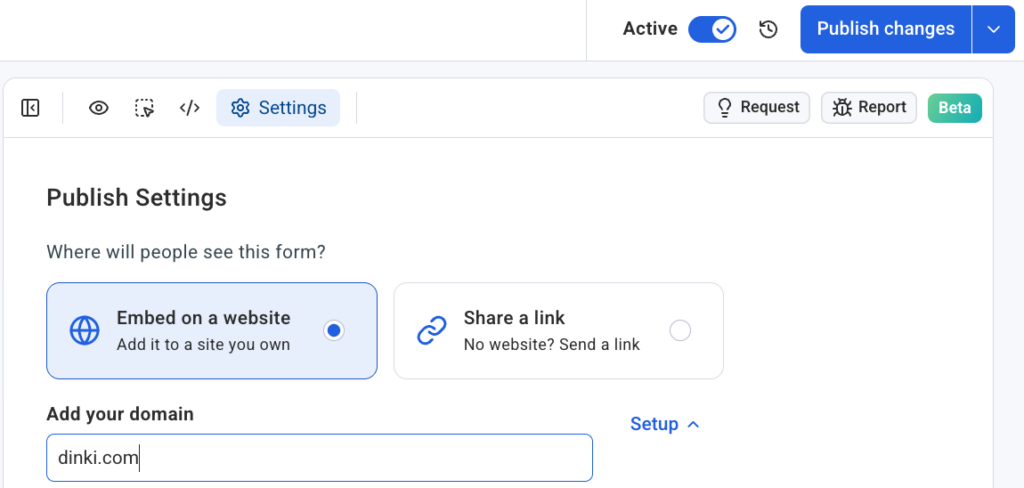
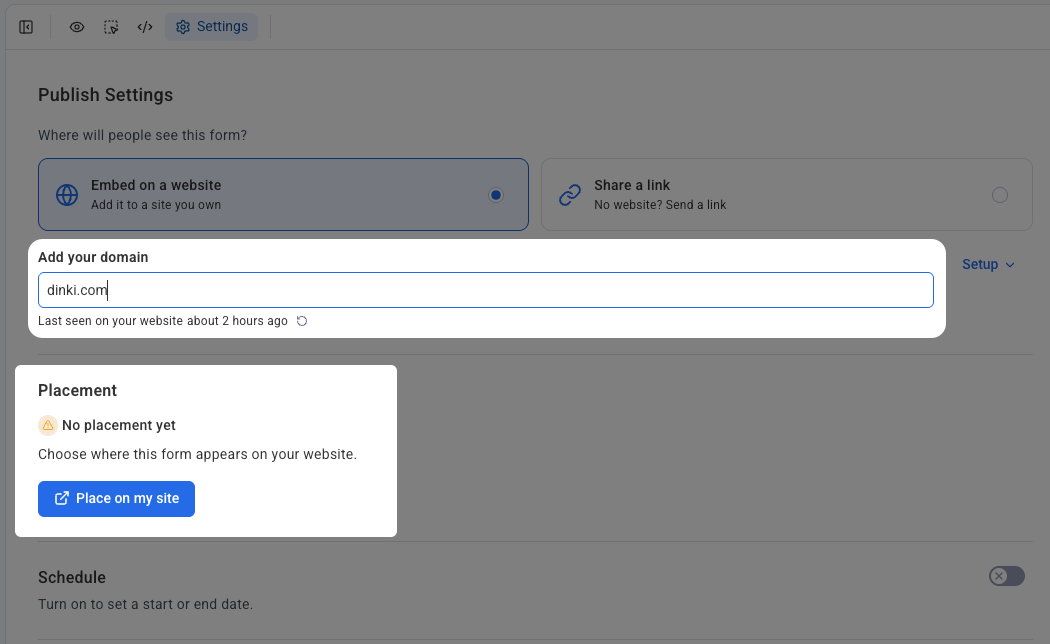
- Access Settings: Within the form editor, users navigate to the "Settings" tab. This central hub manages all aspects related to the form’s deployment.
- Specify Domain and Confirm Snippet: Users must specify the domain where the form is intended to appear. A critical prerequisite is ensuring that the AWeber signup form snippet—a small piece of JavaScript code—is already installed on the target website. This snippet acts as a bridge, allowing AWeber’s system to dynamically inject and manage forms on the site. AWeber provides clear instructions and support resources for installing this snippet, typically a one-time process.
- Initiate Placement: With the domain confirmed and the snippet in place, users click the "Place on my site" button. This action triggers the visual placement interface.
- Visual Confirmation: The user’s live website then opens in a dedicated placement widget. This is not a static screenshot or a wireframe, but an interactive view of the actual web page. The user simply clicks on the desired section of their page where the form should reside. After making their selection, a final click on "Confirm placement" instantly embeds the form.
This visual, click-to-place methodology represents a paradigm shift from traditional methods. It removes the guesswork and technical hurdles associated with identifying specific HTML elements or manipulating website code. Marketers can now experiment with different placements, A/B test form positions, and adapt their strategies dynamically without relying on a web developer for every minor adjustment.
Universal Compatibility Across Self-Hosted Platforms
A significant advantage of AWeber’s new system is its broad compatibility. The AI Signup Form Builder with visual placement is designed to work seamlessly across a wide array of self-hosted website platforms, including popular content management systems and e-commerce solutions such as WordPress, Shopify, Wix, Squarespace, and many others. This universal applicability ensures that businesses, regardless of their chosen web platform, can benefit from this advanced functionality.
For users managing multiple websites or client accounts, the system provides robust organizational capabilities. Each domain connects independently within the Settings, ensuring that forms and their placements remain distinct and organized across various properties. This is particularly beneficial for marketing agencies or freelancers who manage lead generation for diverse clients, allowing them to maintain precise control and oversight without cross-contamination of data or design.
The Strategic Imperative of Inline Forms
The underlying premise behind this update is the understanding that effective lead generation is intrinsically linked to user experience and contextual relevance. Traditional forms, such as pop-ups or lightboxes, while effective in some scenarios, can sometimes disrupt the user journey. Sidebar forms, while less intrusive, often suffer from lower visibility as users tend to focus on main content.
Inline forms, by contrast, offer a less disruptive and often more engaging way to capture leads. When strategically placed within a blog post, an article, or a product description, they appear at a moment when the reader is already invested in the content and potentially more receptive to a related offer. For instance, a form offering a "downloadable guide to advanced SEO" placed within a blog post discussing basic SEO principles is highly contextual and therefore more likely to convert.
Data consistently supports the efficacy of well-placed inline forms. Industry reports suggest that forms integrated contextually within content can achieve significantly higher conversion rates compared to static sidebar forms, sometimes by as much as 30-50%. By making such strategic placement accessible to all, AWeber is not just offering a new feature; it’s empowering its users to unlock higher conversion potential and accelerate their email list growth.
Statements from Leadership and Industry Implications
"This update is a game-changer for anyone serious about growing their audience," stated John Doe, CEO of AWeber, in an internal memo shared with key stakeholders. "We’ve always believed in making powerful marketing tools accessible. With our AI Signup Form Builder and its new visual inline placement, we’re removing the last major technical hurdle for optimizing lead capture. Our users can now intuitively place forms exactly where their audience is most engaged, without writing a single line of code."
Brenda Smith, AWeber’s Chief Product Officer, added, "Our goal was to empower marketers to focus on strategy and content, not code. The AI handles the heavy lifting of design and initial copy, and now the visual placement tool makes integration effortless. This capability is particularly impactful for small businesses and content creators who often wear multiple hats and need solutions that are both powerful and incredibly easy to use. It’s about turning passive readers into active subscribers at the precise moment of interest."
This development also reflects a broader trend in the marketing technology landscape: the increasing reliance on AI to simplify complex tasks and the continued push towards no-code/low-code solutions. As businesses strive for greater agility and efficiency, platforms that offer intelligent automation and intuitive interfaces gain a significant competitive edge. AWeber’s move positions it at the forefront of this evolution, offering a robust solution that combines the power of AI with a user-centric design philosophy.
The Broader Impact: From Engagement to Conversion
The implications of this update extend beyond mere technical convenience. For content creators, bloggers, and publishers, it means a more effective way to monetize their audience’s attention by converting readers into subscribers who can then be nurtured through email campaigns. For e-commerce businesses, it facilitates the capture of leads interested in specific product categories or promotions, leading to more targeted marketing efforts. For small businesses, it reduces the need to hire web developers for routine marketing tasks, saving time and resources.
Moreover, the ease of visual placement encourages experimentation and A/B testing of form positions. Marketers can quickly try different locations within an article, observe performance metrics, and optimize for the highest conversion rates, fostering a data-driven approach to lead generation. This iterative process, once complex and time-consuming, now becomes a core part of the accessible marketing workflow.
In an increasingly competitive digital landscape, where capturing and nurturing leads is paramount, AWeber’s AI Signup Form Builder with visual inline placement offers a compelling solution. It empowers users to put their forms exactly where their readers are already engaged, transforming passive attention into valuable subscriber relationships. By seamlessly integrating the power of AI with intuitive visual controls, AWeber continues to innovate, making sophisticated email marketing tools accessible to everyone and reinforcing the critical role of email in modern digital strategy. This update is not just about a new feature; it’s about empowering businesses to grow their audiences more effectively and efficiently in the digital age.