The digital marketing landscape is perpetually evolving, with businesses constantly seeking innovative strategies to capture audience attention and convert leads into loyal customers. A critical component in this pursuit is the ubiquitous online form, a gateway for data collection and engagement. Recent advancements highlight a significant shift from traditional single-page forms to multi-step forms, a design choice now empirically proven to dramatically increase conversion rates. This evolution is underpinned by psychological principles that streamline the user experience, making the process feel less daunting and more conversational. Leading this charge in accessible innovation, AWeber, a prominent email marketing service, has recently unveiled an AI Signup Form Builder, promising to democratize the creation of these high-converting forms for businesses of all sizes.
The Conversion Catalyst: Understanding Multi-Step Forms
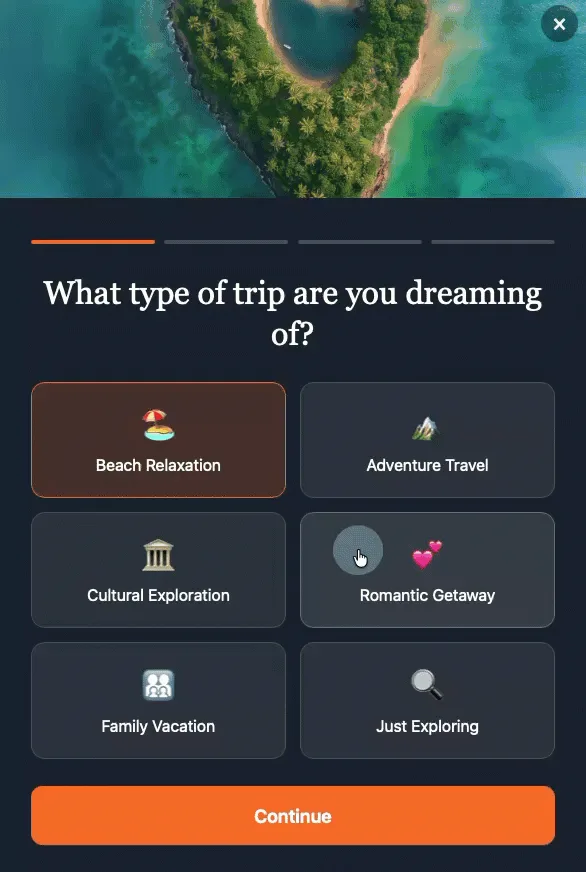
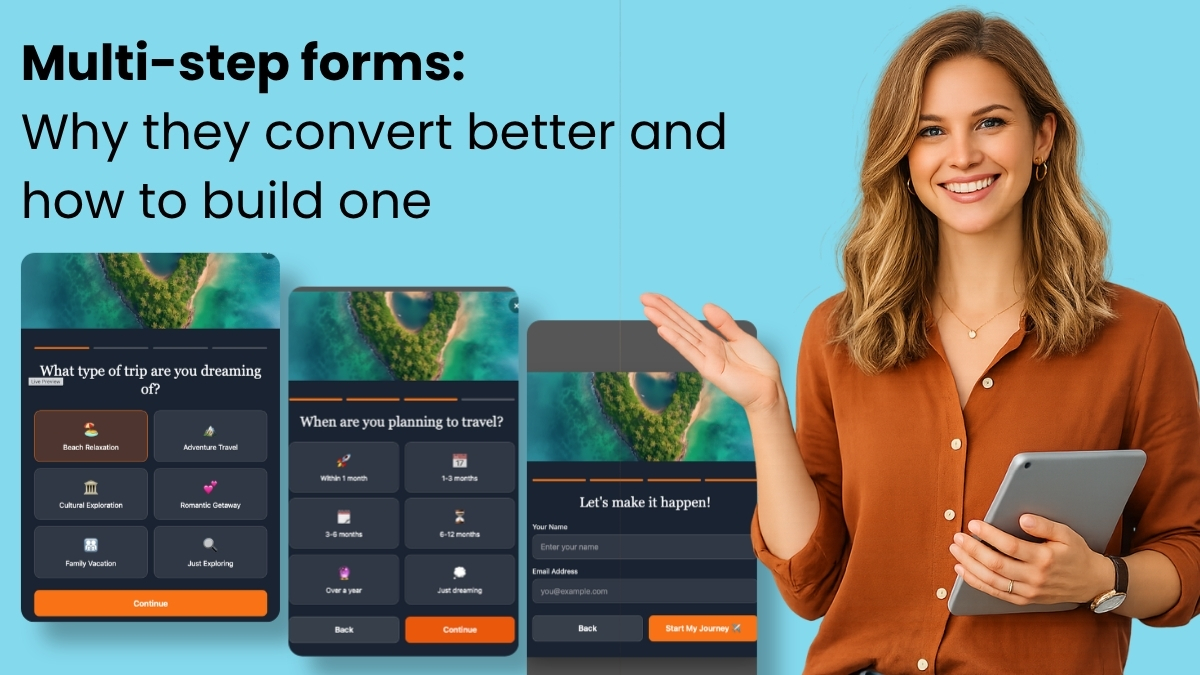
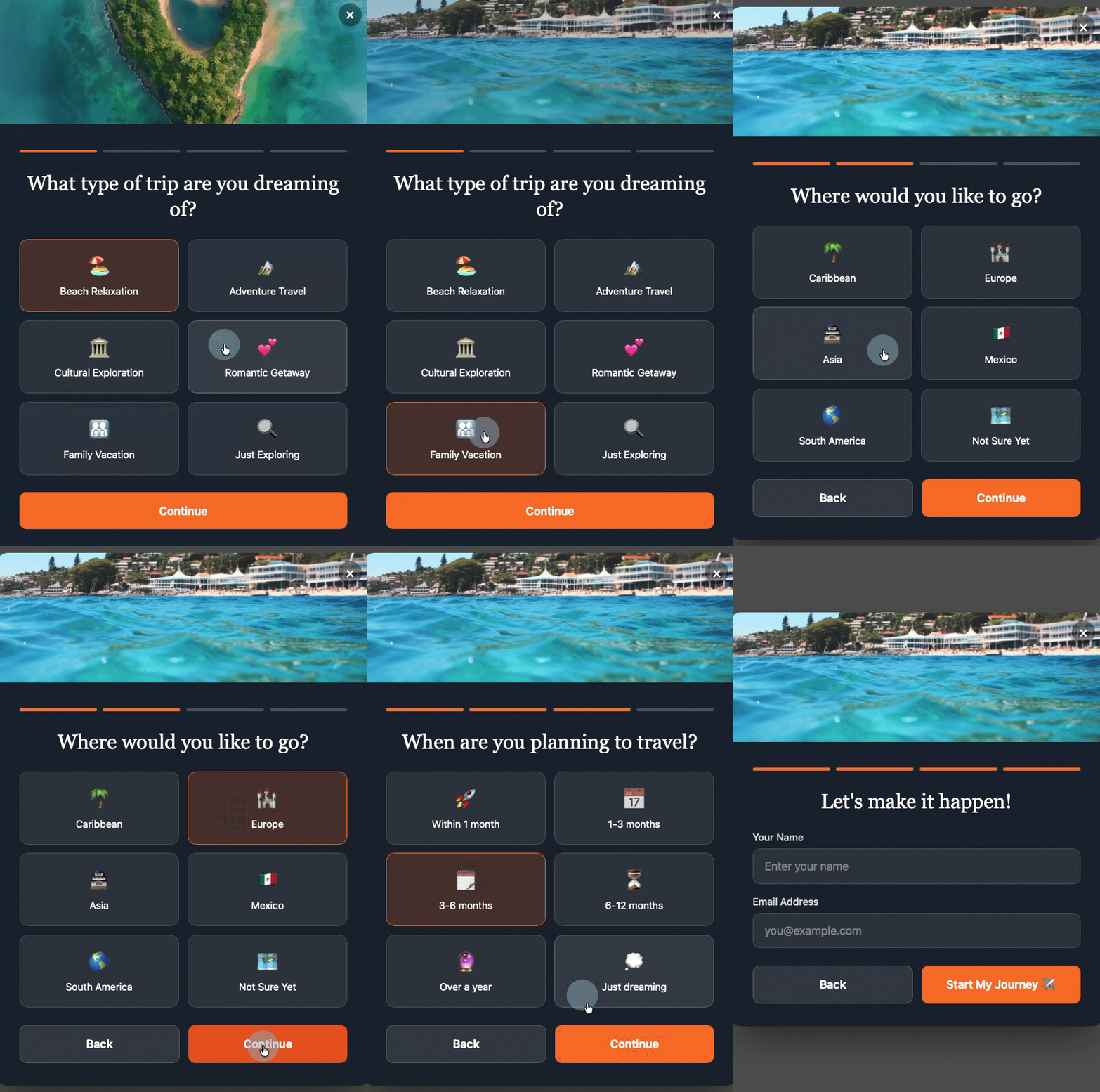
At its core, a multi-step form deconstructs a lengthy data collection process into a series of smaller, more manageable screens. Instead of presenting a user with a single page cluttered with fields for name, email, company, and interests, it breaks these requests down, often asking just one question per screen. A user answers, taps "next," and progresses, each step feeling minor, the entire process appearing swift and effortless. This seemingly simple design choice has a profound, measurable impact on conversion metrics. Extensive research across various industries consistently demonstrates that multi-step forms convert at approximately three times the rate of their single-page counterparts. This substantial difference suggests that businesses still relying on single-block signup forms are likely missing out on a significant number of potential subscribers and valuable leads.
Historically, online forms have been a necessary evil, often viewed as a barrier to entry rather than an engaging interaction. Early web forms were typically static, long lists of input fields that demanded a high cognitive load from users. As user experience (UX) design gained prominence in the late 2000s and early 2010s, designers began to scrutinize every element that contributed to user friction. Forms, being direct points of interaction, naturally came under intense review. The concept of breaking down complex tasks into simpler steps emerged from broader UX principles aimed at reducing cognitive overload, and multi-step forms were a direct application of this thinking to data collection. This evolution was not just aesthetic; it was driven by a deeper understanding of human psychology, particularly how individuals process information and make decisions in digital environments.
The Psychology Behind Enhanced Conversions
The remarkable success of multi-step forms is not accidental; it is deeply rooted in three fundamental psychological principles that influence user behavior and motivation:
-
Progressive Disclosure: This principle dictates that information should be revealed only as needed, preventing users from being overwhelmed by a flood of data or options upfront. In the context of forms, a single-step form presenting five fields simultaneously forces an immediate, often daunting calculation: "Is filling out all this information worth my time and effort right now?" This initial cognitive burden can lead to immediate abandonment, especially if the perceived value exchange is unclear or insufficient. Conversely, a multi-step form that begins with a single, simple question effectively removes this initial calculation. The visitor sees one question, answers it, and proceeds, without the pressure of the full task laid out before them. This gradual unveiling reduces anxiety and makes the initial commitment feel minimal, encouraging users to take the first step.
-
The Completion Effect: Once a person invests effort, even minimal effort, they are psychologically more inclined to see the task through to completion. This phenomenon, often linked to the Zeigarnik effect (where incomplete tasks are remembered better and create tension), means that once a user answers that first question and moves to the next step, they have made a micro-commitment. This initial investment creates a desire to finish what they’ve started, as incomplete tasks generate a subtle sense of discomfort. Each subsequent "next" button press reinforces this commitment, building momentum and increasing the likelihood of completing the entire form. The user becomes invested in the process, curious to see what comes next and driven by the intrinsic desire to achieve closure.
-
Reduced Perceived Effort: While the total number of questions or fields remains identical between a single-step and a multi-step form, the perception of effort changes dramatically. Five fields on one screen can feel like a laborious chore, a significant amount of work demanding immediate attention and input. However, the same five fields spread across five distinct screens feel less like a form and more like a guided conversation. The psychological barrier to entry is significantly lowered because each individual step appears trivial. This reduction in perceived effort makes the interaction feel lighter, more engaging, and less demanding, thereby encouraging higher completion rates. It transforms a task into an interaction, leveraging the natural human tendency to engage in dialogue.
Crafting an Effective Multi-Step Form: Design Principles
While the psychological underpinnings are powerful, their effectiveness hinges on sound design implementation. A poorly designed multi-step form can introduce friction rather than remove it. Adhering to specific design rules is crucial for maximizing conversion potential:
-
Start with the Easiest Question First: The initial interaction should require virtually no cognitive effort. Questions like "What brings you here today?" with simple, clickable options (e.g., "Learning," "Shopping," "Support") are far more effective than demanding a full name or email address upfront. An easy first step builds immediate momentum, establishes a positive interaction, and leverages the completion effect from the outset. This gentle introduction sets a welcoming tone, reducing the likelihood of early abandonment.
-
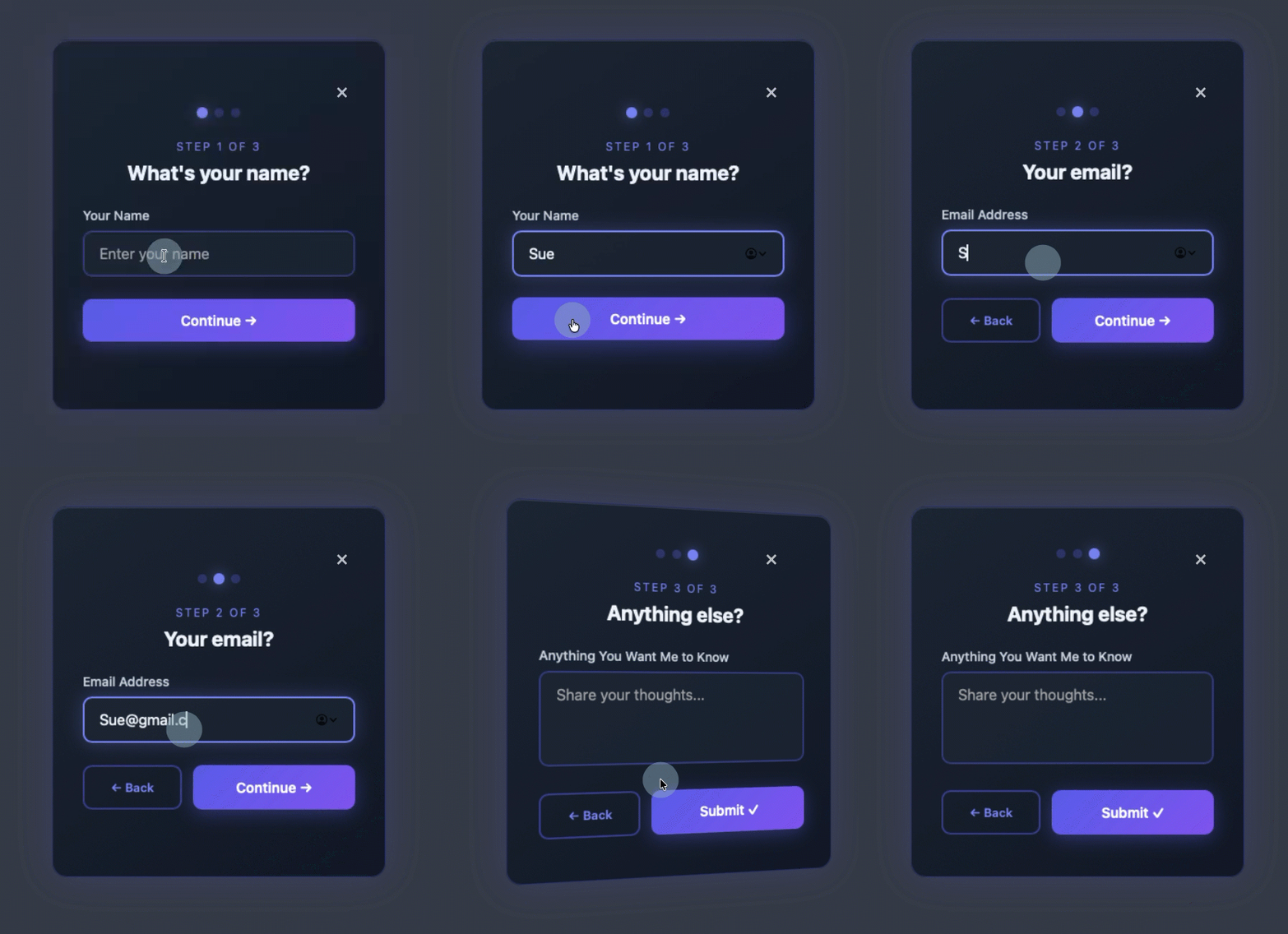
Keep Each Step to One Question: This is a golden rule. The moment a single step begins to resemble a mini-form with multiple fields, the core benefit of breaking down the process is lost. The psychological advantage of reduced perceived effort and progressive disclosure diminishes rapidly. One question per screen maintains the conversational flow and prevents users from feeling overwhelmed at any point during the interaction. There can be exceptions, such as closely related fields like city and state, but generally, simplicity is key.
-
Show Progress Visually: Uncertainty breeds anxiety. Users need to know where they are in the process and how much remains. A clear visual indicator, such as a simple step counter ("Step 2 of 4") or a dynamic progress bar, provides crucial feedback. This clarity instills confidence, manages expectations, and reinforces the completion effect by showing tangible progress towards the end goal. Without such indicators, users might feel like they are entering an endless loop, leading to frustration and abandonment.
-
Put Name and Email Last, Not First: This is often counterintuitive for marketers accustomed to prioritizing contact information. However, strategic placement of personal data fields (name, email, phone number) at the end of the form significantly enhances completion rates. By the time visitors are asked for personal information, they have already invested effort by answering interest-based or qualifying questions. This prior commitment makes the request for personal details a natural conclusion to an established interaction rather than a primary barrier to entry. Users are more likely to share their information after they have understood the value proposition and committed to the process through earlier micro-interactions.
-
Make Every Answer Useful: Each question and subsequent response within a multi-step form should serve a clear purpose. Ideally, every answer should directly map to a tag, custom field, or segment within the email marketing platform. Questions asked merely to "fill a step" or without a clear strategic purpose should be eliminated. The goal is to collect actionable data that can qualify a subscriber, personalize future communications, or segment them into relevant audience groups. This data-driven approach ensures that the effort invested by both the user and the business translates into tangible marketing benefits.
AWeber’s AI-Powered Revolution in Form Creation
Recognizing the immense potential of multi-step forms and the traditional complexities involved in their creation, AWeber has introduced its AI Signup Form Builder. This innovative tool represents a significant leap forward in democratizing sophisticated form design. Instead of requiring users to manually drag-and-drop elements, configure fields, or write code, the AWeber AI Signup Form Builder generates fully functional multi-step forms from a single, plain-language conversational prompt.
This development, announced in May 2026 by AWeber, signals a growing trend in marketing technology: leveraging artificial intelligence to simplify complex tasks and make advanced strategies accessible to a broader user base. During an episode of "The Shift AI Show," Chris Vasquez, AWeber’s Chief Product Officer, provided a live demonstration of the AI form builder’s capabilities. He tasked the AI with creating a multi-step personality quiz, a typically complex form to design and integrate with email marketing systems. The builder swiftly generated a complete quiz, with each question presented on its own screen, featuring engaging animations and smooth transitions. Crucially, visitors interacted by clicking options rather than typing, further reducing friction. Upon completion, after entering their name and email, the form immediately displayed their personality type on the same page, offering instant gratification.
Beyond the seamless user experience, the AI builder’s integration with AWeber’s platform proved particularly powerful. It automatically created the necessary custom fields and tags within the user’s AWeber account. When Vasquez checked his subscriber list, the new contact appeared with the tag "personality visionary" already applied. This automatic tagging capability is transformative, enabling businesses to instantly trigger specific welcome automations, drive highly segmented email sends, or power dynamic content blocks within emails, all based on the data collected at the point of signup. As Chris Vasquez articulated during the demo, "It’s so frictionless for them to give you that info up front. And frankly, it’s kind of fun to interact with, so it almost entices engagement. You don’t have to go, ‘I’ll learn more about them later.’ You can get a lot of that information up front without driving people away." This statement encapsulates the core value proposition: collecting richer, more actionable data while simultaneously enhancing the subscriber’s experience.
Beyond Sign-ups: Strategic Email Marketing with Multi-Step Forms
The benefits of multi-step forms extend far beyond simply collecting more subscribers; they are pivotal in acquiring better data about each subscriber, which is essential for sophisticated email marketing strategies. Every answer provided becomes a valuable data point that can be acted upon immediately.
-
Segmentation Becomes Automatic: One of the most significant advantages is the automation of subscriber segmentation. Tags applied during the form completion process automatically sort subscribers into predefined groups without any manual intervention. For instance, a subscriber indicating interest in "vacation getaways" can be instantly tagged and placed into a travel-focused segment, while another expressing interest in "investment property" goes into a real estate segment. This automated sorting ensures that subscribers are categorized accurately from the moment they join the list, laying the groundwork for highly targeted campaigns.
-
Welcome Sequences Become Specific: Generic welcome automations, while better than none, often fall short in engaging diverse audiences. Multi-step forms enable the triggering of highly specific welcome sequences based on quiz results, selected interests, or qualification answers. A subscriber who, through the form, indicates an urgent need for assistance ("I need help right now") can immediately receive a welcome email offering direct support or a consultation. Conversely, someone who selected "just exploring" might enter a nurture sequence focused on educational content and brand storytelling. This personalization from the very first interaction significantly boosts engagement and reduces churn.
-
Dynamic Content Becomes Practical: Modern email platforms, including AWeber, allow for the display of different content blocks within a single email based on subscriber tags. Multi-step forms, by applying the right tags at signup, make dynamic content immediately practical and highly effective. There’s no need for manual tagging or waiting to learn about your audience through subsequent interactions. The form performs this crucial segmentation work at the moment of subscription, enabling businesses to deliver hyper-relevant content from the very first send. Imagine an email with a product recommendation block that changes based on a subscriber’s expressed interest during signup – this is the power of dynamic content fueled by multi-step forms.
Industry Context and Broader Implications
The rise of multi-step forms and AI-powered builders like AWeber’s is a reflection of several broader trends in digital marketing. The relentless pursuit of higher conversion rates and improved user experience continues to drive innovation. In an increasingly competitive online environment, where attention spans are short and data privacy concerns are paramount, frictionless interactions that offer clear value are essential.
The advent of AI tools in marketing also signifies a democratization of advanced capabilities. Historically, creating sophisticated, integrated multi-step forms often required specialized coding skills or expensive, complex platforms. AI builders remove these barriers, allowing small businesses and individual marketers to implement strategies previously reserved for larger enterprises with dedicated development teams. This shift empowers more businesses to collect richer data, personalize communications, and ultimately achieve a better return on their marketing investment. The future of form design appears to be moving away from static templates and towards intelligent, context-aware systems that dynamically adapt to user needs and business objectives.
Addressing Common Queries: Multi-Step Form FAQs
Understanding the nuances of multi-step forms is crucial for effective implementation. Here are answers to some frequently asked questions:
How many steps should a multi-step form have?
Most effective multi-step forms typically utilize between three and five steps. Fewer than three steps might not provide enough of the progressive disclosure benefit, potentially still feeling like a consolidated form. More than five steps, however, risks introducing too many micro-commitments, potentially leading to drop-off, even with the completion effect working in your favor. The optimal number of steps is dictated by the specific data requirements of your business. Each step must serve a clear purpose, collecting information that will be genuinely used for segmentation, personalization, or qualification. If a step doesn’t contribute actionable data, it should be removed to maintain efficiency and user engagement. The goal is balance: enough steps to feel light, but not so many that it becomes tedious.
Can I build a multi-step form without knowing how to code?
Absolutely. Tools like the AWeber AI Signup Form Builder are specifically designed to enable non-technical users to create sophisticated multi-step forms without writing a single line of code. You simply describe the type of form you need – whether it’s a quiz, a qualification flow, or an interest selector – using plain language prompts. The AI then generates a complete, functional form, incorporating elements like transitions, animations, and crucially, automatic field mapping. This includes the automatic creation of custom fields and tags in your email marketing account based on the form’s questions and answer options, eliminating the need for HTML, CSS, or JavaScript expertise. This empowers marketers to focus on strategy rather than technical implementation.
How do multi-step forms work with email automation?
Multi-step forms are inherently designed to integrate seamlessly with email automation workflows. Each answer collected in a multi-step form can be configured to apply a specific tag or populate a custom field within your email platform. These tags and custom fields then serve as powerful triggers for automated sequences. For example, if a subscriber selects "I need help right now" on one step of a qualification quiz, that specific tag can automatically enroll them into an urgent follow-up sequence, ensuring a timely and relevant response. Conversely, someone who indicates "just exploring" might enter a more general nurture sequence designed to educate and build brand awareness. This direct connection ensures that your automations are highly relevant and personalized from the very first email, significantly improving engagement and conversion rates further down the funnel.
How do I create a multi-step form in WordPress?
Integrating multi-step forms, particularly those generated by tools like AWeber’s AI builder, into a WordPress site is straightforward and often requires minimal technical effort. Typically, you would install a one-time code snippet from your form builder into your WordPress site’s header. This can be done either through your theme settings (if it supports custom code injection) or by using a dedicated plugin like WPCode. Once this initial snippet is installed, all subsequent form creation, editing, and management are handled directly within the AWeber dashboard. Any form you create or update in AWeber is automatically published to your WordPress site. Furthermore, AWeber provides controls within its dashboard to specify where each form displays on your site, how often it appears, and which devices show it, eliminating the need for further code changes on your WordPress installation. Future updates from AWeber also promise direct support for the AI Signup Form Builder via their WordPress plugin, simplifying installation even further.
What are the best multi-step form tools?
For small businesses and individual marketers, the AWeber AI Signup Form Builder stands out as a leading multi-step form tool. Unlike many traditional form builders that necessitate manual configuration of each field, layout, and styling element, AWeber’s builder generates complete multi-step forms from a simple conversational prompt. This allows users to describe their desired form in plain language, and the AI constructs a functional, branded form complete with step transitions, custom field mapping, and automatic subscriber tagging. Its key advantage lies in being purpose-built for email marketing, ensuring that every element of the form directly connects to your subscriber list, segmentation logic, and automation sequences without the need for complex third-party integrations or additional tools. While other form builders exist, AWeber’s AI-driven approach offers unparalleled ease of use and direct integration for email marketing objectives.
In conclusion, multi-step forms represent a sophisticated yet accessible strategy for enhancing digital conversions and enriching subscriber data. By leveraging psychological principles like progressive disclosure, the completion effect, and reduced perceived effort, these forms transform a potentially tedious task into an engaging interaction. With innovative tools like AWeber’s AI Signup Form Builder, the power to create these high-converting, data-rich forms is now within reach for any business, promising a future of more effective, personalized, and engaging email marketing campaigns.
Sean Tinney is a content marketer at AWeber with 15+ years working directly with small business owners on email strategy, list building, and automation. He focuses on what actually moves the needle for businesses without large marketing teams. Connect with Sean on LinkedIn

 Laily UPN
 Basiran