The landscape of software development is undergoing a fundamental shift as artificial intelligence moves from simple autocomplete suggestions to fully agentic command-line interfaces. Anthropic’s Claude Code, a dedicated CLI tool, has emerged as a frontrunner in this transition, offering developers a direct interface with the Claude 3.5 Sonnet model. While many users interact with the tool through its basic conversational interface, a deep dive into the command-line interface (CLI) reference reveals a sophisticated suite of hidden features designed for high-stakes engineering environments. Recent updates, specifically versions 2.1.186 through 2.1.217, have introduced critical functionalities that transform the tool from a simple assistant into a robust background agent capable of managing complex, multi-stage development cycles.
The Chronology of Agentic Coding Tools
To understand the significance of Claude Code’s advanced CLI features, one must look at the timeline of AI integration in software engineering. The initial wave of AI tools, dominated by GitHub Copilot and similar IDE extensions, focused on "ghost text" or inline completions. By 2024, the industry pivoted toward "agentic" workflows—systems that can not only suggest code but also execute shell commands, read files, and run test suites.
Anthropic released Claude Code to bridge the gap between a high-reasoning LLM and the local development environment. Since its inception, the tool has seen rapid versioning. In early 2025, version 2.1.186 introduced enhanced Model Context Protocol (MCP) authentication. By mid-2025, version 2.1.203 introduced "ultracode" effort settings, and version 2.1.217 addressed critical cost-management issues by ensuring that subagent expenditures are tracked against the primary session budget. This rapid iteration reflects an industry-wide push toward making AI tools more reliable for enterprise-level automation.
Advanced Session Management and Workflow Persistence
One of the most frequent friction points in AI-assisted development is the "context reset"—the need to re-explain a project’s architecture to a model every time a new session begins. Claude Code addresses this through a persistent session architecture that many developers overlook.
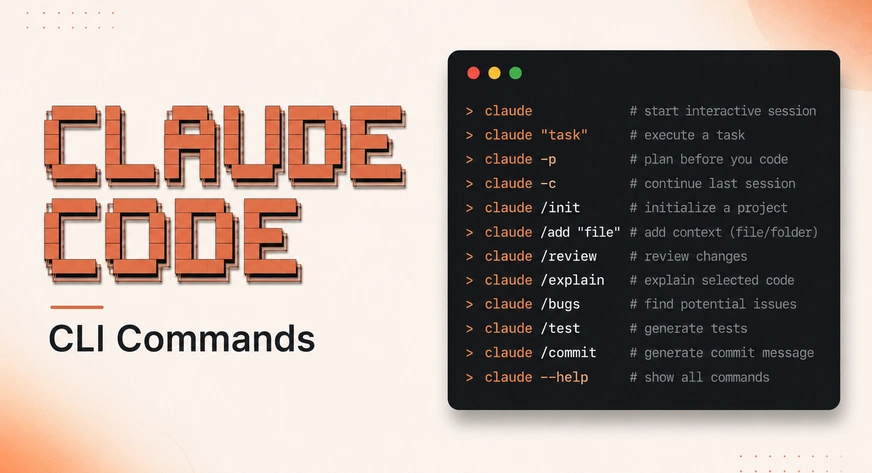
The standard claude command initiates a fresh environment, but the -c flag (continue) allows a developer to resume the most recent session within a specific directory. This is not merely a convenience; it preserves the "mental model" the AI has built of the local codebase. For developers managing multiple concurrent features, the naming and branching flags provide a level of organization similar to Git.
Using claude -n "feature-name" allows for the creation of named sessions. This enables a workflow where a developer can switch between an "auth-refactor" session and a "database-migration" session without cross-contaminating the AI’s context. Furthermore, the introduction of the --fork-session flag allows developers to branch an existing conversation. This is particularly useful for "What If" scenarios—testing a radical architectural change without losing the stable history of the primary session.
Background Agents: The Shift to Asynchronous Development
The most transformative feature within the Claude Code CLI is the ability to delegate tasks to background agents using the --bg flag. In traditional development, an engineer might spend thirty minutes waiting for a comprehensive security audit or a complex refactor to complete. With background agents, the CLI hands control back to the terminal immediately.
When a task is initiated with claude --bg "task-description", the system generates a session ID and continues the work in the background. Industry data suggests that developers using asynchronous AI agents can increase their throughput by up to 40% by offloading "low-concentration, high-duration" tasks like test writing or documentation auditing.
Management of these agents is handled through a specific set of subcommands:
claude agents: Provides a live dashboard of all active and completed background tasks.claude attach <id>: Re-engages the interactive terminal with a background process.claude logs <id>: Allows for non-intrusive monitoring of an agent’s progress.
This "managerial" approach to AI marks a departure from the "pair-programmer" model, positioning the human developer as an orchestrator of multiple specialized AI agents.
Integration via Piping and Non-Interactive Modes
For DevOps engineers and systems administrators, the -p (print) flag is the most critical component for automation. This flag instructs Claude to execute a query, return the output, and immediately exit the process. This transforms Claude Code into a modular utility that can be integrated into larger shell scripts and CI/CD pipelines.
The ability to pipe data into Claude—such as cat server.log | claude -p "identify the root cause of the 500 errors"—bypasses the need for the model to manually browse the file system. This method is significantly faster and more token-efficient. When combined with the --bare flag, which skips the loading of secondary plugins and hooks, the tool becomes a lightweight, high-speed diagnostic engine.
Furthermore, the CLI supports multiple output formats, including JSON and stream-json. This allows the output of an AI reasoning step to be parsed by other software tools, facilitating a hybrid workflow where AI identifies a problem and a traditional script executes the fix.
Economic Optimization and Resource Governance
As enterprise adoption of AI tools scales, cost management has become a primary concern for Chief Technology Officers. Claude Code’s CLI provides granular control over "reasoning effort," a variable that directly correlates with token consumption and API costs.
The --effort flag allows users to toggle between low, medium, high, and ultracode. A "low" effort setting is sufficient for syntax corrections or simple documentation tasks, whereas "high" effort is reserved for complex logical refactors. By matching the model’s reasoning depth to the task’s complexity, organizations can avoid "over-reasoning" on trivial edits, which can lead to significant cost savings over thousands of developer hours.
In version 2.1.217, Anthropic introduced mandatory safety valves for automated tasks:
--max-budget-usd: A hard cap on API spend for a single session.--max-turns: A limit on the number of "agentic turns" (the cycle of reasoning and action) the model can take before requiring human intervention.
These features prevent "hallucination loops," where an agent might repeatedly attempt a failing command, consuming expensive tokens in the process.
Security Frameworks and Permission Hierarchies
A significant barrier to AI adoption in the terminal is the risk of destructive actions. Claude Code mitigates this through six distinct permission modes. The default mode requires human approval for every file edit or shell command, providing maximum safety but higher friction.
The plan mode is a strategic addition for senior architects. In this mode, Claude outlines its intended actions without executing them. This allows for a "pre-flight" review of the AI’s logic. Conversely, the acceptEdits mode allows the AI to modify files freely while still prompting for permission before executing potentially dangerous Bash commands. For sandboxed environments or highly trusted CI pipelines, the --dangerously-skip-permissions flag removes all prompts, though it is recommended only for isolated containers.
The Model Context Protocol (MCP) Ecosystem
Claude Code’s utility is expanded through the Model Context Protocol (MCP), an open standard that allows the AI to connect to external data sources like Slack, GitHub, or internal databases. The CLI includes a dedicated mcp subcommand for managing these connections.
A notable efficiency feature is claude mcp add-from-claude-desktop, which synchronizes server configurations across different Anthropic interfaces. This interoperability ensures that if a developer has already granted the AI access to their Jira board on the desktop app, those permissions and configurations carry over to the terminal environment seamlessly.
Technical Diagnostics and Reliability
To maintain the health of the local installation, the claude doctor command provides a comprehensive diagnostic report. It checks for authentication status, file system permissions, and configuration errors in the settings.json file.
When the AI behaves unexpectedly, the --safe-mode flag serves as a critical troubleshooting step. Safe mode strips away all customizations, including custom system prompts and third-party skills, allowing developers to determine if an issue stems from the core tool or a user-defined configuration.
Strategic Implications for the Software Industry
The enrichment of the Claude Code CLI suggests a future where the terminal is not just a place to type commands, but a hub for AI orchestration. The shift from interactive chat to background agents and piped automation indicates that AI is moving deeper into the "plumbing" of software development.
Analysts suggest that as these CLI tools become more sophisticated, the role of the entry-level developer will shift from writing boilerplate code to auditing AI-generated pull requests and managing agentic workflows. The inclusion of cost-capping and effort-tuning features demonstrates that AI development tools are maturing into enterprise-grade software, where efficiency and governance are as important as raw intelligence.
In conclusion, while the surface-level functionality of Claude Code provides immediate value, its true power lies in the hidden CLI flags that enable persistence, background processing, and rigorous cost control. As the tool continues to evolve past version 2.1.217, the mastery of these advanced commands will likely become a standard requirement for high-performance engineering teams.