The release of Claude Code, a command-line interface (CLI) tool developed by Anthropic, represents a significant shift in the landscape of artificial intelligence-assisted software development. By integrating the reasoning capabilities of the Claude 3.5 Sonnet model directly into the terminal, developers can now interact with their file systems, execute bash commands, and automate complex workflows without leaving their development environment. Central to this efficiency is the implementation of slash commands and "Skills," which allow engineering teams to codify repeatable tasks, enforce project standards, and minimize the cognitive load associated with manual setup.
As the software industry moves toward agentic AI workflows, the ability to define custom triggers has become a competitive necessity. For modern development teams, the daily friction of spinning up new projects, managing deployment checklists, or generating standardized file structures can consume hours of productive time. Claude Code addresses this through a robust system of slash commands—short, text-based triggers starting with a "/" that execute predefined actions instantly. This paradigm, popularized by platforms like Slack and Notion, is now being applied to the core of the engineering stack, transforming how codebases are managed and scaled.
The Evolution of AI in the Terminal
The introduction of Claude Code follows a broader industry trend toward "agentic" development tools. Unlike traditional IDE extensions that primarily offer code completion or chat-based suggestions, CLI agents have the authority to perform file operations and run scripts autonomously. This evolution began with the rise of tools like GitHub Copilot and progressed through specialized editors like Cursor. However, by operating directly in the terminal, Claude Code provides a more direct interface for developers who prefer a keyboard-centric, high-velocity environment.
Industry data suggests that developers spend up to 20% of their time on "boilerplate" tasks and environment configuration. By utilizing slash commands, teams can reduce this overhead. These commands function as a bridge between high-level human intent and low-level execution, allowing a developer to type a single word to initiate a sequence of complex operations that would otherwise require multiple manual steps and repetitive prompting.
Understanding the Architecture of Slash Commands
At its core, a slash command in Claude Code is an abstraction layer. While the tool comes with several built-in commands designed for general maintenance and navigation, its true power lies in its extensibility. The built-in commands provide a foundation for session management and basic interaction:

- /help: Displays a comprehensive list of available commands and usage instructions.
- /exit: Safely terminates the Claude Code session.
- /clear: Resets the current conversation context, allowing for a fresh start on a new task without previous history interference.
- /compact: Summarizes the current conversation history to save on token usage while maintaining the essential context of the task.
- /undo: Reverts the last file change made by the AI, providing a critical safety net during automated editing.
While these built-in triggers facilitate basic interaction, the "Skills" system allows for the creation of project-specific or user-specific logic. Skills are essentially specialized instructions stored as Markdown files within a specific directory structure. When a skill is invoked via a slash command, its contents are added to the AI’s context, providing a set of constraints and instructions tailored to a specific outcome.
Technical Deep Dive: The Anatomy of a Claude Code Skill
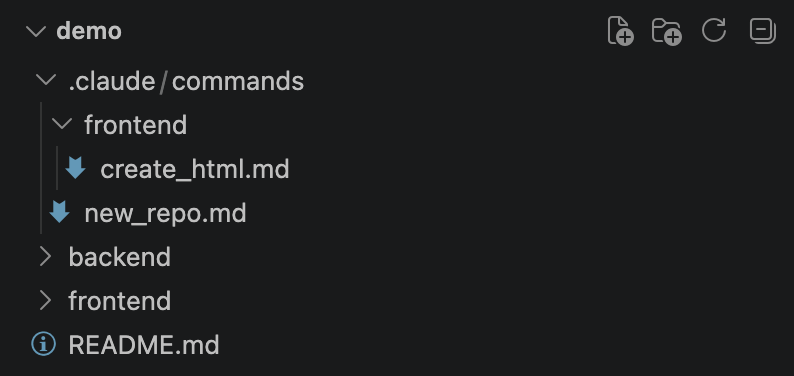
A Claude Code skill is defined by its location and its frontmatter. For a command to be recognized, it must reside in a file named SKILL.md within a subdirectory of .claude/skills/. The name of that subdirectory determines the name of the slash command. For instance, a file located at .claude/skills/deploy/SKILL.md becomes the /deploy command.
The "frontmatter" of these Markdown files is written in YAML and defines how the skill behaves. Key parameters include:

- name: A human-readable identifier for the skill.
- description: A brief explanation of what the skill does.
- disable-model-invocation: A critical security and control feature. When set to
true, the AI cannot decide to use this skill on its own; it must be explicitly triggered by the user. - allowed-tools: Defines which terminal tools (like Bash or Write) the skill is permitted to access, ensuring a principle of least privilege.
- argument-hint: Provides guidance on what parameters the command expects from the user.
Step-by-Step Implementation: Building a Scaffolding Skill
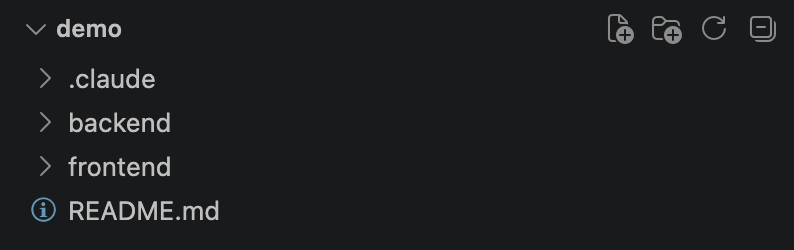
To illustrate the practical utility of these features, consider the task of project scaffolding. Most organizations have specific standards for how a repository should be structured. Manually creating folders for backend and frontend code, initializing README files, and setting up .gitkeep files is a prime candidate for automation.
To implement a /new_repo command, a developer would first ensure the Claude Code CLI is installed via npm (npm install -g @anthropic-ai/claude-code) and authenticated. The next step involves creating the directory structure: .claude/skills/new_repo/SKILL.md.
The content of this skill would look like the following:
---
name: new_repo
description: Add the structure to a new project with backend/, frontend/, and README.md
disable-model-invocation: true
allowed-tools: Bash(ls *), Bash(mkdir *), Write
---
Create the base project structure in the current working directory:
1. Create a `backend/` folder. If it is empty, add a `.gitkeep` file.
2. Create a `frontend/` folder in the same manner.
3. Generate a `README.md` at the project root with a title, a one-paragraph description inferred from the context, and a "Getting Started" section.
Do not overwrite existing files. Report back the final structure.
By setting disable-model-invocation: true, the developer ensures that Claude doesn’t accidentally restructure the project during a normal chat session. It only happens when the developer explicitly types /new_repo. This level of control is vital for maintaining the integrity of complex codebases.
Advanced Automation: Context-Aware Frontend Generation
Beyond simple folder creation, skills can take arguments to perform more sophisticated tasks. A common requirement in rapid prototyping is the generation of standalone HTML files for internal tools or UI demos. By creating a /create_html skill, developers can pass specific requirements as arguments directly from the command line.
The skill definition would utilize the $ARGUMENTS variable to capture user input. For example, if a developer runs /create_html "a dark-themed dashboard with a sidebar and a line chart", the skill takes that string and processes it according to the guidelines defined in the SKILL.md file.
The guidelines within the skill might mandate the use of semantic HTML, responsive design, and the inclusion of all styles and scripts within a single file to avoid external dependency issues. This ensures that every time a developer uses the command, the output meets the team’s quality standards, regardless of how complex the initial prompt was.
The Strategic Impact on Engineering Teams
The implications of custom slash commands extend beyond individual productivity. From a management perspective, skills serve as a form of "executable documentation." Instead of a developer reading a 10-page onboarding document on how to format pull requests or set up a local testing environment, they can simply run a command like /setup_test_env.
This reduces the "time to first commit" for new hires and ensures that senior developers spend less time answering repetitive architectural questions. Furthermore, because these skills can be checked into version control (Git), they evolve alongside the project. When the deployment process changes, the /deploy skill is updated in the repository, and every team member immediately has access to the new workflow.

Security and Governance in AI-Driven Workflows
Granting an AI agent access to the terminal naturally raises security concerns. Anthropic has addressed this by implementing a permission-based system. When a skill attempts to run a bash command or write to a file, Claude Code typically prompts the user for approval.
The use of allowed-tools in the skill frontmatter adds another layer of defense, restricting what the AI can do when that specific skill is active. As organizations increasingly adopt these tools, the role of "Prompt Engineer" is shifting toward "AI Architect," where the focus is on designing these safe, reproducible, and efficient automated pathways.
Chronology of AI Agent Development
The path to Claude Code and its slash command system has been marked by several key milestones in the AI industry:

- Late 2023: The emergence of "AutoGPT" and similar experimental agents demonstrated the potential for LLMs to use tools, though reliability remained low.
- Early 2024: Major LLM providers began releasing "Tool Use" or "Function Calling" capabilities, allowing models to interact with APIs in a structured format.
- Mid 2024: The release of Claude 3.5 Sonnet set new benchmarks for coding tasks and logical reasoning, providing the necessary "brain" for a reliable CLI agent.
- Early 2025: The launch of Claude Code marked the transition from experimental scripts to a production-ready CLI tool capable of managing entire repositories.
Conclusion and Future Outlook
The introduction of slash commands and skills in Claude Code is more than a convenience; it is a fundamental change in the developer-machine interface. By allowing developers to encapsulate complex instructions into simple triggers, Anthropic has provided a framework for consistent, high-quality software engineering at scale.
As these tools mature, we can expect to see a marketplace of shared skills, where developers exchange optimized workflows for specific frameworks like Next.js, Django, or Kubernetes. The future of coding is not just about writing lines of text, but about orchestrating intelligent agents through well-defined, repeatable commands. For teams looking to stay ahead of the curve, mastering the art of the slash command is the first step toward a more automated and creative engineering future.