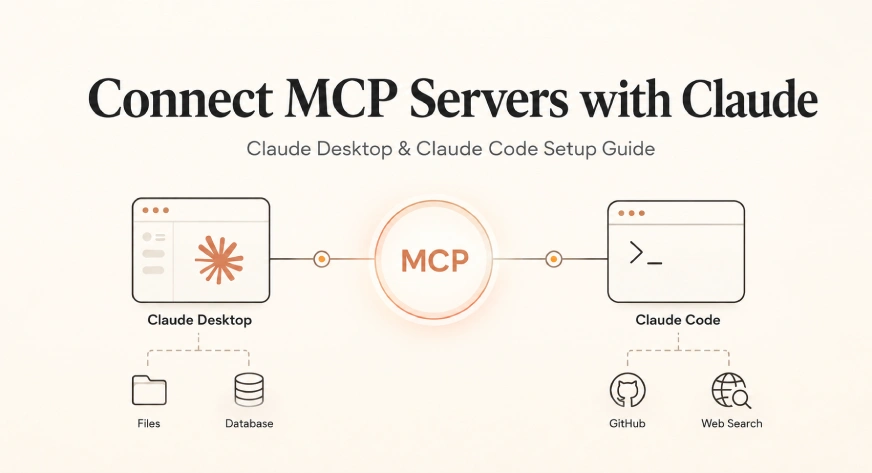
The Model Context Protocol, or MCP, represents a fundamental shift in how large language models interact with the digital world, moving beyond the confines of a static chat interface into a dynamic, tool-enabled ecosystem. Since its introduction by Anthropic in late 2024, MCP has emerged as an open-source standard designed to solve the fragmentation inherent in AI tool integration. By providing a universal connector layer, MCP allows AI models to communicate with external systems—including local filesystems, remote databases, API-driven repositories, and proprietary software—without requiring custom-built integration code for every specific tool-model combination.
The Evolution of AI Connectivity and the Model Context Protocol
Before the advent of MCP, the AI industry faced what developers termed the "N×M problem." If a developer wanted to connect three different AI models to five different productivity tools, they were required to write fifteen unique integrations. This bespoke approach created significant friction, slowed deployment, and limited the utility of AI in professional environments. Anthropic’s solution was to transform this multiplicative problem into an additive one. By building a single MCP server for a tool like GitHub or Slack, that tool becomes immediately accessible to any AI client that supports the protocol, including Claude Desktop, Claude Code, and third-party IDEs like Cursor and Windsurf.
As of early 2026, the ecosystem has matured significantly. The protocol has moved through several iterations, transitioning from the initial Server-Sent Events (SSE) transport method to the now-recommended Streamable HTTP transport. This evolution reflects a broader industry move toward more robust, low-latency communication between AI agents and the data they manipulate.
Understanding the MCP Architectural Framework
The effectiveness of MCP lies in its three-part architecture, which standardizes the relationship between the user, the AI application, and the external data source. Understanding this hierarchy is essential for successful implementation and troubleshooting.
- The Host: This is the primary AI application that the user interacts with directly. The host manages the conversation context, enforces security protocols, and determines which servers are active. Examples include the Claude Desktop application or the Claude Code command-line interface.
- The Client: Residing within the host, the client manages protocol-level communication. It translates the AI’s intent into specific requests that the MCP server can understand and process.
- The Server: This is an external process that exposes specific capabilities—such as searching a database or reading a file—to the AI. Servers can be hosted locally on a user’s machine or remotely on a cloud server.
When a user asks Claude to "summarize the latest changes in my local repository," the host identifies the request, the client communicates with the local Filesystem or Git MCP server, the server retrieves the data, and the information is fed back into the model’s context window for processing. This entire cycle typically occurs in less than a second, effectively hiding the complex infrastructure from the end-user.
Strategic Implementation: Claude Desktop Configuration
Claude Desktop is the primary environment for most users seeking to enhance their productivity through MCP. There are currently two primary methods for connecting servers to the desktop client: the streamlined Desktop Extensions and the more granular JSON configuration method.
Method 1: Desktop Extensions (MCP Bundles)
For users seeking a "plug-and-play" experience, Desktop Extensions—distributed as .mcpb files (formerly .dxt)—offer a simplified installation path. These bundles package the MCP server and its dependencies into a single file that can be installed with a double-click. This method eliminates the need for manual configuration of Node.js environments or path variables, making it the preferred choice for non-technical professionals.
Method 2: Manual JSON Configuration
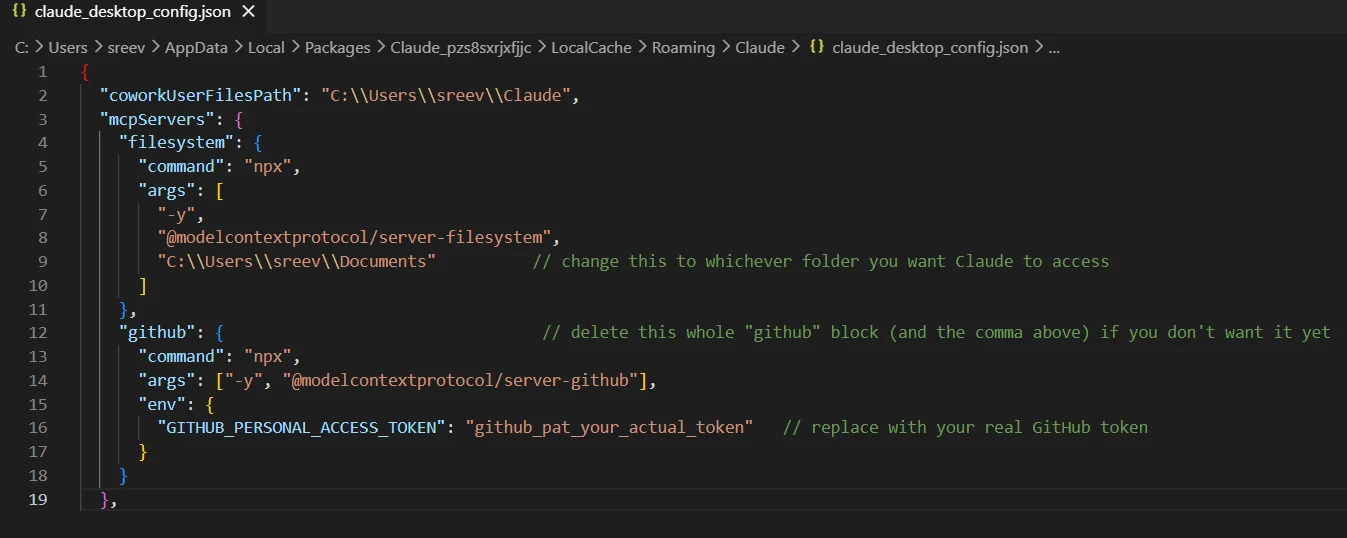
For developers and power users, the JSON configuration method provides total control over environment variables and command arguments. Claude Desktop reads its instructions from a specific file named claude_desktop_config.json. The location of this file varies by operating system, a detail that often serves as a primary point of failure for new users.
- On macOS: The file is located at
~/Library/Application Support/Claude/claude_desktop_config.json. - On Windows: The path depends on the installation method. Standard installs use
%APPDATA%Claudeclaude_desktop_config.json, while Microsoft Store (MSIX) installs redirect to a more complex path within theLocalPackagesdirectory.
To avoid pathing errors, users are encouraged to use the "Edit Config" button within the Claude Desktop Developer Settings, which automatically opens the correct file. A critical technical requirement for Windows users is the use of double backslashes (e.g., C:\Users\Name\Projects) to ensure the JSON parser correctly interprets file paths.
Claude Code: Integration via Command Line Interface
Claude Code, the terminal-based version of the assistant, utilizes a separate configuration surface optimized for developer workflows. Unlike the desktop version, Claude Code allows for server management directly through the CLI, which is often faster and more intuitive for those working within a coding environment.
The primary command for integration is claude mcp add <name> -- <command> [args...]. This command allows for the addition of local servers that run as subprocesses. Additionally, Claude Code supports three distinct "scopes" for server configuration:
- Local Scope: Stored in the current project directory, these servers are specific to a single codebase.
- Project Scope: These are defined in a
.mcp.jsonfile and are intended to be committed to version control, allowing entire teams to share the same tool definitions (e.g., Linear or Sentry integrations). - User Scope: These servers are available across all projects for a specific user, ideal for personal productivity tools.
Ecosystem Data and Recommended Servers
The MCP ecosystem has seen exponential growth. By mid-2026, the number of publicly available MCP servers exceeded 2,300. However, industry analysts and lead developers at Anthropic suggest that a "less is more" approach is vital for performance. Every connected server adds its tool definitions to the model’s context window. A bloated list of tools can lead to "tool-selection degradation," where the AI becomes less accurate in choosing the right tool for a task, and consumes a significant portion of the context window (sometimes up to 40%) just to maintain the schemas.
For an optimal balance of power and performance, the following "Starter Pack" is recommended:
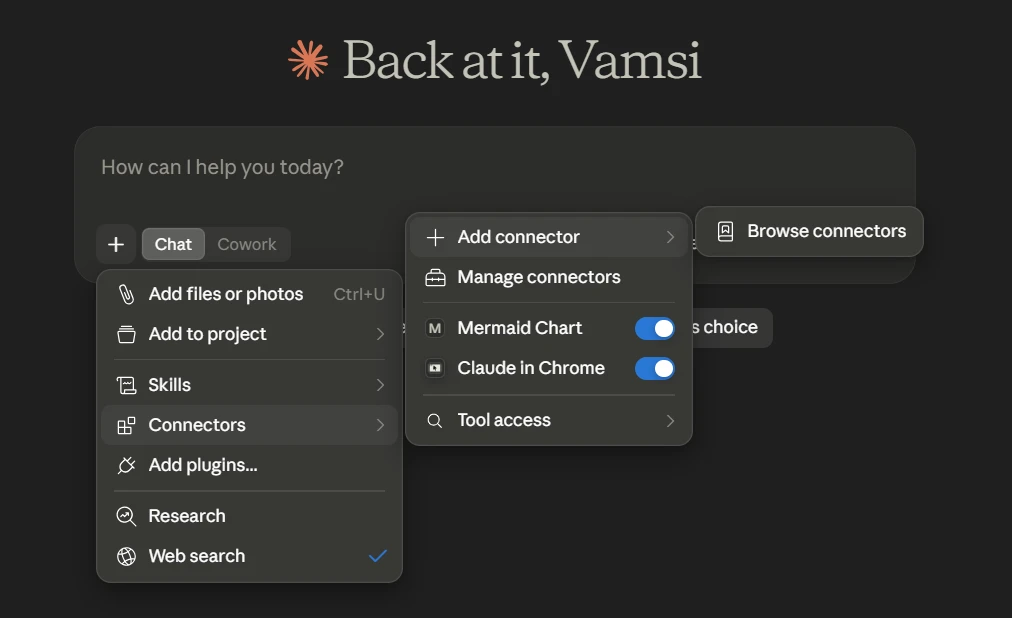
- GitHub (Official): Enables issue creation, PR reviews, and code search.
- Filesystem: Provides the ability to read, search, and organize local data.
- Brave Search: Offers live web search capabilities without the rate-limiting issues of standard search APIs.
- Postgres: Allows for natural language querying of databases.
- Context7: A specialized server that provides up-to-date documentation for libraries, solving the problem of stale training data.
Troubleshooting and Technical Best Practices
Data suggests that approximately 73% of users encounter a connection error during their first MCP setup. These failures generally fall into three categories:
- JSON Syntax Errors: A single missing comma or bracket in the configuration file will silently disable all MCP servers. Validation tools like
jqor online JSON linters are recommended before restarting the application. - Path Resolution Issues: Claude Desktop does not recognize relative paths (e.g.,
./projects). All directory references must be absolute. - Environment Variable Omissions: Tools like the GitHub MCP server require a Personal Access Token (PAT) passed through the
envblock of the JSON config. Without these credentials, the server will fail to authenticate and will show a "Failed to Connect" status.
To verify a successful connection in Claude Code, users should run claude mcp list. A status of "Connected" indicates the server is ready. If a "tools fetch failed" error appears, it usually signifies that the server process is running but has internal configuration errors preventing it from communicating its capabilities.
Security Implications and Scoped Permissions
Integrating MCP servers grants the AI model significant power over a user’s local and remote environments. Security experts emphasize the importance of "scoped permissions." When connecting a server to a database or a cloud repository, users should initially grant read-only access. Write access should only be enabled after the user has verified that the server behaves predictably and that the AI’s "agentic" actions—such as committing code or deleting files—are properly overseen.
The use of environment variables for secrets, rather than hard-coding tokens into command arguments, is another critical security measure. This ensures that sensitive credentials are not logged in plain text within the system’s process history.
The Future of MCP and Agentic AI
The implementation of MCP is more than a technical convenience; it is the infrastructure for the next generation of "Agentic AI." By standardizing how models interact with tools, MCP enables Claude to move from a passive responder to an active participant in professional workflows. As the protocol continues to evolve, we can expect deeper integration with enterprise software and more sophisticated multi-agent systems where different AI entities collaborate through shared MCP servers.
For organizations and developers, mastering MCP setup is the first step toward building a truly integrated AI workspace. By following the structured setup paths for Desktop and Code, managing the context window overhead, and adhering to security best practices, users can unlock the full potential of Claude as a comprehensive digital assistant.


 Ali Ikhwan
 Dwi Wanna