In the dynamic landscape of e-commerce, where every customer touchpoint is critical, transactional emails stand out as an indispensable tool for BigCommerce store owners. Far from being mere administrative notifications, these automated messages are powerful instruments for cultivating customer loyalty, driving repeat purchases, and significantly boosting sales. Recent data underscores their exceptional efficacy: a 2025 report indicated that transactional emails boast a 24% higher open rate and an astonishing 19-fold higher conversion rate compared to conventional marketing emails. This compelling performance highlights their unique position in the digital marketing ecosystem, driven by their inherent relevance and recipient expectation.
The Foundational Role of Transactional Emails in E-commerce
Transactional emails are automated communications triggered by specific customer actions or interactions with an online store. These are not promotional blasts but rather direct responses to an individual’s engagement, such as placing an order, requesting a password reset, or updating shipping preferences. The fundamental distinction lies in their anticipated nature: customers actively expect and often eagerly await these messages, which ensures their high engagement rates. For BigCommerce merchants, this translates into a unique opportunity to reinforce brand identity, provide crucial information, and subtly guide customers through their post-purchase journey.
The strategic importance of these emails extends beyond immediate information delivery. They play a vital role in managing customer expectations, reducing support inquiries by proactively answering common questions, and building trust through transparency. In an era where customer experience is a primary differentiator, well-crafted transactional emails contribute significantly to overall satisfaction, transforming routine updates into opportunities for positive brand interaction.
Key Transactional Email Types for BigCommerce Merchants
![BigCommerce Transactional Emails: Examples and Tips [2026 ]](https://www.omnisend.com/blog/wp-content/uploads/2022/04/big-commerce-transactional-emails-featured-image.png)
For BigCommerce store owners, a core set of transactional email types forms the backbone of effective customer communication. Each type is meticulously designed to address a specific customer need following a particular action, ensuring timely and relevant engagement.
- Order Confirmation Emails: These are perhaps the most anticipated transactional emails. Sent immediately after a purchase, they confirm the order details, including items purchased, total cost, shipping address, and an estimated delivery window. Beyond confirmation, they serve as a digital receipt and a primary reference point for customers.
- Shipping Confirmation Emails: Once an order has been dispatched, a shipping confirmation email informs the customer that their package is en route. Crucially, these emails include tracking numbers and links, allowing customers to monitor their delivery progress. Their high open rates reflect the customer’s keen interest in their purchase’s journey.
- Cancellation Confirmation Emails: Whether initiated by the customer or due to unforeseen circumstances, a cancellation confirmation provides official acknowledgment of an order’s termination. While potentially a negative touchpoint, a thoughtfully designed cancellation email can mitigate disappointment, offer alternatives, or invite future engagement.
- Customer Feedback Request Emails: These emails are sent after a customer has received their order, inviting them to share their experience through reviews, ratings, or surveys. User-generated content is invaluable for social proof and product improvement, making these emails crucial for continuous growth.
- Password Reset Request Emails: In an age of numerous online accounts, forgotten passwords are common. These emails provide a secure mechanism for users to regain access to their accounts, typically containing a time-sensitive link to a password reset page.
- Abandoned Cart Emails (Triggered Emails): While technically falling under trigger-based marketing, abandoned cart emails are essential for BigCommerce stores. They are automatically sent when a customer adds items to their cart but leaves the site before completing the purchase. These emails serve as a gentle reminder, often including incentives, to encourage conversion. Industry data suggests that abandoned cart emails can recover a significant portion of lost sales, with conversion rates often exceeding 10%.
Illustrative Examples from Leading Brands
Analyzing how established brands leverage transactional emails provides invaluable insights into best practices.
- Order Confirmation (e.g., River Island): Major retailers like River Island excel by presenting all critical order information clearly and concisely. Their emails typically include delivery address, estimated delivery window, order number, purchase date, product breakdown, and quick links to FAQs. The key is to prioritize essential details above the fold, allowing customers to quickly grasp the most relevant information without extensive scrolling.
- Shipping Confirmation (e.g., Fitbit): Fitbit’s shipping notifications strike an optimal balance between necessary details and customer support accessibility. They clearly state the product shipped, provide a tracking number, and offer easy contact options for any inquiries. This proactive communication significantly enhances customer satisfaction by keeping them informed and empowered.
- Cancellation Confirmation (e.g., OpenTable, Hulu): While a cancellation might seem like an endpoint, brands like OpenTable and Hulu transform it into an opportunity. OpenTable’s confirmation is direct, inviting users to book new tables. Hulu’s, on the other hand, acknowledges the cancellation while subtly prompting reactivation, sometimes with personalized offers. This demonstrates how even negative interactions can be reframed to encourage future engagement or re-subscription, often incorporating product recommendations or calls to action to explore other services.
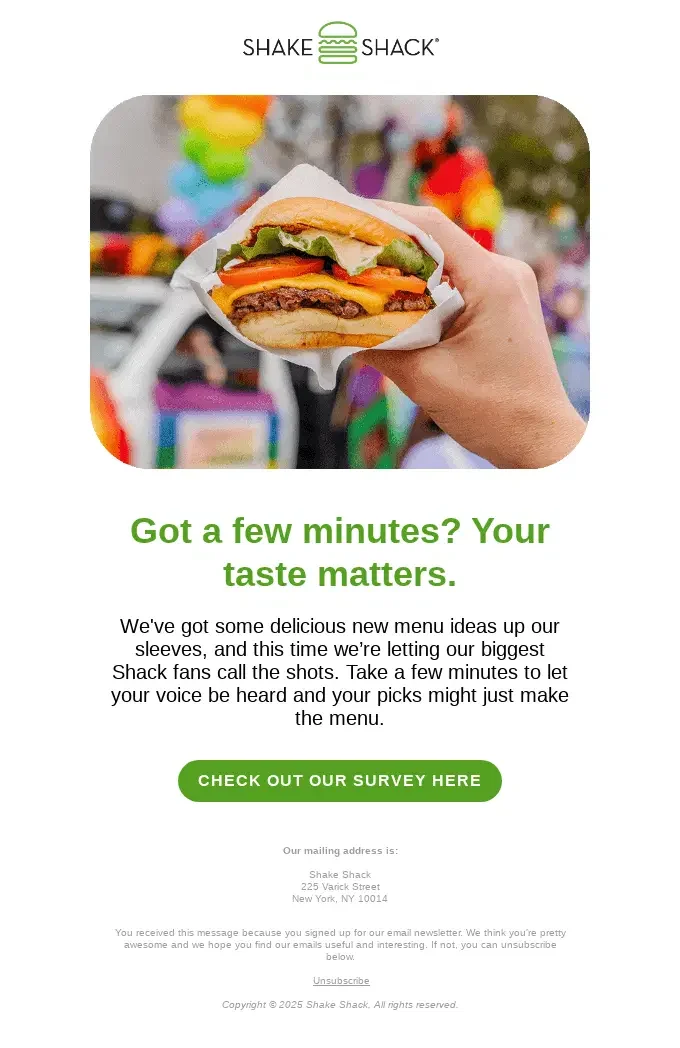
- Customer Feedback Request (e.g., Shake Shack): Shake Shack’s feedback requests are masterclasses in brevity and directness. They get straight to the point, asking for input on specific aspects (e.g., new menu ideas) without excessive text. Such emails make it easy for customers to provide valuable insights, often by valuing their opinion directly and linking it to tangible improvements. This direct approach fosters a sense of community and appreciation.
- Password Reset (e.g., Zapier): Zapier’s password reset emails exemplify clarity and security. They prominently feature a “Reset your password” button, clearly state the expiration of the reset link, and provide instructions for recipients who did not initiate the request. The absence of clutter and the direct visual guidance ensure a seamless and secure account recovery process.
BigCommerce Transactional Email Best Practices
Leveraging the high open rates of transactional emails requires adherence to several best practices to maximize their impact:
- Clarity and Conciseness: The primary goal is to convey information efficiently. Use clear language, bullet points, and strong visual hierarchy to make key details easy to find.
- Mobile Optimization: A significant portion of online shopping occurs on mobile devices. Ensure emails are responsive, loading quickly and displaying correctly on all screen sizes.
- Brand Consistency: Every transactional email is an extension of your brand. Maintain consistent branding—logo, colors, fonts, tone of voice—to reinforce brand identity and professionalism.
- Personalization: While automated, transactional emails can still be personalized with the customer’s name, specific order details, and even tailored product recommendations based on their purchase history.
- Call to Action (CTA): Strategically place relevant CTAs. For an order confirmation, it might be “Track Your Order”; for a feedback request, “Leave a Review.” Avoid overwhelming the recipient with too many options.
- Review and Feedback Integration: Incorporate social proof or review sections in non-critical transactional emails (e.g., shipping confirmations) to subtly encourage future purchases or engagement.
- Customer Support Accessibility: Always provide clear contact information for customer support, including email addresses, phone numbers, or links to a help center. This reduces frustration and builds trust.
- Security Measures: For sensitive emails like password resets, emphasize security protocols and advise customers on how to proceed if they did not initiate the request.
Crafting Effective Messages: Templates and Customization
![BigCommerce Transactional Emails: Examples and Tips [2026 ]](https://www.omnisend.com/blog/wp-content/uploads/2026/06/2-Fitbit-shipping-confirmation.png)
BigCommerce offers native capabilities for editing transactional email content, providing a baseline for customization. Merchants can access these settings via the admin panel under “Store Setup” -> “Email Templates.” This allows for basic text modifications, enabling store owners to inject their brand’s voice into the messages. However, the native editor is largely limited to plain-text formatting, posing a challenge for brands aiming for sophisticated visual branding, dynamic content, or advanced automation workflows. This limitation has historically driven many BigCommerce users to seek more robust solutions.
Basic BigCommerce Transactional Email Templates:
-
Order Confirmation Template:
- Subject: Your [Company Name] order #[ORDER NUMBER] is confirmed
- Hi [First Name],
- Thanks for your order! Here’s a summary of what you’ve purchased:
- [ORDER SUMMARY TABLE: product name, qty, price]
- Order total: [AMOUNT]
- Delivering to: [ADDRESS]
- Estimated delivery: [DATE RANGE]
- We’ll send you a shipping confirmation as soon as your order is on its way.
- [TRACK ORDER BUTTON]
- Questions? Reply to this email or visit our Help Center.
-
Shipping Confirmation Template:
- Subject: Your order #[ORDER NUMBER] is on its way!
- Hi [First Name],
- Good news – your order has shipped. Here’s your tracking info:
- Carrier: [CARRIER NAME]
- Tracking number: [TRACKING NUMBER]
- Estimated delivery: [DATE]
- [TRACK YOUR PACKAGE BUTTON]
- If you have any questions about your shipment, don’t hesitate to get in touch.
-
Cancellation/Refund Confirmation Template:
- Subject: Your order #[ORDER NUMBER] has been cancelled
- Hi [First Name],
- We’ve processed your cancellation request for order #[ORDER NUMBER]. Your refund of [AMOUNT] will be returned to your original payment method within [X] business days.
- Changed your mind? You can place a new order anytime at [STORE URL].
- [SHOP AGAIN BUTTON]
-
Feedback Request Template:
![BigCommerce Transactional Emails: Examples and Tips [2026 ]](https://www.omnisend.com/blog/wp-content/uploads/2026/06/3-OpenTable-cancellation-confirmation.png)
- Subject: How did we do, [First Name]?
- Hi [First Name],
- It’s been [X days] since your order arrived – we’d love to know what you think.
- Leaving a review takes less than two minutes, and it helps other shoppers like you make more confident decisions.
- [LEAVE A REVIEW BUTTON]
- Thank you for shopping with [Store Name].
-
Password Reset Template:
- Subject: Reset your [Store Name] password
- Hi [First Name],
- We received a request to reset the password for your account. Click the button below to set a new one:
- [RESET PASSWORD BUTTON]
- This link will expire in [X hours]. If you didn’t request a password reset, you can safely ignore this email – your account is still secure.
Enhancing Capabilities: The Role of Elite Technology Partners (e.g., Omnisend)
Recognizing the evolving needs of e-commerce businesses, BigCommerce strategically partners with “Elite Technology Partners” like Omnisend. These integrations bridge the gap between BigCommerce’s robust e-commerce platform and advanced marketing functionalities. Omnisend, for instance, provides a comprehensive suite of tools that significantly elevate BigCommerce transactional email capabilities.
Through such integrations, merchants gain access to:
- Advanced Visual Editors: Drag-and-drop editors allow for fully branded, visually appealing emails without needing coding knowledge. This includes incorporating images, dynamic content blocks, and custom fonts.
- Sophisticated Automation Workflows: Beyond simple triggers, tools like Omnisend enable multi-step automation sequences, allowing for more nuanced follow-ups based on customer behavior. For example, an abandoned cart email could be followed by a second reminder with a discount, or an order confirmation could trigger a post-purchase upsell email. Omnisend data indicates that customers automating their email conversions achieve 41% higher results, demonstrating the power of well-orchestrated workflows.
- Enhanced Personalization: Integration allows for deeper personalization, leveraging customer data points beyond just their name, such as past purchases, browsing history, and demographic information, to deliver highly relevant content and product recommendations.
- A/B Testing and Analytics: Advanced platforms offer robust A/B testing capabilities for subject lines, content, and CTAs, alongside detailed analytics to track open rates, click-through rates, and conversion metrics for continuous optimization.
- Segmented Campaigns: Merchants can segment their audience based on various criteria to send targeted transactional messages or combine them with promotional content more effectively.
Connecting a BigCommerce store with an Elite Technology Partner like Omnisend is typically a straightforward process, often involving a few clicks within the BigCommerce app store or via a dedicated integration wizard. This seamless integration ensures that customer data flows efficiently between the platforms, enabling real-time triggering of sophisticated email campaigns.
The Future of BigCommerce Email Marketing
![BigCommerce Transactional Emails: Examples and Tips [2026 ]](https://www.omnisend.com/blog/wp-content/uploads/2026/06/4-Hulu-cancellation-with-reconnection.png)
The trajectory of e-commerce indicates an increasing emphasis on hyper-personalization and automation. For BigCommerce merchants, this means that transactional emails will continue to evolve from mere notifications into critical engagement hubs. The ability to integrate advanced marketing automation platforms with BigCommerce will become not just a competitive advantage but a necessity. This synergy allows businesses to deliver timely, relevant, and visually compelling messages that not only inform but also delight customers, fostering deeper loyalty and driving sustainable growth.
BigCommerce, as a platform, continues to invest in its ecosystem, allowing merchants to choose the best-of-breed solutions for their specific needs. This flexibility, coupled with the inherent power of transactional emails, positions BigCommerce store owners to create exceptional customer experiences that translate directly into increased sales and a stronger brand presence in a crowded digital marketplace.
Frequently Asked Questions
What are BigCommerce transactional emails?
BigCommerce transactional emails are automated messages sent to customers in response to specific actions they take, such as placing an order, initiating a cancellation, or requesting a password reset. These emails are expected by recipients and are primarily informative, though they can also serve strategic marketing purposes.
Can you customize BigCommerce’s default transactional emails?
Yes, BigCommerce allows for some customization of its default transactional emails through its native editor in the admin panel. However, this editor is typically limited to plain-text modifications. For advanced customization, visual branding, dynamic content, and sophisticated automation, integrating with third-party email marketing platforms like Omnisend is often necessary.
Are transactional emails free on BigCommerce?
The ability to send basic transactional emails using BigCommerce’s native functionalities is included with all BigCommerce plans, making it “free” in that sense. There are no additional charges for sending these plain-text emails. However, advanced features, design capabilities, and automation provided by integrated solutions may incur separate subscription fees from the third-party provider.
![BigCommerce Transactional Emails: Examples and Tips [2026 ]](https://www.omnisend.com/blog/wp-content/uploads/2026/06/5-Shake-Shack-feedback-request.png)
What’s the difference between transactional and marketing emails?
The primary difference lies in their purpose and trigger. Transactional emails are automated responses to specific customer actions, are highly anticipated, and primarily provide requested information (e.g., order confirmations, shipping updates). Marketing emails, conversely, are typically promotional, sent to a broader audience or segmented groups, and aim to drive sales, engagement, or brand awareness through newsletters, sales announcements, or product launches. Transactional emails boast significantly higher open and conversion rates due to their expected and highly relevant nature.