rifanmuazin
On May 20th, 2026, the global web development community marked a significant milestone with the release of WordPress 7.0, a major update that propels the world’s most popular Content Management System (CMS) into a new era of usability and sophistication. Diverging from previous releases that primarily focused on incremental enhancements to the block editor, WordPress 7.0 introduces a comprehensive suite of features designed to deliver smarter workflows and a more intuitive, app-like experience. This release is a critical step in the platform’s ongoing roadmap, reinforcing its commitment to empowering both seasoned developers and everyday content creators.
A Refreshed Administrative Experience
At the forefront of WordPress 7.0’s innovations is a profoundly refreshed administrative interface, signaling a strategic shift towards a modern web application aesthetic. One of the most immediately noticeable changes is the introduction of smoother page transitions within the backend. Leveraging the CSS View Transitions API, navigation between administrative pages now presents a fluid, seamless animation, significantly enhancing the user experience by reducing perceived latency and providing a more polished feel. This subtle yet impactful change contributes to the overall impression of a responsive and dynamic environment, moving away from the traditional, static page loads often associated with CMS platforms.
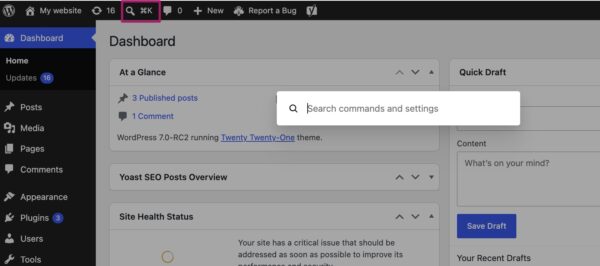
Complementing this visual upgrade is the integration of a new Command Palette shortcut in the top menu bar. Accessible via a dedicated icon or the universal keyboard shortcuts (⌘K or Ctrl+K), the Command Palette offers a centralized, highly efficient tool for backend navigation and executing various actions. Users can quickly search for specific pages, posts, settings, or perform tasks like creating new content, managing plugins, or accessing specific editor modes, all without navigating through multiple menus. This feature is a direct nod to the productivity tools found in modern desktop applications, designed to drastically cut down on clicks and improve the speed at which administrators and editors can manage their sites.
Adding to the visual overhaul, WordPress 7.0 also introduces a new default color palette. The scheme previously known as ‘Modern’ has now been adopted as the standard, aligning the admin interface more closely with the contemporary design language of the block and site editors. This standardization creates a more cohesive visual identity across the entire WordPress ecosystem, reflecting a unified design philosophy. For users who prefer the classic look, the original palette remains available under profile preferences, now relabeled as ‘Fresh.’ These collective improvements to the backend are not merely cosmetic; they represent a concerted effort to make WordPress feel less like a traditional CMS and more like a high-performance web application, catering to the expectations of a digitally native user base.
Enhanced Content Creation with Visual Revisions
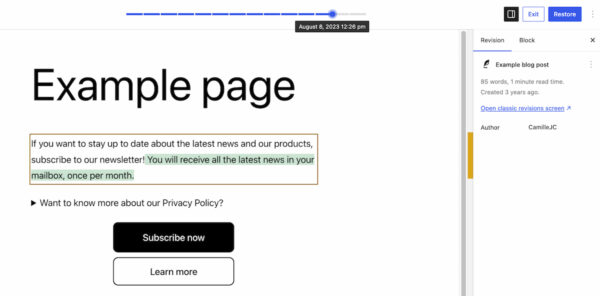
Content management is fundamentally improved in WordPress 7.0 with the introduction of visual revisions. Previously, reviewing past versions of a page involved sifting through raw text differences, a process that could be cumbersome and time-consuming, especially for visually complex layouts. The new visual revisions feature transforms this by providing a direct, graphical representation of changes.
Located in the familiar revisions section, clicking on the feature now takes users to a live preview of their page. A slider at the top allows effortless navigation through earlier versions, clearly displaying the date and time of each modification. Crucially, additions are highlighted in green, changed sections in yellow, and deleted sections in red. This intuitive color-coding system enables immediate identification of alterations, eliminating the need for textual analysis. Site administrators and content creators can now swiftly identify the source of layout discrepancies, review updates with greater clarity, and restore previous versions with confidence. This enhancement significantly streamlines the editorial workflow, reduces the margin for error, and empowers users to maintain content integrity more effectively.
Innovations in the Block Editor
As expected, the heart of content creation in WordPress – the block editor – receives substantial enhancements in version 7.0. This release introduces two new essential blocks and significant improvements to existing ones, further reducing reliance on third-party plugins and custom coding.
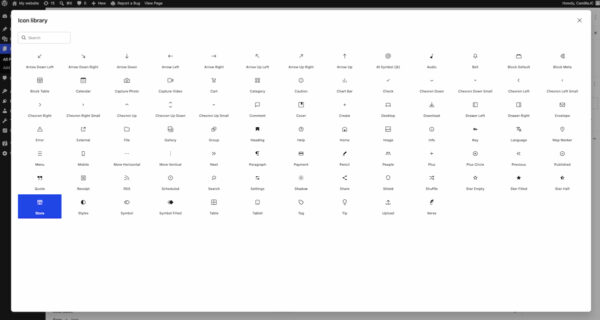
The new Breadcrumbs block offers a native solution for adding navigational breadcrumbs to pages and posts. Upon insertion, it automatically generates the correct hierarchical path, which can then be customized through various options, improving site navigation and SEO. The Icon block provides access to an integrated directory of icons, allowing users to effortlessly embed visual cues and stylistic elements into their content without the need for external libraries or image uploads. This built-in icon library streamlines design processes and ensures consistency across a website.
Existing blocks have also seen valuable updates. The Grid Block has been refined with more sophisticated responsiveness controls, replacing the previous Auto/Manual toggle with a range of options to precisely configure column behavior across different screen sizes. This empowers users to create highly adaptive layouts without delving into custom CSS. The Cover Block now supports embedded videos as backgrounds, enabling dynamic and engaging visual elements using content from platforms like YouTube directly within the block. These new and improved blocks collectively enhance the native capabilities of the block editor, allowing for more ambitious and flexible designs to be achieved out-of-the-box. This continuous expansion of core functionalities underscores WordPress’s ambition to become an all-encompassing site-building tool, minimizing the need for external dependencies.
Precision in Design: Responsive Controls and Smarter Patterns
Recognizing the paramount importance of mobile-first design, WordPress 7.0 introduces advanced responsive design controls, making it significantly easier to tailor content for diverse devices. A new viewport-based control allows users to conditionally show or hide blocks based on the user’s screen size (desktop, tablet, or mobile). This feature is accessible directly from the block toolbar, offering a no-code solution for fine-tuning responsive layouts. By simply selecting the target devices, users can ensure that specific content or design elements are only displayed where they are most effective, thereby optimizing the user experience across all platforms. This capability is a game-changer for non-developers, democratizing advanced responsive design practices.
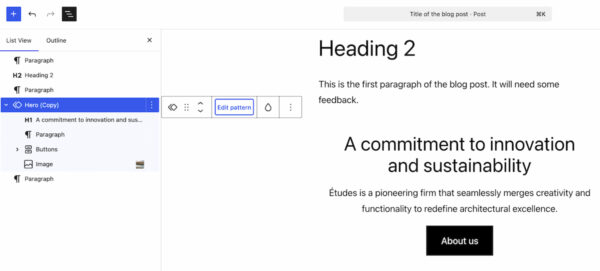
Pattern editing also becomes considerably smarter in this release. Patterns and templates now feature distinct editing modes designed to facilitate content updates without inadvertently disrupting the underlying design. When a pattern is selected, the List View initially presents only the content-focused elements, such as text and images. This “content-first” approach helps users concentrate on optimizing their messaging and visual assets. For more comprehensive design adjustments, clicking ‘Edit pattern’ reveals all remaining elements, including design components like spacers and dividers. This layered editing approach strikes a balance between content focus and design flexibility, enabling users to customize patterns to specific use cases across their website efficiently and safely.
Laying the Groundwork for AI Integration
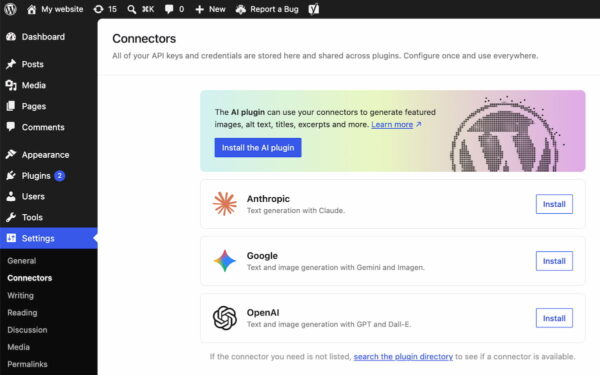
While WordPress 7.0 itself does not include native AI-powered tools, it strategically lays crucial groundwork for future artificial intelligence integration. A new ‘Connectors’ section has been added under Settings in the WordPress backend. This dedicated area serves as a central hub for connecting to external integrations, including leading AI providers and agents such as Claude, Gemini, and OpenAI. Users can search a directory for available integrations or manually configure connections using API keys and other credentials.
This foresightful addition provides a standardized, future-proof ecosystem for developers to build AI-driven functionalities into WordPress or its plugins. By centralizing API key management and connection protocols, it simplifies the process for site owners to leverage AI for tasks ranging from content generation and optimization to advanced analytics and user personalization. Industry experts anticipate that this framework will catalyze a new wave of AI-enhanced WordPress plugins and features, fundamentally transforming how content is created, managed, and delivered on the platform. The ‘Connectors’ section is a clear signal of WordPress’s long-term vision to embrace emerging technologies and maintain its relevance in an evolving digital landscape.
Streamlined Plugin Management
Recognizing the integral role plugins play in extending WordPress functionality, version 7.0 introduces a practical enhancement to plugin management. A new filter allows plugins to register custom tabs on the Plugins screen. This feature enables developers to group related plugins under a dedicated, properly labeled tab, significantly improving organization for site administrators. For instance, a suite of plugins from a single developer, like Yoast SEO and its add-ons, can now be neatly consolidated under a ‘Yoast’ tab. This grouping simplifies the process of checking versions, managing activations, and maintaining an overview of an entire plugin ecosystem, thereby enhancing administrative efficiency and reducing clutter on the Plugins page.
Performance and Under-the-Hood Enhancements
Beyond the visible user interface and feature updates, WordPress 7.0 also delivers critical performance improvements and foundational changes that contribute to a more robust and scalable platform. Performance was a key focus, with notable advancements in client-side media processing. This innovation offloads image and video processing tasks from the server to the user’s browser, resulting in faster upload times and reduced server strain, particularly beneficial for media-heavy websites. Continued optimizations to block rendering further enhance the loading speed and responsiveness of pages built with the block editor. These under-the-hood changes help WordPress scale more efficiently, providing a snappier experience for both site administrators and visitors.
Furthermore, WordPress 7.0 raises the minimum PHP version requirement to 7.4. This update encourages wider adoption of a more modern, secure, and performant PHP environment, which in turn boosts the overall security and efficiency of WordPress installations. This move is consistent with the project’s commitment to leveraging contemporary technologies for a better web.
The Road Ahead: Postponement of Real-time Collaboration
An anticipated feature, real-time collaboration, initially slated for inclusion in WordPress 7.0, was ultimately postponed. The decision, announced by the WordPress core team on May 8th, 2026, was made to prioritize the stability and reliability of the current release. The real-time collaboration feature, which promises Google Docs-like simultaneous editing capabilities, represents a complex technical undertaking. Developers opted to defer its release to ensure a thoroughly tested and robust implementation, preventing potential stability issues that could arise from rushing its deployment. This demonstrates a pragmatic approach to development, prioritizing a solid foundation over immediate feature delivery. While its absence is noted, the community anticipates its eventual release in a future version, which will undoubtedly revolutionize collaborative content creation on WordPress.
Broader Implications and Industry Impact
WordPress 7.0 represents a pivotal moment in the evolution of the platform. Its focus on an “app-like” experience and smarter workflows underscores a strategic move to cater to a user base increasingly accustomed to sophisticated digital tools. By streamlining administrative tasks, enhancing content creation with visual aids, and empowering users with advanced design controls without code, WordPress is broadening its appeal to an even wider audience, including those without deep technical expertise.
The groundwork laid for AI integration through the ‘Connectors’ section is particularly significant. It positions WordPress as a forward-thinking CMS, ready to embrace the next wave of digital transformation. This strategic move ensures that WordPress remains competitive against emerging platforms that often boast native AI capabilities. For developers, this framework provides a clear path to innovate, integrating cutting-edge AI services into their themes and plugins.
The performance enhancements and the updated PHP requirement also reinforce WordPress’s commitment to a robust and secure foundation. As the internet grows more demanding, ensuring fast, efficient, and secure websites is paramount. WordPress 7.0 addresses these needs, offering a more stable and scalable environment for the millions of websites it powers globally. This release is not just about new features; it’s about solidifying WordPress’s position as a dominant, adaptable, and future-proof platform for the open web.
In conclusion, WordPress 7.0 is a landmark release that delivers substantial improvements across the board. From a modernized admin interface and intuitive content creation tools to strategic AI groundwork and foundational performance upgrades, it offers a compelling package for anyone building or managing a website. The advancements signify a clear direction for WordPress – one that embraces innovation, user experience, and future technologies. Site administrators and developers are encouraged to explore the new features and update to this latest version, diving into the comprehensive details available in the official release post on WordPress.org.