The landscape of accounting software is constantly evolving, with platforms like Xero and FreshBooks continuously updating their offerings. While both aim to simplify financial management, they cater to distinct business needs and operational scales. This comprehensive comparison delves into their features, pricing, and ideal user profiles to help businesses make an informed decision.
Evolving Feature Sets Signal Convergence and Differentiation
Historically, Xero and FreshBooks occupied clearly defined niches within the accounting software market. However, recent developments reveal a significant overlap in their feature sets. Both platforms now offer robust double-entry accounting tools, automation capabilities, and comprehensive reporting suites. This convergence means that the decision between them is less about fundamental functionality and more about how well their specialized strengths align with a particular business’s operational model and growth trajectory.
FreshBooks: The Freelancer’s Ally and Agency Staple
FreshBooks has consistently championed its strengths for freelancers and agencies that engage in regular client work. Its core value proposition lies in its intuitive approach to invoicing, client management, and payment tracking. The platform excels in generating customized invoices, setting up recurring billing cycles, and sending automated payment reminders. For businesses where client interactions and timely payments are paramount, FreshBooks offers a streamlined and user-friendly experience. Its emphasis on client-facing features aims to simplify the administrative burden on service-based professionals, allowing them to focus on delivering their core services.
Xero: Empowering Growth and Scalability
In contrast, Xero is increasingly positioning itself as the solution for growing businesses. Its architecture is designed to handle complexity, particularly for companies managing multiple currencies, diverse product lines, and various sales channels. Xero’s robust infrastructure supports businesses that are expanding their operations internationally or dealing with intricate inventory management needs. The platform’s capacity for unlimited users on all plans is a significant differentiator, making it an attractive option for organizations with larger teams or those planning for rapid team expansion.
The Crucial Decision: Aligning Software with Business Ambitions
Ultimately, the choice between Xero and FreshBooks hinges on the specific nature and aspirations of the business. Both are invaluable tools for businesses seeking to escape the complexities of manual financial management. The following sections will explore their pricing, feature sets, and suitability for different business models to guide this critical decision.
Quick Verdict: Xero vs. FreshBooks
For growing companies engaged in international sales, managing diverse products, and requiring robust multi-currency support, Xero emerges as the superior choice. Its advanced app connectors and comprehensive inventory management tools provide a significant advantage. Furthermore, Xero’s unlimited user policy across all its plans offers unparalleled scalability and cost-effectiveness for expanding teams.
Conversely, freelancers and small service-based businesses seeking an intuitive and efficient method for managing invoicing and recurring billing will find FreshBooks to be the ideal solution. Its user-centric design prioritizes ease of use for core invoicing tasks, making it a less intimidating entry point for those new to accounting software.
Xero vs. FreshBooks: Pricing and Total Value
The pricing structures of Xero and FreshBooks reveal distinct approaches to value delivery, impacting the overall cost of ownership, especially as businesses scale.
Xero’s Tiered Feature-Based Pricing:
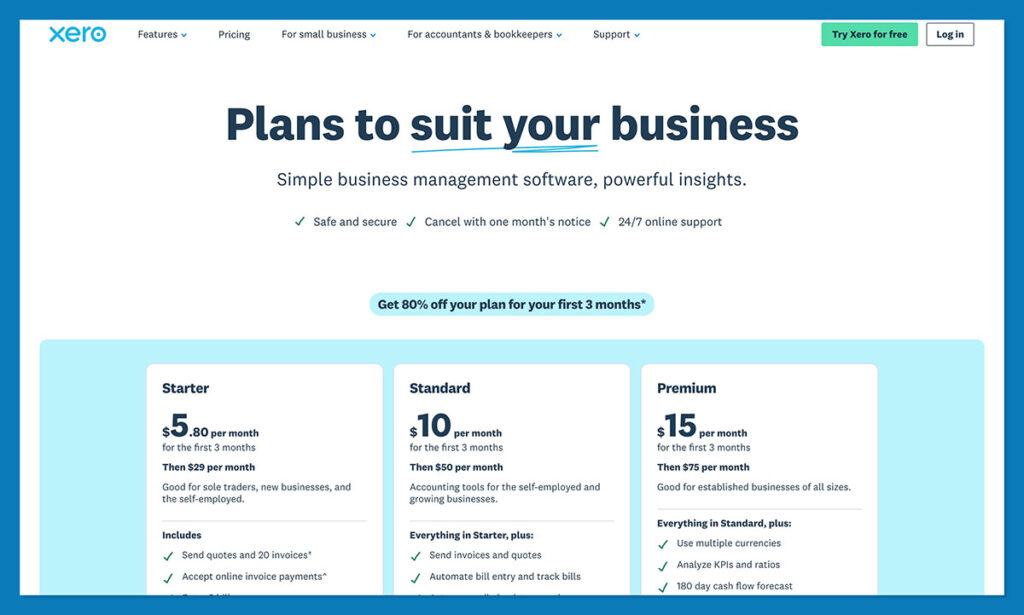
Xero’s pricing model is predicated on the features and functionalities required by the business. While the initial outlay might appear higher, it’s important to note that Xero does not impose per-user fees, a crucial factor for growing teams. The "Early" plan, starting at approximately $25 per month (US pricing), offers essential features but includes limitations on the number of invoices and bills that can be processed. Upgrading to "Growing" ($59 per month) and "Established" ($97 per month) unlocks progressively higher transaction caps, enhanced reporting capabilities, and extended forecasting periods. All Xero plans incorporate valuable extras like real-time reporting and smart document capture, providing a solid foundation for financial oversight.
FreshBooks’ Client-Centric Pricing:
FreshBooks adopts a pricing strategy based on the number of billable clients. Plans typically begin at $23 per month, which includes support for up to five billable clients and unlimited invoices. Higher tiers, such as "Plus" ($43 per month) and "Premium" ($70 per month), expand client limits to 50 and unlimited, respectively, while also introducing advanced features like real-time expense tracking and more comprehensive reporting tools. A key distinction is that each FreshBooks plan is designed for a single user, with additional team members incurring separate charges. This model can make FreshBooks more economical for solo operators but potentially more expensive for businesses with multiple employees requiring access to the accounting system.
Assessing Total Value:
While Xero’s starting price might seem higher, its unlimited user policy can offer superior long-term value for businesses with a growing workforce. Conversely, FreshBooks’ client-based pricing can be highly cost-effective for freelancers and small service providers with a manageable client base. The "total value" proposition therefore depends heavily on a business’s specific operational structure and anticipated growth.
Xero vs. FreshBooks: Core Accounting Features
Both Xero and FreshBooks offer a comprehensive suite of accounting tools, yet their specializations cater to different operational needs.
Invoicing, Expenses, Bills, and Time Tracking
FreshBooks stands out as the more intuitive platform for service-based businesses. Its invoicing capabilities are exceptionally strong, allowing for the creation of highly customized invoices, the implementation of payment plans with up to 12 installments, and the setup of up to three automated reminders. The system also supports partial payments, late fees, and integrates seamlessly with time-tracking features, enabling accurate billing for services rendered. A particularly valuable feature for consultants and retainers is the support for retainers, where FreshBooks can automatically generate invoices for agreed periods, deduct logged hours, and manage billing for additional work.
Xero, while less explicitly focused on service-based businesses, offers robust invoicing tools. Users can generate invoices, accept payments through various methods including ACH and Apple Pay, and schedule automated reminders. Xero’s JAX AI assistant can even assist in designing invoices. Time tracking is available as an add-on, integrating with the core accounting functions.
Analysis: For businesses where invoicing is the primary revenue generation method, FreshBooks offers a more specialized and streamlined experience. However, Xero is continuously enhancing its capabilities, narrowing the gap.
Bank Reconciliation, Payments, and Everyday Bookkeeping
Xero is engineered for robust day-to-day bookkeeping, built upon the foundation of traditional double-entry accounting. It provides advanced tools for bank reconciliation, asset management, category tracking, and detailed transaction searching. While it may lack the client-facing portal features of FreshBooks, Xero excels in automatically capturing and categorizing essential financial documents.
FreshBooks has significantly improved its everyday accounting features, particularly for its higher-tier plans. The "Plus" plan and above include bank reconciliation functionalities that match expenses against invoices, payments, bills, credits, and transfers. A helpful suggestion tool aids in matching transactions. However, FreshBooks’ reconciliation is limited to a single currency and excludes complex financial instruments like loans, investments, and cryptocurrency accounts. Furthermore, Xero offers accountant access on all plans, whereas FreshBooks restricts this on its "Lite" plan, potentially creating a hurdle for collaborative financial management.
Analysis: Xero’s inherent design for double-entry accounting provides a more comprehensive and flexible solution for day-to-day bookkeeping and complex financial reconciliation, especially for businesses dealing with multiple currencies or diverse financial accounts.
E-commerce Integrations, Inventory, and Stock Management
Xero generally holds an advantage in e-commerce finance management due to its extensive integration capabilities. It offers a free Shopify app that seamlessly pulls sales, payout, fee, refund, and tax data directly into the accounting system. The "Inventory Plus" add-on further enhances this by providing connectors for Shopify and Amazon FBA. Xero’s inventory management features include fixed asset management, tracking of categories and individual products, and monitoring of Cost of Goods Sold (COGS) and gross profit. The recent addition of backorder tracking further strengthens its inventory capabilities.
FreshBooks can accommodate e-commerce operations, though its inventory management features are comparatively lighter. It allows for the creation of products, assignment of income accounts, tracking of stock quantities, and inclusion of taxes in reports. Shopify support is available. FreshBooks may be suitable for businesses that primarily offer services but incorporate a small volume of inventory.
Analysis: For businesses heavily reliant on e-commerce and requiring sophisticated inventory control, Xero’s deeper integrations and advanced inventory features make it the more compelling choice.
Multi-Currency Management, Sales Tax, and Compliance
FreshBooks permits multi-currency transactions and accepts various payment methods, but its reporting capabilities are limited to a single currency at a time, mirroring its bank reconciliation limitations. While tax reports can be generated on any plan, more in-depth financial and accounting reports are typically reserved for higher tiers.
Xero’s multi-currency support is tiered. While any plan can accept payments in different currencies, only the "Established" plan allows for multi-currency reporting. This top-tier plan unlocks comprehensive support for over 160 currencies, enabling the creation of foreign invoices, bills, bank accounts, and expenses with automatic conversion. Xero’s integration with Avalara further simplifies sales tax management across various jurisdictions, making it adept at handling international revenue streams.
Analysis: Xero’s advanced multi-currency features and robust sales tax management tools make it the superior option for businesses operating on a global scale or dealing with complex international tax obligations.
Reporting, Analytics, AI, and Automation
FreshBooks offers essential reporting functionalities, including profit/loss statements and expense summaries. However, more advanced reports are often restricted to higher-tier plans. Its automation capabilities are strong, particularly for tasks like sending reminders and delivering invoices on time. While it has some automation, its AI integration is less developed compared to Xero.

Xero demonstrates a more mature approach to AI and automation. Across all plans, users benefit from visualized performance data through graphs and cash flow forecasting (with varying forecast lengths depending on the plan). The optional Payroll add-on further expands its capabilities. Higher-tier plans provide advanced tools such as employee expense reports, Key Performance Indicators (KPIs), financial health scorecards, and budget management. Xero’s JAX AI assistant is a significant differentiator, capable of answering data-related queries, benchmarking performance against industry peers, building cash flow projections, and evaluating uploaded documents.
Analysis: Xero offers a more sophisticated suite of reporting, analytics, and AI-driven tools, providing deeper insights into business performance and future growth potential, making it ideal for data-driven decision-making.
Payroll, Security, and Accountant Collaboration
Payroll: Both platforms offer payroll solutions, often through partnerships. FreshBooks utilizes a Payroll app powered by Gusto, available as an add-on. Xero also integrates with Gusto in the US, providing a similar experience, with the app being more deeply embedded within the Xero ecosystem.
Security: Both Xero and FreshBooks maintain high standards for data security and privacy, employing robust measures to protect sensitive financial information and offering granular control over account access.
Accountant Collaboration: Xero significantly excels in this area. Its ability to accommodate unlimited users on all plans means that accountants can have direct access to the system without incurring additional costs. FreshBooks, on the other hand, restricts accountant access on its lower-tier plans, potentially adding complexity and cost for collaborative financial oversight.
Analysis: While payroll solutions are comparable, Xero’s unlimited user policy provides a substantial advantage for businesses that require close collaboration with their accounting partners.
Ease of Use and Customer Support
FreshBooks is widely regarded as having a gentler learning curve, particularly for users without formal accounting training. Its dashboards are intuitive, and the overall design prioritizes simplicity. The availability of phone support is a significant benefit for businesses that prefer direct, real-time assistance.
Xero, while more powerful, presents a steeper learning curve due to its foundation in traditional double-entry accounting. It assumes a degree of familiarity with accounting principles. However, Xero offers comprehensive onboarding resources, including access to Xero Coaches, certification courses, and an active user community.
Analysis: For businesses prioritizing immediate ease of use and direct phone support, FreshBooks is the more accessible option. Xero requires a greater initial investment in learning but offers a more profound and scalable accounting system for those willing to dedicate the time.
Xero vs. FreshBooks: Which Should You Choose?
FreshBooks remains an exceptional choice for freelancers and service-based businesses where streamlined invoicing and client management are paramount. Its user-friendly interface, dedicated client-facing features, and accessible phone support make it an attractive low-effort, affordable solution.
However, for growing businesses with ambitions for scale, Xero emerges as the stronger contender. Its ability to manage multiple currencies, extensive inventory tools, vast third-party app integrations, and advanced AI capabilities position it as the go-to platform for businesses seeking to expand and optimize their operations. The unlimited user policy is a significant factor for businesses planning to scale their financial teams without incurring incremental per-user costs.
In conclusion, FreshBooks excels in simplicity and specialized features for service-oriented businesses, while Xero provides a more comprehensive and scalable ecosystem for businesses aiming for significant growth and operational complexity.
Xero vs. FreshBooks: Frequently Asked Questions
How much does Xero cost, and is the price changing?
Xero’s US pricing for new subscribers as of October 1, 2026, is $27/month for Early, $59/month for Growing, and $97/month for Established. Previously, these were $25, $55, and $90 respectively. Existing promotional pricing will be honored until expiration, and the multi-organization discount is being phased out.
What are the limits on Xero’s cheapest plan?
The "Early" plan caps users at 20 invoices and 5 bills per month, with a 30-day cash flow forecast. It excludes multi-currency, custom dashboards, financial health scorecards, and Inventory Plus. This plan is best suited for solo consultants sending a minimal number of invoices. For businesses with active sales, the "Growing" plan is generally the recommended starting point.
Does Xero really include unlimited users?
Yes, Xero’s significant advantage is that no plan imposes per-user fees. This means an owner, a bookkeeper, and an external accountant can all have their own logins at no additional cost, offering substantial value compared to FreshBooks’ user-based pricing model.
Which Xero plan do I need for multiple currencies?
Multi-currency functionality, including foreign currency accounts and cross-currency reporting, is exclusively available on the "Established" plan. While lower tiers can accept payments in foreign currencies via payment providers, they cannot hold foreign currency accounts or conduct multi-currency reporting. Businesses requiring this functionality should budget for the "Established" plan.
Is Xero good enough for inventory and e-commerce accounting?
Absolutely. Xero’s core plans include tracked inventory, fixed asset management, and COGS/gross profit monitoring. The "Inventory Plus" add-on, available for "Growing" and "Established" plans, provides enhanced features, including connectors for Shopify and Amazon FBA. A complimentary Shopify app further streamlines data import for sales, payouts, fees, refunds, and taxes.
What is JAX, and what can it actually do?
JAX is Xero’s integrated AI finance assistant. It can interpret plain-language queries about a user’s financial data, generate cash flow projections, benchmark business performance against industry averages, and analyze uploaded documents. Xero also leverages AI for automated bank reconciliation and Smart Document Capture. FreshBooks focuses more on rules-based automation with limited AI capabilities.
Is Xero hard to learn without an accounting background?
Xero has a steeper learning curve than FreshBooks due to its design around traditional double-entry bookkeeping principles, which assumes some prior knowledge. However, Xero provides free onboarding assistance for the first 90 days, along with certification courses and a supportive user community to mitigate this challenge. While initial setup may require more effort, the platform offers a higher ceiling for advanced financial management.
How much does FreshBooks cost?
FreshBooks’ pricing is structured around billable clients. The "Lite" plan costs $23 per month for up to 5 clients, "Plus" is $43 per month for up to 50 clients, and "Premium" is $70 per month for unlimited clients. Each plan is for one user, with additional team members incurring extra charges. This can make it more expensive for businesses with multiple finance team members.
Where does FreshBooks fall short for product businesses?
FreshBooks has limitations for product-based businesses in three key areas: 1) Bank reconciliation is single-currency and excludes complex accounts like loans and investments. 2) Inventory tracking is basic, focusing on stock quantities rather than comprehensive stock control. 3) Accountant access is restricted on the "Lite" plan, potentially hindering month-end collaboration.
Which one is better for freelancers?
FreshBooks is the clear winner for freelancers. Its design is centered around service billing, offering features like client retainers, flexible payment plans, client portals, and automated late fees. Its intuitive interface and available phone support make it a low-effort, user-friendly choice for individuals whose business primarily revolves around invoicing clients.

 Raul Delapena Setiawan
 Ammar Sabilarrohman