On May 20th, 2026, the WordPress project officially released its latest major iteration, WordPress 7.0, a landmark update signaling a significant shift in the platform’s strategic direction. Moving beyond its previous emphasis on iterative improvements to the block editor, this release propels WordPress into a new phase of its roadmap, introducing smarter workflows, a distinctly more app-like administrative experience, and foundational support for future AI integrations. This ambitious update aims to enhance user productivity, streamline site management, and reinforce WordPress’s position as a leading content management system in an evolving digital landscape.
A Strategic Evolution: The Road to 7.0
For over two decades, WordPress has evolved from a simple blogging platform into the world’s most dominant content management system, powering over 43% of all websites. A pivotal moment in its recent history was the introduction of the Gutenberg project, which began with the block editor and expanded into full site editing, transforming how users build and design their websites. Previous major releases, such as WordPress 5.0 and 6.0 series, meticulously refined the block editor, enabling greater creative control without requiring extensive coding knowledge. WordPress 7.0 represents a culmination of these efforts while simultaneously charting a new course. The focus has broadened from purely content creation tools to an overarching improvement of the administrative environment, aiming to make the backend as intuitive and dynamic as modern web applications. This strategic pivot reflects the project’s commitment to staying competitive and relevant in an era dominated by sophisticated SaaS platforms and increasingly demanding user expectations.
Revitalizing the Administrative Interface: A Modern Backend Experience
One of the most immediate and impactful changes in WordPress 7.0 is the comprehensive refresh of its administrative interface. The update introduces several key enhancements designed to make the backend feel more fluid, responsive, and intuitive.
A notable improvement is the adoption of the CSS View Transitions API, which fundamentally alters how users navigate between pages within the backend. Instead of abrupt page reloads, transitions are now remarkably smoother, creating a more seamless and less jarring user experience. This seemingly small technical detail contributes significantly to the "app-like" feel, reducing cognitive load and improving overall usability. Users will find that moving from the dashboard to a post editor or settings page is now a visually cohesive journey, akin to navigating a native desktop application.
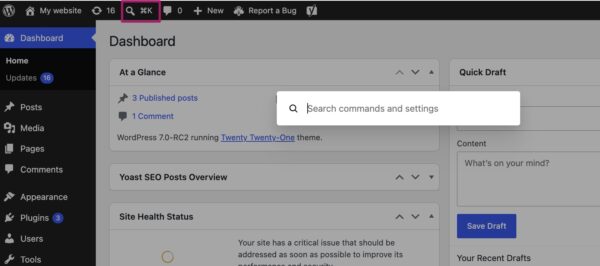
Complementing the smoother transitions is the introduction of the Command Palette shortcut. Accessible via a new icon in the top menu bar or through the familiar keyboard shortcuts (⌘K on Mac or Ctrl+K on Windows), the Command Palette offers a centralized, efficient way to navigate the backend and perform various actions. This feature brings a powerful productivity tool typically found in advanced code editors and modern operating systems directly into WordPress. Users can quickly search for pages, posts, settings, or even trigger specific actions, significantly reducing the time spent clicking through menus. For experienced users, this represents a substantial boost in workflow efficiency, minimizing interruptions and allowing for faster execution of tasks.
Furthermore, WordPress 7.0 redefines the platform’s visual identity with a new default color palette. The scheme previously known as "Modern" has now become the standard, offering a cleaner, more contemporary aesthetic that aligns closely with the visual language of the block and site editor. This move aims to create a more consistent and harmonious design across the entire WordPress ecosystem. For users who preferred the older visual style, the "Fresh" palette remains available under profile preferences, ensuring backward compatibility and user choice. These combined aesthetic and functional updates contribute to a backend that feels not only visually appealing but also inherently more modern and efficient.
Enhanced Content Management: Visualizing Revisions
For content creators and site administrators, the ability to track and revert changes is paramount. WordPress has long included a revisions feature, allowing users to view previous versions of their pages and posts. However, until 7.0, this feature presented revisions primarily as raw text differences, often requiring users to meticulously scan through lines of code or content to discern what had changed.
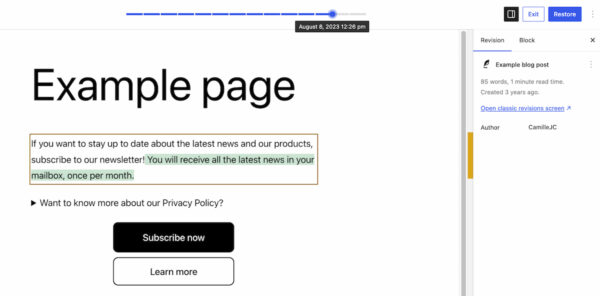
WordPress 7.0 revolutionizes this process with the introduction of visual revisions. Now, when accessing the revisions feature, users are presented with a live preview of their page, accompanied by an intuitive slider at the top. This slider allows for effortless navigation through the history of changes, displaying the exact date and time of each modification. The most significant enhancement is the visual differentiation of changes: additions are highlighted in green, altered sections in yellow, and deleted sections in red. This color-coded system allows users to instantly identify modifications without having to interpret complex text comparisons.
This visual approach simplifies the critical tasks of restoring earlier versions, pinpointing the source of layout or content issues, and reviewing updates before publishing. It transforms the revision process from a painstaking textual comparison into an immediate, visual understanding of content evolution. For teams collaborating on content, this feature drastically improves accountability and streamlines the editing workflow, ensuring greater content integrity and reducing the potential for errors.
Expanding the Block Editor’s Capabilities
The block editor, a cornerstone of modern WordPress, continues to evolve with WordPress 7.0, introducing new functionalities and refining existing ones to provide greater design flexibility and reduce reliance on third-party plugins.
Two significant new blocks have been added:
- The Breadcrumbs Block: This block allows users to easily add breadcrumb navigation paths to their pages, a crucial element for improving site navigation and enhancing SEO. Once added, the block automatically generates the correct hierarchical path, though it also offers customization options to tailor its appearance and behavior. This built-in functionality removes the need for separate SEO or navigation plugins for this specific feature, streamlining site development.
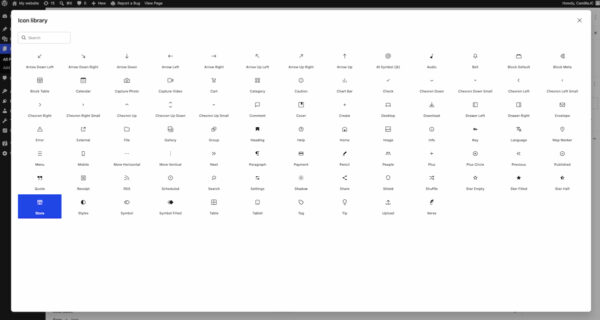
- The Icon Block: Providing a directory of pre-installed icons, this block enables users to quickly embed visual cues and decorative elements into their content. This feature contributes to richer visual storytelling and consistent branding without the performance overhead or complexity often associated with external icon libraries.
Beyond new additions, existing blocks have received substantial improvements:
- Grid Block: The previous "Auto/Manual" toggle has been replaced with more granular options for setting the responsiveness of the block and its columns. This gives designers finer control over how their grid layouts adapt across different screen sizes, leading to more precise and accessible responsive designs.
- Cover Block: This versatile block now supports embedded videos as backgrounds, allowing users to integrate dynamic multimedia from platforms like YouTube directly into their designs. This significantly expands the creative possibilities for hero sections and visual storytelling, making websites more engaging and interactive.
These block-level enhancements collectively reduce the need for custom CSS or external plugins to achieve desired designs, further empowering users to build sophisticated and visually appealing websites directly within the native WordPress environment.
Streamlined Responsive Design Controls
Designing for a multi-device world has always been a challenge for web developers and designers. WordPress 7.0 makes creating adaptive, responsive designs significantly easier with the introduction of viewport-based controls for block visibility. This powerful feature allows users to selectively show or hide specific blocks based on the user’s screen size (desktop, tablet, or mobile).
Accessed through a simple "Show" option in the block toolbar, users can check boxes for the devices on which a block should be visible. Any unselected device types will automatically hide the block. This intuitive mechanism enables precise control over layout and content presentation across different viewports, allowing for tailored user experiences without writing a single line of custom CSS. For non-developers and those building sites without extensive coding knowledge, this feature is a monumental step forward, democratizing advanced responsive design techniques and ensuring that websites look and perform optimally on any device.
Smarter Pattern Editing for Consistent Design
Patterns and templates are integral to efficient site building in WordPress, allowing users to quickly assemble complex layouts from pre-designed blocks. WordPress 7.0 introduces smarter pattern editing modes to enhance this workflow, focusing on content first while still providing full design flexibility.
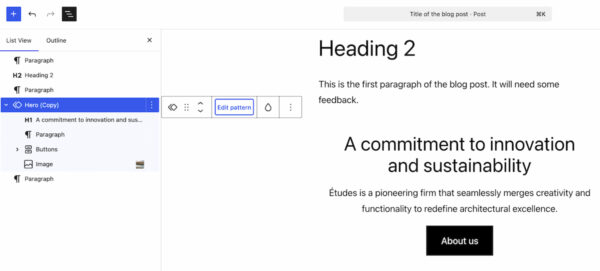
When a pattern is selected, the List View now intelligently displays only the content-focused elements, such as text and image blocks. This allows users to concentrate on editing the core content without being distracted by design-centric components like spacers or layout blocks. This content-first approach streamlines the editorial process, ensuring that the message remains the priority.
However, for those needing to adjust the pattern’s aesthetics or structure, a clear "Edit pattern" button is available. Clicking this reveals all remaining elements, including design-specific components, enabling comprehensive customization of the pattern’s layout and styling. This dual-mode editing caters to different user needs, promoting content optimization while retaining the option for deep design modifications, ultimately leading to more consistent and easily manageable site designs.
Laying the Groundwork for AI Integration
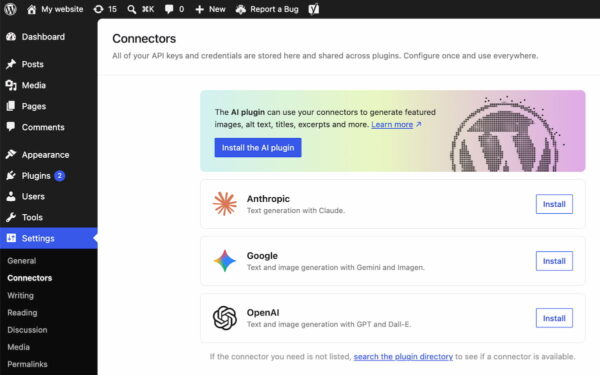
While WordPress 7.0 does not include any built-in AI-powered tools, it takes a crucial step towards future integration by establishing foundational infrastructure. A new "Connectors" section has been added under the Settings menu in the WordPress backend. This dedicated area serves as a central hub for connecting to external integrations, particularly focusing on AI providers and agents.
Users can connect to popular AI platforms such as Claude, Gemini, and OpenAI by configuring API keys or other necessary credentials directly within this section. A directory search feature is also available for discovering and integrating other AI services. This centralized management system offers several benefits:
- Unified Control: Provides a single, secure location for maintaining all external API connections, simplifying management for site administrators.
- Developer Ecosystem: Establishes a standardized, future-proof framework for developers to build AI-powered plugins and features. By offering a consistent API for AI integration, the WordPress core team encourages innovation and ensures that the platform remains at the forefront of technological advancements.
- Security and Scalability: Centralizing connector management can lead to more secure handling of sensitive API keys and better performance scaling for AI-driven functionalities across the WordPress ecosystem.
This strategic move positions WordPress to readily embrace the burgeoning field of artificial intelligence, allowing the platform and its extensive plugin ecosystem to leverage AI capabilities in a structured and sustainable manner in the coming years.
Improved Plugin Management and Performance Underpinnings
WordPress 7.0 also includes practical improvements for site administrators, such as a new list filter for plugins. This feature allows plugins to register custom tabs on the Plugins screen, enabling more organized grouping of related plugins. For instance, a dedicated "Yoast" tab can now consolidate all Yoast plugins installed on a site into a single view. This significantly enhances the user experience for managing multiple plugins from the same vendor, simplifying version checks, activation management, and overall oversight.
Under the hood, WordPress 7.0 has not ignored performance. Several enhancements contribute to a faster and more efficient platform:
- Client-Side Media Processing: This improvement optimizes media uploads by processing images and other media files directly in the user’s browser before sending them to the server. This reduces server strain, accelerates upload times, and leads to a more responsive experience, particularly for sites heavy with multimedia content.
- Continued Block Rendering Improvements: Ongoing optimizations in how blocks are rendered contribute to faster page load times and a smoother editing experience within the block editor.
- Overall Responsiveness: The entire platform benefits from general performance tuning, ensuring a snappier backend and frontend.
Furthermore, WordPress 7.0 raises the minimum PHP version requirement to 7.4. This is a critical technical update that ensures the platform can leverage modern PHP features, security enhancements, and performance optimizations. While requiring users and hosting providers to update their PHP versions, this move is essential for maintaining the long-term stability, security, and performance of WordPress.
The Road Ahead: Real-time Collaboration Postponed
One highly anticipated feature, real-time collaboration, was initially slated for inclusion in WordPress 7.0. However, the WordPress core team made a strategic decision to postpone its release to a future version. This move, announced earlier in May 2026, underscores the project’s commitment to stability and ensuring that major new functionalities are thoroughly vetted before public deployment. While the absence of real-time collaboration might be a minor disappointment for some, its postponement highlights a disciplined approach to development, prioritizing the robust delivery of other significant features in this release. The community eagerly anticipates its eventual integration, which promises to further enhance collaborative content creation within WordPress.
Strategic Implications and Future Outlook
WordPress 7.0 represents more than just an incremental update; it is a strategic repositioning of the platform. By focusing on an "app-like" experience, smarter workflows, and robust AI foundations, WordPress is actively evolving to meet the demands of modern web development and user expectations. This release strengthens its competitive edge against proprietary SaaS website builders, offering an open-source alternative that combines flexibility, power, and an increasingly intuitive user experience. The emphasis on no-code responsive design, visual revisions, and streamlined admin functions democratizes complex web development tasks, making advanced features accessible to a broader user base.
The "Connectors" section for AI integration is particularly forward-thinking, demonstrating WordPress’s commitment to future-proofing the platform and fostering an innovative ecosystem for AI-powered tools. This approach ensures that as AI technologies mature, WordPress will be ready to seamlessly integrate them, empowering users with intelligent content creation, optimization, and management capabilities.
In summary, WordPress 7.0 is a transformative release that solidifies the platform’s commitment to modernization, performance, and user-centric design. It sets a robust foundation for future innovations, ensuring WordPress remains a powerful, versatile, and accessible tool for building the web. Site administrators and developers are strongly encouraged to update to the latest version to leverage these significant advancements and explore the full potential of this pivotal release. More detailed information can be found in the official release post on WordPress.org.