A newsletter signup form stands as the singular, pivotal gateway between a website visitor and an organization’s invaluable email list. It serves as the primary mechanism for collecting subscriber information and seamlessly integrating new contacts into an email marketing platform, thereby initiating a direct line of communication for delivering newsletters and other targeted content. Yet, for many small businesses, the implementation of a basic form on their website often marks the end of strategic consideration, a oversight that frequently results in missed opportunities and diminished list growth. Common deficiencies include over-solicitation of data, insufficient articulation of value, and static, inconspicuous placement—factors that collectively present multiple points of friction, potentially deterring prospective subscribers before they receive their inaugural email. Addressing these shortcomings through a data-driven, user-centric approach is fundamental to cultivating a robust and engaged email audience.
The Strategic Imperative of Email List Building
In the contemporary digital landscape, where social media algorithms are constantly shifting and paid advertising costs are escalating, an email list remains one of the most stable and valuable assets a business can possess. It represents an owned audience, free from the whims of external platforms, allowing for direct, consistent communication. For small businesses, particularly, this direct channel is critical for nurturing leads, building brand loyalty, and driving sales without constant reliance on third-party intermediaries. The efficacy of this channel, however, hinges significantly on the initial interaction: the newsletter signup form. A poorly optimized form can stifle growth, while a strategically crafted one can transform passive visitors into active participants in a brand’s ecosystem. Industry data consistently underscores email marketing’s superior return on investment (ROI), often cited as high as $36 for every $1 spent, making the signup form a critical first step in realizing this potential.
Streamlining Data Collection: The Minimalist Approach to Form Fields
The journey to an optimized newsletter signup form begins with a critical assessment of its data collection requirements. The baseline, and often the optimal starting point, is a minimalist design incorporating only an email address field and a clear subscribe button. This fundamental structure is deliberately lean because every additional field introduced inherently creates friction, a known deterrent to conversion. Research indicates that conversion rates can decrease by several percentage points with each extra field added to a form, as visitors perceive a higher barrier to entry or a greater demand on their time and privacy. For the vast majority of small business newsletters, an email address alone is sufficient to commence delivering value and build an initial connection.
-
When to Justify a First Name Field: The inclusion of a first name field can be justified only when there is a concrete plan to leverage personalization within the newsletter content. Addressing subscribers by their first name, such as "Hey Sean" instead of a generic "Hey there," has been shown to potentially increase email open rates by up to 26%. However, this benefit materializes only if the email content actively utilizes the merge tag for personalization. If personalization is not a consistent element of the email strategy, the first name field becomes an unnecessary hurdle, adding friction without providing commensurate value. One fewer field means one less reason for a visitor to abandon the signup process.
-
Fields to Rigorously Exclude from Newsletter Forms: Certain fields, such as phone number, company name, job title, or physical address, are almost universally detrimental to newsletter signup conversion rates. These data points are more appropriate for lead capture forms associated with gated content, sales inquiries, or more intensive business-to-business (B2B) interactions. Their presence on a general newsletter form signals an immediate demand for significant personal information before any value has been delivered, creating a perception of an intrusive sales pitch rather than an invitation to receive valuable content. The principle here is clear: if the collected data will not be actively used to enhance the subscriber’s experience or deliver the promised newsletter content, it should not be collected. This approach prioritizes subscriber trust and ease of entry.
Strategic Placement: Maximizing Form Visibility and Conversion Potential
The most meticulously designed form will fail to grow an email list if it remains unseen. Strategic placement is paramount to maximizing visibility and, consequently, conversion potential. The effectiveness of various placements can differ significantly depending on the website’s primary purpose and content strategy.

-
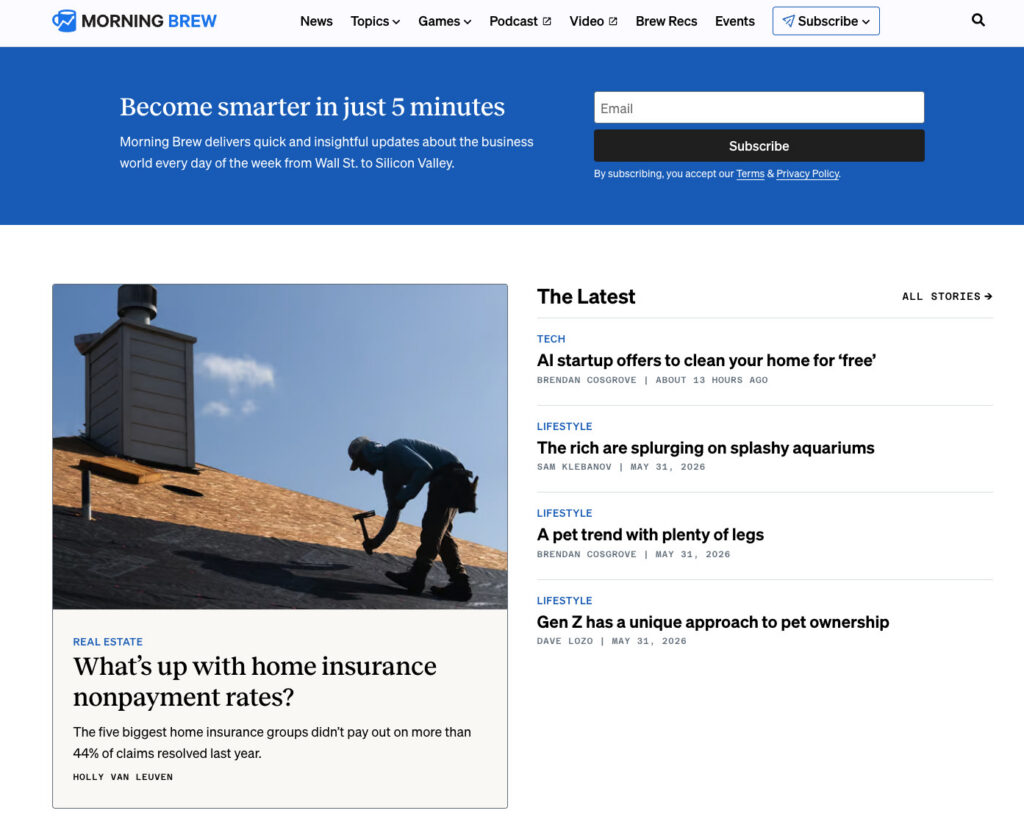
Above the Fold on the Homepage: For businesses where the newsletter itself is the core product, such as prominent digital publications like Morning Brew or The Hustle, placing the signup form prominently "above the fold" on the homepage is essential. Visitors to these sites are often arriving with the explicit intent to subscribe, making the form the central focus of the page. For businesses where the newsletter supports a primary product or service, a homepage form can still be effective but must be positioned to complement, rather than overshadow, the site’s main call to action. It should be easily discoverable without competing for immediate attention with core product offerings.
-
Sidebar Placement for Content-Rich Sites: A sidebar signup form offers persistent visibility as readers navigate through content-heavy pages. This placement is particularly effective when the newsletter content aligns closely with the topics covered in the main articles. A persistent sidebar form allows visitors, who have already demonstrated interest in a specific subject, to subscribe without interrupting their reading experience. On desktop browsers, sidebar forms maintain constant visibility, making them highly effective. However, on mobile devices, where sidebars often collapse below the main content, this placement should be augmented with other form locations to ensure mobile users have ample opportunity to subscribe.
-
Dedicated Signup Page: A standalone landing page exclusively dedicated to the newsletter provides ample space to articulate the unique value proposition of subscribing, free from the distractions of other website elements. This format allows for a more comprehensive "sales pitch" for the newsletter, enabling businesses to elaborate on the benefits, frequency, and type of content subscribers will receive. Dedicated signup pages are ideal for linking from external sources such as social media bios, podcast show notes, guest post bylines, and email signatures, offering a clear and focused pathway to subscription. Alexandra Franzen, a business strategist renowned for building her audience primarily through email, famously described her newsletter as "an art project," emphasizing the need to "make it so good that every reader goes and tells ten friends about it." A dedicated signup page should embody this mindset, selling the unique experience and value rather than merely the act of subscribing.
-
Persistent Header or Top Navigation Bar Form: Integrating a compact signup form within the website’s header or top navigation bar ensures it remains visible across every page. This strategy is particularly effective for sites with extensive content, encouraging visitors who browse multiple pages to consider subscribing. The key here is conciseness: an email field and a single button are typically sufficient to maintain unobtrusiveness while providing a constant opportunity to subscribe.
-
Footer Form as a Safety Net: The website footer serves as a conventional location for visitors who have consumed content and are seeking additional information or further engagement. A newsletter signup form placed here acts as a valuable safety net, capturing individuals who may not have been ready to subscribe upon their initial arrival but have since become more engaged after exploring the site’s offerings. It caters to the user who has scrolled through an entire page and is now actively looking for "what’s next."
-
Exit-Intent Popups: An exit-intent popup dynamically appears when a visitor’s cursor indicates an intention to leave the site (e.g., moving towards the browser’s close or back button). This presents a final opportunity to offer the newsletter before the visitor departs. To be effective without being intrusive, exit-intent popups should adhere to best practices: display only once per session, feature a clearly visible close button, and offer a specific, compelling benefit. For instance, "Get weekly email tips for your small business" is significantly more effective than a generic "Subscribe to our newsletter," as it immediately communicates value.
Crafting Conversion-Driven Newsletter Signup Form Copy
Beyond placement and field selection, the language used on a signup form is a powerful determinant of its conversion performance. Three critical elements drive conversions: a clear promise of value, transparent frequency expectations, and minimal effort required from the user.
-
Lead with the Benefit, Not the Action: A common pitfall is generic copy like "Subscribe to our newsletter." While this instructs the visitor on the action, it fails to provide any compelling reason to take that action. The word "subscribe" is transactional; it doesn’t answer the fundamental question in a visitor’s mind: "What’s in it for me?" Conversely, benefit-driven copy like "Get one email per week with strategies to grow your small business" immediately answers three crucial questions: What will I receive? How often? Is it relevant to my needs? This clarity enables visitors to make an informed decision quickly, eliminating guesswork and significantly increasing the likelihood of conversion. The distinction is between asking the reader to imagine value and explicitly stating it. For example, "Get our Tuesday email: one tactic to grow your list this week" specifies the day, the promise, and the topic, leaving no room for ambiguity.
-
Set Frequency Expectations Upfront: This often-overlooked element on a signup form is vital for managing subscriber expectations and reducing early unsubscribes. Clearly stating the newsletter’s sending frequency—e.g., "sent every Tuesday," "twice a month," or "weekly"—creates a transparent contract between the sender and the subscriber. When individuals subscribe with full knowledge of the sending schedule, they are far less likely to feel surprised or overwhelmed when emails arrive, mitigating the instinct to unsubscribe. This mutual understanding builds trust from the very first interaction, fostering a more sustainable and engaged audience.
-
Utilize Specific, Action-Oriented Call-to-Action (CTA) Buttons: The button text is the final prompt a visitor reads before committing to subscribe. Generic text like "Submit" offers no incentive or information. "Subscribe" is an improvement but remains vague. The most effective button text echoes the benefit promised elsewhere on the form. If the headline states "Weekly email marketing strategies for small businesses," the button could reinforce this with "Get weekly strategies" or "Send me the tips." This transforms the button from a mere mechanical action into a confirmation of the value being offered. Incorporating social proof, such as "Join 1,200 readers," can also be highly persuasive, leveraging the psychological principle that people are more likely to do something if others are already doing it. Crucially, avoid ambiguous button text like "Learn more" or "Get started," which can confuse users about the immediate outcome of clicking.
Leveraging AI for Intelligent Form Generation
For years, the standard approach to creating signup forms involved selecting a generic template and customizing it with brand colors and logos. The inherent flaw in this method is that templates are designed for a hypothetical, generalized business, often leading to a reverse engineering process where businesses try to fit their unique offerings into a pre-defined structure. A template lacks intrinsic knowledge of a newsletter’s specific frequency, target audience (e.g., freelance designers, food industry entrepreneurs), brand voice, or unique value proposition.
This challenge has led to innovations like AWeber’s AI Signup Form Builder. This technology shifts the paradigm by allowing businesses to describe their newsletter’s essence, enabling the AI to generate a complete, brand-matched form. By analyzing website content and understanding the brand’s voice, the AI produces forms that are inherently aligned with the business’s identity and communication style, eliminating the need to adapt a generic design. These AI-generated forms can be embedded on any page, utilized as standalone landing pages, or deployed as popups, with the AI guiding optimal placement suggestions. Each form is directly linked to the subscriber list, ensuring new signups are immediately ready to receive subsequent newsletters.
Measuring Performance for Continuous Optimization
The creation of an optimized signup form is merely the first step; continuous tracking and analysis of its performance are essential to ascertain its effectiveness and identify areas for further refinement.
-
Conversion Rate by Placement: Monitoring the conversion rate for each form placement (e.g., homepage, sidebar, footer) provides critical insights into which locations are most effective at driving subscriptions. For example, a form embedded within a high-performing blog post might yield a 3% conversion rate, while a footer form might achieve 0.5%. Such data informs strategic decisions about where to concentrate optimization efforts and resource allocation. Tools like AWeber’s AI Signup Form Builder often include integrated analytics to track this data automatically.
-
Unsubscribe Rate in the First 30 Days: A high unsubscribe rate within the first month of subscription is a strong indicator that the signup form may be setting incorrect expectations. This mismatch between the promised content or frequency on the form and the actual email content or sending schedule is a primary cause of early churn. Regular review of form copy against actual email campaigns can help identify and rectify these discrepancies, ensuring that what is promised aligns perfectly with what is delivered, thereby fostering long-term subscriber retention.

Frequently Asked Questions (FAQs)
-
What constitutes a newsletter signup form? A newsletter signup form is a specialized web form, either embedded within a page or existing as a standalone entity, designed to capture visitor information for the sole purpose of adding them to a recurring email newsletter list. Distinct from broader email signup forms that might funnel subscribers into automated sequences, product updates, or transactional communications, a newsletter form’s specific objective is to secure the right individuals for a consistent stream of newsletter content. This distinction is crucial, as the form’s design, messaging, and field choices must accurately reflect the specific nature of the newsletter being offered, ensuring trust and clarity from the outset.
-
How is a newsletter signup form integrated into a website? Using platforms like AWeber, the process typically involves utilizing the AI Signup Form Builder to describe the newsletter’s purpose and content, which then generates a customized form aligned with the brand. Once the design is approved, an embed code is provided. This code can be copied and pasted directly into the website’s HTML at the desired location. Most popular website builders, including WordPress, Squarespace, and Wix, offer custom HTML blocks or widgets where this code can be easily inserted, making integration straightforward even for users without extensive coding knowledge.
-
How can a newsletter signup be added to Facebook? To add a newsletter signup option to a Facebook presence, first create the signup form within an email marketing platform like AWeber. Then, retrieve the form’s unique hosted URL. This link can be strategically placed on the Facebook page’s primary action button, included in the page’s bio, or pinned as a prominent post. When visitors click this link, they are directed to the hosted form, allowing them to subscribe seamlessly without needing to leave their browser, thus extending the reach of the email list building efforts to social media audiences.
-
What is the process for creating a newsletter signup form in HTML? While it is possible to code a newsletter signup form from scratch in HTML, leveraging an email marketing service like AWeber streamlines the process significantly. By building the form within AWeber, a functional HTML version is automatically generated. This pre-coded HTML includes the necessary subscription logic, ensuring new signups are correctly connected to the email list. Users can then copy this clean, functional code and further customize its styling, field labels, and layout directly in the HTML without the complex task of developing the backend subscription mechanism from scratch. This hybrid approach offers both ease of use and flexibility for advanced customization.
The Broader Impact of Optimized Signup Forms
The continuous optimization of newsletter signup forms extends far beyond mere list growth. It fundamentally impacts the quality of the subscriber base, the effectiveness of email campaigns, and ultimately, the long-term viability and profitability of a business. By reducing friction, clearly communicating value, and ensuring strategic visibility, businesses cultivate an audience that is not only larger but also more engaged, more receptive, and more likely to convert into loyal customers. This meticulous attention to the initial point of contact builds a foundation of trust and transparency, essential for any sustainable digital marketing strategy. In an increasingly competitive online environment, an optimized newsletter signup form is not just a utility; it is a strategic asset that underpins sustained digital engagement and robust business growth.


 Ammar Sabilarrohman
 Asro
Asro