The highly anticipated WordPress 7.0, released today, marks a significant evolutionary step for the world’s most popular content management system. Shifting focus beyond incremental block editor refinements, this iteration propels the platform into a new phase of its ambitious roadmap, emphasizing smarter workflows and a more integrated, app-like user experience. This release is poised to redefine how millions of users interact with their websites, offering a blend of aesthetic modernization, functional enhancements, and foundational technological advancements.
Background: WordPress’s Evolution Towards a Modern Web Platform
For over two decades, WordPress has powered a substantial portion of the internet, evolving from a simple blogging tool into a robust, versatile platform capable of supporting everything from personal portfolios to complex e-commerce sites and corporate intranets. The introduction of the Gutenberg block editor in WordPress 5.0 represented a pivotal moment, initiating a multi-phase project aimed at transforming the editing experience. While previous releases largely concentrated on refining this block-based content creation, WordPress 7.0 signals a broader strategic pivot. The overarching vision, often articulated by the project’s lead developers, is to transition WordPress from a traditional CMS paradigm to a more dynamic, intuitive, and integrated web application environment, akin to modern SaaS platforms. This involves not only enhancing content creation but also streamlining site management, improving performance, and laying groundwork for future innovations like real-time collaboration and artificial intelligence integration.
A Modernized Administrative Experience
A cornerstone of the WordPress 7.0 update is a comprehensive refresh of the administrative interface, designed to foster a more seamless and contemporary user experience. A notable, albeit seemingly subtle, enhancement is the implementation of smoother page transitions within the backend. Leveraging the CSS View Transitions API, navigation between different administrative screens now presents with a fluid animation, replacing the abrupt page loads of previous versions. This change contributes significantly to the feeling of interacting with a responsive, native application rather than a series of static web pages.
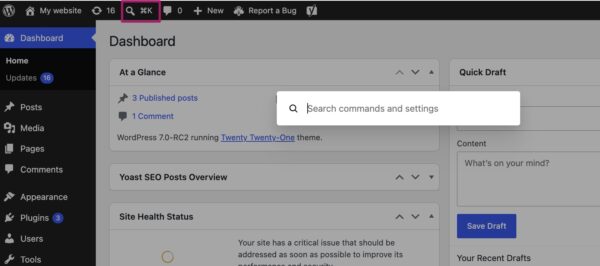
Further enhancing usability is the introduction of the Command Palette shortcut in the top menu bar. This new icon provides immediate access to a powerful command palette, which can also be invoked via the keyboard shortcut ⌘K (or Ctrl+K on Windows). The command palette acts as a centralized search and action interface, allowing users to quickly navigate to specific sections of the backend, search for posts or pages, or initiate various administrative actions without needing to click through multiple menus. This feature is particularly valuable for power users and those managing complex sites, offering a significant boost to efficiency. Industry analysts anticipate that this will become an indispensable tool for site administrators, significantly reducing the cognitive load associated with managing extensive WordPress installations.
Accompanying these functional improvements is a refreshed visual aesthetic. WordPress 7.0 standardizes the color palette previously known as ‘Modern’ as the new default. This scheme, characterized by a cleaner, more contemporary appearance, better aligns the backend with the visual direction of the block and site editors, fostering a cohesive design language across the entire platform. For users who preferred the classic look, the original default palette remains accessible under profile preferences, now designated as ‘Fresh.’ This attention to visual detail, coupled with enhanced navigational tools, underscores the intent to make WordPress feel less like a traditional content management system and more like a modern, intuitive web application.
Revolutionizing Content Management with Visual Revisions
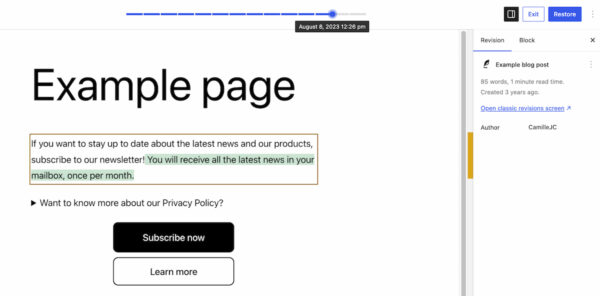
The process of tracking and restoring previous versions of content has received a substantial upgrade in WordPress 7.0, moving from a text-based comparison to a highly intuitive visual revision system. Previously, the revisions feature displayed raw text differences, which, while functional, often required meticulous examination to discern changes, especially in visually rich content.
With WordPress 7.0, users can now access visual revisions directly within a preview of their page or post. Upon entering the revisions interface, a slider at the top allows for effortless navigation through different saved versions, each clearly marked with its date and time stamp. The most impactful aspect of this enhancement is the color-coded visual differentiation of changes: additions are highlighted in green, modified sections in yellow, and deletions in red. This immediate visual feedback allows content creators and editors to instantly identify modifications without needing to parse through lines of code or complex text diffs.
This feature is expected to be a significant quality-of-life improvement for anyone involved in content creation and management. It streamlines the process of reviewing updates, pinpointing the source of layout or content discrepancies, and restoring earlier versions with confidence. For editorial teams, it facilitates clearer collaboration and accountability, while for site administrators, it simplifies troubleshooting and ensures content integrity. The enhanced visual revisions underscore WordPress’s commitment to making powerful features accessible and user-friendly, catering to both technical and non-technical users.
Expanded Capabilities in the Block Editor
The block editor, a central focus of recent development cycles, has received further enhancements in WordPress 7.0, introducing new blocks and refining existing ones to provide greater design flexibility and functionality. These additions continue the trend of empowering users to achieve sophisticated layouts and features without recourse to custom code or additional plugins.
Two new blocks stand out:
- Breadcrumbs Block: This block allows users to easily integrate breadcrumb navigation into their pages. Once added, it automatically generates the correct hierarchical path based on the page structure, significantly improving site navigation and user experience. Users also have options to customize its appearance and behavior, ensuring it seamlessly integrates with their site’s design. This is particularly beneficial for SEO, as breadcrumbs provide clear navigational cues to search engines.
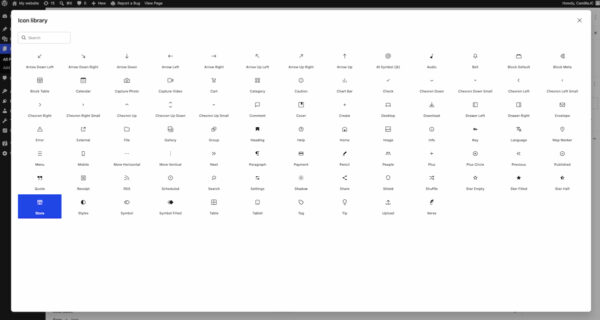
- Icon Block: The Icon block provides access to a directory of pre-defined icons, allowing users to easily insert visual elements into their content. This simplifies the process of adding visual flair, highlighting key information, or enhancing call-to-action elements, without the need for external icon libraries or custom SVG uploads. The curated directory is expected to grow, offering a versatile range of visual assets.
Beyond new blocks, existing elements have also seen significant improvements:
- Grid Block: The previous Auto/Manual toggle for the Grid block has been replaced with a more granular set of options for controlling responsiveness and column behavior. This empowers designers to create highly adaptive layouts that perform optimally across various screen sizes, offering greater control over complex grid structures.
- Cover Block: The versatile Cover block now supports embedded videos as background elements. This means users can directly integrate videos from platforms like YouTube or Vimeo into their hero sections or visual displays, adding dynamic and engaging content to their pages. This expands the creative possibilities for visually rich content, previously often requiring custom coding solutions.
These block editor innovations collectively continue WordPress’s strategic direction of reducing reliance on third-party plugins for core design and functionality needs, thereby enhancing performance, security, and ease of maintenance.
Granular Responsive Design Controls
A major stride in empowering non-developers to create sophisticated, adaptive websites comes with the introduction of viewport-based controls for blocks. WordPress 7.0 now allows users to precisely dictate which blocks appear or are hidden based on the user’s screen size (desktop, tablet, or mobile).
This functionality is accessed directly within the block toolbar. Users can select a block, click the ‘Show’ option, and then choose the specific devices on which the block should be visible. Any unselected device types will automatically hide the block. This feature eliminates the need for custom CSS media queries for many common responsive design adjustments.
The implications of this feature are profound for web designers and content creators. It provides unprecedented flexibility to fine-tune designs for different breakpoints, ensuring optimal user experience across the diverse landscape of devices. For instance, a complex data table might be hidden on mobile in favor of a simplified summary, or specific call-to-action elements could be tailored for desktop users versus mobile users. This capability democratizes responsive design, allowing a broader range of users to build truly adaptable websites without extensive coding knowledge, significantly enhancing the platform’s utility for modern web development.
Smarter Pattern and Template Editing
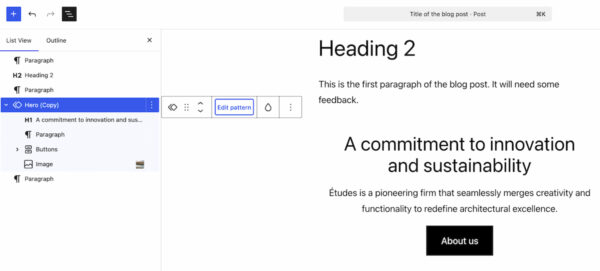
WordPress 7.0 introduces intelligent editing modes for patterns and templates, aiming to streamline content updates while safeguarding design integrity. When a pattern is selected, the List View now prioritizes content-focused elements, such as text and image blocks. This allows users to focus solely on updating the core message and media without being distracted by or accidentally altering design elements.
However, recognizing that design adjustments are sometimes necessary, a dedicated ‘Edit pattern’ button is provided. Clicking this button reveals all elements within the pattern, including design-oriented components like spacers, dividers, or layout containers. This dual-mode approach offers a balance: facilitating quick, content-centric edits by default, while still providing the flexibility for deeper structural or aesthetic modifications when required.
This intelligent pattern editing system is a boon for maintaining consistency across a website. It ensures that content editors can efficiently update information within pre-designed layouts without inadvertently breaking the site’s visual coherence. For developers and designers, it means patterns can be created with confidence, knowing that content teams can utilize them effectively while preserving the intended design framework. This feature underscores WordPress’s commitment to improving workflow efficiency and maintaining design integrity across diverse user roles.
Laying the Groundwork for AI Integration: The Connectors Section
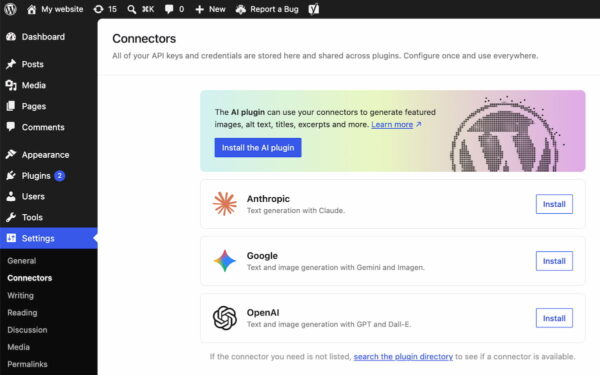
While WordPress 7.0 itself does not ship with built-in AI-powered tools, it takes a significant foundational step towards integrating artificial intelligence into its ecosystem. A new ‘Connectors’ section has been introduced under the ‘Settings’ menu in the WordPress backend.
This dedicated area serves as a central hub for connecting the WordPress installation to external integrations, including various AI providers and agents. Users can now natively link their sites to services like Claude, Gemini, OpenAI, and other emerging AI platforms. A directory search function is available for discovering and adding integrations not immediately listed.
This strategic inclusion has several critical implications. Firstly, it provides a standardized, centralized location for managing API keys and other credentials for all external services, simplifying site administration and improving security posture. Secondly, and more importantly, it establishes a future-proof ecosystem and a consistent framework for developers. This means that plugin and theme developers can confidently build AI-powered features, knowing there’s a native, officially supported mechanism for connecting to leading AI services.
The introduction of Connectors signals WordPress’s proactive approach to the rapidly evolving AI landscape. It allows the platform to adapt and integrate future AI innovations without requiring disruptive core changes, positioning WordPress as a forward-thinking platform ready to embrace intelligent content creation, optimization, and automation tools as they mature. This move is anticipated to spur a new wave of innovative plugins leveraging AI, transforming how content is generated, optimized, and managed within the WordPress environment.
Refined Plugin Management: Custom List Filters
Managing a growing list of plugins can often become cumbersome for site administrators. WordPress 7.0 addresses this by introducing a new filter mechanism that allows plugins to register custom tabs on the ‘Plugins’ screen. This seemingly minor enhancement provides a significant organizational benefit.
The feature enables developers to group their suite of plugins under a dedicated, properly labeled tab. For example, a prominent SEO plugin developer like Yoast can now create a ‘Yoast’ tab, under which all their associated plugins (e.g., Yoast SEO, Yoast SEO Premium, Yoast Local SEO) are displayed. This aggregates related plugins into a single, easily navigable view.
For site administrators, this translates to a much cleaner and more intuitive plugin management experience. Instead of scrolling through a single, potentially very long list, they can quickly access and manage specific plugin suites. This improves the ease of checking versions, managing activation states, and generally maintaining an overview of the various functionalities installed on a website. This enhancement reflects WordPress’s ongoing commitment to improving the administrative experience, particularly for sites that rely on a diverse array of plugins.
Performance Enhancements and Infrastructure Updates
Beyond the user-facing features, WordPress 7.0 delivers crucial performance optimizations and infrastructure updates that bolster the platform’s stability, speed, and scalability. These under-the-hood improvements are vital for ensuring WordPress remains competitive and robust in a demanding web environment.
Key performance gains include:
- Client-side Media Processing: This release introduces enhanced client-side processing for media uploads. By offloading some of the image and video processing tasks from the server to the user’s browser, WordPress 7.0 significantly reduces server strain and accelerates media upload times. This is particularly beneficial for media-heavy sites, improving the efficiency of content creation and reducing demands on hosting resources.
- Continued Block Rendering Improvements: The ongoing optimization of the block editor’s rendering engine further refines the speed and responsiveness of the editing experience. These incremental improvements contribute to a snappier, more fluid interaction when building and editing content with blocks.
- Overall Responsiveness: General improvements to the platform’s core code contribute to a more responsive overall experience, both in the frontend for visitors and in the backend for administrators.
Furthermore, WordPress 7.0 raises the minimum PHP version requirement to 7.4. This is a significant, albeit necessary, step. PHP 7.4 offers substantial performance improvements and enhanced security features over older versions. By requiring a more modern PHP environment, WordPress ensures that sites running on 7.0 can leverage these underlying performance and security benefits, while also encouraging hosting providers to update their infrastructure. This move is critical for maintaining the platform’s long-term health and security.
Strategic Postponement: The Road to Real-time Collaboration
One of the most anticipated features, real-time collaboration, was originally slated for inclusion in WordPress 7.0 but was ultimately postponed. The decision, announced shortly before the release on May 8, 2026, was made to prioritize the stability and reliability of the current release. The development team concluded that further refinement was necessary to ensure the feature met WordPress’s rigorous standards for performance and user experience, particularly given its complexity and potential impact on core functionality.
This strategic postponement underscores the project’s commitment to quality over hurried feature delivery. Real-time collaboration, which would allow multiple users to edit content simultaneously in a manner similar to Google Docs, is a foundational component of the "app-like" vision for WordPress. While its absence in 7.0 might be a slight disappointment for some, the community generally understands that ensuring a robust and stable core platform is paramount. The feature is expected to be a highlight of a future major release, continuing WordPress’s evolution towards a truly collaborative and dynamic content creation environment.
Broader Impact and Future Trajectory
WordPress 7.0 represents a holistic upgrade that touches nearly every aspect of the platform, from user interface and content creation to performance and foundational architecture. The emphasis on an "app-like" experience, smarter workflows, and robust AI integration foundations positions WordPress strongly for the future of web development.
For content creators, the visual revisions and intuitive pattern editing modes will significantly enhance productivity and reduce the learning curve for complex layouts. Site administrators will benefit from the modernized admin interface, command palette, and refined plugin management, leading to more efficient site operations. Developers gain a standardized framework for AI integration and a platform that leverages modern PHP, fostering innovation and ensuring long-term compatibility.
The cumulative effect of these changes is a WordPress that is more powerful, more intuitive, and more aligned with contemporary web standards. It reinforces the platform’s commitment to accessibility for all users while simultaneously providing the depth and flexibility required by professional developers. As the web continues to evolve, WordPress 7.0 ensures that its millions of users are equipped with a cutting-edge platform capable of meeting the demands of tomorrow. The release, as detailed in the comprehensive post on WordPress.org, marks a significant milestone in the platform’s ongoing journey of innovation.

 Pevita Pearce
 Nila Kartika Wati