In an increasingly competitive digital landscape, where fleeting website visits represent missed opportunities, the strategic deployment of lead capture forms has emerged as a paramount necessity for businesses aiming to cultivate meaningful customer relationships and drive sustainable growth. Historically, online interactions were largely transactional, with visitors consuming content and departing without leaving a trace. This challenge, characterized by high traffic but low conversion into actionable leads, underscores the critical role of effective lead capture mechanisms in transforming anonymous visitors into engaged subscribers.
The Evolution and Imperative of Lead Capture in the Digital Age
The journey of online lead generation has evolved significantly since the early days of the internet. Initially, simple email subscription boxes were the primary method, often placed discretely in website footers. However, as digital marketing matured, so did the understanding of user psychology and the value of direct communication. The late 2000s saw the rise of more prominent calls-to-action and the integration of forms with email marketing platforms, allowing for automated follow-up. By the 2010s, personalized content and segmented marketing became mainstream, demanding more sophisticated data collection at the point of signup. Today, in 2026, the imperative for robust lead capture is amplified by several factors: the increasing cost of paid advertising, the fragmentation of audience attention across numerous platforms, and stricter global data privacy regulations like GDPR and CCPA. These regulations emphasize the importance of explicit consent and transparency in data collection, making well-designed, compliant lead capture forms indispensable. They serve as the digital handshake, the initial point of consent and data exchange that lays the groundwork for a long-term, value-driven relationship. Without a mechanism to capture contact information, businesses are left with ephemeral traffic, unable to nurture prospects, build trust, or drive repeat engagement and sales.
Defining the Modern Lead Capture Form
At its core, a lead capture form is a concise digital interface on a website or landing page designed to collect a visitor’s contact information, typically an email address, in exchange for something valuable – a lead magnet. This valuable exchange could be an e-book, a webinar invitation, exclusive content, a discount code, access to a free tool, or simply a promise of useful regular updates. The form acts as a crucial bridge, converting casual browsers into identifiable prospects within a business’s marketing ecosystem. These forms are strategically deployed across various digital touchpoints, including website homepages, specific landing pages, integrated within blog posts, and even on social media "link-in-bio" pages. Their fundamental power lies in their direct integration with email marketing platforms, ensuring that every new subscriber automatically enters a system ready to deliver a personalized welcome sequence, commencing the journey of relationship building and value delivery. This seamless integration is what transforms a simple data collection point into a dynamic lead nurturing engine.
Strategic Field Inclusion: Balancing Data Collection with Conversion Rates
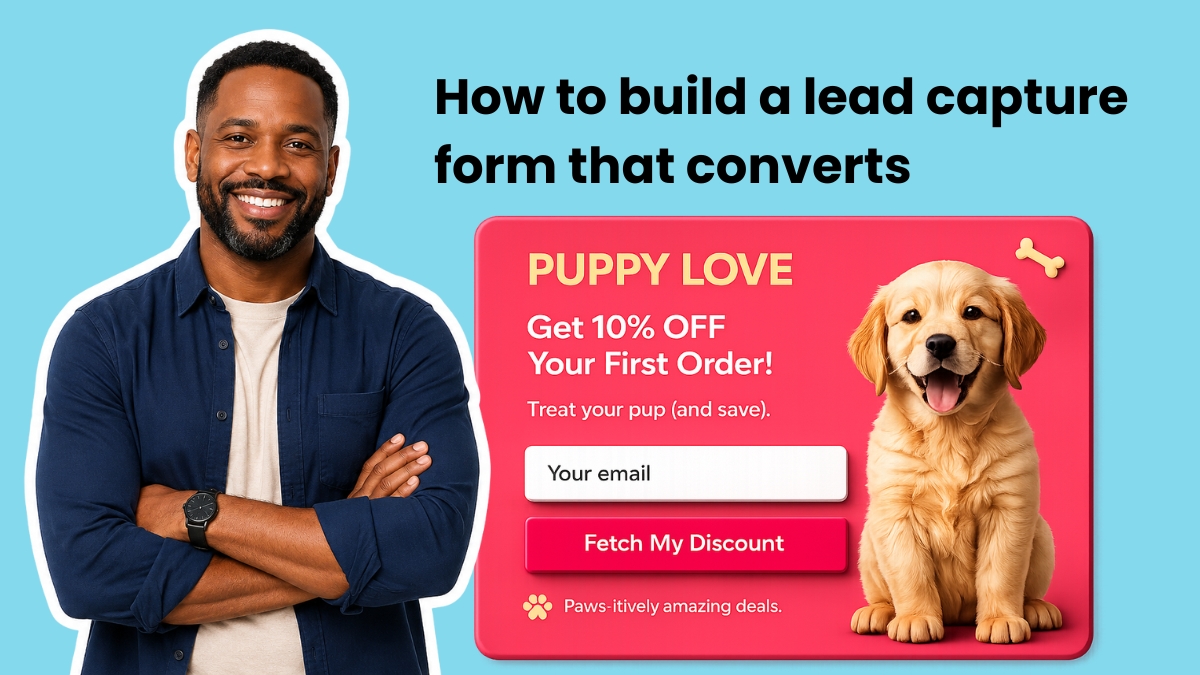
The design of a lead capture form is a delicate balance between acquiring valuable subscriber data and minimizing friction to maximize conversion rates. Industry best practices advocate starting with the absolute minimum: an email address field and a clear submit button. Research consistently shows that every additional field beyond this baseline can decrease conversion rates. For instance, studies by marketing analytics firms often indicate a drop of 2-5% in conversion for each extra field introduced. The crucial question for marketers is whether the incremental information gained from an additional field outweighs the potential loss of subscribers.
-
Email Address (The Non-Negotiable): This is the foundational and only truly mandatory field. Without it, the primary objective of lead capture – the ability to follow up and communicate directly – cannot be achieved. It serves as the unique identifier for initiating and maintaining digital correspondence.
-
First Name (Enhancing Personalization): Including a first name field enables a significant enhancement in email personalization. Addressing subscribers by their first name (e.g., "Hey Sean") has been shown to improve open rates and engagement compared to generic greetings ("Hey there"). This simple addition fosters a more personal connection, signaling that the communication is tailored and not a mass broadcast.
-
Additional Segmentation Fields (Strategic Value): For businesses seeking deeper insights and advanced segmentation, a single, well-chosen segmentation question can be invaluable. Questions like "What best describes your business?" or "What’s your biggest challenge right now?" allow marketers to tag subscribers at the point of signup. In platforms like AWeber, these tags feed directly into workflow automation, enabling the immediate routing of new subscribers into highly targeted email sequences. This ensures that from their very first email, subscribers receive content directly relevant to their stated interests or needs, dramatically increasing engagement and perceived value.
-
Fields to Approach with Caution: Certain fields rarely justify their presence on initial lead capture forms due to their high friction. These include phone numbers (unless the business model heavily relies on immediate calls, like a service booking platform), company name, job title, and physical address. Such sensitive or extensive information is best collected later in the customer journey, once trust has been established and the subscriber understands the clear value proposition for providing it. For most small businesses, a sweet spot of two to three fields (email, first name, plus one segmentation question) offers the optimal balance between data utility and conversion efficiency. For more extensive data collection, multi-step forms can mitigate friction by spreading the ask across several screens.
The Power of Placement: Where to Deploy Lead Capture Forms for Maximum Impact
The most meticulously designed lead capture form will yield zero conversions if it remains unseen or poorly positioned. Strategic placement is paramount, ensuring that forms appear at points of high user intent or visibility.
-
Above the Fold on Your Homepage: This is arguably the highest-visibility location on any website. Placing a lead capture form here ensures that visitors see it immediately upon arrival, without needing to scroll. This position is ideal for capturing general interest and should be paired with a compelling value proposition that clearly articulates what subscribers will receive, how often, and why it matters to them.
-
Inline Within Blog Posts: Contextual relevance is key here. Integrating a form approximately one-third of the way into a blog post leverages existing reader engagement. At this point, the reader has invested enough time to trust the content and the author’s expertise but has not yet finished the article. The offer presented in this inline form should directly relate to the topic of the blog post. For example, a post about email subject lines should offer a "subject line swipe file" or "template," rather than a generic newsletter signup, thereby extending the value of the content they are already consuming.

-
Exit-Intent Pop-ups: These dynamic forms are triggered when a visitor’s cursor indicates an intention to leave the page, typically by moving towards the browser’s close button or back arrow. Exit-intent pop-ups are highly effective in recapturing visitors who would otherwise depart without interaction. The success of an exit-intent form hinges on a specific, compelling, and often urgent offer. Phrases like "Wait! Grab this free template before you go!" consistently outperform generic "Subscribe to our newsletter" prompts. Modern email marketing platforms, such as AWeber, feature built-in exit-intent detection and automated triggering capabilities, making deployment seamless.
Modern form builders, particularly those leveraging AI, simplify placement decisions. Users can often specify the desired form type (inline, pop-up, exit-intent overlay) and its intended location, allowing the builder to generate the form optimized for that specific deployment.
Crafting Conversion-Driven Form Copy: The Art of Persuasion
Every word on a lead capture form is a miniature marketing message, either propelling a visitor towards subscription or introducing hesitation. The copy framework should be direct and value-oriented: clearly state what the subscriber will receive, how often, and what action will follow their submission.
-
Headline: This should be a concise, benefit-driven statement. Instead of a generic "Subscribe to our newsletter," opt for something like "Get weekly email marketing tips that take five minutes to read." This communicates immediate value and manages expectations regarding frequency and time commitment.
-
Subheadline: Address potential objections or alleviate concerns. A phrase such as "No spam. Unsubscribe anytime." removes risk and builds trust, directly countering common hesitations about sharing personal information.
-
Button Text: The submit button is a call to action, and its text should be specific and reflective of the promised value. "Send me the templates" is significantly more effective than a generic "Submit" or "Sign Up." The ideal button text completes the implied sentence "I want to…" – guiding the user towards the desired outcome.
-
Social Proof (Optional but Powerful): When applicable and genuine, social proof can be a strong motivator. Statements like "Join 100,000+ small business owners" leverage the principle of consensus, suggesting that if many others find value, so too will the new subscriber. This is most effective with impressive, verifiable numbers. For smaller lists, a short, impactful testimonial quote placed near the form can serve a similar purpose, lending credibility without requiring large subscriber counts.

Technological Advancements: The Emergence of AI in Form Building
The landscape of lead capture form creation has been revolutionized by artificial intelligence. Gone are the days when building an effective, visually appealing form required extensive coding knowledge or design expertise. Platforms like AWeber’s AI Signup Form Builder represent a significant leap forward, democratizing access to sophisticated form design.
This AI-powered approach allows users to describe their desired form in plain text, much like interacting with a human designer. Whether it’s a single-field email capture for a homepage, a complex multi-step quiz designed to segment visitors across several screens before requesting an email, or a branded pop-up with custom button copy and a specific offer, the AI builder can generate it from a textual description. This capability frees users from the constraints of rigid templates or preset layouts, enabling unprecedented customization and flexibility. An AWeber spokesperson might comment, "Our AI Form Builder is designed to remove technical barriers, allowing businesses of all sizes to create highly effective, branded lead capture experiences in minutes, simply by articulating their vision." This innovation empowers marketers to focus on strategy and content, rather than the mechanics of form creation. The ability to upload an image of a desired form from another site and instruct the AI to create something similar, tailored to one’s own brand, further highlights the transformative potential of this technology.
Lead Capture Form Best Practices for Enhanced Conversion and User Experience
Effective form design is fundamentally about minimizing user friction while maximizing motivation. These principles apply universally, whether constructing a minimalist single-field pop-up or a comprehensive four-step segmentation form.
- Ask for One Thing Per Screen (Multi-Step Forms): Multi-step forms consistently outperform lengthy single-page forms because each screen presents a manageable, quick interaction. Presenting one question, a few answer choices, and a clear button reduces cognitive load and the perception of effort, leading to higher completion rates.
- Match the Offer to the Page (Contextual Relevance): This is perhaps the single most critical driver of form conversion. A form embedded in a blog post about SEO best practices should offer an "SEO checklist" or "keyword research template," not a generic newsletter signup. Relevance ensures that the offer directly extends the value of the content the visitor is already engaged with.
- Use Specific Button Copy: As previously discussed, action-oriented button text like "Get the Free Checklist" or "Send My Guide Now" always outperforms generic terms like "Submit" or "Download." The button should clearly articulate the immediate benefit of clicking.
- Show a Progress Bar on Multi-Step Forms: For forms spanning multiple screens, a visual progress indicator (e.g., "Step 2 of 4") significantly reduces abandonment rates. Users are more likely to complete a process when they can see their progress and the proximity of the finish line.
- Place the Form Where Intent is Highest: Strategic placement is about understanding visitor intent. Above-the-fold placement caters to visitors with high initial intent. Inline forms target engaged blog readers. Exit-intent forms are for those on the verge of leaving, offering a final opportunity to capture their interest. Different placements capitalize on varying levels of user commitment.
- Keep the Design Clean and Accessible: Visual clarity is paramount. Ample white space around form fields reduces visual clutter, focusing the user’s attention on the form itself. Simple, intuitive layouts, coupled with responsive design for mobile devices, ensure a seamless experience across all platforms.
- Tag Subscribers at Submission (Automated Segmentation): Every answer choice on a multi-step or segmentation form should trigger the application of a specific tag to the subscriber’s profile. These tags become powerful triggers for automated email sequences within workflow builders. This ensures that each new subscriber immediately receives content precisely matched to the preferences or needs they indicated on the form, initiating a highly personalized and relevant communication journey.
The Best Form Builder for Lead Capture: Seamless Integration and AI-Powered Customization
The ideal lead capture form builder transcends mere template selection. It offers unparalleled flexibility, allowing users to create any form they can imagine, free from rigid presets. Critically, the best form builder is natively integrated with the email marketing platform. A form that collects data but cannot seamlessly apply tags, trigger automations, or route subscribers into the correct welcome sequences is merely a data collection tool, not a full-fledged lead generation engine.
AWeber stands out in this regard by offering a unified system. Its AI Signup Form Builder creates any form described in plain text – from single-field pop-ups to branded multi-step quizzes or full-page signups with custom segmentation fields. Users simply articulate their business needs, offer, and desired fields, and the AI generates a branded form incorporating colors, copy, and layout. This eliminates the need for outdated templates, allowing for truly bespoke solutions. Furthermore, because the form builder resides within the AWeber ecosystem, every form is inherently connected to the subscriber list, tags, and Workflow Builder automations. This native integration removes the complexities of configuring third-party integrations, webhooks, or data transfer protocols. A subscriber fills out the form, and in that same moment, they are entered into the automation workflow, ready to receive tailored communication. This seamless operation is a hallmark of efficient, modern digital marketing.

The Broader Implications: ROI and Sustainable Business Growth
The investment in optimizing lead capture forms yields significant returns on investment (ROI). By converting anonymous traffic into identifiable leads, businesses gain the ability to nurture prospects over time, educate them about products or services, and build lasting trust. This translates directly into higher conversion rates down the sales funnel, reduced customer acquisition costs, and increased customer lifetime value. An engaged, segmented email list is one of the most valuable assets a business can possess, offering a direct, cost-effective channel for marketing, sales, and customer service.
The continuous feedback loop provided by form analytics (conversion rates, abandonment rates) allows for ongoing optimization. Small tweaks in copy, placement, or field selection can lead to substantial improvements in lead volume and quality. In an era where digital presence is paramount, sophisticated lead capture is not just a marketing tactic; it’s a foundational element of sustainable business growth, empowering companies to forge direct, meaningful connections with their audience and navigate the complexities of the digital marketplace with confidence.
Navigating the Future of Lead Capture
The future of lead capture will likely see continued innovation driven by AI, personalization, and interactive experiences. Conversational forms, where users interact with a chatbot-like interface, and highly personalized forms that adapt based on user behavior or demographic data, are emerging trends. The emphasis will remain on creating frictionless, value-driven interactions that respect user privacy while efficiently gathering critical insights. For businesses, the ongoing commitment to testing, optimizing, and adapting their lead capture strategies will be key to staying ahead in a dynamic digital landscape.
In conclusion, lead capture forms are far more than mere data entry points; they are strategic gateways to customer relationships, essential tools for market segmentation, and powerful engines for business growth. By embracing best practices in design, placement, copy, and leveraging advanced AI-driven builders, businesses can transform fleeting website visits into a sustainable stream of engaged, valuable leads, ensuring a robust and responsive digital presence for years to come.

 Laily UPN
 Basiran