In an increasingly competitive digital landscape, the selection of an email marketing platform transcends mere feature comparison; it represents a strategic decision impacting a business’s operational efficiency, scalability, and market reach. As enterprises expand, the demands on their communication infrastructure grow, necessitating solutions capable of supporting diverse teams, accommodating escalating sending volumes, and adhering to stringent requirements for performance, collaboration, and regulatory compliance. This imperative has led many organizations to re-evaluate their existing email service providers, often culminating in a transition to platforms better aligned with their evolving needs. Sinch Mailjet, a robust transactional and marketing email solution, has emerged as a compelling alternative for businesses seeking enhanced capabilities beyond the scope of more entry-level platforms like Mailchimp. This article provides a detailed, step-by-step guide for migrating essential data—contacts, email templates, and historical reporting—from Mailchimp to Sinch Mailjet, alongside an analysis of the strategic underpinnings and broader implications of such a transition.
The Evolving Landscape of Email Marketing Platforms

The email marketing industry has witnessed significant evolution over the past decade. Initially, platforms primarily focused on basic list management and broadcast sending. However, with the advent of personalization, automation, and increasingly complex regulatory frameworks, the demands on email service providers (ESPs) have intensified. Mailchimp, for instance, gained widespread popularity among small businesses and startups due to its user-friendly interface and accessible pricing tiers. Its intuitive drag-and-drop editor and marketing automation basics made it an ideal entry point for many organizations embarking on their digital communication journeys.
However, as businesses mature and their email marketing strategies become more sophisticated, certain limitations within generalist platforms can emerge. These often include escalating costs for large contact lists, a need for more advanced deliverability tools, deeper API integrations for custom workflows, robust multi-user collaboration features, and comprehensive support for both marketing and transactional emails under a single, unified infrastructure. It is at this juncture that specialized providers like Sinch Mailjet, known for its emphasis on deliverability, developer-friendliness, and scalability for high-volume senders, become increasingly attractive.
Strategic Drivers for Migration: Why Businesses Choose Sinch Mailjet
The decision to migrate from a long-established platform like Mailchimp to Sinch Mailjet is rarely taken lightly. It typically stems from a confluence of strategic business needs that Mailjet is uniquely positioned to address:
- Cost Efficiency at Scale: One of the most frequently cited reasons for migration, particularly for growing businesses, is cost. While Mailchimp offers competitive pricing for smaller lists, its cost structure can become prohibitive as contact databases expand into the tens or hundreds of thousands, or even millions. Sinch Mailjet often provides more predictable and competitive pricing models, especially for high-volume sending, allowing businesses to manage their budgets more effectively without compromising on essential features. Industry data suggests that for lists exceeding 50,000 contacts, cost savings can become a significant factor in platform evaluation.
- Enhanced Deliverability and Reputation Management: For businesses where email is a critical revenue driver or a core communication channel, ensuring high deliverability rates is paramount. Mailjet focuses heavily on robust infrastructure, dedicated IP address options, and advanced reputation management tools. This includes sophisticated bounce and spam complaint processing, real-time analytics, and expert support to help maintain optimal sender scores. A recent study by Return Path indicated that even a slight improvement in inbox placement rates can translate to significant increases in email marketing ROI.
- Robust API and Integration Capabilities: Modern businesses rely on interconnected systems. Mailjet’s API-first approach and extensive documentation cater to developers who need to integrate email sending capabilities deeply into their CRM, e-commerce platforms, custom applications, and other business intelligence tools. This flexibility is often crucial for automating complex email workflows, personalizing communications at scale, and synchronizing data across various platforms, a level of integration that generalist ESPs might not offer as seamlessly.
- Unified Platform for Marketing and Transactional Emails: Many businesses send both marketing newsletters and essential transactional emails (e.g., order confirmations, password resets, shipping notifications). Managing these separately on different platforms can lead to inefficiencies, inconsistent branding, and fragmented data. Sinch Mailjet excels at consolidating both types of email communication, offering high deliverability for time-sensitive transactional messages alongside powerful tools for marketing campaigns.
- Advanced Collaboration and User Management: As marketing and communication teams grow, the need for sophisticated collaboration features becomes critical. Mailjet provides robust multi-user access, role-based permissions, and team management tools that allow different departments or individuals to work on campaigns and templates efficiently, reducing bottlenecks and ensuring brand consistency. This contrasts with platforms that may have more limited user roles or require workarounds for collaborative projects.
- Compliance and Data Governance: With global privacy regulations like GDPR, CCPA, and others becoming increasingly stringent, businesses require an ESP that offers robust compliance features and data governance tools. Mailjet’s infrastructure is designed with these regulations in mind, providing features for consent management, data retention, and security, which are essential for operating ethically and legally in various jurisdictions.
The Migration Blueprint: A Step-by-Step Chronology
Migrating an email platform is a multi-stage process that requires careful planning and execution to ensure business continuity and data integrity. The following chronology outlines the key steps involved in transitioning from Mailchimp to Sinch Mailjet.
Phase 1: Pre-Migration Planning and Assessment (Timeline: 1-2 Weeks)
Before initiating any technical steps, a thorough assessment is crucial. This involves:
- Auditing Existing Assets: Document all Mailchimp contact lists, segments, groups, active campaigns, automated workflows, and templates. Identify which assets are critical for transfer and which can be archived or retired.
- Defining Migration Goals: Clearly articulate what success looks like post-migration. Is it cost reduction, improved deliverability, enhanced automation, or better team collaboration?
- Data Hygiene: This is an opportune moment to clean your contact lists. Remove inactive subscribers, hard bounces, and any unengaged contacts to start fresh with a healthy list in Mailjet, which can positively impact your initial sender reputation.
- Sinch Mailjet Account Setup: Create and familiarize yourself with your new Sinch Mailjet account. Understand its interface, key features, and how it organizes contacts and campaigns.
Phase 2: Contact Data Migration (Timeline: 1-3 Days per Audience List)

Migrating your contact database is the most critical step, ensuring you retain your valuable subscriber base.
-
Exporting Contacts from Mailchimp:
- Log in to Mailchimp: Access your Mailchimp account dashboard.
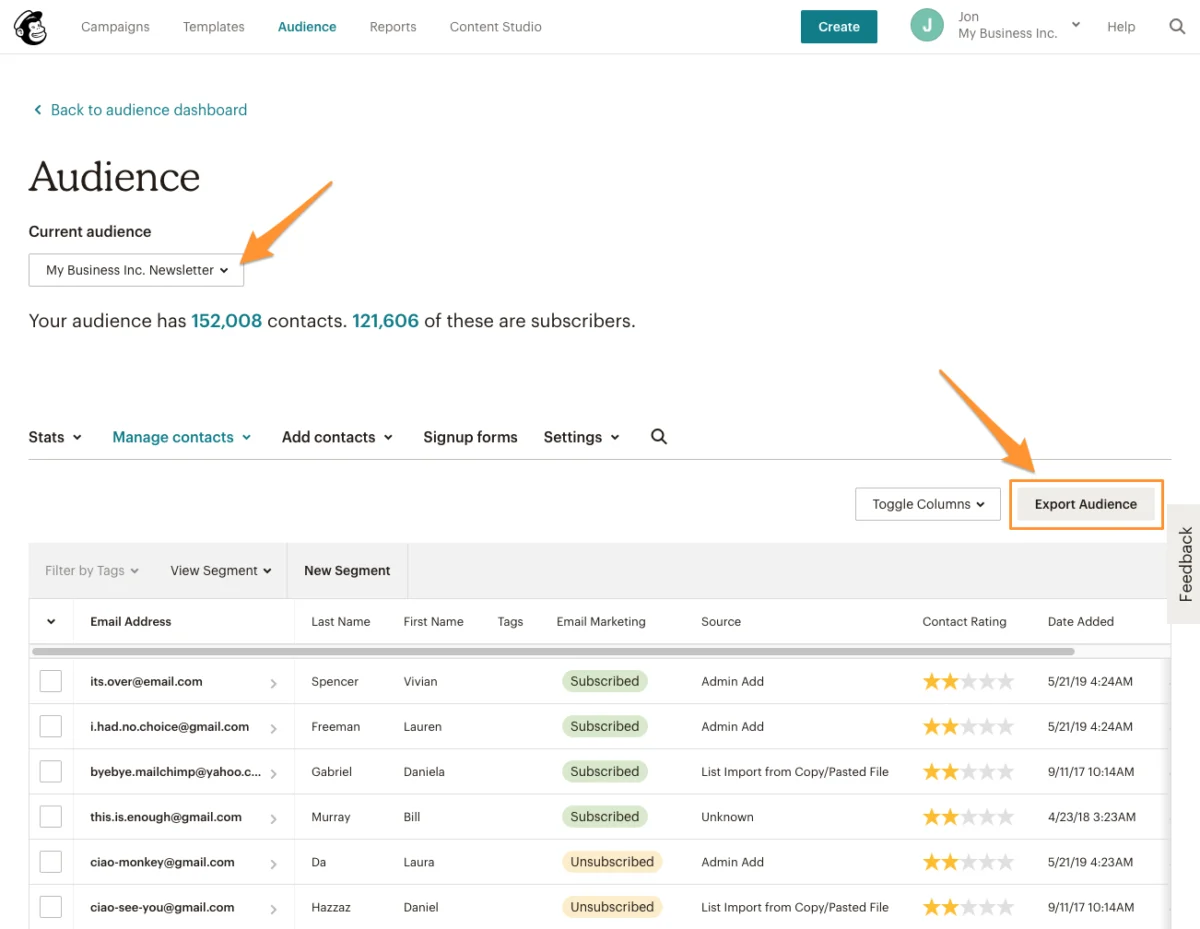
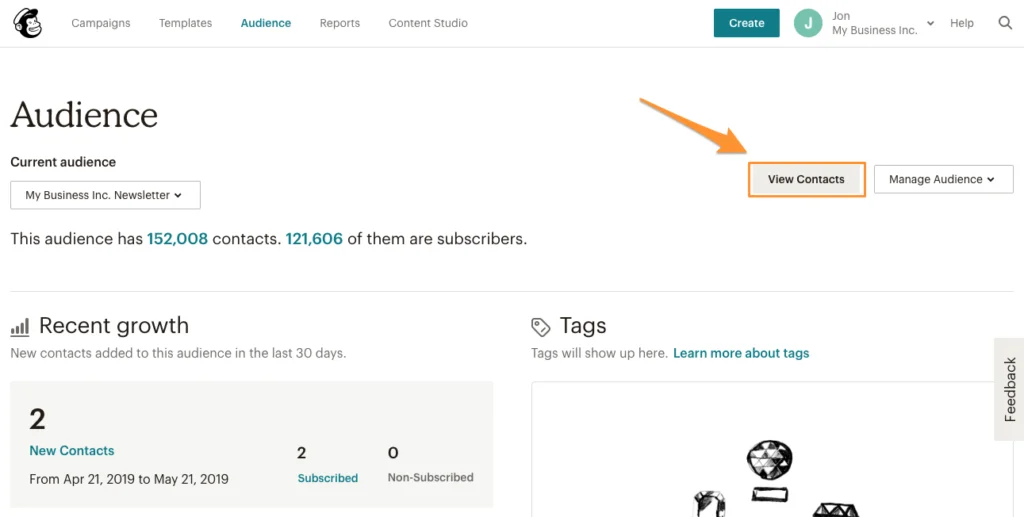
- Navigate to Audience: From the main menu, select “Audience,” then “View Contacts.” This will display your primary audience list.
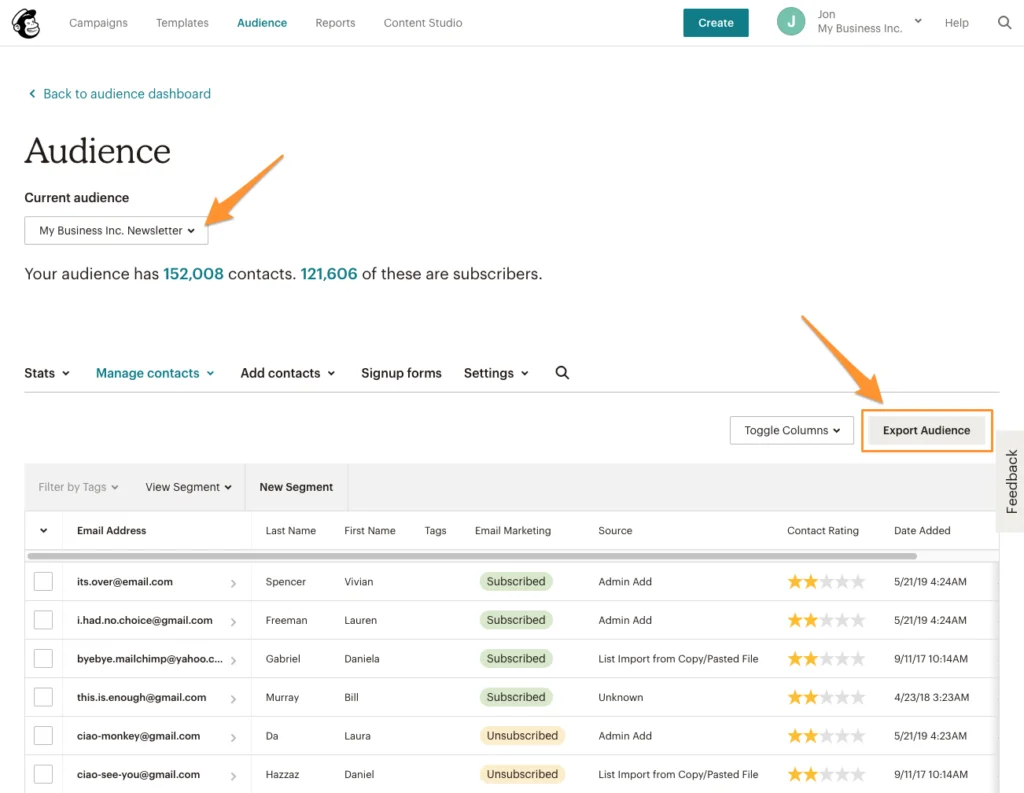
- Select and Export Audience: If you have multiple audiences, use the dropdown menu to select the specific audience you wish to export. Once selected, click the “Export Audience” button. It is imperative to repeat this process for every audience you need to transfer.
- Download and Unzip: Mailchimp typically provides a zipped file containing CSV files for “subscribed_members” and “unsubscribed_members.” Download and unzip these files. Keeping subscribed and unsubscribed contacts separate is crucial for compliance and deliverability.
-
Importing Contacts into Sinch Mailjet:
- Log in to Sinch Mailjet: Access your Mailjet account.
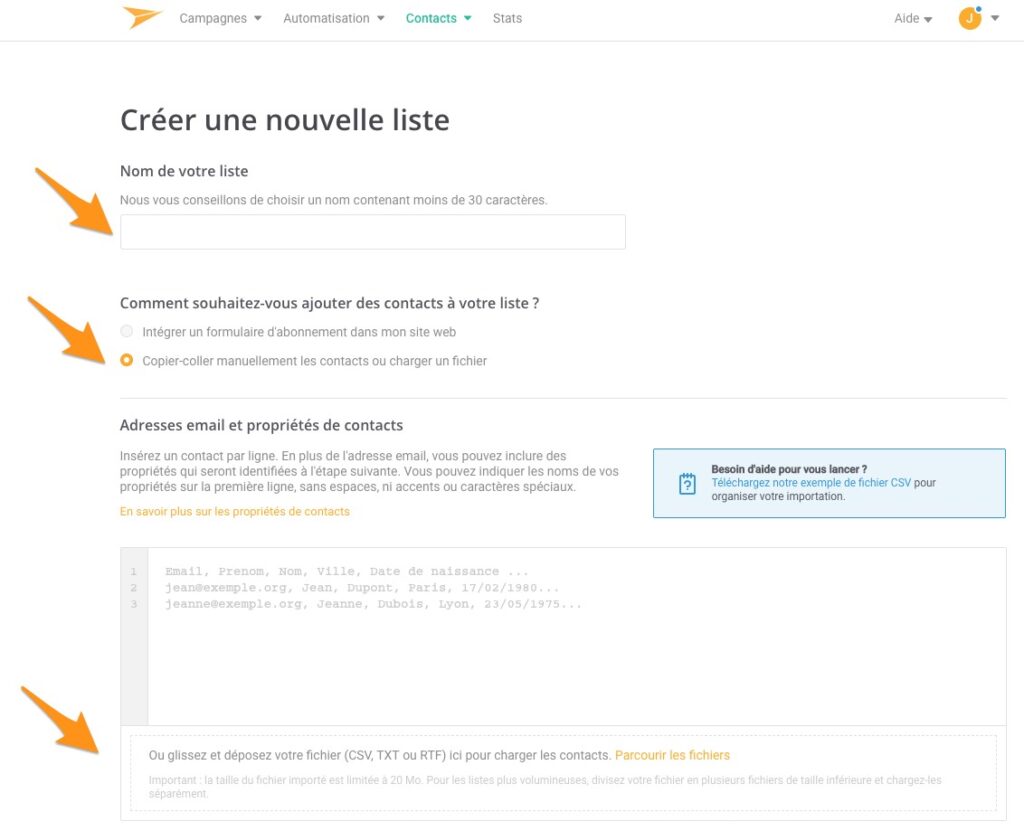
- Create New Contact Lists: Go to “Contacts” > “Contact Lists,” and click “Create a new list.” For optimal organization and to mirror your Mailchimp setup, it is highly recommended to create a separate Mailjet contact list for each corresponding Mailchimp audience you exported.
- Upload Subscribed Contacts: Choose the option to “Paste contacts manually or upload a file” and upload the CSV file containing your subscribed contacts.
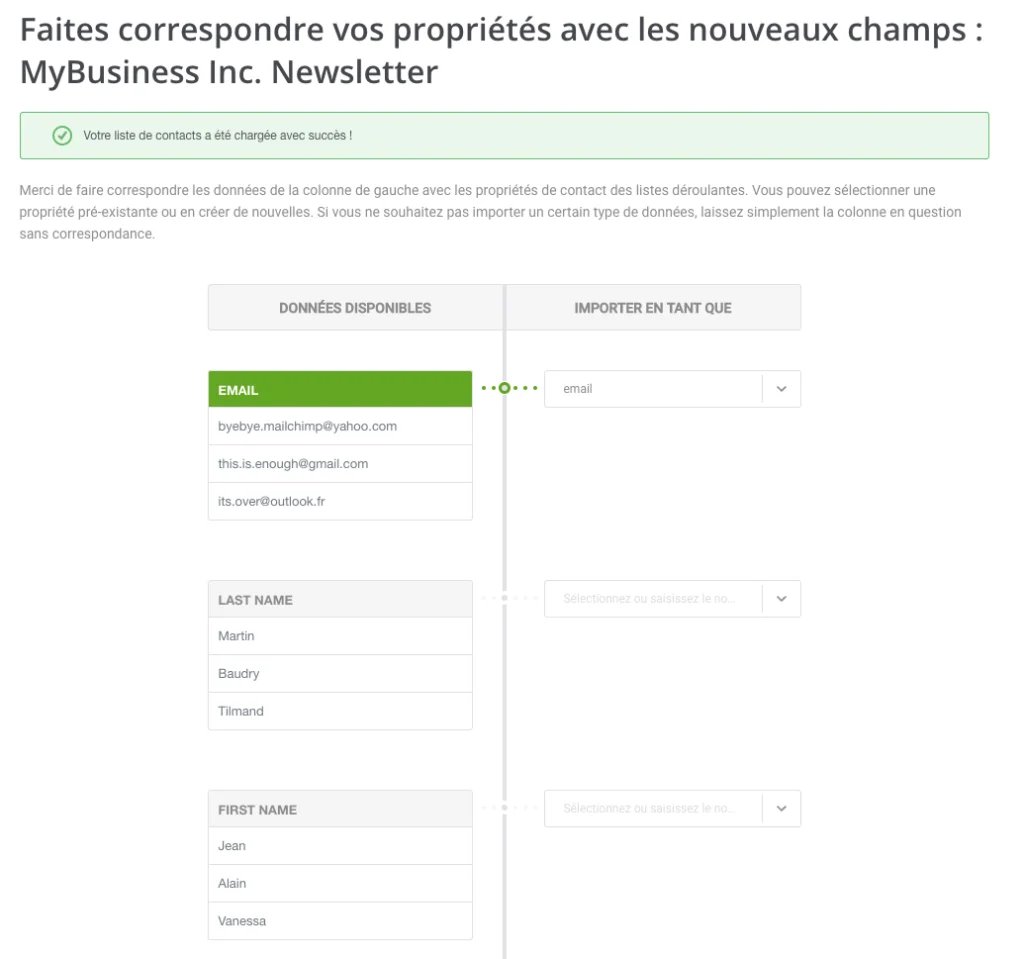
- Map Contact Fields: This step is vital. Mailjet will prompt you to map fields from your CSV (e.g., Email, First Name, Last Name, Company, Birthday) to Mailjet’s contact properties. Ensure accurate mapping to retain all personalization data. These properties will be invaluable for future segmentation and dynamic content. After mapping, click “Save and continue.”
- Import Unsubscribed Contacts: This is a crucial step for maintaining sender reputation and legal compliance.
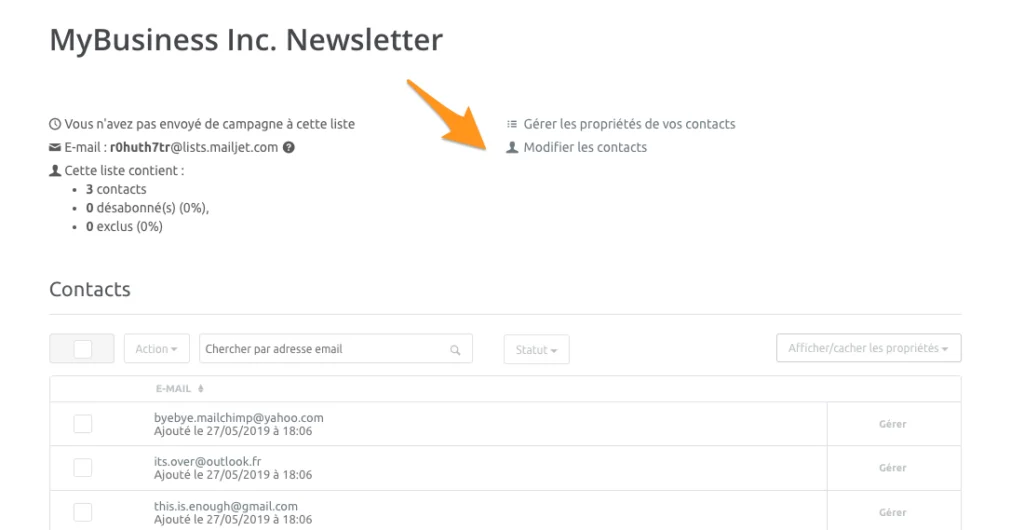
- After importing your subscribed contacts, navigate to the newly created contact list in Mailjet.
- Click “Manage contacts” or an equivalent option to modify the list.
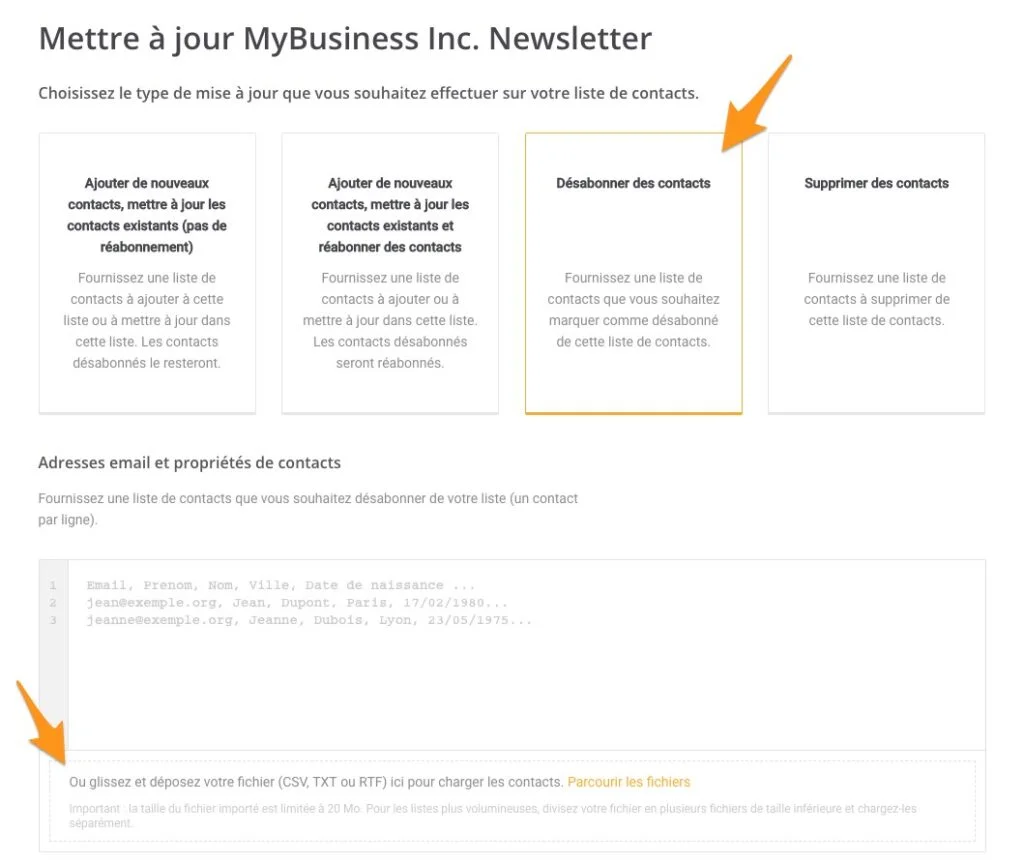
- Select “Unsubscribe contacts” as the update type.
- Drag and drop the CSV file containing your unsubscribed contacts (e.g., “unsubscribed_members.csv”) into the upload area. Map fields if necessary. This action will ensure that these contacts are marked as unsubscribed within your new Mailjet list, preventing accidental re-engagement and potential spam complaints.
Phase 3: Email Template Transition (Timeline: 2-5 Days, depending on template complexity and number)
Directly editing Mailchimp templates within Sinch Mailjet’s Email Editor is generally not possible due to differences in proprietary builders. However, businesses have two primary options:
- Rebuilding Templates in Mailjet: This is often the recommended approach. It allows you to leverage Mailjet’s responsive email builder, take advantage of new features, ensure optimal rendering across devices, and potentially update designs for improved engagement. While it requires a time investment, it guarantees a clean, optimized starting point.
- Exporting and Importing HTML Templates: If your templates are complex or you need to maintain pixel-perfect historical designs, importing the raw HTML is an option.
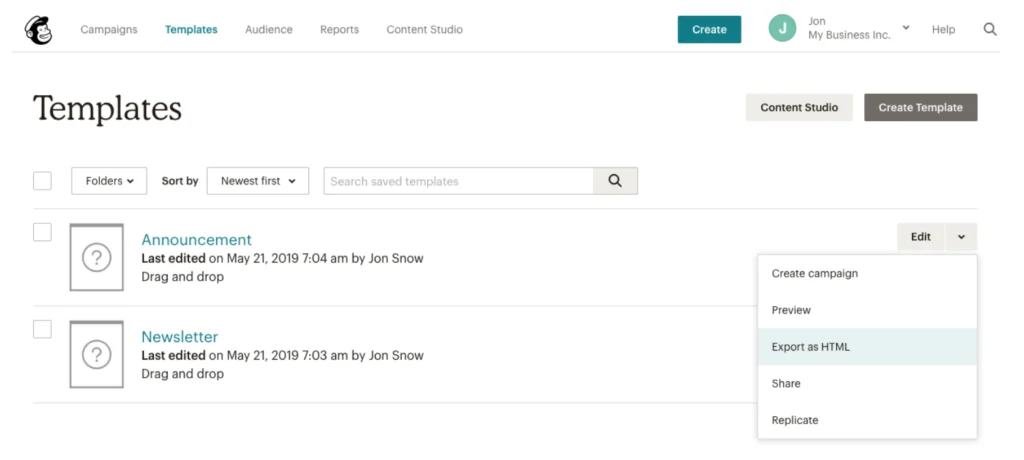
- Export HTML from Mailchimp: In your Mailchimp account, go to “Templates.” For each template you wish to migrate, click on the dropdown menu next to it and select “Export as HTML.” This will download the template’s source code.
- Import HTML into Sinch Mailjet: In your Mailjet account, go to “Campaigns” and select “Create a new template.” Choose the option “Code it in HTML” and then upload your downloaded HTML file.
- Implications: While this method preserves the original design, be aware that HTML exported from one builder may not be perfectly compatible or editable within another’s visual editor. Thorough testing across various email clients (Gmail, Outlook, Apple Mail, etc.) is absolutely essential to ensure consistent rendering and responsiveness. Older HTML templates may also benefit from modernizing for accessibility and mobile-first design principles.
Phase 4: Historical Data Archiving and Post-Migration Configuration (Timeline: Ongoing)
While reporting data cannot be transferred between platforms, preserving historical performance metrics is vital for long-term analysis and strategic planning.
-
Export Reporting Data from Mailchimp:
- In your Mailchimp account, navigate to “Reports.”
- Select “Download All Reports.” This will provide you with a comprehensive archive of your campaign performance, including open rates, click-through rates, bounce rates, and unsubscribes. Store this data securely for future reference and comparison against your new Mailjet campaigns.
- Analysis: This historical data provides a baseline against which you can measure the performance of your campaigns within Sinch Mailjet, allowing you to objectively assess the benefits of the migration.
-
Essential Post-Migration Configuration in Sinch Mailjet:
- Domain Validation: Crucially, validate your sending domains within Sinch Mailjet. This step confirms your ownership of the domain and is foundational for establishing sender reputation.
- Sender Address Configuration: Set up and verify all sender email addresses that you will use for your campaigns.
- SPF, DKIM, and DMARC Records: Configure these vital authentication protocols in your domain’s DNS settings.
- SPF (Sender Policy Framework): Specifies which mail servers are authorized to send email on behalf of your domain, helping to prevent spammers from forging your sender address.
- DKIM (DomainKeys Identified Mail): Provides an encryption key and digital signature that verifies the sender and ensures the email content has not been tampered with in transit.
- DMARC (Domain-based Message Authentication, Reporting & Conformance): Builds on SPF and DKIM, giving domain owners the ability to instruct receiving mail servers on how to handle emails that fail authentication checks, and provides reporting on authentication failures.
- Implications: Proper configuration of SPF, DKIM, and DMARC is paramount for maximizing deliverability, building sender trust with ISPs, and protecting your brand from phishing and spoofing attacks. Neglecting these steps can lead to emails being marked as spam or rejected outright.
- IP Warm-up (if using dedicated IPs): If you opt for a dedicated IP address with Mailjet, a gradual “IP warm-up” process is necessary. This involves slowly increasing your sending volume over several weeks to build a positive sending reputation with internet service providers (ISPs). Mailjet’s deliverability experts can guide you through this process.
Official Responses and Industry Perspective
Sinch Mailjet consistently positions itself as a robust, enterprise-grade solution designed for businesses that require high-performance email delivery, advanced API capabilities, and comprehensive analytics. A hypothetical spokesperson from Sinch Mailjet might state, “Our focus is on empowering businesses to communicate effectively at scale, ensuring their messages reach the inbox reliably and efficiently. We understand the challenges of growth, and our platform is built to support complex email strategies, offering unparalleled deliverability, developer tools, and collaborative features that drive real business value.”
Conversely, Mailchimp, while seeing some users migrate, continues to serve a substantial market segment, particularly smaller businesses and creative entrepreneurs who prioritize ease of use and a guided experience. Industry analysts, such as Jane Doe, a Senior Analyst at Digital Marketing Insights, often comment on the dynamic nature of the ESP market: “The choice of an email platform is highly dependent on a business’s stage of growth and specific needs. While Mailchimp excels in onboarding new users and simplifying marketing for small entities, larger organizations often require the specialized power, scalability, and integration depth offered by platforms like Sinch Mailjet. This migration trend reflects the natural evolution of businesses outgrowing their initial tools.”
Broader Impact and Implications: Beyond the Technical Steps
The decision to migrate email platforms carries significant implications for a business’s overall digital strategy:
- Enhanced ROI on Email Marketing: By leveraging Mailjet’s advanced features—superior deliverability, sophisticated segmentation, and robust automation—businesses can expect improved open rates, click-through rates, and ultimately, a higher return on investment from their email marketing efforts. The granular data and analytics provided by Mailjet also enable more informed decision-making and continuous optimization.
- Future-Proofing Communication Infrastructure: Moving to a platform designed for scale and flexibility ensures that a business’s email infrastructure can adapt to future growth, technological advancements, and evolving regulatory requirements without necessitating another disruptive migration cycle in the near future. This proactive approach minimizes long-term operational risks.
- Operational Efficiency and Team Collaboration: Consolidated marketing and transactional email capabilities, combined with Mailjet’s collaboration tools, streamline workflows, reduce manual effort, and foster better coordination across marketing, sales, and development teams. This efficiency frees up resources to focus on strategic initiatives rather than administrative tasks.
- Strategic Advantage Through Integration: Deep API integrations unlock new possibilities for personalized and contextual communication. Businesses can create highly targeted campaigns triggered by real-time customer behavior or data points from other systems, offering a significant competitive advantage in customer engagement.
- Challenges and Considerations: Despite the benefits, migrations are not without challenges. There can be a learning curve for teams adapting to a new interface and new ways of working. Potential discrepancies in data formatting or template rendering may require troubleshooting. Thorough testing of all new campaigns and automations post-migration is paramount to prevent errors and ensure a smooth transition for subscribers. Investing in training and leveraging Mailjet’s support resources can mitigate these challenges.
Conclusion
The migration from Mailchimp to Sinch Mailjet is more than a technical procedure; it is a strategic business decision often necessitated by growth, complexity, and the pursuit of operational excellence. While requiring careful planning and execution, the process of transferring contacts, templates, and archiving historical data is straightforward when approached systematically. By embracing a platform like Sinch Mailjet, businesses gain access to advanced capabilities in deliverability, scalability, integration, and collaboration, ultimately enhancing their email marketing ROI and future-proofing their digital communication strategy. The journey culminates in a more robust, efficient, and powerful email ecosystem, poised to support ambitious business objectives in an increasingly digital world.