 Layla Zulfa
As of June 5, 2026, the strategic selection of an email marketing platform transcends mere feature comparison, evolving into a critical business decision influencing scalability, operational efficiency, and compliance. For growing enterprises, the chosen solution must robustly support diverse teams, accommodate escalating sending volumes, and consistently meet stringent requirements for performance, collaboration, and regulatory adherence. This comprehensive guide delves into the prevalent motivations driving companies to transition from Mailchimp to Sinch Mailjet, offering a meticulously detailed, step-by-step methodology for migrating essential assets, including contacts, email templates, and historical data, with precision and minimal disruption.
The Evolving Landscape of Email Marketing Platforms

The email marketing industry, a cornerstone of digital communication strategies, has witnessed significant evolution over the past decade. What began as simple broadcast tools has transformed into sophisticated ecosystems offering advanced segmentation, automation, analytics, and deliverability features. This transformation has introduced both opportunities and complexities for businesses, necessitating platforms that can adapt to dynamic market demands and growing organizational needs. Companies like Mailchimp have long served as entry points for many small and medium-sized businesses due to their user-friendly interfaces and accessible pricing tiers. However, as these businesses mature, their operational demands often outgrow initial solutions, prompting a re-evaluation of their email service providers (ESPs). The competitive landscape of ESPs is vibrant, with numerous providers vying for market share by specializing in different aspects, from transactional email to hyper-personalized marketing campaigns. Sinch Mailjet, a prominent player, distinguishes itself by emphasizing enterprise-grade deliverability, robust API capabilities, and scalable infrastructure, catering specifically to businesses with complex sending needs and global reach.
Driving Factors Behind Platform Migrations
The decision to migrate from one email platform to another is rarely taken lightly, often stemming from a confluence of strategic and operational imperatives. Businesses typically initiate such transitions when faced with limitations in their current provider’s ability to support growth, optimize performance, enhance collaboration, or ensure regulatory compliance.
- Scalability Challenges: A primary driver for migration is often the need for greater scalability. As contact lists expand and sending volumes increase, some platforms may struggle to maintain optimal performance, leading to slower send times, increased costs per email, or degraded deliverability. Businesses reaching millions of subscribers or sending high volumes of transactional emails require an infrastructure designed for enterprise-level throughput.
- Performance and Deliverability: Email deliverability—the ability for emails to reach the inbox rather than spam folders—is paramount. Factors like sender reputation, IP infrastructure, and advanced authentication protocols (SPF, DKIM, DMARC) directly impact campaign effectiveness. Companies may seek platforms that offer superior deliverability tools, dedicated IP options, and expert support to optimize inbox placement rates. Poor deliverability can severely impact ROI, leading to lost sales and diminished brand perception.
- Collaboration and Team Management: For larger organizations with multiple marketing teams, agencies, or departments, robust collaboration features are essential. The ability to manage user roles, permissions, template libraries, and campaign approvals across a centralized platform significantly streamlines workflows. Platforms with limited team access or restrictive user management can create operational bottlenecks and inefficiencies.
- Compliance and Data Governance: In an era of heightened data privacy regulations like GDPR and CCPA, compliance is non-negotiable. Businesses require platforms that offer comprehensive data governance features, secure data handling, clear consent management, and audit trails. Migrations may be prompted by a need for more robust compliance frameworks or to leverage an ESP with a stronger global presence and adherence to international data protection standards.
- Cost-Effectiveness and Pricing Models: While initial cost savings might seem attractive, businesses often discover that pricing models become less favorable as they scale. Hidden fees, restrictive contact limits, or expensive add-ons can significantly inflate operational costs. A comparison of Mailchimp alternatives, for instance, frequently highlights how providers like Sinch Mailjet offer more predictable and competitive pricing, especially for high-volume senders or those requiring extensive feature sets without premium tier lock-ins. This can include more flexible plans for unlimited contacts or better value for advanced automation and API access.
- Advanced Features and Automation: Growing businesses often demand more sophisticated automation workflows, deeper segmentation capabilities, and richer integration options with CRM, e-commerce, and other marketing technology stacks. A platform that offers an intuitive drag-and-drop editor alongside robust API access for custom integrations provides the flexibility needed for complex marketing strategies.
Sinch Mailjet’s Value Proposition for Migrating Businesses
Sinch Mailjet positions itself as a robust solution addressing the aforementioned challenges. Its offering typically includes unlimited contacts, which removes a common scaling bottleneck encountered with other providers. Furthermore, it emphasizes powerful collaboration features, allowing multiple team members to work efficiently on campaigns with granular access controls. Advanced automation capabilities enable businesses to create intricate customer journeys, trigger personalized emails, and optimize engagement without manual intervention. Critically, Sinch Mailjet also champions its deliverability expertise, leveraging sophisticated infrastructure and proactive monitoring to ensure high inbox placement rates, a vital component for any email-dependent business.
Navigating the Transition: A Strategic and Technical Migration Guide
The process of migrating an email marketing operation requires careful planning and execution to ensure data integrity, maintain service continuity, and leverage the full potential of the new platform. This multi-phase approach outlines the strategic considerations and technical steps involved in transitioning from Mailchimp to Sinch Mailjet.
Phase 1: Strategic Planning and Pre-Migration Assessment
Before initiating any technical steps, a thorough strategic assessment is crucial. This involves:

- Defining Migration Goals: Clearly articulate what the business aims to achieve by moving to Sinch Mailjet (e.g., improved deliverability, reduced costs, enhanced automation, better team collaboration).
- Data Audit: Review existing Mailchimp data. Identify all active contact lists, segments, tags, and custom fields. Document email templates, automation workflows, and transactional email setups. This audit helps in understanding the scope of migration and potential data cleansing needs.
- Feature Mapping: Compare Mailchimp’s current usage with Sinch Mailjet’s capabilities. Understand how existing workflows will translate and identify new opportunities for optimization.
- Team Preparation: Inform and train relevant team members on the new platform. Establish a clear communication plan for internal stakeholders.
- Timeline Development: Create a realistic migration timeline, accounting for potential challenges and testing phases.
Phase 2: Data Migration – Ensuring Continuity and Compliance
The core of the migration involves transferring critical data assets. This phase demands meticulous attention to detail to prevent data loss or service interruption.
Step 1: Migrating Your Contacts from Mailchimp to Sinch Mailjet
The integrity of your contact lists is paramount. This process ensures that your subscriber base is accurately transferred and that you maintain compliance with anti-spam regulations.
- Access Mailchimp Account: Begin by logging into your Mailchimp account.
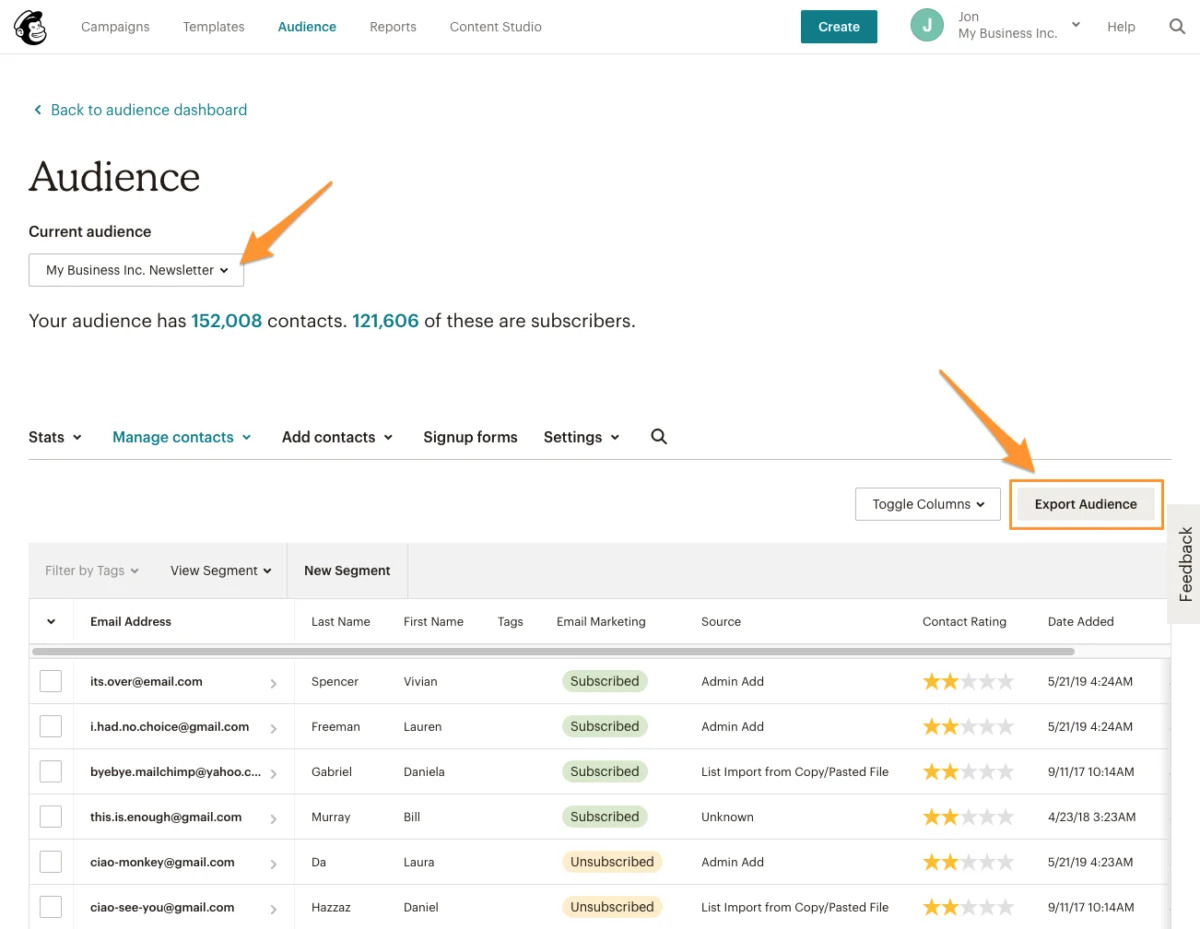
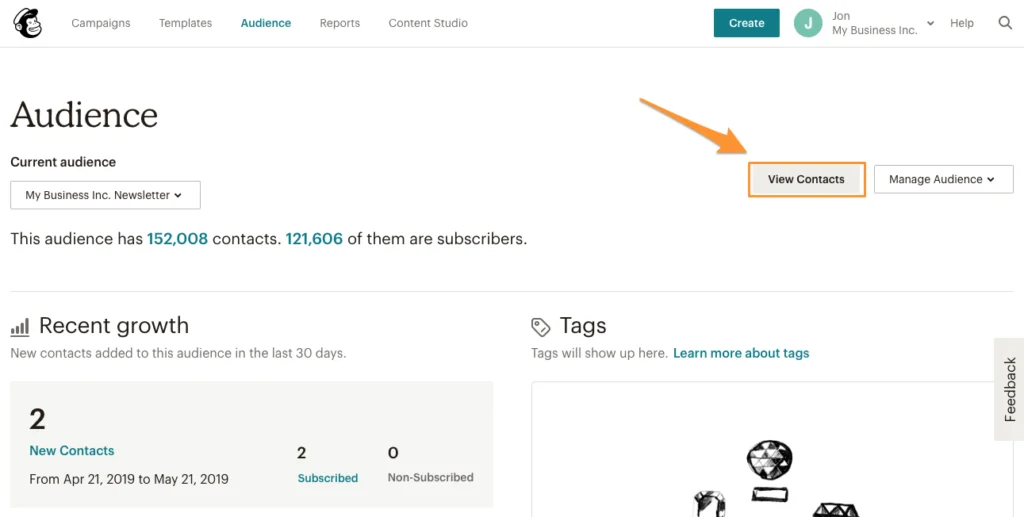
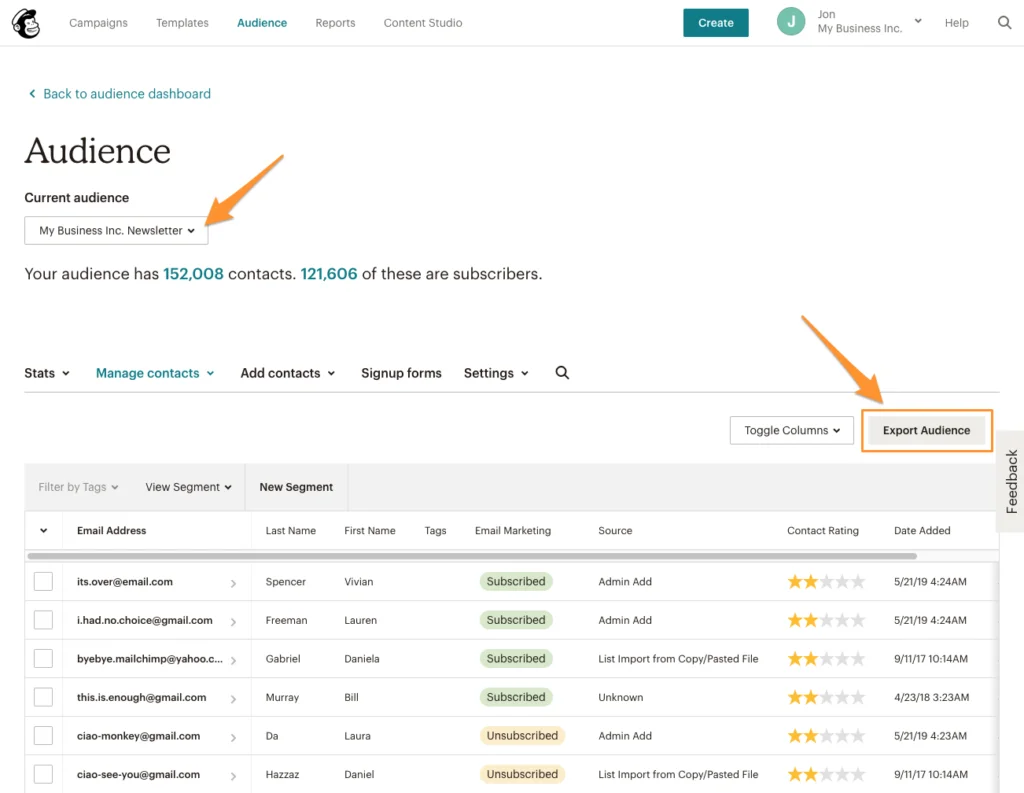
- Navigate to Audience: From the primary menu, click "Audience," then select "View Contacts." This action will display your consolidated contact lists.
- Export Audience Data: Locate and click the "Export Audience" button. It is imperative to repeat this export process for every distinct audience you have configured within Mailchimp. Each audience often represents a unique segment or purpose (e.g., "Newsletter Subscribers," "Customer List," "Event Attendees"), and maintaining this segmentation in Mailjet is crucial for targeted communication.
- Download and Unzip CSV Files: Once the export is complete, download the generated CSV file(s). These files are typically compressed (zipped) and will need to be unzipped to access the individual
subscribed_members.csvandunsubscribed_members.csvfiles. Separating subscribed and unsubscribed contacts is a critical step for compliance. - Log into Sinch Mailjet: Access your Sinch Mailjet account to begin the import process.
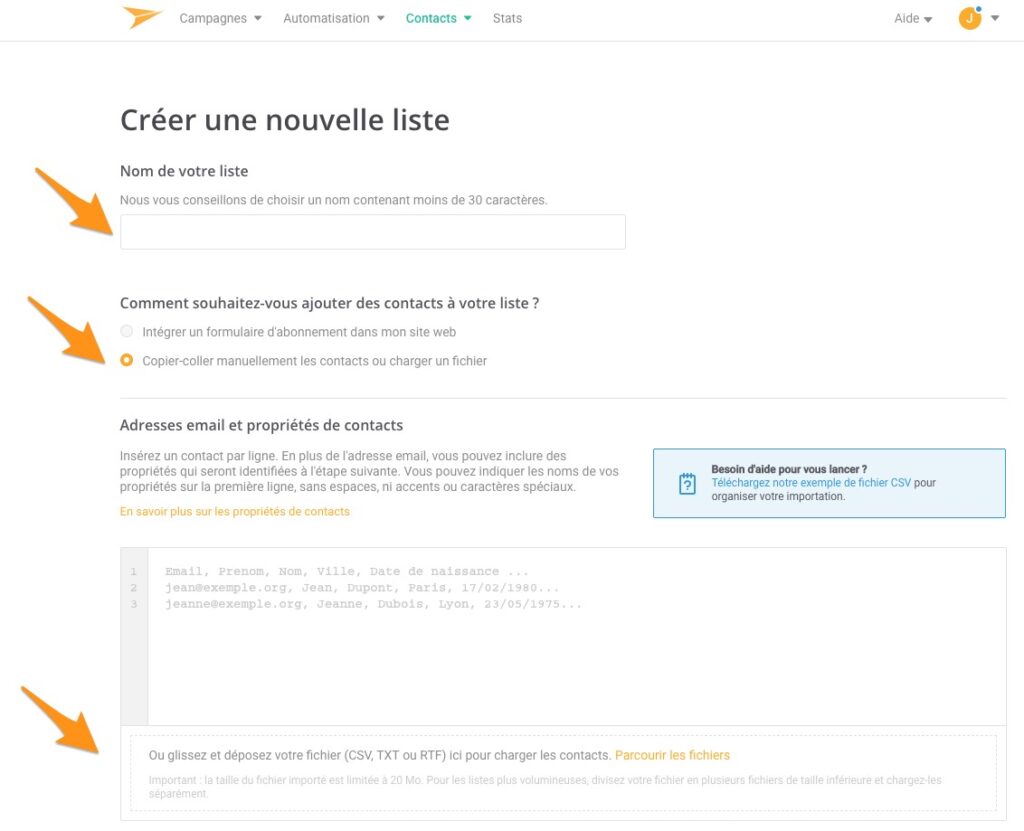
- Create New Contact List(s) in Mailjet: From the Mailjet menu, navigate to "Contacts" > "Contact Lists." Click "Create a new list." For optimal organization and to preserve the segmentation established in Mailchimp, it is highly recommended to import each Mailchimp audience into a separate contact list within Mailjet. This mirrors your previous structure and facilitates targeted campaigning.
- Upload Subscriber Data: Select the option to "Paste contacts manually or upload a file," then upload the
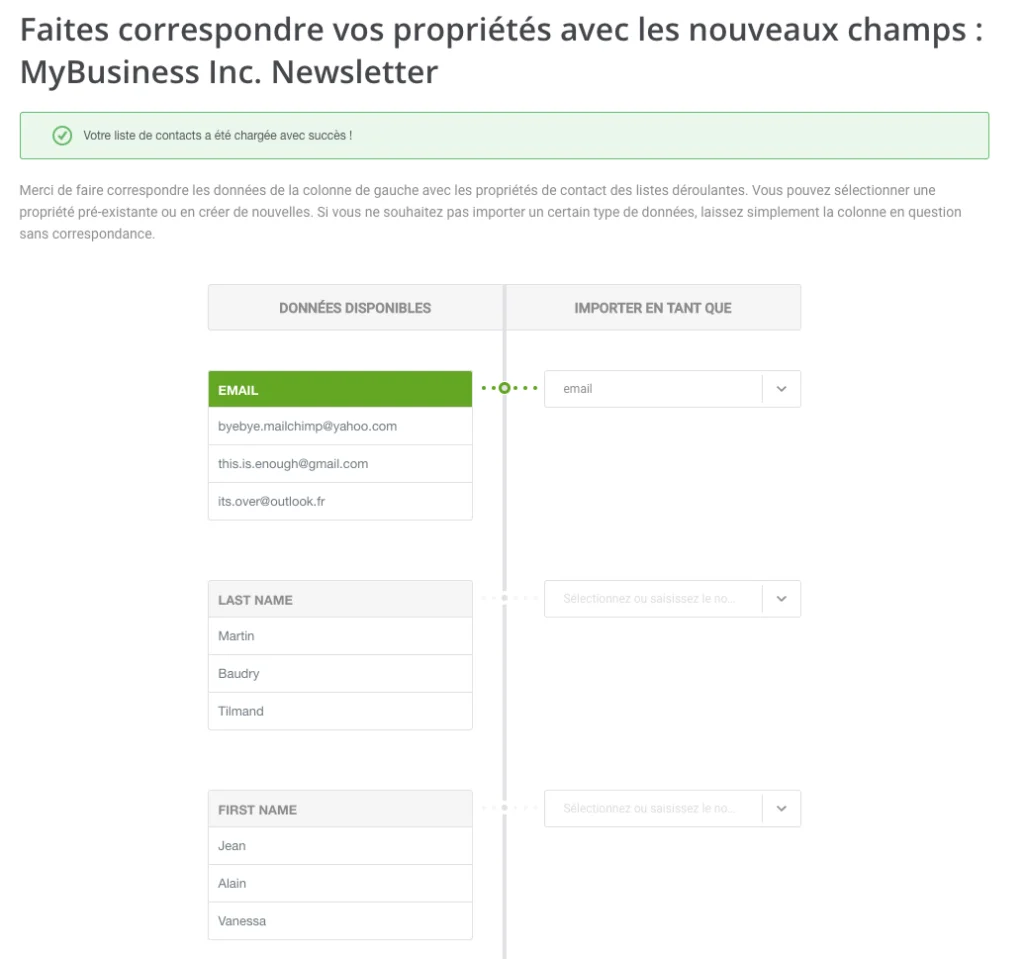
subscribed_members.csvfile. - Map Contact Fields: This is a crucial step for data integrity. The Mailjet interface will prompt you to map the columns from your uploaded CSV file (e.g., "Email Address," "First Name," "Last Name," "Company," "Birthday") to the corresponding contact properties within Mailjet. Mailjet’s robust system allows for the import of all relevant contact properties, which can then be leveraged for advanced segmentation and personalized email content. After meticulously mapping all fields, click "Save and continue."
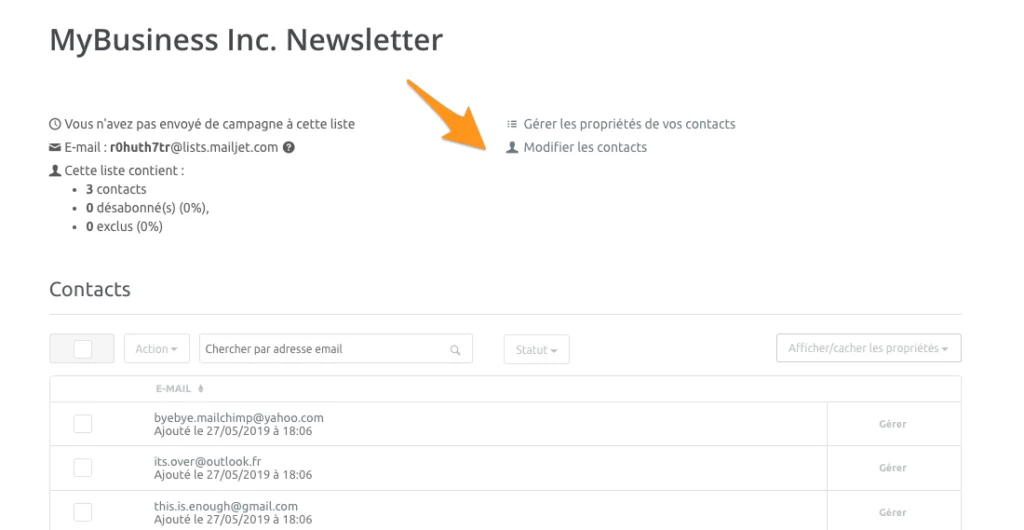
- Import Unsubscribed Contacts: To ensure strict adherence to anti-spam regulations (e.g., CAN-SPAM, GDPR) and to respect subscriber preferences, it is vital to import your list of unsubscribed contacts. From your newly created Mailjet contact list dashboard, click "Manage contacts."
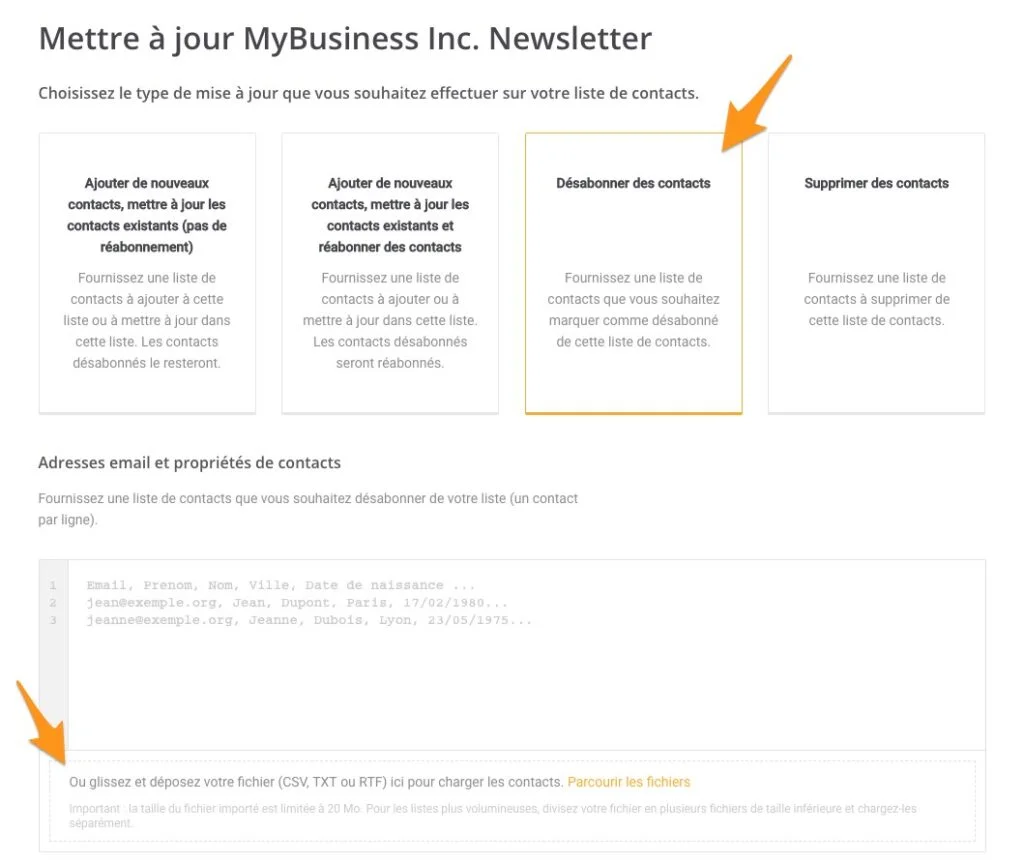
- Update List with Unsubscribes: Select "Unsubscribe contacts" as the update type. Drag and drop the
unsubscribed_members.csvfile into the designated upload area. Again, carefully map any relevant fields before proceeding. This action will mark these contacts as unsubscribed within Mailjet, preventing any accidental future mailings and protecting your sender reputation.
Step 2: Migrating Your Email Templates
While direct, editable export of Mailchimp templates into Sinch Mailjet’s native editor is not possible, businesses are not required to start from scratch. Two primary options facilitate the transfer of your visual branding and content:
- Rebuilding Templates in Mailjet: Leverage Mailjet’s intuitive Email Editor to recreate your templates. This option allows for full native editing capabilities within Mailjet and can be an opportunity to optimize designs for the new platform. Mailjet offers a rich library of pre-designed templates and a flexible drag-and-drop builder to expedite this process.
-
Exporting and Importing HTML: For more complex designs or to maintain exact visual fidelity, you can export your Mailchimp templates as HTML and import them into Mailjet.
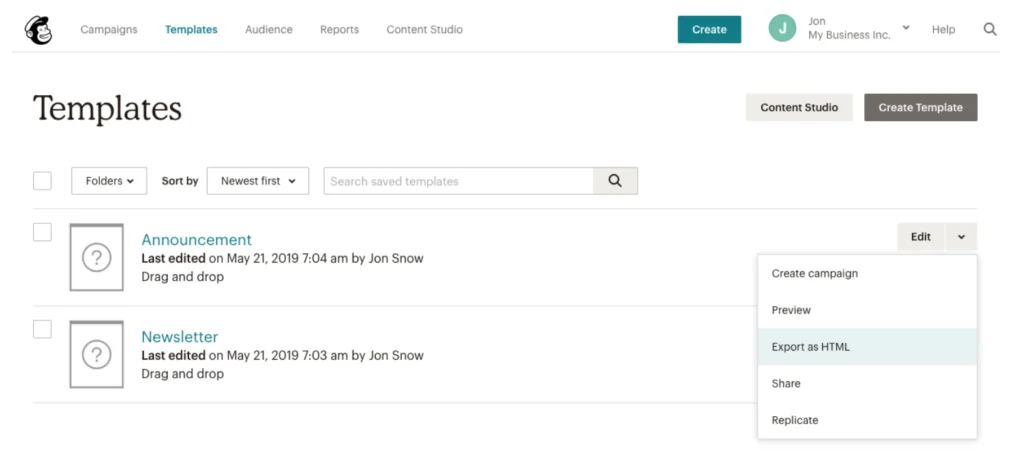
- Export HTML from Mailchimp: In your Mailchimp account, navigate to "Templates." For each template you wish to migrate, access its dropdown menu and select "Export as HTML." Download these HTML files to your local system.
- Import HTML into Sinch Mailjet: Log into your Sinch Mailjet account. Go to "Campaigns" and select "Create a new template." Choose the "Code it in HTML" option. You will then have the choice to "Import a file," where you can upload the HTML file(s) exported from Mailchimp. While these templates will be functional, further editing will typically require direct HTML modification rather than Mailjet’s visual editor.
Step 3: Exporting Your Reporting Data
It is important to acknowledge that direct transfer of historical reporting data (e.g., open rates, click-through rates, bounce rates from past campaigns) from Mailchimp to Sinch Mailjet is not technically feasible. However, preserving this historical data is crucial for long-term performance analysis, trend identification, and strategic decision-making.
- Download All Reports from Mailchimp: In your Mailchimp account, go to "Reports." Locate and select "Download All Reports." This will typically generate a comprehensive archive of your past campaign performance data.
- Archiving and Analysis: Download and securely store these reports. While they won’t be integrated into Mailjet’s analytics dashboard, they serve as a vital historical record. Businesses can use this data for offline analysis, comparing past performance with new campaigns run on Mailjet, or for compliance and auditing purposes.
Phase 3: Post-Migration Validation and Optimization
With contacts and templates successfully migrated, the final phase focuses on validating the setup and optimizing the new environment for peak performance.
- Critical Deliverability Configurations: Before sending the first campaign from Sinch Mailjet, it is absolutely essential to configure your domain and sender authentication.
- Domain and Sender Address Validation: Ensure all sending domains and email addresses are properly validated within Mailjet. This confirms your ownership and authorization to send emails from these addresses.
- SPF, DKIM, and DMARC Records: Configure these vital email authentication protocols in your domain’s DNS settings.
- SPF (Sender Policy Framework): Specifies which mail servers are authorized to send emails on behalf of your domain.
- DKIM (DomainKeys Identified Mail): Provides a method for validating a domain name identity that is associated with an email message through cryptographic authentication.
- DMARC (Domain-based Message Authentication, Reporting, and Conformance): Builds on SPF and DKIM, allowing senders to indicate that their emails are protected by SPF and/or DKIM, and tells receivers what to do if neither of those authentication methods passes (e.g., quarantine, reject).
Proper configuration of these records is critical for establishing sender trust, enhancing deliverability, and protecting against phishing and spoofing.
- Thorough Testing: Conduct extensive testing of your imported templates and new campaigns. Send test emails to various email clients (Gmail, Outlook, Yahoo, etc.) to check rendering, links, and personalization tags. Test automation workflows to ensure they trigger correctly.
- Gradual Ramp-Up (if applicable): For very large sending volumes, consider a gradual "IP warm-up" process if you are using new dedicated IPs, to build sender reputation gradually with internet service providers (ISPs).
- Leveraging New Capabilities: Explore Sinch Mailjet’s advanced features. This includes setting up new segmentation rules based on imported contact properties, configuring sophisticated automation journeys, and utilizing Mailjet’s API for deeper integrations with other business systems.
Broader Implications and Future Outlook
The successful migration to a platform like Sinch Mailjet marks a significant milestone for businesses seeking to enhance their digital communication capabilities. It signifies a strategic investment in a more robust, scalable, and compliant email infrastructure. The implications extend beyond operational efficiency, touching upon improved customer engagement through advanced personalization, greater marketing ROI due to optimized deliverability, and enhanced data security and compliance posture.
Industry analysts frequently point to the increasing sophistication required in email marketing. Businesses can no longer rely on generic blasts; personalized, timely, and relevant communications are key to cutting through the noise. Platforms that offer superior analytics, A/B testing, and AI-driven optimization tools will be increasingly vital. The competitive nature of the ESP market ensures continuous innovation, pushing providers to offer more value in terms of features, support, and infrastructure.
By undertaking such a migration, businesses are not just switching providers; they are strategically repositioning their entire email marketing framework to be more agile, powerful, and future-proof. This allows them to adapt to evolving customer expectations and regulatory landscapes, ultimately supporting sustained growth and competitive advantage in the digital sphere.
Your migration to Sinch Mailjet is now complete, providing a solid foundation for future growth. Your contacts and templates are primed for utilization within Sinch Mailjet, ready to power your next generation of campaigns.
To fully harness the capabilities of Sinch Mailjet, businesses are encouraged to delve into its advanced features, designed to expand audience reach, foster collaboration, automate complex workflows, and ensure optimal deliverability.
Create your free Sinch Mailjet account today to experience the difference, and discover how Sinch Mailjet stands in comparison to Mailchimp through detailed analyses available on their platform.


 Ali Ikhwan

 Iffa Jayyana