 Ammar Sabilarrohman

The digital marketing landscape is currently undergoing a seismic shift as privacy regulations, browser restrictions, and the gradual phase-out of third-party cookies redefine how businesses track consumer behavior. In response to these challenges, the integration of Tracklution with Google Tag Manager (GTM) has emerged as a critical solution for organizations seeking to maintain high-fidelity data across multiple advertising platforms. This technical synergy allows marketers to transition from traditional client-side tracking to more robust server-side architectures, ensuring that data sent to platforms such as Meta, Google Ads, TikTok, and LinkedIn remains accurate and compliant with evolving privacy standards.

For many enterprises, the investment in Google Tag Manager is substantial, representing hours of configuration and a complex web of existing triggers. The compatibility between Tracklution and GTM addresses a primary concern within the digital analytics community: the ability to upgrade tracking capabilities without dismantling established infrastructure. By leveraging GTM’s Community Template Gallery, Tracklution provides a streamlined pathway for custom-built websites—including those developed using generative artificial intelligence tools—to implement sophisticated server-side tracking with minimal friction.
The Evolution of Digital Tracking and the Privacy-First Mandate
To understand the significance of the Tracklution-GTM integration, one must examine the broader context of the "Cookie Apocalypse." Over the past three years, the industry has faced significant headwinds. Apple’s App Tracking Transparency (ATT) framework, introduced in iOS 14.5, decimated the ability of client-side pixels to track users across apps and websites. Furthermore, the increasing prevalence of ad-blockers and the deprecation of third-party cookies in browsers like Safari and Firefox (and eventually Google Chrome) have resulted in a data loss of approximately 30% to 60% for standard tracking setups.
Traditional client-side tracking relies on the user’s browser to execute scripts and send data directly to advertising platforms. This method is increasingly fragile. Server-side tracking, facilitated by intermediaries like Tracklution, moves this process from the browser to a secure server. This not only improves website performance by reducing the number of heavy scripts running in the browser but also allows for better data sanitization and bypasses many of the limitations imposed by browser-based privacy protections.
Chronology of Implementation: A Technical Roadmap
The deployment of Tracklution via Google Tag Manager follows a precise chronological sequence designed to ensure data integrity and system stability. This process is applicable to a wide range of web environments, from standard WordPress installations to bespoke, hand-coded applications.
Phase 1: Establishing the GTM Foundation
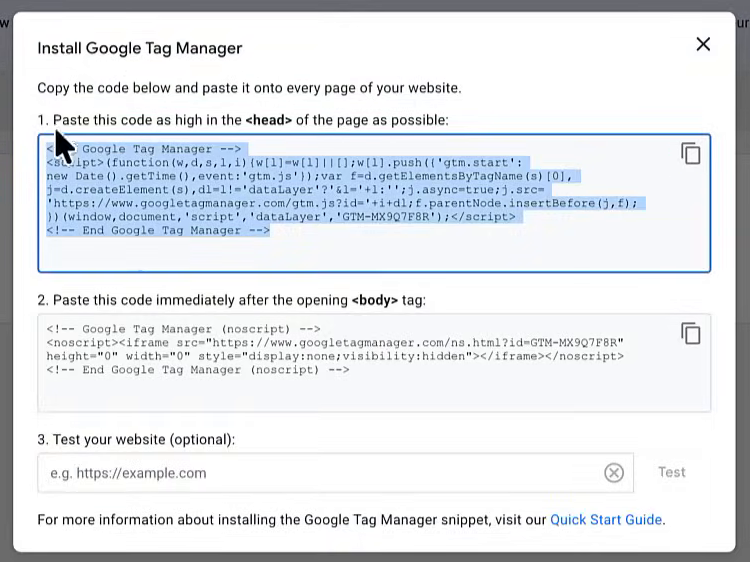
The initial stage requires the successful deployment of the GTM container on the target website. For WordPress users, this is typically achieved through specialized plugins like GTM4WP, which simplify the injection of the required script snippets. For custom-built sites, developers must manually place the GTM header and body scripts into the site’s source code. The rise of AI coding assistants, such as Claude or GitHub Copilot, has significantly lowered the barrier to entry for this step, allowing non-technical users to accurately place tracking code within complex file structures.
Phase 2: Template Integration and Security Verification
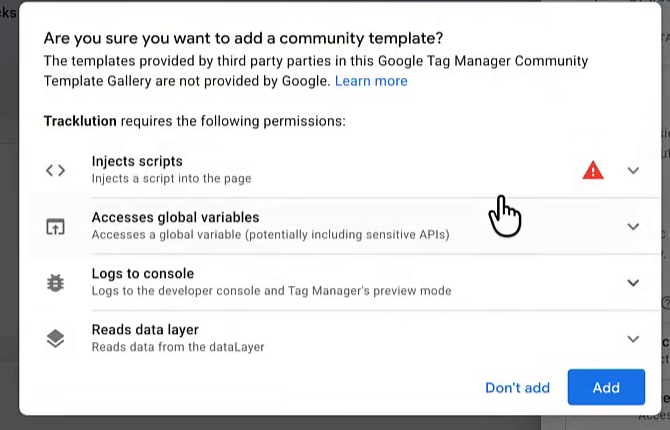
Once GTM is active, the integration utilizes the GTM Community Template Gallery. This repository serves as a verified source for custom tag templates. The Tracklution template is designed to act as a bridge, funneling event data from the website to the Tracklution server. Industry experts emphasize the importance of verifying template authors during this phase to prevent the injection of malicious scripts. The Tracklution template requires specific permissions to inject code, a standard requirement for templates that manage data transmission.
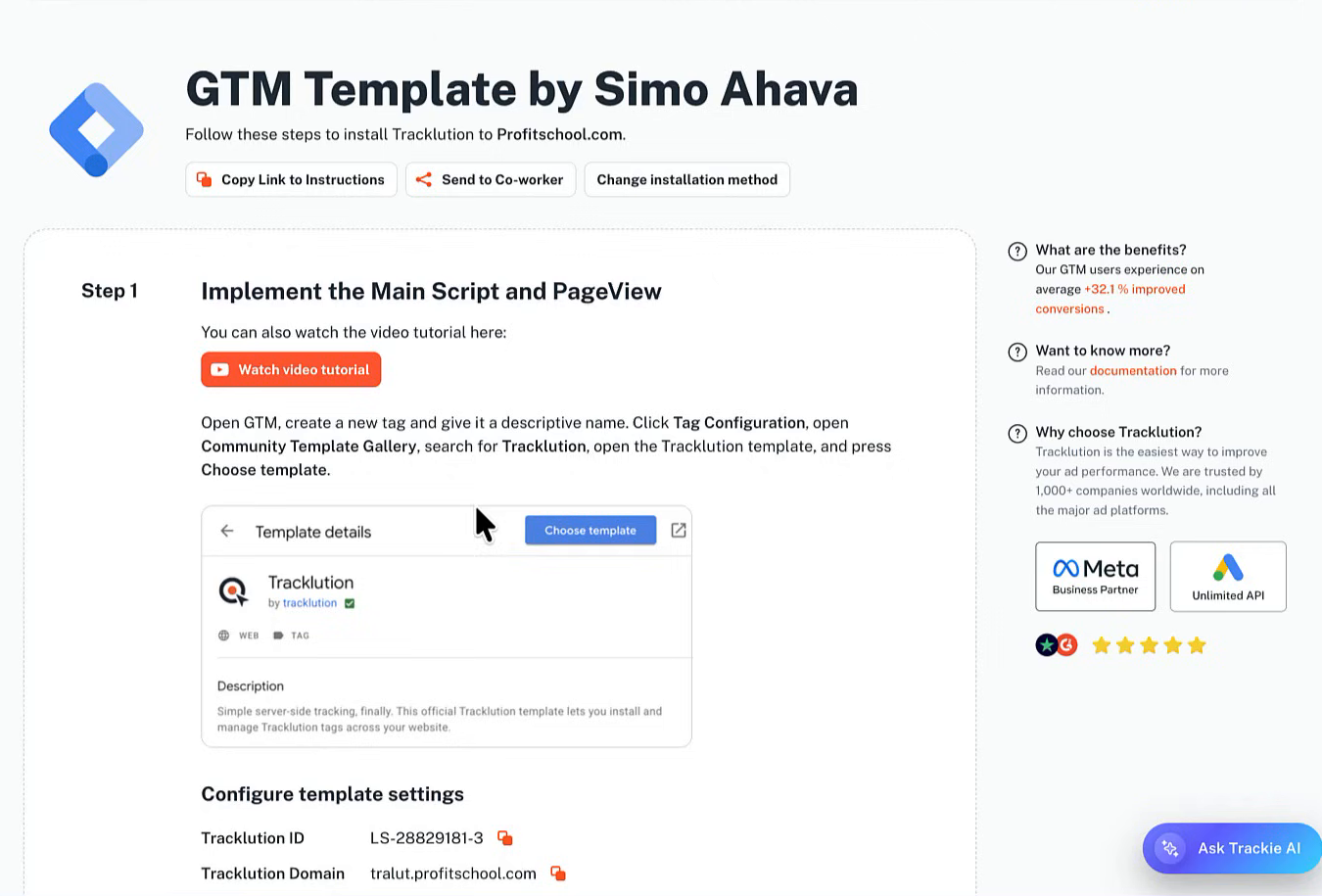
Phase 3: Configuration of the Primary Data Pipeline
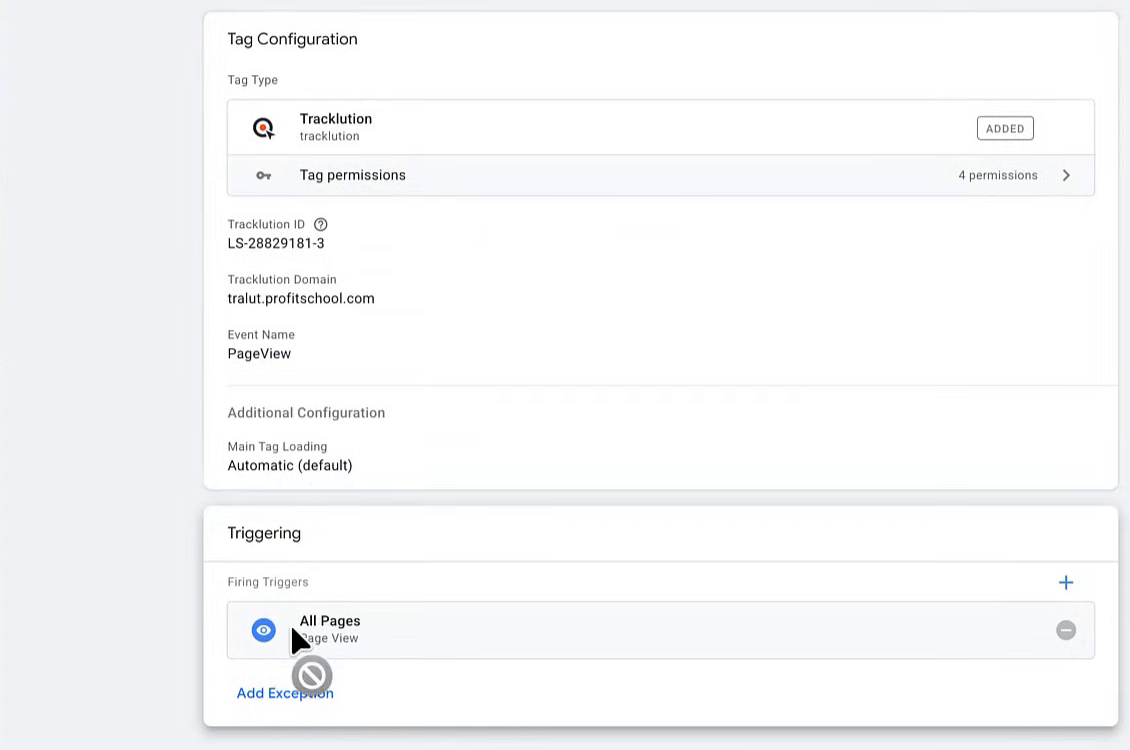
The core of the setup involves connecting the GTM container to a specific Tracklution account using a unique Installation ID and a dedicated tracking domain. The first tag configured is typically the "Page View" tag. In a server-side context, this tag serves as the foundational signal, informing the server that a session has commenced. This is often mapped to the "All Pages" trigger within GTM, though advanced setups may incorporate consent management platforms (CMPs) to ensure that tracking only fires after a user has provided explicit permission.
Phase 4: Custom Event Mapping and Testing
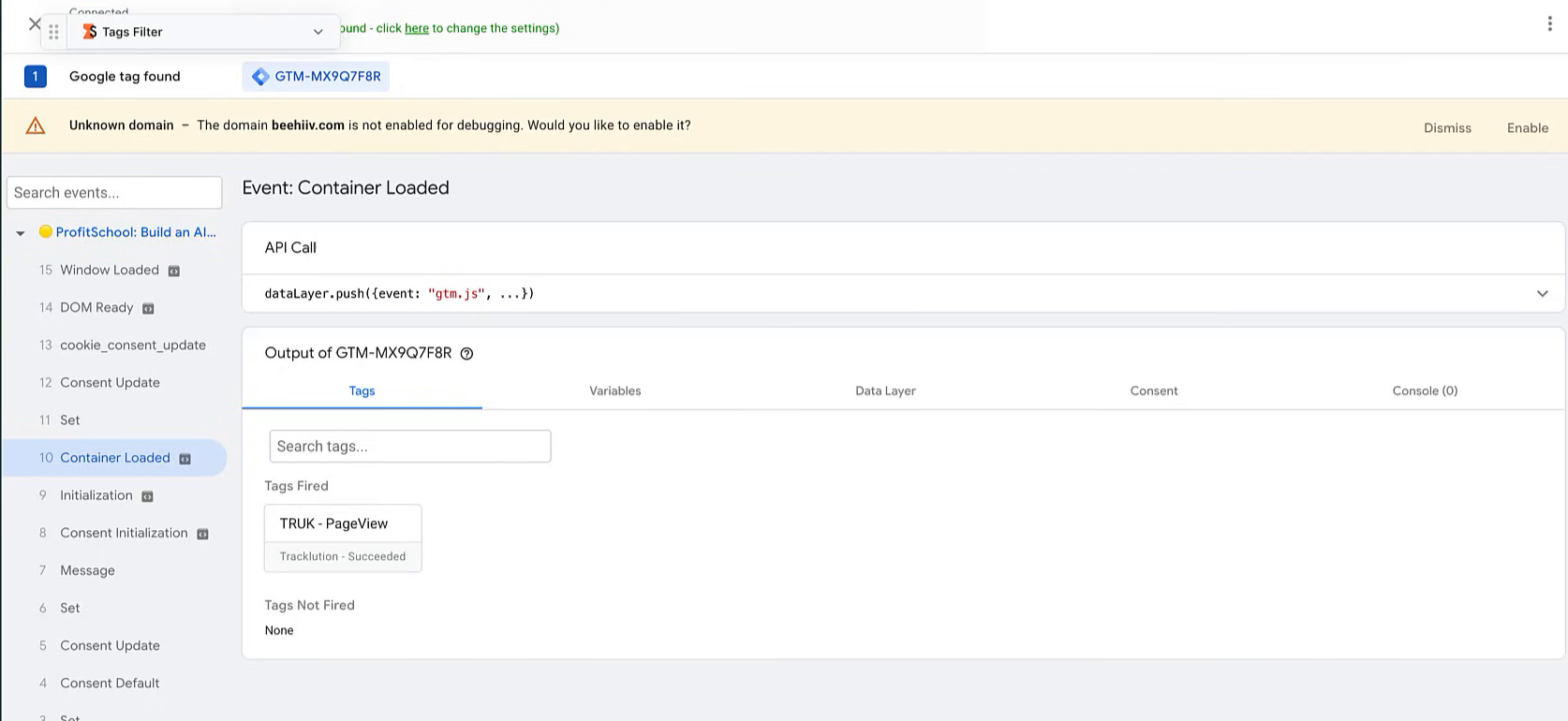
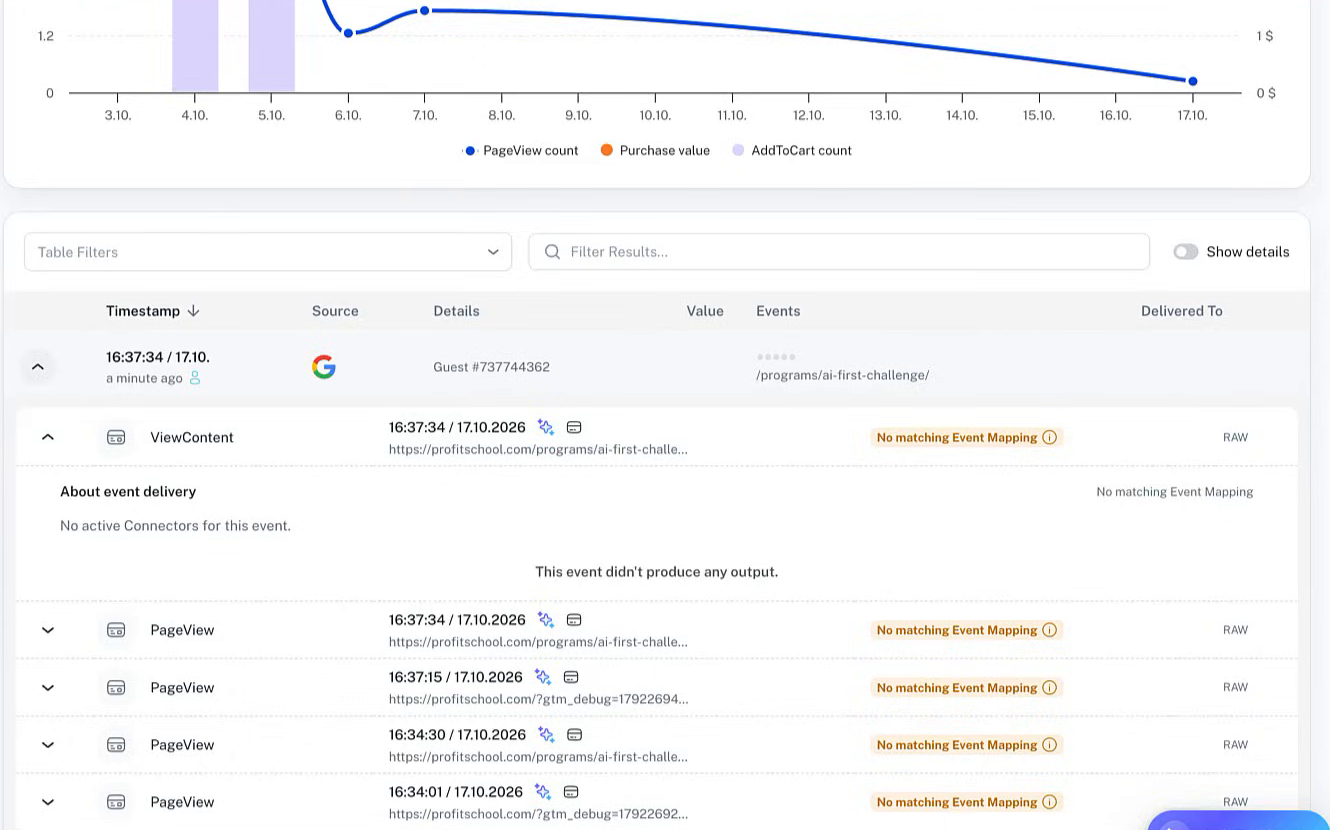
Beyond simple page views, the integration allows for the tracking of high-value actions, such as lead generations, sign-ups, or "View Content" events. This is achieved through a "duplicate and modify" workflow within GTM, where existing triggers are repurposed to fire specific Tracklution events based on URL patterns or click behaviors. Before going live, the "Preview Mode" in GTM is utilized to confirm that tags are firing correctly and that data is successfully reaching the Tracklution dashboard.
Supporting Data: Why Server-Side Integration Matters
Statistical analysis of marketing performance reveals a stark contrast between organizations using standard pixels and those employing server-side solutions like Tracklution. According to industry benchmarks, server-side tracking can lead to a 15% to 25% increase in attributed conversions for Meta Ads alone. This is not because more people are converting, but because the tracking mechanism is capturing data that was previously blocked or lost due to browser timeouts.
Furthermore, website performance metrics show that offloading tracking scripts to a server-side environment can improve PageSpeed Insights scores by 10 to 20 points. By reducing the "Total Blocking Time" caused by multiple third-party marketing tags, businesses see lower bounce rates and higher organic search rankings, as site speed remains a critical factor in Google’s Core Web Vitals.
Industry Perspectives and Official Responses
Digital measurement specialists have noted that the "old way" of managing tracking—where individual tags for Meta, Google, and TikTok were all loaded into GTM—is no longer sustainable. A spokesperson from the MeasureU community recently highlighted that the complexity of managing 15 different tags often leads to configuration errors and data discrepancies.
Tracklution’s approach focuses on a "one-to-many" model. Once data is sent to the Tracklution server via GTM, it is the server’s responsibility to distribute that data to various advertising platforms. This centralization simplifies the marketing technology (MarTech) stack. Analysts suggest that this shift represents a democratization of advanced tracking technology, making "server-side" capabilities—once reserved for enterprise-level companies with massive dev budgets—accessible to small and medium-sized businesses.

Broader Impact and Future Implications for E-commerce
The implications of this integration extend far beyond technical convenience. For e-commerce entities, particularly those on platforms like Shopify or WooCommerce, the ability to track the full customer journey accurately is the difference between a profitable ad campaign and a wasted budget. As AI-driven bidding algorithms in Google Ads and Meta Ads become more prevalent, they require more data to function effectively. Inaccurate or incomplete data feeds lead to "algorithmic drift," where the AI optimizes for the wrong audience because it isn’t seeing the full picture of who is actually purchasing.
Looking forward, the role of server-side tracking will only expand. As first-party data becomes the primary currency of digital advertising, tools that facilitate the secure and accurate collection of that data will be indispensable. The Tracklution-GTM integration sets a precedent for how software-as-a-service (SaaS) providers can work within existing ecosystems to provide value without requiring a total overhaul of a client’s digital assets.
Conclusion and Strategic Recommendations
For organizations currently relying on standard client-side pixels, the transition to a Tracklution-GTM setup is recommended as a high-priority strategic move. The process involves:
- Auditing Existing GTM Containers: Identifying which tags are currently active and which can be consolidated into the server-side pipeline.
- Implementing Consent Frameworks: Ensuring that all server-side data collection complies with regional laws like GDPR in Europe or CCPA in California.
- Continuous Monitoring: Using the Tracklution dashboard to cross-reference recorded events with actual sales data to ensure a near-100% match rate.
By adopting this integrated approach, businesses can future-proof their marketing efforts against further browser changes and ensure that their advertising spend is guided by the most accurate data possible. In an era where data privacy and data accuracy are often at odds, the synergy between Google Tag Manager and Tracklution provides a rare middle ground that satisfies both the regulator and the marketer.

 Sagoh

 Dwi Wanna