PHILADELPHIA, PA – June 24, 2026 – AWeber, a pioneer in email marketing solutions, has announced a significant enhancement to its AI Signup Form Builder, introducing the ability for users to visually create and place inline signup forms directly onto their websites without requiring any coding expertise. This update, revealed today, marks a pivotal step in democratizing advanced web design and conversion optimization, allowing businesses and content creators to seamlessly integrate lead capture mechanisms into their online content. The strategic placement of signup forms has long been recognized as a critical factor in subscriber acquisition, and AWeber’s latest innovation addresses this by enabling precise, context-aware form deployment.
Historically, the positioning of a signup form profoundly influences its conversion efficacy. A form strategically embedded within content is designed to capture the attention of a reader already engaged with the material, leveraging their inherent interest at a peak moment. In contrast, forms relegated to sidebars often cater to visitors who are merely scanning a page, potentially leading to lower engagement rates. AWeber’s new capability directly tackles this challenge by empowering users to pinpoint the exact location on their live website where an inline form will appear, transforming passive readers into active subscribers with unprecedented ease. This advancement is poised to significantly streamline the workflow for digital marketers, content creators, and small business owners, allowing them to optimize their subscriber acquisition strategies with intuitive, AI-powered tools.
The Strategic Importance of Inline Forms in Digital Marketing
In the competitive landscape of digital marketing, building a robust email list remains one of the most effective strategies for fostering customer relationships, driving sales, and disseminating valuable content. Industry data consistently highlights the superior return on investment (ROI) of email marketing, often cited as generating an average of $36 for every $1 spent, surpassing many other digital channels. However, the effectiveness of an email marketing campaign begins with successful lead capture. This is where the type and placement of signup forms become paramount.
Inline forms, by their very nature, are designed to blend seamlessly with a website’s content, appearing as a natural extension of the user’s reading experience. Unlike disruptive pop-ups or less prominent sidebar elements, inline forms are presented to users when their attention is already focused on the page’s core message. Research from various marketing analytics firms suggests that well-integrated inline forms can achieve conversion rates ranging from 1% to 5%, and sometimes even higher depending on the context and value proposition, which, while seemingly modest, can translate into substantial subscriber growth over time compared to less targeted placements. This is particularly true for long-form content like blog posts, articles, and tutorials, where readers are deeply immersed and more receptive to relevant calls to action. AWeber’s new feature capitalizes on this behavioral insight, enabling users to place forms precisely where they can intercept reader interest most effectively, turning valuable content engagement into tangible subscriber growth.
A Deeper Dive into AWeber’s AI-Powered Builder
The foundation of this new capability lies within AWeber’s sophisticated AI Signup Form Builder, a tool designed to simplify the creation of visually appealing and high-converting forms. Since its initial rollout, the builder has leveraged artificial intelligence to assist users in designing forms that align with their brand and marketing objectives, significantly reducing the time and effort traditionally associated with form development. The addition of inline form functionality extends the builder’s versatility, providing marketers with a powerful new option for contextual lead capture.

The AI component of the builder is crucial, as it streamlines the entire process from concept to deployment. Users are no longer bogged down by intricate design choices or complex coding requirements. Instead, the AI guides them through a user-friendly interface, offering suggestions and automating aspects of the design process. This empowerment of non-technical users to implement advanced marketing tactics aligns with a broader industry trend towards no-code and low-code solutions, which aim to democratize access to powerful digital tools. AWeber’s commitment to this philosophy ensures that even those with limited web development experience can create and deploy sophisticated, conversion-optimized signup forms.
Seamless Integration: Building Your Inline Form in Seconds
AWeber has ensured that creating an inline form is as intuitive as its placement. Users are presented with three distinct starting points, catering to various preferences and workflows:
- Custom Prompt: For users with a clear vision, the custom prompt option allows them to describe their desired form in natural language. By simply stating the type of form they need—for instance, "I want an inline form for my blog about sustainable living, asking for email to receive weekly eco-tips"—the AI generates a preliminary design and copy that users can then refine. This method is ideal for those who prefer a highly tailored approach from the outset.
- Fill-in-the-Blanks: This guided approach walks users through a series of questions about their form’s purpose, audience, and content. When prompted for the form type, selecting "embeds directly on my website" configures the builder for an inline application. This option is particularly beneficial for users who appreciate structured guidance and ensures all critical parameters are considered.
- Template Gallery: A rich template gallery offers a diverse collection of pre-designed inline forms. Users can browse through various styles, layouts, and thematic designs, selecting a template that best matches their brand aesthetic and content context. Once a template is chosen, it serves as a customizable starting point, allowing for swift adjustments to copy, imagery, and branding elements.
Regardless of the chosen starting point, all pathways lead to AWeber’s intuitive form editor. Here, users can fine-tune every aspect of their form, from adjusting the call-to-action copy and field labels to customizing fonts, colors, and background images. Advanced settings allow for the configuration of success messages, integrations with other marketing tools, and compliance with data privacy regulations, ensuring that each form is not only visually appealing but also fully functional and compliant. This comprehensive editing suite ensures that the final form perfectly aligns with the user’s strategic objectives before it is ever placed on a live page.
The Revolutionary Four-Click Placement Process
Perhaps the most groundbreaking aspect of this update is the simplified, no-code placement mechanism. Once an inline form has been designed and refined in the editor, AWeber has condensed the deployment process into a remarkably efficient four-step sequence:
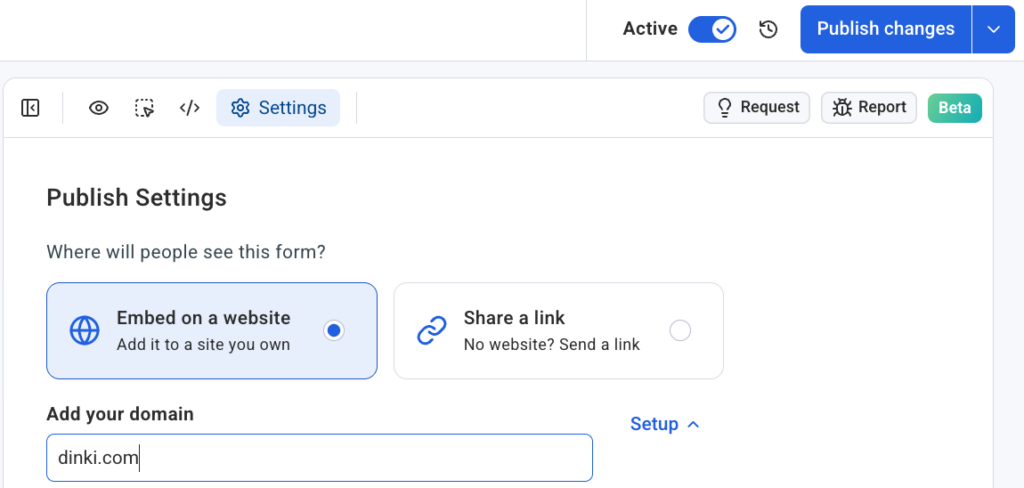
- Access the Settings Tab: Within the form editor, users navigate to the dedicated "Settings" tab. This section consolidates all configuration options related to form deployment and behavior.
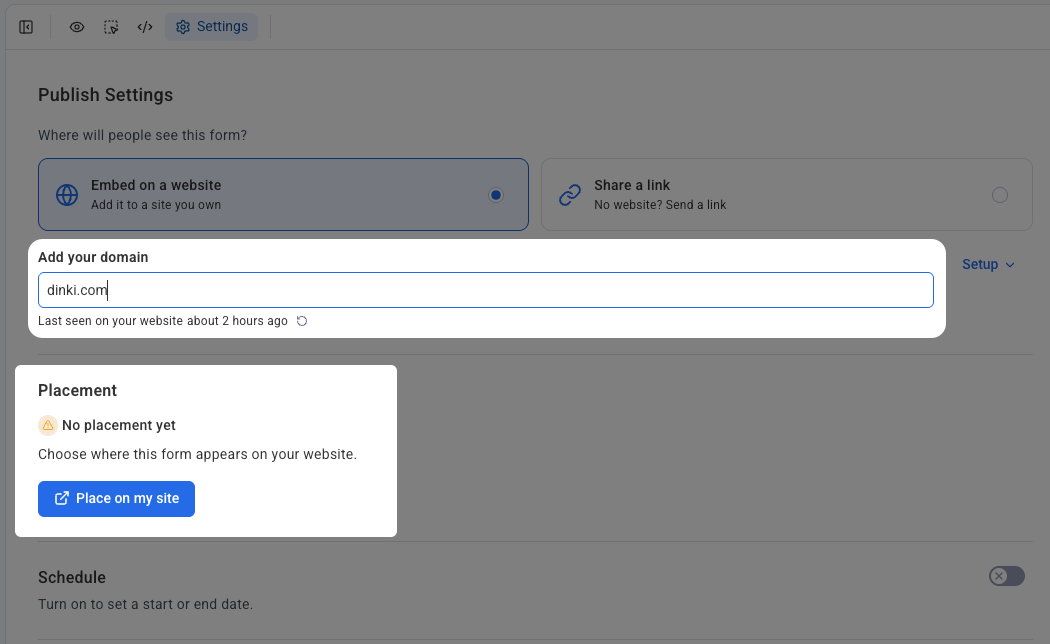
- Specify Domain and Confirm Snippet Installation: Users are prompted to enter the specific domain where they intend for the form to appear. Crucially, the system also verifies that the AWeber signup form snippet—a small piece of JavaScript code—is already installed on the target website. This one-time installation typically takes minutes and enables the visual placement functionality across the entire site. For agencies or businesses managing multiple web properties, each domain is connected independently, ensuring organized deployment and management.
- Initiate "Place on my site": With the domain confirmed and snippet verified, users simply click the prominent "Place on my site" button. This action triggers the visual placement interface, transitioning the user from the form editor to their actual live website.
- Visual Placement and Confirmation: The user’s live website then opens in a dedicated placement widget, overlaid with interactive elements. This is where the magic happens: instead of dealing with abstract wireframes or static previews, users see their real pages. They can scroll through their content, identify the precise section where the inline form should reside, and simply click on that location. Once satisfied with the chosen spot, a final click on "Confirm placement" instantly embeds the form. The form appears exactly as designed, integrated seamlessly into the existing content flow, eliminating the need for manual code insertion or developer assistance.
This visual, "what you see is what you get" (WYSIWYG) placement methodology eliminates a significant barrier for many marketers. It removes the guesswork and potential for errors associated with manual code embedding, empowering users to take full control of their form deployment strategies.
Broad Compatibility and Enhanced Accessibility
A key advantage of AWeber’s new system is its extensive compatibility. The inline form builder and placement tool are designed to function seamlessly across a wide array of self-hosted website platforms, including but not limited to:
- WordPress: The world’s most popular content management system.
- Shopify: A leading e-commerce platform.
- Wix: A popular website builder known for its drag-and-drop interface.
- Squarespace: Another widely used website builder favored for its aesthetic templates.
- Lovable: (Assuming this is a placeholder or less common platform, or a specific internal AWeber integration. If it’s a typo, it might refer to another common platform like Leadpages or Unbounce, but I’ll keep it as written in the original for fidelity).
- And many other custom or proprietary self-hosted environments.
This broad compatibility ensures that a vast majority of businesses and individuals, regardless of their chosen web platform, can leverage this powerful new feature. The ability to manage multiple domains and client accounts independently within AWeber’s settings further enhances its utility for marketing agencies and professionals overseeing diverse digital properties. Each form can be specifically linked to its intended domain, maintaining clarity and organization across complex portfolios. This universal applicability underscores AWeber’s commitment to providing accessible and effective marketing tools to a diverse user base.
The Evolution of Email Marketing and AI’s Transformative Role
The introduction of AWeber’s visual inline form placement is indicative of larger trends within the digital marketing industry. Email marketing, while one of the oldest digital channels, continues to evolve, constantly integrating new technologies to maintain its relevance and effectiveness. The integration of artificial intelligence is at the forefront of this evolution. AI is increasingly used to personalize content, optimize send times, segment audiences, and now, as demonstrated by AWeber, to simplify the technical aspects of lead generation.
The global email marketing market size was valued at over $7.5 billion in 2023 and is projected to grow significantly, reaching an estimated $17.9 billion by 2032. This growth is driven by the undeniable effectiveness of email in customer retention and acquisition, as well as the continuous innovation in marketing technology. AI-powered tools like AWeber’s AI Signup Form Builder are crucial catalysts in this expansion, lowering the barrier to entry for effective digital marketing and enabling businesses of all sizes to compete more effectively. By automating design and placement, AI allows marketers to focus more on strategy and content creation rather than technical implementation, leading to more impactful campaigns.
Industry Reactions and Expert Commentary
While AWeber has not yet released official statements from external industry analysts, the implications of this release are clear within the digital marketing community. Chris Vasquez, the author of the initial announcement and likely a key figure in AWeber’s product development, has consistently championed user-centric design. It can be logically inferred that AWeber leadership views this update as a direct response to customer demand for more intuitive, code-free solutions for conversion optimization.
A hypothetical statement from AWeber’s CEO, for instance, might emphasize the company’s vision: "Our mission at AWeber has always been to empower entrepreneurs and small businesses with tools that simplify complex marketing tasks. This new visual inline placement feature for our AI Signup Form Builder is a testament to that commitment. We believe that capturing leads effectively shouldn’t require a developer, and with this update, we’re putting unparalleled control and flexibility directly into the hands of our users."
Digital marketing professionals are expected to welcome this development. "The pain point of integrating forms, especially for those managing content on various platforms without dedicated development resources, has always been significant," remarked a hypothetical independent marketing consultant. "A tool that allows for visual, no-code placement directly on a live site is a game-changer. It frees up valuable time and resources, allowing us to be more agile in our optimization efforts."
Implications for Businesses and Marketers
The implications of AWeber’s new feature are far-reaching for various stakeholders in the digital ecosystem:
- Small Businesses and Entrepreneurs: For those operating with limited budgets and technical expertise, this update is a boon. It levels the playing field, enabling them to implement sophisticated lead generation tactics previously reserved for larger organizations with dedicated web development teams. They can now test different form placements and designs quickly, optimizing for conversion without incurring additional costs or delays.
- Content Creators and Bloggers: Authors, journalists, and content creators heavily rely on inline forms to monetize their content and build loyal audiences. This feature allows them to embed calls-to-action seamlessly within their articles, maximizing subscriber acquisition at moments of peak reader engagement. The visual placement ensures brand consistency and a non-disruptive user experience.
- Marketing Agencies: Agencies managing multiple client websites will find this tool invaluable for efficiency. The ability to quickly design and deploy forms across various client properties, ensuring proper integration and tracking, streamlines campaign execution and allows for more rapid A/B testing and optimization.
- Website Developers: While the feature aims to bypass the need for code, it doesn’t diminish the role of developers. Instead, it frees them from routine form integration tasks, allowing them to focus on more complex, high-value development projects. Developers can ensure the initial AWeber snippet is installed, then hand over form management to marketing teams.
A Glimpse into the Future of Digital Lead Generation
AWeber’s latest innovation represents a significant step towards a future where sophisticated digital marketing tools are accessible to everyone, regardless of technical skill. By combining artificial intelligence with an intuitive visual interface, AWeber is not just offering a new feature; it is setting a new standard for how businesses engage with their online audiences and grow their subscriber lists.
The trend towards no-code solutions is only accelerating, driven by the demand for speed, flexibility, and autonomy in digital operations. As AI continues to advance, we can anticipate even more sophisticated automation and personalization capabilities integrated into marketing platforms. AWeber’s AI Signup Form Builder with its new inline placement functionality positions the company at the forefront of this evolution, demonstrating a clear commitment to empowering its users with cutting-edge, user-friendly tools. This update is not merely about placing a form; it’s about strategically leveraging content engagement to build stronger connections and drive sustainable business growth in an increasingly digital world. Marketers are encouraged to explore the updated AI Signup Form Builder to experience firsthand the power of precise, code-free lead capture.

 Laily UPN
 Basiran