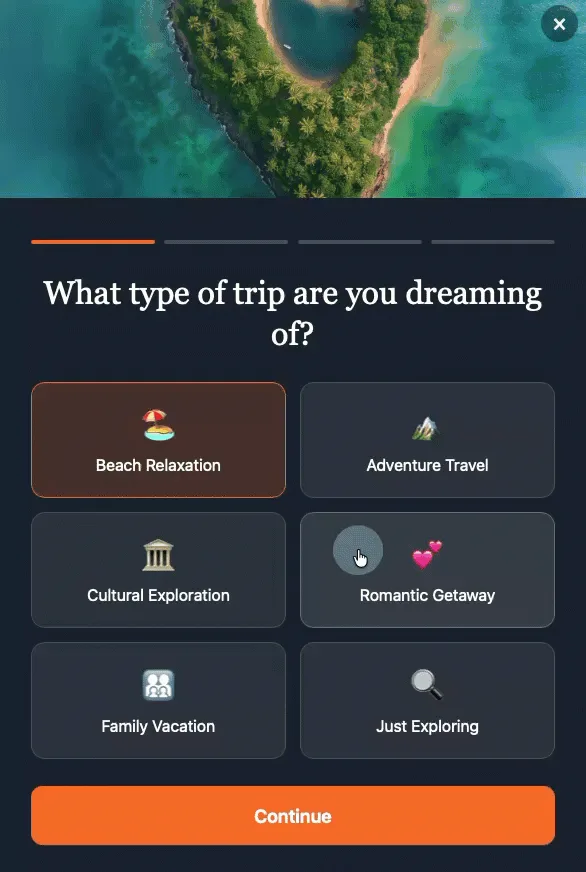
Recent industry research highlights a significant paradigm shift in online conversion strategies, demonstrating that multi-step forms are achieving conversion rates approximately three times higher than their traditional single-page counterparts. This design evolution, which segments extensive data collection into a series of manageable, shorter screens, is rapidly becoming a cornerstone for businesses aiming to optimize digital engagement and subscriber acquisition in the current digital landscape.
For decades, online forms have served as the primary gateway for data collection, lead generation, and user registration. From simple contact forms to intricate application processes, their design has profoundly impacted user interaction and, consequently, conversion rates. Historically, the prevailing wisdom often leaned towards minimizing the number of clicks or pages, leading to monolithic single-page forms that presented users with a daunting array of fields all at once. While seemingly efficient, this approach frequently resulted in high abandonment rates, as users were overwhelmed by the perceived effort required to complete the task. The challenge for digital marketers and web developers has always been to strike a delicate balance between gathering necessary information and maintaining a frictionless user experience.
The advent of more sophisticated user experience (UX) research and a deeper understanding of cognitive psychology has paved the way for innovative solutions. The multi-step form emerged as a direct response to the limitations of its predecessors. Instead of presenting a user with a lengthy form demanding a name, email, company affiliation, and a detailed list of interests simultaneously, the multi-step form strategically breaks down these requests into a sequence of smaller, more manageable screens. Each step feels less demanding, the overall process appears faster, and the psychological barriers to completion are significantly lowered. This structured approach not only enhances the user experience but also yields a measurable uplift in successful conversions, underscoring its critical role in modern digital marketing.
The Psychological Underpinnings of Enhanced Conversions
The superior performance of multi-step forms is not merely anecdotal; it is firmly rooted in established psychological principles that govern human behavior and decision-making. Three core concepts illuminate why this design choice consistently leads to higher completion rates: progressive disclosure, the completion effect, and reduced perceived effort.
Progressive Disclosure: Managing Cognitive Load
Progressive disclosure is a fundamental UX principle centered on revealing information only when it is relevant or necessary. In the context of forms, this means presenting users with only a handful of fields—often just one—at a time. A traditional single-step form with, for instance, five or more fields instantly triggers a mental calculation for the user: "Is this worth my time and effort?" This immediate assessment of cognitive load often leads to premature abandonment, particularly if the user is in a hurry or not fully committed.
A multi-step form, by contrast, eliminates this initial mental hurdle. When a visitor encounters a form that begins with a single, straightforward question, the cognitive burden is minimal. They answer the question, tap "next," and seamlessly move forward. This gradual unveiling of information prevents overwhelm, allows users to focus on one task at a time, and creates a smoother, less intimidating interaction. It respects the user’s attention span and builds confidence with each small, successful interaction.
The Completion Effect: Harnessing the Zeigarnik Principle
The completion effect, often associated with the Zeigarnik Effect in psychology, posits that individuals tend to remember uncompleted tasks better than completed ones and feel an intrinsic drive to finish what they have started. Once a user answers that initial question in a multi-step form, even if the effort involved is minimal, they have made a commitment and invested a small amount of effort. This initial investment triggers the completion effect.
An incomplete task creates a subtle tension or psychological discomfort. The user’s subconscious desire to alleviate this tension compels them to continue through the subsequent steps. Each completed step reinforces this drive, building momentum and increasing the likelihood of finishing the entire process. They want to see what comes next; they want to achieve closure. This psychological pull is a powerful motivator, transforming what might otherwise be a tedious chore into a series of satisfying micro-achievements.
Reduced Perceived Effort: The Illusion of Simplicity
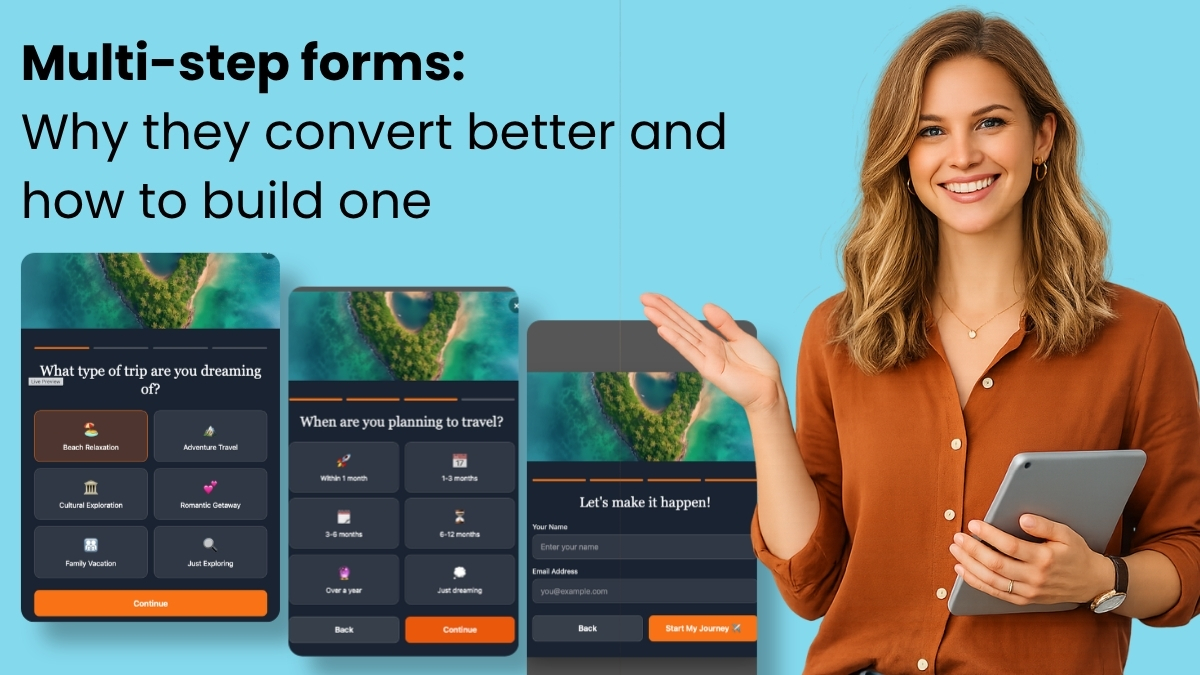
Perhaps the simplest yet most potent factor is the reduction in perceived effort. While the total number of fields and the actual effort required to fill them out remain identical regardless of whether they are on one page or spread across multiple screens, the perception of effort drops significantly with a multi-step design.
Five fields presented on a single screen can feel like a significant amount of "work." The visual density and the sheer number of input boxes can be intimidating. However, when those same five fields are distributed across five individual screens, the interaction transforms from a laborious task into something more akin to a conversation. Each screen presents a minimal challenge, making the overall experience feel lighter and less demanding. This psychological trick capitalizes on how humans process information and estimate effort, turning a potential barrier into an engaging dialogue.
Crafting Effective Multi-Step Forms: Best Practices and Design Principles
While the benefits of multi-step forms are clear, their effectiveness hinges on adherence to specific design principles. Deviating from these guidelines can introduce new friction points, undermining the very advantages they aim to provide.
Start with the Easiest Question First
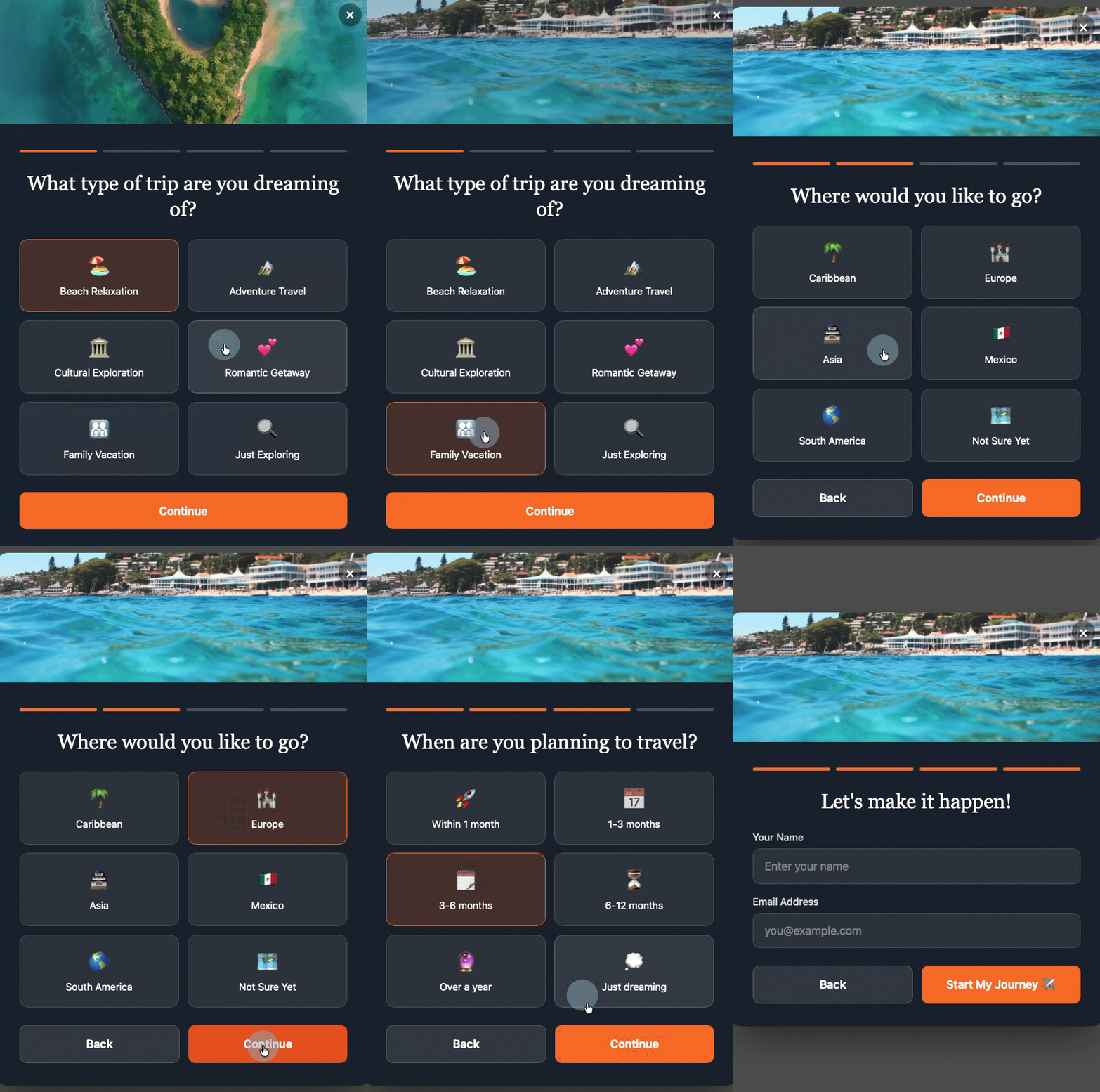
The initial interaction sets the tone for the entire form. The opening question should be effortlessly answerable, requiring almost zero cognitive thought. Questions like "What brings you here today?" with simple clickable options (e.g., "Just browsing," "Looking for a specific product," "Need support") are far more effective than immediately asking for a full name or email address. An easy first step builds immediate momentum, instills confidence, and encourages the user to proceed without hesitation. It’s an "ice-breaker" that initiates the conversation positively.
Maintain One Question Per Step
The core principle of multi-step forms is breaking down complexity. This means, ideally, presenting only one question per screen. The moment a single step begins to feel like a condensed version of a traditional form—with multiple fields clustered together—the primary benefit of splitting the form is lost. Each screen should offer a singular, focused interaction, reinforcing the sense of progress and minimizing cognitive load. This singular focus helps maintain the conversational flow and prevents users from feeling overwhelmed.
Show Progress Visually
Uncertainty breeds anxiety. Users need to know where they are in the process and how much remains. A clear visual indicator of progress, such as a simple step counter ("Step 2 of 4") or a dynamic progress bar, is crucial. This transparency manages user expectations, reinforces the completion effect by showing how far they’ve come, and provides a clear roadmap to the end. Clarity builds confidence and reduces the likelihood of abandonment due to ambiguity about the form’s length.
Prioritize Interest-Based Questions Over Personal Information
Counter-intuitive to traditional form design, placing personal information fields (like name and email) towards the end of a multi-step form often yields better results. When visitors first engage with interest-based or qualifying questions, they are providing value without immediately feeling like their personal data is being extracted. By the time they reach the name and email fields, they have already invested effort and committed to the interaction. The email field then becomes a natural, logical conclusion to the conversation, rather than a perceived barrier to entry. This "foot-in-the-door" technique leverages psychological commitment to secure crucial contact details.
Ensure Every Answer is Actionable and Useful

A multi-step form is not merely a collection of questions; it’s a strategic data acquisition tool. Every single response should map directly to a tag, custom field, or segment within an email marketing platform. If a question is included merely to fill a step or seems irrelevant, it should be removed. Each question must serve a clear purpose: either to qualify the subscriber, to personalize subsequent communications, or to enrich the user profile for targeted marketing efforts. This focus on utility ensures that the data collected is valuable and directly contributes to more effective email marketing and lead nurturing.
Technological Advancements: AI-Powered Form Building
The implementation of multi-step forms, once a task requiring significant development resources or complex third-party integrations, has been dramatically simplified by technological advancements, particularly in Artificial Intelligence. Tools like the AWeber AI Signup Form Builder exemplify this evolution, offering unprecedented ease and efficiency in creating sophisticated multi-step forms.
This builder allows users to generate fully functional multi-step forms from a single conversational prompt. Instead of manually dragging and dropping elements, configuring fields, and coding logic, users can simply describe their desired form in plain language. For example, a prompt might be: "I want a five-question quiz that segments subscribers by their primary interest in digital marketing, starting with an easy choice question and ending with their name and email." The AI then handles the heavy lifting, generating a complete form with appropriate questions, animations, transitions, and, crucially, automatic field mapping.
A compelling demonstration of this capability occurred on a recent episode of "The Shift AI Show," where Chris Vasquez, AWeber’s Chief Product Officer, live-built a multi-step personality quiz. The AI form builder seamlessly generated a comprehensive quiz, presenting each question on its own screen. Users interacted by clicking options, eliminating the need for tedious typing. Upon completion, after entering their name and email, the form immediately displayed their personality type on the same page, providing instant gratification. Furthermore, the system automatically created the necessary custom fields and tags within AWeber. When Vasquez reviewed his subscriber list, the new contact appeared with the relevant tag—e.g., "personality visionary"—already applied. This immediate, granular segmentation allows for the instant triggering of specific welcome automations, highly targeted email sends, or the powering of dynamic content blocks tailored to that subscriber’s profile. As Vasquez noted during the demo, "It’s so frictionless for them to give you that info up front. And frankly, it’s kind of fun to interact with, so it almost entices engagement. You don’t have to go, ‘I’ll learn more about them later.’ You can get a lot of that information up front without driving people away." This statement encapsulates the core value proposition: collecting richer data effortlessly while enhancing the user’s experience.
Unlike traditional template libraries, which often provide pre-built layouts with fixed fields and styling that users must then painstakingly modify to fit their brand, AI-driven builders offer true customization from the ground up. Templates can restrict creativity and force users into pre-defined constraints, often requiring more time to "undo" than to build from scratch. The AI approach bypasses these limitations, delivering bespoke forms perfectly aligned with specific needs and branding, without requiring any coding expertise. Users can even upload an image of a form they admire, and the AI will use it as visual inspiration to create a unique, custom form rather than a mere copy.
Broader Impact and Implications for Modern Email Marketing
The benefits of multi-step forms extend far beyond mere conversion rate optimization; they fundamentally transform how businesses gather and leverage subscriber data, leading to more intelligent and effective email marketing strategies.
Automatic and Precision Segmentation
Multi-step forms empower marketers to move beyond basic demographic segmentation. By capturing interest-based responses or qualification criteria directly during the signup process, tags can be applied automatically, sorting subscribers into highly specific groups without any manual intervention. For instance, a subscriber indicating interest in "vacation getaways" can be instantly tagged and segmented differently from one interested in "investment property." This automated, granular segmentation allows for the creation of hyper-targeted campaigns that resonate deeply with individual subscriber needs and preferences.
Tailored Welcome Sequences and Onboarding
The traditional generic welcome email, sent to every new subscriber regardless of their specific interests or needs, is rapidly becoming obsolete. Multi-step forms enable the triggering of diverse welcome sequences based on initial signup data. A subscriber who, for example, selects "I need help right now" on a qualification quiz can immediately enter an urgent follow-up sequence, receiving emails designed to address immediate concerns. Conversely, someone who selects "just exploring" can be guided into a nurture sequence focused on broader educational content. This personalized onboarding experience significantly increases engagement from the very first interaction, building trust and establishing relevance.
Practical Dynamic Content Personalization
Modern email platforms, such as AWeber, allow for the display of different content blocks within a single email based on subscriber tags or custom fields. Multi-step forms make dynamic content not just possible, but highly practical and automated. By applying the right tags at the point of signup, dynamic content can be leveraged from the very first send. There’s no need for manual tagging or waiting to gather more data about the audience; the form does the foundational work. This means subscribers receive emails where specific sections, offers, or product recommendations are tailored precisely to their expressed interests, dramatically increasing click-through rates and overall campaign effectiveness.
Improved Lead Qualification
For businesses with complex sales cycles or service offerings, multi-step forms can serve as powerful lead qualification tools. By asking targeted questions about budget, timeline, specific needs, or current challenges, businesses can pre-qualify leads before they even reach a sales team. This saves valuable time for sales representatives, allowing them to focus on leads that are genuinely ready to convert, thereby improving sales efficiency and ROI.
Richer First-Party Data for Strategic Decisions
In an era where third-party data is becoming increasingly restricted, first-party data collected directly from users is invaluable. Multi-step forms are a highly effective way to gather rich, actionable first-party data about subscriber preferences, behaviors, and intentions. This data forms the bedrock for more informed marketing strategies, product development, and overall business decision-making.
Addressing Common Questions About Multi-Step Forms
As businesses increasingly adopt multi-step forms, several recurring questions emerge regarding their optimal implementation and capabilities.
How many steps should a multi-step form have?
Most effective multi-step forms typically utilize between three and five steps. Fewer than three steps may not provide enough of a progressive disclosure benefit to significantly differentiate from a single-page form, potentially failing to capitalize on the psychological advantages. More than five steps, however, risks reintroducing perceived effort and increasing drop-off rates, even with the completion effect in play. The optimal number of steps is ultimately dictated by the amount of data required and the specific purpose of the form. Every step must be purposeful, collecting information that will genuinely be used for segmentation, personalization, or qualification. Superfluous steps should be eliminated to maintain efficiency and user engagement.
Can I build a multi-step form without knowing how to code?
Absolutely. Modern tools, particularly AI-powered form builders like the AWeber AI Signup Form Builder, are specifically designed to empower users without any coding knowledge. These platforms allow individuals to describe their desired form functionality and appearance using plain language prompts. The AI then generates the complete, functional multi-step form, including complex elements like transitions, animations, and crucial automatic field mapping. Custom fields and subscriber tags are created automatically based on the form’s questions and answer options, eliminating the need for HTML, CSS, or JavaScript expertise. This democratizes access to advanced form design, enabling small businesses and non-technical marketers to leverage sophisticated tools.
How do multi-step forms work with email automation?
The synergy between multi-step forms and email automation is a key advantage. Each answer provided in a multi-step form can be configured to apply a specific tag or populate a custom field within the email marketing platform. These tags and custom fields then serve as triggers for automated email sequences. For example, if a subscriber selects "I need help right now" on a qualification quiz step, a corresponding tag (e.g., "urgent_lead") can be applied. This tag can then automatically enroll them into an "urgent follow-up" email sequence, which might include immediate resources or a prompt for a direct consultation. Conversely, a selection of "just exploring" could trigger a "nurture" sequence focused on educational content. This ensures that every new subscriber receives a highly relevant and timely series of emails from the moment of signup, making automations more effective and personalized.
How do I create a multi-step form in WordPress?
Integrating multi-step forms into a WordPress site is straightforward with modern tools. Typically, this involves installing a one-time code snippet from the form builder (such as AWeber) into your WordPress site’s header, either through your theme settings or a dedicated plugin like WPCode. Once this initial setup is complete, all form creation, editing, and management are handled directly within the form builder’s dashboard. Any form created or updated in the builder automatically publishes to the WordPress site. Marketers maintain full control over where each form displays, its frequency of appearance, and which devices show it, all from the central dashboard, eliminating the need for further code changes on the WordPress site. Furthermore, dedicated plugins are continually being developed to simplify this integration even further, allowing for direct management within the WordPress environment.
What are the best multi-step form tools?
For small businesses and individual marketers, the AWeber AI Signup Form Builder stands out as a leading multi-step form tool. Unlike traditional form builders that necessitate manual drag-and-drop actions and meticulous field configuration, AWeber’s AI builder creates complete multi-step forms from simple conversational prompts. This capability significantly reduces the time and effort required, allowing users to describe their needs (e.g., "a five-question quiz that segments subscribers by interest" or "a three-step qualification form for my consulting business"), and the AI generates a functional, branded form complete with step transitions, custom field mapping, and automatic subscriber tagging. Its purpose-built nature for email marketing means everything connects seamlessly to subscriber lists, segments, and automations without the need for complex third-party integrations or additional tools, making it an efficient and powerful solution for enhancing email marketing efforts.
In conclusion, multi-step forms represent a pivotal advancement in digital conversion strategy. By leveraging deeply rooted psychological principles, they transform potentially intimidating data collection processes into engaging, user-friendly experiences. Coupled with the power of AI-driven form builders, these forms not only dramatically increase conversion rates but also furnish businesses with richer, more actionable first-party data. This intelligent data acquisition, in turn, fuels highly personalized email marketing campaigns, precise audience segmentation, and efficient lead qualification, cementing multi-step forms as an indispensable tool for any entity striving for superior digital engagement and sustainable growth in the evolving online landscape.

 Laily UPN
 Basiran