

The digital marketing landscape is currently saturated with recycled data, with a significant portion of online form statistics dating back to the early 2010s. For years, professionals have relied on a handful of "zombie" statistics—such as the claim that 81% of users abandon forms or that multi-step forms universally convert 86% better—without verifying the original context or the age of the research. In 2024, the necessity for accurate, primary-sourced data has never been higher, as user behavior has shifted radically with the rise of mobile-first browsing, biometric autofill, and heightened privacy expectations. Modern conversion rate optimization (CRO) requires a departure from these outdated benchmarks to understand the nuanced reality of how users interact with digital interfaces today.
The Evolution of Form Analytics and the Data Gap
The history of form analytics can be divided into the pre-mobile era and the modern responsive era. In the early 2010s, forms were primarily a desktop experience, characterized by long lists of fields and manual typing. During this period, several foundational studies were conducted that still dominate search engine results today. However, the methodology used in these older studies often failed to distinguish between different types of abandonment. For instance, a user leaving a site after seeing a form is fundamentally different from a user who begins a form and encounters a technical or psychological barrier.
Industry experts now emphasize that the "average" conversion rate is a deceptive metric because it conflates diverse intents. A high-intent form, such as a mortgage application or a contest entry, will naturally have different performance markers than a low-intent newsletter signup. By relying on data from 2015 or 2018, businesses risk optimizing for a user base that no longer exists—one that lacked the convenience of modern browsers and mobile ecosystems.
Decoding Modern Completion and Abandonment Rates
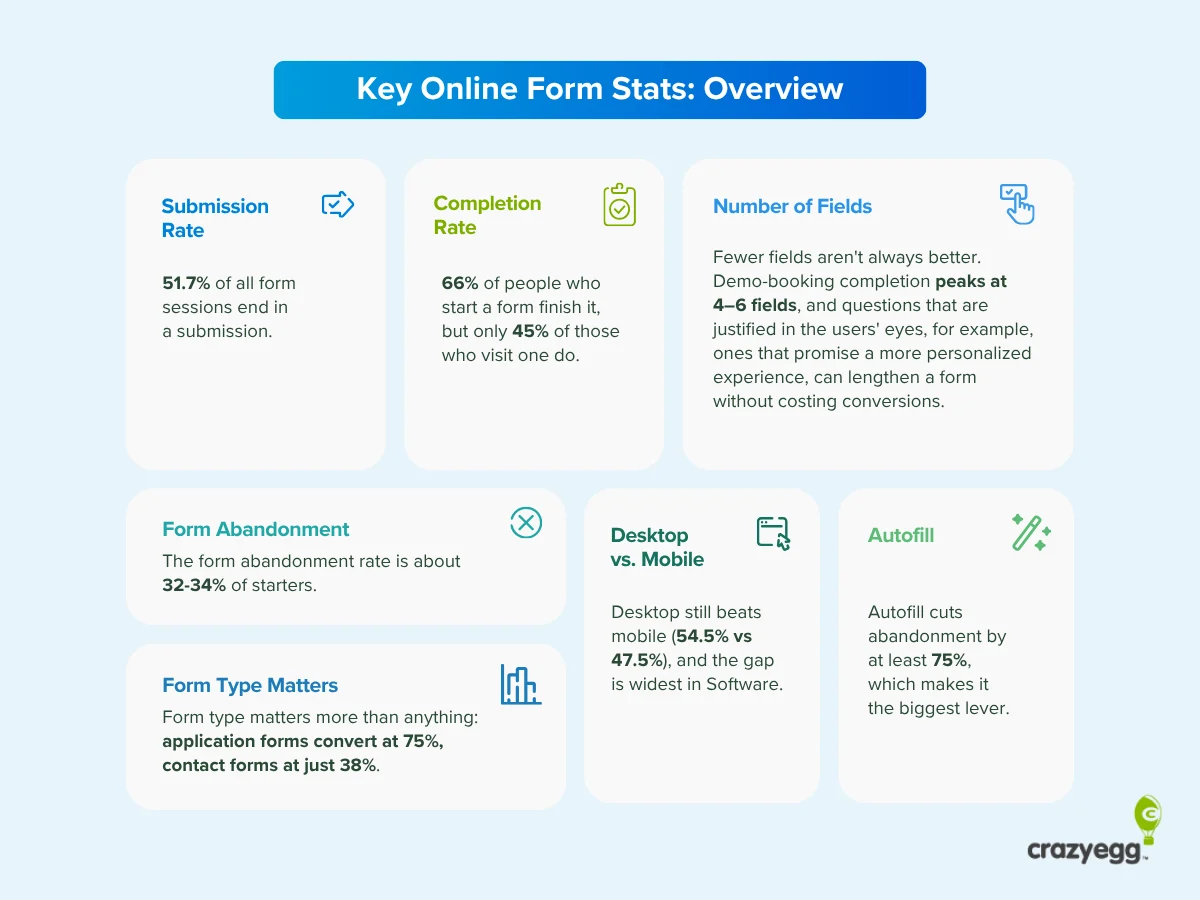
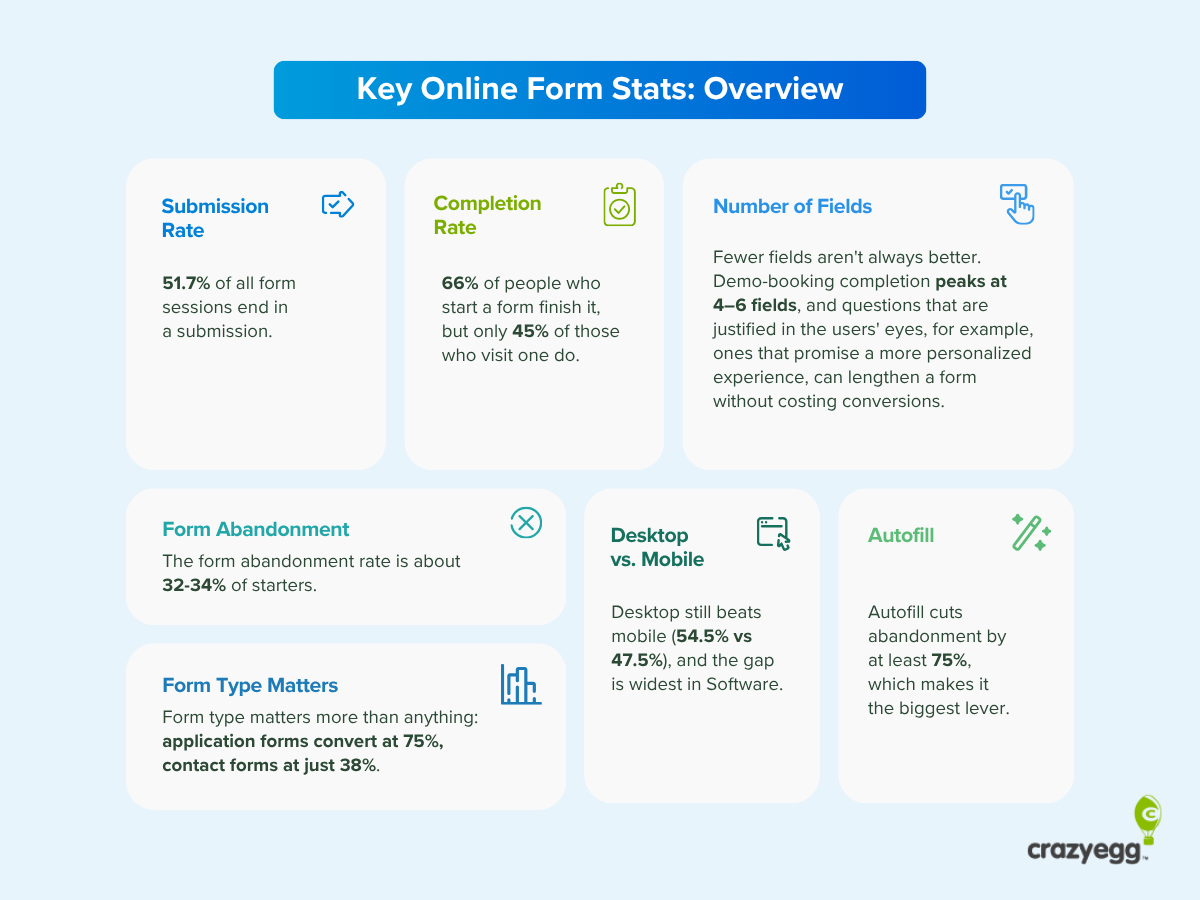
Recent data indicates that form completion rates are highly sensitive to how the "denominator" is defined in the calculation. When measuring conversion based on every visitor who lands on a page containing a form, the completion rate typically hovers around 50%. However, when focusing exclusively on users who actually interact with the first field—known as the "start-to-finish" rate—the benchmark rises significantly to approximately two-thirds (66%).
This distinction is critical for diagnostic purposes. If a site has a low visitor-to-completion rate but a high start-to-finish rate, the issue is likely with the page’s value proposition or the "hook" rather than the form design itself. Conversely, a high start rate followed by a low completion rate points directly to friction within the form fields, such as intrusive questions, confusing labels, or technical errors on mobile devices.
Device-Specific Performance
The gap between desktop and mobile performance is closing, yet distinct differences remain. As of 2024, mobile forms see a completion rate of approximately 47.53%. While this is roughly seven percentage points lower than the desktop average (which sits closer to 54%), it represents a massive improvement from five years ago. This shift is attributed to better responsive design and the ubiquity of mobile-optimized payment and data entry systems. Marketers who still believe that users "prefer" desktop for forms are often looking at stated preference surveys from 2018 rather than actual 2024 behavioral data.
The Psychology of Form Design: Length vs. Friction
One of the most persistent myths in digital marketing is that shorter forms always convert better. While it is true that removing unnecessary fields can reduce friction, the relationship between field count and conversion is not linear. Users are surprisingly willing to complete long, complex forms if they perceive the "exchange" to be fair.
The Multi-Step Debate
The claim that multi-step forms convert 86% better is a prime example of data being stripped of its context. Original research from 2015 and 2019 often compared high-intent multi-step forms (like university applications) with low-intent single-step forms (like "Contact Us" pages). The higher conversion was often a result of the user’s pre-existing commitment to the process rather than the layout itself.
In a modern context, multi-step forms are effective because they utilize the "Endowed Progress Effect"—a psychological phenomenon where people are more likely to finish a task if they feel they have already made a start. By placing easy, non-intrusive questions in the first step, designers build momentum. However, if the total number of fields remains excessive or irrelevant, the multi-step layout cannot save the conversion rate.
Column Layouts and Visual Flow
A landmark study by Speero (formerly CXL) in 2016 suggested that single-column forms are completed significantly faster—by an average of 15.4 seconds—than multi-column forms. While the study is nearly a decade old, its core finding remains a standard in UX design. A single vertical path reduces cognitive load, as the user’s eyes do not have to "zigzag" across the screen. On mobile devices, this is not just a preference but a necessity, as multi-column layouts often break or become unreadable on narrow viewports.
The Impact of Autofill and Automation
If there is a "silver bullet" for form conversion in the current era, it is autofill technology. Browser-based and third-party password managers have transformed the user experience by allowing complex forms to be populated in seconds. Data shows that autofill is the single most effective lever for increasing completion rates because it reduces the physical and mental effort of typing.
However, the efficacy of autofill relies entirely on correct backend labeling. Approximately one-third of web forms currently utilize improper HTML tags or non-standard labels that prevent autofill from triggering correctly. This technical oversight creates "silent friction," where the user may not know why they are frustrated, but they are significantly more likely to abandon the process due to the perceived manual labor involved.
Retiring "Zombie" Statistics: A Fact-Check
To improve the quality of marketing decisions, several widely cited statistics should be officially retired from professional discourse:
- The "81% Abandonment" Metric: Originating from a 2018 survey by The Manifest, this number reflected whether respondents had ever abandoned a form in their lifetime. It is not a reflection of current session-based performance and provides no actionable benchmark for a specific website.
- The "1.7% Average Conversion" Rate: This figure, often cited by Ruler Analytics, refers to the percentage of total website visitors who become qualified leads via a form. It is a marketing funnel metric, not a form usability metric. Comparing it to a 50% completion rate is an "apples-to-oranges" error.
- The Mobile Preference Myth: Older surveys suggested only 3% of people prefer mobile forms. In reality, mobile now accounts for the majority of web traffic, and behavioral data shows that users will complete mobile forms at high rates if the interface is optimized.
Diagnostic Strategies for Leaky Forms
Identifying why a form is failing requires more than just looking at a final conversion number. Industry leaders recommend a four-tiered approach to diagnostics:
- Heatmapping: Tools like Crazy Egg allow developers to see where users are clicking and how far they are scrolling. If users are clicking on non-interactive elements, it suggests a confusing UI.
- Session Recordings: By watching real-time playbacks of user interactions, designers can identify "rage clicks" or moments where a user stalls, often indicating a validation error or a confusing question.
- Form Analytics: Specific field-level tracking can reveal which individual question causes the highest percentage of drop-offs. If 40% of users quit when asked for a phone number, that field is a high-friction point.
- A/B Testing: Once a potential fix is identified—such as moving to a single-column layout or adding inline validation—it must be tested against the original version to confirm that the change actually improves the bottom line.
Broader Implications and the Future of Data Entry
As we move further into 2024 and beyond, the nature of "the form" itself is changing. The rise of AI-driven "zero-click" interfaces and voice-to-text input is beginning to challenge the traditional input field. Furthermore, increasing privacy regulations like GDPR and CCPA have made users more protective of their data.
The most successful organizations are moving away from "data hoarding"—asking for every possible detail—and toward "progressive profiling." This strategy involves asking for only the most essential information initially and gathering further details over time as the relationship with the user grows. This approach respects the user’s time and privacy while maintaining high conversion benchmarks.
In summary, the key to online form success in the current era is not brevity for the sake of brevity, but rather the elimination of unnecessary friction. Usability, accessibility, and relevance are the true drivers of conversion. Organizations that rely on primary, up-to-date data rather than decade-old "zombie" stats will be better positioned to optimize their digital touchpoints and achieve superior ROI in an increasingly competitive market.







