The highly anticipated WordPress 7.0, a landmark release for the world’s most popular content management system, officially launched on May 20th, 2026. This major update marks a significant pivot in the platform’s ongoing evolution, moving beyond incremental block editor refinements to deliver a more integrated, app-like experience characterized by smarter workflows, refined user interfaces, and foundational groundwork for future AI integration. It represents a critical juncture in the project’s roadmap, aiming to cement WordPress’s position as a cutting-edge platform capable of meeting the demands of modern web development and content creation.
A Decade of Evolution: The Road to WordPress 7.0
WordPress, which powers over 43% of all websites on the internet, has undergone a transformative journey over the past decade. Following its inception in 2003, the platform steadily grew in popularity due to its accessibility and extensibility. The most profound shift began with the introduction of the Gutenberg editor in WordPress 5.0 in late 2018. This initiative, part of a multi-phase project, aimed to modernize the editing experience by transitioning from a classic text editor to a block-based system. Subsequent releases, leading up to 7.0, focused heavily on iterating and expanding the block editor, introducing Full Site Editing (FSE), and enabling greater visual control over entire websites without requiring extensive coding knowledge.
WordPress 7.0 is the culmination of years of development, drawing on feedback from millions of users and a vast global community of developers. It signifies a maturation of the block-editing paradigm, integrating it more deeply into the core user experience while simultaneously enhancing the underlying architecture for improved performance and future-proofing. The project’s consistent release cycle, typically featuring several major updates annually, underscores a continuous commitment to innovation and adaptability in a rapidly changing digital landscape.
Redefining the Administrative Experience
One of the most immediate and impactful changes in WordPress 7.0 is the comprehensive overhaul of its administrative interface, designed to make the backend feel less like a traditional content management system and more akin to a modern web application.
A subtle yet powerful enhancement is the introduction of CSS View Transitions API for page navigation. When moving between different sections of the backend, users will now experience significantly smoother and more fluid transitions, eliminating the jarring jumps that characterized previous versions. This improvement, while seemingly minor, contributes substantially to a more polished and responsive user experience, reducing cognitive load and enhancing overall usability. It reflects a growing industry trend towards micro-interactions that elevate the perceived quality of software.
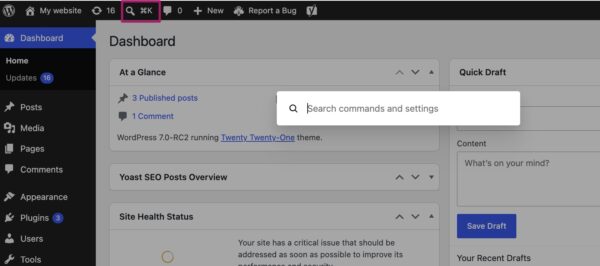
Adding a layer of unprecedented efficiency, WordPress 7.0 introduces the Command Palette shortcut to the top menu bar. Accessible via a dedicated icon or the universal keyboard shortcuts ⌘K (Mac) or Ctrl+K (Windows/Linux), this feature provides quick access to a powerful search and action interface. Users can rapidly navigate their backend, find specific posts or pages, initiate actions, or access settings without needing to click through multiple menus. This feature, inspired by similar implementations in modern code editors and productivity apps, is expected to significantly boost the productivity of site administrators and developers, streamlining complex workflows and reducing time spent on routine tasks. Early adopters and power users are anticipated to find this one of the most transformative additions to the admin interface.
The visual refresh extends to the platform’s aesthetics with a new default color palette. The scheme previously known as ‘Modern’ has now become the standard, aligning the admin interface more closely with the contemporary visual language of the block and site editor. This shift creates a more cohesive design language across the entire WordPress ecosystem. For users who preferred the classic look, the ‘Fresh’ palette remains available under profile preferences, ensuring backward compatibility and user choice. This design evolution is not merely cosmetic; it aims to reduce visual friction and provide a more intuitive environment for content creators.
Visual Revisions: A Leap in Content Management
For anyone involved in content creation, editing, or version control, the improvements to the revisions system in WordPress 7.0 are a game-changer. Historically, WordPress revisions provided a raw, text-based comparison of changes, requiring users to meticulously sift through code-like differences to understand what had been altered.
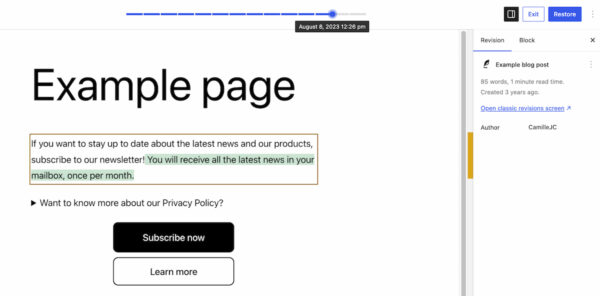
WordPress 7.0 fundamentally transforms this experience by introducing visual revisions. Now, when accessing the revisions feature, users are presented with a live preview of their page or post. A slider at the top allows seamless navigation through different versions, clearly indicating the date and time of each change. Crucially, the system visually highlights modifications: additions appear in green, deleted sections in red, and changed content in yellow.
This visual representation vastly simplifies the process of reviewing, comparing, and restoring previous versions of content. Site administrators and content teams can instantly identify modifications, troubleshoot layout issues, or revert unwanted changes with unprecedented ease. This enhancement is particularly beneficial for large websites with multiple contributors, where maintaining content integrity and tracking changes is paramount. Industry experts predict this feature will significantly reduce errors and improve collaboration efficiency within content workflows.
Expanded Creative Toolkit: New Blocks and Enhancements
The block editor, the cornerstone of modern WordPress content creation, continues to evolve with WordPress 7.0, introducing new functional blocks and significant improvements to existing ones. These additions further empower users to build sophisticated layouts and features without resorting to custom code or additional plugins.
The new Breadcrumbs block is a welcome addition for site navigation and SEO. When added to a page, it automatically generates a correct breadcrumb path, providing clear navigational cues for users and helping search engines understand site structure. The block also offers customization options, allowing site owners to tailor its appearance and behavior. This built-in functionality streamlines a previously common task, reducing reliance on third-party plugins.
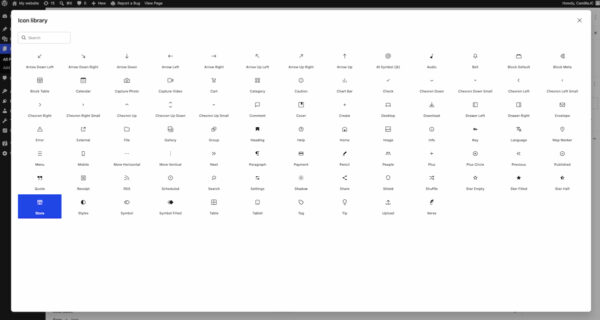
Another key new component is the Icon block. This block allows users to easily integrate a wide range of vector-based icons directly into their pages, drawing from an internal directory of icons available in the backend. This provides a standardized and efficient way to add visual emphasis and functionality, ensuring consistent design across a website and eliminating the need to upload individual image files or rely on external icon libraries.
Existing blocks have also received significant upgrades. The Grid Block, previously limited by an ‘Auto/Manual’ toggle, now offers more granular controls for setting responsiveness and column configurations. This enhanced flexibility allows designers to create more complex and adaptive grid-based layouts that perform optimally across various screen sizes. The Cover Block now supports embedded videos as backgrounds, enabling users to integrate dynamic video content from platforms like YouTube directly into their hero sections or visual elements. These block enhancements collectively reduce the dependency on custom CSS or specialized plugins, making advanced design capabilities accessible to a broader user base.
Empowering Responsive Design Controls
In an era dominated by mobile browsing, responsive design is no longer a luxury but a necessity. WordPress 7.0 introduces powerful new viewport-based controls, making it easier than ever for users to fine-tune their designs for different devices without writing a single line of code.
This feature allows users to selectively show or hide blocks based on the user’s screen size (desktop, tablet, or mobile). By simply selecting a block and using the new ‘Show’ option in the toolbar, users can specify which device types should display the block. The system automatically handles the hiding of the block on unselected devices. This intuitive control provides unprecedented flexibility for creating truly adaptive designs, allowing for tailored content experiences across different viewports. For instance, a complex data table might be displayed on desktop, while a simplified summary is shown on mobile. This capability significantly democratizes responsive web design, empowering non-developers and content creators to craft highly optimized experiences for all users.
Smarter Pattern Editing for Streamlined Workflows
Patterns and templates are central to efficient site building in modern WordPress, allowing users to reuse pre-designed sections. WordPress 7.0 introduces smarter pattern editing modes to enhance this workflow, enabling users to make targeted changes without inadvertently disrupting the overall design.
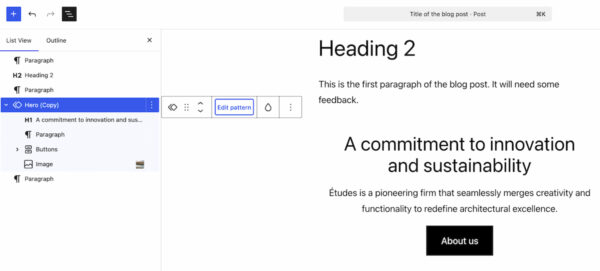
When a pattern is selected, the List View now intelligently displays only the content-focused elements, such as text and images. This "content-first" approach helps users focus on modifying the core message and media without being distracted by structural or design elements. However, for those who need to adjust the layout, clicking "Edit pattern" reveals all elements, including design components like spacers. This dual-mode editing approach balances ease of content modification with the flexibility for deeper design adjustments. It streamlines the content update process for recurring elements across a website, ensuring consistency while still allowing for necessary customization. This feature is particularly valuable for agencies and large organizations managing numerous sites or complex content structures.
Laying the Groundwork for AI Integration: The Connectors Section
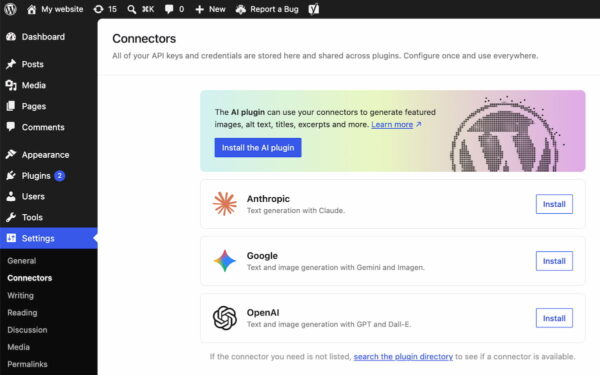
While WordPress 7.0 does not ship with built-in AI-powered tools, it takes a crucial strategic step by introducing a robust framework for future AI integration. A new Connectors section has been added under ‘Settings’ in the WordPress backend.
This dedicated area serves as a central hub for connecting to external services and integrations, including prominent AI providers and agents such as Claude, Gemini, and OpenAI. Users can connect their WordPress installations to these external platforms using API keys or other credentials. The system also includes a directory for discovering additional integrations.
This initiative is a forward-thinking move, positioning WordPress as an adaptable platform ready for the inevitable rise of AI in web development and content creation. By providing a standardized framework, it offers developers a future-proof ecosystem to build AI-powered plugins and functionalities. This means that while WordPress itself remains lean, its extensibility allows for seamless integration with the latest advancements in artificial intelligence, empowering users to leverage AI for tasks ranging from content generation and optimization to advanced analytics and user personalization. The Connectors section signals WordPress’s commitment to remaining at the forefront of technological innovation.
Streamlined Plugin Management: The Custom List Filter
For site administrators managing numerous plugins, WordPress 7.0 introduces a practical enhancement to the plugin management screen. A new filter allows plugins to register custom tabs, enabling developers to group related plugins under a dedicated, properly labeled view.
For instance, a suite of plugins from a single developer, like Yoast, can now be grouped under a ‘Yoast’ tab on the Plugins screen. This significantly improves organization and manageability for sites utilizing multiple products from the same vendor. Administrators can more easily check versions, manage activations, and maintain an overview of their installed plugins, reducing clutter and improving the user experience for plugin management. This feature is a testament to WordPress’s ongoing commitment to improving the platform’s usability for its diverse user base.
Performance and Under-the-Hood Optimizations
Beyond the visible feature enhancements, WordPress 7.0 includes significant under-the-hood improvements aimed at bolstering performance, scalability, and security.
A key focus has been on client-side media processing. This optimization means that certain media tasks, such as image resizing or compression, can now be handled more efficiently by the user’s browser rather than solely relying on the server. The result is faster media uploads, reduced server strain, and an improved experience for users uploading large files or high volumes of media. This is particularly beneficial for media-heavy websites, e-commerce platforms, and news portals.
Continued improvements to block rendering and overall platform responsiveness contribute to a snappier editing and browsing experience. The core development team has also raised the minimum PHP version requirement to PHP 7.4. This upgrade ensures that WordPress 7.0 benefits from the performance and security enhancements inherent in more modern PHP versions, paving the way for future optimizations and maintaining compatibility with current web hosting standards.
The Road Ahead: Real-time Collaboration Postponed for Stability
One feature initially slated for WordPress 7.0 that garnered significant anticipation was real-time collaboration. This capability, designed to allow multiple users to edit content simultaneously in a manner similar to Google Docs, was ultimately postponed. The decision, announced shortly before the release, was made by the core development team to prioritize the overall stability and reliability of the 7.0 release. This strategic move underscores the project’s commitment to delivering robust and dependable software, even if it means delaying ambitious features. Real-time collaboration remains a high priority and is expected to be integrated into a future WordPress release, promising to further enhance content team workflows.
Broader Impact and Strategic Vision
WordPress 7.0 is more than just an update; it’s a strategic declaration of intent. By focusing on a modern admin experience, enhancing core content management tools, empowering non-developers with responsive design controls, and establishing a clear path for AI integration, WordPress is actively evolving to meet the demands of the next generation of web development.
For content creators and marketers, the visual revisions and smarter pattern editing mean less time spent on technicalities and more on crafting compelling narratives. Site owners and small businesses will benefit from the intuitive design controls and performance enhancements, allowing them to maintain professional-grade websites with greater ease. Web developers and agencies gain a more streamlined backend, a robust framework for AI integration, and a platform that continues to reduce the need for custom coding for common functionalities, allowing them to focus on bespoke solutions.
The update reinforces WordPress’s commitment to accessibility and usability, broadening its appeal to an even wider audience. By pushing the platform towards a more app-like paradigm, WordPress is not only modernizing its interface but also solidifying its market leadership in an increasingly competitive digital landscape. The foundation laid in 7.0 suggests a future where WordPress remains the go-to platform for creating sophisticated, scalable, and future-ready websites.
For those eager to explore the new functionalities, WordPress 7.0 is now available for update. Comprehensive details and technical specifications can be found in the official release post on WordPress.org.