The highly anticipated major release of WordPress, version 7.0, was officially launched on May 20th, 2026, marking a significant milestone in the platform’s evolution. While preceding releases predominantly refined the block editor experience, this iteration propels WordPress into the next phase of its ambitious roadmap, introducing smarter workflows, a more intuitive user interface, and laying crucial groundwork for future integrations. This release signifies a strategic pivot towards making WordPress feel less like a traditional Content Management System (CMS) and more akin to a modern web application, enhancing both the creator and administrative experiences.
The Evolution of WordPress: A Contextual Backdrop
For over two decades, WordPress has powered a substantial portion of the internet, evolving from a simple blogging platform into a versatile CMS. The introduction of the Gutenberg project (the block editor) in WordPress 5.0 in late 2018 began a multi-phase transformation aimed at modernizing the editing experience and ultimately enabling full site editing. Subsequent releases, leading up to 7.0, have steadily built upon this foundation, integrating more design capabilities directly into the core, thereby reducing reliance on complex themes and numerous plugins. WordPress 7.0 is a culmination of these efforts, pushing the boundaries of what users can achieve natively and streamlining operations across the board. The development cycle for such a monumental release typically involves months of planning, coding sprints, beta testing, and release candidates, with thousands of contributors globally dedicating their expertise to its success.
A Refreshed and Modern Admin Experience
One of the most immediate and impactful changes users will notice in WordPress 7.0 is the significantly refreshed admin interface, designed to provide a smoother, more engaging, and efficient backend experience. The core team’s vision was to imbue the admin area with the fluidity and responsiveness typically associated with desktop or mobile applications.
A subtle yet powerful enhancement is the integration of the CSS View Transitions API. This modern web standard facilitates seamless, visually pleasing transitions between pages in the backend. Instead of abrupt page reloads, navigation now features smooth animations, creating a continuous and less jarring user journey. This seemingly minor detail contributes significantly to the overall perception of an “app-like” experience, reducing cognitive load and making prolonged work sessions in the admin area more pleasant. Developers have long sought ways to make web interfaces feel more native, and this adoption by WordPress marks a significant step in that direction, setting a new standard for backend interaction.
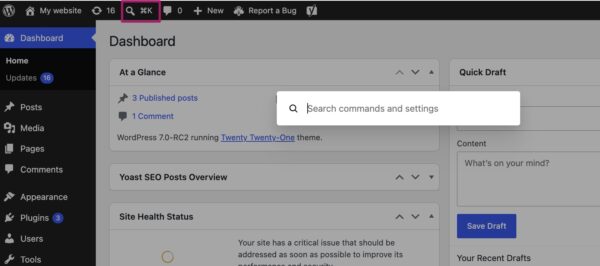
Further boosting efficiency, WordPress 7.0 introduces the Command Palette shortcut to the top menu bar. Accessible via a click on its dedicated icon or the keyboard shortcuts ⌘K (Mac) or Ctrl+K (Windows), this feature offers quick access to a powerful search and action bar. Users can swiftly navigate the backend, search for specific posts, pages, or settings, and perform various administrative actions without needing to click through multiple menus. This feature, inspired by similar tools in modern code editors and operating systems, is a boon for power users and those who value expedited workflows, dramatically reducing the time spent on routine tasks. It democratizes efficiency, making advanced navigation accessible to all users.
Complementing these functional improvements is a subtle but impactful visual overhaul: the new default color palette. The scheme previously known as ‘Modern’ has now been elevated to the default, replacing the older ‘Fresh’ palette. This change aligns the admin interface more closely with the contemporary visual language of the block and site editors, ensuring a cohesive design experience across the entire WordPress ecosystem. The new default prioritizes clarity, readability, and a clean aesthetic, reflecting current web design trends. For users who prefer the nostalgic ‘Fresh’ look, it remains available under profile preferences, ensuring backward compatibility and user choice. These design refinements, collectively, aim to make the WordPress backend not just more functional, but also more inviting and intuitive.
Visual Revisions: A Leap in Content Management
For content creators, editors, and site administrators, the ability to track and restore previous versions of content is paramount. WordPress has long offered a revisions feature, but until now, it presented changes primarily as raw text differences, often requiring careful scrutiny to discern specific modifications, especially in visually rich content.
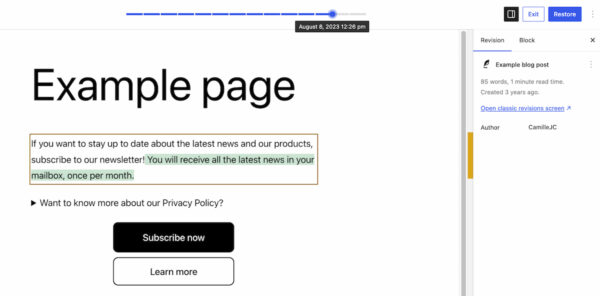
WordPress 7.0 revolutionizes this by introducing visual revisions. When accessing the revisions feature (found in its familiar location), users are now presented with a live preview of their page, complete with a slider at the top. This slider allows users to effortlessly navigate through earlier versions of the content, with each iteration clearly timestamped. The most transformative aspect is the visual highlighting of changes: additions are prominently displayed in green, modified sections in yellow, and deleted content in red.
This visual differentiation immediately clarifies what alterations were made, where, and when. No longer do users need to mentally reconstruct the layout from text differences; they can see the exact state of the page at any given point. This dramatically simplifies the process of:
- Auditing changes: Quickly reviewing modifications made by team members.
- Troubleshooting layout issues: Identifying precisely when a design element was altered or removed.
- Restoring content: Confidently reverting to a previous, stable version without guesswork.
The enhancement significantly reduces the potential for errors and speeds up the content management workflow, making revisions a truly powerful and user-friendly tool for maintaining content integrity.
New and Improved Blocks in the Editor
The block editor, central to WordPress’s content creation strategy, continues to expand its capabilities with new blocks and significant enhancements to existing ones, further reducing the need for external plugins for core design elements.
A highly anticipated addition is the Breadcrumbs block. Breadcrumbs are vital for website navigation and search engine optimization (SEO), providing users with a clear path of their location within the site hierarchy and helping search engines understand site structure. Upon insertion, the block automatically generates the correct breadcrumb path based on the page’s position, with intuitive options for customization, such as hiding the home link, changing separators, or defining custom starting points. This native integration is a considerable win for site builders, eliminating the need for third-party SEO plugins solely for breadcrumb functionality.
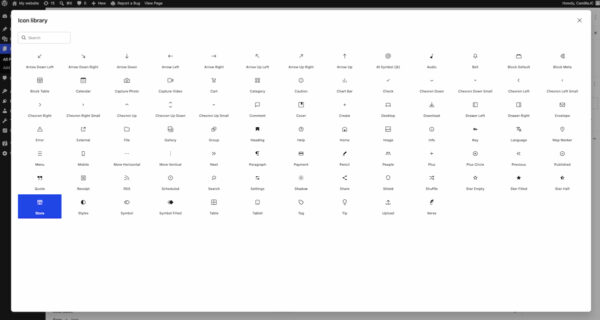
Another new utility block is the Icon block. This block allows users to easily embed various icons into their pages, selected from a bundled directory within the WordPress backend. The directory is designed to be extensible, allowing themes and plugins to register their own icon sets, promoting consistency and reducing reliance on external icon libraries. Native icon support means better performance (as icons can be optimized as SVGs or icon fonts bundled with core) and easier styling, making it simple to add visual flair and improve readability.
Existing blocks also receive powerful upgrades:
- The Grid Block has seen its ‘Auto/Manual’ toggle replaced with a more granular set of options for defining responsiveness. Users can now set specific column counts, minimum/maximum widths, and other layout properties for different viewport sizes (desktop, tablet, mobile) directly within the editor. This empowers designers to craft sophisticated, adaptive layouts without resorting to custom CSS.
- The Cover Block, a versatile block for hero sections and background imagery, now supports embedded videos as backgrounds. This means users can effortlessly integrate videos from platforms like YouTube or Vimeo directly into their cover sections, adding dynamic and engaging visual elements to their pages. This feature significantly enhances the visual storytelling capabilities of WordPress pages, allowing for more immersive user experiences without requiring complex custom code or expensive video hosting solutions.
These block editor advancements collectively underscore WordPress’s commitment to providing a robust, flexible, and code-free design experience, pushing the platform closer to its full site editing ambitions.
Enhanced Responsive Design Controls
Crafting websites that look impeccable across all devices – from large desktop monitors to small smartphone screens – is no longer optional; it’s a necessity. WordPress 7.0 simplifies this critical aspect of web design with new, intuitive viewport-based controls for block visibility.
Users can now select any block and, through a simple toggle in the block toolbar, specify which device types (desktop, tablet, or mobile) should display that particular block. If a device type is deselected, the block will automatically be hidden on that device. This powerful feature eliminates the need for custom CSS snippets or complex conditional logic to manage content visibility for different screen sizes.
For example, a site owner might choose to display a detailed infographic on desktop and tablet, but replace it with a summarized text block or a smaller image on mobile to optimize for screen real estate and load times. This capability directly empowers content creators and designers who may not have extensive coding knowledge to build truly responsive designs, fine-tuning the user experience for every device. This not only improves the aesthetic appeal of a site but also its usability and performance, particularly for mobile users, where load times and layout are critical.
Smarter Pattern Editing for Streamlined Workflows
Patterns and templates are cornerstones of efficient website design in the block editor, allowing users to reuse pre-designed layouts. WordPress 7.0 refines the editing experience for these elements by introducing different editing modes, designed to prevent accidental design alterations while facilitating focused content updates.
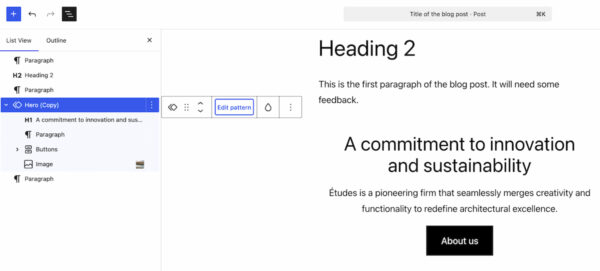
When a user selects a pattern, the List View (a hierarchical outline of all blocks on the page) will initially display only the content-focused elements, such as text and image blocks. This “content-only” mode allows content creators to quickly and safely update the text or swap images within a pattern without fear of inadvertently altering its underlying design or layout (e.g., margins, padding, column structures). This workflow is invaluable for marketing teams or content writers who need to frequently update specific parts of a page without disrupting the overall site aesthetic.
However, for users who do need to modify the structural or design elements, a clear “Edit pattern” button is available. Clicking this button expands the List View to show all elements within the pattern, including design components like spacers, column blocks, and group blocks. This dual-mode approach ensures that the editing experience is tailored to the user’s immediate goal, balancing ease of content update with full design flexibility. This feature promotes greater consistency across a website, makes it easier for non-technical users to work with pre-defined design systems, and ultimately streamlines the entire website creation and maintenance process.
Laying the Groundwork for AI: The Connectors Section
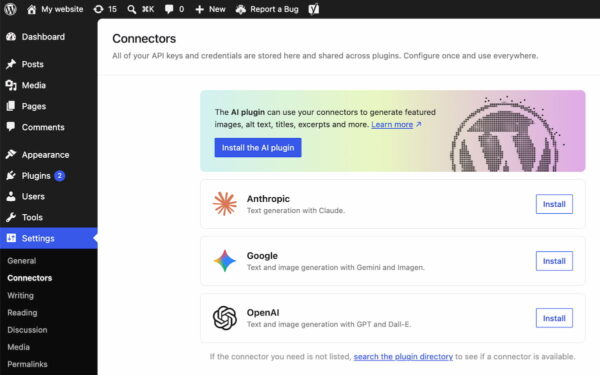
While WordPress 7.0 does not natively bundle AI-powered tools, it takes a significant strategic step towards future AI integration by introducing a dedicated Connectors section under Settings in the WordPress backend. This new area serves as a central hub for managing external integrations, particularly with Artificial Intelligence providers and agents.
The Connectors section provides a standardized framework for connecting WordPress to external AI services such as Claude, Gemini, OpenAI, and potentially many others. Users can browse a directory of pre-listed integrations or search for specific providers. This design choice reflects a thoughtful approach to AI: instead of locking users into a single AI solution, WordPress is creating an open ecosystem where site owners can choose their preferred AI tools.
This approach offers several key advantages:
- User Choice: Allows users to select AI providers that best suit their needs, budget, and ethical considerations.
- Future-Proofing: As AI technology rapidly evolves, this flexible connector system ensures WordPress can adapt without requiring core updates for every new AI breakthrough.
- Developer Ecosystem: Provides a standardized API for plugin developers to build AI-powered features, ensuring consistent and secure integration. This could lead to a proliferation of innovative AI-driven plugins for content generation, image optimization, SEO analysis, translation, and more.
- Centralized Management: Consolidates API keys and other credentials for external services in one secure location, simplifying management for site administrators.
The Connectors section is a clear signal of WordPress’s long-term vision to seamlessly integrate cutting-edge AI capabilities into the platform, empowering users with intelligent tools while maintaining control and flexibility.
A New List Filter for Plugins
Managing a large number of plugins can often be a cumbersome task for site administrators. WordPress 7.0 addresses this by introducing a new filter mechanism that allows plugins to register custom tabs on the Plugins screen.
This feature enables developers to group related plugins under a dedicated, properly labeled tab. For instance, a suite of plugins from a single developer, like Yoast SEO and its various add-ons, can now be displayed together under a “Yoast” tab. This provides site administrators with a much cleaner, more organized view of their plugin installations, making it significantly easier to:
- Monitor versions: Quickly check if all related plugins are up-to-date.
- Manage activation/deactivation: Perform bulk actions on grouped plugins.
- Maintain overview: Reduce clutter on the main plugins page, especially for sites with dozens of installed extensions.
This seemingly small improvement significantly enhances the usability of the plugin management interface, particularly for sites that rely heavily on a diverse set of extensions, contributing to a more streamlined administrative workflow.
Performance Enhancements and Technical Underpinnings
Beyond the visible feature enhancements, WordPress 7.0 also includes crucial under-the-hood improvements focused on performance and stability, which are vital for the platform’s scalability and user experience.
One notable improvement is client-side media processing. This innovation allows certain media operations, such as image resizing and compression, to occur in the user’s browser before the files are uploaded to the server. The benefits are manifold:
- Faster Uploads: Smaller file sizes being sent across the network result in quicker upload times, especially beneficial for users with slower internet connections.
- Reduced Server Strain: Less processing required on the server side, leading to improved server performance and reduced hosting costs for high-traffic sites.
- Better User Experience: A more responsive and efficient media library workflow.
- Optimized Images: Ensures images are appropriately sized and compressed from the outset, contributing to faster page load times on the frontend.
Continued improvements to block rendering further optimize how blocks are loaded and displayed in both the editor and on the frontend, contributing to a snappier, more responsive overall experience. The emphasis on responsiveness throughout the release (e.g., new design controls, optimized media processing) ensures that WordPress sites are not only easy to build but also perform exceptionally well on any device.
It is also important for users and developers to note that WordPress 7.0 raises the minimum required PHP version to 7.4. This upgrade brings significant advantages in terms of security, performance, and access to modern language features for plugin and theme developers. Users running older PHP versions will need to update their server environments to ensure compatibility and leverage the full benefits of WordPress 7.0. This move aligns WordPress with current industry best practices for server-side scripting.
Still to Come: Real-Time Collaboration
A highly anticipated feature, real-time collaboration, was originally slated for inclusion in WordPress 7.0. This feature, which promises Google Docs-like simultaneous editing capabilities for multiple users, represents a significant step towards making WordPress a truly collaborative content creation platform. However, the core development team made a strategic decision to postpone its release shortly before 7.0’s launch.
This decision was driven by a commitment to ensuring the utmost stability and a polished user experience for such a complex and critical feature. The team recognized that a robust, bug-free real-time collaboration system requires extensive testing and refinement. While its absence in 7.0 might be a slight disappointment for some, it underscores WordPress’s dedication to quality over rushed delivery. The feature is now expected to be a cornerstone of a future major release, and its eventual integration will undoubtedly transform content workflows for teams worldwide.
Final Thoughts and Implications
WordPress 7.0 represents a comprehensive and impactful release, solidifying the platform’s trajectory towards becoming a more modern, app-like, and user-friendly web building tool. The combination of a refreshed admin interface, intuitive visual revisions, powerful new blocks, enhanced responsive design controls, and smart pattern editing collectively elevates the user experience for content creators, designers, and site administrators alike.
The strategic groundwork laid for AI integration through the Connectors section is a forward-looking move, positioning WordPress to gracefully embrace the evolving landscape of artificial intelligence. Coupled with crucial performance optimizations and the necessary PHP version bump, 7.0 is not just about new features; it’s about a more robust, efficient, and future-ready foundation for the millions of websites it powers.
This release reaffirms WordPress’s commitment to empowering users with sophisticated tools while maintaining its core principles of accessibility and ease of use. As always, users are encouraged to update to the latest version to take advantage of these significant improvements and explore the full details outlined in the official release post on WordPress.org. The future of WordPress looks increasingly dynamic and user-centric, with 7.0 serving as a pivotal step in this ongoing evolution.