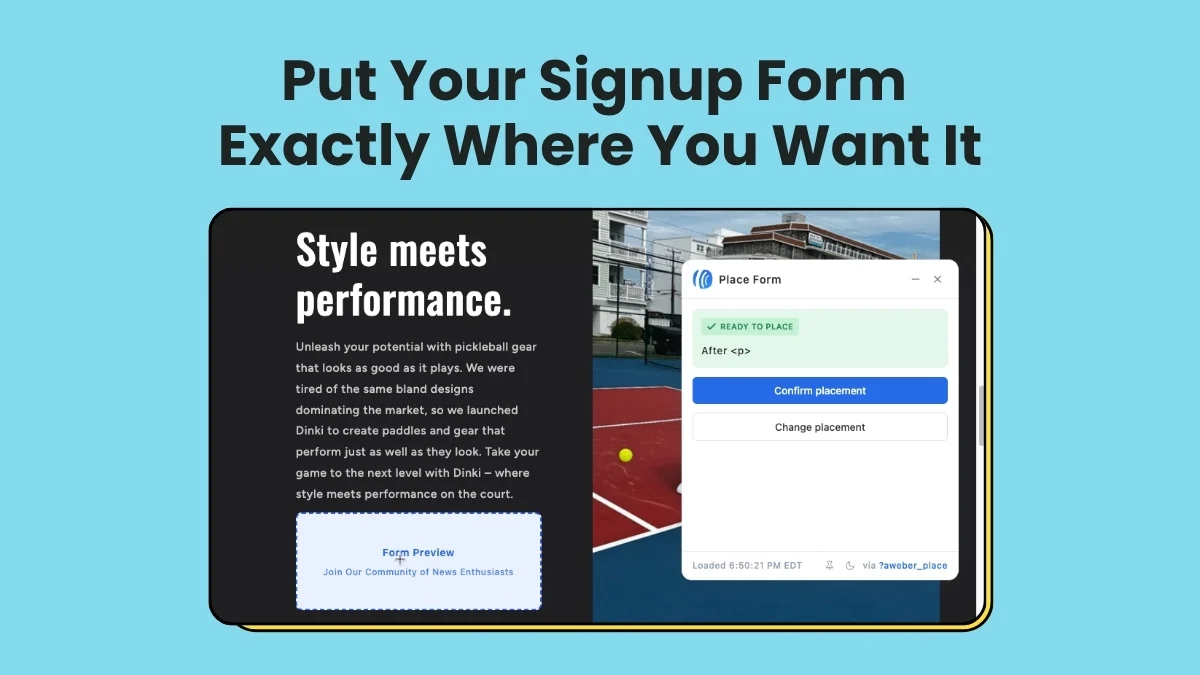
Chalfont, PA – June 24, 2026 – AWeber, a pioneer in email marketing solutions, today announced a significant enhancement to its AI Signup Form Builder, introducing the capability to create and visually place inline forms directly onto websites without requiring any coding expertise. This advancement, detailed by Chris Vasquez, aims to dramatically simplify and optimize the process of converting website visitors into valuable email subscribers, marking a pivotal step in democratizing sophisticated marketing tools for businesses of all sizes.
The core of this innovation lies in its intuitive, no-code visual placement system. Traditionally, embedding signup forms into website content has required users to interact with HTML code or rely on complex website builders, often creating a barrier for non-technical marketers and small business owners. AWeber’s new feature bypasses these hurdles entirely, allowing users to design an inline form using artificial intelligence and then, with just a few clicks, select its exact placement on a live webpage. This strategic positioning within content is crucial, as an inline form integrated mid-read captures the attention of an already engaged audience, distinguishing it from less contextual placements like sidebars or pop-ups.
The Strategic Advantage of Inline Forms in Digital Marketing
The effectiveness of a signup form is heavily influenced by its location on a webpage. While sidebar forms cater to visitors scanning content, an inline form — embedded directly within an article, blog post, or product description — intercepts a reader precisely when their interest is piqued and contextually relevant. This integration transforms passive consumption into active engagement, offering a seamless pathway for interested individuals to opt-in to newsletters, exclusive content, or promotional updates. Data consistently shows that contextual relevance significantly boosts conversion rates. According to a recent study by MarketingProfs, forms placed within relevant content can see conversion rates up to 50% higher than those relegated to less prominent positions.
AWeber’s move addresses a persistent challenge for digital marketers: optimizing the user journey for subscriber acquisition. By removing the technical complexities associated with form embedding, the platform empowers content creators, e-commerce businesses, and service providers to strategically deploy forms where they are most likely to convert, turning website traffic into a tangible, actionable asset. This is particularly vital in an era where email lists remain one of the most reliable and high-ROI marketing channels, boasting an average return of $42 for every $1 spent, according to Litmus.
Revolutionizing Form Creation with AI
The enhanced AI Signup Form Builder offers three distinct starting points, catering to various user preferences and technical proficiencies, all leading to a robust form editor where further customization is possible.
-
Custom Prompt: For users who prefer a more descriptive approach, the AI now understands natural language prompts that specifically request an inline form for their site. A user might type, “Create an inline form for my blog post about sustainable living, asking for email and name to subscribe to a weekly eco-tips newsletter.” The AI leverages advanced natural language processing (NLP) to interpret these requests, generating a form with appropriate fields, compelling copy, and design suggestions tailored to the described context. This method significantly accelerates the initial design phase, turning a concept into a ready-to-edit form in seconds.
-
Fill-in-the-Blanks: This guided option is ideal for users seeking a structured process. Through a series of intuitive prompts, users provide essential information such as the purpose of the form, desired fields, and call-to-action. Crucially, they can now select “embeds directly on my website” as their preferred form type. This structured input helps the AI generate a relevant form while ensuring all necessary parameters for inline placement are considered from the outset.
-
Template Gallery: A comprehensive gallery of pre-designed, optimized inline templates offers a quick-start solution. Users can browse a variety of professional designs tailored for different industries and purposes – from newsletter sign-ups for bloggers to lead magnets for e-commerce sites or event registrations for service providers. Selecting a template provides a solid foundation, which can then be easily customized in the form editor to match specific branding and content needs.
Regardless of the chosen starting point, all pathways converge into AWeber’s intuitive form editor. Here, users have granular control over every aspect of their form: adjusting headlines and body copy, customizing design elements like fonts, colors, and button styles, and configuring backend settings such as automated tagging, welcome email sequences, and integration with other marketing tools. This comprehensive editor ensures that while AI streamlines the creation process, human creativity and brand consistency remain at the forefront.
Seamless Visual Placement: A Four-Click Process
The true innovation of this update lies in its visual placement mechanism, which transforms a traditionally technical task into a simple, interactive process. Once a form has been designed and refined in the editor, placing it on a live website is a streamlined four-step procedure:
-
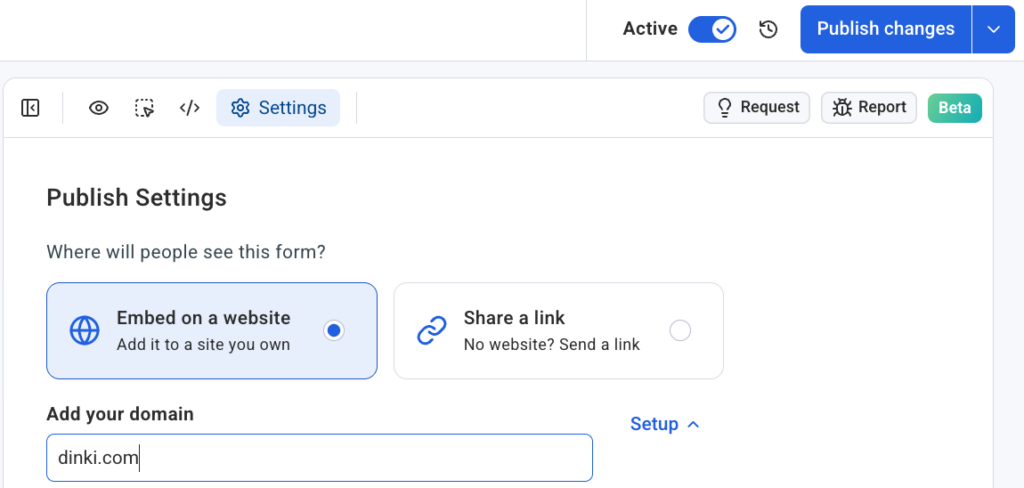
Navigate to Settings: Within the form editor, users click on the “Settings” tab. This section is the central hub for configuring how the form interacts with the website and user data. Beyond placement, it typically houses options for success messages, error handling, and advanced tracking.
-
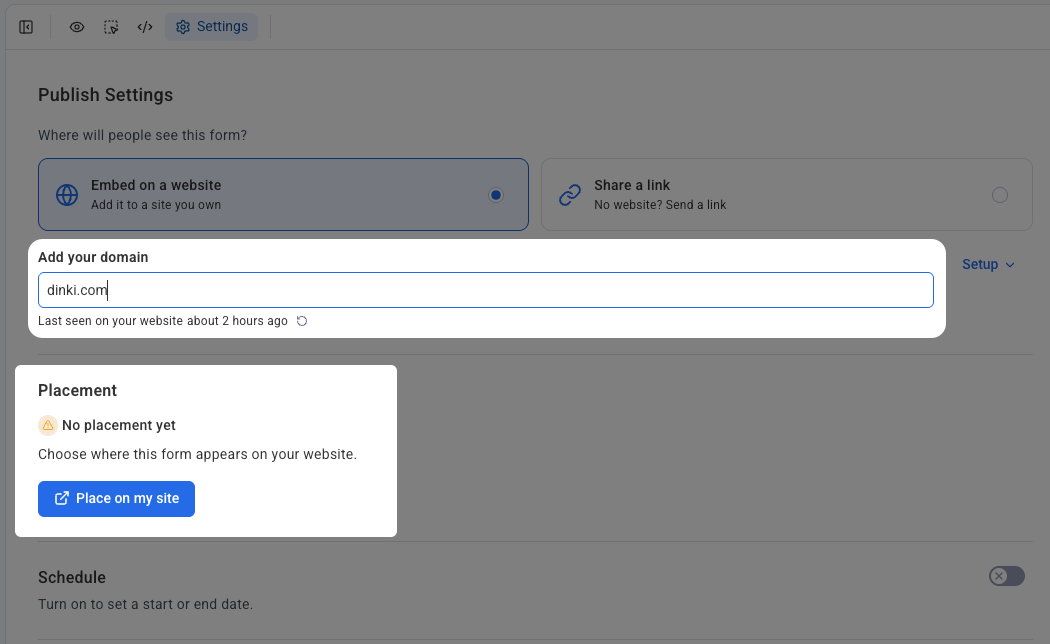
Domain Configuration & Snippet Confirmation: Users specify the domain where the form is intended to appear. This step is critical for security and proper functionality, ensuring the form is deployed on an authorized web property. A crucial prerequisite for this visual placement functionality is the installation of AWeber’s signup form snippet on the target website. This lightweight JavaScript code, typically placed in the header or footer of a website, acts as the bridge, allowing AWeber’s platform to communicate with and visually manipulate elements on the live page without direct server-side access. AWeber provides clear instructions for installing this snippet, which is a one-time setup for each domain.
-
Initiate Placement: With the domain set and the snippet confirmed, users click the “Place on my site” button. This action triggers the system to prepare for the visual integration process.
-
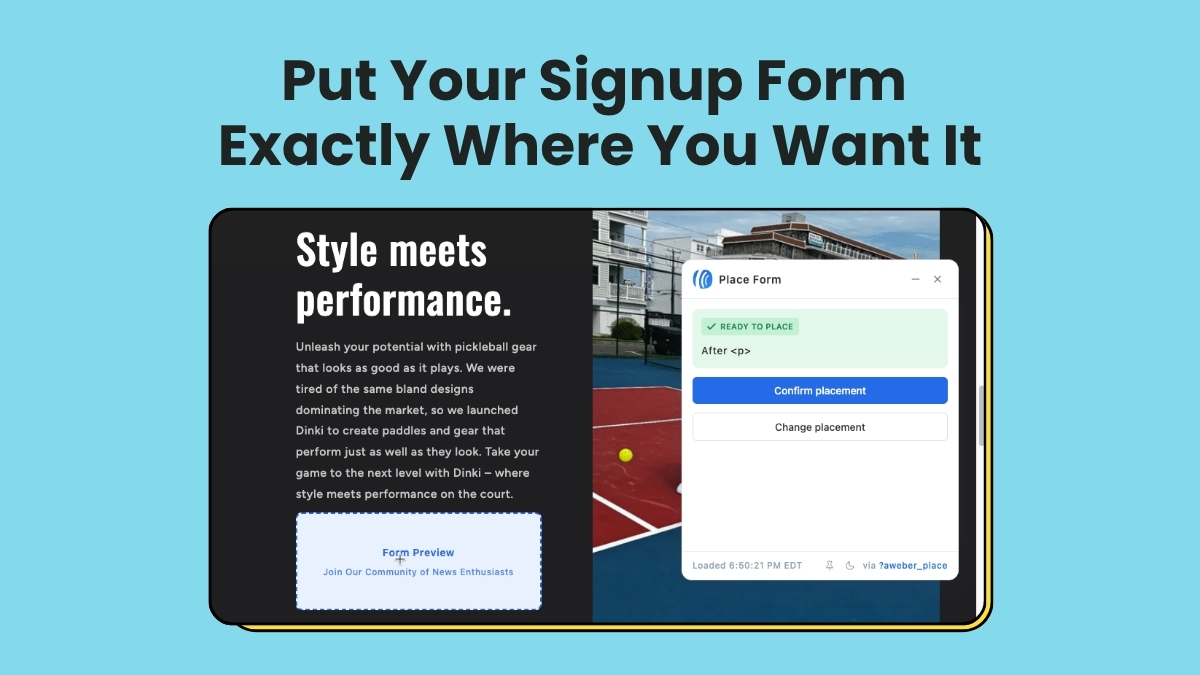
Live Site Placement & Confirmation: The user’s live website opens in a new browser window or within an embedded frame, overlaid with an interactive placement widget. Instead of a generic wireframe or a static preview, users see their actual website content. They can then visually navigate to the exact section or content block where they wish the form to appear. A simple click on the desired spot highlights the area, and a final click on “Confirm placement” embeds the form instantly. This “What You See Is What You Get” (WYSIWYG) approach eliminates guesswork and the need for iterative adjustments through code, saving significant time and reducing potential errors.
This revolutionary visual placement widget shows the actual site, reflecting real-time layout and content. This direct interaction with the live page ensures that the form’s integration is precise and aesthetically aligned with the existing design, a level of control previously reserved for web developers.
Broad Compatibility Across Self-Hosted Platforms
AWeber’s new inline form builder and visual placement feature are designed for broad compatibility, working seamlessly across a wide array of self-hosted website platforms. This includes popular content management systems (CMS) and e-commerce platforms such as WordPress, Shopify, Wix, Squarespace, and many others. Each domain is connected independently within the AWeber Settings, offering robust organization for users managing multiple websites or digital marketing agencies handling various client accounts. This ensures that form placements remain distinct and manageable across diverse web properties, preventing conflicts and maintaining clarity in multi-site environments. For platforms like WordPress, the AWeber snippet can often be integrated via a dedicated plugin or by simply pasting it into the theme’s header.php or functions.php file.
Official Reactions and Industry Implications
Chris Vasquez, Chief Product Officer at AWeber, commented on the release: “Our mission at AWeber has always been to empower entrepreneurs and small businesses with powerful, yet accessible, marketing tools. This enhancement to our AI Signup Form Builder, particularly the visual inline placement, is a game-changer. It eliminates the technical barriers that often prevent marketers from strategically placing forms where they are most effective. Now, anyone can turn their engaging content into a subscriber-generating machine, precisely where their readers are already engaged, without writing a single line of code. We believe this democratizes advanced conversion optimization, allowing our users to focus more on their content and less on the complexities of web development.”
Industry analysts are quick to recognize the significance of AWeber’s innovation. “The integration of AI for form generation combined with a truly no-code visual placement system is a strong move by AWeber,” stated Dr. Evelyn Reed, a lead analyst at MarTech Insights. “In a crowded market, solutions that simplify complex tasks for the everyday marketer are poised for success. This feature positions AWeber as a leader in user-friendly, AI-powered marketing, making sophisticated list-building strategies accessible to a much broader audience. It also sets a new benchmark for competitors to follow in the ongoing race to streamline digital marketing workflows.”
For small business owners, the impact is expected to be immediate and positive. Sarah Chen, owner of “Green Thumb Gardens,” a popular online plant nursery, shared her enthusiasm in a hypothetical testimonial: “As a small business owner, every minute counts. I know how important email subscribers are, but finding the right place for a signup form and then dealing with code was always a headache. AWeber’s new visual placement tool is a dream come true. I can now integrate forms exactly where they make sense within my blog posts about gardening tips, and it takes me seconds. It truly frees me up to focus on what I do best – growing plants and sharing my passion.”
Broader Impact and Future Outlook
The introduction of AWeber’s AI Signup Form Builder with visual inline placement represents more than just a product update; it signifies a broader trend in the marketing technology landscape. It underscores the increasing demand for no-code solutions that leverage artificial intelligence to simplify complex tasks, making powerful marketing strategies accessible to a wider demographic of users who may not possess deep technical skills. This move is likely to intensify competition within the email marketing platform sector, prompting other providers to accelerate their own AI and user experience innovations.
For AWeber, this enhancement solidifies its position as an innovator committed to user empowerment. By focusing on both intelligent form generation and intuitive placement, the company is directly addressing key pain points in subscriber acquisition. The ability to embed forms contextually within content is projected to lead to higher engagement rates and improved conversion metrics for AWeber’s clientele, fostering stronger, more responsive email lists.
Looking ahead, the potential for further AI integration is vast. Future iterations could include AI-driven A/B testing suggestions for form variations, predictive analytics to recommend optimal placement locations based on user behavior patterns, or even dynamic content generation within forms tailored to individual visitor segments. As AI technology continues to evolve, tools like AWeber’s AI Signup Form Builder will likely become even more sophisticated, offering unparalleled personalization and optimization capabilities that further blur the lines between automated efficiency and human creativity.
Ultimately, AWeber’s latest offering empowers businesses to harness the power of their content more effectively. By putting signup forms exactly where readers are already engaged, the platform streamlines the path from passive visitor to active subscriber, ensuring that valuable attention translates directly into list growth and long-term customer relationships. The AI Signup Form Builder, with its new visual inline placement, is now available to all AWeber users, inviting them to transform their websites into highly efficient subscriber acquisition machines.