In a significant move to enrich its interactive capabilities and refine the user experience, professional networking giant LinkedIn has rolled out two key platform updates: native GIF support directly within comments and a redesigned, streamlined presentation for post action buttons and engagement counts. These enhancements, while seemingly incremental, signal LinkedIn’s ongoing evolution from a purely functional job-seeking platform to a more dynamic and engaging professional social network, increasingly embracing visual communication and user-friendly interface design.
The Evolution of Visual Communication on Professional Networks
The integration of native GIF support in LinkedIn comments marks a notable expansion of visual communication tools available to its vast user base. For years, social media platforms across the spectrum, from Facebook and Twitter to Instagram and TikTok, have championed visual content as a primary driver of engagement. GIFs, in particular, have carved out a unique niche, offering a blend of static image and short video that effectively conveys emotion, reaction, or humor in a concise, shareable format. Their resurgence in popularity, especially over the last decade, underscores a broader cultural shift towards more visually expressive and less text-heavy digital interactions.
LinkedIn, traditionally known for its earnest, text-centric professional discourse, has been progressively adapting to these visual trends. The platform first introduced GIF support in its messaging feature, allowing for more casual and expressive one-on-one or group conversations. This was followed by the ability for marketers to incorporate GIFs into single-image advertisements, recognizing their potential to capture attention in a crowded feed. However, until this recent update, incorporating a moving animation directly into a public post or comment required an inconvenient workaround: users had to convert the GIF into an MP4 video file to ensure it would play in-stream. This cumbersome process limited the spontaneous and widespread use of GIFs in the main feed, often restricting them to more premeditated content strategies rather than organic reactions.
Deep Dive: Native GIF Integration in Comments
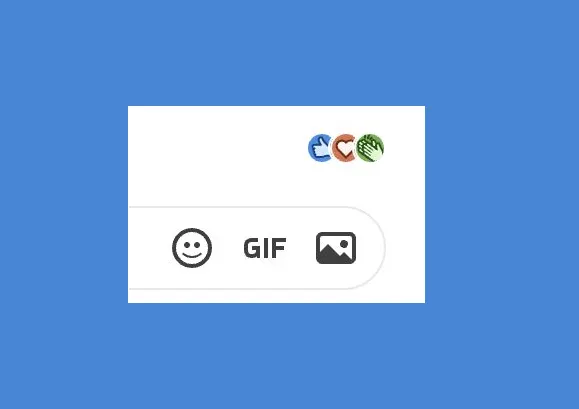
The new functionality eliminates this conversion hurdle, allowing users to embed animated GIFs directly into their post replies with ease. As demonstrated in an announcement post by Hari Srinivasan, LinkedIn’s Chief Product Officer, the updated version of the LinkedIn mobile application now features a dedicated GIF option within the reply dialog box, positioned alongside other content tools. This intuitive integration mirrors the GIF functionality found on most mainstream social media platforms, providing a seamless way to browse and select animated images from a curated library (likely powered by services like Giphy or Tenor).
The strategic rationale behind this integration is multifaceted. Firstly, it addresses a growing demand for more expressive communication. In a professional context, a well-chosen reaction GIF can convey empathy, congratulations, excitement, or even gentle humor more effectively and efficiently than a lengthy text response. For example, a “mind blown” GIF could perfectly encapsulate a reaction to an innovative industry update, or a celebratory animation could accompany a colleague’s job promotion announcement. This direct visual feedback can foster a sense of community and personal connection, making professional interactions feel less formal and more human.
Secondly, the update aims to boost engagement metrics. Visual content consistently outperforms plain text in terms of reach, likes, and shares across social platforms. By making it easier for users to contribute visually appealing and reactive content, LinkedIn anticipates an increase in comment activity and overall time spent on the platform. This aligns with a broader industry trend where platforms continually seek ways to make interactions more dynamic and “sticky.”
However, the introduction of GIFs on a professional network like LinkedIn also sparks a nuanced discussion regarding digital etiquette. While GIFs are ubiquitous in informal settings, their appropriateness in a professional environment has been a point of contention. Some younger users, often referred to as Gen Z, have even started to label GIFs as “uncool” or “unc,” preferring newer forms of short-form video or meme culture. This generational perspective highlights a potential tension: while many LinkedIn users, particularly those from older demographics, may welcome the expressive power of GIFs, there’s a delicate balance to strike to maintain the platform’s professional integrity. The success of this feature will largely depend on how users self-regulate and adapt their GIF usage to the prevailing professional norms of the LinkedIn community.
Strategic Rationale Behind GIF Adoption
LinkedIn’s decision to embrace native GIF support in comments, despite some debate about their perceived “coolness,” is a calculated move rooted in several strategic objectives:
- Enhancing Expressiveness and Emotional Intelligence: Professional communication isn’t always purely factual; it often involves nuanced emotional responses. GIFs offer a quick, universally understood way to convey joy, surprise, agreement, or support, adding a layer of emotional intelligence to digital interactions that plain text can sometimes lack. This can humanize the professional environment, fostering stronger connections.
- Driving Engagement and Virality: Content that elicits an emotional response is more likely to be engaged with and shared. GIFs are inherently attention-grabbing and shareable. By enabling their use in comments, LinkedIn facilitates a more dynamic comment section, potentially leading to longer discussions and increased virality of posts.
- Meeting User Expectations: Most active social media users are accustomed to GIF functionality on other platforms. Introducing it on LinkedIn brings the platform closer to the modern social media experience, preventing users from feeling that LinkedIn is technologically lagging or overly rigid. It responds to an implicit, if not explicit, user demand for more versatile communication tools.
- Broadening Appeal and User Base: By becoming more visually interactive, LinkedIn can appeal to a wider demographic, including younger professionals who are digital natives and expect rich media experiences. This is crucial for long-term growth and relevance in a competitive social media landscape.
- Reinforcing its Identity as a Social Network: While its core remains professional development and networking, LinkedIn has increasingly positioned itself as a social platform where professionals connect, share insights, and build community. Features like native GIF support reinforce this social dimension, differentiating it from purely static professional directories.
However, LinkedIn will need to carefully monitor the implementation to ensure GIFs are used judiciously and do not detract from the platform’s professional ethos. Clear community guidelines and potentially AI moderation tools could play a role in maintaining decorum.
Streamlining the User Interface: Post Action Buttons

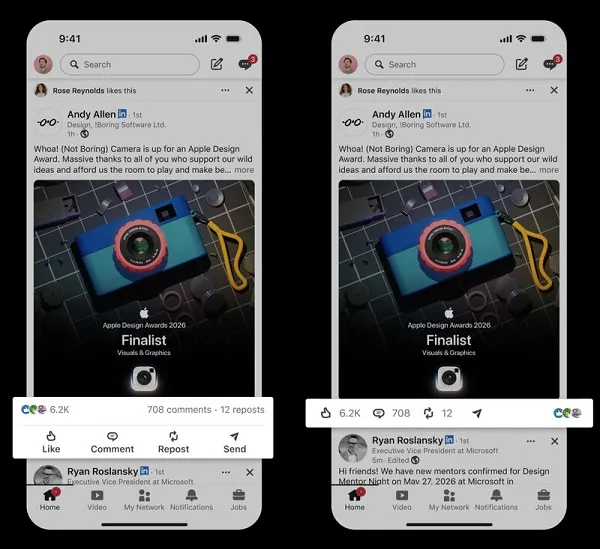
Concurrent with the GIF integration, LinkedIn has also introduced an update to the presentation of post action buttons and engagement counts. This user interface (UI) refinement, announced by Rishi Kothari, a Product Lead at LinkedIn, aims to streamline the visual clutter in the feed, making posts appear cleaner and more modern.
The previous UI typically displayed “Like,” “Comment,” and “Share” buttons, along with numerical counts for each, often spread across multiple lines or in a less consolidated fashion below a post. The updated design consolidates these elements into a single, compact line. Users can now tap on individual icons within this streamlined row to perform the respective actions or view the detailed counts. For instance, tapping the “Like” icon will register a like, while tapping the numerical count next to it will display who has liked the post. Similarly, tapping the comment icon opens the comment section, and tapping the comment count shows all existing comments.
This UI change reflects a broader trend in digital design towards minimalism and efficiency. By reducing visual noise, LinkedIn aims to enhance readability and improve the overall aesthetic of the feed. A cleaner interface can make content consumption more pleasant and less overwhelming, potentially encouraging users to engage with more posts. The decision to make these elements tappable for action reinforces an intuitive design principle: direct interaction with the element you wish to manipulate.
The implications of this UI update are subtle but significant:
- Improved User Experience: A less cluttered feed is generally perceived as more user-friendly and aesthetically pleasing. This can contribute to a more positive overall experience on the platform.
- Focus on Content: By de-emphasizing the action buttons slightly, the design subtly shifts focus back to the primary content of the post, which is crucial for a content-driven platform.
- Potential for Increased Interaction: While the buttons are consolidated, their clear presentation might encourage quicker engagement. The ability to tap directly on counts for details also simplifies navigation.
- Modernization: This update aligns LinkedIn’s visual design with contemporary UI standards seen across leading digital platforms, projecting an image of continuous innovation and responsiveness to user needs.
Broader Implications for LinkedIn’s Ecosystem
These dual updates, though distinct in their function, collectively underscore LinkedIn’s strategic direction towards fostering a more interactive, engaging, and visually rich professional environment.
For Individual Users:
The most immediate impact for individual users will be a more expressive and cleaner platform. Professionals can now convey emotions, acknowledge achievements, or react to industry news with a quick GIF, adding personality to their online presence. The streamlined UI makes for a more comfortable browsing experience, reducing cognitive load and potentially encouraging more frequent and longer sessions on the platform. These changes cater to the evolving communication styles of professionals, offering tools that are both functional and enjoyable.
For Marketers and Content Creators:
For brands, marketers, and content creators leveraging LinkedIn for professional outreach, these updates present new opportunities and challenges. Native GIF support in comments means that engaging with audience reactions can now be more dynamic. Marketers can encourage GIF-based responses to polls or announcements, fostering a more interactive dialogue. However, it also necessitates a clear understanding of brand voice and tone to ensure GIF usage remains professional and aligned with corporate image. The cleaner UI might mean that compelling visual content and concise messaging become even more critical to stand out in a less cluttered feed, where the content itself is the primary focal point.
For LinkedIn as a Platform:
Strategically, these updates reinforce LinkedIn’s ambition to be more than just a recruitment tool or a professional directory. They solidify its position as a vibrant social network where professionals can truly connect, share insights, learn, and grow. By investing in features that enhance user engagement and modernize the user interface, LinkedIn aims to increase daily active users, boost time spent on the platform, and ultimately strengthen its value proposition in a highly competitive social media landscape. These moves are crucial for retaining its existing user base and attracting new generations of professionals who expect rich, intuitive, and interactive digital experiences. The ongoing refinement of the platform demonstrates a commitment to adapting to user behavior and technological trends, ensuring its continued relevance in the professional world.
The Road Ahead: Future of LinkedIn’s User Experience
The introduction of native GIF support and a streamlined UI are indicative of LinkedIn’s iterative approach to product development, prioritizing user feedback and observed engagement patterns. While relatively minor in isolation, these updates collectively contribute to a more contemporary and engaging platform experience. They suggest a future where LinkedIn continues to balance its core professional identity with an increasing emphasis on dynamic content, visual communication, and user-centric design. As digital communication continues to evolve, LinkedIn’s ability to integrate popular, expressive features while maintaining its professional integrity will be key to its sustained growth and influence in the global professional community.