On May 20th, 2026, a pivotal moment arrived for the world’s most popular content management system with the release of WordPress 7.0. This significant update marks a strategic shift, moving beyond incremental block editor refinements to propel the platform into its next evolutionary phase, characterized by smarter workflows, a more fluid user experience, and a pronounced app-like feel. This release is poised to redefine how millions interact with their websites, offering a suite of enhancements designed to streamline content creation, site administration, and overall digital presence management.
The journey to WordPress 7.0 has been a methodical progression, rooted in the ambitious “Gutenberg” project initiated years prior. Gutenberg’s initial aim was to modernize the content editing experience through blocks, fundamentally altering how users built pages and posts. Subsequent major releases have consistently built upon this foundation, expanding the block editor’s capabilities and introducing full site editing (FSE). WordPress 7.0 represents a maturation of this vision, integrating the block-centric philosophy deeper into the core administrative experience and expanding its reach to encompass broader site management functionalities. This release is not merely about new features; it’s about a cohesive, integrated environment that empowers users with greater control and efficiency, reflecting a broader industry trend towards more intuitive and visually driven web development tools.
A Modernized Administrative Experience
A cornerstone of WordPress 7.0’s advancements is a thoroughly refreshed administrative interface, designed to make the backend feel less like a traditional content management system and more akin to a sophisticated web application. This transformation is immediately apparent through several key improvements:
One notable enhancement is the integration of the CSS View Transitions API, which fundamentally alters the experience of navigating between pages within the WordPress backend. Previously, page transitions could often feel abrupt or disjointed. With this new implementation, navigating from one administrative screen to another now boasts a significantly smoother, more fluid animation. This subtle yet impactful change contributes to a more polished and responsive user interface, reducing cognitive load and enhancing the overall sense of a modern, interconnected application. The adoption of this W3C standard API underscores WordPress’s commitment to leveraging contemporary web technologies for an improved user experience, aligning with similar transitions seen in leading SaaS products.
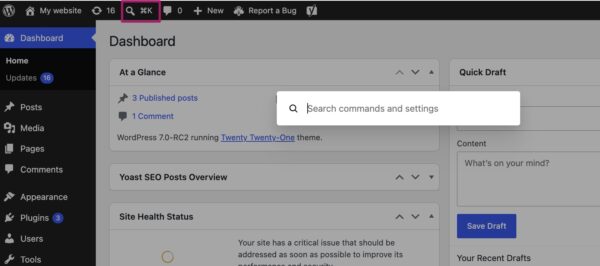
Further elevating the admin experience is the introduction of the Command Palette shortcut in the top menu bar. Accessible by clicking a dedicated icon or using the universal keyboard shortcuts (⌘K on macOS or Ctrl+K on Windows), this feature provides instant access to a powerful command-line interface within the WordPress dashboard. The Command Palette allows users to quickly navigate to different backend pages, perform various actions (such as creating a new post, managing plugins, or accessing settings), and even search for specific content or settings without having to manually click through menus. This productivity-boosting tool is a direct nod to similar functionalities in advanced text editors and development environments, offering power users an expedited workflow and significantly reducing the time spent on routine administrative tasks. Early feedback from beta testers indicates a substantial improvement in efficiency for those who frequently interact with the backend.
The visual refresh extends to the platform’s aesthetic with a new default color palette. The palette previously known as “Modern” has now been adopted as the standard, replacing the long-standing “Fresh” theme. This strategic shift in default styling aims to better align the administrative interface with the visual direction and modern aesthetic of the block editor and full site editing experience. The new palette offers a cleaner, more contemporary look, providing a cohesive visual identity across the entire WordPress ecosystem. For users who preferred the classic appearance, the “Fresh” palette remains available as an option within individual profile preferences, ensuring backward compatibility and user choice. These comprehensive UI/UX updates collectively contribute to WordPress 7.0’s ambition of delivering a truly modern and efficient web management platform.
Visual Revisions: A Clearer History
For content creators and site administrators, the ability to track and restore previous versions of content is invaluable. WordPress 7.0 dramatically improves this critical functionality with the introduction of visual revisions, moving beyond the previous raw text-based comparison.
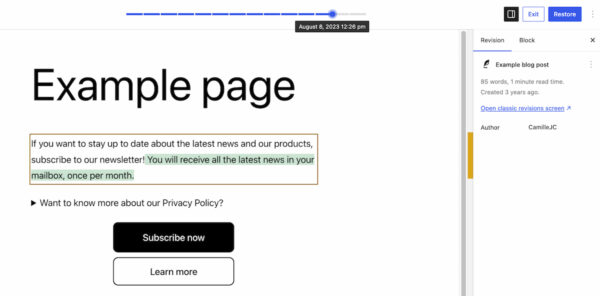
Historically, WordPress revisions provided a list of changes, but deciphering what exactly changed often required meticulous reading of side-by-side text, which could be cumbersome, especially for extensive content or layout modifications. WordPress 7.0 transforms this by offering a dynamic, visual preview of page revisions.
When accessing the revisions feature, users are now presented with a live preview of their page. A slider at the top allows seamless navigation through different versions, with each timestamp clearly indicating the date and time of the change. The most significant enhancement lies in the visual differential display: additions to the content are highlighted in green, modified sections appear in yellow, and deleted elements are distinctly marked in red. This intuitive color-coding allows users to immediately identify and understand the scope of changes at a glance, eliminating the need to parse through lines of code or text.
This visual approach significantly streamlines the process of auditing content changes, pinpointing the source of layout issues, or swiftly reverting to a previous, stable version of a page. For collaborative environments, visual revisions enhance accountability and understanding, making it easier for multiple contributors to track each other’s work. The feature not only improves error recovery but also serves as an invaluable learning tool for understanding content evolution, fostering greater confidence in content management processes.
Expanding the Block Editor’s Arsenal
As expected from a major WordPress release, the block editor receives substantial enhancements, further empowering users to build rich and dynamic content without custom code. WordPress 7.0 introduces two new core blocks and significant improvements to existing ones:
The Breadcrumbs block is a welcome addition, addressing a long-standing need for improved navigational aids and SEO. When added to a page, this block automatically generates a correct breadcrumb path based on the page’s hierarchical structure, displaying it prominently at the top. Beyond automatic generation, users are provided with customization options, allowing them to fine-tune its appearance and behavior. Breadcrumbs are crucial for user experience, offering clear navigation cues, and are equally important for search engine optimization, helping search engines understand site structure and potentially leading to rich snippets in search results. Its inclusion as a core block significantly reduces the reliance on third-party plugins for this essential functionality.
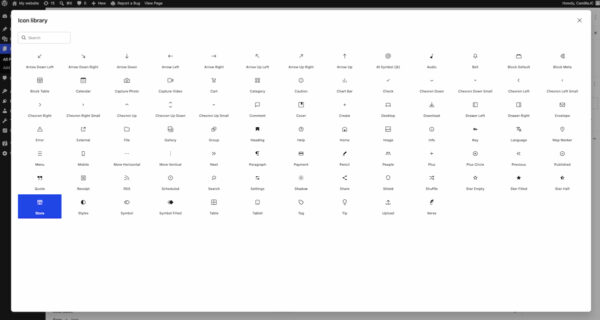
The new Icon block offers a streamlined way to integrate visual elements into content. It provides access to a directory of pre-defined icons directly within the block editor, allowing users to easily select and insert icons without needing to upload custom images or rely on icon font libraries. This not only ensures visual consistency across a website but also simplifies the workflow for designers and content creators, reducing asset management overhead and improving page load times by utilizing optimized vector graphics.
Existing blocks have also seen valuable improvements. The Grid Block, a powerful layout tool, now features enhanced responsive options, replacing the simpler Auto/Manual toggle. These new controls provide granular settings for managing column layouts and responsiveness across different screen sizes, giving designers more precise control over complex grid-based designs. The Cover Block, frequently used for visually striking hero sections, now supports embedded videos as backgrounds. This allows users to directly integrate videos from platforms like YouTube or Vimeo, adding a dynamic and engaging element to page headers or sections, further reducing the need for specialized plugins for advanced media integration.
These block editor advancements collectively reinforce WordPress’s strategy of providing a comprehensive, code-free design and content creation environment, enabling users to achieve sophisticated layouts and functionalities that once required significant technical expertise or reliance on a multitude of external plugins.
Granular Responsive Design Controls
In an era dominated by mobile browsing, responsive design is no longer a luxury but a fundamental necessity. WordPress 7.0 makes designing for diverse screen sizes significantly easier and more accessible through viewport-based controls.
This innovative feature allows users to dictate the visibility of individual blocks based on the user’s screen size. Within the block toolbar, a new “Show” option provides a simple toggle for selecting target devices: desktop, tablet, or mobile. By selecting specific devices, users can automatically hide a block on unselected devices. For instance, a complex data table might be displayed only on desktop and tablet, while a simplified summary block is shown on mobile.
This capability empowers site builders to create highly optimized and tailored experiences for different devices without writing a single line of custom CSS. It’s a game-changer for those without coding knowledge, enabling them to fine-tune layouts, prioritize content, and ensure optimal user experience across the entire spectrum of devices. Beyond aesthetic considerations, this also has performance implications. By intelligently hiding blocks that are not intended for certain viewports, the browser can potentially render less content, leading to faster page load times and a smoother experience for mobile users. This feature is a significant step towards democratizing advanced responsive web design.
Smarter Pattern Editing for Enhanced Workflows
Patterns and templates have become indispensable tools for accelerating site development and maintaining design consistency. WordPress 7.0 introduces smarter pattern editing modes to enhance user focus and prevent accidental design modifications.
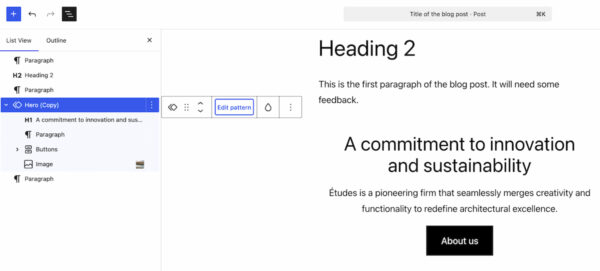
When a user selects a pattern in the editor, the List View now intelligently prioritizes and displays only the content-focused elements, such as text and image blocks. This “content-first” editing mode allows creators to concentrate solely on updating the actual information within the pattern, streamlining the content entry process and minimizing distractions from design elements. This is particularly beneficial for maintaining brand consistency across repetitive elements like call-to-action sections or team member profiles.
However, recognizing that design adjustments are sometimes necessary, WordPress 7.0 also provides a distinct “Edit pattern” option. Clicking this button expands the List View to reveal all underlying elements, including design-focused components like spacers, column structures, and background settings. This dual-mode approach offers the best of both worlds: a focused content editing environment for routine updates and a comprehensive design editing mode when layout or styling modifications are required.
This intelligent segmentation of editing capabilities significantly improves workflow efficiency, reduces the likelihood of unintentional design alterations, and ensures that patterns can be customized to fit specific use cases across a website without compromising the core design integrity. It fosters a more robust design system approach within WordPress, making it easier for teams to collaborate and manage complex site structures.
Laying the Groundwork for AI: The Connectors Section
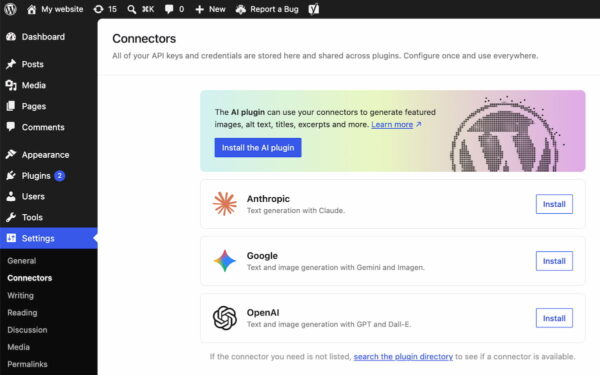
While WordPress 7.0 notably does not include any built-in, AI-powered tools, it takes a crucial strategic step by introducing a “Connectors” section located under Settings in the WordPress backend. This new central hub is designed to manage external integrations, particularly those involving Artificial Intelligence providers and agents.
The Connectors section provides a standardized framework for connecting a WordPress site to various external AI services such as Claude, Gemini, OpenAI, and potentially many others. Users can browse a directory of supported integrations or manually add connections using API keys and other credentials. This centralized approach simplifies the management of API access for different services, offering a unified interface rather than scattering connection settings across various plugin configurations.
This forward-thinking addition is not merely a convenience; it represents a significant piece of future-proofing for the WordPress ecosystem. By providing a standardized mechanism for external AI integration, WordPress is creating a robust, secure, and developer-friendly environment for the inevitable wave of AI-powered plugins and features. It ensures that as AI technology evolves, WordPress sites can seamlessly leverage these advancements without being locked into a single provider’s proprietary solutions. This strategic move positions WordPress to remain at the forefront of web technology, fostering innovation within its vast developer community and enabling site owners to harness the power of AI as it becomes more integral to content creation, optimization, and user interaction.
Enhanced Plugin Management: A New List Filter
For site administrators managing numerous plugins, the plugin screen can often become cluttered and challenging to navigate. WordPress 7.0 addresses this by introducing a new list filter for plugins, allowing developers to register custom tabs on the Plugins screen.
This feature enables plugins to be grouped under dedicated, custom-labeled tabs. For instance, a developer with a suite of related plugins can now create a single “Developer Name” tab (e.g., “Yoast” as mentioned in the original context) that, when clicked, displays only their specific plugins. This significantly improves organization and readability on the Plugins screen, which can often list dozens or even hundreds of active and inactive plugins.
For site administrators, this means a cleaner, more intuitive interface for managing their plugin arsenal. It simplifies tasks such as checking versions, monitoring activation statuses, and performing bulk actions on related plugins. This seemingly minor enhancement contributes greatly to the overall administrative user experience, reducing cognitive overload and making plugin management a more efficient process, particularly for sites with extensive functionality relying on multiple specialized plugins.
Performance, Infrastructure, and Future Outlook
Beyond the headline features, WordPress 7.0 delivers essential under-the-hood improvements that underpin a more performant and scalable platform. Performance was a key focus, with notable advancements including client-side media processing. This innovation allows for image and video optimizations to occur directly within the user’s browser before files are uploaded to the server. The benefits are manifold: faster upload times for users, reduced strain on server resources, and improved overall efficiency, particularly for media-heavy websites. Alongside this, continued improvements to block rendering contribute to general site speed and responsiveness, ensuring a snappier user experience.
An important infrastructure update is the decision to raise the minimum PHP version to 7.4. This move is critical for maintaining security, leveraging modern language features, and ensuring optimal performance. While it requires hosting providers and site owners to update older PHP installations, it aligns WordPress with current web development best practices and paves the way for future performance and security enhancements.
Still to Come: Real-time Collaboration
One highly anticipated feature, real-time collaboration, initially slated for WordPress 7.0, was ultimately postponed. The decision to delay its release was made to ensure the stability and robustness of the core platform, prioritizing a smooth and reliable update for millions of websites. This feature, which promises to allow multiple users to edit content simultaneously in the block editor, is a significant undertaking and is now expected to be part of a future release, underscoring WordPress’s cautious approach to introducing complex functionalities.
In conclusion, WordPress 7.0 is a landmark release that solidifies the platform’s commitment to modern web development. It’s a testament to the ongoing evolution of the block editor and the broader ambition to transform WordPress into an intuitive, app-like environment. From a more streamlined admin experience and visual content revisions to powerful new blocks and foundational AI integration capabilities, this version empowers users with unprecedented control and efficiency. While the real-time collaboration feature awaits a future debut, the current suite of enhancements offers a compelling reason for site owners and developers to update and explore the next phase of intuitive web management. The release reaffirms WordPress’s position as a dynamic and adaptive leader in the digital landscape, continually striving to democratize web publishing and creation for a global audience.