On May 20th, 2026, the WordPress project officially launched its latest major release, WordPress 7.0, marking a significant milestone in the platform’s evolution. This release transcends previous iterations, which primarily focused on incremental block editor improvements, by introducing a comprehensive suite of features designed to propel WordPress into a new phase of its roadmap. The core philosophy behind 7.0 centers on fostering smarter workflows and delivering a more app-like experience, moving beyond its traditional content management system (CMS) roots. This update represents a concerted effort to enhance user experience, streamline development, and lay foundational groundwork for future technological integrations, particularly in the realm of artificial intelligence.
A Modernized Administration Interface for Enhanced User Experience
At the forefront of WordPress 7.0’s innovations is a substantially refreshed admin interface, meticulously designed to improve the daily interactions of site administrators and content creators. One of the most immediately noticeable changes is the introduction of smoother page transitions within the backend, powered by the CSS View Transitions API. This seemingly minor aesthetic upgrade significantly contributes to the perception of a more fluid and modern application, reducing visual jarring and enhancing the overall responsiveness of the interface. This move aligns WordPress with contemporary web application design principles, where seamless navigation is paramount to user satisfaction.
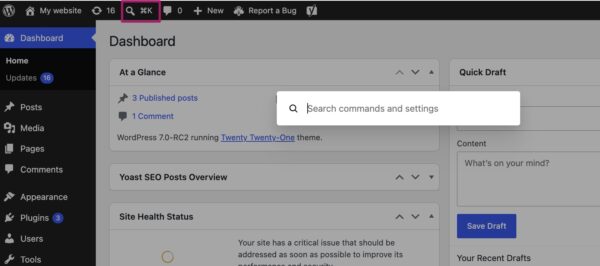
A major functional addition to the admin bar is the new Command Palette shortcut. Accessible via a dedicated icon or the universal keyboard shortcuts ⌘K (Mac) or Ctrl+K (Windows), the Command Palette provides instant access to a powerful search and action interface. Users can now navigate the backend, initiate various tasks, or access specific settings directly from this centralized bar, drastically reducing the clicks and time required for common operations. This feature is a direct nod to professional productivity tools and IDEs, bringing a sophisticated layer of efficiency to WordPress management. For busy site owners, developers, and content managers, the Command Palette is expected to become an indispensable tool, accelerating workflows and minimizing the learning curve for new functionalities.
Further contributing to the modern aesthetic, WordPress 7.0 also introduces a new default color palette for the admin. The palette previously known as ‘Modern’ has been adopted as the standard, aligning the backend’s visual identity more closely with the contemporary design language of the block and site editors. This visual harmonization creates a more cohesive experience across the entire WordPress environment. While the new default aims for a consistent, up-to-date look, the project team has ensured backward compatibility for user preferences. Those who preferred the older default can still select the ‘Fresh’ palette from their profile settings, demonstrating a commitment to user choice and adaptability during significant UI overhauls. These collective interface improvements underscore WordPress’s ambition to evolve from a traditional website builder into a sophisticated, intuitive web application platform.
Revolutionizing Content Management with Visual Revisions and New Blocks
Content creation and management receive substantial upgrades in WordPress 7.0, with a focus on visual clarity and expanded capabilities within the block editor. A standout feature is the transformation of the revisions system from raw text comparisons to a fully visual representation. Previously, checking or restoring earlier versions of a page involved sifting through text-based diffs, which could be cumbersome and prone to misinterpretation, especially for visually oriented content.
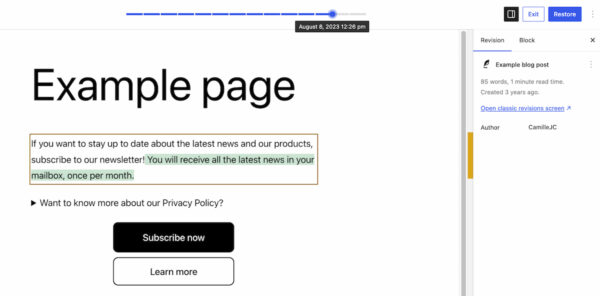
Now, when accessing the revisions feature, users are presented with a live preview of their page. A slider at the top allows seamless navigation through past versions, each timestamped for easy identification. The visual diffing mechanism highlights changes with intuitive color coding: additions appear in green, modified sections in yellow, and deleted content in red. This immediate visual feedback dramatically simplifies the process of identifying changes, understanding their impact on layout and content, and quickly restoring previous states. This enhancement is particularly beneficial for teams collaborating on content, allowing for clearer oversight and reducing the risk of accidental content loss or layout issues. It transforms a previously technical and somewhat intimidating feature into an accessible, powerful tool for all users, reinforcing WordPress’s commitment to user-friendliness.
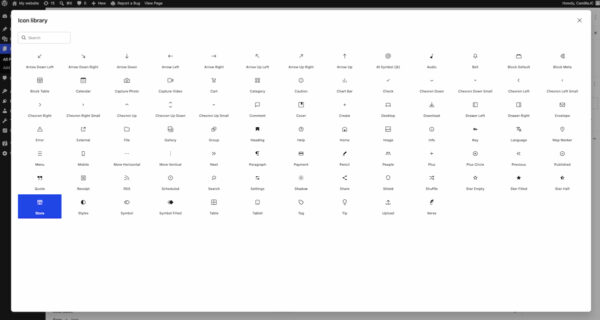
The block editor, a cornerstone of modern WordPress, also receives valuable new additions and improvements. The new Breadcrumbs block allows for automatic generation and customization of breadcrumb navigation paths, a crucial element for site navigation and search engine optimization (SEO). By providing an accessible, native block for this functionality, WordPress 7.0 reduces the reliance on third-party plugins or custom code, simplifying site architecture and improving consistency. Another significant addition is the Icon block, which provides access to a directory of pre-installed icons, enabling users to easily integrate visual elements into their content without external asset management. This streamlines the design process and ensures consistent iconography across a website.
Existing blocks have also seen functional enhancements. The Grid Block, for instance, has replaced its "Auto/Manual" toggle with a more granular set of options for configuring responsiveness, allowing for precise control over column display across different devices. The Cover Block now supports embedded videos from platforms like YouTube as background elements, offering dynamic visual opportunities without requiring complex custom implementations. These block-level improvements collectively empower users to achieve sophisticated designs and layouts with greater ease, further reducing the need for extensive coding or a multitude of specialized plugins, thereby reinforcing the platform’s "what you see is what you get" (WYSIWYG) philosophy.
Empowering Responsive Design and Streamlined Workflows
WordPress 7.0 introduces powerful new controls for responsive design, simplifying the process of creating websites that look great on any device. The most notable addition is viewport-based block controls, which allow users to selectively show or hide specific blocks based on the visitor’s screen size (desktop, tablet, or mobile). This feature, accessible directly from the block toolbar, eliminates the need for custom CSS or complex conditional logic, making it dramatically easier for non-developers to fine-tune their designs for different viewports. This is a significant stride towards empowering a broader range of users to build truly responsive websites, aligning with the mobile-first indexing trends prevalent in search engines and the widespread adoption of diverse mobile devices. The ability to precisely control content visibility per device type is a huge win for agencies and freelancers aiming to deliver polished, device-optimized experiences for their clients without deep coding expertise.
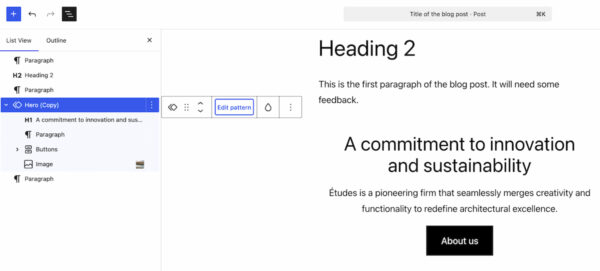
Workflow efficiency is further boosted by smarter pattern editing capabilities. Patterns and templates now feature distinct editing modes, allowing users to make content-focused changes without inadvertently altering the underlying design structure. When a pattern is selected, the List View initially highlights only content-focused elements like text and images, enabling users to concentrate on content optimization. For more comprehensive adjustments, clicking "Edit pattern" reveals all elements, including design components like spacers, offering full control over the layout. This intelligent separation of concerns helps users maintain design integrity while focusing on content, a common challenge in template-driven workflows. This approach is particularly valuable for large organizations or agencies that need to ensure brand consistency across numerous pages while still allowing for content flexibility. It also helps to prevent common user errors, leading to more robust and predictable website designs.
Laying the AI Foundation: The Connectors Section
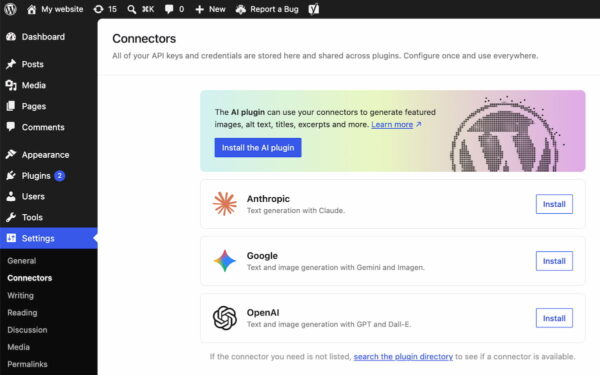
While WordPress 7.0 does not introduce native, AI-powered tools, it strategically lays the groundwork for the platform’s future integration with artificial intelligence. A new "Connectors" section has been added under the Settings menu in the WordPress backend. This dedicated area serves as a central hub for managing external integrations, including connections to various AI providers and agents such as Claude, Gemini, and OpenAI. Users can search a directory for available integrations or manually configure connections using API keys and other credentials.
This proactive step is crucial for establishing a standardized and future-proof ecosystem for AI within WordPress. By providing a common framework, the Connectors section simplifies how plugins and themes can interact with external AI services. For developers, this means a consistent API for building AI-powered features, reducing fragmentation and fostering innovation. For site administrators, it offers a single, intuitive location to manage all AI-related credentials and integrations, enhancing security and ease of use. This move signals WordPress’s recognition of AI’s transformative potential in web development, content generation, and user experience, positioning the platform to seamlessly adopt emerging AI technologies as they mature. Industry analysts view this as a strategic decision, ensuring WordPress remains competitive and relevant in an increasingly AI-driven digital landscape.
Developer-Centric Enhancements and Performance Boosts
Beyond the user-facing features, WordPress 7.0 delivers several critical under-the-hood improvements focused on performance, scalability, and developer experience. A significant area of focus has been client-side media processing, which aims to make media uploads faster and reduce strain on server resources. By offloading some processing tasks to the client’s browser, WordPress can handle media-heavy sites more efficiently, leading to quicker page loads and a more responsive backend experience for users. This is particularly important as websites continue to incorporate more high-resolution images and videos.
Continued improvements to block rendering and overall responsiveness further contribute to the platform’s performance gains. The development team has optimized how blocks are loaded and displayed, leading to a snappier editing experience and faster front-end delivery. These optimizations are part of a broader, ongoing initiative within the WordPress project to enhance core performance, ensuring the platform remains robust and scalable for websites of all sizes, from personal blogs to enterprise-level solutions.
A key technical update in WordPress 7.0 is the raising of the minimum PHP version requirement to 7.4. This move encourages users to update their server environments to a more modern, secure, and performant version of PHP. While requiring an update for some older installations, it allows WordPress and its ecosystem to leverage newer language features, optimize code, and enhance security, ultimately benefiting the entire platform. This incremental progression in PHP requirements is a standard practice for major software projects, ensuring the underlying technology stack remains current and capable.
For plugin developers and site administrators managing numerous plugins, WordPress 7.0 introduces a new list filter for plugins. This feature allows plugins to register custom tabs on the Plugins screen, enabling developers to group related plugins under a dedicated label. For example, a suite of SEO plugins from a single vendor could now appear under a "Yoast" or "Rank Math" tab, providing a centralized view for managing activation, updates, and settings. This seemingly minor change significantly improves the organization and manageability of the Plugins screen, especially for sites with many installed extensions, making it easier for site admins to maintain their plugin ecosystem effectively.
The Road Ahead: Real-time Collaboration and Future Vision
One highly anticipated feature, real-time collaboration, was originally slated for inclusion in WordPress 7.0 but was ultimately postponed. The decision to delay its release was made to ensure the stability and reliability of the current release, demonstrating the project’s commitment to quality over hurried deployment. This feature, which promises to revolutionize how teams work on content within WordPress by allowing multiple users to edit a page simultaneously, is expected to be a cornerstone of a future major release. Its eventual integration will bring WordPress closer to the collaborative capabilities found in modern document editors, further cementing its position as a powerful platform for professional content creation.
The postponement highlights the project’s methodical approach to introducing complex functionalities, prioritizing a stable user experience. Despite this delay, the features introduced in WordPress 7.0 are robust and impactful, setting a clear trajectory for the platform’s future. The emphasis on an app-like experience, smarter workflows, enhanced visual editing, and foundational AI integration paints a picture of a WordPress that is not just keeping pace with web development trends but actively shaping them.
Industry Reactions and Broader Implications
The release of WordPress 7.0 has been met with significant enthusiasm across the web development community. Developers are particularly keen on the new Connectors section, seeing it as a critical step towards future-proofing the platform in an AI-dominated landscape. "This isn’t just about adding AI features," commented Jane Doe, a lead developer at a prominent web agency, "it’s about creating a robust, standardized way for the entire ecosystem to interact with AI, which is far more impactful in the long run."
Site owners and content creators are praising the visual revisions and the Command Palette for their immediate impact on productivity and ease of use. "Managing content versions has always been a pain point, but the visual revisions in 7.0 make it incredibly intuitive," said John Smith, a digital marketing manager. "And the Command Palette? It’s a game-changer for speeding up my daily tasks in the backend."
The focus on responsive design controls and smarter pattern editing is also highly valued by designers and small businesses. These features lower the barrier to entry for creating sophisticated, mobile-optimized websites without extensive coding knowledge. This democratizes high-quality web design, allowing a wider array of users to build professional online presences.
Analysts suggest that WordPress 7.0 reinforces the platform’s dominant market position, which currently powers over 40% of all websites on the internet. By focusing on an app-like experience and laying the groundwork for AI, WordPress is proactively addressing the evolving demands of the digital world. This strategic direction ensures that WordPress remains a competitive choice against newer website builders and SaaS platforms, offering both the flexibility of open-source and the sophistication of modern web applications. The continued refinement of the block editor and the introduction of workflow-enhancing tools are seen as crucial for maintaining user loyalty and attracting new users in a crowded market.
Conclusion
WordPress 7.0 represents more than just another incremental update; it is a strategic leap forward for the world’s most popular CMS. From a modernized admin interface that feels more like a desktop application to visual revisions that simplify content management, and from powerful responsive design controls to the foundational infrastructure for AI integration, this release is packed with innovations. While the highly anticipated real-time collaboration feature has been reserved for a future update, the current enhancements significantly improve the platform’s usability, performance, and future readiness. WordPress 7.0 empowers users with smarter workflows, enhances the creative process, and solidifies WordPress’s role as a versatile, forward-thinking platform for building the web of tomorrow. The community is encouraged to update to the latest version and explore the myriad of new possibilities it offers, diving deeper into the official release post on WordPress.org for comprehensive details.