The digital landscape is undergoing a significant transformation, with visual content increasingly dominating how individuals explore interests, discover brands, and plan their lives. At the forefront of this evolution is Pinterest, a platform that has transcended its initial reputation as a digital mood board to become a powerful engine for visual discovery. Central to this shift is the burgeoning phenomenon of Pinterest collages, dynamic visual compositions that blend creative expression with strategic utility, capturing attention and driving engagement in a crowded online environment.
These layered visuals, ranging from Gen Z’s viral "Shuffles" to meticulously curated mood boards, are not merely aesthetic pleasing; they are potent tools for communication, branding, and commerce. Unlike ephemeral, scroll-and-forget content prevalent on many social media platforms, Pinterest collages are designed for permanence, consistently being saved, searched, and shared, extending their impact far beyond the initial posting time. This guide delves into the strategic creation of Pinterest collages that effectively stop the scroll, cultivate brand identity, and generate sustained traffic.
The Evolving Landscape of Pinterest: From Inspiration to Strategic Imperative
Pinterest has quietly but powerfully evolved beyond its traditional role as a repository for dream kitchen designs or elusive lemon cake recipes. It has emerged as a relevant, future-facing platform indispensable for creators, small business owners, and digital strategists. This evolution is underscored by its emphasis on "personal media" rather than social media, as famously articulated by Pinterest co-founder Ben Silbermann. This distinction highlights the platform’s focus on individual exploration and utility, making it a fertile ground for evergreen, searchable content that continues to yield results weeks, months, and even years after its initial publication.
The current prominence of Pinterest collages is undeniable. From vision board-style posts that encapsulate personal aspirations to product roundups and aesthetic mashups designed to compel saves, collages are dominating feeds. Their popularity stems from their inherent alignment with contemporary digital consumption habits: visual-first, mood-forward, and optimized for rapid inspiration coupled with long-term strategic planning. This format resonates deeply with current cultural trends observed across Gen Z and millennial demographics, including a strong focus on curated visual identities, the intersection of wellness and productivity, and the burgeoning concept of lifestyle design as a form of content.
While platforms like TikTok operate on rapid, often fleeting trends and Instagram frequently shifts its algorithmic priorities, Pinterest maintains a steady, enduring value proposition. Supporting this, Pinterest Business data reveals that a remarkable 80% of weekly users discover new brands or products on the platform, indicating its robust capacity for driving sticky, long-term traffic and conversions.
Defining the Pinterest Collage: A Mood Board with a Mission
At its core, a Pinterest collage is a curated visual story—a mood board infused with a strategic mission. It is designed to interrupt the scroll, captivating an audience with a narrative they are compelled to save and revisit. For content creators aiming to solidify their brand, small business owners showcasing product lines, or individuals meticulously crafting their digital dream lives, understanding how to harness the power of Pinterest collages is paramount.
A Pinterest collage is more than a mere collection of images; it is a styled, layered, and intentionally designed visual narrative. It can articulate a specific ambiance (e.g., "slow mornings + strong matcha"), present a cohesive product lineup, or illustrate an entire aesthetic vision. These collages represent a powerful intersection of strategic communication, compelling storytelling, and undeniable scroll appeal. Unlike traditional Pins that typically highlight a single image, a collage offers a comprehensive narrative arc within a single visual, providing bite-sized branding with significant potential impact without requiring users to navigate away from the platform.
The explosion of this trend is closely linked to the launch and widespread adoption of Pinterest’s Shuffles app. This application empowers users to create interactive collage content directly from existing Pins and their iPhone photo libraries. Gen Z, in particular, embraced Shuffles, leveraging it as a dynamic tool for exploring identity, fashion, interior design, and broader lifestyle aesthetics. A report by Modern Retail highlighted Shuffles’ rapid success, noting nearly 500,000 downloads on Apple’s App Store within four weeks of its beta release. This rapid uptake serves as compelling evidence that visual remixing has indeed become a new primary engine for discovery. Coupled with Pinterest’s recent enhancements in AI-powered search, the platform is strategically prioritizing aesthetic-driven content—content that not only gets seen but, crucially, gets saved and acted upon. In essence, if traditional Pins function as magazine advertisements, Pinterest collages represent the full editorial spread, with the user acting as the creative director.
Key Demographics and Strategic Applications of Pinterest Collages
The Pinterest collage trend transcends mere aesthetic appeal or generational niche; it is evolving into a fundamental mode of online creation, communication, and curation. Its utility spans a diverse user base, from solo creatives and multi-hyphenate entrepreneurs to niche enthusiasts.
-
Creators and Influencers: Creators utilize Pinterest collages to tell compelling visual stories that resonate and are readily shared. A single collage can encapsulate an entire brand mood, illustrate seasonal style transitions, or curate a collection of favorite items, eliminating the need for numerous individual Pins. This allows them to:
- Showcase an entire brand aesthetic or mood board.
- Highlight seasonal trends and product groupings.
- Curate product recommendations or wishlists.
- Create visual narratives for events or campaigns.
Whether a fashion influencer maps out fall trends or a wellness coach visualizes a "Sunday reset" routine, the collage format offers a high-impact, enduring presence.
-
Small Business Owners and Brands: Pinterest has long been a vital channel for product discovery. Collages transform this discovery into direct conversion opportunities. Instead of isolated product photos, brands now leverage collage-style Pins to provide context, demonstrate lifestyle integration, and show how multiple items complement each other. Examples include:
- Showcasing a new product collection in a lifestyle setting.
- Creating "shop the look" collages for fashion or home decor.
- Visualizing complementary products (e.g., "skincare routine essentials").
- Presenting gift guides or seasonal product roundups.
Collages serve as an immersive digital storefront display, enhancing the shopping experience.
-
Coaches, Educators, and Thought Leaders: Professionals in these fields are adopting Pinterest collages as concise, visually rich content libraries. Visual tools are highly effective for explaining complex concepts in an easily digestible, scrollable format, offering a longer lifespan than typical social media posts. Use cases include:
- Illustrating step-by-step guides or processes.
- Summarizing key takeaways from blog posts or workshops.
- Creating visual metaphors for abstract concepts.
- Presenting educational infographics or checklists.
These collages also offer versatile repurposing potential, serving as email content, digital product assets, or printables.
-
Everyday Users (Pinterest’s Power Base): This demographic forms the bedrock of Pinterest’s success. From the DIY bride planning her wedding to the student designing their dorm room, or the minimalist curating a capsule wardrobe, collages are ideal for visual planning. Users value the control, creativity, and sense of calm they offer in organizing ideas. Popular themes encompass:
- Event planning (weddings, parties, holidays).
- Home decor and renovation projects.
- Fashion and beauty inspiration.
- Travel itineraries and bucket lists.
- Personal development and wellness routines.
- Recipe collections and meal planning.
It’s no longer just about collecting ideas; it’s about actively crafting a visual representation of personal identity and future aspirations.
Ultimately, Pinterest collages empower individuals to express themselves, enable businesses to sell smarter, and facilitate more intentional planning online.
Diverse Formats of Visual Storytelling: Types of Pinterest Collages
Pinterest collages have evolved into a versatile medium, each type serving distinct purposes for storytelling, branding, and personal expression.
- Vision Board Collages: A timeless application, these collages allow users to visually articulate goals and aspirations. They typically combine inspiring images, motivational quotes, and affirmations to create a compelling visual blueprint for objectives.
- Style and Aesthetic Collages: Focused on fashion, personal style, or specific aesthetics, these collages often blend outfit ideas, accessories, and color schemes to forge a cohesive look or mood.
- Seasonal Mood Boards: These capture the essence of a particular time of year, integrating colors, activities, and themes relevant to the season. They provide rich inspiration for fashion, home decor, and lifestyle choices.
- Product Collages: Employed by brands and influencers, these collages showcase multiple items within a single, visually engaging image, proving highly effective for product promotion and sales conversion.
- Color Palette Guides: Centered on specific color schemes, these collages offer inspiration for design projects, fashion coordination, or interior decor, often displaying swatches or illustrative imagery.
- Quote + Image Mashups: These collages combine inspirational or thought-provoking quotes with pertinent imagery, aiming to evoke emotion and resonate deeply with viewers. They are widely used for personal development and social sharing.
- Mobile Pinterest Collages (Shuffles): Created directly within the Pinterest mobile app or Shuffles, these interactive collages utilize cutouts from existing Pins and personal photos, resulting in dynamic and highly personalized visual content.
Each collage type offers unique avenues for creative expression, idea sharing, and audience engagement, providing a rich source of inspiration for users.
Crafting Effective Collages: Tools and Techniques
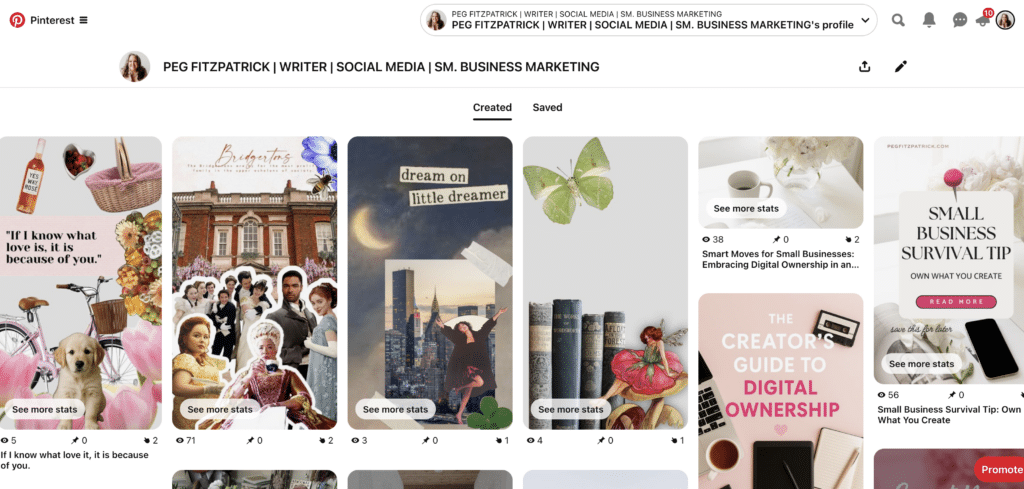
Creating a Pinterest collage is a blend of artistic vision and strategic execution. Whether constructed natively within Pinterest or designed using external tools, intentionality is key to connecting with the target audience.
Option 1: Using Pinterest’s Native Collage Tool (Mobile Only)
Pinterest has integrated its own collage feature, echoing the dynamic capabilities of its Shuffles app. To create one directly in the Pinterest app:
- Open the Pinterest app.
- Tap the "+" icon at the bottom of the screen to create a new Pin.
- Select "Collage" from the creation options.
- Choose images from your device’s gallery or select existing Pins.
- Use the editing tools to arrange, resize, rotate, and add stickers or text to your images.
- Once satisfied, tap "Next."
- Add a descriptive title and a keyword-rich description.
- Select a relevant board to save your collage to.
- Tap "Publish" to share your creation.
Pinterest’s official help guides provide detailed walkthroughs for this process.
Option 2: Designing a Pinterest Collage with Canva
Canva remains the preferred tool for many creators seeking branded and polished collages. The process typically involves:
- Open Canva and select "Pinterest Pin" as your design type (standard dimensions are 1000x1500px).
- Explore Canva’s extensive library of collage templates or start with a blank canvas.
- Upload your chosen images or select from Canva’s stock photo collection.
- Arrange and layer images, experimenting with grids, frames, and background elements.
- Add text overlays, incorporating keywords and a clear call to action.
- Integrate subtle branding elements such as brand colors or a discreet logo.
- Download your finished collage in a high-quality format (e.g., PNG or JPG).
- Upload the image to Pinterest, adding a compelling title, description, and destination link.
Saving a custom template allows for consistent branding and efficient creation of future collage series.
Bonus Tools for Deeper Creative Exploration:
- Adobe Express: Offers powerful editing features for image manipulation and graphic design, suitable for more complex collages.
- PicMonkey: Provides a range of photo editing and design tools, including collage makers, filters, and text options.
- Unfold: Popular for creating aesthetic story templates, which can be adapted for Pinterest collages.
- PhotoGrid: A user-friendly mobile app for creating photo collages, video collages, and editing pictures.
The creation process should be both enjoyable and purposeful, as a well-crafted collage can maintain content visibility for months on end.
Optimizing for Visibility: The SEO Imperative for Pinterest Collages
Creating a visually stunning Pinterest collage is only the initial step. To ensure it reaches the intended audience and sustains engagement, optimizing for Pinterest’s search algorithm is crucial.
-
Optimize Your Pin Title and Description:
- Keyword-Rich Titles: Craft clear, concise titles that include primary keywords users are searching for. For example, instead of "My Fall Vibes," use "Autumn Capsule Wardrobe Inspiration | Cozy Fall Fashion Ideas."
- Detailed Descriptions: Write comprehensive descriptions (2-3 paragraphs) that naturally integrate relevant keywords and long-tail phrases. Describe the content of the collage, its purpose, and what value it offers. Pinterest’s AI processes this text to understand content context.
-
Incorporate Hashtags Strategically:
- Relevant Hashtags: Use a mix of broad and niche-specific hashtags (e.g., #sustainablefashion #minimaliststyle #fallfashiontrends). Pinterest recommends 5-10 relevant hashtags per Pin.
- Shuffles Context: While traditional Pinterest hashtag usage has evolved, they remain particularly effective for discovery within the Shuffles app, where users often search by specific aesthetic tags.
-
Design with SEO in Mind:
- Text Overlays: Include relevant keywords directly on the collage image as text overlays. This makes the Pin more visually informative and aids Pinterest’s visual search capabilities.
- Vertical Format: Design collages in the optimal vertical aspect ratio (e.g., 2:3 or 1000×1500 pixels) for better visibility in feeds.
- High-Quality Imagery: Use clear, high-resolution images. Pinterest prioritizes visually appealing content.
-
Engage with the Community:
- Active Pinning: Consistently create and save new, relevant content to your boards. This signals activity to the algorithm.
- Group Boards: Participate in relevant group boards (if active and moderated) to expand your reach, though their impact has decreased over time.
-
Monitor Performance and Adjust:
- Pinterest Analytics: Regularly check which collages are performing best in terms of impressions, saves, and outbound clicks.
- Adapt Strategy: Use these insights to refine your keyword choices, design aesthetics, and content themes for future collages.
By diligently implementing these SEO strategies, Pinterest collages can achieve sustained visibility and engagement, significantly enhancing one’s presence on the platform.
Driving Action: Collages as Traffic Generation Engines
Beyond aesthetics, the true power of a Pinterest collage lies in its ability to generate tangible results—drawing new audiences, attracting followers, and converting leads into website visits, sales, or newsletter subscriptions. Pinterest’s unique value proposition is its capacity for long-term traffic generation through evergreen content that users genuinely want to save and revisit.
-
Every Pin Needs a Destination: Even if a collage primarily conveys a "vibe," it should always link to a helpful destination. This could be:
- A specific blog post or article.
- A product page or collection in an e-commerce store.
- A lead magnet or email sign-up page.
- A relevant category page on a website.
- An affiliate link (transparently disclosed).
The objective is to provide the audience with a clear, actionable next step, preventing them from being left in "mood board limbo."
-
Match the Collage to the Link: A common error is linking a collage to a generic homepage. If a collage showcases "Fall Slow Fashion," the link should direct users to that precise blog post or product collection. This direct alignment between visual content and destination enhances click-through rates and prolongs site visits.
-
Save to Multiple Relevant Boards: Avoid the "pin once and forget" approach. Strategically schedule your collage to be saved to several relevant boards over time. For instance, a collage on "Clean Girl Skincare" could be saved to boards like:
- "Skincare Routines"
- "Beauty Essentials"
- "Minimalist Lifestyle"
- "Wellness & Self-Care"
Distribute these saves naturally to avoid appearing spammy, maximizing discoverability across different interest categories.
-
Repurpose Smartly: A single Pinterest collage can fuel an entire content cycle. Repurpose it across various platforms and formats:
- Embed it in blog posts or website articles.
- Share it on Instagram Stories or as a carousel post.
- Feature it in email newsletters.
- Use elements in e-commerce product descriptions.
- Adapt it for other social media platforms like Facebook or X (formerly Twitter).
-
Utilize Idea Pins + Shuffles for Engagement: While Idea Pins (multi-frame stories) and Shuffles collages do not permit direct outbound links, they are invaluable for boosting reach and engagement. Use them to:
- Build brand awareness and aesthetic recognition.
- Showcase expertise through visual tutorials or guides.
- Grow followers and increase profile visibility.
- Create highly shareable, trending content that indirectly drives traffic to your profile.
-
Track What’s Working: Leverage Pinterest analytics to monitor:
- Impressions: How many times your collage was seen.
- Saves: How many users saved your collage for future reference.
- Outbound Clicks: How many times users clicked through to your linked destination.
- Top Performing Pins: Identify which collages are driving the most engagement and traffic.
Analyze these metrics to identify successful patterns and replicate them in future content creation. A Pinterest collage is not merely decorative; it is a purposeful asset that, when combined with scroll-stopping visuals and strategic linking, transforms inspiration into tangible results.
Measuring Success: Analytics and Trend Forecasting
Eliminating guesswork from your Pinterest strategy is possible through the platform’s robust analytics. Once several collages are published, delving into the data becomes essential for shaping future content and building momentum.

Where to Start: Pinterest Analytics
Access your Pinterest Business Hub and examine:
- Overview: General performance metrics (impressions, engagements, audience).
- Pin Performance: Detailed data for individual Pins, including collages.
- Audience Insights: Demographics and interests of your engaged users.
- Outbound Clicks: Crucial for understanding traffic generation.
- Top Boards: Identify which of your boards are driving the most activity.
The goal is to discern patterns: which colors, layouts, topics, or calls to action are consistently generating saves and clicks?
What to Watch in Collage Performance:
- Engagement Rate: (Saves + Clicks) / Impressions. A high engagement rate indicates resonant content.
- Outbound Click-Through Rate (CTR): Clicks / Impressions. This directly measures how effective your collage is at driving traffic.
- Saves vs. Clicks: Some collages might be highly savable (inspiration) but generate fewer clicks, while others might be click-magnets. Both are valuable, but for traffic generation, prioritize clicks.
- Audience Demographics: Does your content resonate with your target audience?
Leveraging Pinterest Trends to Stay Ahead
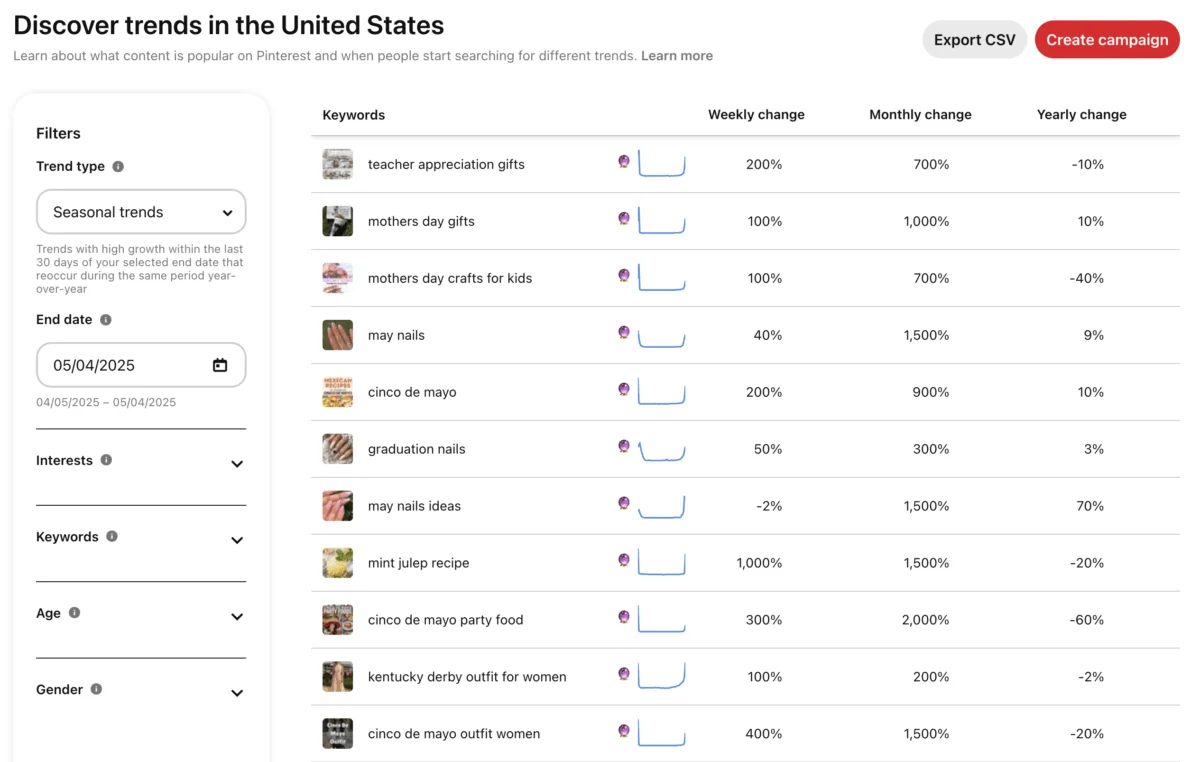
The Pinterest Trends tool serves as a predictive resource, revealing what your audience is actively searching for before it becomes mainstream. Search for terms like:
- "minimalist bedroom aesthetic"
- "sustainable fashion capsule"
- "DIY home office organization"
- "healthy meal prep ideas"
- "vintage wedding decor"
By identifying rising trends, creators can develop Pinterest collages around these topics ahead of the curve, positioning their content at the top of search results and sustaining its visibility.
Test. Tweak. Repeat.
Not every collage will go viral, and some may underperform. This iterative process is part of Pinterest’s reward system for consistency and experimentation.
Consider testing:
- Different Layouts and Visual Styles: Grid vs. freeform, minimal vs. rich.
- Text Overlays: Different fonts, sizes, and messaging.
- Calls to Action: Explicit vs. subtle, varied phrasing.
- Linked Destinations: Blog posts vs. product pages vs. lead magnets.
- Pinning Times: While less critical for evergreen content, it can still influence initial reach.
Small, deliberate tweaks lead to significant insights. Allow data to inform your creativity without stifling it.
Observing Competitors and Niche Leaders
Your niche is replete with valuable clues. Search "Pinterest collage" combined with your niche keywords (e.g., "Pinterest collage travel," "Pinterest collage home office") to identify:
- Popular Styles: What visual aesthetics are performing well?
- Common Themes: What topics are frequently covered?
- Engagement Strategies: How are others driving saves and clicks?
Pinterest success isn’t about reinvention but about presenting fresh, on-brand content that aligns with existing search demand.
Common Mistakes to Avoid for Enduring Collage Impact
Pinterest is a platform that offers substantial long-term returns, but only when approached strategically. A well-crafted collage can generate traction for extended periods, but its potential can be undermined by classic missteps.
- Overdesigning or Overcrowding: A Pinterest collage is a visual story, not a digital scrapbook. Packing in too many images, excessive fonts, or dense text overwhelms the viewer. Effective collages prioritize visual flow, intentional white space, and a focused narrative, allowing images to breathe.
- Ignoring Mobile Optimization: Over 80% of Pinterest traffic originates from mobile devices. A collage that appears stunning on a desktop but becomes unreadable or visually messy on a smartphone will fail to engage. Always test collages at mobile scale before publishing.
- Lack of Clear Focus or Call to Action (CTA): Aesthetic appeal alone is insufficient. Every collage needs a purpose, guiding viewers towards a blog post, product, or specific idea. Even a subtle prompt to "save for later" or "learn more" provides direction.
- Weak or Missing Keywords: Without proper keyword optimization, Pinterest cannot effectively categorize and display your collage to the relevant audience. Neglecting keyword research or using vague, non-searchable titles (e.g., "Spring Thingz") severely limits discoverability. Use precise, searchable phrases in titles and descriptions.
- Forgetting to Link Out (or Linking to the Wrong Page): A common oversight is uploading collages as Idea Pins without a clear next step, or linking a skincare mood board to a generic homepage instead of the specific product collection featured. Every Pin requires a logical, specific destination to avoid becoming a dead end.
- Relying Only on Static Pins: While static Pins remain powerful, Pinterest increasingly favors engagement-rich content such as videos and creations from Shuffles. Exclusively using static images means missing out on potential algorithmic boosts and expanded reach.
- Posting Once, Then Ghosting: Collages offer evergreen potential, but Pinterest rewards consistent activity. Repin high-performing collages to different relevant boards, update seasonal content with fresh variations, and maintain a steady stream of new visuals to keep the engagement flywheel turning.
Avoiding these common pitfalls doesn’t demand perfection but rather a strategic, iterative approach. Continuous refinement ensures Pinterest collages work effectively to support overall content and marketing objectives.
Advanced Tips and Creative Ideas for Maximizing Impact
Once the fundamentals of Pinterest collages are mastered, the focus shifts to smarter, more impactful strategies that differentiate content, build trust, and sustain traffic.
-
Create a Collage Series: Individual Pins are effective, but a cohesive series fosters bingeability and consistent audience engagement. Consider:
- "Outfit of the Week" or "Seasonal Style Guide" series: Showcasing evolving fashion.
- "Room Makeover Progression": Documenting a design project in stages.
- "Product Deep Dive": Highlighting different aspects or uses of a single product across multiple collages.
- "Weekly Planner/Journal Prompts": Offering recurring value.
Maintain a consistent layout or design template across the series for immediate brand recognition.
-
Lean Into Themes That Spark Emotion or Utility: Pinterest users are inherently planners and dreamers. Collages that offer solutions or evoke desirable feelings resonate deeply. Effective themes include:
- Aspirational Lifestyle: "Dream Home Office Setup," "Weekend Getaway Inspiration."
- Problem-Solving: "Budget-Friendly Meal Prep," "Small Space Storage Solutions."
- Emotional Resonance: "Cozy Hygge Home Decor," "Mindful Morning Routine."
- Educational Value: "Beginner’s Guide to [Topic]," "Key Steps to [Goal]."
-
Collaborate With Others for Shared Reach: Partnering with creators or brands in complementary niches can expand audience reach. For example, a "Minimalist Home Vibes" collage creator could collaborate with a "Clean Beauty Favorites" creator. Pinning to each other’s relevant boards, tagging, and maintaining aligned aesthetics can facilitate mutual audience growth.
-
Reuse High-Performing Content in New Formats: If a blog post or product guide is performing well, transform its core message into a Pinterest collage. Conversely, if a collage is highly successful, remix it into:
- An Idea Pin with multiple frames.
- A video Pin animating elements of the collage.
- A carousel post on Instagram or LinkedIn.
- An infographic for a blog post.
- A downloadable guide or printable.
-
Add Subtle Brand Elements Without "Screaming Branding": People save inspiring content, not overt advertisements. Instead of a large logo, try:
- Consistent Color Palettes: Incorporate brand colors naturally.
- Unique Typography: Use a consistent brand font for text overlays.
- Watermarks: A small, discreet logo or URL in a corner.
- Signature Styling: A recognizable aesthetic or filter applied to images.
These elements build brand recognition organically.
-
Tap Into Nostalgia and Pop Culture: Pinterest’s millennial and Gen Z user base appreciates relevant cultural references. Collage ideas could include:
- "90s Grunge Fashion Revival."
- "Romantic Academia Aesthetic."
- "Cozy Cottagecore Interiors."
- "Y2K Fashion Trends Reimagined."
- "Dark Academia Study Inspiration."
These themes leverage existing cultural trends for heightened engagement.
Pinterest collages are more than just visually appealing images; they represent a visual language that audiences already understand and engage with. By creating with this level of intention, content doesn’t merely get saved—it becomes memorable and impactful.
Your Turn – Get Started on a Pinterest Collage
The strategic framework has been laid out, and the compelling examples underscore the power of a well-executed Pinterest collage. Now, it’s time to translate this knowledge into action. Whether the objective is brand building, personal life planning, or simply creating content that achieves maximum visibility, saves, and shares, Pinterest collages offer an efficient path to standing out without succumbing to burnout.
Here’s a concise action plan to initiate your Pinterest collage journey today:
- Define Your Purpose: Before selecting images, determine the core message or goal of your collage. Is it to inspire, educate, sell, or drive traffic?
- Research Keywords: Utilize Pinterest Trends and the search bar to identify relevant, high-traffic keywords for your chosen topic.
- Gather High-Quality Visuals: Curate a collection of aesthetically pleasing, high-resolution images that align with your theme and brand.
- Choose Your Creation Tool: Decide whether to use Pinterest’s native mobile collage tool or a design platform like Canva for more control and branding.
- Design Your Collage: Arrange your chosen images, add relevant text overlays (incorporating keywords), and ensure mobile optimization.
- Craft Compelling Copy: Write a keyword-rich title and a detailed description that explains the collage’s value and encourages engagement.
- Add a Strategic Link: Ensure your collage links to a specific, relevant destination that provides further value or prompts action.
- Select Relevant Boards: Pin your collage to the most appropriate boards on your profile.
- Schedule for Consistency: Plan to create and publish collages regularly to maintain visibility and engage your audience over time.
- Analyze and Refine: Monitor your collage’s performance using Pinterest Analytics and adapt your strategy based on what resonates most with your audience.
Success on Pinterest isn’t contingent on viral hits but on consistent, strategic presence with visuals that connect and content that endures. Begin where you are, pin with intention, and build a content asset that works harder than fleeting algorithmic trends.