admin
admin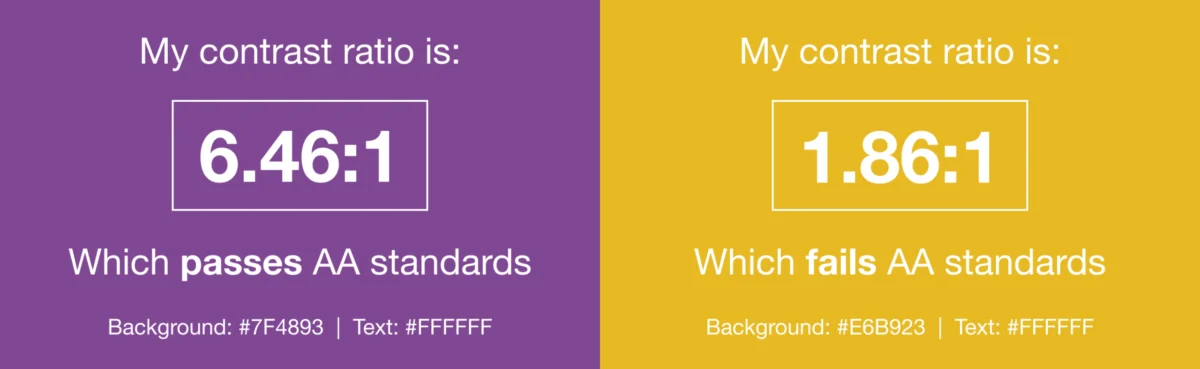
In the contemporary digital landscape, where companies meticulously craft and deliver email experiences designed to captivate subscribers, a critical element often remains overlooked: email accessibility. Neglecting this fundamental aspect risks alienating a substantial portion of the audience, specifically individuals living with visual, physical, cognitive, and neurological disabilities. As digital communication becomes increasingly ubiquitous, ensuring that every message is perceivable, operable, understandable, and robust for all users is no longer merely a best practice but a societal, legal, and commercial imperative.
Defining Email Accessibility: A Foundational Pillar of User Experience

Email accessibility, at its core, is an extension of robust user experience and design principles. It mandates that every individual, regardless of their abilities or the assistive technologies they employ, can effortlessly read, comprehend, and interact with an email message. This concept parallels the ongoing efforts to ensure email compatibility across a myriad of email clients, particularly those with historically poor support. By proactively incorporating workarounds and fallbacks, marketers ensure a positive and consistent experience for a broader audience, thereby fostering trust and cultivating enduring loyalty with subscribers.
The universally recognized standard guiding digital accessibility is the Web Content Accessibility Guidelines (WCAG). Developed by the World Wide Web Consortium (W3C) under its Web Accessibility Initiative (WAI), WCAG provides comprehensive international standards for making websites, applications, and other digital properties accessible to people with disabilities. The guidelines are regularly updated to reflect advancements in technology and evolving accessibility considerations.
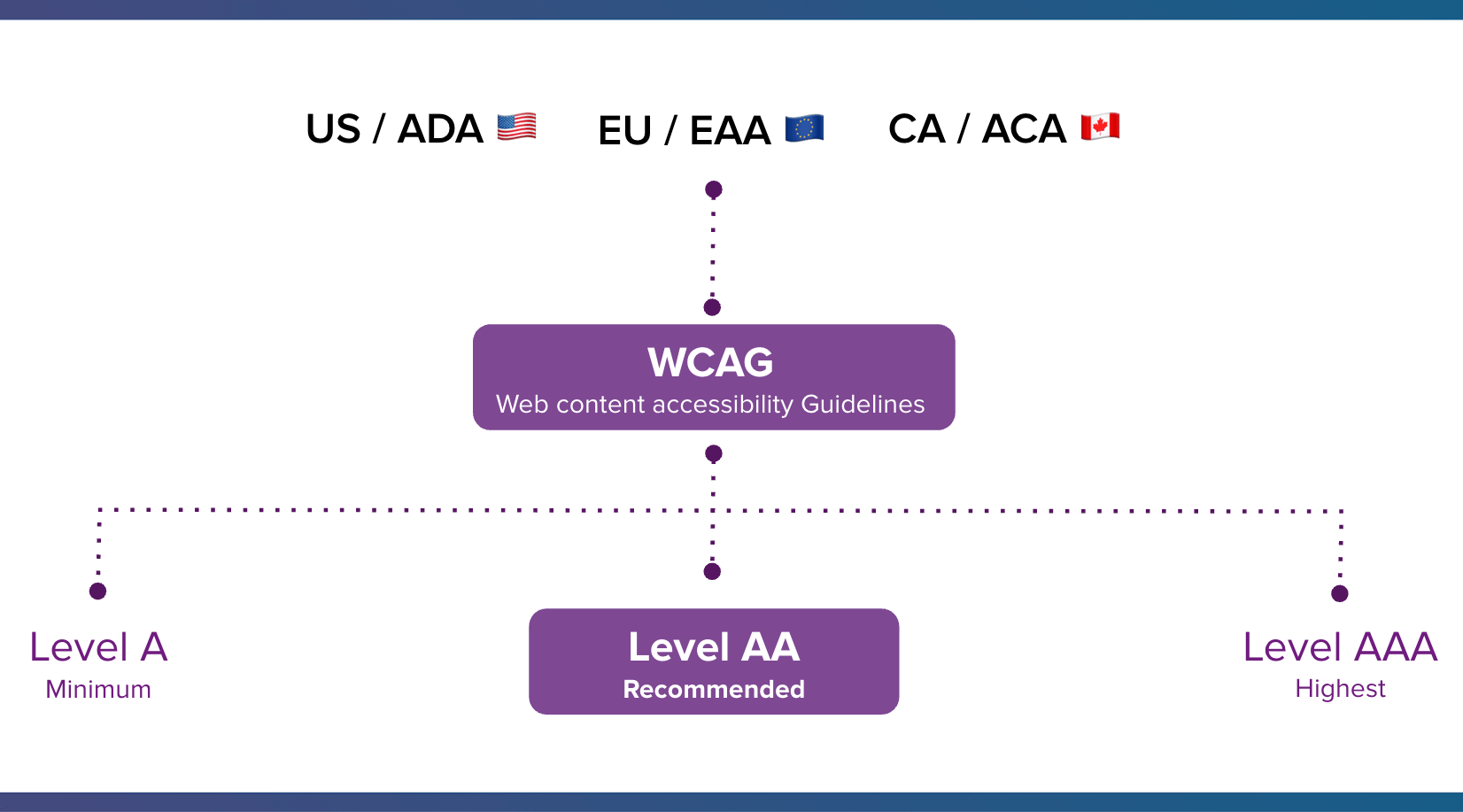
The WCAG framework outlines three levels of conformance: Level A (the minimum accessibility), Level AA (the recommended target for most organizations to ensure broad accessibility), and Level AAA (the highest level, typically requiring specialized solutions). While WCAG itself is not a law, its principles are widely adopted and supported by numerous national and international accessibility legislations, including the Americans with Disabilities Act (ADA) in the U.S., the European Accessibility Act (EAA), and Canada’s Accessible Canada Act (ACA). Conformance with WCAG, particularly Level AA, signifies a business’s commitment to meeting these legal and ethical standards, safeguarding against potential legal challenges and reinforcing a brand’s reputation for inclusivity.
The foundation of WCAG standards rests on four main principles, collectively known by the acronym POUR:
- Perceivable: Information and user interface components must be presentable to users in ways they can perceive. This means not relying solely on one sensory modality, such as sight or hearing. For instance, providing alternative text for images or captions for videos.
- Operable: User interface components and navigation must be operable. This implies that users must be able to interact with all controls and navigational elements, regardless of whether they use a mouse, keyboard, or assistive input devices.
- Understandable: Information and the operation of user interface must be understandable. Content should be clear, concise, and predictable, making it easier for users to grasp the meaning and function of the interface.
- Robust: Content must be robust enough that it can be interpreted reliably by a wide variety of user agents, including assistive technologies. This ensures that content remains accessible even as technologies evolve.
Why Accessibility is Non-Negotiable: Legal, Ethical, and Commercial Imperatives
The push for email accessibility is driven by a confluence of factors, ranging from sheer demographic scale to stringent legal mandates and undeniable commercial advantages. Ignoring these facets represents a significant oversight with tangible consequences.

1. The Pervasive Reach of Disability – An Underserved Audience:
Disabilities are far from an "edge case." Data from the Centers for Disease Control and Prevention (CDC) reveals that one in four adults in the United States lives with a disability. Similarly, the European Union reports that approximately one in four adults experience some form of disability. On a global scale, the World Health Organization (WHO) estimates that one in six people live with a significant disability. This equates to over a billion people worldwide who may face barriers in digital environments, including email.
Email, as a communication channel, continues its exponential growth. Statista projects that by 2027, there will be 4.89 billion email users globally. With subscribers spending an average of 8.97 seconds engaging with an email, as per Litmus research, every second counts. As Lauren Castady, a Design Leader, Accessibility Advocate & Creative Consultant at LC Creative, aptly states, "Too often accessibility is framed as designing for someone, if that’s an edge case or a small segment. But the truth is it’s one of the largest audiences we design for."
The impact of common disabilities on email engagement is profound:
- Visual Impairments: Users relying on screen readers need descriptive alternative text for images, clear structural headings, and high color contrast. Those with low vision benefit from scalable fonts and magnifiers.
- Physical Impairments: Individuals with limited motor control, using alternative input devices like head pointers or eye-tracking software, require large, easily targetable clickable areas and full keyboard navigability.
- Cognitive and Neurological Disabilities: Users with dyslexia, ADHD, or photosensitive epilepsy benefit from clear, concise language, predictable layouts, reduced visual clutter, and the absence of flashing or rapidly moving content.
- Hearing Impairments: While less common for text-based emails, any embedded video content requires captions or transcripts.
Beyond permanent disabilities, accessible design also significantly benefits individuals experiencing situational or temporary impairments. This "curb cut effect" means features designed for specific needs often improve usability for everyone. Examples include reading emails on a small screen in bright sunlight, navigating with one hand due to a temporary injury, or accessing content on an older device with a slow internet connection.
2. Legal Mandates – The Cost of Non-Compliance:
Governments worldwide have increasingly legislated digital accessibility to ensure equal access to information and services.
- U.S. Americans with Disabilities Act (ADA): While enacted in 1990, the ADA’s Title III, prohibiting discrimination on the basis of disability in places of public accommodation, has been broadly interpreted by courts to include websites and digital services. Numerous lawsuits have been filed against companies whose digital properties, including emails, are not accessible.
- European Accessibility Act (EAA): Effective by mid-2025, the EAA mandates accessibility requirements for various products and services, including e-commerce and communication services, across all EU member states.
- Accessible Canada Act (ACA): Passed in 2019, the ACA aims to identify, remove, and prevent accessibility barriers in areas under federal jurisdiction, including communications.
- Other Laws: Similar legislation exists in countries like the UK (Equality Act 2010), Australia (Disability Discrimination Act 1992), and Japan (Act on the Elimination of Discrimination against Persons with Disabilities).
Failure to adhere to these standards can result in costly legal actions, significant fines, reputational damage, and mandatory remediation efforts. More importantly, it perpetuates the exclusion of individuals who rely on accessible digital experiences to participate fully in society and the economy.
3. Driving Business Results – Beyond Compliance to Commercial Advantage:
While legal compliance provides a compelling impetus, email accessibility is far more than a defensive measure; it is a strategic business advantage.
- Expanded Market Reach and Revenue: The "disability market" holds substantial economic power. The Return on Disability (ROD) Group estimates that people with disabilities in the U.S. control over $1 trillion in annual disposable income. Ignoring accessible design means actively leaving a significant portion of potential revenue on the table.
- Enhanced Engagement and Deliverability: Accessible emails are inherently better designed. They are clearer, more structured, and easier to navigate for all users. This improved user experience often translates into higher engagement rates, which positively impacts email deliverability. Email service providers often favor senders with strong engagement, meaning more accessible emails are more likely to land in the inbox, creating a "win-win-win" scenario.
- Stronger Brand Reputation and Loyalty: Brands that prioritize accessibility demonstrate a commitment to inclusivity and social responsibility. This resonates deeply with consumers, building trust and fostering loyalty not only among individuals with disabilities but also among their friends, family, and allies. In an increasingly socially conscious market, inclusive design is a powerful differentiator.
- Innovation and Universal Design: Designing for accessibility often pushes innovation. Features initially conceived for specific needs frequently enhance the experience for the broader user base. For example, high-contrast text benefits users in bright environments, and clear, concise language improves comprehension for everyone.
Given the widespread availability of tools and technology to facilitate accessible email campaigns, there is no longer a valid excuse for neglecting this critical aspect. Prioritizing accessibility is not just the right thing to do; it is a smart business move that improves the experience for everyone, including those with temporary impairments.
Implementing Accessibility: Best Practices for Email Marketers

Achieving email accessibility requires a holistic approach, integrating best practices across visual design, structural coding, and content creation.
Visual Design Considerations:
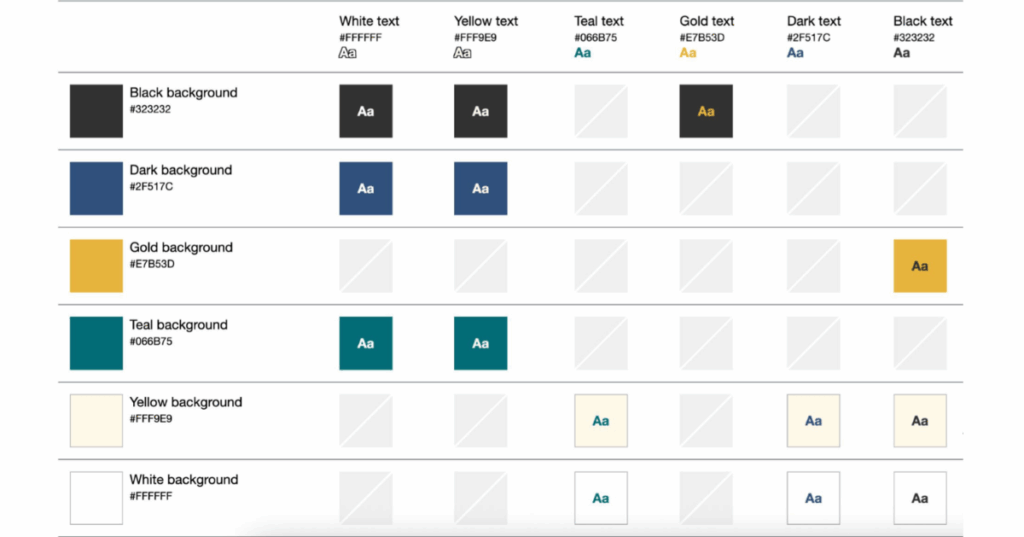
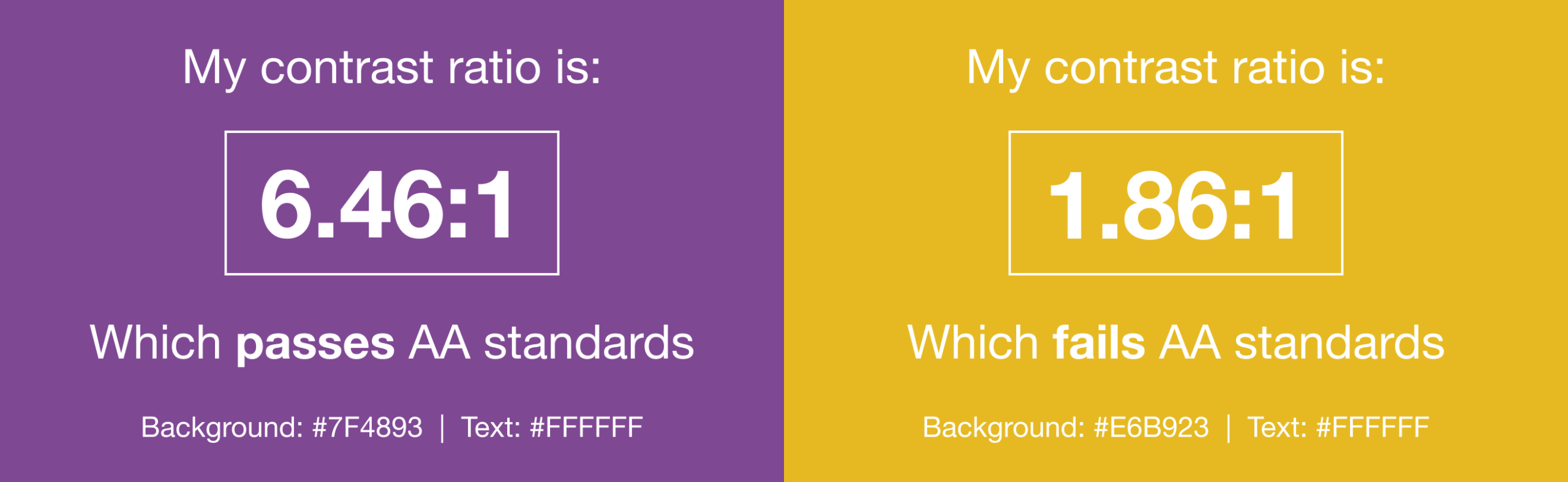
- Intelligent Color Use: Color should never be the sole method of conveying important information. For subscribers with color blindness, differentiate elements using patterns, icons, or text labels in addition to color. Crucially, maintain high color contrast between text and background elements. Tools like WebAim’s Color Contrast Checker can verify that your chosen color combinations meet WCAG AA standards. As Lauren Castady advises, "Color contrast issues are one of the fastest ways brands can be more accessible. The fix isn’t fewer colors, it’s clearer rules. So one of the most practical things that you can do is create a color matrix. It shows which brand colors work together and which ones don’t. This removes subjective decision making and speeds teams up."
- Avoiding Harmful Content: Flashing content, especially at certain rates or in specific patterns (e.g., 2-55 Hz), can trigger photosensitive seizures. Avoid such content entirely. If using animated GIFs, ensure they stop after three cycles or within five seconds, and always provide a static fallback for critical information.
- Balancing Text and Images: While images can be engaging, critical information should primarily be conveyed using live HTML text. Screen readers cannot interpret text embedded within images, forcing blind users to rely solely on alt text, which may not always capture the full nuance.
- Legible Font Sizes: Text smaller than 14 pixels on desktop screens often requires effort to read. For mobile devices, where text can appear even smaller, use media queries to increase the minimum font size to 16 pixels. Consider using
remunits instead ofpixelsfor font sizes;rems scale dynamically based on the user’s browser settings, accommodating those who have increased their default font size for accessibility. - Prioritizing Live HTML Text: This is perhaps the most fundamental accessibility practice. As Lauren Castady emphasizes, "The single biggest thing we can do to improve accessibility over and over for as long as I’ve worked in email is to use live HTML text wherever possible. Live text supports screen readers. It scales when someone zooms in, it adapts to dark mode and it allows us to maintain minimum readable body size of 14-16 pixels. Live text preserves us to maintain the brand voice better than images ever could because it adapts, responds and travels."
- Strategic White Space and Line Height: Adequate line height (typically 1.5 times the font size) improves readability, especially for users with cognitive disabilities. Generous white space between paragraphs and around text blocks prevents visual clutter and helps users track their place. Add padding to table cells or paragraph tags to keep text away from the email’s edges.
- Left-Aligned Text: Avoid justified text, where word and letter spacing is adjusted to fill both margins. This often creates inconsistent gaps, known as "rivers," making text difficult to read. Left-aligned text provides a consistent reading flow.
- Thoughtful Typeface Selection: Choose clean, evenly spaced, and non-condensed typefaces. While web fonts offer creative freedom, prioritize accessibility. Always include appropriate fallback fonts for email clients that do not support your chosen web font.
Structural and Semantic Markup:
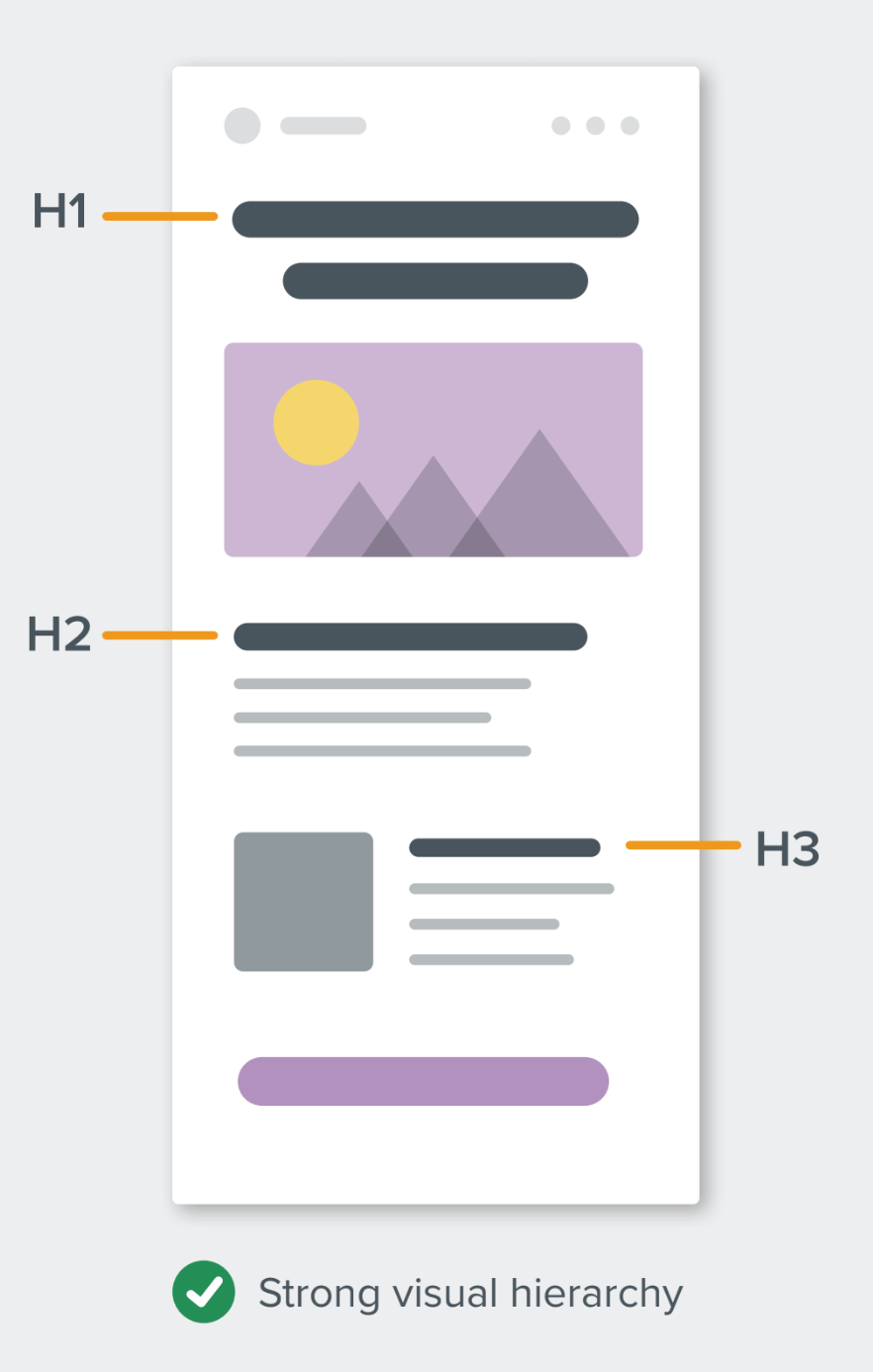
- Clear Visual Hierarchy with Headings: Use HTML heading tags (
<h1>,<h2>,<h3>, etc.) to create a logical structure and hierarchy for your content. Use only one<h1>per email, and ensure heading levels are nested logically (e.g.,<h2>follows<h1>, not<h3>). This aids screen reader users in navigating the email’s content. - Semantic Elements for Screen Readers: Properly use
<p>and<h1>tags. While historically challenging to style, modern techniques allow control over whitespace usingmargin:0;andmso-line-height-rule:exactly;for Microsoft Outlook clients, which helps maintain specified line heights. For semantic elements, usemarginrather thanpadding, as padding support can be inconsistent. - Correct Use of ALT Attributes: The
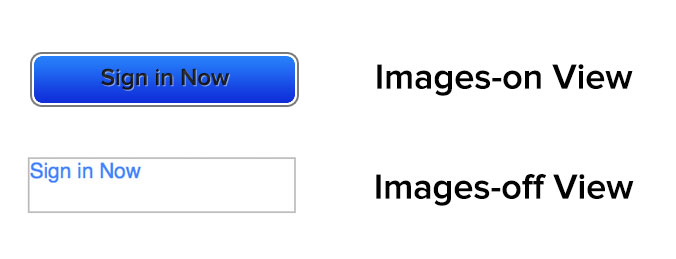
altattribute is crucial for images, providing descriptive text when images are blocked or for screen reader users. Determine if an image is functional (e.g., a button), illustrative (conveys information), or decorative (purely aesthetic). Functional and illustrative images require descriptive alt text, while decorative images should use a nullalt=""to prevent screen readers from announcing irrelevant content. Always test your email with images off to ensure the alt text provides sufficient context. role="presentation"for Layout Tables: Given the reliance on HTML tables for email layout, differentiate between data tables and layout tables. For tables used purely for design, applyrole="presentation"to the<table>element (not individual<td>s). This tells screen readers to ignore the table structure and read the content sequentially, improving the experience. Additionally,aria-hidden="true"can be used on purely visual elements that should be entirely skipped by screen readers.
Content and Interaction:
- Enhancing Readability of Copy: Writing accessible copy means writing "human" copy. Use the Flesch-Kincaid Reading Ease test (available in Microsoft Word) to assess readability. Aim for a score between 60 and 70 for a general audience. This means opting for smaller words, shorter sentences, active voice, and clear, concise language, avoiding jargon or overly complex sentence structures.
- Accessible Links and Buttons: Ensure calls-to-action (CTAs) are sufficiently large and tappable, especially for mobile users or those with physical disabilities. Bulletproof buttons, which are rendered as HTML text, are ideal. WCAG recommends a minimum target size of 44×44 CSS pixels for interactive elements.
- Descriptive Link Text: Banish generic phrases like "click here." Instead, use descriptive link text that provides context out of context (e.g., "Download the full report," "See more shoes"). This greatly benefits screen reader users who often navigate by tabbing through links, as well as sighted users who scan emails quickly. It also makes your emails more device-independent, as "click here" is irrelevant for touch-based devices.
Real-World Examples: Accessibility in Practice
Several pioneering marketers and developers have demonstrated that accessible email design is not only achievable but also aesthetically pleasing and highly effective. For instance, Paul Airy’s "Type E" newsletter utilizes interactive progressive enhancement, allowing subscribers to choose between standard or large text sizes. It also includes an opt-in feature for tinted backgrounds, catering to users with specific visual sensitivities. Similarly, Eyal Bitton has crafted emails featuring contextual link copy that makes sense even when read out of sequence by a screen reader, often signaling the end of the email with hidden text for blind subscribers. These examples underscore that thoughtful, deliberate steps can significantly enhance accessibility and broaden audience engagement without compromising design integrity.
Cultivating an Inclusive Culture: Scaling Accessibility Efforts
To truly embed accessibility into email marketing operations, it must transcend individual efforts and become an organizational priority. This requires educating teams, establishing clear standards, and integrating accessibility throughout the campaign lifecycle.
The business case for accessibility is compelling. Email boasts an impressive ROI of 36:1, and with people with disabilities controlling over $1 trillion in annual disposable income in the U.S. alone, ignoring accessibility means missing a key demographic. Teams must understand that accessibility is not just about compliance, but about maximizing reach and revenue.
Start by developing a library of accessible email templates that incorporate best practices, such as live text, strong color contrast, and semantic markup. This ensures consistency and reduces the burden on individual marketers. Regular training and continuous learning programs are essential to keep teams updated on evolving WCAG standards and new assistive technologies. Accessibility should be integrated into every stage of campaign planning, from initial design concepts and content creation to development and quality assurance. Fostering collaboration between design, development, and legal teams ensures that accessibility is a shared responsibility, making it a routine part of the process and building stronger, more lasting relationships with the entire audience.
Leveraging Technology: Tools for Accessible Email Marketing
Modern email platforms and testing tools have significantly streamlined the process of creating accessible emails.
- Automated Accessibility Checks: Solutions like Litmus offer built-in accessibility checkers that scan emails for over 40 potential issues, providing detailed reports and actionable guidance. This allows marketers to identify and fix problems proactively, often as they build the email.
- Visual Impairment Filters: These tools allow marketers to simulate various color vision deficiencies (e.g., deuteranopia, protanopia, tritanopia, achromatopsia), enabling them to see how their emails appear to subscribers with different visual impairments and adjust color palettes accordingly.
- Screen Reader Previews: Integrations with popular screen readers like NVDA (NonVisual Desktop Access) provide an auditory preview of how an email will be read aloud. This is invaluable for understanding the user experience and ensuring correct
langattributes are used to specify the email’s language, which aids accurate transcription in over 80 supported languages.
These technological aids empower marketers to integrate accessibility seamlessly into their workflows, making the journey toward inclusive communication more efficient and effective.
Conclusion: Beyond Compliance to Connection
Email accessibility is more than a regulatory obligation; it is a profound opportunity to foster deeper connections with every subscriber. By embracing inclusive design principles, marketers not only ensure legal compliance and tap into a vast, underserved market but also strengthen brand reputation and cultivate genuine loyalty. In a world increasingly reliant on