rifanmuazin
In today’s hyper-competitive digital landscape, businesses face an unrelenting barrage of dynamic shifts: competitors adjust pricing strategies, launch innovative advertising creatives, dominate search engine results with superior content, and even capture visibility in emerging AI answer engines. These competitive maneuvers often occur within the same week, creating a formidable challenge for marketing teams striving to maintain an advantage. While a plethora of competitor monitoring tools exist to track these developments, many organizations grapple with fragmented data, scattered across disparate platforms. This disunity frequently leads to delayed insights, effectively closing the window for a timely and impactful response.
The core distinction lies between mere monitoring and actionable analysis. Monitoring involves the continuous tracking of competitor activities, identifying changes as they happen. Analysis, on the other hand, is a point-in-time deep dive into a competitor’s holistic strategy, market positioning, and performance. Crucially, competitive intelligence possesses a rapidly decaying shelf-life. A competitor’s pricing adjustment, for instance, holds maximum value the moment it occurs, not months later during a quarterly strategy review. Consequently, the most valuable tools are those that significantly shorten the gap between detecting a competitive signal and enabling a decisive organizational action.
This guide delves into the essential categories of competitor monitoring tools, examining their capabilities across five critical marketing use cases: Search Engine Optimization (SEO), AI Search Visibility, Social Media Engagement, Paid Advertising, and Web Change/Pricing Monitoring. Each section explores leading paid solutions, complete with honest trade-offs, alongside a dedicated segment on robust free tools, allowing businesses to validate the relevance of each category before committing substantial budget. The overarching principle guiding this exploration is clear: Will this help my team act faster and more strategically?
The Evolution of Competitive Intelligence: From Manual Audits to AI-Driven Insights

Historically, competitive analysis was often a labor-intensive, manual process involving periodic website checks, subscription to industry newsletters, and anecdotal market observations. The advent of the internet and the subsequent explosion of digital marketing channels revolutionized this approach. Early tools focused primarily on basic website analytics and keyword tracking. However, as the digital ecosystem matured, encompassing social media, programmatic advertising, and now artificial intelligence, the need for more sophisticated, real-time, and integrated monitoring solutions became paramount. This evolution reflects a broader industry shift towards data-driven decision-making, where market intelligence is not a luxury but a fundamental component of business agility and sustained growth.
Strategic Imperatives for Modern Businesses
The implications of neglecting real-time competitive monitoring are significant. Businesses risk being outmaneuvered on pricing, losing market share to more aggressive advertising, missing key content opportunities, and failing to adapt to evolving consumer search behaviors, particularly with the rise of AI. Conversely, a robust monitoring framework empowers companies to:
- Optimize Pricing Strategies: Respond rapidly to competitor price changes, preventing customer churn or capitalizing on market opportunities.
- Enhance Product Development: Identify competitor feature launches, product roadmaps, and customer feedback to inform their own innovation.
- Refine Marketing Campaigns: Adapt ad creatives, targeting, and messaging based on competitor performance and strategy.
- Improve Content Strategy: Pinpoint keyword gaps, popular content formats, and emerging topics to capture organic traffic and AI visibility.
- Strengthen Sales Pitches: Equip sales teams with real-time competitive insights to counter objections and highlight unique selling propositions.
Competitor Monitoring Tools by Marketing Use Case

I. SEO Competitor Analysis Tools: Unearthing Organic Growth Opportunities
SEO competitor analysis tools are indispensable for marketers and SEO professionals aiming to understand their rivals’ organic search performance. These platforms reveal which keywords competitors rank for, estimate traffic volumes to their most successful pages, and uncover backlink profiles. The global SEO software market is projected to reach over $2.5 billion by 2027, underscoring the critical role these tools play in digital strategy.
-
Ahrefs: Widely regarded for its unparalleled backlink intelligence, Ahrefs boasts one of the world’s largest and most frequently updated indexes of live backlinks. This enables near-real-time visibility into who is linking to competitors and the underlying reasons. Its "Best by links" report is particularly useful for identifying competitor pages that attract the most backlinks, offering valuable insights for content ideation. For example, if a competitor’s top-linked pages are original research or statistical compilations, a strategic response might involve investing in similar authoritative content to attract backlinks.
- Pros: Deep backlink data, robust keyword research, site audit capabilities, strong content explorer.
- Cons: Can be expensive for full features, UI might have a learning curve for beginners, some data limits on lower plans.
- Pricing: Starts at $29/month (Starter plan), with Brand Radar add-on for AI search visibility starting at $199/month.
- Best for: In-depth backlink analysis and understanding competitor authority.
-
Semrush: A comprehensive suite for keyword gap analysis, market sizing, and tracking competitor rankings over time, Semrush offers extensive historical data dating back to January 2012. The Keyword Gap tool allows for side-by-side comparison of domains, instantly highlighting keywords competitors rank for that you don’t. Its Market Overview feature provides a broader strategic perspective, detailing total addressable market, market share, and competitor traffic metrics, essential for answering strategic questions about market opportunity and competitive weaknesses.
- Pros: Extensive keyword data, comprehensive site auditing, PPC analysis, market research features, long historical data.
- Cons: Can be overwhelming due to feature richness, cost can escalate with advanced features, data accuracy varies by region.
- Pricing: Free plan available (10 queries/day); paid plans start at $139.95/month.
- Best for: Comprehensive keyword and market intelligence, historical ranking data.
-
SpyFu: Distinguished by its remarkable 18+ years of competitive data, SpyFu provides the deepest historical archive among leading SEO tools. Its ad history stretches back to 2007, allowing marketers to identify consistently profitable keywords for competitors versus fleeting tests. Organic SEO ranking data extends to 2006, with the Ranking History report visualizing domain search position shifts over time, revealing seasonal patterns or strategic pivots that shorter lookback windows might miss. The Kombat tool visually represents keyword overlap via Venn diagrams, clearly segmenting "Missing Keywords" and "Core Keywords" for actionable insights.
- Pros: Deepest historical data for SEO and PPC, budget-friendly pricing, intuitive visual reporting.
- Cons: Less comprehensive for technical SEO audits than Ahrefs or Semrush, UI can feel slightly dated.
- Pricing: Starts at $39/month.
- Best for: Budget-conscious teams needing extensive historical keyword and PPC data.
II. AI Search Competitive Analysis Tools: Navigating the New Frontier of Visibility
The emergence of conversational AI and large language models (LLMs) has introduced a new dimension to search. AI search competitive analysis tools track how frequently a brand (and its competitors) are cited in AI-generated answers. This practice, known as Answer Engine Optimization (AEO), is distinct from traditional SEO. While SEO targets search result rankings, AEO focuses on whether a brand is mentioned, quoted, or recommended when users pose questions to AI assistants like ChatGPT, Perplexity, or Gemini. This is a burgeoning field, and early adopters are rapidly building compounding advantages that will become increasingly difficult for latecomers to match. Reports indicate a significant portion of online searches are now influenced by AI, making AEO an urgent strategic consideration.
-
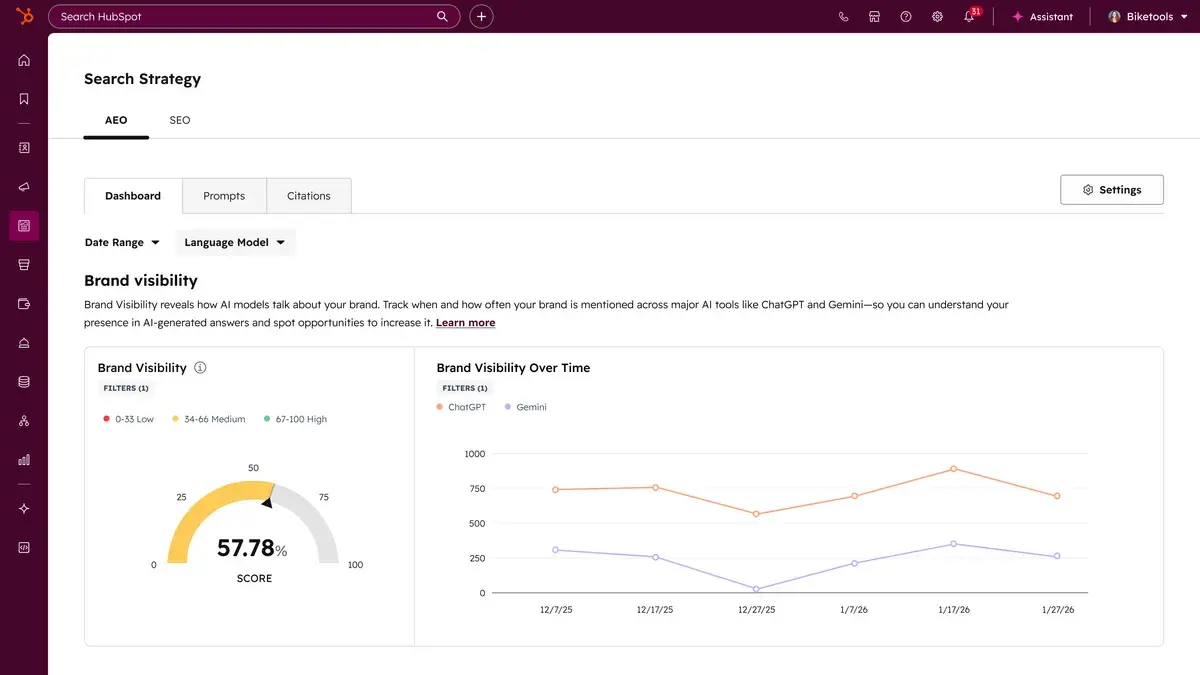
HubSpot AEO: Unlike many standalone AEO tools, HubSpot AEO integrates visibility data directly with content creation capabilities within the HubSpot Marketing Hub platform. For Marketing Hub Professional and Enterprise customers, AEO is natively built-in, allowing seamless transition from identifying a citation gap to publishing responsive content (blog posts, social content, landing pages). The Brand Visibility Dashboard provides a single score representing the percentage of tracked prompts where the brand appears in AI answers. The Competitor Analysis view further refines this by showing "Share of Voice" against rivals, prioritizing which gaps to address. Its unique strength lies in recommendations informed by CRM data, ensuring tracked prompts align with specific industries, competitors, and customer segments.
- Pros: Seamless integration with HubSpot CRM and content tools, CRM-informed prompt recommendations, clear brand visibility scoring.
- Cons: Primarily beneficial for existing HubSpot users, advanced features tied to higher Marketing Hub tiers.
- Pricing: Free trial (10 prompts for 28 days); paid plans start at $50/month.
- Best for: HubSpot users seeking integrated AI visibility data and content action.
-
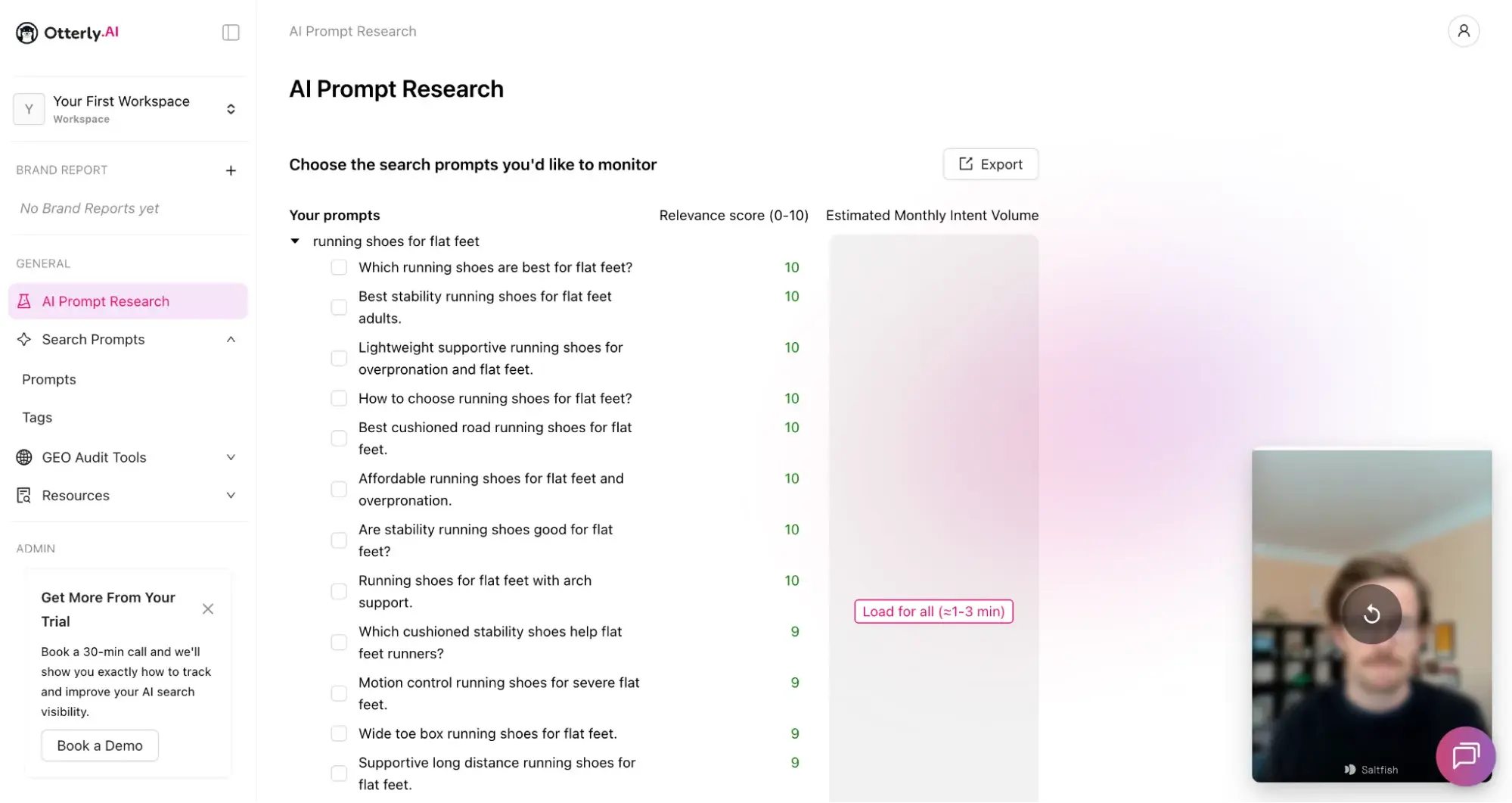
Otterly: An affordable, dedicated AEO tracking tool, Otterly monitors brand mentions and website citations across six key AI answer engines: ChatGPT, Google AI Overviews, Google AI Mode, Perplexity, Gemini, and Copilot. Its AI Prompt Research tool is particularly valuable, helping bridge the gap in identifying actual buyer prompts. By inputting existing search prompts, SEO keywords, or URLs, Otterly generates specific AI prompts, scored by relevance. The platform also features polished onboarding with guided video walkthroughs, significantly reducing the learning curve.
- Pros: Wide coverage of AI answer engines, strong prompt research capabilities, user-friendly onboarding, agency reporting features.
- Cons: Gemini and Google AI Mode are paid add-ons, newer tool compared to established platforms, integration options might be less extensive than full marketing suites.
- Pricing: Starts at $29/month (Lite, 15 prompts).
- Best for: Budget-friendly AI visibility monitoring, robust prompt research, and agency-focused reporting.
III. Social Media Competitor Monitoring Tools: Gauging Brand Perception and Engagement
Social media competitor monitoring tools are vital for understanding what rivals are posting, how their audiences engage, and how a brand’s share of voice compares across various platforms. With over 5 billion social media users globally, these channels are crucial for brand building and customer interaction.
-
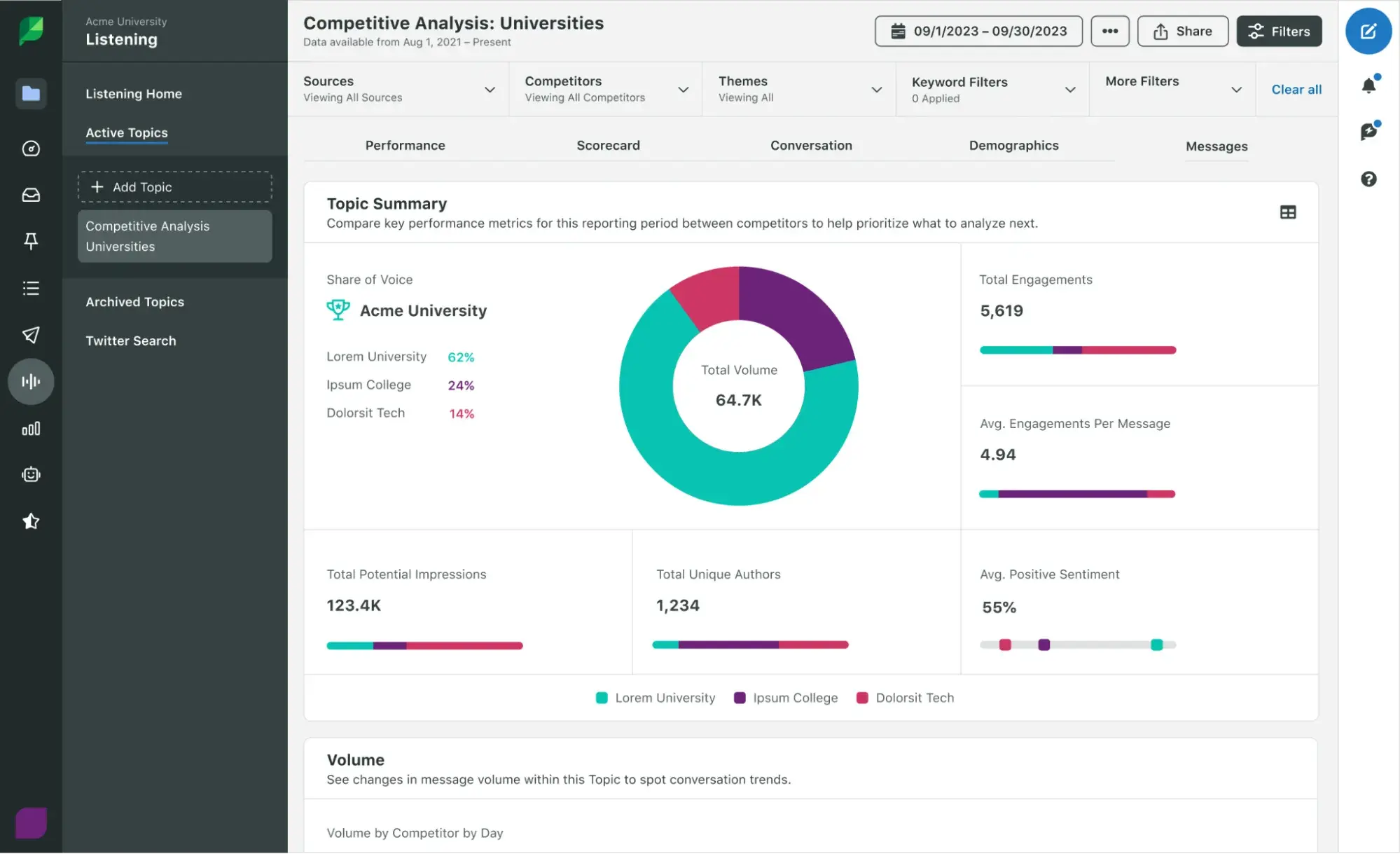
Sprout Social: A comprehensive social media management platform, Sprout Social excels in competitor analysis. Its Competitor Performance Reports (available from the Professional tier) enable benchmarking of follower growth and engagement against competitors on platforms like Facebook, Instagram, and X. Combining these reports with a Competitive Analysis Listening Topic, which leverages Sprout’s Social Listening feature (a separately priced add-on), allows businesses to track rivals’ share of voice, sentiment, and impressions. This moves beyond simply tracking competitor posts to understanding broader public perception and discussions surrounding them.
- Pros: All-in-one social media management, robust competitive performance reports, strong social listening capabilities, detailed analytics.
- Cons: High price point, social listening is an add-on, can be complex for small teams.
- Pricing: Starts at $99/seat/month (Essentials); competitor reports available at Professional tier ($299/seat/month).
- Best for: Enterprise social teams requiring comprehensive benchmarking, listening, and publishing.
-
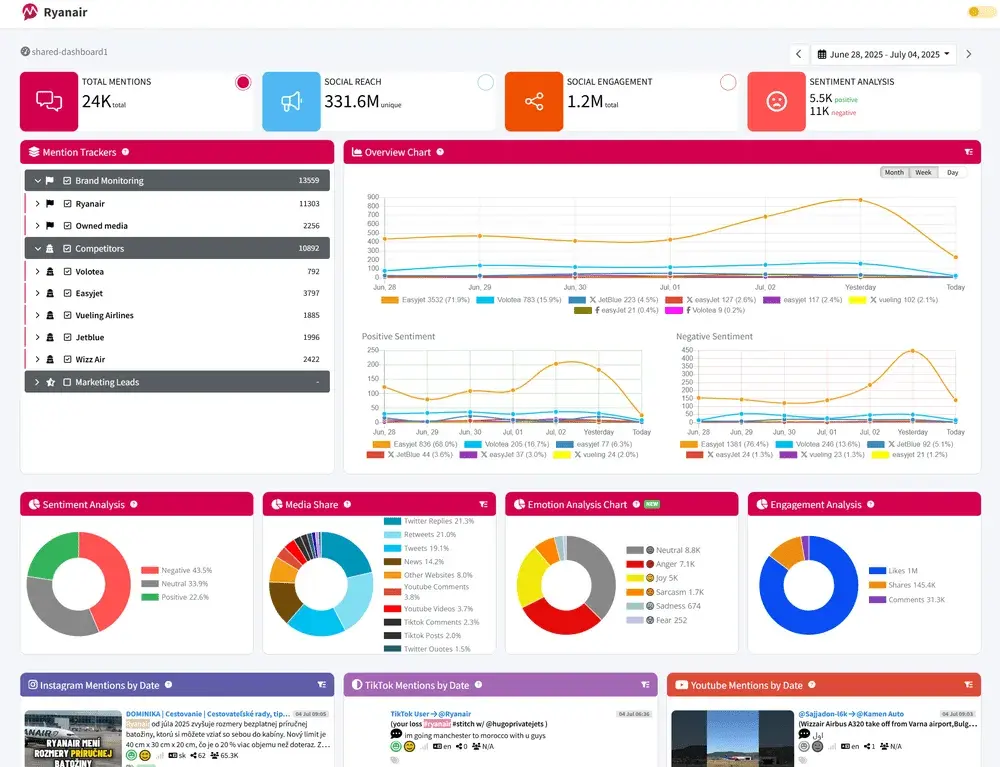
Mentionlytics: This tool offers extensive monitoring of brand and competitor mentions across a broad spectrum of social platforms, including TikTok, X, Instagram, Facebook, LinkedIn, YouTube, Reddit, Bluesky, Telegram, as well as blogs, news sites, and forums. A standout feature is SIA (Social Intelligence Advisor), an AI-powered assistant that analyzes mention data to generate personalized recommendations. SIA automatically flags negative mentions, suggests optimal posting times, and monitors competitor activity, providing near-daily competitive signals without requiring manual dashboard navigation.
- Pros: Wide range of monitored sources, AI-powered insights and recommendations, affordable for its feature set, strong sentiment analysis.
- Cons: Data refresh rate (24-48 hours) might not be instantaneous for rapidly evolving crises, some advanced features could require higher plans.
- Pricing: Starts at $59/month (Basic); 14-day free trial.
- Best for: Small to mid-size teams needing full-featured social listening with competitor tracking at a competitive price.
IV. Paid Ads and Creative Monitoring Tools: Deciphering Advertising Strategies
Paid ads and creative monitoring tools provide crucial insights into competitors’ advertising efforts, revealing their ad creatives, successful approaches, and spending allocations. With global digital ad spending projected to exceed $700 billion by 2024, understanding competitor ad strategies is paramount for optimizing one’s own campaigns and achieving a better return on investment.
-
BigSpy: Claiming a database of over 1 billion ad creatives from nearly 10 million advertisers, BigSpy monitors ads across major social platforms like Facebook, Instagram, X, Pinterest, and Yahoo, with advanced tiers covering YouTube, AdMob, and Unity. It serves as an excellent resource for marketers seeking creative inspiration or aiming to dissect a competitor’s social ad strategy. Its extensive database allows users to filter by platform, country, ad format, and even call-to-action, providing granular insights into what’s performing in the market.
- Pros: Massive ad creative database, multi-platform coverage, detailed filtering options, affordable entry point.
- Cons: Advanced platforms (YouTube, etc.) are locked behind higher-tier plans, data might not be real-time for all platforms.
- Pricing: Starts at $19/month (Basic); $1 three-day Pro trial available.
- Best for: Affordable, multi-platform social ad creative discovery and competitor inspiration.
-
Adbeat: Specializing in display and native advertising intelligence, Adbeat reveals where competitors are buying traffic, their estimated spend, and which publishers and ad networks are driving results. Covering over 140 ad networks, including Google Display Network, Taboola, Outbrain, and AdRoll, Adbeat provides actionable intelligence for paid media teams managing display or programmatic budgets. This granular data directly informs media buying decisions, helping to optimize ad placement and budget allocation. The platform can show historical ad campaigns, allowing users to track long-term strategies and identify sustained efforts.
- Pros: Deep competitive intelligence on display and native ads, accurate spend estimates, publisher placement data, extensive network coverage.
- Cons: Higher price point, not focused on social media ads, primarily for display and native advertising.
- Pricing: Free Basic plan; paid Pro plans start at $249/month.
- Best for: In-depth competitive intelligence on display, native, and programmatic ad campaigns.
V. Web Change and Pricing Monitoring Tools: Detecting Critical Website Updates
These tools track updates to competitor websites—including pricing pages, product launches, messaging shifts, and even team changes—and issue alerts when significant modifications occur. For businesses, especially those in e-commerce or SaaS, rapid detection of pricing changes is crucial for maintaining competitive parity and optimizing their own pricing strategies.
-
Visualping: Visualping monitors any specified webpage—be it pricing pages, product pages, landing pages, or job boards—and notifies users of changes. Its distinguishing feature is AI-powered filtering, allowing users to define specific conditions (e.g., "notify me when the price drops below $50"). This intelligence filters out irrelevant updates like footer tweaks or cookie banner changes, ensuring alerts are only triggered by meaningful competitive actions. This precision helps prevent "alert fatigue" common with basic change detection tools.
- Pros: AI-powered filtering for relevant changes, monitors any webpage, customizable alert conditions, easy to set up.
- Cons: Free plan is limited, higher check frequencies require paid plans.
- Pricing: Free Personal plan (150 checks/month); paid plans start at $10/month.
- Best for: AI-powered website change detection that filters noise and highlights critical updates.
-
Hexowatch: Offering 13 distinct monitoring types, Hexowatch is a powerhouse for technical competitive intelligence. It tracks visual changes, content, source code, technology stack, availability, keyword presence, API endpoints, backlinks, WHOIS data, sitemaps, HTML elements, pricing, and RSS feeds. This comprehensive capability means businesses can detect highly technical changes, such as a competitor switching its front-end framework (e.g., React to Next.js), adding new subdomains, or altering DNS registration, providing a holistic view of their digital infrastructure evolution.
- Pros: Extensive range of monitoring types (technical and content), affordable pricing for its capabilities, detailed change logs.
- Cons: Can generate a large volume of data if not configured carefully, user interface might be overwhelming for non-technical users, some niche monitoring types may have less depth than specialized tools.
- Pricing: Starts at $29/month (Pro plan); 7-day free trial.
- Best for: Deep technical change monitoring across content, source code, pricing, tech stack, and backlinks at an affordable price.
Free Competitor Analysis Tools: Initial Validation Without Budget Commitments
Before investing in paid subscriptions, several free tools offer valuable insights to validate which competitive intelligence categories are most critical for a team.
- Semrush Free Plan (SEO): Offers 10 searches per day, 10 tracked keywords, and a 100-page site audit. Sufficient for basic domain overviews, identifying initial keyword gaps, and spotting obvious technical SEO issues.
- HubSpot AEO Grader (AI Search): A free tool providing a baseline score across five dimensions: sentiment, presence quality, brand recognition, share of voice, and market position in AI answers.
- Google Alerts (Social Media & Brand Monitoring): A simple yet effective tool to set up alerts for competitor brand names, product names, key executives, and industry terms, receiving email notifications when new content mentioning these terms is indexed.
- Meta Ad Library (Paid Ads & Creative Monitoring): Allows users to see exactly which ads competitors are running across Meta platforms (Facebook, Instagram) without requiring a Facebook account.
How to Choose and Implement Competitor Tracking Tools Effectively
The abundance of tools can be overwhelming. A structured approach is crucial for effective selection and implementation.
1. Prioritize Use Cases Over Feature Lists:
Instead of getting lost in extensive feature sets, begin by identifying the one or two most urgent competitive blind spots. If organic traffic is declining inexplicably, SEO tools take precedence. If buyers are increasingly using AI chatbots for research and brand visibility is unknown, AI search tools become the priority. The right tools directly address these specific gaps.
2. Leverage Existing Software Ecosystems:
Consider the advantages of integrating competitive monitoring within existing software stacks. Shared data, fewer logins, and streamlined workflows reduce friction between insight generation and action. For instance, a HubSpot Marketing Hub Professional or Enterprise customer gains immediate benefits from HubSpot AEO, as prompt tracking is automatically informed by their CRM data.
3. Curate a Shortlist for Each Category:
From the identified categories, select two to three candidate tools. Cross-reference with free options to conduct initial tests without financial commitment. This limited selection prevents analysis paralysis while allowing for meaningful comparisons.
4. Rigorous Testing Before Commitment:
Most reputable tools offer free tiers, trials, or money-back guarantees. Utilize these opportunities. Test each tool against the same competitor set and timeframe to ensure direct comparability of outputs. Pay close attention to the speed and clarity with which actionable insights are surfaced, rather than merely confirming data existence.
5. Evaluate Usefulness Over Time (Two Weeks Minimum):
After a trial period, critically assess the tool’s performance: Are the alerts genuinely actionable or merely noisy? Can the insights be succinctly communicated to stakeholders? Did the tool influence a strategic decision or operational change? If the answers are consistently negative, the tool, regardless of its impressive features, is not effectively solving the business’s problem.
Turning Signals Into Action: Operationalizing Competitive Intelligence
Selecting the right tools is only the initial step. The more challenging aspect is ensuring that the insights generated reach the individuals capable of acting upon them in a timely manner.
A. Building an Integrated Competitor Dashboard:
Start by identifying one critical metric per tool category. This might be a keyword gap count from Semrush, an AI visibility score from an AEO tool, or a share of voice percentage from Sprout Social. Consolidate these metrics into a shared dashboard—even a simple, regularly updated Google Sheet can suffice initially. This centralized view provides the team with an at-a-glance competitive picture, eliminating the need to log into multiple platforms.
B. Leveraging CRM for Operationalized Signals:
While a CRM may not be the repository for every piece of competitive intelligence, it becomes invaluable when a competitive signal necessitates follow-up, assignment of ownership, or the addition of context to active sales pipelines or marketing campaigns. For example, if a competitor alters its pricing page, launches a new comparison page, or significantly increases its AI answer visibility, this signal can be routed via Slack, email, or a CRM-based workflow to the appropriate team. In this setup, the CRM functions less as a note-taking tool and more as an action layer, facilitating task creation, owner notification, prioritization of follow-up, and connecting competitive context to potentially affected campaigns, accounts, or opportunities.
This integrated approach represents the crucial difference between passive monitoring and proactive action. The most effective competitor monitoring tools do more than just report changes; they empower teams to decide on the next steps, ensuring that the competitive signal remains fresh and impactful.
Frequently Asked Questions About Competitor Monitoring Tools
Q: What is the difference between competitor monitoring tools and competitor analysis tools?
A: Monitoring is an ongoing process, while analysis is a point-in-time deep dive. Competitor monitoring tools continuously track changes in rankings, new ads, pricing shifts, or AI citation gaps, alerting users when something moves. Competitor analysis tools are used for evaluating a competitor’s full SEO profile, ad strategy, or market positioning comprehensively. Most tools offer both capabilities to varying degrees, but understanding the specific need helps in selecting the most appropriate solution.
Q: How can alert fatigue with competitor tracking tools be avoided?
A: The key is to set fewer, sharper alerts. Focus only on metrics directly tied to actions that would genuinely alter business decisions—such as a competitor’s pricing page changing, a new ad launching in a specific category, or a significant drop in AI visibility score. Tools like Visualping, with their natural language condition setting, can help filter out noise and notify only when meaningful changes occur.
Q: Which free competitor analysis tools are best for getting started?
A: For initial competitive intelligence, the following free tools are highly recommended: Semrush’s free plan for SEO keyword gap analysis, HubSpot AEO Grader for a baseline AI visibility score, Google Alerts for brand and social media monitoring, and Meta Ad Library for insights into paid ad creatives. Begin with the tool that addresses the most significant immediate blind spot. If the AEO Grader reveals substantial gaps, HubSpot AEO offers a natural progression for continuous, integrated tracking.
Q: How can competitor monitoring be integrated into a CRM system?
A: The primary value of integrating competitor monitoring with a CRM is not necessarily to store every update within the CRM, but to route critical changes quickly to the right personnel. Before choosing a tool, decide if competitive signals need to trigger specific actions in the CRM or if an alert via Slack or email is sufficient. Many modern tools, like Visualping, offer Zapier integrations that can trigger actions in CRM systems (e.g., HubSpot) when a competitor page changes. This ensures that vital pricing or messaging shifts are noticed and acted upon swiftly. For HubSpot users, HubSpot AEO within Marketing Hub provides the tightest workflow, with prompt recommendations informed by CRM data and the ability for Professional and Enterprise customers to act on citation gaps using HubSpot’s content tools without switching platforms.