In the fiercely competitive digital landscape, the ability to convert anonymous website visitors into identifiable leads is paramount for sustainable business growth. A fundamental tool in achieving this transformation is the lead capture form, a mechanism designed to collect crucial contact information from potential customers in exchange for valuable content or services. Far from being a mere data collection portal, these forms are strategic touchpoints that initiate customer relationships, enable personalized communication, and lay the groundwork for effective marketing automation. The challenge for many businesses, however, lies in optimizing these forms to maximize conversion rates while simultaneously gathering the necessary data for nuanced subscriber segmentation and tailored engagement.
The Strategic Imperative of Lead Capture
Digital traffic alone, no matter how substantial, holds limited value if it doesn’t translate into actionable leads. Visitors browsing content and then departing without leaving contact information represent missed opportunities for follow-up, relationship building, and ultimately, sales. Lead capture forms directly address this challenge by providing a structured pathway for visitors to express interest and opt into further communication. This shift from anonymous interaction to an established connection is critical in an era where consumers expect personalized experiences and businesses strive for deeper engagement beyond transient website visits.
Historically, lead generation has evolved significantly, from direct mail and telemarketing to the sophisticated digital strategies prevalent today. The advent of the internet and subsequent rise of email marketing in the late 1990s and early 2000s cemented the lead capture form’s role as a cornerstone of digital strategy. Early forms were often basic, focusing solely on email addresses. However, as marketing matured and data analytics became more sophisticated, the demand for more granular subscriber information grew, leading to the development of multi-field forms and advanced segmentation capabilities. Today, with increasing awareness around data privacy regulations like GDPR and CCPA, transparency and clear value exchange in lead capture have become even more critical.
Defining the Modern Lead Capture Form
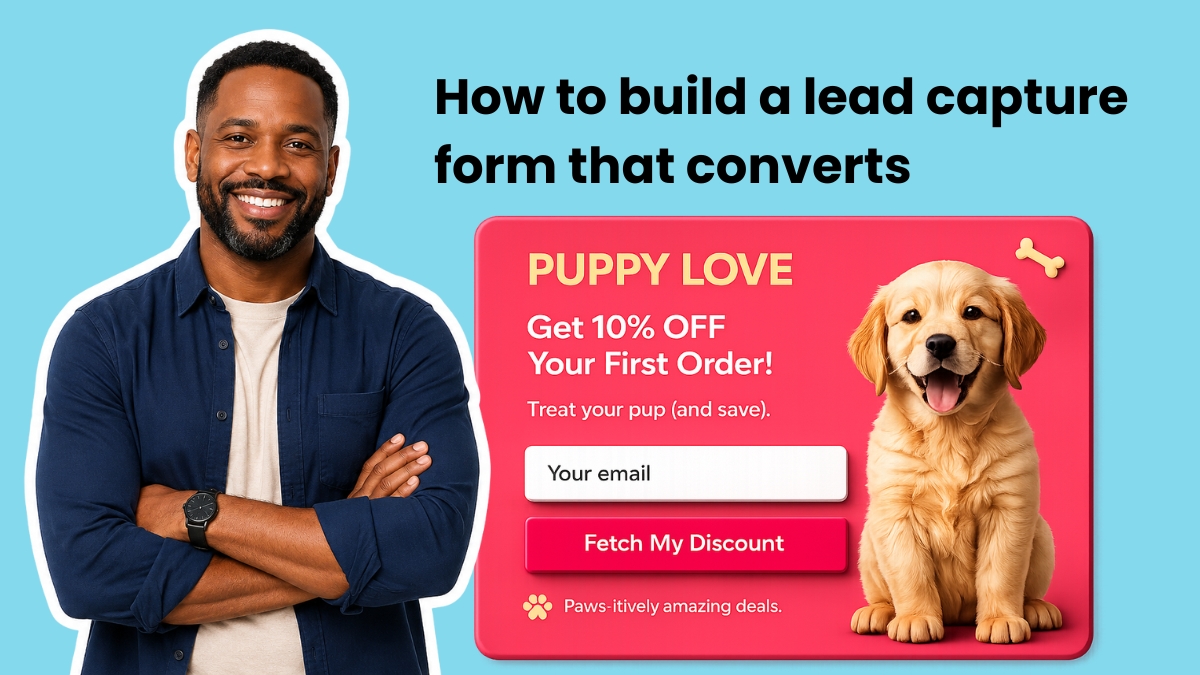
At its core, a lead capture form is a concise digital interface embedded within a website, landing page, blog post, or social media profile that prompts visitors to submit their contact details—most commonly an email address—in exchange for a defined benefit. This benefit, often referred to as a "lead magnet," could be anything from a free e-book, a webinar registration, an exclusive discount, a newsletter subscription, or access to a specialized tool. The immediate connection of these forms to an email marketing platform is vital, ensuring that every new subscriber is automatically integrated into the system, ready to receive a carefully crafted welcome sequence and subsequent targeted communications.
The true power of a well-implemented lead capture form extends beyond mere data collection. It serves as the initial gateway for segmenting audiences from the moment they sign up. By asking strategic questions, businesses can categorize subscribers based on their interests, needs, or demographic profiles, enabling highly relevant and personalized marketing campaigns. This proactive segmentation is a significant departure from traditional, one-size-fits-all email blasts, offering a more efficient and effective approach to nurturing leads through the sales funnel.
Crafting the Optimal Form: Field Selection and Personalization
The number and type of fields included in a lead capture form represent a critical balancing act between data acquisition and conversion optimization. Industry data consistently shows an inverse relationship between the number of form fields and conversion rates: every additional field typically leads to a measurable decrease in submissions. Therefore, the guiding principle should be to request the minimum information necessary to initiate a valuable relationship and achieve immediate segmentation goals.
- Email Address: This remains the undisputed essential field. Without it, the primary purpose of lead capture—the ability to follow up via email—is negated. It is the non-negotiable component of any lead capture strategy.
- First Name: Including a first name field, while adding a slight friction point, offers a significant return on investment through personalization. Emails addressed with a subscriber’s first name, such as "Hey [Name]," have been shown in numerous studies to outperform generic greetings like "Hey there" in terms of open rates and engagement. This simple personalization fosters a sense of individual connection, making communication feel more direct and less automated.
- Strategic Additional Fields for Segmentation: Beyond the basics, any further fields must be justified by their ability to provide actionable insights for segmentation and personalization. A single, well-chosen segmentation question can dramatically enhance the relevance of subsequent communications. Examples include:
- "What best describes your business?" (e.g., small business owner, marketer, freelancer)
- "What’s your biggest challenge right now?" (e.g., generating leads, improving sales, content creation)
- "Which topic are you most interested in?" (e.g., email marketing, social media, SEO)
These questions allow marketers to apply specific "tags" to subscribers at the point of signup. In platforms like AWeber, these tags seamlessly integrate with workflow automation builders, enabling immediate routing of subscribers into targeted email sequences. For instance, a subscriber indicating interest in "email marketing" can instantly receive a welcome series focused exclusively on email marketing tips and resources.
Conversely, fields that rarely justify their inclusion in initial lead capture forms include phone numbers (unless the core business model involves direct sales calls, like service booking), company name, job title, or physical address. Such detailed information is generally best collected later in the customer journey, once trust has been established and the subscriber sees greater value in sharing more personal data. For the vast majority of small businesses and content creators, a sweet spot of two to three fields—email, first name, and one segmentation question—offers an optimal balance of data collection and conversion efficiency. For situations requiring more extensive data, multi-step forms, which break down the information request across several screens, can mitigate friction by making each individual step seem less daunting.
Optimizing Placement: Maximizing Visibility and Intent

The effectiveness of a lead capture form is heavily dependent on its strategic placement on a website. Even the most perfectly designed form with compelling copy will yield zero conversions if visitors don’t see it or encounter it at the right moment in their browsing journey. Different placements cater to varying levels of visitor intent and engagement:
- Above the Fold on Your Homepage: This is arguably the highest-visibility location on any website. Placing a lead capture form here ensures that visitors see it immediately upon arrival, without needing to scroll. This placement is ideal for capturing general interest and should be paired with a crystal-clear value proposition that communicates what the subscriber will receive, how often, and why it’s beneficial. It targets visitors who arrive with a general purpose or curiosity about the brand.
- Inline within Blog Posts: Contextual inline forms embedded within blog content are highly effective. Placing them approximately one-third to halfway through an article ensures that the reader has consumed enough content to trust the author’s expertise and feel engaged with the topic. The offer associated with this form should be directly relevant to the blog post’s subject matter. For example, an article discussing "email subject line best practices" should offer a "subject line template" or "swipe file" rather than a generic newsletter signup. This relevance dramatically boosts conversion rates because the offer extends the immediate value the reader is already seeking.
- Exit-Intent Pop-ups: These dynamic forms appear when a visitor’s cursor indicates an intention to leave the page, typically by moving towards the browser’s close button or back arrow. Exit-intent pop-ups are a powerful last-ditch effort to capture visitors who would otherwise depart without interaction. The key to their success lies in a highly specific and compelling offer—something that truly makes a visitor pause. Phrases like "Wait! Grab this free template before you go" significantly outperform generic "Subscribe to our newsletter" calls to action. Modern email marketing platforms, such as AWeber, can detect these cursor movements and trigger pop-ups automatically, making them an indispensable tool for maximizing lead capture from abandoning visitors.
- Dedicated Landing Pages: For specific campaigns, promotions, or lead magnets, dedicated landing pages with prominent lead capture forms are crucial. These pages eliminate distractions and focus solely on converting visitors for a single offer.
- Social Media Link-in-Bio: For businesses leveraging social media, the "link in bio" on platforms like Instagram and TikTok often directs to a page with a lead capture form, allowing social followers to transition into email subscribers.
The intelligent placement of forms can often be automated. AI-powered form builders can generate forms tailored for specific placements, ensuring optimal design and functionality for each context (e.g., an inline form for a blog, a full-page pop-up for a homepage, or an exit-intent overlay).
Crafting Compelling Copy: The Art of Persuasion
Every word on a lead capture form contributes to its conversion potential, either by motivating a visitor to subscribe or by introducing friction and hesitation. A simple yet effective copy framework involves clearly stating the benefit, frequency, and immediate next steps.
- Headline: The headline should be a concise, benefit-oriented statement. Instead of a generic "Subscribe to our newsletter," a more compelling headline would be "Get weekly email marketing tips that take five minutes to read" or "Unlock exclusive strategies to grow your business." This immediately communicates the value proposition to the visitor.
- Subheadline: This secondary text should address potential objections or concerns, particularly regarding spam. Phrases like "No spam. Unsubscribe anytime." or "Your privacy is important to us" help to build trust and remove perceived risk, reassuring visitors about their data and the commitment required.
- Button Text (Call to Action): The submit button’s text is crucial and should be highly specific, reinforcing the benefit and clarifying the immediate action. Generic terms like "Submit" or "Sign Up" underperform significantly compared to action-oriented phrases such as "Send me the templates," "Get my free guide," or "Start my journey." The ideal button text completes the implicit sentence "I want to…" from the subscriber’s perspective.
- Social Proof (Optional): When applicable and genuine, social proof can be a powerful motivator. Phrases like "Join 100,000+ small business owners" or "Trusted by industry leaders" leverage the psychological principle of herd mentality. However, this element should only be used if the numbers are substantial and authentic. For smaller lists, a short testimonial quote placed near the form can serve a similar purpose, lending credibility and demonstrating value through a third-party endorsement.
Advanced Techniques and Best Practices for High Conversion
Effective lead capture form design and strategy hinge on reducing friction and amplifying motivation. These practices are universally applicable, whether designing a minimalist single-field pop-up or a complex multi-step segmentation form.

- Ask for One Thing Per Screen (Multi-Step Forms): Multi-step forms consistently outperform lengthy single-page forms, particularly when collecting more information. By presenting one question or a few related choices per screen, the user experience feels faster and less intimidating. This approach leverages the "Zeigarnik effect," where people are more likely to complete a task once they’ve started it.
- Match the Offer to the Page (Contextual Relevance): As previously emphasized, the offer associated with a form must be highly relevant to the content the visitor is currently consuming. A blog post about social media engagement should offer a "social media content calendar," not a generic company newsletter. This contextual alignment is a primary driver of conversion.
- Use Specific Button Copy: Always prioritize specific, action-oriented button text over generic phrases. "Download the checklist now" communicates immediate value and action more effectively than "Click here."
- Show a Progress Bar on Multi-Step Forms: For forms with multiple screens, a visual progress indicator (e.g., "Step 2 of 4") significantly reduces abandonment rates. It manages user expectations, provides a sense of accomplishment, and keeps visitors motivated by showing them how close they are to completion.
- Place the Form Where Intent is Highest: Strategic placement is not accidental. It involves understanding visitor behavior and intent. Above-the-fold forms target general interest, inline forms capture engaged readers, and exit-intent forms recover abandoning visitors. Tailoring placement to intent levels maximizes conversion opportunities.
- Maintain a Clean Design: Visual clutter is a conversion killer. Forms should feature ample white space around fields, clear typography, and a minimalist aesthetic. Fewer competing elements on the page ensure that the visitor’s attention remains focused on the form itself.
- Tag Subscribers at Submission for Automation: Every answer choice or field submission, especially in multi-step forms, should ideally apply a specific tag to the subscriber. These tags are invaluable for triggering automated email sequences (workflows) that deliver content precisely matched to the subscriber’s expressed interests or needs. This ensures a highly personalized onboarding experience from the very first email.
- Mobile Responsiveness: With a significant portion of web traffic originating from mobile devices, all lead capture forms must be fully responsive, adapting seamlessly to various screen sizes and orientations. A poorly rendered form on a mobile device is a guaranteed conversion blocker.
The Technological Edge: AI in Form Building and Seamless Integration
The evolution of lead capture tools has reached a new frontier with the integration of Artificial Intelligence. Traditional form builders often rely on templates and pre-set layouts, which, while useful, can limit creativity and force businesses to adapt their vision to existing frameworks. The advent of AI-powered form builders, such as AWeber’s AI Signup Form Builder, represents a paradigm shift, enabling unprecedented flexibility and efficiency.
These advanced tools allow users to describe the desired form in plain text—whether it’s a single-field email capture for a homepage, a branded multi-step quiz for segmentation, or an exit-intent pop-up with custom button copy. The AI then generates the form, incorporating specified branding, copy, fields, and even placement instructions, all within seconds. This eliminates the need for coding or extensive design skills, democratizing sophisticated lead capture strategies for businesses of all sizes. The ability to simply "describe what you need" and have the AI build it, or even upload an image of a desired form from another site and have the AI replicate a branded version, vastly accelerates the development process and allows for hyper-customization.
Crucially, the effectiveness of a form builder is inextricably linked to its integration with an email marketing platform. A form that efficiently collects data but cannot seamlessly connect to subscriber lists, apply tags, trigger automations, or route individuals into the correct welcome sequences is merely a data collection mechanism, not a strategic marketing tool. The ideal solution is a unified system where the form builder and the email platform are one and the same.
AWeber exemplifies this integrated approach. Because its AI Signup Form Builder resides natively within the AWeber ecosystem, every form created is automatically connected to the user’s subscriber lists, tagging system, and Workflow Builder automations. This eliminates the complexities of configuring third-party integrations, managing webhooks, or ensuring data consistency between disparate systems. The moment a subscriber completes a form, their data is instantly available, tagged, and ready to trigger personalized email sequences, ensuring a smooth and immediate transition into the customer journey. This native integration reduces technical overhead and allows marketers to focus on strategy and content rather than troubleshooting connectivity issues.
Broader Impact and Future Outlook

The strategic implementation of lead capture forms, particularly when enhanced by AI-driven creation and seamless integration with marketing automation, has profound implications for businesses. It moves beyond merely growing an email list to building a robust, segmented audience that receives highly relevant communications. This personalization fosters stronger customer relationships, increases engagement rates, and ultimately drives higher conversion rates and customer lifetime value.
For small businesses, the democratization of sophisticated form building through AI means they can compete more effectively with larger enterprises, leveraging advanced tools without needing a dedicated development team. The ability to rapidly iterate on form designs, test different offers, and segment audiences with precision allows for agile marketing strategies that respond quickly to market demands and consumer preferences.
Looking ahead, the evolution of lead capture will likely continue towards even greater personalization and predictive analytics. AI will play an increasing role in not just building forms but also in optimizing their performance, perhaps even dynamically adjusting fields or offers based on individual visitor behavior in real-time. The emphasis will remain on creating low-friction, high-value exchanges that respect user privacy while efficiently gathering the data needed to nurture meaningful customer relationships in an increasingly digital-first world. The lead capture form, therefore, remains not just a utility, but a strategic cornerstone of modern digital marketing, constantly evolving to meet the demands of businesses and consumers alike.


 Ammar Sabilarrohman
 Asro
Asro