Understanding the fundamental differences between plain text and HTML emails is paramount for crafting successful email marketing campaigns in 2024. While both formats offer distinct advantages, their strategic application can significantly impact engagement, deliverability, and ultimately, return on investment (ROI). Marketers must critically assess their content, target audience, campaign objectives, and resource availability to determine which format, or combination thereof, will yield optimal results. This guide will delve into the technical underpinnings, practical implications, and best practices for both HTML and plain text email formats.
Defining the Core Formats: A Historical and Technical Perspective
Email communication has evolved dramatically since its inception. Initially, all emails were purely plain text, devoid of any formatting beyond basic line breaks. The introduction of HyperText Markup Language (HTML) revolutionized email, mirroring the rise of the World Wide Web itself.
What is an HTML Email?
HTML, or HyperText Markup Language, is the standard markup language used to create web pages and, by extension, visually rich emails. An HTML email allows for extensive formatting and design elements, transforming a simple message into a dynamic, interactive experience. This format leverages the same coding principles as websites, enabling designers to embed images, videos, custom fonts, clickable buttons, background colors, and complex layouts.
Historically, the adoption of HTML email began in the mid-1990s, allowing for greater brand expression and more engaging marketing messages. However, this flexibility comes with inherent challenges, primarily concerning rendering consistency across the myriad of email clients (Outlook, Gmail, Apple Mail, etc.) and devices (desktop, mobile, tablet). Early HTML emails were often plagued by rendering issues, a problem that, while significantly improved, still requires careful consideration and testing in modern campaigns.
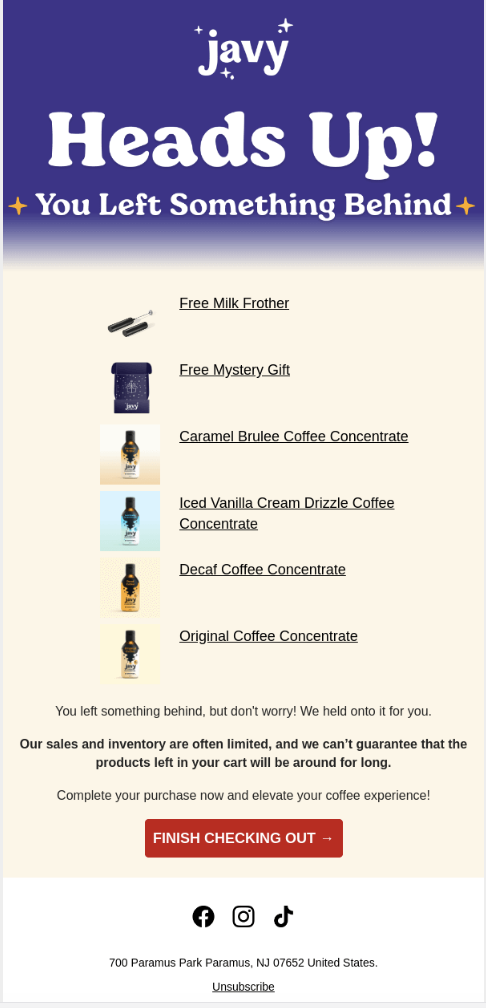
The primary advantage of HTML emails lies in their ability to deliver a strong visual punch. Brands can create immersive experiences that reflect their aesthetic, convey complex information through infographics, and drive action with prominent calls-to-action (CTAs). For instance, an e-commerce brand launching a new product line can use high-resolution images, product videos, and direct purchase buttons to entice customers, often leading to higher click-through rates (CTRs) when executed flawlessly.
What is a Plain Text Email?
In stark contrast, a plain text email is a bare-bones message composed solely of unformatted characters. It contains no images, custom fonts, bolding, italics, or clickable buttons beyond simple text-based URLs. Plain text emails are the digital equivalent of a traditional letter or memo, prioritizing clarity and directness over visual flair.
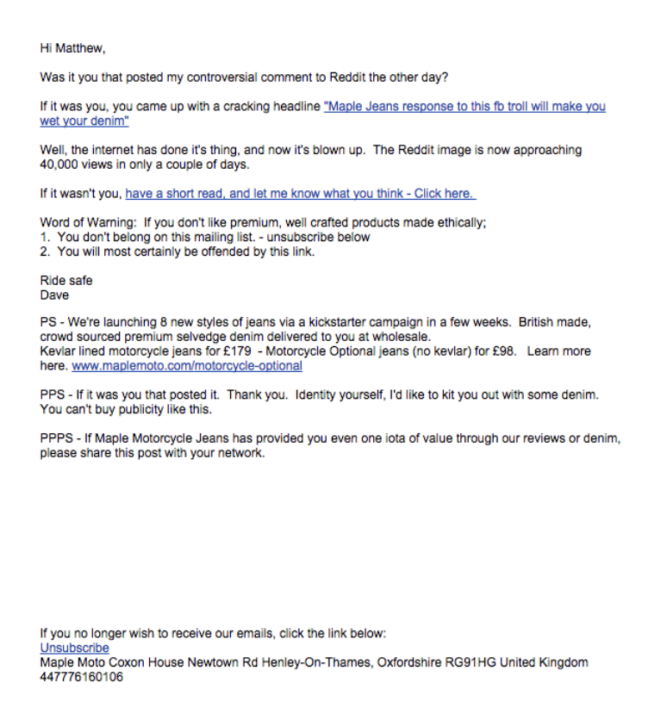
The simplicity of plain text emails ensures universal compatibility. They render identically across all email clients, operating systems, and devices, eliminating the common rendering inconsistencies associated with HTML. This reliability has kept plain text emails relevant, especially for personal communications, transactional alerts, and situations where visual elements might be distracting or unnecessary. Some digital marketing experts argue that plain text emails can foster a sense of authenticity and personal connection, as they mimic the style of one-to-one communication. This can be particularly effective for urgent updates, direct replies, or sensitive information where a minimalist approach builds trust.
Comparative Analysis: HTML vs. Plain Text Emails in Detail
The choice between HTML and plain text is rarely absolute; rather, it’s a strategic decision based on a comprehensive understanding of their respective strengths and weaknesses across several key criteria. Most sophisticated marketers employ a hybrid approach, using multipart/MIME emails that send both an HTML and a plain text version, allowing the recipient’s email client to display the most appropriate format.
1. Visual Appeal and Brand Representation
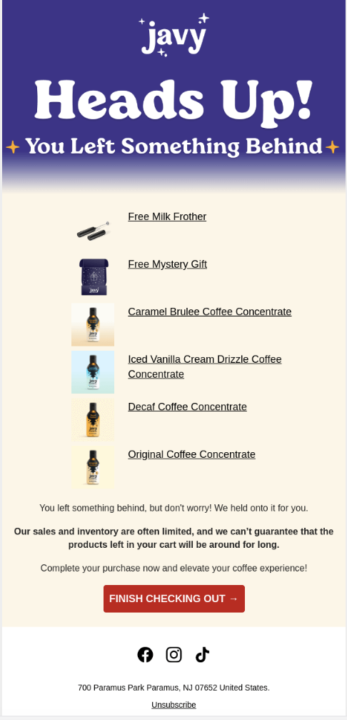
- HTML: Offers unparalleled design freedom. Marketers can incorporate branding elements like logos, brand colors, custom fonts, and intricate layouts. The ability to embed images, GIFs, and even video (though often linked rather than directly embedded) allows for rich storytelling and product showcases. This visual richness is crucial for brands where aesthetic appeal is a core part of their identity, such as fashion, luxury goods, or creative agencies. The goal is to create an engaging, memorable experience that reinforces brand recognition.
- Plain Text: Lacks any visual styling. Branding is limited to the sender’s name and email address. While this might seem like a disadvantage, it forces the content to stand on its own, emphasizing the message’s clarity and conciseness. For internal communications, personal outreach, or messages where the content itself is the primary focus, the absence of distractions can be highly effective.
Implications: HTML excels at building brand identity and captivating audiences visually, potentially leading to higher initial engagement. However, if poorly designed or heavy, it can also lead to frustration. Plain text, while visually unassuming, guarantees a consistent, readable experience, fostering trust through simplicity.
2. Creation and Development Time
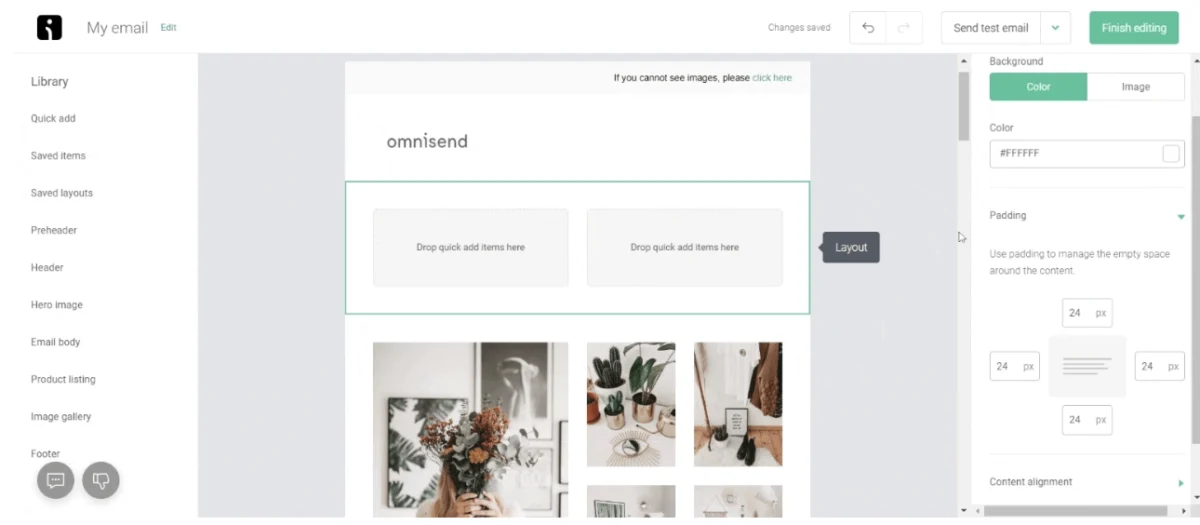
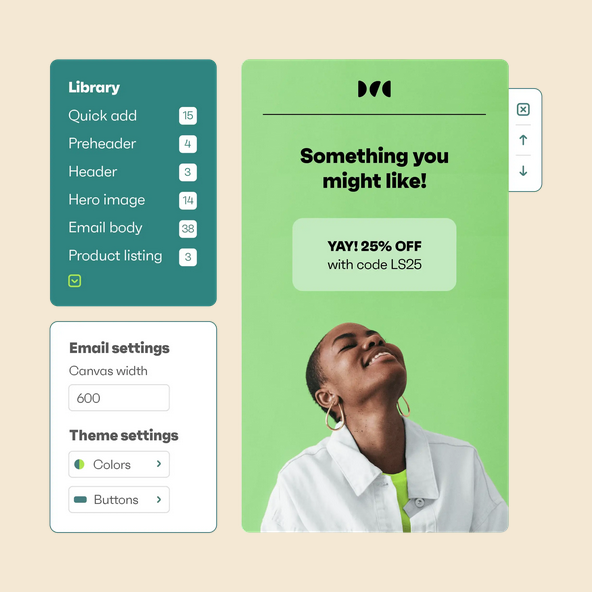
- HTML: Designing and coding HTML emails is a resource-intensive process. It requires design expertise, knowledge of HTML/CSS, and often, familiarity with email-specific coding quirks (e.g., using tables for layout due to historical email client limitations). Cross-client testing is mandatory to ensure consistent rendering. Tools like Omnisend’s drag-and-drop email builder significantly reduce this complexity, allowing marketers to create sophisticated designs without extensive coding knowledge, leveraging pre-built templates and content blocks. Despite these tools, the iterative process of design, content population, and testing still demands more time than plain text.
- Plain Text: Creation is remarkably fast. It’s essentially writing a message. No design, no coding, no complex rendering tests are required. This makes plain text ideal for rapid deployment of urgent messages, quick announcements, or simple, direct communications where speed is critical.
Implications: Businesses with dedicated design and marketing teams, or those utilizing advanced email marketing platforms, can leverage HTML’s capabilities. Smaller businesses or those needing agile communication might find plain text more efficient for certain campaigns.
3. Flexibility and Personalization
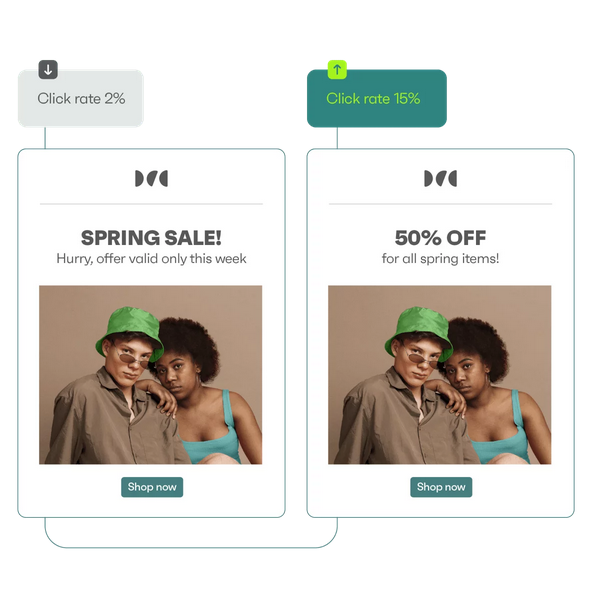
- HTML: Offers immense flexibility. Dynamic content blocks can be used to personalize emails based on recipient data (e.g., displaying different product recommendations for different customer segments). A/B testing can be conducted on various design elements, CTAs, and layouts. The ability to create highly customized experiences tailored to individual preferences is a powerful driver of engagement and conversion.
- Plain Text: Its flexibility is limited to content variations. Personalization is primarily achieved through merging recipient names or other data fields into the text. While effective for simple personalization, it cannot adapt visual elements or complex content based on user behavior.
Implications: For sophisticated, data-driven marketing strategies aiming for deep personalization, HTML is the superior choice. Plain text is suitable for more generalized communications or when personalization is content-driven rather than visually driven.
4. Analytics and Performance Tracking
- HTML: Provides robust analytics capabilities. Tracking pixels can monitor open rates, link wrapping allows for detailed click-through rate (CTR) analysis, and heat maps can reveal user interaction with different parts of the email. A/B testing features within email platforms allow for systematic optimization of subject lines, content, and design elements. This rich data is invaluable for understanding campaign performance, optimizing future sends, and calculating precise ROI.
- Plain Text: Tracking options are significantly more limited. Open rates are generally not trackable without embedding a tracking pixel, which goes against the "plain" nature of the email (though some platforms may offer approximate tracking). Link clicks can be tracked if URLs are wrapped with tracking parameters, but sophisticated interaction data like heat maps is impossible. Performance analysis relies more on direct replies or conversions further down the sales funnel.
Implications: For data-driven marketers who rely on granular insights to refine their strategies, HTML is indispensable. For campaigns where the primary goal is direct communication without complex performance metrics, plain text may suffice.
5. Deliverability and Load Times
- HTML: Can be heavier due to embedded images, complex code, and external resources. This can lead to slower load times, especially on poor internet connections or older devices. Furthermore, overly complex or poorly coded HTML can sometimes trigger spam filters, particularly if it contains suspicious links or an imbalance of images to text. A study by MailChimp (though older, principles remain) indicated that simpler HTML emails often perform better in terms of deliverability.
- Plain Text: Extremely lightweight and loads almost instantly on any device or connection speed. Its simplicity makes it less likely to be flagged by spam filters, often resulting in higher deliverability rates. This reliability is why plain text is often preferred for critical transactional emails like password resets, order confirmations, or security alerts.
Implications: For urgent or critical communications where guaranteed delivery and immediate loading are paramount, plain text is the safer bet. HTML emails require careful optimization (image compression, clean code) to ensure good load times and deliverability. Many email service providers (ESPs) automatically create a plain text version alongside HTML emails (multipart/MIME) to enhance deliverability and provide a fallback.
6. Accessibility Considerations
- HTML: Can be made accessible with careful coding practices (e.g., using alt text for images, proper semantic structure, appropriate color contrast). However, poorly designed HTML emails can be a nightmare for users relying on screen readers or those with visual impairments. Ensuring accessibility requires adherence to WCAG (Web Content Accessibility Guidelines) standards.
- Plain Text: Inherently more accessible. Screen readers can easily interpret and vocalize the content without interference from complex layouts or un-tagged visual elements. This ensures that the message is universally understood, regardless of the recipient’s abilities or assistive technologies.
Implications: Modern marketing emphasizes inclusivity. While HTML can be accessible, plain text is inherently accessible, making it a strong choice for ensuring broad reach and compliance.
7. Security and Spam Filters
- HTML: The complexity of HTML allows for more sophisticated phishing attempts or malware distribution through malicious links or embedded scripts. Consequently, spam filters are often more stringent with HTML emails, scrutinizing their code, links, and image-to-text ratio. A high image-to-text ratio, for example, can be a red flag. Marketers must ensure their HTML is clean, free of broken links, and authenticated (SPF, DKIM, DMARC) to avoid being flagged.
- Plain Text: Far less susceptible to security exploits or spam filtering based on content complexity. Its simplicity offers fewer vectors for malicious code, making it inherently more trustworthy in the eyes of email clients and recipients alike.
Implications: For highly sensitive communications or industries where security is paramount, plain text can offer a perceived and actual advantage in terms of trust and deliverability.
Strategic Application: When to Use Which Format
The optimal email format is not a one-size-fits-all solution; it depends on the specific campaign goal, audience segment, and brand persona.
Scenarios for HTML Emails:
- Promotional Campaigns: Product launches, sales announcements, holiday promotions benefit from engaging visuals and clear CTAs.
- Newsletters: Regular updates, content marketing, and blog digests can leverage visual hierarchy and branding.
- Branding & Awareness: Campaigns focused on reinforcing brand identity, showcasing new designs, or telling brand stories.
- Customer Engagement: Interactive content, surveys, or personalized recommendations.
- Welcome Series: Initial onboarding emails that introduce the brand with visual appeal.
Scenarios for Plain Text Emails:
- Transactional Emails: Order confirmations, shipping updates, password resets, account notifications – where clarity and deliverability are paramount.
- Personal Outreach: One-to-one sales emails, follow-ups, or direct communications from a specific individual within the company.
- Urgent Announcements: Critical updates, service outages, or security alerts where immediate, guaranteed readability is essential.
- Audience Preference: Some segments of your audience may explicitly prefer plain text for its simplicity and directness.
- Testing: As a control group in A/B tests to see if visual elements truly enhance engagement for specific audiences.
The Hybrid Approach: Multipart/MIME Emails
Modern email marketing largely relies on multipart/MIME (Multipurpose Internet Mail Extensions) emails. This technology sends both an HTML version and a plain text fallback version within a single email. The recipient’s email client then automatically displays the version it supports best or the one the user has set as their preference. This ensures maximum compatibility and deliverability, combining the best of both worlds. For marketers, creating both versions is generally recommended.
Best Practices for Crafting Effective Emails
Regardless of the format chosen, adhering to best practices is crucial for maximizing campaign effectiveness and ensuring a positive recipient experience.
Best Practices for Creating Plain Text Emails:
- Keep it Concise and Focused: Plain text thrives on brevity. Get straight to the point and avoid unnecessary jargon or lengthy paragraphs.
- Use Clear Headings and Line Breaks: Although no formatting exists, strategic use of capitalization, asterisks (*), dashes (-), and blank lines can create visual breaks and hierarchy, improving scannability.
- Employ Bullet Points and Numbered Lists: These simple structures enhance readability and help recipients quickly digest information.
- Clear Calls to Action (CTAs): Use descriptive text links (e.g., "Visit Our Website: [URL]") rather than relying on visual buttons. Ensure the link is functional and easy to copy/paste if necessary.
- Maintain a Conversational Tone: Plain text often feels more personal. A friendly, direct tone can build rapport.
- Proofread Meticulously: Without visual distractions, typos and grammatical errors are more prominent and can undermine credibility.
- Include Sender Information and Unsubscribe Option: Even in plain text, legal and ethical obligations dictate clear sender identification and a simple way to opt-out.
Best Practices for Creating HTML Email Campaigns:
- Responsive Design is Non-Negotiable: With over half of all emails opened on mobile devices (Litmus, 2023), emails must render perfectly on all screen sizes. Aim for a single-column layout for mobile and ensure images scale appropriately.
- Optimize Images: Compress images to reduce file size, which improves load times and deliverability. Use relevant alt text for all images for accessibility and in case images fail to load.
- Maintain a Balanced Image-to-Text Ratio: Avoid image-heavy emails that might trigger spam filters or appear unprofessional if images are blocked. A good rule of thumb is 60% text to 40% images.
- Use Clear and Prominent CTAs: Buttons should be visually distinct, sufficiently sized for mobile taps, and clearly state the desired action.
- Brand Consistency: Ensure your email design aligns with your overall brand guidelines (colors, fonts, logos).
- Personalization and Dynamic Content: Leverage recipient data to create tailored experiences that resonate individually.
- Thorough Cross-Client Testing: Use tools like Litmus or Email on Acid to preview how your email will appear across various email clients and devices. This is critical to catch rendering issues before sending.
- Consider Dark Mode: Design with dark mode users in mind, ensuring text and visuals remain legible and appealing.
- Email Authentication: Implement SPF, DKIM, and DMARC to improve deliverability and protect your sender reputation.
- Provide a Plain Text Alternative: Always include a well-formatted plain text version for accessibility and fallback purposes.
- Include Unsubscribe Links: Clear and easy-to-find unsubscribe options are crucial for compliance and maintaining a healthy sender reputation.
Leveraging Technology: Creating HTML Campaigns with Modern Tools
Modern email marketing platforms, such as Omnisend, simplify the creation and management of sophisticated HTML email campaigns, democratizing access to powerful tools previously requiring extensive coding knowledge.
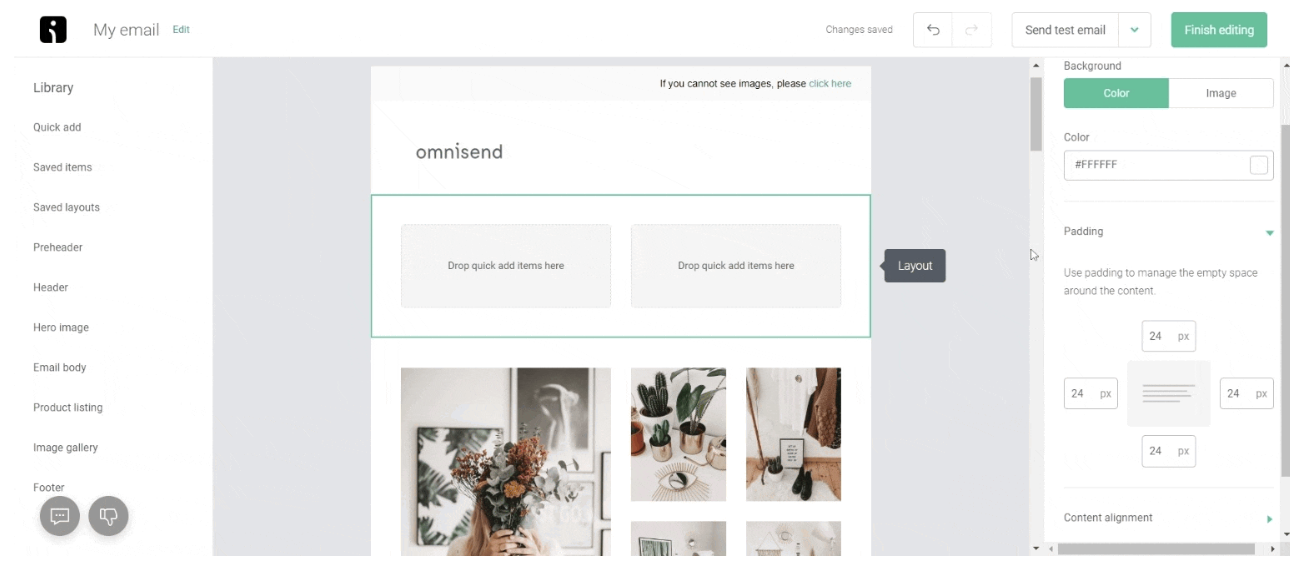
How to Create HTML Email Campaigns with Omnisend:
- Design Your Email with Intuitive Builders: Omnisend’s drag-and-drop email builder is engineered for user-friendliness, allowing marketers to assemble visually appealing emails without writing a single line of code. Users can select from a gallery of professionally designed, mobile-responsive templates tailored for various campaign types. Customization options for colors, backgrounds, fonts, and layouts are extensive. Predesigned content blocks (e.g., product listings, banners, testimonials) can be easily added and arranged, streamlining the design process. Features like a product picker that integrates directly with e-commerce platforms, dynamic content blocks for personalization, and a robust image editor further enhance design capabilities.
- Preview and Test Thoroughly: Before sending, utilize the platform’s preview function to see how the email will look on different devices (desktop, tablet, mobile). Send test emails to various internal accounts (e.g., Gmail, Outlook, Yahoo) to catch any rendering inconsistencies. Check all links for functionality and ensure personalized elements are populating correctly. Confirm that the plain text version is also well-formatted.
- Schedule and Automate for Optimal Impact: Timing plays a critical role in email open rates. Omnisend allows for precise scheduling of campaigns based on audience behavior patterns. Furthermore, its automation workflows enable marketers to trigger emails based on specific customer actions (e.g., abandoned cart reminders, welcome series for new subscribers, post-purchase follow-ups). This ensures that the right message reaches the right person at the most opportune moment, maximizing engagement and conversion potential. Analyzing past campaign data to understand peak engagement times is key to optimizing send schedules.
Broader Impact and Implications for 2024 Email Marketing
In 2024, the strategic interplay between HTML and plain text emails will continue to define effective email marketing. The overarching implication is that marketers must adopt a nuanced approach, moving beyond a simplistic "either/or" mentality to embrace a "both/and" strategy.
The digital landscape is increasingly diverse, encompassing a wide range of devices, internet speeds, and user preferences. A sophisticated email marketing strategy acknowledges this diversity by:
- Prioritizing User Experience (UX): Whether through visually rich HTML or universally readable plain text, the end-user’s experience should be paramount. This means fast loading, clear messaging, and accessible design.
- Leveraging Data for Informed Decisions: The extensive analytics offered by HTML emails provide invaluable insights into consumer behavior, allowing for continuous optimization. Even with plain text, tracking click-throughs on embedded links offers a window into engagement.
- Building Trust and Credibility: While HTML can build brand presence, plain text often fosters a sense of authenticity and direct communication, which can be crucial for trust-building, especially in an era of increasing skepticism towards overly commercialized content.
- Adapting to Evolving Technologies: The rise of dark mode, advanced spam filters, and new email client features means that both HTML and plain text strategies must remain agile and adaptable.
Ultimately, the choice between HTML and plain text is a tactical decision within a broader strategic framework. By understanding the advantages and disadvantages of each, and by leveraging modern email marketing platforms, businesses can craft compelling campaigns that resonate with their audience, drive conversions, and achieve their marketing objectives in the competitive landscape of 2024. The key is knowing your audience, understanding your campaign goals, and choosing the right tool for the job, often employing both in harmony for maximum impact.

 Iffa Jayyana
 Pevita Pearce