An order confirmation email serves as a critical digital touchpoint in the e-commerce customer journey, transcending its basic function as a mere receipt to become a powerful tool for building trust, fostering loyalty, and even driving future sales. This transactional message, dispatched immediately following a successful purchase, verifies the transaction, details the purchased items, and provides essential information, thereby alleviating customer anxiety and establishing the initial groundwork for a sustained brand relationship. Industry reports underscore the profound significance of these communications, with Omnisend’s 2026 Ecommerce Marketing Report highlighting an average open rate of 53.99% for order confirmation emails, a figure substantially higher than nearly any other email type, including promotional campaigns and even welcome series. This remarkable engagement rate positions the order confirmation email as an unparalleled opportunity for brands to connect with their customers during a moment of peak attention and positive sentiment.
Defining the E-commerce Transactional Backbone
![Order Confirmation Email: Templates & Examples [2026 ]](https://www.omnisend.com/blog/wp-content/uploads/2020/03/Order-Confirmation-Email-Example.png)
At its core, an order confirmation email is a transactional message customers receive moments after completing a purchase. Its primary purpose is to confirm that the order has been successfully placed and to detail the specifics of what the customer has bought. This immediate validation is crucial in the digital age, where customers seek instant reassurance that their financial transaction was successful and their money directed appropriately. This instantaneous feedback loop builds a foundational layer of trust, signaling to the customer that the online store is professional, organized, and attentive to their needs. A well-executed confirmation email reassures the customer, allowing them to proceed with their day confident in their purchase.
Legally, order confirmation emails are classified as transactional emails, a distinction that carries significant implications under regulations such as CAN-SPAM in the United States and GDPR in Europe. Unlike marketing emails, transactional messages are generally exempt from standard opt-in rules, meaning businesses can send them without explicit consent, provided their content remains primarily transactional. However, a crucial caveat exists: any promotional content embedded within these emails must adhere to an approximate 80/20 rule, ensuring the message remains at least 80% transactional and no more than 20% promotional. This balance is vital for maintaining legal compliance and customer trust, preventing the essential confirmation from feeling like an unsolicited advertisement. While most e-commerce platforms offer automated basic confirmation emails, utilizing a dedicated email marketing tool provides enhanced control over design, content, and integration into a broader post-purchase email strategy, allowing for a more refined and branded customer experience.
Clarifying Transactional Documents: Confirmation vs. Receipt vs. Invoice
![Order Confirmation Email: Templates & Examples [2026 ]](https://www.omnisend.com/blog/wp-content/uploads/2026/06/2-Sundays-order-confirmation-email-scaled.jpg)
The terminology surrounding post-purchase communications can often lead to confusion, with “order confirmation,” “receipt,” and “invoice” sometimes used interchangeably. However, each serves a distinct purpose within the transaction lifecycle:
- Order Confirmation: Sent immediately after a purchase, this email records that the order has been placed. It provides comprehensive details about the order, including items purchased, shipping information, and outlining the next steps for the customer. It’s the first official communication that acknowledges the successful initiation of the order process.
- Receipt: Issued after payment has been fully processed, the receipt serves as a financial record of the transaction. It confirms the amount paid, the payment method, and often includes tax information. While an order confirmation verifies the order placement, a receipt confirms the financial settlement.
- Invoice: Distinct from the other two, an invoice is typically sent before payment is made. It functions as a bill requesting payment for goods or services rendered or agreed upon. This makes it the only pre-purchase document among the three.
In practice, many e-commerce businesses streamline their post-purchase communication by combining the essential elements of an order confirmation and a receipt into a single, comprehensive email. This approach often suffices for most consumers, offering both verification of the order and a financial record in one convenient message, reducing email clutter for the customer and simplifying communication for the brand.
Architecting the Ideal Confirmation Email: Essential Components
![Order Confirmation Email: Templates & Examples [2026 ]](https://www.omnisend.com/blog/wp-content/uploads/2026/06/3-AG1-order-confirmation-email-scaled.jpg)
Customers open their order confirmation emails with a clear objective: to verify that all aspects of their purchase are accurate. To meet this expectation and project an image of trustworthiness and professionalism, several key elements are indispensable:
- Clear Order Number: Prominently displayed for easy reference.
- Itemized List of Products: Including product names, quantities, sizes/colors, and individual prices.
- Order Total: Clearly stating the final amount charged, including taxes and shipping.
- Shipping Address: To allow customers to confirm accuracy immediately.
- Billing Address (if different from shipping): For financial record-keeping.
- Payment Method: Confirmation of how the purchase was paid for.
- Estimated Delivery Date/Window: Managing expectations is crucial.
- Customer Support Contact Information: Easy access for any queries.
Beyond these core components, several optional additions can further enhance the customer experience, provided they adhere to the 80/20 transactional-to-promotional content rule:
- Product Images: Visual confirmation of items purchased.
- Tracking Link: Empowers customers to monitor their shipment independently.
- Loyalty Program Information: A subtle nudge towards continued engagement.
- Social Media Links: Encouraging connection and community.
- Referral Program Details: Incentivizing word-of-mouth marketing.
- FAQs/Help Center Link: Proactively addressing common post-purchase questions.
Crafting Compelling Communications: Writing and Design Principles
![Order Confirmation Email: Templates & Examples [2026 ]](https://www.omnisend.com/blog/wp-content/uploads/2026/06/4-Casper-order-confirmation-email--scaled.jpg)
An effective order confirmation email goes beyond simply listing details; it communicates clearly, efficiently, and in a manner consistent with the brand’s identity.
Writing for Clarity and Impact:
- Subject Line Precision: The subject line’s singular objective is to confirm the order quickly. It should be direct, perhaps including the order number and a personal touch (e.g., “Your Order #12345 is Confirmed, [Customer Name]!”). Keeping it under 50 characters ensures optimal display on mobile devices, where the majority of these emails are opened.
- Preheader for Expectation Setting: The preheader text, often overlooked, provides a valuable opportunity to set immediate expectations about the order’s status or next steps (e.g., “Your order is being prepared and will ship within 24 hours.”).
- Lead with a Clear Heading: The email’s main heading should immediately confirm the order and reference the order number for instant verification (e.g., “Order #189178 Confirmed – Thank You, [Customer Name]”).
- Set Expectations in the Description: Following the heading, a concise description (2-3 sentences) should inform the customer what happens next and when to anticipate a shipping notification. This proactive communication reduces uncertainty.
- Transparent Order Information Layout: The core of the email demands a clear, itemized breakdown of the purchase. Utilizing dynamic Liquid placeholders ensures personalization for each customer, detailing product names, quantities, prices, discounts, subtotal, shipping cost, and the total paid.
- Strategic Support Links: Thoughtfully placed links at the bottom can significantly reduce customer service queries. Essential links include “Track Your Order,” “Visit Our FAQ,” or “Create an Account,” empowering customers to find answers independently.
- Rigorous Pre-Launch Testing: Before activation, send test emails to various email clients (Gmail, Outlook) and devices to verify image loading, link functionality, and mobile responsiveness. Crucially, disable the e-commerce platform’s default confirmation email to prevent customers from receiving duplicate messages, which can cause confusion and diminish brand professionalism.
Designing for Readability and Brand Cohesion:
![Order Confirmation Email: Templates & Examples [2026 ]](https://www.omnisend.com/blog/wp-content/uploads/2026/06/5-Crocs-order-confirmation-email--scaled.jpg)
Good order confirmation email design prioritizes four key aspects: mobile-first formatting, accessibility, brand consistency, and a clean, scannable layout.
- Mobile-First Formatting: Given that most customers access these emails on their phones, a single-column layout, body text of at least 14px, and tap-friendly buttons (minimum 44px tall) are non-negotiable. Ample spacing (e.g., 20px maximum between elements) prevents a cluttered appearance.
- Accessibility: Designing for all users includes supporting screen readers. Descriptive alt text for all images and clear, action-oriented text for CTA buttons (e.g., “View Return Policy” instead of “Click Here”) ensure equitable access to information. Always include a plain-text version as a fallback.
- Brand Consistency: The confirmation email is an extension of the brand. It should seamlessly integrate the company logo, brand colors, and font family used on the website. A generic or off-brand confirmation can undermine trust and diminish the overall customer experience.
- Clean and Scannable Layout: Information hierarchy is paramount. The order number should be prominently placed near the top. Product images within the summary enhance clarity. Avoid multi-column layouts that often break on mobile and refrain from cramming content. The design should facilitate quick information retrieval, not overwhelm the customer.
Performance Benchmarks: A Window of Opportunity
Order confirmation emails are not just highly opened; they are exceptionally effective in driving further engagement and revenue. Omnisend’s 2026 Ecommerce Marketing Report reveals impressive benchmarks for this automation type:
![Order Confirmation Email: Templates & Examples [2026 ]](https://www.omnisend.com/blog/wp-content/uploads/2026/06/6-Wimp-order-confirmation-email--scaled.jpg)
- Open Rate: 53.99%: This metric is the highest among all automation types, signaling that customers actively seek out and open these emails immediately after purchase.
- Click-to-Sent Rate: 7.71%: This indicates a significant portion of sent emails generate a click, demonstrating customer interest in delving deeper into their order details or related information.
- Conversion Rate: 1.10%: A notable percentage of sent emails lead to a follow-up action or even another purchase, underscoring the email’s potential beyond mere confirmation.
- Click-to-Conversion Rate: 14.25%: Roughly one in seven customers who click on an element within the email proceeds to complete another action, highlighting the high intent of customers engaging with this communication.
- Revenue Per Email: $1.60: On average, each order confirmation email sent generates $1.60, making it a powerful revenue driver, especially when considering the sheer volume of such emails sent by active e-commerce businesses.
These metrics collectively emphasize that the moment an order confirmation email lands in a customer’s inbox represents a prime opportunity for engagement. The customer is highly invested, having just committed to a purchase, making them receptive to clear information and subtle, value-added brand interactions. This window can be strategically leveraged to enhance satisfaction, encourage repeat business, and solidify brand loyalty.
Exemplary Brand Applications: Real-World Insights
Observing how leading brands implement their order confirmation strategies offers valuable insights into best practices.
![Order Confirmation Email: Templates & Examples [2026 ]](https://www.omnisend.com/blog/wp-content/uploads/2026/06/7-IPSY-order-confirmation-email.jpg)
- Postable – The Customer-Centric Confirmation: Postable, a gift card retailer, prioritizes warmth and clarity. Their confirmations lead with a genuine thank-you and a transparent delivery timeline, placing the order number strategically beneath a cheerful image. The inclusion of a clear cancellation option further enhances customer confidence and flexibility.
- Sundays – The Progress Bar Experience: This air-dried dog food brand uses a distinctive DTC voice, opening with an engaging heading and a visual progress bar. This not only confirms the order but also sets clear expectations for the next steps in the fulfillment process, enhancing anticipation and reducing uncertainty.
- AG1 – The Retention-First Approach: For its subscription-based nutrition supplements, AG1’s confirmations for existing customers focus on reinforcing the purchase decision by leading with product benefits rather than a simple thank you. This subtly encourages continued subscription and leverages the confirmation as a retention tool.
- Casper – Building Anticipation: The mattress and sleep products brand cleverly titles its confirmation “Countdown to better sleep,” transforming the functional message into an anticipation-building experience. Prioritizing the shipping address in the summary reflects the customer’s primary concern for a high-value item like a mattress.
- Crocs – Side-by-Side Efficiency: The global footwear brand adopts a side-by-side layout for key details like order number, date, billing, and shipping information. This design choice allows customers to quickly scan and verify all critical data without excessive scrolling, improving user experience.
- Wimp – Shipping-Forward Messaging: This decaf coffee brand reorients the confirmation around the next critical stage: shipping. By leading with “Your order will be shipped soon!”, Wimp proactively answers the customer’s next likely question, demonstrating thoughtful customer journey mapping.
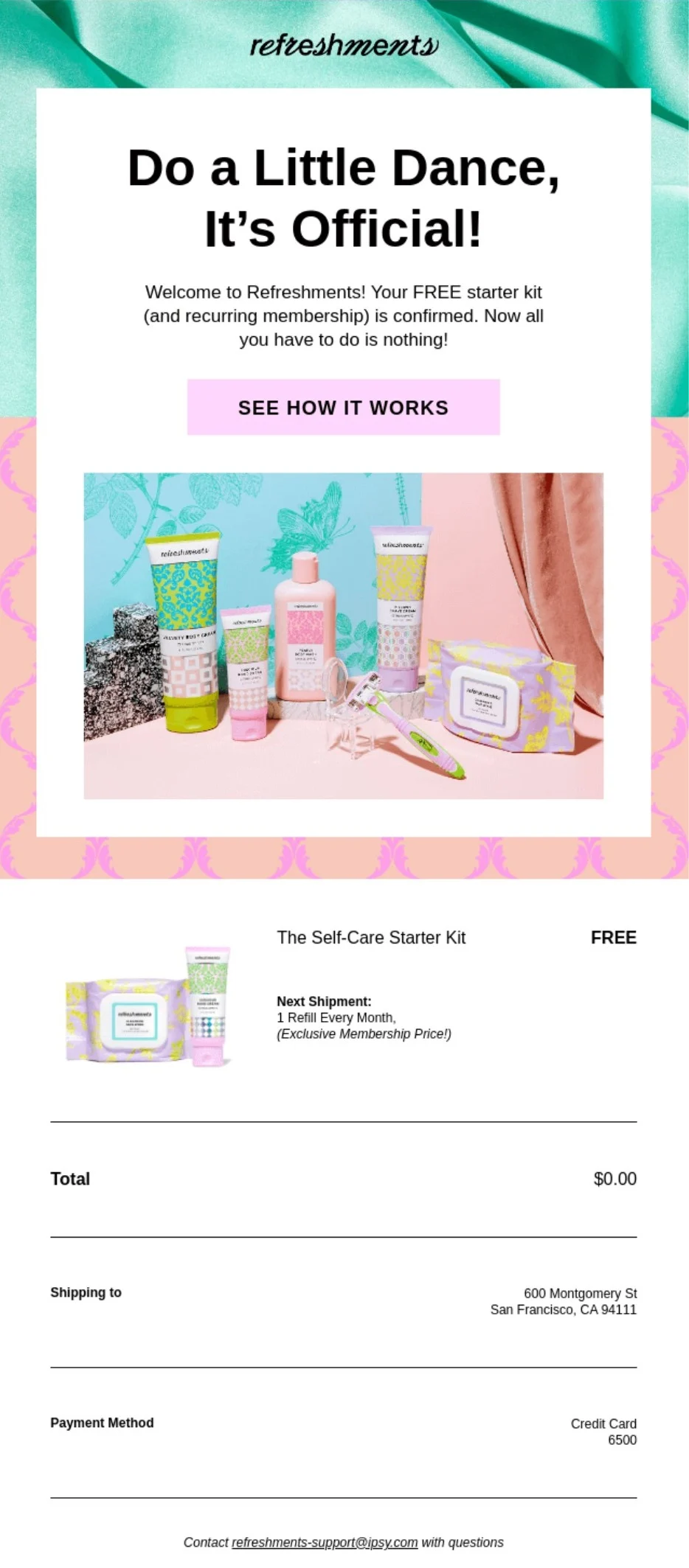
- IPSY – The Subscription Welcome: As a beauty subscription brand, IPSY’s confirmation doubles as a warm welcome, using an enthusiastic heading like “Do a Little Dance, It’s Official!” It clearly explains the subscription mechanics, including billing cycles and management options, proactively addressing potential confusion around recurring services.
- Patagonia – The Purpose-Driven Confirmation: The outdoor apparel brand, known for its sustainability focus, combines a clean layout with a seasonal hero image. Its confirmation is direct, easy-to-scan, and offers the convenience of text delivery updates, aligning with a customer base that values efficiency and connection.
Broader Implications for E-commerce Success
The strategic importance of the order confirmation email extends far beyond immediate transaction verification. It is a cornerstone of the post-purchase experience, influencing brand perception, customer retention, and operational efficiency. By transforming a utilitarian message into a branded, informative, and reassuring communication, businesses can:
- Enhance Customer Trust and Confidence: A well-structured confirmation immediately validates the customer’s decision, reducing buyer’s remorse and building confidence in the brand.
- Drive Repeat Business: By providing a positive, friction-free post-purchase experience, brands increase the likelihood of future purchases. Subtle, compliant promotional elements (e.g., loyalty program details, related product recommendations within the 20% limit) can further encourage engagement.
- Improve Operational Efficiency: Clear and comprehensive order details, coupled with links to FAQs or tracking information, empower customers to self-serve, significantly reducing the volume of customer support inquiries related to order status.
- Strengthen Brand Identity: Consistent branding, tone of voice, and visual design across all customer touchpoints, including transactional emails, reinforce brand identity and foster a cohesive customer experience.
- Leverage High Engagement for Value: The exceptionally high open rates of confirmation emails represent a unique opportunity to deliver value beyond the immediate transaction, whether through helpful content, community building, or subtly showcasing brand values.
Conclusion
![Order Confirmation Email: Templates & Examples [2026 ]](https://www.omnisend.com/blog/wp-content/uploads/2026/06/8-Patagonia-order-confirmation-email-scaled.jpg)
The order confirmation email, often underestimated, stands as one of the most powerful and engaged communications in the e-commerce landscape. It is not merely a digital receipt but a strategic asset capable of shaping customer perception, building lasting trust, and influencing future purchasing decisions. By meticulously crafting these emails—focusing on clarity, mobile-first design, accessibility, and brand consistency—businesses can transform a necessary administrative step into a significant touchpoint that reinforces customer loyalty and drives sustained growth. The high engagement metrics associated with these emails underscore their potential, making automation of a well-designed, informative, and on-brand order confirmation email an indispensable component of any successful e-commerce strategy. Investing in this critical communication ensures that every purchase marks not just a transaction, but the beginning, or continuation, of a valuable customer relationship.