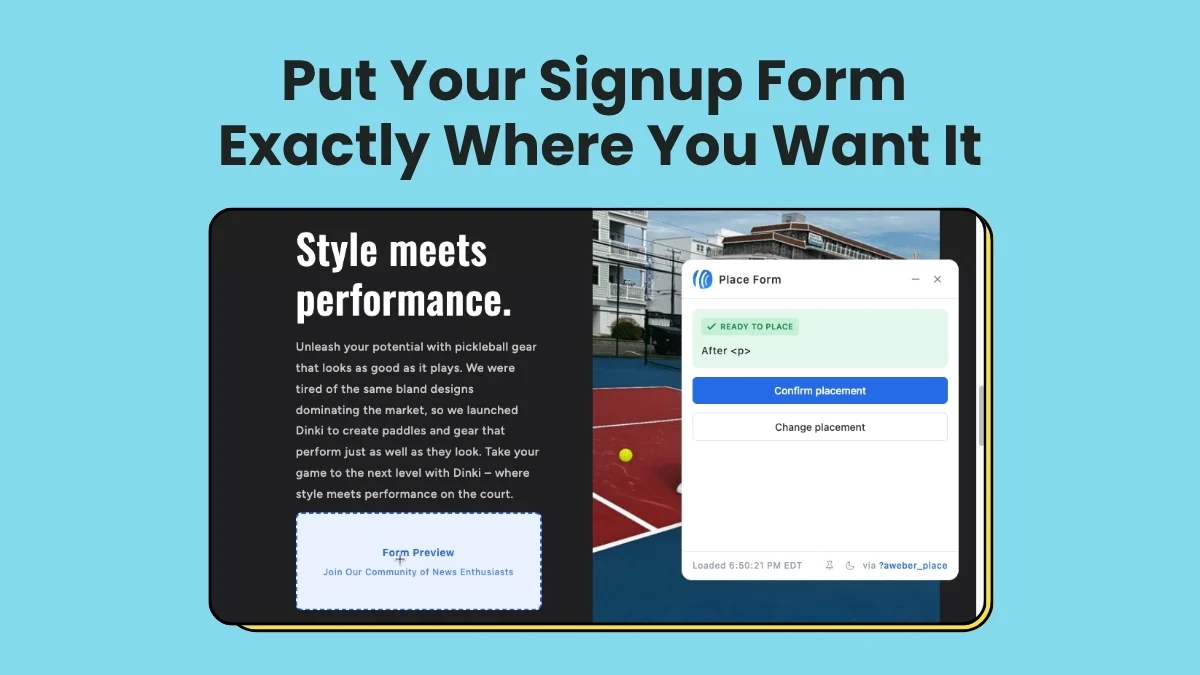
AWeber, a long-standing leader in email marketing solutions, has announced a significant enhancement to its AI Signup Form Builder, introducing visually placed inline forms that eliminate the need for coding. Released on June 24, 2026, this innovation allows businesses and content creators to seamlessly integrate high-converting signup forms directly within their web content, leveraging artificial intelligence for rapid creation and a groundbreaking visual editor for precise, no-code placement on live websites. This development marks a pivotal moment in simplifying subscriber acquisition, empowering marketers to optimize conversion pathways without technical hurdles.
The strategic placement of a signup form is a critical determinant of its effectiveness. Traditional methods often involve sidebar forms, which primarily capture the attention of users who are scanning content rather than deeply engaged. In contrast, forms embedded directly within content—known as inline forms—are designed to intercept readers at the peak of their engagement, while they are actively consuming information. AWeber’s latest update specifically targets this high-value interaction point, providing tools to capitalize on engaged audiences. The company’s AI Signup Form Builder now facilitates the creation of these inline forms and, crucially, offers a novel visual placement mechanism. Users can now pinpoint the exact location on their live webpage where the form should appear, confirm their selection, and deploy it instantly, all without writing a single line of code.
The Evolution of Subscriber Acquisition: A Background
Email marketing has consistently proven to be one of the most effective digital marketing channels, boasting a significant return on investment compared to other strategies. For decades, companies like AWeber have been at the forefront of providing tools for businesses to build and nurture their email lists. The journey of subscriber acquisition, however, has often been fraught with technical complexities. Early signup forms required manual HTML embedding, a task often relegated to web developers. As content management systems (CMS) evolved, plugins and widgets simplified some aspects, but precise placement and custom design still demanded technical proficiency or a substantial time investment.
The rise of AI in digital tools has promised to democratize complex processes, and AWeber’s AI Signup Form Builder is a testament to this trend. Before this latest update, the builder already utilized AI to help users craft compelling forms with intelligent copy and design suggestions. The challenge remained in the deployment phase, especially for those seeking to integrate forms seamlessly into their content flow without disrupting user experience or requiring development resources. This new visual placement feature directly addresses that gap, representing a significant leap forward in user accessibility and marketing efficiency.

Chronology of Innovation Leading to Visual Placement
AWeber, founded in 1998, has a rich history of pioneering email marketing solutions.
- Late 1990s – Early 2000s: AWeber establishes itself as one of the first email marketing service providers, focusing on autoresponders and basic list management. Signup forms are rudimentary, requiring direct code embeds.
- Mid-2000s – Early 2010s: Introduction of drag-and-drop email editors and more customizable form builders, reducing reliance on coding for design, but placement still involves manual embedding of snippets.
- Mid-2010s: Expansion into landing page builders and deeper integrations with popular CMS platforms, simplifying the creation of forms but not fully abstracting the placement process for complex inline scenarios.
- Early 2020s: AWeber integrates AI into its platform, launching the AI Signup Form Builder. This tool leverages machine learning to generate form content, optimize design elements, and suggest conversion-boosting language based on user prompts and industry best practices. This marked the first major step towards intelligent form creation.
- June 24, 2026: The launch of the AI Signup Form Builder’s enhanced capability, introducing visually placed inline forms. This update integrates the sophisticated AI creation engine with a novel, no-code visual deployment system, completing the circle of user-friendly form management from concept to live placement. This date signifies AWeber’s commitment to continuous innovation, focusing on reducing friction for its user base and enhancing the effectiveness of their marketing efforts.
Creating Your Inline Form in Seconds: The AI Advantage
The updated AI Signup Form Builder streamlines the form creation process, offering three intuitive starting points tailored to different user preferences, all converging into a powerful form editor. This flexibility ensures that users, regardless of their technical expertise or creative approach, can quickly generate a form that aligns with their marketing objectives.
- Custom Prompt: For users with a clear vision, the "Custom prompt" option allows for natural language descriptions. A user might describe, "I need an inline form for my blog post about sustainable gardening, asking for email addresses to send weekly tips and exclusive discounts." The AI then interprets this prompt, generating a form with relevant fields, compelling copy, and an appropriate design theme, specifically configured as an inline form. This method leverages the generative capabilities of AI to translate ideas into tangible assets rapidly.
- Fill-in-the-Blanks: This structured approach guides users through a series of questions, such as "What is the purpose of this form?", "What information do you want to collect?", and "What is your brand’s primary color?" Crucially, within these prompts, users select "embeds directly on my website" as their desired form type. This guided process is ideal for those who prefer a more structured workflow, ensuring all necessary details are captured for an effective form.
- Template Gallery: For inspiration or a quick start, AWeber provides a comprehensive template gallery. Users can browse a variety of pre-designed inline form templates, selecting one that best fits their aesthetic and functional requirements. These templates are fully customizable, serving as a robust foundation that can be easily tweaked to match specific branding and messaging.
Regardless of the starting point, all paths lead to AWeber’s intuitive form editor. Here, users can fine-tune every aspect of their inline form. This includes adjusting the copy to perfect the call-to-action, modifying design elements like colors, fonts, and button styles to match brand guidelines, and configuring settings such as confirmation messages, tag application, and list segmentation. This comprehensive editor ensures that the AI-generated or template-based form is fully optimized before deployment, striking a balance between AI-driven efficiency and granular user control.
Placing It with Four Clicks: A Breakthrough in Deployment
The true innovation of this update lies in its no-code visual placement system, reducing what was once a complex, multi-step process into a mere four clicks. This simplification empowers even the most non-technical user to precisely control where their inline form appears on their website, eliminating the need for developer intervention or manual code snippets.
- Click the Settings Tab in the Form Editor: Once the form’s design and content are finalized within the editor, the user navigates to the ‘Settings’ tab. This centralized control panel houses all deployment-related configurations.
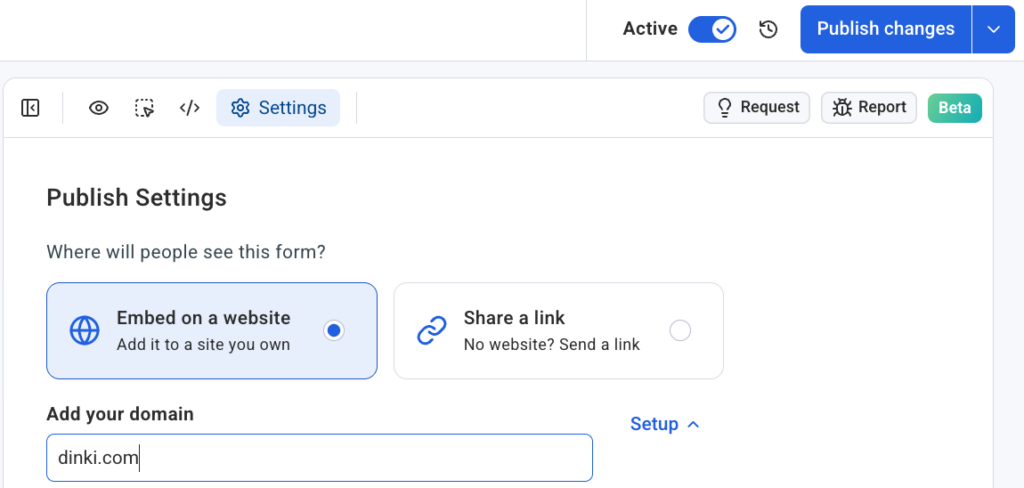
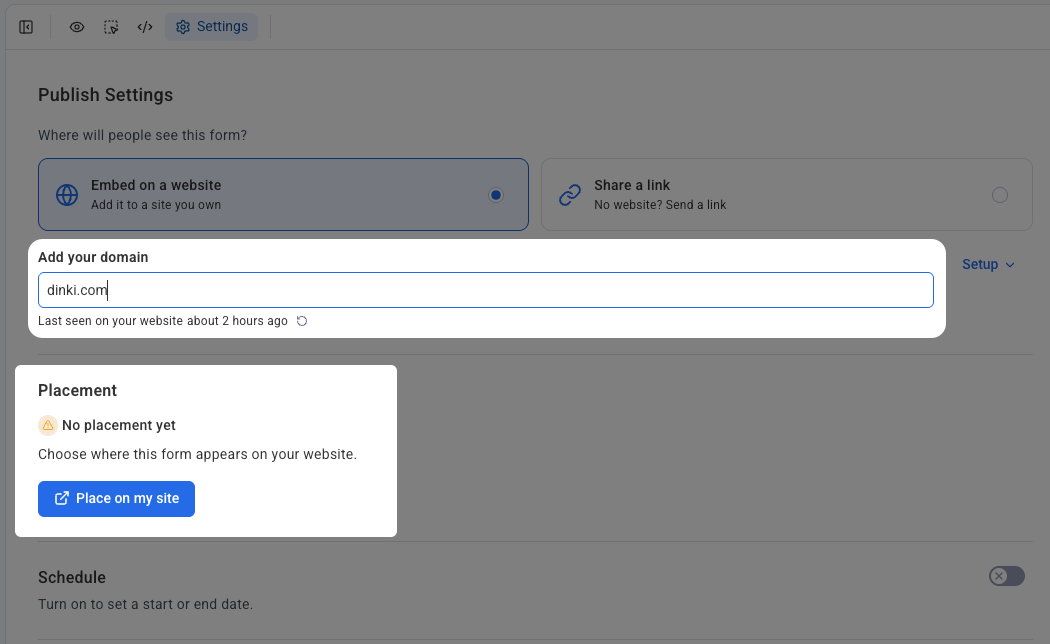
- Set the Domain and Confirm Snippet Installation: Within the settings, users specify the domain where the form is intended to appear. This step is crucial for security and proper form functionality, ensuring the form is tied to its designated website. A critical prerequisite is the installation of AWeber’s universal signup form snippet on the target website. This lightweight JavaScript snippet acts as a bridge, allowing AWeber’s platform to dynamically insert and manage forms on the site. AWeber provides clear instructions and resources to assist users in installing this snippet, a one-time process that unlocks the visual placement capability across the entire domain.
- Click "Place on My Site": With the domain configured and the snippet confirmed, users simply click a prominent button labeled "Place on my site." This action initiates the visual placement interface, transitioning from the form editor to the live website environment.
- Confirm Placement on Your Live Site: The user’s live website then opens in a special placement widget. This is not a simulated preview or a wireframe, but the actual, functional website. The widget allows the user to visually interact with their page. By simply clicking on the desired section or area within their live content—for instance, between two paragraphs in a blog post, or below an image—the user indicates where the inline form should reside. After selecting the spot, a final click on "Confirm placement" deploys the form instantly. The form is then live and active on the website, precisely where it was intended.
This groundbreaking approach bypasses the traditional methods of copying and pasting code, which are prone to errors and require a foundational understanding of HTML or website structure. By interacting directly with the live site, marketers gain unparalleled control and confidence in form deployment, ensuring optimal user experience and conversion opportunities.
Universal Compatibility: Works on Self-Hosted Sites and Beyond
A significant advantage of AWeber’s new visual placement feature is its broad compatibility across a multitude of self-hosted website platforms. This ensures that a vast array of businesses, from bloggers using WordPress to e-commerce stores on Shopify, can leverage the new capabilities without platform-specific limitations. The system supports:
- WordPress: The most popular CMS globally, powering millions of websites.
- Shopify: A leading e-commerce platform for online stores.
- Wix: A popular website builder known for its user-friendliness.
- Squarespace: Another widely used website builder favored for its design aesthetics.
- And more: The underlying technology of the universal signup form snippet allows for integration with virtually any website that supports JavaScript, including custom-coded sites.
Each domain is connected independently within the AWeber Settings. This robust architecture is particularly beneficial for users who manage multiple websites, such as agencies handling client accounts or businesses operating several branded properties. Forms and their placements remain organized and isolated across different domains, preventing conflicts and streamlining management. This scalability makes the AI Signup Form Builder an invaluable tool for professional marketers and agencies seeking efficient, centralized control over their client’s subscriber acquisition strategies.
Put Your Form Where Your Readers Already Are: Implications and Broader Impact
The core philosophy behind inline forms is to capitalize on existing user engagement. Content, whether it’s a compelling blog post, an informative article, or a detailed product description, serves as a magnet, drawing visitors in and capturing their attention. An inline form strategically placed within this content transforms that momentary attention into a tangible subscriber, without requiring the user to navigate to a separate landing page or hope they notice a less prominent sidebar element. This direct conversion pathway is designed to minimize friction and maximize signup rates.
Data-Driven Advantages:
Industry research consistently highlights the benefits of well-placed inline forms. While pop-up forms can achieve high conversion rates, they can also be intrusive and negatively impact user experience if not implemented carefully. Sidebar forms, while less disruptive, often suffer from lower visibility and engagement. Inline forms strike a balance, appearing naturally within the content flow. Studies by marketing analytics firms often show that inline forms, when contextually relevant, can achieve conversion rates significantly higher than static sidebar forms—sometimes by as much as 10-20%—because they appear when the reader is most invested in the topic. The ability to visually place these forms precisely allows marketers to test and optimize placement for even better performance, turning informed guesswork into data-driven strategy.
Empowering Marketers and Small Businesses:
This innovation democratizes advanced conversion optimization techniques. Small business owners, content creators, and solopreneurs often lack the budget for dedicated web developers or the technical skills to implement complex form strategies. AWeber’s no-code visual placement empowers these users to deploy sophisticated forms with ease, leveling the playing field against larger enterprises with more resources. This fosters greater autonomy and allows marketers to iterate quickly on their subscriber acquisition tactics.
Future of Marketing Tools:
AWeber’s move signals a broader trend in the martech landscape: the increasing integration of AI for both content generation and operational simplification. The combination of AI-powered design and no-code visual deployment represents a powerful paradigm shift, where tools become more intelligent and intuitive, reducing the technical barriers to effective marketing. It also underscores the growing importance of first-party data collection through email lists, especially in an era of evolving privacy regulations and reduced reliance on third-party cookies. Platforms that can simplify this critical function will gain a competitive edge.
The release of AWeber’s enhanced AI Signup Form Builder with visual inline form placement is more than just a product update; it’s a strategic evolution in how businesses can efficiently grow their audience. By allowing users to build AI-driven forms in seconds and place them exactly where they belong with just four clicks, AWeber is not only simplifying a complex process but also unlocking new opportunities for conversion and engagement. Marketers are now better equipped than ever to turn their valuable content into a robust and engaged subscriber base, solidifying email marketing’s position as an indispensable channel for sustained business growth.