The allure of starting a print-on-demand (POD) sticker business on Shopify is undeniable, promising near-zero startup costs, no inventory risk, and an impulse-buy price point. However, many aspiring entrepreneurs are blindsided by hidden expenses, particularly shipping and processing fees, which can quickly turn a seemingly profitable venture into a financial drain. This comprehensive guide aims to demystify the process, providing a step-by-step roadmap for establishing a sustainable and profitable sticker store, even for those with no prior e-commerce or design experience. The global print-on-demand market is projected to reach between $13 billion and $15 billion by 2026, according to reports from Grand View Research and Mordor Intelligence, highlighting the significant growth potential within this sector.
Step 1: The Crucial Sticker Math Before Design
Before a single design is created, a thorough understanding of the financial realities of selling stickers is paramount. The common pitfall lies in underestimating the cost of fulfilling a single order. Consider a seemingly straightforward scenario: selling a single 3×3 inch kiss-cut sticker for $4.99 with free shipping, using a platform like Printful.
The breakdown reveals a stark reality:
- Retail Price (3x3in kiss-cut, free shipping): +$4.99
- Printful Base Cost (3x3in kiss-cut): -$1.95
- Printful US Shipping (first item): -$4.29
- Shopify Payments Fee (2.9% + $0.30): -$0.44
- Net per Order: -$1.69
This calculation demonstrates that selling a single sticker at this price point results in a loss of $1.69 per order. The primary culprit is the high cost of shipping the initial item. Printful’s pricing structure shows that while the first sticker in an order ships for $4.29, each subsequent sticker in the same order drops to $0.99. This distinction is critical: shipping is a per-order cost, not a per-sticker cost, and this fundamental principle dictates the entire product strategy.
Beginners often overlook several significant expenses:
- Platform Subscription Fees: Shopify plans have monthly costs, ranging from $5 for the Starter plan to $39 for the Basic plan.
- Payment Processing Fees: Beyond Shopify’s own fees, payment gateways also charge a percentage of each transaction.
- Potential App Fees: While many POD apps offer free tiers, premium features or higher-tier plans can incur additional monthly costs.
- Marketing and Advertising: Driving traffic to a new Shopify store requires investment in marketing efforts.
- Returns and Refunds: While not always immediately apparent, a percentage of sales will likely involve returns or refunds, impacting profitability.
The prevalent pricing advice found online, such as "charge 2 to 3 times your base cost," often fails to account for these crucial elements. A $1.20 base cost with a 40% margin plus $0.30 processing, totaling $2.10, completely ignores the substantial impact of shipping, platform subscriptions, and transaction fees. To break even on a single sticker sold with free shipping at Printful’s rates, a retail price closer to $8 would be necessary, a price point unlikely to resonate with consumers for a single sticker. The solution is not to increase prices drastically but to fundamentally alter the unit of sale.
Step 2: Optimizing the Offer with Bundles and Thresholds
The key to overcoming the single-sticker deficit lies in restructuring the offer. Instead of selling individual stickers, focus on creating bundles, sticker sheets, or implementing a free shipping threshold. This strategy leverages the reduced per-item shipping cost for subsequent items within the same order.
Consider selling five stickers, which could be offered in different formats:
-
Five $4.99 Singles (5 separate orders):
- Fulfillment Cost: $33.40
- Retail Price: $24.95
- Net per Order: -$8.45 (Significant loss)
-
One 5-Sticker Pack (fulfilled as five loose stickers):
- Fulfillment Cost: $18.73
- Retail Price: $14.99
- Net per Order: -$3.74 (Still a loss, but reduced)
-
One Printed Sticker Sheet (5.83 x 8.25in):
- Fulfillment Cost: $10.07
- Retail Price: $14.99
- Net per Order: +$4.92 (~33% gross profit)
The sticker sheet emerges as the most profitable option because it is treated as a single item. This means the higher first-item shipping charge is incurred only once, drastically improving the profit margin.
To maximize profitability, consider these three levers:
- Sticker Sheets: Design cohesive sets of stickers that appeal to specific aesthetics or themes, sold as a single SKU. This is particularly effective for niches where buyers are inclined to purchase multiple designs at once.
- Sticker Packs: Offer curated collections of individual stickers bundled together. While less cost-effective than sheets, they provide flexibility and can cater to different customer preferences.
- Free Shipping Threshold: Implement a minimum order value for free shipping, such as $15 or $25. This encourages customers to add more items to their cart, increasing the average order value and offsetting the per-item shipping costs.
It is important to note that while Printful offers bulk discounts starting at 25 units, larger-scale printers like Sticker Mule can offer significantly lower per-unit costs for bulk orders (e.g., around $0.12 each at 10,000 units). However, this approach necessitates upfront inventory investment, a risk that POD largely mitigates. This strategy of bulk purchasing is more suitable for established businesses with predictable demand, as detailed in Step 4.
The ideal sticker niche is not solely defined by what is trending but by the purchasing behavior of its audience. Niches where buyers are inclined to purchase four or more items at a time are significantly more conducive to POD sticker business models due to the favorable shipping economics.
Before sketching any designs, conduct thorough niche research. Utilize free tools like Google Trends and Etsy’s search data to identify popular search terms and trending categories. Analyze competitor offerings to understand their product formats and pricing strategies. The goal is to identify niches where customers are likely to buy multiple stickers in a single order. For example, planner, journal, nurse, and aesthetic-set niches often see customers adding several items to their carts, making them prime candidates for sticker sheets and packs.
A crucial legal consideration before creating any artwork is to strictly avoid fan art, brand logos, and copyrighted characters. Engaging in such practices carries significant legal risks, including takedown notices and potential lawsuits. Focusing on original artwork is the safest and most sustainable approach for long-term business success.
For beginners, a strategic recommendation is to focus on one aesthetic niche and one occupation niche, developing 8 to 12 designs for each. These can then be packaged as both individual sticker SKUs and as a cohesive sticker sheet SKU, offering customers variety and catering to different purchasing preferences.
Step 4: Navigating the Print-on-Demand Supplier Landscape
Choosing the right print-on-demand supplier is a critical decision that directly impacts profit margins and product quality. While many guides offer generic advice, focusing on concrete pricing and service details is essential.
Here’s a comparative look at some prominent Shopify-compatible sticker suppliers:
| Supplier | Sticker Types | Base Cost Per Unit (Approx.) | Shipping (US) | Monthly Plan | Shopify App Rating |
|---|---|---|---|---|---|
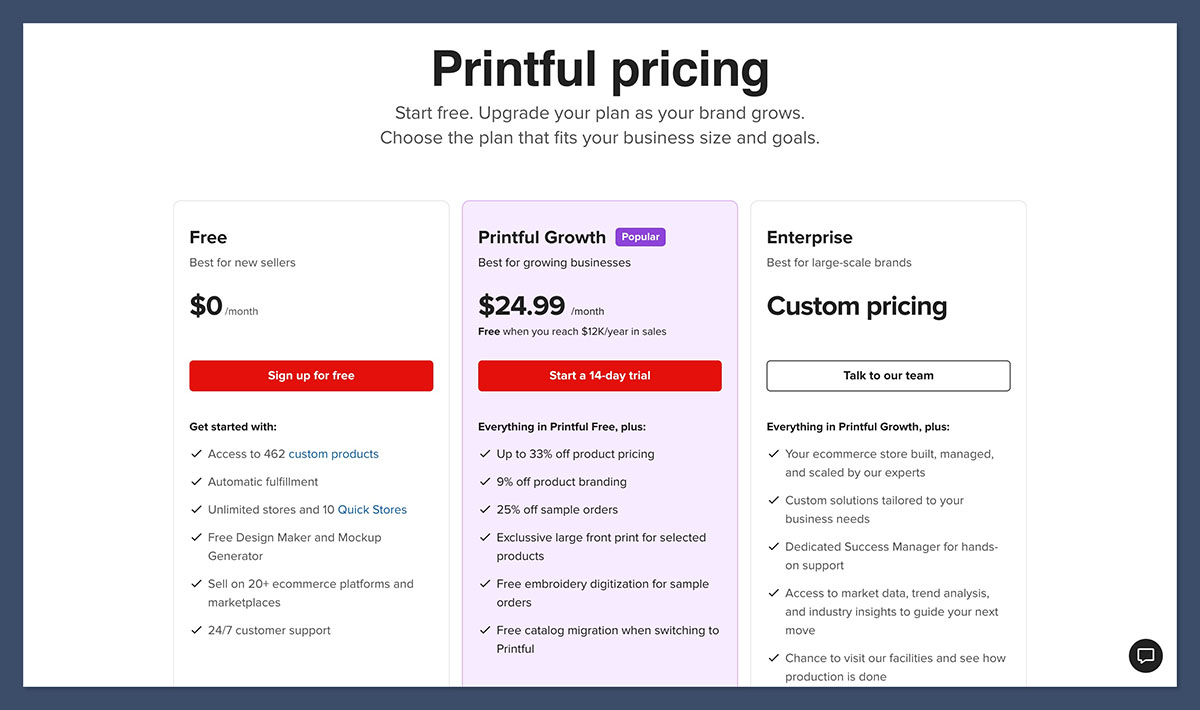
| Printful | Kiss-cut, die-cut, holographic, bumper, sheets | 3x3in kiss-cut $1.95, 5.5in die-cut $4.50 | $4.29 first item, $0.99 each additional | Free; Growth $24.99/mo | 4.8 stars (3,662 reviews) |
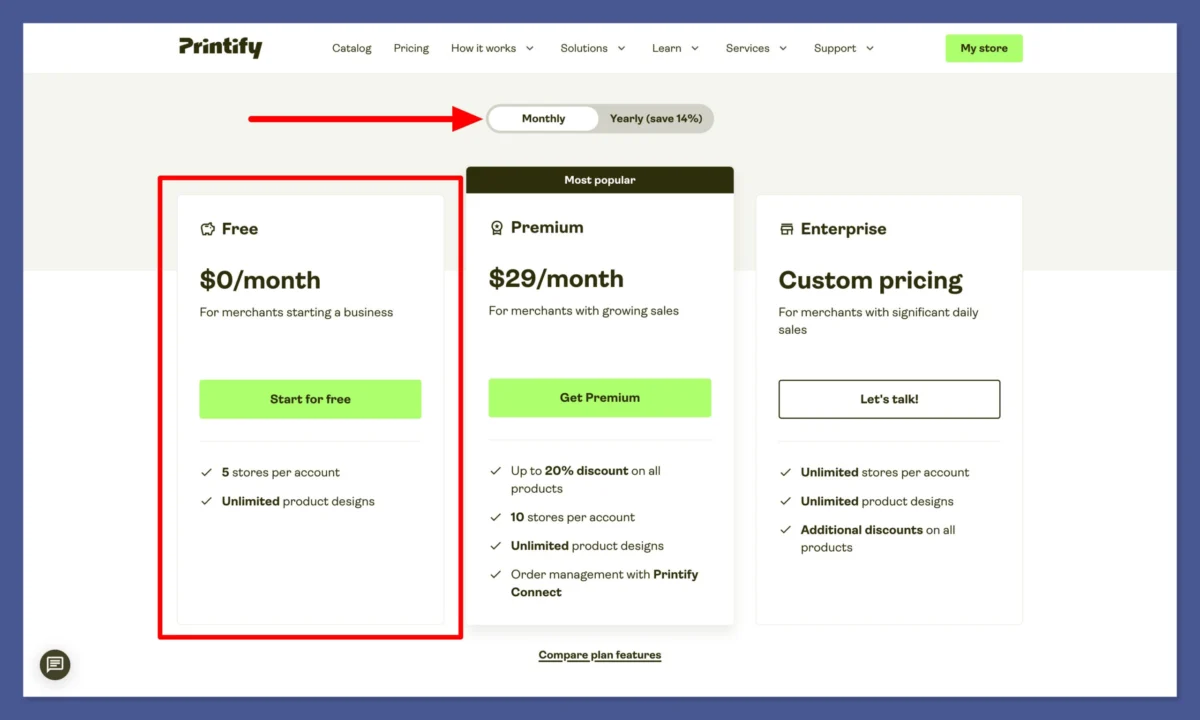
| Printify | Kiss-cut, die-cut, sheets | Kiss-cut ~$1.02-$1.39 (Premium) | Varies by print provider | Free (5 stores); Premium $39/mo | 4.7 stars (4,280 reviews) |
| Gelato | Kiss-cut, die-cut (local production) | Not publicly published | Local production reduces international shipping costs | Free; Gelato+ $19.99-$23.99/mo | Not listed |
| Sticker Mule (Bulk Pre-Order) | Die-cut vinyl | $0.12/ea at 10,000 units, $1.20/ea at 50 units | Free, ~4-day production | None | Not listed |
When evaluating suppliers, consider factors beyond just base cost:
- Print Quality Consistency: Printful operates its own facilities, offering a higher degree of consistency. Printify, on the other hand, routes orders to various third-party providers, leading to potential variations in quality.
- Shipping Speed and Reliability: While Printful’s flat-rate shipping is predictable, Printify’s varied shipping times can be a concern.
- App Integration and Ease of Use: A seamless integration with Shopify is crucial for efficient order fulfillment.
- Customer Support: Responsive and helpful customer support can be invaluable when issues arise.
For beginners, starting with Printful’s free plan is often recommended due to its predictable pricing and consistent quality, even if the base costs are slightly higher. As order volume increases, Printify can become a more cost-effective option, but it requires careful vetting of individual print providers to ensure quality.
Sticker Mule presents a different model, focusing on bulk pre-orders rather than true print-on-demand. Their exceptionally low unit costs at high volumes (e.g., approximately $0.23 per die-cut sticker for 1,000 units) make them attractive for businesses with established demand and the capital to invest in inventory.
Printful:
- Best for: Beginners prioritizing consistent quality and predictable pricing, those who value a single point of contact for production and support.
- Skip if: You are highly price-sensitive and can afford to invest in sample orders to vet multiple Printify providers.
Printify:
- Best for: Businesses with higher order volumes seeking potentially lower per-unit costs, those willing to invest time in researching and comparing different print providers.
- Skip if: You are a complete beginner and prefer the simplicity and consistency of a single, integrated production facility.
Step 5: Crafting Print-Ready Sticker Files
The quality of your printed stickers hinges on the accuracy and adherence to print specifications. Printful provides clear guidelines, and following these six checks will ensure your designs translate well from screen to physical product:
- File Format: Use PNG files with transparent backgrounds for kiss-cut and die-cut stickers. For sticker sheets, a transparent PNG is also ideal.
- Resolution: Ensure your design is at least 300 DPI (dots per inch) at the intended print size. This guarantees sharp, clear prints.
- Color Profile: Design in RGB color mode. Most POD printers use RGB, and designing in CMYK can lead to duller colors when printed.
- Bleed: Include a 3mm bleed around your design. This is an extra margin of color that extends beyond the trim line, preventing white edges if the cut is slightly off.
- Safe Zone: Keep crucial design elements (text, important graphics) at least 3mm away from the cut line. This "safe zone" prevents any part of your design from being accidentally cut off.
- Cut Lines: For die-cut stickers, ensure a clean silhouette. For kiss-cut stickers, the backing shape is defined by the printer, so focus on the design within the sticker’s boundaries.
A common pitfall is the color profile mismatch, often leading to the complaint "the printer ruined my colors." This is typically a user-side issue stemming from designing in the wrong color profile.
For design work, several free tools can be utilized:
- Canva: Offers a user-friendly interface with a vast library of templates and design elements, including a free tier.
- Photopea: A free, web-based image editor that closely resembles Adobe Photoshop, capable of handling complex design tasks and transparent backgrounds.
The total design cost for a bootstrapped entrepreneur can be effectively $0 by leveraging these free resources. The type of cut also influences file preparation. Die-cut designs require a precise outline, while kiss-cut designs are more forgiving due to the surrounding backing material. For sticker sheets, ensure adequate spacing between individual designs to allow the cutting machine to separate them cleanly.
The four critical elements to focus on are: 300 DPI resolution, a 3mm bleed, a 3mm safe zone, and a transparent PNG in sRGB color mode. Mastering these will significantly improve print quality.
Step 6: Establishing Your Shopify Store
Setting up a Shopify store requires a methodical approach, avoiding common time sinks like excessive theme customization in the initial stages. Six fundamental elements must be in place before connecting a supplier and publishing products.
The initial setup process on Shopify involves:
- Sign Up for a Shopify Account: Choose a plan that best suits your budget and expected sales volume.
- Choose a Store Name: Select a memorable and relevant name for your brand.
- Set Up Your Domain: Connect a custom domain or use the default Shopify subdomain.
- Configure Basic Settings: Input your business information, currency, and timezone.
- Design Your Store: Focus on essential pages and a clean, user-friendly layout.
- Add Essential Pages: Create About Us, Contact Us, Shipping Policy, and Refund Policy pages.
Before connecting a POD supplier, ensure these six core components are established:
- Clear Product Photography: Use high-quality mockups or, ideally, actual product photos of your samples.
- Compelling Product Descriptions: Highlight the unique selling points and benefits of your stickers.
- User-Friendly Navigation: Make it easy for customers to browse and find products.
- Defined Shipping Options: Clearly outline your shipping policies and costs.
- Secure Checkout Process: Ensure a smooth and trustworthy payment experience.
- Contact Information: Provide clear channels for customer inquiries.
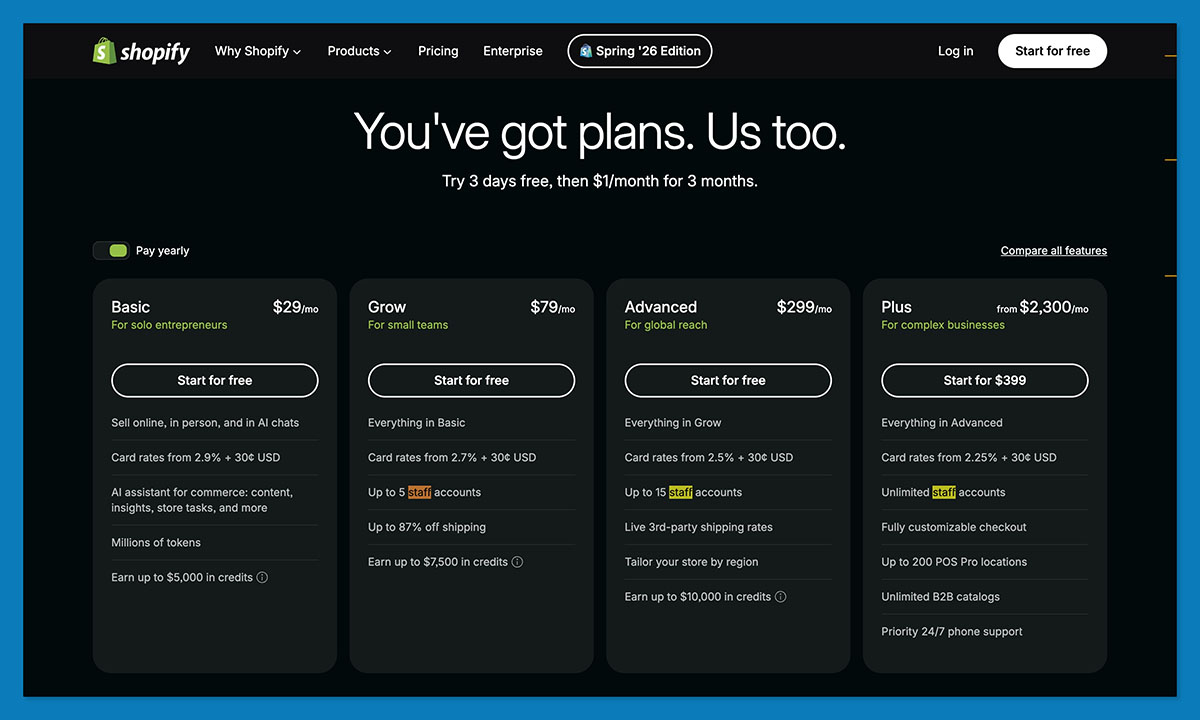
Regarding Shopify plans, the Starter plan at $5/month is the most budget-friendly but incurs a 5% transaction fee on every sale, even when using Shopify Payments. The Basic plan, priced at $39/month (or $29/month billed annually), offers a more standard 2.9% + $0.30 processing fee without additional transaction charges. A detailed financial analysis in Step 8 will clarify the break-even point for these plans.
Initially, it is advisable to bypass theme customization, upsell apps, and complex analytics dashboards. Design tweaks and feature additions should be considered only after the store has generated its first sale and established a customer base.
A quick comparison of Shopify plans reveals that at typical sticker order values (e.g., $15), the 5% transaction fee on the Starter plan equates to $0.75 per order. The Basic plan’s additional monthly cost of $34 ($39 – $5) is offset by the absence of this high transaction fee until approximately 45 orders per month are processed. Therefore, the Starter plan remains more economical for lower sales volumes.
Step 7: Integrating POD Apps and Publishing Products
Connecting your chosen POD app to Shopify is a relatively straightforward process that typically takes only a few minutes. However, meticulous verification after the connection is crucial to prevent potential customer service issues and refunds. There are two primary methods for establishing this integration:
Method A: Starting in Printify (or your chosen POD app)
- Create an Account: Sign up for an account on the POD platform (e.g., Printify).
- Connect to Shopify: Navigate to the app’s integration settings and select "Connect to Shopify."
- Authorize Access: Grant the POD app permission to access your Shopify store data.
- Select Products: Choose the sticker products you wish to sell and configure their variants (size, color, etc.).
- Publish to Shopify: Once configured, publish the products directly to your Shopify store.
A common oversight is a typo in the store URL, which can prevent successful integration.
Method B: Starting in Shopify
- Install the POD App: Go to the Shopify App Store and search for your desired POD app (e.g., Printful or Printify). Install the app.
- Authorize Access: Allow the app to access your Shopify store.
- Create a New Product: Within your Shopify admin, navigate to "Products" and click "Add product."
- Select POD Supplier and Product: The POD app will typically guide you to select the supplier and the specific sticker product you want to list.
- Design and Configure: Upload your design, set pricing, and configure product variants as per the app’s interface.
- Publish the Product: Once finalized, publish the product to your online store.
After the product is published, it’s essential to perform several checks:
- Product Titles and Descriptions: Ensure they are accurate, engaging, and SEO-friendly.
- Product Images: Verify that the correct mockups or sample photos are displayed.
- Pricing: Confirm that the retail prices set in Shopify match those in the POD app.
- Variants: Check that all available sizes, colors, and styles are correctly configured.
- Collections: Ensure the product is added to the appropriate category on your store.
A critical aspect of POD fulfillment is understanding the payment flow. Your credit card funds the fulfillment of an order, not your Shopify payout, which can take several days to process. This temporary cash flow gap is a significant consideration for entrepreneurs operating on a tight budget.
Before directing any traffic to your store, it is highly recommended to order a sample of your product. This vital step, detailed in Step 9, ensures quality control and provides authentic product imagery.
Step 8: Strategic Pricing and Financial Planning
Accurate pricing is the cornerstone of a profitable sticker business, and it must be derived from the fully burdened fulfillment cost, not merely a multiple of the base product price. The monthly overhead of running a sticker store on Shopify can be substantial, and understanding these fixed costs is crucial for setting realistic revenue targets.
A typical cost breakdown for a beginner sticker store might look like this:
| Cost | Cheapest Path | Comfortable Path | Notes |
|---|---|---|---|
| Shopify Plan | $5 Starter | $39 Basic ($29 annually) | Starter incurs a 5% transaction fee on all sales. |
| Payment Processing | 2.9% + $0.30 | 2.9% + $0.30 | Third-party gateways add a 2% Shopify fee. |
| POD App | $0 (Free Plan) | Printify Premium $39/mo | Printful Growth becomes free at $12K/yr sales; Premium unlocks up to 33% off. |
| Design Tools | $0 (Canva Free + Photopea) | Canva Pro | Free tier requires Photopea for transparent backgrounds. |
| Samples | ~$7-15 (once) | One per format sold | One-time cost, essential for quality control. |
| Marketing | $0 (Organic) | $100-300 (to test) | Premature before store conversion is validated. |
| Total to be Live | ~$5 | ~$45-80/mo | Excludes per-order fulfillment costs. |
The break-even point is a critical calculation. On the comfortable path ($78/month in fixed costs, assuming Basic + Printify Premium), with a gross profit of $4.92 per $14.99 sticker sheet (from Step 2), you would need approximately 16 sheet orders per month to cover your fixed expenses. On the cheapest path ($5/month for Starter + free POD plans), the 5% transaction fee reduces the gross profit to about $4.17 per sheet, meaning just over one order is needed to break even on fixed costs.
The decision between Shopify Starter and Basic is also influenced by sales volume. While Starter is cheaper at lower volumes, the 5% transaction fee becomes a significant burden as sales increase. At a $14.99 order value, the $0.75 fee per order on Starter versus the $34 monthly difference in plan cost means Basic becomes more cost-effective around 45 orders per month.
Printify Premium, at $39/month, offers up to 33% off products. On a $5.05 sticker base cost, this saving is approximately $1.67 per order. To recoup the $39 monthly fee, approximately 23 orders are needed. Therefore, it’s advisable to remain on the free plan until order volume justifies the upgrade.
The overarching recommendation is to start with the most cost-effective path, utilizing free plans and trials, and upgrade only when increased order volume necessitates it. Feature lists should not be the primary driver for upgrades; financial performance should.
Step 9: The Indispensable Sample Order and Quality Assurance
Before investing in marketing and driving traffic to your store, a crucial step is to order a physical sample of your product. This $7-$15 investment serves as the cheapest form of insurance in the print-on-demand model. The first person to hold your sticker should not be a paying customer.
Order at least one unit of every product format you intend to sell – be it a single kiss-cut sticker, a sticker sheet, or a die-cut sticker. These samples are purchased through the POD app at base cost plus shipping.
Upon receiving your sample, meticulously inspect it based on the following criteria:
- Print Quality: Examine the sharpness of the print, color accuracy, and any potential smudging or banding.
- Color Accuracy: Compare the printed colors to your original design files, paying attention to how vibrant or muted they appear.
- Cutting Accuracy: For kiss-cut stickers, ensure the cut is clean and the backing is easy to peel. For die-cut stickers, verify the precision of the outline cut.
- Material Quality: Assess the feel and durability of the sticker material.
- Adhesion: Test how well the sticker adheres to common surfaces.
- Packaging and Delivery: Note the condition in which the product arrived and the speed of delivery.
If the sample quality is unsatisfactory, diagnose the issue before making design changes. With Printify, quality can vary significantly between print providers. If your sample exhibits poor print quality or material issues, switching to a different provider within Printify may resolve the problem. For Printful, complaints often relate to shipping carriers or customer support, so testing delivery times and support responsiveness is also important.
Leverage your sample by photographing it in real-world settings. Authentic photos of stickers on water bottles, laptops, or notebooks convert significantly better than generic supplier mockups. These real-world images cost nothing to produce beyond the sample itself and provide an honest representation of your product, setting your store apart from competitors relying solely on digital mockups.
The most prudent approach is to order one sample per product format, allow for shipping time, and then launch the store. If budget is a constraint, allocating funds to this step is more critical than any other single investment outlined in this guide.
Step 10: Driving Traffic and Long-Term Growth
The statistic that over 80% of Shopify stores generate zero revenue in their first 90 days underscores a critical challenge: visibility. Shopify is a powerful e-commerce platform, but it is not a marketplace like Etsy, which already hosts millions of active buyers actively searching for products. A new Shopify store starts with zero organic discovery.
To overcome this, strategic traffic generation is essential. Tactics suitable for sticker businesses include:
- Social Media Marketing: Leverage platforms like Instagram, TikTok, and Pinterest to showcase your designs, engage with potential customers, and run targeted ad campaigns.
- Influencer Marketing: Collaborate with micro-influencers in relevant niches to promote your products to their followers.
- Content Marketing: Create blog posts, tutorials, or behind-the-scenes content related to sticker art, design, or niche interests to attract organic traffic.
- Search Engine Optimization (SEO): Optimize your product listings and website content with relevant keywords to improve search engine rankings.
- Email Marketing: Build an email list by offering incentives and nurture leads with newsletters, promotions, and new product announcements.
A recommended progression for complete beginners with no existing audience is to first establish a presence on Etsy for one to three months. This allows for validation of designs and acquisition of initial sales on a platform with built-in traffic. Subsequently, transition to a dedicated Shopify store around months 6 to 12, once an audience and some sales momentum have been built. Shopify then serves as the brand’s central hub, not the initial customer acquisition channel.
Budgeting for paid advertising should be deferred until the store’s product pages demonstrate a reasonable conversion rate with free organic traffic. The initial 90 days should be viewed as a period of validation, not immediate revenue generation. Stores that achieve early success typically share three traits: rapid execution, a pre-existing warm audience, and optimized conversion basics from day one.
A comparative analysis for the first month highlights the distinct advantages of each platform:
- Etsy: Immediate access to a large buyer base, listing fees, adherence to marketplace rules, high competition among sticker shops.
- Shopify: No existing buyer traffic, full profit margins, complete brand control and data ownership.
Utilizing Etsy for demand validation and Shopify for long-term brand building is a common and effective strategy. Regardless of the chosen path, ensuring the store is priced correctly from its inception is paramount for sustainable profitability.
FAQ
What’s the difference between kiss-cut and die-cut stickers?
Kiss-cut stickers are cut through the vinyl layer only, leaving a surrounding backing. This is more cost-effective and ideal for multi-design sheets. Die-cut stickers are cut entirely through the backing material to the exact outline of the artwork, offering a custom look at a slightly higher cost.
How much does it cost to start selling print-on-demand stickers on Shopify?
The initial setup can be under $60. This includes Shopify’s Starter plan ($5/mo) or Basic ($39/mo), a free POD app plan, a physical sample ($7-15), and free design tools. There are no upfront inventory costs due to the print-on-demand model.
What profit margin can I expect on print-on-demand stickers?
A well-structured offer, such as a sticker sheet with a free shipping threshold, can yield around 33% gross profit. Conversely, poorly structured offers, like selling single stickers with free shipping, can result in negative profit margins. The format of the sale significantly impacts profitability more than the price alone.
Does offering free shipping hurt print-on-demand sticker profits?
Yes, for single-sticker orders where the shipping cost exceeds the product price. However, for sticker packs and sheets, a free shipping threshold (e.g., $15-$25) can increase order values and offset shipping costs effectively, enhancing conversion rates without sacrificing profitability.
Can I legally sell fan art or logo stickers through print on demand?
No, it is not legally safe to sell fan art or logo stickers without proper licensing. Copyright holders control derivative works, and relying on "fair use" is a risky defense after a takedown notice. Focusing on original art is the recommended and safest approach for POD businesses.
Should a complete beginner sell stickers on Etsy or Shopify first?
For beginners without an existing audience, Etsy is recommended first due to its built-in traffic. After validating designs and gaining initial sales, transitioning to Shopify offers better long-term margins, brand control, and direct customer data. Many sellers operate both platforms concurrently.