
The landscape of digital marketing and lead generation is undergoing a significant transformation with the advent of AI-powered form builders, tools designed to create sophisticated signup forms from simple, plain-language descriptions. This innovative approach eliminates the traditional complexities of manual design, coding, or reliance on professional designers, allowing businesses to generate functional, visually appealing, and highly interactive forms in mere seconds. One prominent example of this burgeoning technology is the AI Signup Form Builder recently introduced by AWeber, launched on May 20, 2026, which exemplifies the shift towards intuitive, AI-driven solutions in the realm of online engagement.
The Evolution of Digital Forms: From Code to Conversational AI
For decades, the creation of online forms has been a cornerstone of digital strategy, essential for capturing leads, gathering feedback, and facilitating user interactions. Initially, forms were meticulously coded using HTML, CSS, and JavaScript, a process demanding specialized technical skills. The subsequent rise of traditional form builders, characterized by drag-and-drop interfaces and pre-designed templates, democratized form creation to some extent. These tools empowered non-developers to assemble forms by selecting elements, adjusting layouts, and configuring fields one by one. While a significant leap forward, this method still presented users with a "blank canvas" dilemma, requiring considerable time and design acumen to produce truly engaging and effective forms.
The current paradigm shift, catalyzed by advancements in artificial intelligence, particularly Large Language Models (LLMs), ushers in a new era. AI form builders represent the third wave of innovation, moving beyond manual manipulation to intelligent interpretation. Instead of users dictating every design choice, they simply describe their desired outcome in natural language—a sentence, a phrase, or even a screenshot. The AI then takes on the heavy lifting of layout, styling, animation, and field mapping, translating abstract intent into concrete digital assets. This evolution underscores a broader trend in technology where AI is increasingly abstracting away complexity, making powerful tools accessible to a wider audience, especially small businesses and independent marketers who often lack dedicated design resources.
Understanding the Mechanics: How AI Form Builders Operate

At its core, an AI form builder leverages sophisticated LLMs to interpret user input and generate a fully functional web form. This process typically unfolds in three distinct, yet interconnected, stages:
-
Input Provision: The initial stage involves the user communicating their requirements to the AI. This can take several forms, demonstrating the versatility of these tools. A user might provide a written description, such as "Create a popup with a countdown timer and email field for a flash sale." Alternatively, they could upload a screenshot of an existing form they admire from another website, prompting the AI to analyze its structure and design elements. Many AI builders also offer guided prompts, which walk users through a series of structured choices regarding form type, required fields, and desired behaviors, making the process even more accessible for those unsure where to start. This multi-modal input capability is crucial for accommodating diverse user preferences and technical proficiencies.
-
AI Interpretation and Generation: Once the input is received, the AI’s LLMs come into play. They parse the natural language description, analyze the visual cues from a screenshot, or process the selections from a guided prompt to understand the user’s intent. The AI then synthesizes this understanding into a complete form structure. This isn’t merely producing static HTML; a capable AI form builder generates interactive elements, including responsive layouts, dynamic styling, entrance and exit animations, scroll triggers, conditional display rules, and even gamified components like scratch-card reveals or spin-the-wheel mechanics. The AI handles the intricate details of design principles, user experience best practices, and technical implementation, constructing a publishable form that is optimized for various devices and user interactions.
-
Conversational Refinement: The final stage, and arguably where AI form builders truly differentiate themselves, is the iterative refinement process. Rather than navigating through complex menus or adjusting individual settings, users can request changes in plain language. Phrases like "Make the button larger," "Change the background to dark blue," or "Add a progress bar for the multi-step form" are understood and acted upon by the AI. This conversational loop allows for rapid prototyping and fine-tuning, with the AI updating the form in real-time for immediate preview. This method significantly reduces the time and effort traditionally spent on design iterations, enabling marketers to achieve their desired form aesthetics and functionality through natural dialogue, even allowing for visual inspiration mid-conversation by uploading images. The ability to save context and resume editing later further streamlines the workflow, making the design process remarkably fluid and intuitive.
Key Differentiators: How AI Form Builders Surpass Traditional Approaches
The distinction between AI and traditional form builders is profound, particularly in their impact on efficiency, accessibility, and the scope of what can be achieved without specialized skills.

-
Eliminating the "Blank Canvas" Barrier: Traditional builders, despite their drag-and-drop convenience, often present a daunting blank canvas or a gallery of generic templates. For small businesses, as AWeber’s research indicates—with 43% having 500 or fewer email subscribers—this initial hurdle can be paralyzing. Many know they need a signup form but are deterred by the sheer number of options and the perceived complexity of design. AI form builders bypass this by instantly generating a working form from a simple prompt, transforming a potential roadblock into a swift starting point.
-
Unlocking Advanced Interactivity: Multi-step forms, animated popups, floating 3D buttons, scratch-card reveals, spin-the-wheel signups, and countdown timers were once the exclusive domain of developers or expensive custom solutions. Traditional builders often require custom code for such features, if they offer them at all. AI form builders collapse this complexity, generating these sophisticated, engagement-boosting elements from a single descriptive prompt. This democratizes access to advanced conversion optimization tactics.
-
Unprecedented Speed and Efficiency: The ability to generate a form in seconds, then refine it through natural conversation, dramatically cuts down on development time. What might have taken hours or even days of manual configuration, coding, and troubleshooting with traditional methods can now be accomplished in minutes. This speed is invaluable for businesses operating in fast-paced digital environments, allowing them to react quickly to marketing opportunities or campaign needs.
-
Cost-Effectiveness and Resource Optimization: By reducing the need for specialized design or development skills, AI form builders offer significant cost savings. Small businesses can achieve professional-grade forms without hiring external designers or dedicating internal staff to intricate manual processes. This allows marketing teams to reallocate resources towards strategic planning and content creation, rather than tactical execution of form design.
Defining Excellence: What to Look for in a Capable AI Form Builder
Not all AI form builders are created equal. As the market matures, discerning users should seek out tools that offer a comprehensive suite of features beyond basic generation. A truly capable AI form builder should embody:
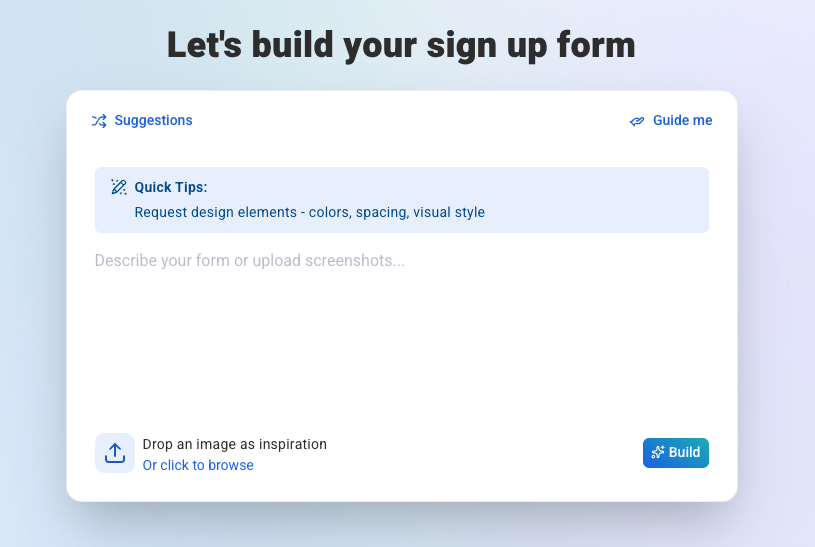
- Multiple, Flexible Input Methods: The best tools offer a range of starting points—free-form text prompts for creative freedom, guided prompts for structured assistance, screenshot uploads for visual inspiration, and a robust template gallery for quick starts. This ensures usability for diverse user needs and comfort levels.
- Sophisticated Conversational Refinement: The ability to generate an initial form is foundational, but the real power lies in the iterative refinement loop. A strong AI form builder allows users to make detailed changes through natural language, maintaining context throughout the conversation and even incorporating new visual inputs mid-session.
- Rich Interactive and Animated Elements: Beyond static fields, a top-tier AI form builder should effortlessly create dynamic elements that capture attention. This includes custom scroll triggers, entrance animations, hover effects, gamified mechanics (like scratch cards or spin-the-wheel), and multi-step layouts with progress bars. These features are critical for modern conversion rate optimization.
- Intelligent Custom Field Mapping: For businesses collecting data beyond basic name and email, the AI should intelligently map collected information (e.g., "favorite product," "company name") to corresponding fields in the user’s email marketing platform or CRM. Crucially, if a field doesn’t exist, the builder should have the capability to create it automatically upon publication, ensuring seamless data integration.
- Granular Display and Targeting Controls: A form’s effectiveness hinges on its visibility to the right audience at the optimal time. Essential features include page-level targeting, device targeting (desktop, mobile, or both), frequency controls (e.g., once per visitor, once per session), and robust scheduling options for seasonal promotions or time-sensitive campaigns.
- Comprehensive Preview and Testing Environment: Before deployment, marketers need to confidently assess how the form will appear and behave in a live environment. This necessitates a preview mode that accurately simulates animations, field validation, entrance triggers, and thank-you page behavior, allowing for thorough testing and adjustments.
AWeber’s AI Signup Form Builder: A Deep Dive into Functionality
AWeber’s AI Signup Form Builder, currently in open beta and available to all users, serves as a compelling illustration of these capabilities, embodying the cutting edge of AI-driven lead generation.
Getting Started: AWeber provides four distinct pathways to initiate form creation:
- Free Prompting: Users can simply open the builder and describe their vision. For instance, a prompt like "Create a scratch-card signup form where visitors scratch off to reveal a hidden discount. Always reveal 15% off," will generate a fully functional form complete with the interactive scratch mechanic, the prize logic, and email capture fields. Integrated quick tips guide users in crafting more effective prompts.
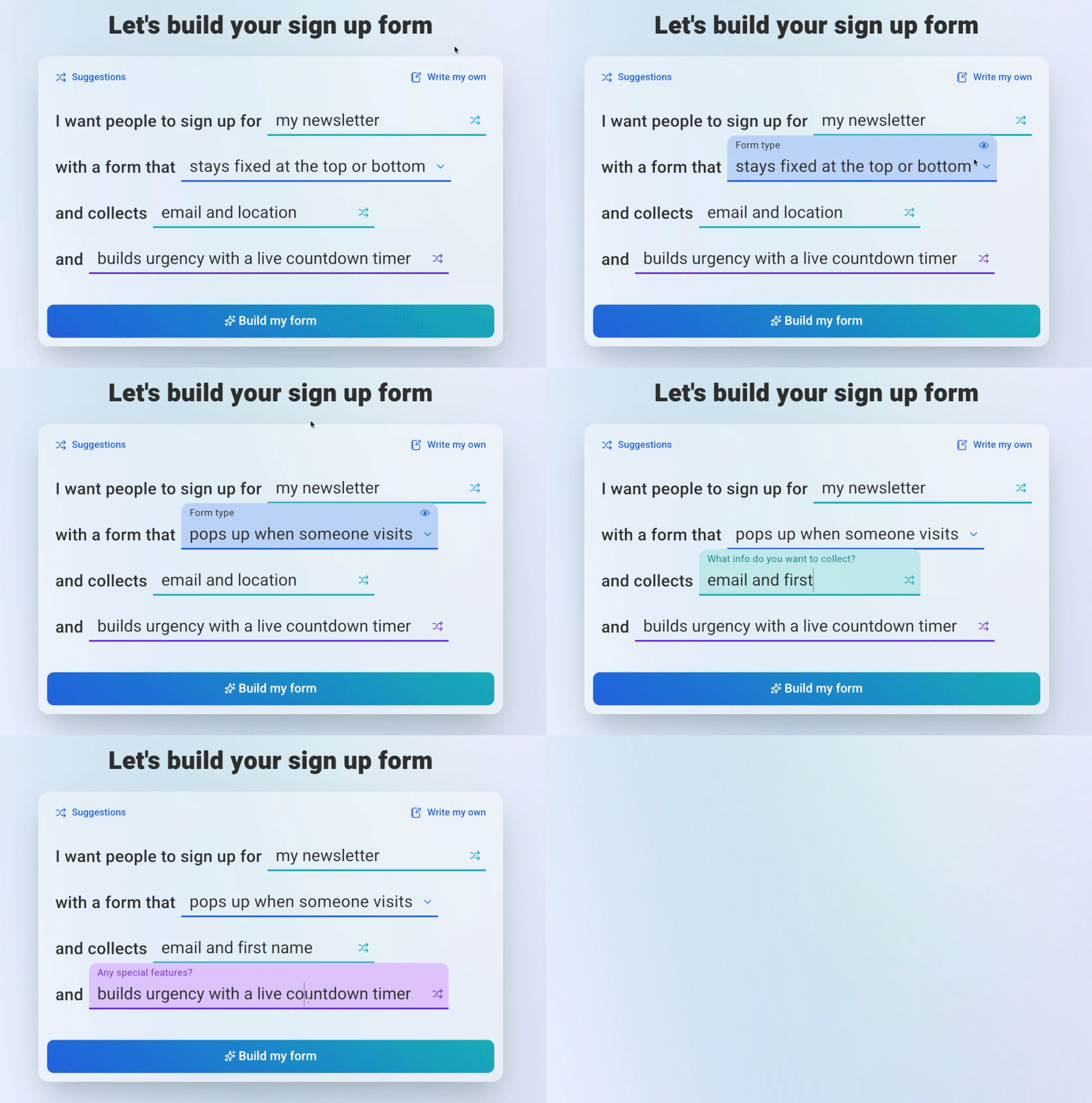
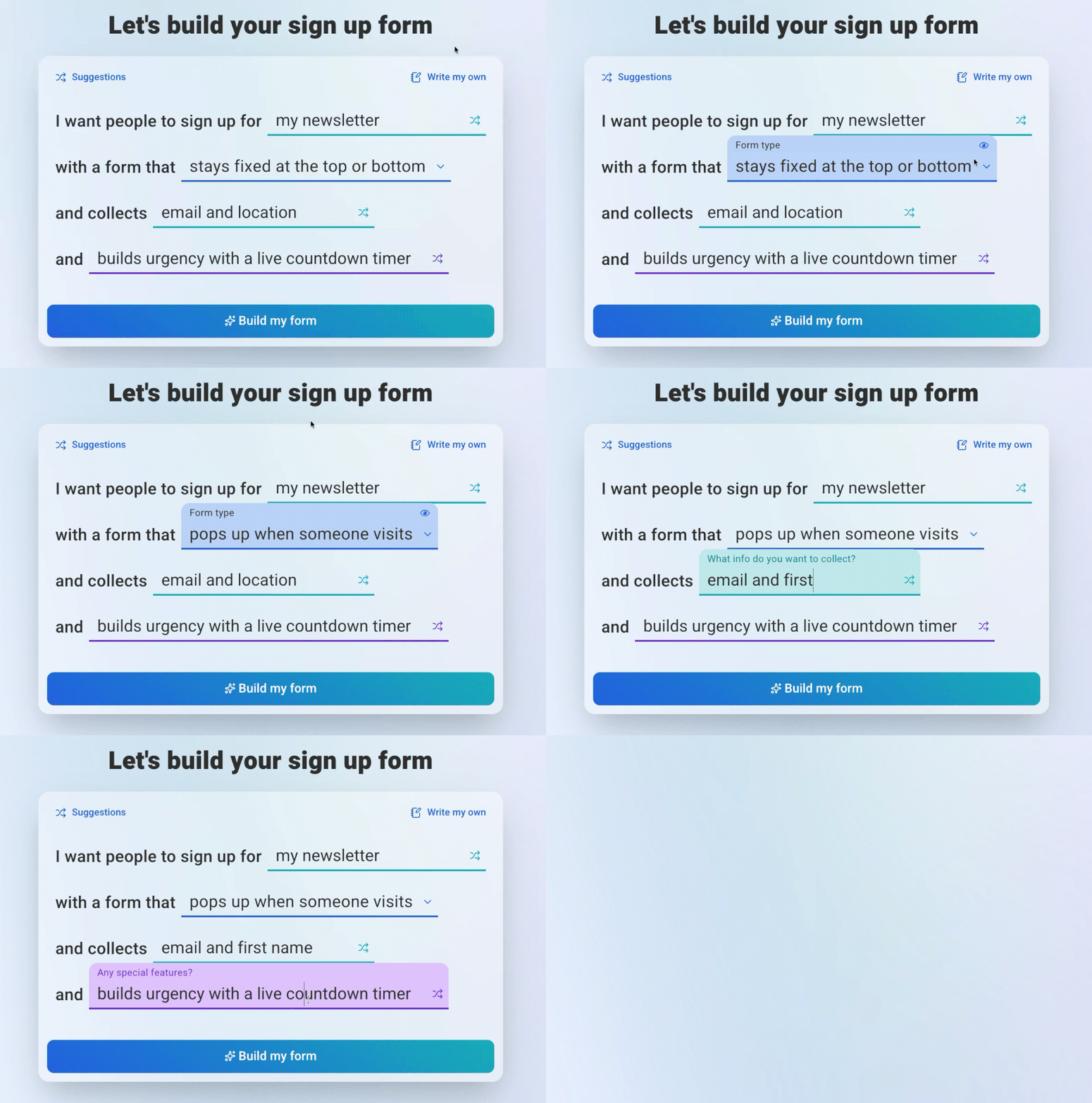
- Guided Prompts: For users seeking more structure, a fill-in-the-blank interface walks them through key decisions: the purpose of the signup, the desired form type (popup, slide-in, floating button, horizontal bar), the fields to collect, and any specific behaviors (urgency timer, animation, gamification). This ensures a tailored form even for novices.
- Screenshot Upload: Recognizing the power of visual inspiration, AWeber allows users to upload a screenshot of a form they’ve encountered and admired. The AI analyzes the image, adapts the design, and incorporates the user’s branding, providing a personalized starting point for customization.
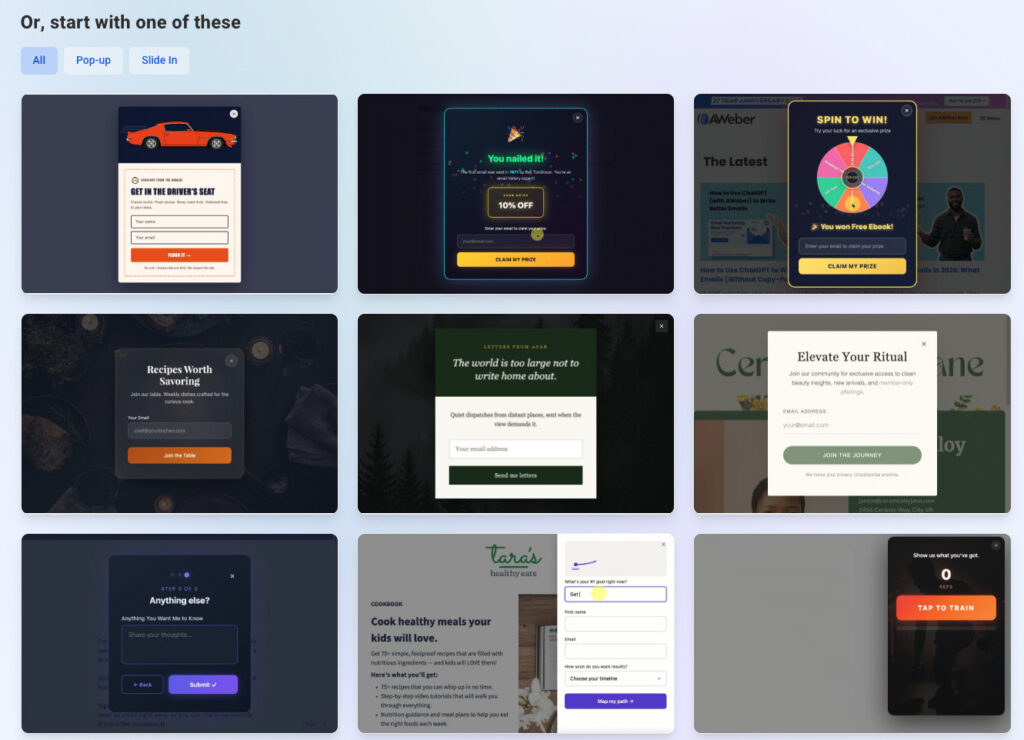
- Template Gallery: A curated collection of ready-to-use forms, categorized by type, offers another convenient starting point. Users can select a template and then refine it through conversational commands, blending structured design with AI flexibility.
Making Edits: The editing process is centered around an intuitive chat interface. Any desired change can be described in natural language, and the builder instantly updates the form. Additionally, users can directly click on text or button elements for immediate editing, moving, or copying. The builder maintains full context of the ongoing design, allowing users to pause and resume their work without losing progress.
Publishing and Targeting: Once a form is finalized, AWeber provides extensive display settings. Users can choose to show forms on specific pages, across an entire site, or apply frequency controls (e.g., every visit, once per visitor, once per session). Device targeting and scheduling options for start/end dates empower precise campaign management, and an instant on/off switch allows for immediate deployment or deactivation without requiring any website code modifications.
Custom Field Mapping: A critical feature for data segmentation, AWeber’s builder automatically maps custom fields. If a form collects information like "favorite color" or "company name," the AI intelligently matches it to existing custom fields in the AWeber account. If no matching field is found, the system automatically creates one upon publication, streamlining data capture and organization.
Previewing and Testing: Before any form goes live, a robust preview mode allows users to test every aspect: appearance, animations, field validation, and thank-you page behavior. The ability to reload the preview ensures that all dynamic elements, such as entrance animations, can be thoroughly reviewed from their starting point.
Diverse Form Creations from a Single Prompt:
AWeber’s AI Signup Form Builder demonstrates the breadth of interactive forms achievable with minimal effort:
- Animated Popups: Forms that slide, bounce, or fade into view, controlled by scroll triggers, entrance animations, and timing set in a single prompt. For example: "Make a popup that slides up from the bottom of the screen with a bounce effect when a visitor scrolls past 50% of the page."
- Floating 3D Buttons: Buttons and elements designed with a lifelike 3D shadow effect and hover animations, drawing attention to calls-to-action without disrupting page content.
- Scratch-Card Reveals: Gamified forms where visitors use their mouse or finger to "scratch off" a hidden area to reveal a discount or offer. The AI handles the mechanic, prize logic, and email capture.
- Spin-the-Wheel Signups: Interactive forms where users enter their email for a chance to win a discount, with the AI generating the wheel, prize logic, and capture mechanism.
- Multi-Step Forms with Progress Bars: Longer forms are broken into manageable steps, complete with progress indicators and field validation, improving user experience and completion rates.
- Countdown Timer Forms: Incorporate urgency with live countdown timers, seamlessly integrated with form fields and display logic.
Each of these advanced form types, traditionally requiring significant development or design expertise, is now accessible through a simple descriptive prompt, fundamentally changing how businesses approach lead generation and user engagement.
Implications for the Digital Marketing Landscape
The rise of AI form builders carries significant implications across the digital marketing ecosystem:
- Democratization of Design and Advanced Features: AI tools level the playing field, enabling even the smallest businesses to deploy sophisticated, highly engaging forms that were once the preserve of large enterprises with extensive resources. This fosters greater competitiveness and innovation.
- Increased Efficiency and Focus on Strategy: Marketers and business owners are freed from the tedious, time-consuming aspects of form design. This allows them to allocate more time and creative energy to overarching marketing strategies, content creation, and analyzing campaign performance.
- Enhanced Conversion Rates: Highly interactive, well-designed, and strategically targeted forms naturally lead to higher engagement and conversion rates. AI’s ability to quickly generate and refine these forms empowers businesses to optimize their lead capture funnels more effectively.
- Shifting Skill Sets: While traditional design skills remain valuable for complex projects, the advent of AI form builders suggests a shift in demand towards marketers who can effectively prompt AI, understand user experience principles, and interpret data for iterative optimization, rather than solely focusing on manual design execution.
- Personalization at Scale: As AI evolves, future iterations of these builders could potentially learn from visitor behavior and automatically adapt form content or design in real-time, leading to unprecedented levels of personalization and conversion efficiency.
Looking Ahead: The Future of AI in Marketing Automation
The introduction of AI form builders is merely a precursor to a broader integration of AI into marketing automation. We can anticipate:
- Predictive Form Optimization: AI analyzing historical data to suggest optimal form layouts, fields, and calls-to-action for specific audience segments.
- Dynamic Content Adaptation: Forms that not only look good but also dynamically adjust their content, offers, or questions based on a visitor’s browsing history, demographics, or real-time intent.
- Seamless Integration with AI-Powered Stacks: Form builders becoming integral components of larger AI ecosystems, communicating effortlessly with AI-driven CRMs, email marketing platforms, and analytics tools to create a truly intelligent and automated marketing workflow.
- Voice-Activated Form Creation: The ability to verbally describe a form, allowing AI to generate it, further simplifying the design process.
Frequently Asked Questions About AI Form Builders
Can an AI form builder create multi-step forms?
Yes, a capable AI form builder like AWeber’s AI Signup Form Builder is designed to create multi-step forms with integrated progress bars from a single descriptive prompt. Users can describe the information to collect at each stage, and the builder automatically generates the step logic, visual progress indicators, and field validation rules. This capability significantly streamlines the creation of longer forms, which traditionally required complex, manual configuration of each step, transition, and validation rule.
Is the AI Signup Form Builder from AWeber free?
Yes, the AI Signup Form Builder is included with all AWeber plans, including its free plan, which supports up to 500 subscribers. Currently in open beta, all AWeber users have full access to its features, allowing them to create AI-generated signup forms without any additional cost. This makes advanced form creation accessible to businesses of all sizes, including startups and small ventures.
Do I need coding skills to use an AI form builder?
No, the fundamental advantage of an AI form builder is that it completely removes the need for coding skills. Users describe their desired form in plain, natural language, and the AI handles all the technical implementation. AWeber’s AI Signup Form Builder offers multiple zero-code input methods, including free prompting, guided prompts, screenshot uploads, and a template gallery, ensuring that anyone, regardless of technical expertise, can create sophisticated forms.

Are there security concerns with AI forms, particularly regarding data privacy?
Reputable AI form builders prioritize data security and privacy. They are built to adhere to industry standards and regulations like GDPR and CCPA. When choosing an AI form builder, it’s crucial to select providers known for their robust security infrastructure, data encryption, and transparent data handling policies. The AI’s role is primarily in generating the form structure and logic, while the underlying platform is responsible for secure data transmission and storage, just like traditional form builders.
What about customization limits? Can AI-generated forms be fully branded?
While AI generates the initial form based on prompts, capable AI form builders offer extensive customization options. Users can typically refine colors, fonts, images, and branding elements through conversational commands or direct editing interfaces. The AI acts as a powerful assistant, providing a strong starting point that can then be fine-tuned to match specific brand guidelines and aesthetic preferences, offering a balance between automated efficiency and bespoke design.
In conclusion, AI form builders represent a monumental leap forward in digital lead generation. By harnessing the power of artificial intelligence, these tools are democratizing access to high-quality, interactive form design, empowering businesses of all sizes to create engaging digital touchpoints with unprecedented speed and ease. As tools like AWeber’s AI Signup Form Builder continue to evolve, they promise to reshape how marketers connect with their audiences, driving greater efficiency, creativity, and ultimately, more meaningful conversions in the digital age.