The digital landscape is under siege, with a staggering 80 to 95 percent of all cyberattacks originating from a seemingly innocuous phishing email. As artificial intelligence (AI) rapidly evolves, empowering cybercriminals to craft increasingly sophisticated and convincing attacks, the financial toll of cybercrime is projected to skyrocket, reaching an estimated $10.5 trillion annually by 2025. This alarming trajectory underscores an urgent need for robust digital defenses, and at the forefront of this battle lies a fundamental yet often overlooked technology: the Sender Policy Framework (SPF) record. Implementing a properly formatted SPF record is not merely a technicality; it is a critical safeguard designed to protect organizations, their brands, and their customers from the pervasive threats of phishing and email spoofing. This comprehensive guide delves into the intricacies of SPF records, explaining their function, setup, and pivotal role in enhancing email security and deliverability.
The Genesis of Email Vulnerability: A Historical Perspective
To fully appreciate the significance of SPF, it’s essential to understand the inherent vulnerabilities of early internet email protocols. The Simple Mail Transfer Protocol (SMTP), the foundational technology for sending email, was designed in an era of trust, predating the widespread commercialization of the internet and the proliferation of malicious actors. A key characteristic of SMTP is its lack of built-in sender authentication. An email’s “From” address, much like the return address on a physical letter, can be easily faked or “spoofed.” This fundamental design flaw allowed spammers, fraudsters, and malicious entities to send emails impersonating legitimate organizations, leading to a surge in unsolicited mail, phishing scams, and brand impersonation.
As the volume of email grew exponentially in the late 20th and early 21st centuries, so did the sophistication of these attacks. Businesses found their brand reputations damaged by fraudulent emails sent in their name, while users struggled to differentiate legitimate communications from malicious ones. The lack of a reliable mechanism for recipient mail servers to verify the true origin of an email became a critical security gap. In response to this escalating crisis, the internet community, through bodies like the Internet Engineering Task Force (IETF), began developing email authentication standards. SPF emerged as one of the earliest and most widely adopted solutions, providing a crucial layer of sender verification.
Understanding Sender Policy Framework (SPF): A Technical Deep Dive
A Sender Policy Framework (SPF) record is a specialized type of Domain Name System (DNS) text record (TXT record) that plays a crucial role in email authentication. Its primary function is to empower domain owners to explicitly specify which mail servers (identified by their IP addresses) are authorized to send email on behalf of their domain. When an email server receives an incoming message, it can perform an SPF check by querying the sender’s domain’s DNS records. If the IP address of the server sending the email matches one listed in the SPF record, the email is deemed legitimate. If it doesn’t, the receiving server can flag the email as suspicious, potentially redirecting it to a spam folder or rejecting it outright.
This mechanism is particularly vital for organizations utilizing custom domain email addresses (e.g., [email protected]). Unlike generic email service providers (ESPs) that often handle SPF configuration for their users, custom domains require direct management by the domain owner or their IT team. Without proper SPF protection, these domains become prime targets for fraudsters, making them more susceptible to blocklisting by spam filters and eroding recipient trust. SPF, therefore, acts as a digital passport, verifying the sender’s identity and helping to establish the legitimacy of email communications.

The Architecture of an SPF Record: Mechanisms and Qualifiers
An SPF record is a single line of text within a domain’s DNS TXT record. While seemingly simple, its structure is precise and powerful. Every SPF record begins with v=spf1, indicating the version of SPF being used. Following this, a series of “mechanisms” define the rules for which servers are authorized, and “qualifiers” dictate how receiving servers should interpret the results of these checks.
Common SPF mechanisms include:
a: Authorizes the A record (host record) of the current domain to send mail.mx: Authorizes the MX (Mail eXchanger) records of the current domain to send mail.ip4: Authorizes a specific IPv4 address or range of addresses (e.g.,ip4:192.0.2.1orip4:192.0.2.0/24).ip6: Authorizes a specific IPv6 address or range of addresses.include: Authorizes senders listed in another domain’s SPF record (e.g.,include:spf.mailservice.com). This is frequently used when relying on third-party email service providers (ESPs) like HubSpot, Mailchimp, or Microsoft 365.exists: A more advanced mechanism that queries DNS for a host record, often used for more complex authorization scenarios.redirect: Specifies that the SPF record for another domain should be used instead of the current one. This is a less common mechanism.
Each mechanism is typically preceded by a “qualifier” which tells the receiving server how to treat emails that match or fail to match that mechanism:
+(Pass): The default qualifier if none is specified. Indicates that the sender is authorized, and the email should be accepted. (e.g.,+a,+mx)-(Fail): Indicates that the sender is explicitly not authorized. Emails from such senders should be rejected. This is the strongest and most secure qualifier, often used as-allat the end of a record.~(SoftFail): Suggests that the sender is likely not authorized, but the receiving server should still accept the email, though it might be marked as suspicious or spam. Often used as~allat the end of a record, providing a less strict policy than-all.?(Neutral): Explicitly states no assertion is made about the sender’s authorization. Emails are typically accepted without strong judgment. This qualifier is rarely used due to its lack of security.
A well-constructed SPF record might look like this:
v=spf1 ip4:192.0.2.1 ip4:198.51.100.0/24 include:spf.thirdpartyesp.com ~all
In this example:
v=spf1: Declares SPF version 1.ip4:192.0.2.1: Authorizes a specific IPv4 address.ip4:198.51.100.0/24: Authorizes a range of IPv4 addresses.include:spf.thirdpartyesp.com: Authorizes all IP addresses listed in the SPF record ofspf.thirdpartyesp.com.~all: Specifies a SoftFail policy for any sender not explicitly authorized by the preceding mechanisms. This means emails from unauthorized sources might still be delivered but marked as suspicious. A-allpolicy would result in outright rejection.
Beyond Security: The Deliverability Imperative
While SPF’s primary role is security, its impact extends significantly to email deliverability. Email deliverability refers to the likelihood that an email will successfully reach a recipient’s inbox, rather than being diverted to a spam folder or rejected entirely. In today’s crowded digital environment, where inboxes are flooded with communications, establishing sender legitimacy is paramount.
When a recipient’s mail server receives an email, it performs a series of checks, including an SPF lookup, to assess the sender’s credibility. If an email originates from an SPF-validated domain, it signals to the receiving server that the sender is legitimate and has taken steps to prevent spoofing. This added layer of reputability significantly improves the chances of the message landing in the primary inbox. Conversely, emails from domains without SPF records, or with improperly configured ones, are far more likely to be viewed with suspicion. They face a higher probability of being filtered into spam or junk folders, or even being blocked outright, regardless of the quality of their content.
For businesses, this translates directly to the effectiveness of their email marketing campaigns, customer service communications, and transactional emails. Poor deliverability means missed opportunities, lost revenue, and frustrated customers. By preventing bad actors from gaining access to or impersonating their domain, organizations demonstrate a commitment to security and transparency, fostering trust with recipients and ultimately enhancing the visibility and impact of their legitimate email communications.
Implementing SPF: A Five-Step Strategic Guide
Setting up an SPF record, while technical, can be broken down into a manageable five-step process. While IT teams or Email Service Providers (ESPs) often handle the implementation, understanding these steps is crucial for any organization.
Step 1: Inventory Email Sending Sources
The foundational step is to meticulously identify every server and IP address that sends email on behalf of your organization. This is often more extensive than initially perceived and can include:
- Your organization’s primary mail servers (e.g., Microsoft Exchange, Google Workspace).
- Third-party Email Service Providers (ESPs) used for marketing campaigns (e.g., Mailchimp, Constant Contact, SendGrid).
- Transactional email services (e.g., for password resets, order confirmations).
- CRM systems with email capabilities (e.g., Salesforce, HubSpot).
- Help desk or support platforms.
- Any other cloud services or applications that send notifications or communications from your domain.
A thorough inventory is critical, as missing even one legitimate sending source can lead to deliverability issues for emails from that source. Consulting with your IT System Administrator or ESP is often necessary to compile a complete and accurate list of associated IP addresses andincludedirectives.
Step 2: Identify All Relevant Domains
Most organizations own multiple domains. While some are actively used for sending email, others might be registered for defensive purposes (e.g., protecting against cybersquatting, holding similar brand names), or simply lie dormant. It is a best practice to create SPF records for all your domains, not just those actively sending mail. This proactive measure prevents unauthorized parties from spoofing your non-sending domains, which could still be used in phishing attacks to trick unsuspecting recipients who recognize your brand name. Your IT System Administrator or ESP can assist in cataloging all domains associated with your organization.
Step 3: Constructing the SPF Record
Once you have identified all authorized sending sources and relevant domains, the next step is to construct the SPF record. This typically involves combining the v=spf1 tag with ip4, ip6, a, mx, and crucially, include mechanisms for all third-party services. A critical rule to remember is that the Internet Engineering Task Force (IETF) explicitly forbids multiple SPF records for a single domain. If you have multiple legitimate sending sources, you must merge their respective include statements and IP addresses into a single, comprehensive SPF record. For example, if both ESP A and ESP B provide include statements, your record would combine them: v=spf1 include:esp_a.com include:esp_b.com ~all. The record must also end with a qualifier, typically ~all (SoftFail) or -all (Fail), with -all being the most secure but requiring absolute certainty that all legitimate sources are included. Given the technical nature, this step is best handled by experienced IT personnel or your ESP.
Step 4: Publishing to DNS
After creating the SPF record, it must be published as a TXT record in your domain’s DNS settings. This is usually done through your domain registrar’s control panel (e.g., GoDaddy, Namecheap, Cloudflare). The process involves logging into your domain account, navigating to the “DNS management” or “name server management” section, selecting the specific domain, and adding the SPF text string as a new TXT record. If your ISP administers your DNS records, or if you are unsure who is responsible, your IT department can provide guidance. Once published, DNS changes can take some time to propagate across the internet (typically a few minutes to a few hours), during which the new SPF record may not be immediately active globally. This propagation process is what allows mail servers worldwide to query your domain’s DNS and verify sender authenticity.
Step 5: Verification and Monitoring
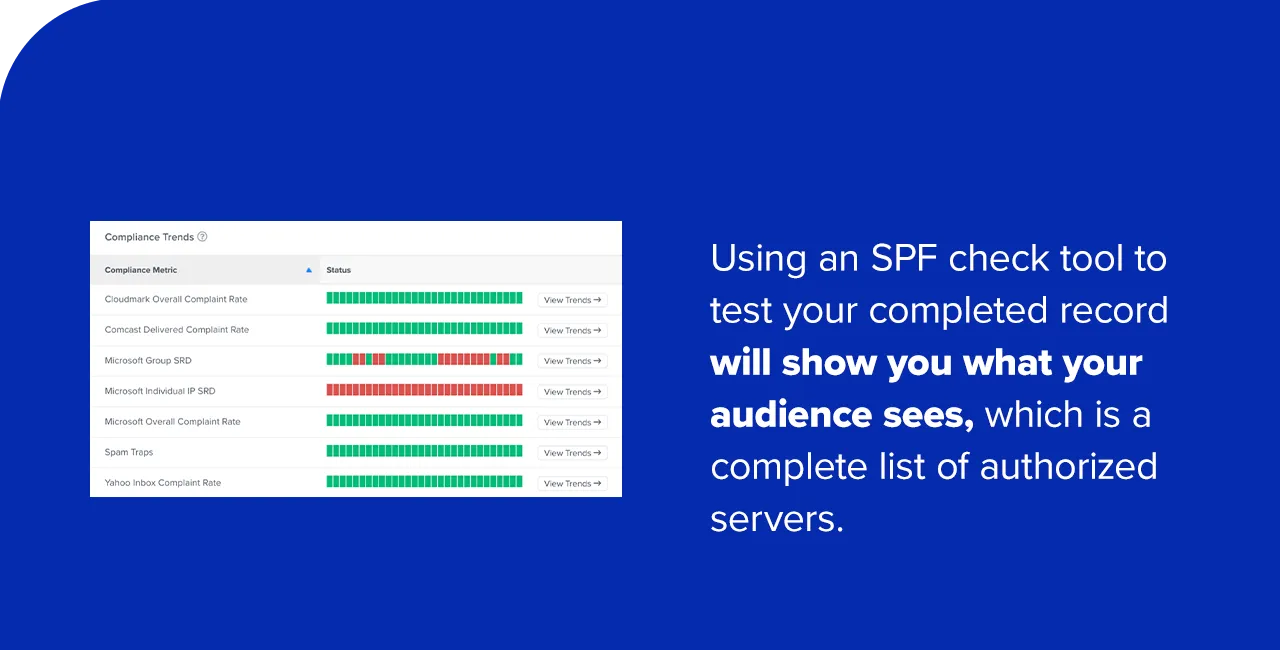
The final, and arguably most critical, step is to verify that your SPF record is correctly configured and functioning as intended. Before sending any email campaigns, utilize an SPF check tool (many free online tools are available). These tools analyze your domain’s DNS settings and report on the validity and content of your SPF record. They will highlight any syntax errors, missing authorized senders, or issues like “too many lookups” (a common error where an SPF record exceeds the 10-DNS-lookup limit). If discrepancies are found, the record must be updated immediately. Ongoing monitoring is also essential, as IP addresses of third-party ESPs can change, or new sending services might be adopted. Regular review ensures the SPF record remains accurate and comprehensive, preventing future deliverability issues.
Navigating Pitfalls: Common SPF Configuration Errors
Even with careful implementation, SPF records are prone to several common errors that can severely impact email deliverability and security. Awareness of these pitfalls is crucial for effective management:
- Too Many Lookups (DNS Lookup Limit): SPF records have a limit of 10 DNS lookups. Each
a,mx,ptr,exists, orincludemechanism that requires a DNS query counts towards this limit. Exceeding 10 lookups will result in a “PermError,” causing SPF validation to fail for all emails from that domain, regardless of their legitimacy. This is a very common issue, especially when multiple third-party services are included. - Multiple SPF Records: The IETF standard explicitly states that a domain should have only one SPF TXT record. If a domain has more than one SPF record, it also results in a “PermError,” causing all emails from that domain to fail SPF validation. All legitimate sending sources must be consolidated into a single record.
- Syntax Errors and Typos: A simple typo, misplaced character, or incorrect formatting in the SPF string can render the entire record invalid, leading to validation failures.
- Missing Authorized Sending Sources: If a legitimate mail server or ESP is not included in the SPF record, emails sent from that source will fail SPF checks, potentially being flagged as spam or rejected.
- Incorrect Qualifier Usage (e.g.,
?allor+all): Using overly permissive qualifiers like?all(Neutral) or+all(Pass for all) severely diminishes the security benefits of SPF, essentially telling receiving servers to accept emails from any source. While-all(Fail) is most secure, it requires absolute confidence in the record’s completeness;~all(SoftFail) is a common compromise during initial deployment. - Stale Records: SPF records are not set-it-and-forget-it. As organizations change ESPs, add new services, or update their infrastructure, the SPF record needs to be updated accordingly. Stale records can lead to legitimate emails failing validation.
Regular use of SPF check tools and meticulous proofreading are indispensable practices to prevent these common errors and maintain the integrity of your email authentication.
Best Practices for Robust SPF Management
Effective management of SPF records is an ongoing process that requires vigilance and strategic planning. Adhering to best practices can significantly enhance your email security posture and ensure optimal deliverability:
- Regular Audits of Sending Sources: Periodically review all services and servers sending email on behalf of your domain. This ensures that your SPF record accurately reflects your current email infrastructure.
- Consolidate SPF Records: If you discover multiple SPF records for a single domain, or if you are approaching the 10-DNS-lookup limit, work to consolidate them. This often involves combining
includestatements and ensuring all authorized IP addresses are correctly listed without excessive nested lookups. - Layer with DKIM and DMARC: SPF is a foundational layer, but for comprehensive email authentication, it should be deployed in conjunction with DomainKeys Identified Mail (DKIM) and Domain-based Message Authentication, Reporting & Conformance (DMARC). DKIM provides cryptographic authentication of email content, ensuring messages haven’t been tampered with in transit. DMARC builds upon both SPF and DKIM, allowing domain owners to specify policies for handling emails that fail authentication and providing reporting on email activity.
- Stay Updated on IP Changes: Third-party ESPs frequently update their sending IP addresses. Subscribe to their notifications or regularly check their documentation to ensure your SPF record remains current.
- Document All Changes: Maintain a clear record of all modifications made to your SPF record, including dates, reasons, and who made the changes. This helps in troubleshooting and auditing.
- Continuous Monitoring: Utilize DMARC reporting tools, in addition to SPF checkers, to gain ongoing visibility into email authentication failures and successes. This allows for proactive identification and resolution of issues.
The Broader Email Authentication Ecosystem: SPF, DKIM, and DMARC
While SPF is a critical component, it is part of a larger, multi-layered email authentication ecosystem that includes DKIM and DMARC. Together, these protocols provide a robust defense against email-borne threats.

- DKIM (DomainKeys Identified Mail): DKIM provides a method for an organization to cryptographically sign outgoing emails. This digital signature, embedded in the email header, verifies that the email was indeed sent by the authorized domain owner and that its content has not been altered in transit. While SPF verifies the sender’s IP address, DKIM verifies the message’s integrity.
- DMARC (Domain-based Message Authentication, Reporting & Conformance): DMARC acts as the policy layer that ties SPF and DKIM together. It allows domain owners to specify what actions recipient mail servers should take when an email fails SPF or DKIM authentication (e.g., “none” for monitoring, “quarantine” for sending to spam, or “reject” for outright blocking). Crucially, DMARC also provides domain owners with aggregated reports on their email authentication results, offering invaluable insights into legitimate email deliverability and potential spoofing attempts. As a cybersecurity expert might state, “SPF alone is a good start, but DMARC is what truly empowers organizations to gain visibility and control over their email domains, turning authentication failures into actionable intelligence.”
The deployment of SPF, DKIM, and DMARC in concert represents the gold standard for email authentication. SPF ensures the email originates from an authorized server, DKIM guarantees message integrity, and DMARC enforces policies based on these checks, providing crucial reporting for continuous improvement.
Industry Implications and the Future of Email Security
The widespread adoption and meticulous management of SPF records, alongside DKIM and DMARC, carry significant implications across various sectors. For businesses, the direct benefits are tangible: enhanced brand trust, improved customer loyalty through reliable communication, and a reduced risk of financial loss due to phishing-induced data breaches. Furthermore, adhering to email authentication best practices can be increasingly relevant for regulatory compliance, especially concerning data privacy regulations like GDPR and CCPA, where email-borne attacks are a common vector for data compromise.
The ongoing evolution of AI presents a dual challenge and opportunity. While AI can undoubtedly empower cybercriminals to craft hyper-realistic and personalized phishing attacks, it also offers powerful tools for defenders. AI-powered threat detection systems are becoming more adept at identifying anomalies and patterns indicative of malicious emails, working in conjunction with authentication protocols like SPF. The future of email security will undoubtedly involve a continuous arms race between attackers and defenders, with authentication protocols serving as a fundamental, non-negotiable layer of defense.
Conclusion
In an era defined by escalating cyber threats and the pervasive influence of artificial intelligence on both offense and defense, the Sender Policy Framework (SPF) record stands as a critical, foundational pillar of email security. From its historical origins addressing the inherent vulnerabilities of SMTP to its contemporary role in combating sophisticated phishing and spoofing attacks, SPF has evolved into an indispensable tool for protecting digital communications. By enabling domain owners to explicitly authorize their sending servers, SPF not only bolsters security but also significantly enhances email deliverability, safeguarding brand reputation and ensuring the effective flow of information. While SPF is a powerful defense mechanism, its true potential is realized when integrated into a comprehensive email authentication strategy alongside DKIM and DMARC. Organizations must prioritize the diligent creation, publication, and ongoing management of their SPF records – a proactive measure that is no longer optional but a fundamental imperative for navigating the complexities of the modern digital landscape and securing their digital future.