
 rifanmuazin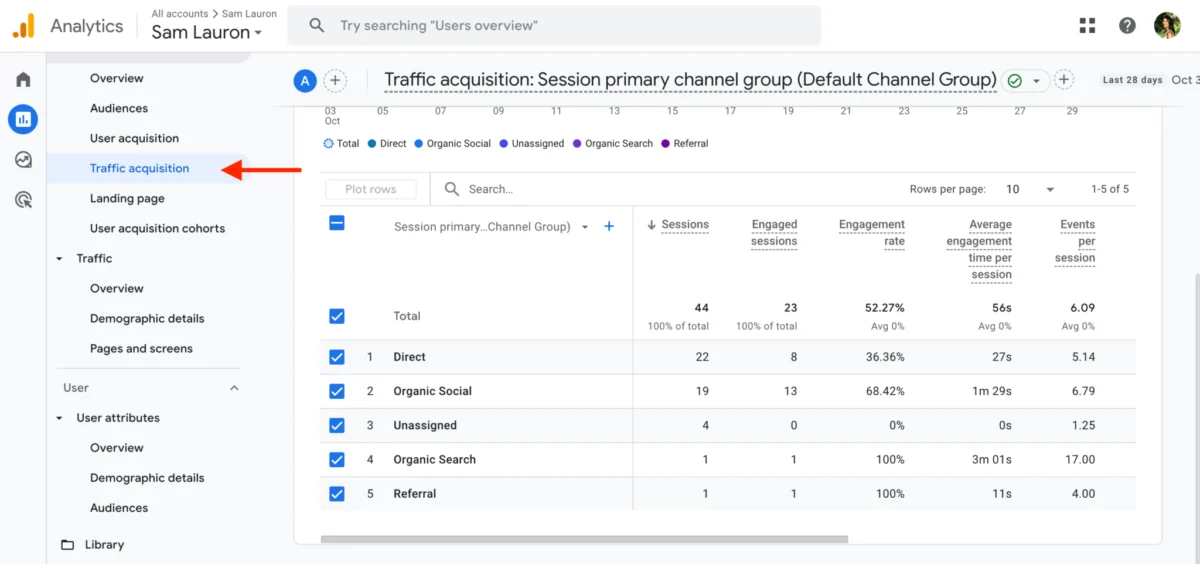
In the rapidly evolving landscape of digital marketing, understanding the true impact of social media efforts extends far beyond likes and shares. Google Analytics 4 (GA4) has emerged as an indispensable, free analytics platform, offering marketers a profound lens into how audiences interact with their websites and applications after engaging with social content. This guide delves into GA4’s capabilities, providing a roadmap for social media professionals to transcend vanity metrics and establish tangible business value.
The Paradigm Shift: From Universal Analytics to GA4

Google Analytics 4 represents a significant evolution from its predecessor, Universal Analytics (UA), which officially ceased processing new data on July 1, 2023. This transition was driven by several critical factors: the need for a more robust, user-centric tracking model across diverse platforms (websites and apps), adaptation to a privacy-first internet, and leveraging advanced machine learning for predictive insights. Unlike UA’s session-based model, GA4 operates on an “event-based” framework, treating every user interaction – from page views and clicks to video plays and purchases – as an event. This unified approach provides a more holistic and flexible view of the customer journey, crucial for understanding today’s multi-device, multi-platform user behavior.
GA4 helps businesses track where their traffic originates, precisely what users do on their digital properties, and how these actions align with overarching business objectives. For social media marketers, this translates into an unparalleled ability to measure the downstream effects of campaigns, moving beyond platform-specific metrics to concrete website engagement and conversions.
Synergizing Social Media and GA4 for Enhanced Insights

Integrating GA4 into a social media reporting strategy unlocks a new dimension of insights. While native social media analytics tools offer valuable data on platform performance (reach, engagement rates, follower growth), they often fall short in detailing what happens after a user clicks a link from a social post. GA4 bridges this gap, connecting social efforts directly to website traffic, lead generation, and ultimately, conversions.
According to Eileen Kwok, Former Social and Influencer Marketing Strategist at Hootsuite, GA4 empowers social media professionals in four critical ways:
1. Precision Conversion Tracking
Social media analytics often struggle to attribute specific actions on a website back to a social post. GA4 excels here, meticulously tracking user actions such as content downloads, webinar registrations, product views, or newsletter sign-ups. Kwok emphasizes the strategic importance of this: “Every week we aim to have at least 2-4 pieces of ‘conversion’ content going out. This ensures we are striking the right balance of reaching new customers while also nurturing our current follower base by providing value, whether through free resources or campaign launches.” For small businesses, this granular tracking is invaluable for identifying which content types truly resonate and drive desired outcomes, optimizing resource allocation.
2. Deepening Audience Understanding Beyond Platforms
While social platforms provide demographic data on their users, GA4 offers insights into what users do after clicking a social link. This behavioral data is critical. Kwok highlights a common misconception: “One thing a lot of social marketers overlook is just because a social post didn’t perform well with vanity metrics, doesn’t mean it didn’t convert!” She recounts instances where posts with low likes generated significant content downloads. GA4 provides the tools to uncover these hidden successes, revealing true audience intent and behavior, thereby enabling marketers to refine content strategies for higher impact. Understanding which demographics from which social channels engage most deeply with specific website content allows for hyper-targeted future campaigns.
3. Verifying Traffic Sources and Optimizing Channel Strategy
GA4’s ability to pinpoint exact traffic sources is one of its most powerful features. Marketers can discern whether website visitors originate from organic search, paid ads, email campaigns, or specific social media platforms. This clarity allows for strategic reallocation of efforts. If LinkedIn consistently drives high-quality leads or Instagram generates more sign-ups, marketers can double down on these channels, tailoring calls-to-action (CTAs) and content accordingly. Real-time reports further enable dynamic adjustments to posting schedules and content themes based on immediate traffic patterns.
4. Quantifying Social Media Return on Investment (ROI)
Proving social media ROI has historically been a significant challenge. GA4 directly addresses this by linking social media activities to tangible business outcomes. Acquisition reports, for example, can directly attribute leads and conversions to specific social networks, providing concrete evidence of social media’s value. Kwok underscores this, stating, “When it comes to it, [leadership] cares the most about ROI. With a Google Analytics dashboard, you can share the success of the conversions you’ve been able to bring to the organization.” This data empowers marketers to justify budgets, secure resources, and elevate the strategic importance of social media within the organizational framework.
Key Metrics to Monitor in GA4 for Social Media Performance
As social media professionals navigate GA4, focusing on specific metrics is paramount to extracting actionable insights:
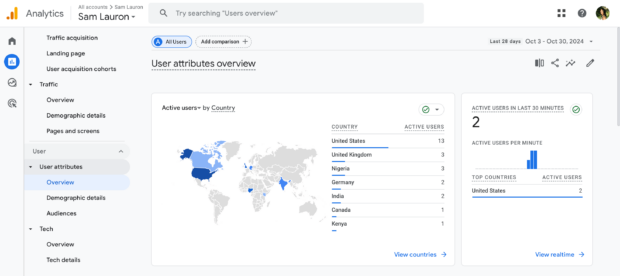
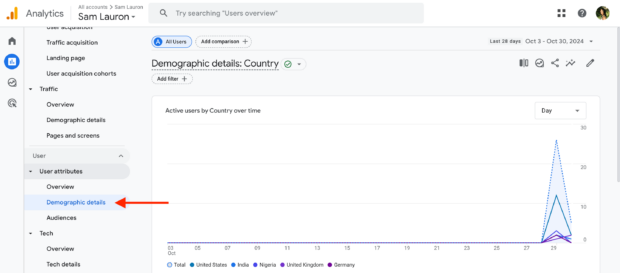
1. User Attributes: This data provides a comprehensive profile of website visitors, including geographical location, demographics (age, gender, language), and interests. For social marketers, this reveals the characteristics of the audience clicking through from social posts, allowing for more precise audience targeting and content customization. Access this by navigating to Reports > User > User attributes.
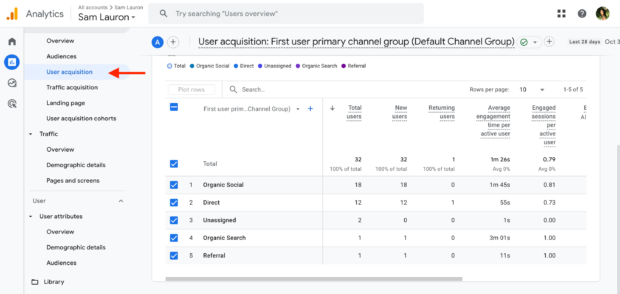
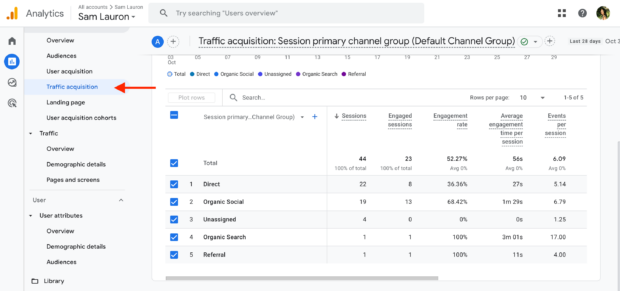
2. Acquisition: GA4 distinguishes between user acquisition (how new users first arrived) and traffic acquisition (how users arrived in each session). This data categorizes sources such as organic search, direct traffic, referrals, paid search, and crucially, social media. By examining this, marketers can identify which social channels are most effective at bringing new visitors to their site versus driving repeat engagement. This data is typically found under the Reports > Acquisition section, broken down by channel.
3. Engagement: Beyond mere traffic, engagement metrics reveal how users interact with your website. Key metrics include:
- Sessions: The duration of a user’s activity on your site (ending after 30 minutes of inactivity).
- Engaged sessions: Sessions lasting longer than 10 seconds, having a conversion event, or including two or more page/screen views.
- Average engagement time: The average length of an engaged session.
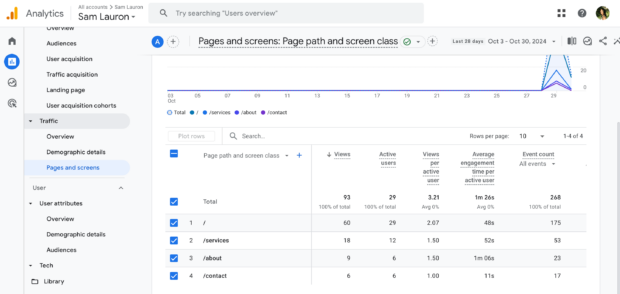
- Pages and screens: Identifying the specific pages users visit and engage with, particularly useful for tracking performance of social media landing pages. These metrics help evaluate content quality and user experience for social media-driven traffic.
4. Conversions (Key Events): In GA4, the term “goals” from UA has evolved into “key events.” These are any user actions deemed significant to your business, such as 90% scroll depth on a landing page, clicks on specific CTAs, or file downloads. While “conversions” still exist, they are now more closely tied to Google Ads, tracking actions like purchases or sign-ups across platforms. The ability to define and mark custom “key events” allows social marketers to precisely measure the effectiveness of specific campaigns, linking social efforts directly to desired user actions. As Kwok states, “Any conversion metric is where a GA dashboard really shines… all of this can be tracked in GA and provides insights on the type of content your audience resonates with.”
Setting Up and Utilizing GA4 for Social Media Tracking
For marketers ready to leverage GA4, a systematic approach is key:
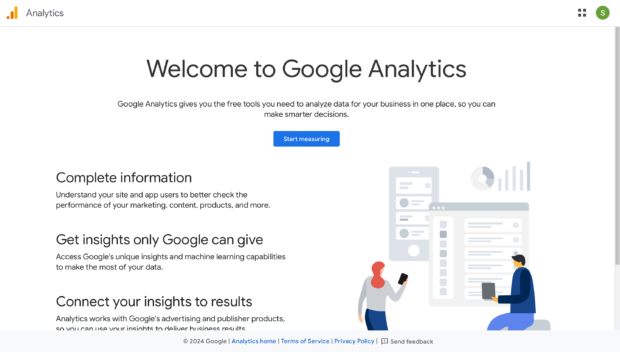
Step 1: Log in to Google Analytics.
Assuming an existing GA4 property, log into your dashboard. For new users, Google provides a straightforward guide to setting up a GA4 account, which is now the default for all new properties.
Step 2: Select Your Website.
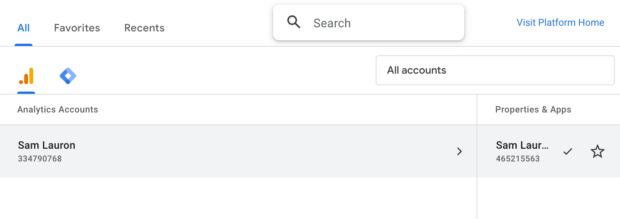
Choose the specific website property you wish to analyze. Agencies or freelancers may manage multiple properties, while in-house marketers will typically have one primary site.
Step 3: Implement Google Tag Manager (GTM).
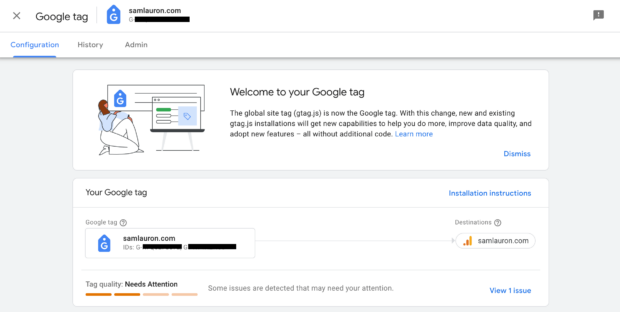
Google Tag Manager is a crucial intermediary, simplifying the process of sending data to GA4 without requiring direct code modifications. It connects your website to various tools, including Google Ads and GA4, ensuring seamless data flow. Setting up your Google Tag via GTM is essential for accurate data collection. Verify proper installation by checking Admin > Data collection and modification > Data streams within GA4.
Step 4: Define Key Events to Track Social Media Goals.
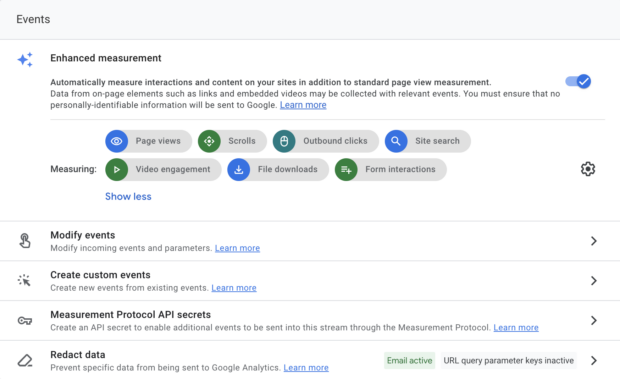
This step is fundamental. Identify the specific actions on your website that align with your social media and broader business objectives. The SMART goal-setting framework is highly recommended here. Within GA4, navigate to Admin > Data streams, select your website, and review the existing events (e.g., page views, scrolls, outbound clicks). You can then create and mark custom events that directly relate to your social media KPIs. Crucially, employ UTM parameters for all links shared on social media. This allows for granular tracking, attributing specific conversions back to particular campaigns, platforms, or even individual posts.
Step 5: Integrate GA4 with Hootsuite Analytics.
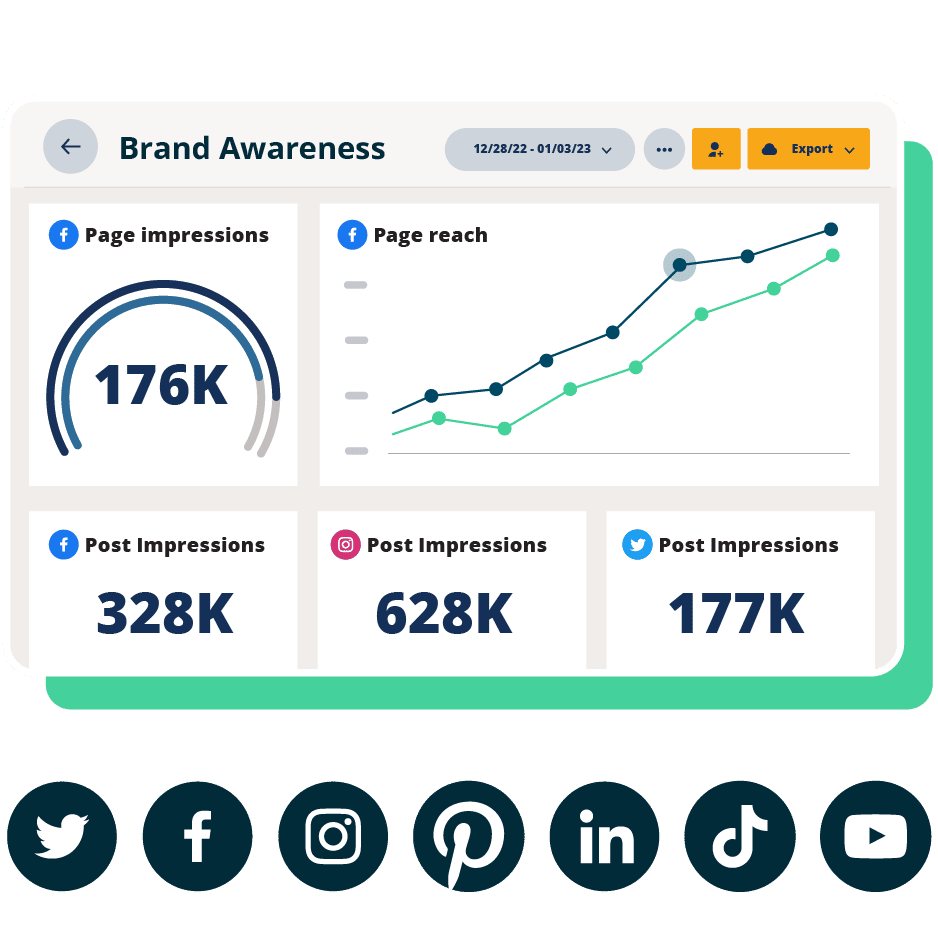
For a truly comprehensive view, connecting GA4 to a social media management platform like Hootsuite is highly recommended. This integration consolidates platform-specific social analytics with GA4’s website insights into a single dashboard. Hootsuite’s reporting functionality is enhanced by this integration, allowing marketers to access Google Analytics data directly within custom reports, overview reports, and scheduled reports, streamlining analysis and decision-making.
Expert Strategies for Maximizing GA4’s Potential
Beyond the technical setup, adopting best practices ensures GA4 delivers its full value:
1. Establish Clear, Measurable Goals: Before diving into data, define explicit goals for each social media post and campaign. Whether it’s driving brand awareness, generating leads, or increasing traffic, these goals provide context for GA4 data. As Kwok advises, “Every social post has a different goal and purpose… Make sure to note that down so your team knows what metrics they should be monitoring.” Regularly review GA4 reports against these goals to understand which channels and content types are effectively “moving the needle.”
2. Implement A/B Testing Driven by GA4 Insights: GA4 provides the deep website behavioral data necessary for effective A/B testing. Social media marketers can test variations in ad copy, visual assets, call-to-action buttons, or landing page designs. GA4 then measures the downstream impact of these variations on website engagement and conversions, offering a more complete picture than platform-specific metrics alone. For example, a LinkedIn ad with one CTA might generate more clicks, but GA4 could reveal that a different CTA, while less clicked, leads to significantly more form submissions on the website.
3. Actively Monitor Audience Feedback and Behavior: Combine quantitative data from GA4 with qualitative feedback from social media. A post might not garner many likes on Twitter, but GA4 could reveal it drove an unusually high number of visitors to a specific product page. This divergence in on-platform engagement versus off-platform action provides critical insights into audience behavior and preferences, informing future content strategies that are both engaging and effective.
4. Embed GA4 into Regular Social Reporting Meetings: Make GA4 an integral part of weekly or bi-weekly social media reporting sessions. This ensures that discussions move beyond superficial engagement metrics to focus on tangible business impact. Kwok highlights this practice: “Our social team has weekly reporting meetings where we analyze the performance of our posts for the past week… While engagement, reach, and other front-facing metrics are discussed, we care a lot about the conversations our social posts are able to drive, and that’s where Google Analytics comes in.” This fosters a data-driven culture and ensures alignment across the team regarding strategic priorities and successes.
Broader Impact and Future Implications
The advent of GA4 marks a significant step towards a more sophisticated, privacy-conscious, and user-centric approach to digital analytics. For social media marketers, it’s not just a tool; it’s a strategic partner that transforms how campaigns are planned, executed, and measured. By enabling a clear understanding of the customer journey across various touchpoints, GA4 empowers businesses of all sizes to optimize their social media strategies, enhance user experiences, and confidently demonstrate the concrete ROI of their digital marketing investments. As the digital landscape continues to evolve, proficiency in GA4 will be an increasingly vital skill for any marketer seeking to thrive in a data-driven world.
FAQ: Google Analytics 4 for Marketers
How do businesses use Google Analytics to measure marketing performance?
Businesses use Google Analytics, particularly GA4, to track user interactions with their websites and apps after engaging with various marketing channels. It provides detailed data on traffic sources, user demographics, on-site behavior, and conversion paths. These insights help identify which campaigns, content, and channels are most effective in driving traffic, engagement, and desired business outcomes, supporting optimization efforts across the marketing funnel.
How do you set up Google Analytics for tracking website and campaign data?
To set up GA4, you first create a GA4 property within your Google Analytics account. Then, you connect your website (and/or app) by installing the Google Tag via Google Tag Manager (GTM) or directly into your site’s code. Crucially, you configure “key events” to track specific user actions important to your business. For campaign-specific tracking from social media, it’s essential to use UTM parameters on all shared links, allowing GA4 to attribute traffic and conversions accurately to individual campaigns and platforms.
What are the most important Google Analytics metrics for marketers?
The most important GA4 metrics for marketers revolve around understanding the user journey and impact. These include:
- Users and Sessions: To understand reach and frequency of visits.
- Acquisition (User Acquisition, Traffic Acquisition): To identify effective channels.
- Engagement (Engaged Sessions, Average Engagement Time, Pages and Screens): To assess content quality and user interest.
- Conversions (Key Events): To measure the achievement of specific business goals (e.g., downloads, sign-ups, purchases).
These metrics collectively illustrate how people find your site, what they do once there, and whether they take valuable actions.
How do companies use Google Analytics to measure ROI across channels?
Companies leverage GA4’s advanced attribution models and detailed reporting to measure ROI across channels. By defining key events and tracking conversions, they can see which marketing touchpoints (including social media, organic search, paid ads, email) contribute to desired outcomes. This allows them to compare the performance of different channels, understand their contribution to the customer journey, and strategically allocate marketing budgets to maximize return on investment.
Google Analytics vs. other analytics tools: which should businesses use?
Google Analytics is unparalleled for tracking comprehensive website and app performance, user behavior, and cross-channel attribution. However, it’s often best used in conjunction with other specialized tools. For instance, social media analytics platforms provide deep, platform-specific insights (e.g., Instagram Reels performance, LinkedIn audience demographics) that GA4 doesn’t cover. Most successful businesses employ a complementary approach, using GA4 for holistic website performance and ROI, and dedicated social media analytics tools for platform-specific optimization and community engagement.