
 rifanmuazin
In the rapidly evolving digital marketplace, a common but detrimental misconception persists among e-commerce operators: that a conversion audit is a reactive measure reserved for periods of declining sales or technical failure. However, industry analysts and digital strategists increasingly argue that a Conversion Rate Optimization (CRO) audit should be viewed as a proactive "health check-up" for a website. Much like regular medical screenings prevent chronic illness, consistent CRO audits identify latent friction points before they escalate into significant revenue leaks. By the time a high cart abandonment rate becomes visible in the quarterly reports, a business has already "left money on the table."
A CRO audit is a comprehensive evaluation of an online store’s performance, focusing on the critical touchpoints that influence a visitor’s journey from a casual browser to a confirmed buyer. This process examines product pages, checkout flows, site navigation, page load speeds, and the underlying analytics infrastructure. The ultimate objective of an audit is threefold: to uncover hidden revenue opportunities, to enhance the user experience (UX), and to ensure that the brand’s digital strategy remains aligned with shifting consumer behaviors.
The Foundation of Quantitative Data: Tracking the "What"
The first phase of a professional CRO audit framework involves the collection and analysis of quantitative data. While numbers cannot explain the psychological motivations of a user, they provide an empirical map of where visitors are dropping off and the financial magnitude of those exits. Without a robust data foundation, any changes made to a website are merely based on intuition rather than evidence.
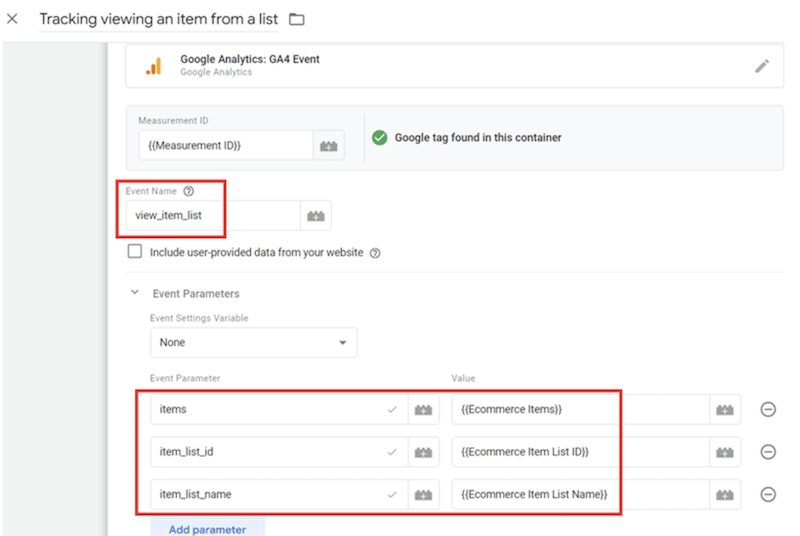
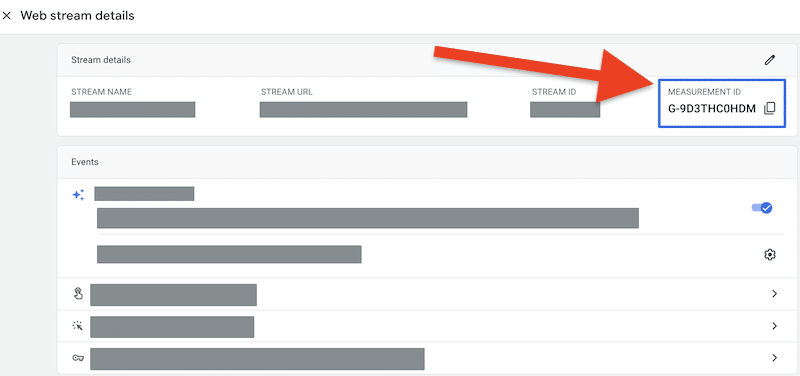
Central to this quantitative phase is the configuration of Google Analytics 4 (GA4). For e-commerce entities, standard page-view tracking is insufficient. Analysts recommend a "shopping-specific" event setup that monitors four critical actions: viewing an item (view_item), adding a product to the cart (add_to_cart), initiating the checkout process (begin_checkout), and completing the purchase (purchase).
By analyzing the ratios between these events, a business can pinpoint specific funnel bottlenecks. For instance, if data shows 10,000 product views but only 3,000 "add to cart" actions, the friction likely exists on the product page itself—perhaps due to poor imagery or unclear pricing. Conversely, a high "begin checkout" rate coupled with a low "purchase" rate suggests that the final payment or shipping steps are deterring customers.
Technical Benchmarking and Core Web Vitals
A critical but often overlooked component of the quantitative audit is technical performance. Modern consumers have a low tolerance for latency. Research from major tech firms indicates that even a 100-millisecond delay in load time can result in a significant percentage drop in conversions. Google’s "Core Web Vitals" have become the gold standard for measuring this performance.
Audit teams focus on three primary metrics:
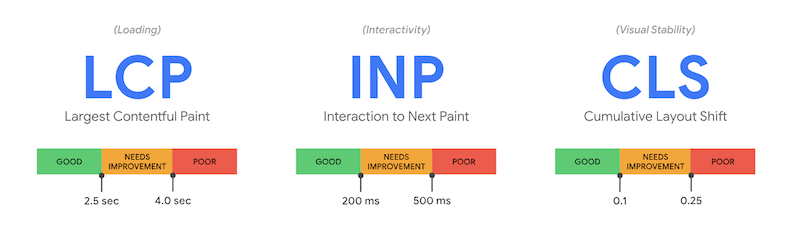
- Largest Contentful Paint (LCP): Measures how long it takes for the main content of a page to load. The target is 2.5 seconds or less.
- Interaction to Next Paint (INP): Assesses the responsiveness of the page when a user clicks or taps an element.
- Cumulative Layout Shift (CLS): Measures visual stability, ensuring that elements do not jump around as the page loads, which can cause "mis-clicks" and user frustration.
Tools such as PageSpeed Insights and Google Search Console are utilized to identify which pages fail these benchmarks. Common remedies identified during audits include image compression, the removal of redundant third-party scripts, and the optimization of server response times.
Qualitative Insights: Understanding the "Why"
Once the "where" of user drop-off is established through quantitative data, the audit shifts to qualitative insights to understand the "why." This phase involves observing human behavior and gathering direct feedback to uncover the psychological barriers to conversion.
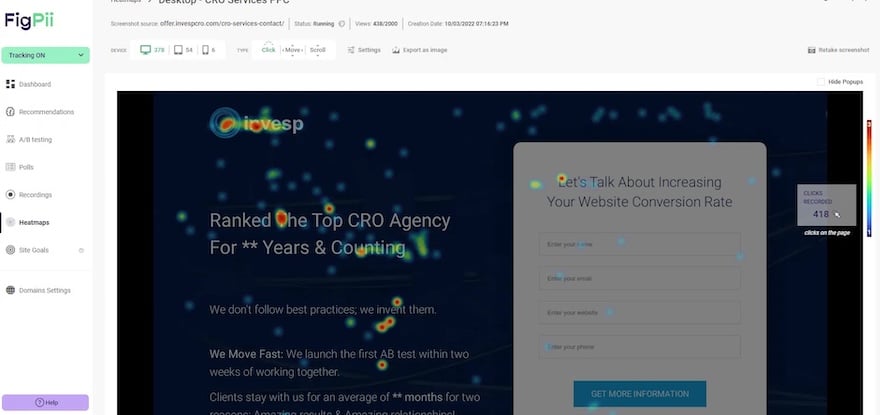
Visualizing Behavior with Heatmaps and Session Replays
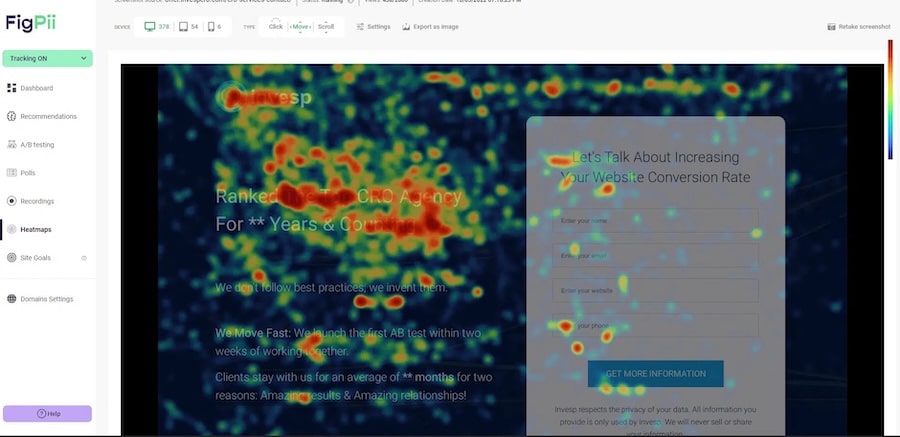
Heatmaps provide a visual representation of user interaction, using color-coded "hot" and "cold" zones to show where users click, how far they scroll, and where their cursors move.
- Click Maps: These often reveal "dead clicks," where users attempt to interact with non-clickable elements, signaling a need for design clarification.
- Scroll Maps: These show the "fold" of the page. If critical information like social proof or the call-to-action (CTA) is located in a "cold" zone that only 20% of users reach, the audit will recommend moving those elements higher.
- Session Replays: Often described as the "movie" version of an audit, replays allow researchers to watch real-time recordings of anonymous user journeys. This can uncover "rage-clicking"—repeatedly clicking a button that isn’t responding—or confusing navigation paths that are not apparent in aggregated data.
Direct Feedback via Surveys and Exit Polls
While heatmaps show action, surveys capture intent. High-impact audits often employ "micro-surveys" or exit-intent polls. These are designed to be brief, often asking a single, pointed question: "What is stopping you from completing your purchase today?" or "Did you find what you were looking for?" If a significant percentage of users cite "uncertainty about shipping costs" or "confusion over sizing," the business gains a clear directive for optimization.

The Role of User Testing and Interviews
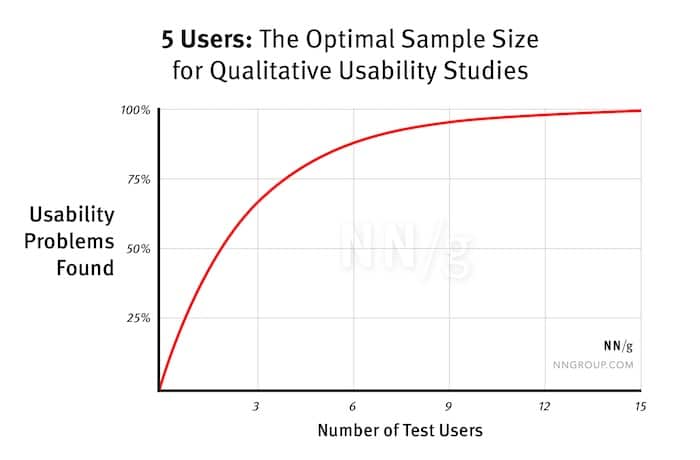
Deep-dive qualitative research culminates in moderated or unmoderated user testing. According to the Nielsen Norman Group, testing with as few as five users can uncover up to 85% of usability issues. In these sessions, participants are asked to complete specific tasks, such as "Find a gift for under $50 and proceed to the final payment screen." Observing the hesitation in a user’s voice or the confusion in their navigation provides context that no automated tool can replicate. Interviews with recent buyers or those who abandoned their carts further refine the understanding of the brand’s perceived value and trustworthiness.
Audit Specialization: The Product Page Strategy
The product page is the "moment of truth" in the e-commerce journey. A specialized audit of these pages focuses on four pillars:
- Visual Presentation: A single image is no longer sufficient. Audits look for high-resolution galleries, 360-degree views, and videos that demonstrate the product in use. Furthermore, images must be dynamically linked to variants (e.g., changing the photo when a user selects "blue").
- Compelling Copy: Effective product descriptions move beyond technical specifications to highlight benefits. Leading brands use storytelling to answer potential objections before they arise, focusing on the "transformation" the product offers the customer.
- Call-to-Action (CTA) Clarity: The "Add to Cart" button must be the most prominent element on the page. Audits check for contrasting colors, appropriate sizing on mobile devices, and placement that ensures the button is visible without excessive scrolling.
- Social Proof Integration: Ratings, reviews, and user-generated content (UGC) act as powerful psychological triggers. Data suggests customers are significantly more likely to purchase if they see evidence of satisfaction from other real people. An audit ensures these elements are placed strategically to bolster confidence at the point of decision.
Maximizing the Cart and Checkout Experience
The final frontier of the CRO audit is the cart page. Despite being so close to the finish line, this is where the majority of e-commerce friction occurs. A successful cart page must adhere to the principles of clarity, simplicity, and speed.
Key audit questions for the checkout flow include:
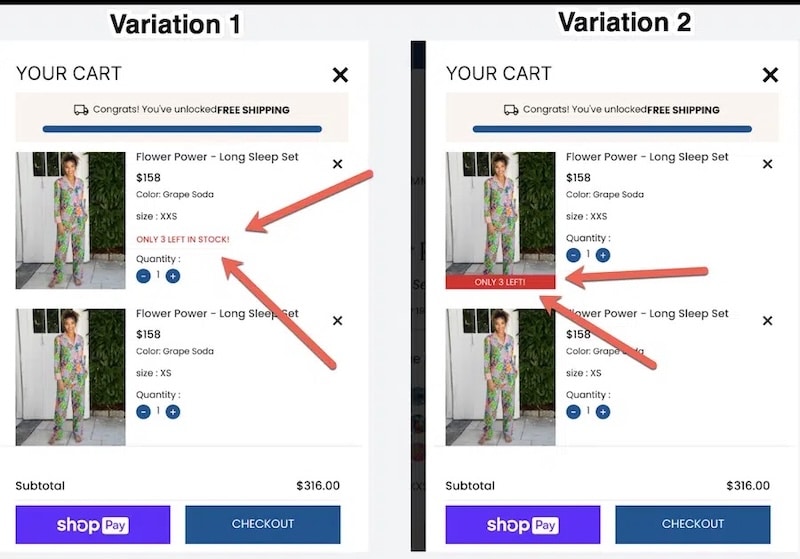
- Is the "Proceed to Checkout" button unmistakable?
- Are all costs (shipping, taxes, fees) transparently displayed before the final step?
- Does the site offer a "Guest Checkout" option to avoid the friction of account creation?
- Is the layout clean, or is it cluttered with distracting promotions that pull the user away from the transaction?
Prioritization and Implementation: The PIE Framework
A comprehensive audit often results in dozens of potential "fixes." To manage this, strategists use prioritization frameworks such as PIE (Potential, Importance, Ease).
- Potential: How much improvement can be made on this page?
- Importance: How much traffic does this page receive?
- Ease: How technically difficult or expensive is it to implement the change?
By scoring each identified issue, businesses can focus on "quick wins"—high-impact, low-effort changes—before moving on to complex structural overhauls.
Conclusion: The Long-Term Impact of Continuous Optimization
The implications of a CRO audit extend far beyond a temporary bump in sales. In an era where customer acquisition costs (CAC) are rising across all digital channels, the ability to convert existing traffic more efficiently is a significant competitive advantage. A disciplined approach to auditing fosters a culture of data-driven decision-making, reducing the risk of expensive design failures.
Ultimately, a CRO audit is not a one-time event but a recurring strategic necessity. As technology evolves and consumer expectations shift, the digital storefront must adapt. By treating the website as a living, breathing entity that requires regular diagnostic care, e-commerce brands can ensure sustainable growth, improved customer loyalty, and a maximized return on their marketing investments. In the high-stakes world of online retail, the most successful companies are those that never stop asking why their customers do—or do not—click "buy."








