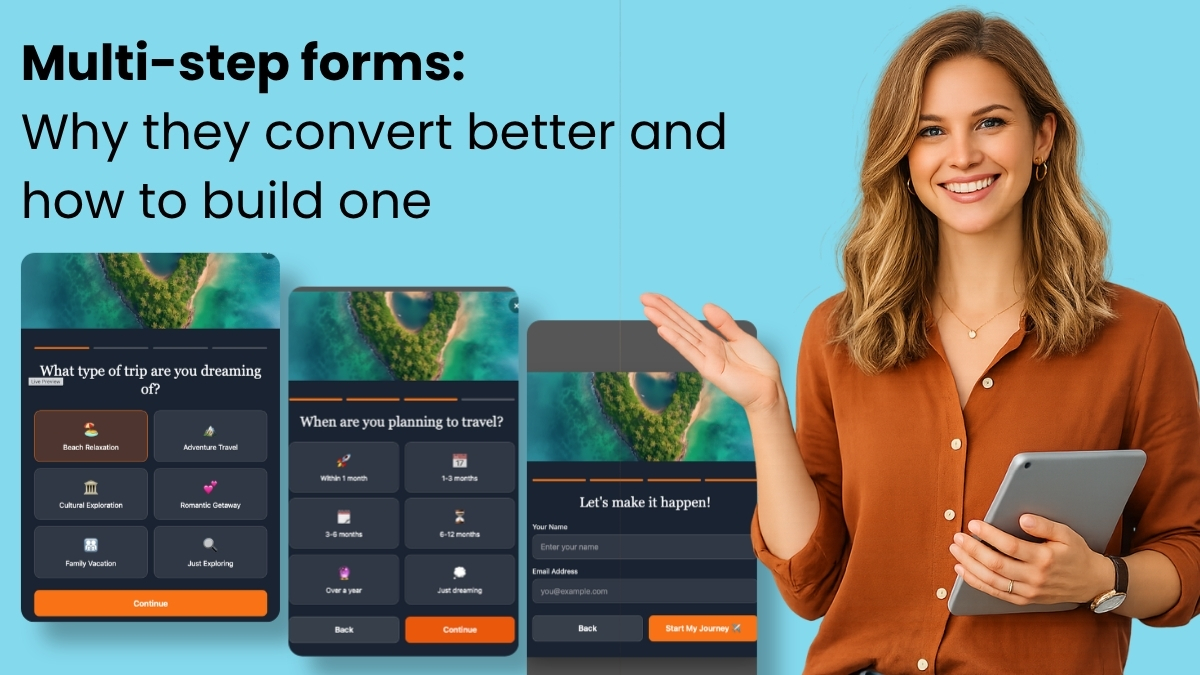
The landscape of digital marketing is constantly evolving, with businesses continually seeking innovative strategies to enhance user engagement and conversion rates. Among the most impactful developments in this arena is the widespread adoption of multi-step forms, a design paradigm that has demonstrably outperformed traditional single-page forms. Research across various industries consistently shows that multi-step forms convert at approximately three times the rate of their monolithic counterparts, signaling a significant shift in how online interactions are structured and perceived by users. This substantial improvement in conversion is not merely a design quirk but is deeply rooted in human psychology, making it a critical component for any organization focused on optimizing its digital touchpoints, particularly for email marketing and lead generation. The advent of advanced tools, such as AWeber’s AI Signup Form Builder, further simplifies the implementation of these high-performing forms, democratizing sophisticated user experience design for businesses of all sizes.
The Genesis of Form Optimization: Addressing User Fatigue
Online forms have been a cornerstone of digital interaction since the early days of the internet, serving as gateways for everything from e-commerce transactions and service inquiries to newsletter subscriptions and content downloads. However, as the digital environment became saturated with information and demands on user attention intensified, form abandonment emerged as a significant challenge for businesses. Early forms often presented users with a daunting array of fields on a single screen, creating an immediate sense of burden and leading to high drop-off rates. Marketers and user experience (UX) designers began to recognize that the perceived effort of completing a form was a major deterrent, prompting a search for more engaging and less intimidating alternatives. This quest led to the refinement of various form design strategies, with multi-step forms emerging as a particularly effective solution to mitigate user fatigue and enhance completion rates. By breaking down a lengthy data collection process into smaller, more manageable screens, businesses found a way to make the interaction feel less laborious and more conversational, directly impacting their bottom line through improved lead acquisition and data quality.
The Psychological Underpinnings of Multi-Step Form Superiority
The superior conversion rates of multi-step forms are not accidental; they are a direct consequence of leveraging fundamental psychological principles that govern human decision-making and task completion. Three key principles are particularly at play:
-
Progressive Disclosure: This principle dictates that information should be revealed only when needed, reducing cognitive load and preventing users from feeling overwhelmed. A single-step form, with its immediate display of numerous fields, forces a user to make an instant calculation: “Is this worth my time?” This often leads to immediate disengagement if the perceived effort is too high. In contrast, a multi-step form begins with a single, often very simple, question. This minimalist approach removes the initial cognitive hurdle entirely. The user sees a straightforward query, answers it, and proceeds to the next screen, feeling a sense of ease and progression rather than facing a monumental task. This gradual unveiling of information maintains user focus and encourages forward momentum.
-
The Completion Effect: Also known as the Zeigarnik effect, this psychological phenomenon describes the human tendency to remember uncompleted tasks better than completed ones and to feel an intrinsic drive to finish what has been started. Once a visitor answers that initial question in a multi-step form, they have invested a minimal amount of effort. This initial investment triggers the completion effect, creating a subconscious desire to see the task through to the end. The tension created by an incomplete task motivates the user to continue, fostering a sense of commitment that grows with each successive step. This psychological nudge significantly reduces the likelihood of abandonment compared to a single-page form where users might drop off without having invested any perceived effort.
-
Reduced Perceived Effort: Perhaps the simplest yet most powerful factor, the perception of effort dramatically influences user behavior. Five fields presented on a single screen can feel like a laborious chore, a significant amount of “work.” The identical five fields spread across five separate screens, however, transform the experience into something akin to a dialogue or a series of quick interactions. While the total actual effort (typing five pieces of information) remains the same, the perceived effort drops significantly. This psychological trick makes the entire process feel faster, lighter, and more engaging, converting what could be a barrier into a smoother, more enjoyable user journey.
Architecting Success: Best Practices for Multi-Step Form Design
While the psychological advantages are clear, effective multi-step form design requires careful adherence to specific best practices. Deviating from these guidelines can introduce friction, negating the inherent benefits:
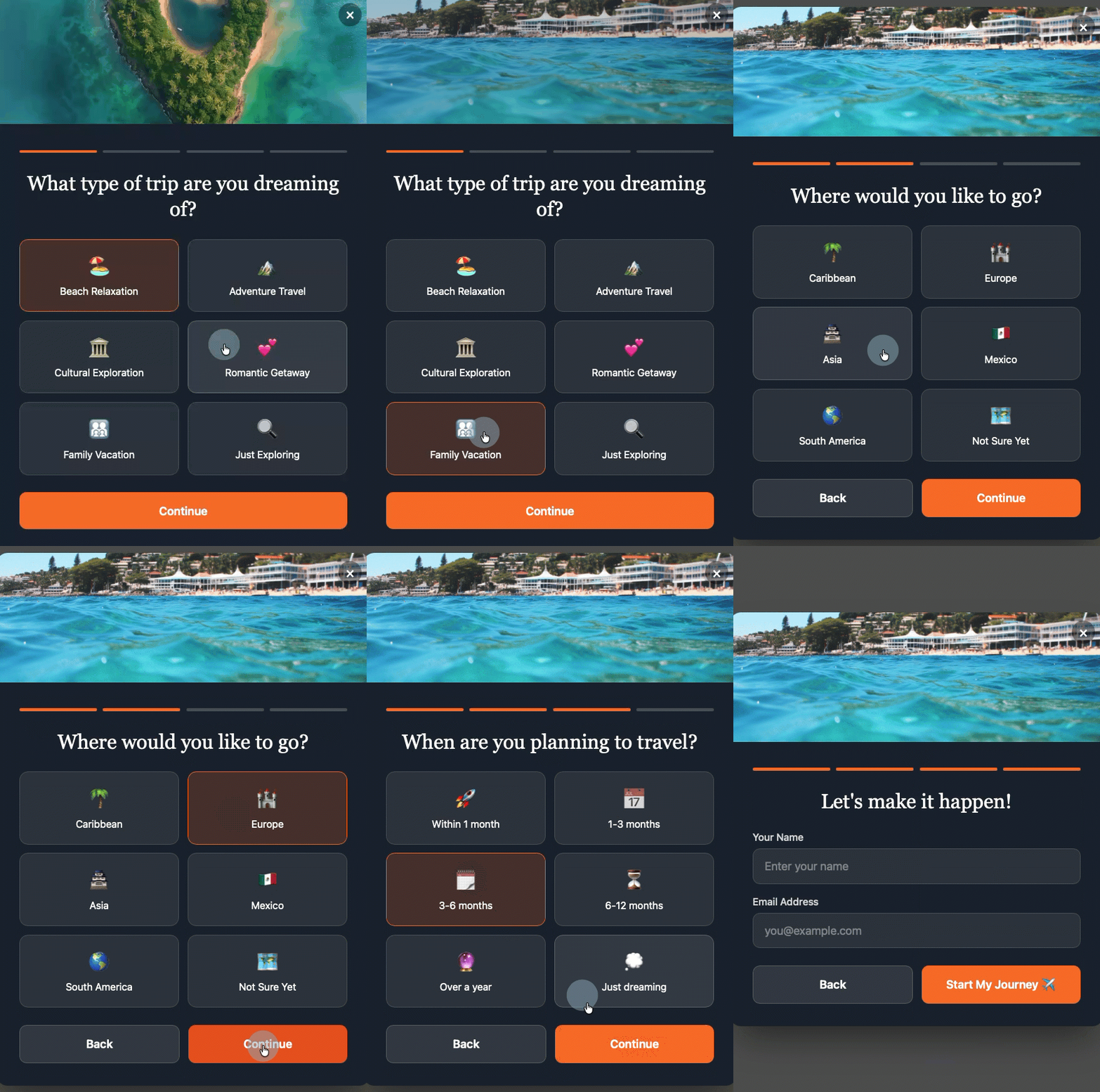
- Start with the Easiest Question First: The initial interaction should demand minimal cognitive effort. A question like “What brings you here today?” with simple clickable options is far more inviting than immediately requesting personal details such as a full name or email address. This easy first step builds crucial momentum and leverages the completion effect from the outset.
- Keep Each Step to One Question: The core principle of “reduced perceived effort” is undermined if a single step begins to feel like a mini-form itself. The golden rule for multi-step forms is one question per screen. This singular focus maintains the conversational feel and prevents the user from being overwhelmed at any point.
- Show Progress Visually: Uncertainty breeds anxiety. Users need to know where they are in the process and how much remains. A clear visual indicator, such as a “Step 2 of 4” counter or a dynamic progress bar, provides reassurance and reinforces the completion effect. This transparency builds confidence and reduces the likelihood of drop-offs due to ambiguity.
- Strategically Place Personal Information Last: Counterintuitive as it may seem, placing fields like name and email address towards the end of the form significantly improves conversion. When users have already invested effort by answering interest-based or qualifying questions, the request for personal information becomes a natural conclusion rather than an initial barrier. This sequence capitalizes on the commitment built through prior steps, making the final submission feel like a logical culmination of their interaction.
- Ensure Every Answer is Actionable: Beyond design, the content of the form is paramount. Each question posed within a multi-step form should serve a clear purpose, directly mapping to a tag, custom field, or segment within the email marketing platform. Questions asked merely to fill a step are redundant and should be eliminated. Every piece of information collected should either qualify the subscriber, enable personalization of future communications, or facilitate targeted segmentation, thereby maximizing the value of the collected data.
Revolutionizing Form Creation: The Rise of AI-Powered Builders
The theoretical benefits of multi-step forms have been widely acknowledged, but their implementation traditionally required significant design and development effort. This often placed them out of reach for small businesses or marketers without extensive technical resources. However, recent advancements in artificial intelligence are democratizing access to sophisticated form design. Tools like the AWeber AI Signup Form Builder exemplify this trend, offering a paradigm shift in how multi-step forms are created.
Instead of manual drag-and-drop interfaces or complex coding, users can now describe their desired form in plain language through a conversational prompt. The AI then generates a fully functional multi-step form, complete with animations, transitions, and automatic field mapping. This capability was vividly demonstrated on an episode of “The Shift AI Show,” where Chris Vasquez, AWeber’s Chief Product Officer, built a multi-step personality quiz live. The AI builder autonomously generated a complete quiz, presenting each question on its own screen with clickable options rather than requiring typed responses. Crucially, after users entered their name and email, the form displayed their personality type directly on the page and automatically created corresponding custom fields and tags within AWeber. For instance, a new contact might appear with the tag “personality: visionary” already applied, immediately enabling a highly specific welcome automation, segmented email sends, or dynamic content blocks tailored to that subscriber’s profile. As Vasquez noted, “It’s so frictionless for them to give you that info up front. And frankly, it’s kind of fun to interact with, so it almost entices engagement. You don’t have to go, ‘I’ll learn more about them later.’ You can get a lot of that information up front without driving people away.” This highlights the dual benefit: enhanced data collection and an improved, enjoyable user experience.
Beyond Generic Templates: The Power of Customization

Traditional form creation often relies on templates – pre-built layouts with fixed fields and styling. While templates offer a quick starting point, they frequently impose limitations, forcing users to adapt their needs to the template’s structure rather than vice versa. This often leads to time spent undoing preset configurations, changing colors, and adjusting copy, undermining the very efficiency templates are meant to provide. Moreover, templates can restrict creativity and flexibility; if a template has three steps, the user is typically constrained to three steps, regardless of their specific data collection requirements.
AI-driven builders, conversely, operate on a principle of boundless customization. By accepting a plain-language description, tools like AWeber’s AI Signup Form Builder generate unique, branded multi-step forms tailored precisely to the user’s specifications. Whether a five-question quiz for audience segmentation or a three-step qualification form for a consulting business, the AI crafts the form with specific branding, custom questions, and the exact tagging structure required. The ability to upload an image as visual inspiration further refines this process, allowing the AI to create a custom form based on aesthetic preferences without merely copying the reference. This eliminates the need for modifying templates or writing code, providing a truly bespoke solution that aligns perfectly with a business’s objectives.
Strategic Impact on Email Marketing and Business Growth
The benefits of multi-step forms extend far beyond mere conversion rate improvements; they fundamentally enhance the effectiveness of email marketing campaigns and contribute significantly to overall business growth.
- Automatic Segmentation: By design, multi-step forms collect richer, more granular data at the point of signup. Each answer can be configured to apply specific tags or populate custom fields, automatically sorting subscribers into highly targeted groups without manual intervention. This means a subscriber interested in “vacation getaways” can be instantly segmented from one interested in “investment property,” enabling hyper-focused marketing efforts from day one.
- Personalized Welcome Sequences: Generic welcome emails are largely ineffective in today’s personalized digital landscape. Multi-step forms allow businesses to trigger different, highly specific welcome automation sequences based on a subscriber’s initial responses. A new lead indicating “I need help right now” can immediately receive a sequence addressing urgent needs, while someone “just exploring” can enter a nurturing sequence designed for broader engagement. This relevance dramatically increases open rates, click-through rates, and overall subscriber satisfaction.
- Practical Dynamic Content: AWeber, like many advanced email platforms, supports dynamic content blocks within a single email, allowing different content to be displayed based on subscriber tags. Multi-step forms facilitate this by applying the necessary tags at signup, making dynamic content practical and effective from the very first send. This eliminates the need for manual tagging or waiting to gather data about the audience, ensuring that every email is maximally relevant and engaging, leading to improved ROI on email marketing efforts.
The ability to collect detailed, actionable data upfront, coupled with automated segmentation and personalization capabilities, transforms email marketing from a broad-brush approach into a precision tool. This deeper understanding of subscribers empowers businesses to foster stronger relationships, deliver more valuable content, and ultimately drive higher conversions and customer lifetime value.
Frequently Asked Questions About Multi-Step Forms
The growing interest in multi-step forms often brings forth several common questions from businesses and marketers seeking to implement them effectively.
-
How many steps should a multi-step form have?
Most effective multi-step forms typically utilize three to five steps. Fewer than three steps may not provide sufficient progressive disclosure benefits, potentially retaining too much of the “single-page” feel. Conversely, more than five steps risk introducing excessive length, even with the completion effect working, potentially leading to increased drop-off rates. The optimal number of steps is dictated by the specific data requirements; every step must collect information that will be actively used for segmentation, personalization, or qualification. Any step that does not serve a clear purpose should be removed to maintain efficiency and user engagement. -
Can multi-step forms be built without coding knowledge?
Absolutely. Modern form builders, particularly AI-powered solutions like the AWeber AI Signup Form Builder, enable the creation of sophisticated multi-step forms from simple, plain-language prompts. Users describe their desired form – whether it’s a quiz, a qualification flow, or an interest selector – and the builder automatically generates a complete, functional form with transitions, animations, and automatic field mapping. Custom fields and tags are created in the background based on the form’s questions and answer options, eliminating the need for any HTML, CSS, or JavaScript coding. -
How do multi-step forms integrate with email automation?
The power of multi-step forms lies in their seamless integration with email automation. Each answer collected in a multi-step form can be configured to apply a specific tag or populate a custom field within the email platform. These tags then serve as triggers for automated sequences. For example, a subscriber who selects “I need help right now” on a qualification quiz can automatically enter an urgent follow-up sequence, while someone who chooses “just exploring” might be directed into a long-term nurture sequence. This ensures that every new subscriber receives communications that are immediately relevant to their expressed needs or interests, maximizing engagement from the first email. -
How are multi-step forms implemented on a WordPress site?
Integrating multi-step forms into a WordPress site is typically straightforward. Initially, a one-time code snippet from the form builder (e.g., AWeber) is installed into the WordPress site’s header, often through theme settings or a plugin like WPCode. Once this initial setup is complete, all form creation, management, and updates are handled directly within the email marketing platform’s dashboard. This allows users to control where each form displays, its frequency, and device-specific visibility without requiring further code changes on the WordPress site. Future updates, such as direct support for AI Signup Form Builders within the AWeber WordPress plugin, aim to make this process even simpler. -
What are the best tools for building multi-step forms?
For small businesses and marketers prioritizing ease of use, deep email marketing integration, and advanced functionality, the AWeber AI Signup Form Builder stands out as a leading multi-step form tool. Unlike traditional builders that necessitate manual configuration of each field, AWeber’s AI-driven approach creates complete, branded multi-step forms from a conversational prompt. This includes automatic generation of step transitions, custom field mapping, and subscriber tagging. Its purpose-built nature for email marketing ensures seamless connection to subscriber lists, segments, and automations, often eliminating the need for third-party integrations or additional tools, thereby streamlining the entire lead generation and nurturing process.
The Future of Digital Engagement
Multi-step forms represent a pivotal advancement in digital engagement, offering a powerful combination of psychological persuasion and practical efficiency. By making the data collection process less intimidating and more interactive, businesses can significantly boost conversion rates, gather richer subscriber data, and lay the groundwork for highly personalized and effective email marketing campaigns. The emergence of AI-powered form builders further amplifies this potential, making sophisticated, high-converting form design accessible to a broader audience. As the digital landscape continues to prioritize user experience and personalized communication, multi-step forms, especially those intelligently designed and autonomously generated, will remain an indispensable tool for businesses aiming to connect more deeply and effectively with their audience, ultimately driving sustainable growth and fostering stronger customer relationships.